
ASUS Pro WS W890E-SAGE SE
5.0Editor score
Dual Intel 10Gb LAN
Seven PCIe 5.0 slots
ECC RDIMM memory support
Dedicated IPMI management
Workstation-grade power delivery
Our expert guide compares 10 motherboards with 10GB Ethernet, highlighting networking, CPU support, expansion, storage, cooling, and management for builders.
A motherboard with 10GB Ethernet is built for demanding networks, large file transfers, fast NAS access, and professional workflows that can overwhelm ordinary gigabit connections. The best models also provide a strong processor platform, modern PCIe expansion, capable storage options, effective cooling, and convenient setup features.
We compared the supplied models by examining network-controller support, CPU compatibility, PCIe and M.2 expansion, memory support, power delivery, cooling, wireless connectivity, remote-management features, and practical installation aids. The list also identifies several boards whose published specifications show only 2.5Gb or 5Gb Ethernet, so readers can distinguish true 10Gb options.
Each review explains where a board stands out, what trade-offs accompany its feature set, and which builders are most likely to benefit from it. Product details and availability can change, while retailers frequently alter pricing, so confirm the current specifications, processor support, and accessory requirements before purchasing.
5.0Editor score

4.8Editor score
4.3Editor score
The comparison below covers four models with explicitly listed 10Gb Ethernet and six additional ASUS platforms that provide useful context, including several with 2.5Gb or 5Gb networking. Socket, form factor, expansion, wireless support, and management capabilities vary considerably across the group.
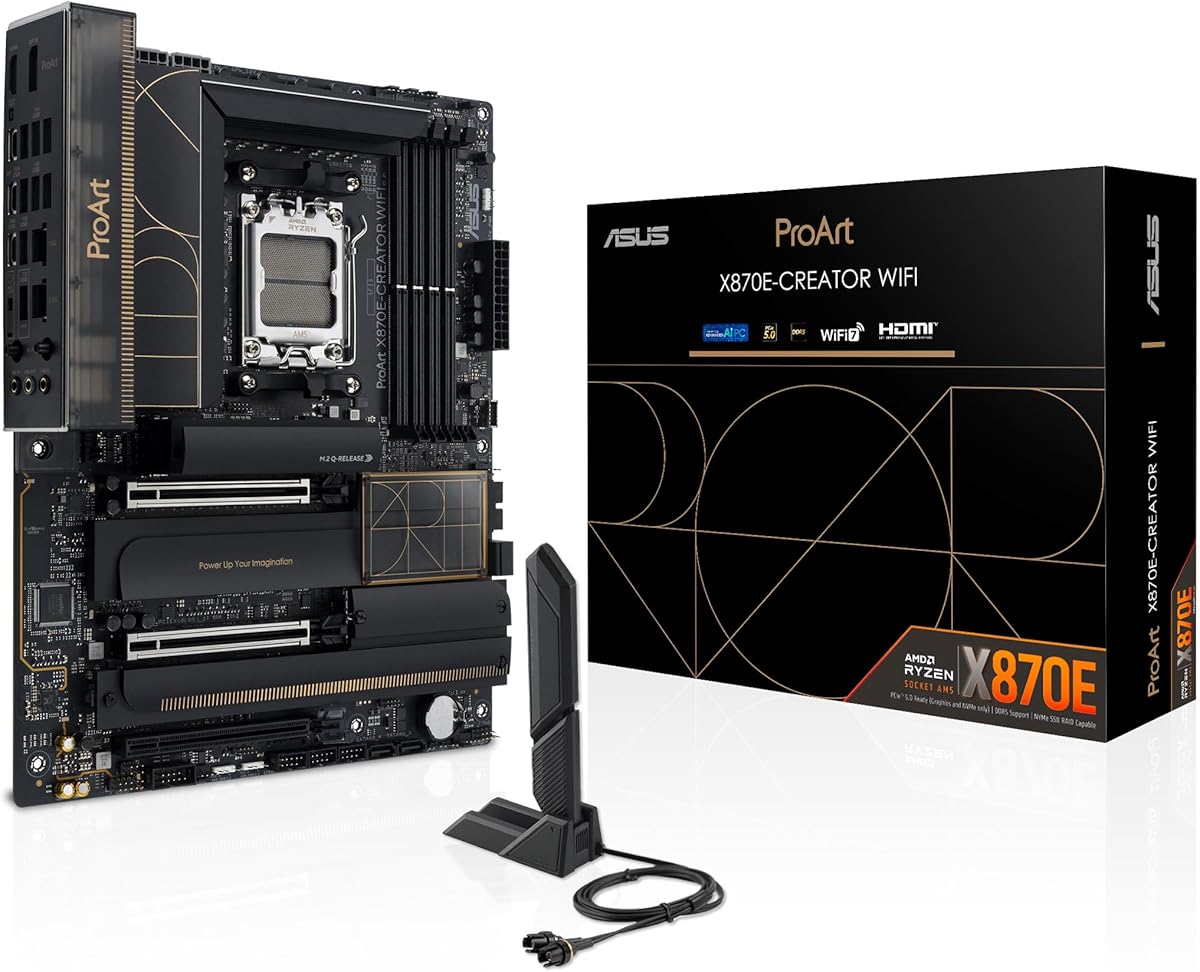


The ASUS ProArt X870E-CREATOR WiFi is a well-rounded AMD AM5 board for creators, developers, and enthusiasts who want genuine 10Gb Ethernet alongside high-speed expansion. Its published 4.3 rating reflects a favorable overall reception, although motherboard reviews often involve small sample sizes and evolving firmware. The main attraction is not merely the network-controller headline but the combination of 10Gb Ethernet, 2.5Gb Ethernet, WiFi 7, dual USB4, and a generous set of PCIe 5.0 and M.2 capabilities.
We may earn a commission when you buy through this link, at no additional cost to you.
Its 16+2+2 teamed power stages, ProCool II connectors, alloy chokes, and durable capacitors are designed to support demanding Ryzen 9000, 8000, and 7000 desktop processors. Connectivity is especially strong: two PCIe 5.0 and two PCIe 4.0 M.2 slots allow a mixture of high-speed boot drives and additional storage, while the primary PCIe 5.0 x16 slot supports current and next-generation graphics hardware. The USB 20Gbps front-panel connector and Quick Charge 4+ support further improve compatibility with modern cases and accessories.
The tradeoff is that this is an ATX board rather than a compact workstation platform, and it does not provide the onboard server-grade IPMI remote-management arrangement found on the ASUS Pro WS models. Enthusiast-oriented features such as AI Overclocking, AI Cooling, AI Networking II, Dynamic OC Switcher, and Core Flex also make it more complex than a straightforward office or home PC motherboard. Buyers who only need a browser and occasional cloud transfers will find some of that capability unnecessary.
This is a strong recommendation for a powerful AMD workstation that will move large media libraries, virtual-machine assets, or NAS data over a 10Gb network. It is particularly suitable when WiFi, faster wired networking, and creator-oriented USB connectivity all matter. Choose it over simpler AM5 boards when its full network and expansion capability can be used; otherwise, the smaller Pro WS B850M-ACE SE may be easier to accommodate.
The board supports current Ryzen 9000, 8000, and 7000 desktop processors through AM5, while its power delivery and PCIe 5.0 options suit high-end graphics and workstation-class accelerators. That combination makes it relevant to creators moving large video, image, or project files without relying exclusively on external storage.
Having 10Gb and 2.5Gb Ethernet plus WiFi 7 provides several ways to connect. The 10Gb port is the focal point for high-speed NAS or local-network workflows, while 2.5Gb Ethernet can serve as a versatile secondary wired connection or compatibility option.
We may earn a commission when you buy through this link, at no additional cost to you.
The ASUS ROG Crosshair X870E Dark Hero combines AMD's newest AM5 platform with true 10Gb Ethernet, 5Gb Ethernet, WiFi 7, extensive PCIe 5.0 support, and five onboard M.2 positions. Its 4.8 rating is the highest supplied rating among the models, making it an especially strong all-around recommendation for gamers and performance enthusiasts who want high-speed networking without giving up current-generation platform features.
We may earn a commission when you buy through this link, at no additional cost to you.
The 20(110A)+2(110A)+2 power stages are a major strength for high-core-count Ryzen processors and sustained overclocking. Thermal design includes large integrated heatsinks, an L-shaped heatpipe, high-conductivity pads, and a 3D VC M.2 heatsink for one PCIe 5.0 drive. Storage support includes two PCIe 5.0 and three PCIe 4.0 M.2 slots, all described as having substantial cooling solutions. Two PCIe 5.0 x16 SafeSlots add graphics and accelerator flexibility.
Networking and peripheral connectivity are unusually comprehensive. Realtek 10Gb and 5Gb Ethernet controllers allow the 10Gb port to handle demanding transfers while the faster-than-gigabit secondary port remains available for another device or network segment. Dual USB4 Type-C ports, two front USB 20Gbps Type-C headers, nine additional USB 10Gbps ports, and ROG SupremeFX audio create a platform that can take advantage of a wide range of modern cases and accessories.
This board is best suited to an enthusiast PC, advanced gaming system, or high-end creator machine that will genuinely use PCIe 5.0 storage, multiple graphics cards, high-bandwidth networking, and robust overclocking tools. Its large feature set, RGB lighting, and extensive ASUS ecosystem may be excessive for a quiet office build, but for a no-compromise AM5 system, the combination of networking, expansion, power delivery, and convenience features is especially convincing.
Separate 10Gb and 5Gb Ethernet controllers make the board flexible for NAS transfers, server connections, and segmented networks. The 10Gb interface is the important option for sustained large-file movement, while 5Gb can provide a practical secondary path without forcing all traffic through one controller.
Two PCIe 5.0 M.2 slots, three PCIe 4.0 M.2 slots, and two PCIe 5.0 x16 SafeSlots create exceptional expansion potential. This is valuable for content-production systems that combine fast scratch drives, large archival storage, and a powerful graphics accelerator.
We may earn a commission when you buy through this link, at no additional cost to you.
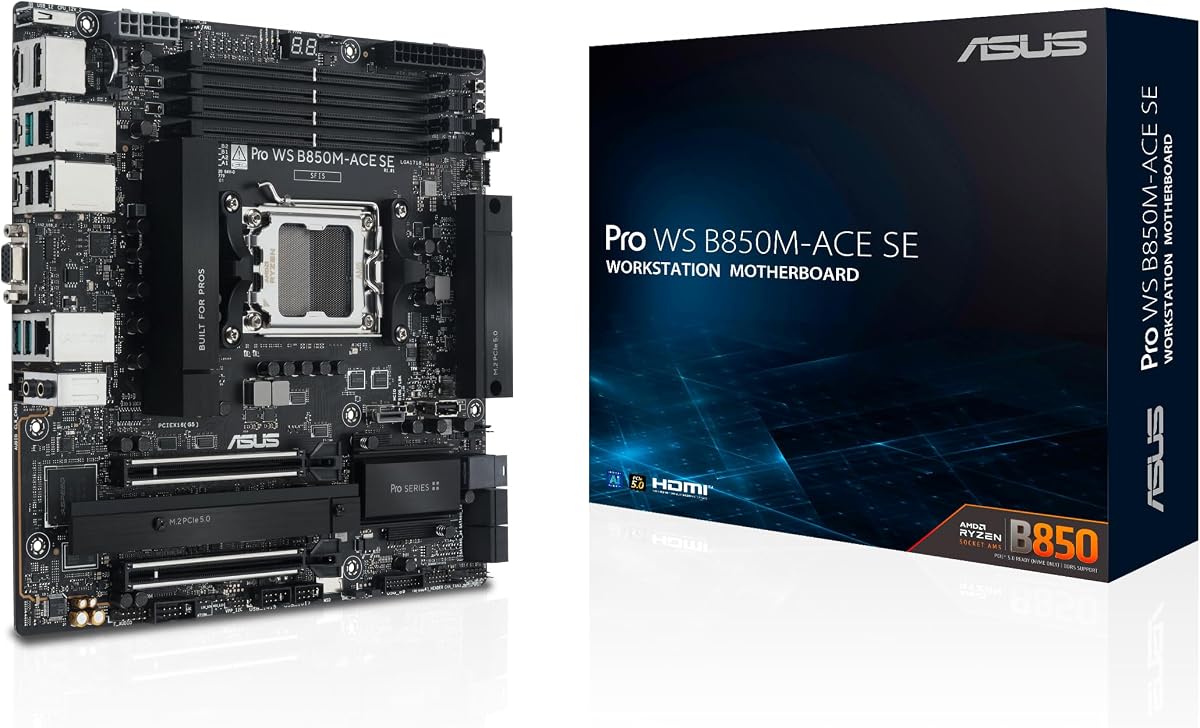
The ASUS Pro WS B850M-ACE SE is a compact mATX business motherboard that brings true 10Gb Ethernet and remote management to a platform otherwise associated with much larger workstations. Its 4.3 rating indicates a generally favorable reception, while the combination of 10Gb and 2.5Gb LAN, an onboard AST2600 BMC, and support for both Ryzen and EPYC processors makes it particularly relevant to IT-managed systems.
We may earn a commission when you buy through this link, at no additional cost to you.
The board supports AMD Ryzen 9000, 8000, and 7000 desktop processors as well as AMD EPYC 4005 Series processors. Its compact size does not prevent serious storage use: two PCIe 5.0 x4 M.2 slots, MCIO NVMe support, and U.2 support provide options for fast and high-capacity storage. Two PCIe 5.0 or 4.0 x16 slots, with one operating at x4, expand the available bandwidth for accelerators and other add-in cards.
Unlike gaming-focused X870E and B850 boards, this model emphasizes administration rather than decorative features or elaborate enthusiast software. ASUS Control Center Express enables remote monitoring and management through the onboard BMC, while the broader compatibility validation and 24/7 testing focus suit systems expected to operate continuously. On the other hand, only two M.2 sockets are listed, so builds requiring several directly attached NVMe drives may need a larger platform or add-in storage controller.
This is the most compelling choice here for a compact office, laboratory, edge-computing, or home-lab machine that needs 10Gb networking and out-of-band management in a smaller enclosure. It may lack the RGB styling and extensive overclocking tools expected in a gaming build, but those omissions are advantages in a professional environment. For managed small-form-factor systems, the combination is unusually useful.
The onboard AST2600 BMC provides hardware-level management features that are uncommon on consumer boards. Administrators can monitor and manage supported systems remotely through ASUS Control Center Express, reducing the need for physical access when diagnosing a machine or performing routine maintenance.
MCIO and U.2 support make the mATX board useful for storage-dense professional systems. Combined with two PCIe 5.0 x4 M.2 slots, these interfaces allow fast local caching and expandable backend storage while retaining the benefit of a smaller chassis.
We may earn a commission when you buy through this link, at no additional cost to you.
The ASUS Pro WS W890-SAGE is a highly expandable Intel workstation motherboard aimed at professional users who need more lanes, more memory flexibility, and true 10Gb networking than a conventional desktop board provides. It supports Intel Xeon 600 workstation processors on LGA 4710-2 and is validated for compatibility and 24/7 operation. No numeric customer rating was supplied, so this review relies on the documented specifications rather than a rating-based conclusion.
We may earn a commission when you buy through this link, at no additional cost to you.
Its seven PCIe 5.0 x16 slots are the defining feature for specialized workloads such as GPU rendering, machine learning, high-end simulation, or multi-card professional visualization. The board also provides four M.2 positions, two SlimSAS connectors, USB4, and a 20Gbps USB Type-C header. ECC R-DIMM DDR5 support in a two-DIMM-per-channel configuration, enhanced through ASUS NitroPath DRAM technology, favors workstations that need higher memory capacity and dependable operation.
Networking includes Realtek 10Gb LAN and Intel 2.5Gb Ethernet, while an IPMI expansion-card option adds server-grade remote-management capability. The 12+(2+2)+1+2 power stages, multiple eight-pin CPU and PCIe connectors, and dual-psu provisions indicate that the board is intended for sustained professional loads. Cooling covers the VRM, chipset, and M.2 areas, which is important in dense workstation enclosures.
This motherboard is a compelling choice for engineers, render farms, scientific-computing users, and studios with unusual expansion requirements. It is less suitable for a normal gaming PC because the Xeon 600 platform, CEB form factor, and workstation memory options create a much narrower ecosystem. When the workload genuinely needs numerous PCIe lanes, 10Gb networking, ECC memory, and remote administration, however, this board has a clear professional purpose.
Seven PCIe 5.0 x16 slots enable configurations that consumer motherboards rarely support, including multiple accelerators and specialized capture or processing cards. SlimSAS and M.2 connections further increase the range of supported storage and expansion configurations.
ECC R-DIMM support and NitroPath DRAM technology target applications that value stability and sustained performance. Dedicated cooling across the VRM, chipset, and M.2 areas helps the board operate reliably in workstation chassis with substantial processing loads.
We may earn a commission when you buy through this link, at no additional cost to you.
The ASUS ProArt Z890-CREATOR WIFI is an Intel creator platform with true 10Gb Ethernet, 2.5Gb Ethernet, WiFi 7, and some of the most advanced external connectivity in this roundup. Its 4.4 rating places it among the better-reviewed products. It supports Core Ultra Series 2 9, 7, and 5 desktop processors through LGA 1851, making it a natural fit for systems that combine high-bandwidth peripherals, fast storage, and local network workflows.
We may earn a commission when you buy through this link, at no additional cost to you.
The strongest differentiator is its Thunderbolt implementation. Two Thunderbolt 5 Type-C ports and one Thunderbolt 4 port provide a large bandwidth for external storage, docks, displays, and other peripherals. The board also includes 10Gb and 2.5Gb Ethernet, WiFi 7, a USB 20Gbps front-panel header, two PCIe 5.0 slots with full support for next-generation GPUs, one additional PCIe 5.0 slot, and four PCIe 4.0 M.2 slots.
Power delivery uses 16+2+1+2 teamed stages with ProCool II connectors, alloy chokes, and durable capacitors. ASUS supplies AI Overclocking, AI Cooling II, AI Networking II, AI Advisor, and NPU Boost, while ProArt Creator Hub integrates color-management functions associated with Pantone utilities. ASUS Control Center Express adds USB-port management, software blacklisting, and registry controls that can be valuable in a professional environment.
This board is well suited to high-end Intel creator PCs that move large media between workstations, NAS devices, and fast external storage. It may feel oversized for a basic office machine, and the need to use both Thunderbolt and 10Gb networking to justify the platform can limit its appeal. For creators who value broad high-speed connectivity on the newest Intel desktop platform, though, the combination is unusually complete.
Thunderbolt 5 and 10Gb Ethernet address different parts of a creator's workflow. Thunderbolt provides flexible high-bandwidth peripherals, while 10Gb networking accelerates sustained file movement to and from shared storage or local collaboration systems.
ProArt Creator Hub, Pantone-related color-management tools, AI features, and Control Center Express extend beyond basic hardware. These utilities can simplify calibration, cooling, networking, and system-control tasks for users who regularly handle detailed creative projects.
We may earn a commission when you buy through this link, at no additional cost to you.
The ASUS ROG Strix X870E-E Gaming WiFi is a strong AM5 gaming motherboard with a 4.4 rating, five M.2 slots, dual USB4 Type-C ports, and extensive power delivery. It is important to be precise about its fit for this particular keyword, however: the supplied specifications list Realtek 5Gb Ethernet, not 10Gb Ethernet, so it does not qualify as a true 10Gb option based on the available data.
We may earn a commission when you buy through this link, at no additional cost to you.
Its 18+2+2 power solution uses stages rated at 110 amps and includes dual ProCool II connectors, alloy chokes, and durable capacitors. That foundation suits high-end Ryzen 9000, 8000, and 7000 processors, particularly when paired with a demanding graphics card. Large heatsinks, an integrated I/O cover, thermal pads, and an L-shaped heatpipe provide the cooling framework. Three PCIe 5.0 M.2 and two PCIe 4.0 M.2 slots offer generous storage options.
The board also supports AI Overclocking, AI Cooling II, AI Networking, AEMP, Dynamic OC Switcher, Core Flex, Asynchronous Clock, and PBO Enhancement. Peripheral connectivity includes two USB4 Type-C ports, a front USB 20Gbps Type-C connector, a USB 10Gbps port offering up to 30 watts of Power Delivery, and nine additional USB 10Gbps ports. These details make it an excellent enthusiast platform even though its wired network speed falls short of the guide's central requirement.
Choose this model for an AM5 gaming build that prioritizes power delivery, storage, graphics support, and USB connectivity over 10Gb networking. It can serve as a fallback platform when the rest of the build uses a 2.5Gb network or relies on WiFi 7. If a 10Gb link is essential, the ProArt X870E-CREATOR WiFi, ROG Crosshair X870E Dark Hero, or a Pro WS board offers a documented faster Ethernet controller.
Three PCIe 5.0 M.2 slots, two PCIe 4.0 M.2 slots, PCIe 5.0 x16 SafeSlots, and dual USB4 make the board well equipped for modern gaming systems. It can support fast game storage, high-end graphics, and numerous high-speed peripherals without relying on add-in cards.
A 5Gb controller can still be useful for common home networks and moderately equipped NAS systems. However, it does not deliver the full potential of a properly configured 10Gb network, so buyers transferring very large files should select a board with an explicit 10Gb interface.
We may earn a commission when you buy through this link, at no additional cost to you.
The TUF Gaming B850M-PLUS WIFI7 is a compact mATX AM5 board with a 4.2 rating, WiFi 7, 2.5Gb Ethernet, three M.2 slots, and a modern PCIe 5.0 primary graphics slot. It offers an approachable platform for compact gaming and general-purpose systems, but its listed 2.5Gb Ethernet controller means it should not be presented as a true 10Gb Ethernet motherboard.
We may earn a commission when you buy through this link, at no additional cost to you.
Its 14+2+1 DrMOS power stages, eight-layer PCB, 8+8-pin ProCool connectors, alloy chokes, and durable capacitors provide a more serious foundation than the entry-level designation might initially suggest. Support for Ryzen 9000, 8000, and 7000 processors gives builders access to the entire AM5 ecosystem. One PCIe 5.0 M.2 slot and two PCIe 4.0 M.2 slots cover common storage combinations without requiring a large ATX board.
External and internal connectivity are practical for smaller modern cases. A rear USB-C port supports 20Gbps, the front-panel USB-C connector supports 10Gbps, and the board includes DisplayPort, HDMI, WiFi 7, and 2.5Gb Ethernet. The compact form factor can make the motherboard easier to route around in a smaller chassis while still leaving room for substantial CPU cooling.
This board makes sense for a compact PC where fast wireless connectivity, a PCIe 5.0 graphics slot, and modern USB are more important than 10Gb Ethernet. A 2.5Gb network is still an upgrade over many older gigabit systems, particularly when paired with compatible switches and storage. Users whose primary goal is sustained 10Gb transfers should choose a clearly specified 10Gb model instead.
The mATX format offers a practical middle ground between full-size ATX and the most constrained mini-ITX boards. It can simplify assembly in compact cases while retaining three storage positions, a modern graphics slot, and multiple high-speed USB connections.
The Realtek 2.5Gb Ethernet controller remains useful for fast NAS access, large downloads, and local file sharing on compatible infrastructure. However, network transfers are limited to the controller's rated speed, making it unsuitable as a substitute for a board with a true 10Gb port.
We may earn a commission when you buy through this link, at no additional cost to you.
The ASUS B650E MAX Gaming WiFi W is an ATX AM5 gaming motherboard built around a white PCB, DDR5 memory, PCIe 5.0 expansion, three M.2 slots, and Wi-Fi 6E. Its 4.4 rating indicates a favorable response, and the board's visual design is especially appealing for systems with light-colored components. The supplied network specification lists Realtek 2.5Gb Ethernet, not 10Gb.
We may earn a commission when you buy through this link, at no additional cost to you.
The 8+2+1 phase design, six-layer PCB, alloy chokes, and durable capacitors offer a conventional foundation for Ryzen 9000, 8000, and 7000 desktop processors. The primary PCIe 5.0 x16 slot supports high-performance graphics, and one of the three M.2 positions uses PCIe 5.0. Two USB 10Gbps Type-A ports and one USB 10Gbps Type-C port at the rear provide modern peripheral connectivity.
Cooling includes dedicated VRM and M.2 heatsinks, a chipset heatsink, hybrid fan headers, and Fan Xpert 2+. The pre-mounted I/O shield, BIOS FlashBack, Q-Antenna, and Q-LED Core simplify installation and troubleshooting. Three Addressable RGB Gen 2 headers can synchronize compatible lighting through Aura Sync, while CEC Tier II readiness adds another display-oriented feature.
The B650E MAX Gaming WiFi W is a strong choice for a white-themed gaming PC that values modern graphics and storage support. It also works well for creators who prefer the ATX format but do not need workstation memory or remote management. Those seeking genuine 10Gb Ethernet should choose one of the explicitly equipped ProArt, ROG Crosshair, or Pro WS platforms instead.
The white PCB, restrained styling, and Aura Sync integration make this board easier to coordinate with matching cases, graphics cards, and cooling. It delivers current-generation platform features without relying on the more elaborate visual language of the ROG range.
A PCIe 5.0 x16 slot, one PCIe 5.0 M.2 position, two additional PCIe 4.0 M.2 positions, and BIOS FlashBack cover the main needs of a modern gaming system. The lack of a documented 10Gb controller is the clearest reason to choose another model for this guide's intended use.
We may earn a commission when you buy through this link, at no additional cost to you.
The ASUS TUF Gaming B650EM-E WiFi is a compact AM5 gaming motherboard with a solid 4.5 rating, mATX dimensions, three M.2 slots, and a PCIe 5.0 x16 graphics slot. Its 8+2+1 DrMOS power stages, eight-layer PCB, 8+4-pin ProCool connectors, alloy chokes, and durable capacitors create a sturdy foundation for mainstream and performance Ryzen processors.
We may earn a commission when you buy through this link, at no additional cost to you.
Storage includes one PCIe 5.0 M.2 slot and two PCIe 4.0 M.2 positions. Network connectivity consists of WiFi 6 and Realtek 2.5Gb Ethernet, which means the board does not provide the 10Gb Ethernet highlighted by this guide. For displays, the board includes DisplayPort and HDMI, while the rear USB-C port supports 10Gbps and the front USB-C header supports 5Gbps.
The mATX layout is accompanied by an enlarged VRM heatsink, M.2 heatsink, PCH heatsink, hybrid fan headers, and Fan Xpert 2+. Installation conveniences include PCIe Slot Q-Release, M.2 Q-Latch, Q-LED, BIOS FlashBack, and a pre-mounted I/O shield. Three Addressable RGB Gen 2 headers support Aura Sync, and the software bundle includes DriverHub, TUF Protection, and DTS audio processing.
This motherboard is a good fit for a smaller gaming PC where a discrete GPU, fast primary storage, and a couple of additional drives are desired without the footprint of ATX. It may be especially attractive to builders who prioritize the 4.5 rating and straightforward TUF feature set. If the network requirement is genuinely 10Gb, select a qualifying board with an explicitly listed 10Gb Ethernet controller.
The board preserves the major components of a modern gaming platform—DDR5 support, a PCIe 5.0 graphics slot, fast NVMe storage, and WiFi—while using a more manageable mATX footprint. That balance makes it suitable for compact cases that cannot comfortably accept a full ATX board.
Realtek 2.5Gb Ethernet can meaningfully improve transfers compared with a standard gigabit port when the switch, storage device, and network configuration support it. It remains useful for local storage and backups, although it cannot match the throughput potential of a true 10Gb interface.
We may earn a commission when you buy through this link, at no additional cost to you.
The ASUS Pro WS W890E-SAGE SE is the most specialized and network-capable motherboard in this guide. It pairs the Intel W890 workstation platform with dual Intel E610-XAT2 10Gb LAN controllers, server-grade remote management, seven PCIe 5.0 x16 slots, and extensive storage connectivity. Its supplied 5.0 rating is the highest in the group, making it an outstanding premium recommendation for professional workloads that require more than a single fast Ethernet port.
We may earn a commission when you buy through this link, at no additional cost to you.
Support for Intel Xeon 600 workstation processors through LGA 4710-2 positions the board for serious engineering, simulation, rendering, and data-processing systems. ECC R-DIMM DDR5 memory is supported in a one-DIM-per-channel configuration and benefits from ASUS NitroPath DRAM technology. The 16+(2+2)+1+2 power stages, multiple eight-pin CPU and PCIe connectors, and dual-psu provisions support dense, continuous workloads.
Storage and expansion are exceptional. The board offers seven PCIe 5.0 x16 slots, four M.2 positions, MCIO, two SlimSAS connectors, USB4, and USB 20Gbps Type-C. Active cooling covers the VRM, chipset, M.2, and memory areas, a useful detail in a workstation chassis running compute-intensive workloads. Compatibility validation and 24/7 testing emphasize dependable operation rather than short-lived enthusiast benchmarks.
A dedicated LAN link to the AST2600 BMC controller provides hardware and software-level remote management, with ASUS Control Center Express supporting real-time monitoring. This makes the board particularly useful in studios, laboratories, rendering environments, and managed IT deployments where unattended operation matters. It is excessive for an ordinary desktop, but for a professional workstation requiring two independent 10Gb connections, extensive lanes, ECC memory, and remote administration, it is an outstanding match.
Dual Intel 10Gb LAN controllers allow one connection to handle high-volume data while the other supports management, replication, segmented networks, or redundant workflows. This flexibility is particularly valuable in professional environments where separating traffic can improve reliability and organization.
The Xeon 600 processor support, ECC RDIMM capability, extensive power delivery, active cooling, and 24/7 validation target machines that must operate reliably under heavy loads. Seven PCIe 5.0 slots and multiple storage interfaces make it possible to build a dense compute or visualization system without several separate expansion chassis.
We may earn a commission when you buy through this link, at no additional cost to you.
A motherboard with 10GB Ethernet should be selected around the entire platform rather than the network controller alone. Processor compatibility, expansion lanes, storage, cooling, management, case size, and the devices connected to the network all influence whether the extra network speed delivers meaningful value.
Choose based on the controller that is actually included, not the chipset family or a general performance label.
Verify socket, chipset generation, processor support, and memory type before planning a complete system.
Count the add-in cards, accelerators, and bandwidth requirements of every planned device before selecting a board.
Prioritize both drive count and PCIe generation, and confirm that storage devices are supported by the board's QVL.
Choose onboard IPMI or BMC features for managed deployments, and verify that the required management software and network path are supported.
Match the board dimensions, socket position, slot spacing, and cooler clearance to the chosen enclosure.
Balance CPU and graphics power against the board's supported connectors, thermal design, and chassis capacity.
Prioritize the connection standards you actually use, while confirming port placement and case compatibility.
Before installation, confirm that the processor, memory modules, graphics card, M.2 drives, and network equipment are supported by the motherboard. Read the manual for socket orientation, DIMM ordering, M.2 heatsink installation, and the recommended sequence for attaching the power supply. Install the CPU and cooler before fitting the board, and avoid applying unnecessary pressure to socket contacts or the board's heatsinks.
After the first boot, update the motherboard firmware before relying on advanced memory, PCIe 5.0, or networked boot features. Enter the network controller's configuration interface, enable the intended 10Gb port, and verify that the connected switch, network interface card, router, and storage device all support the same speed and cabling standard. Use a quality network cable and confirm that negotiated link speed appears as expected in the operating system.
For routine care, keep the board's M.2 and VRM heatsinks clear of dust, maintain unobstructed airflow around the rear network ports, and periodically check that cables are not sharply bent. Update network-controller and motherboard software through the manufacturer's official support channels, use a surge protector or properly grounded supply, and back up important data before major firmware changes. If a 10Gb link becomes unstable, test another cable, switch port, adapter, or storage endpoint before altering the system configuration.
It can be valuable when a computer regularly transfers large files to a NAS, workstation, or high-speed server. It is less noticeable during ordinary web browsing, streaming, and cloud applications because those activities rarely fill a 1Gb connection. The benefit depends on every device and switch in the path supporting 10Gb networking.
No. Several supplied products list 2.5Gb or 5Gb Ethernet and are included as contextual alternatives rather than true 10Gb matches. The ROG Strix X870E-E, TUF B850M-PLUS WIFI7, B650E MAX Gaming WiFi W, and TUF B650EM-E WiFi should not be treated as 10Gb boards based on the supplied specifications.
Yes, the other end of the connection must also support 10Gb. A basic gigabit switch will limit the link to 1Gb, while a suitable 10Gb switch, network interface card, or direct workstation connection can unlock the controller's full capability. Compatibility also depends on the relevant standards and cabling being used.
You can connect the board to the same network, but its Ethernet controller will negotiate at a speed it supports. A 2.5Gb port may operate at 2.5Gb, 1Gb, or another compatible rate depending on the switch and other endpoints. Faster local storage and networking may still improve performance, but the board will not provide the full 10Gb transfer rate.
A 10Gb controller can theoretically transfer up to 10 gigabits per second, while a 2.5Gb controller is limited to 2.5 gigabits per second. Real-world performance also depends on storage speed, the operating system, protocol overhead, switch quality, and the other endpoint. The larger difference becomes most visible during sustained transfers of large files.
A baseboard management controller can provide remote monitoring and out-of-band access even when the main operating system is unavailable. This is useful for offices, labs, studios, and servers where physical access may be inconvenient. The Pro WS B850M-ACE SE and W890E-SAGE SE are particularly relevant when this capability is required.
Neither is universally more important. A newer PCIe 5.0 M.2 slot can provide greater bandwidth for compatible high-speed drives, but most everyday workloads benefit from sufficient capacity and a properly configured storage system. Builders should consider slot count, generation, thermal requirements, processor lane sharing, and operating-system boot support together.
The ASUS Pro WS B850M-ACE SE is the strongest compact choice because it combines an mATX footprint, 10Gb and 2.5Gb LAN, an onboard AST2600 BMC, and multiple fast storage interfaces. It is especially suitable for managed home labs, research systems, edge-computing units, and small professional workstations.
The ASUS ROG Crosshair X870E Dark Hero is the strongest all-around choice for an enthusiast AM5 system, combining true 10Gb Ethernet with five M.2 slots, broad PCIe 5.0 expansion, robust power delivery, and extensive cooling. The ASUS Pro WS W890E-SAGE SE leads the premium workstation group with dual 10Gb controllers, seven PCIe 5.0 slots, ECC memory support, and dedicated remote management. For a smaller managed system, the ASUS Pro WS B850M-ACE SE delivers 10Gb networking and an onboard BMC in an mATX chassis.
When choosing among them, prioritize the networking controller first, then confirm processor socket, memory type, expansion requirements, storage interfaces, and physical case support. A true 10Gb port only improves performance when the switch, endpoint, cable, and storage device can sustain that speed. Remote management matters for professional fleets, while creators may place equal importance on Thunderbolt, USB4, and fast M.2 expansion.
Finally, verify the current manufacturer specifications before ordering, because network-controller configurations and supported processor lists can change between board revisions or firmware updates. Retailer listings, bundle contents, and prices also change, so confirm the exact model and required accessories. With those checks complete, the right board can provide a dependable foundation for fast networking without sacrificing the rest of the build.

