
OwlTree DIY Type C 5V to 12V 4 Pin PWM Fan Speed Adapter Controller
4.5Editor score
Five-volt USB-C power input
Eight-watt maximum output
Twelve-volt four-pin PWM output
Custom enclosure friendly
Our PWM Fan Controller guide compares ten models for fan count, power input, temperature control, PWM compatibility, installation ease, and dependable PC
A PWM fan controller gives PC builders, NAS owners, and cooling-project enthusiasts precise control over compatible 4-pin fans. A good controller should match the voltage and connector of your equipment, provide enough current for every attached fan, and offer an adjustment method that suits the installation.
We compared these ten controllers by examining their stated fan compatibility, supported fan counts, power inputs, maximum output, adjustment range, monitoring features, protection mechanisms, and intended applications. The list includes basic manual controllers, multi-fan hubs, automatic temperature governors, and compact modules for DIY projects.
Each review explains the product's strongest use case, important limitations, and installation considerations. Ratings reflect the supplied customer feedback, while product details are based on manufacturer information. Availability, ratings, and prices can change, so compare the current listing before making a purchase.
4.5Editor score

4.9Editor score
4.6Editor score
The table below compares the ten PWM fan controllers by their core design, supported fan count, power approach, and control method, making it easier to identify the right option for a desktop PC, NAS, cabinet, or other cooling project.


This controller is built for installations that need several 4-pin PWM fans under a single manual speed command. It supports as many as six fans, offers a maximum combined output of 60 watts at 12 volts, and provides ten illuminated duty-cycle levels. Its 4.4 rating reflects generally positive user feedback, although the product appears more specialized than the simplest desktop controllers.
We may earn a commission when you buy through this link, at no additional cost to you.
The strongest feature is its flexible power arrangement. It can receive 12-volt power through a USB-C connection using PD3.0 or QC3.0, or through a 5.5-by-2.1-millimeter DC5521 input. The PWM indicator lights make the selected duty cycle easy to identify, while blue, orange, and red states provide information about the input voltage and whether the power source is operating below the stated thresholds.
The main limitation is that the product is a controller rather than a complete cooling package; six compatible fans are not included. It also expressly excludes 3-pin and 2-pin fans. The total draw of all connected fans must remain below the 5-amp combined limit, and each individual port is limited to 2 amps, so the controller should not be treated as an unlimited power source.
This is a sensible choice for a multi-fan desktop, compact server, or controlled enclosure when every fan uses the same 12-volt four-pin format. Buyers who already own compatible fans will value the six-port capacity, multiple power options, and clearly illuminated adjustment levels. Verify connector size, voltage, and total current before installation.
Supporting both Type-C PD3.0 or QC3.0 and DC5521 input makes this controller easier to adapt to different power arrangements. The chosen source must still deliver the correct 12-volt level and enough current for the complete fan group.
Ten indicator lights correspond to ten-percent PWM increments, reducing uncertainty when setting fan output. Separate color indications alert the user to normal, low-voltage, and unusably low input conditions.
We may earn a commission when you buy through this link, at no additional cost to you.
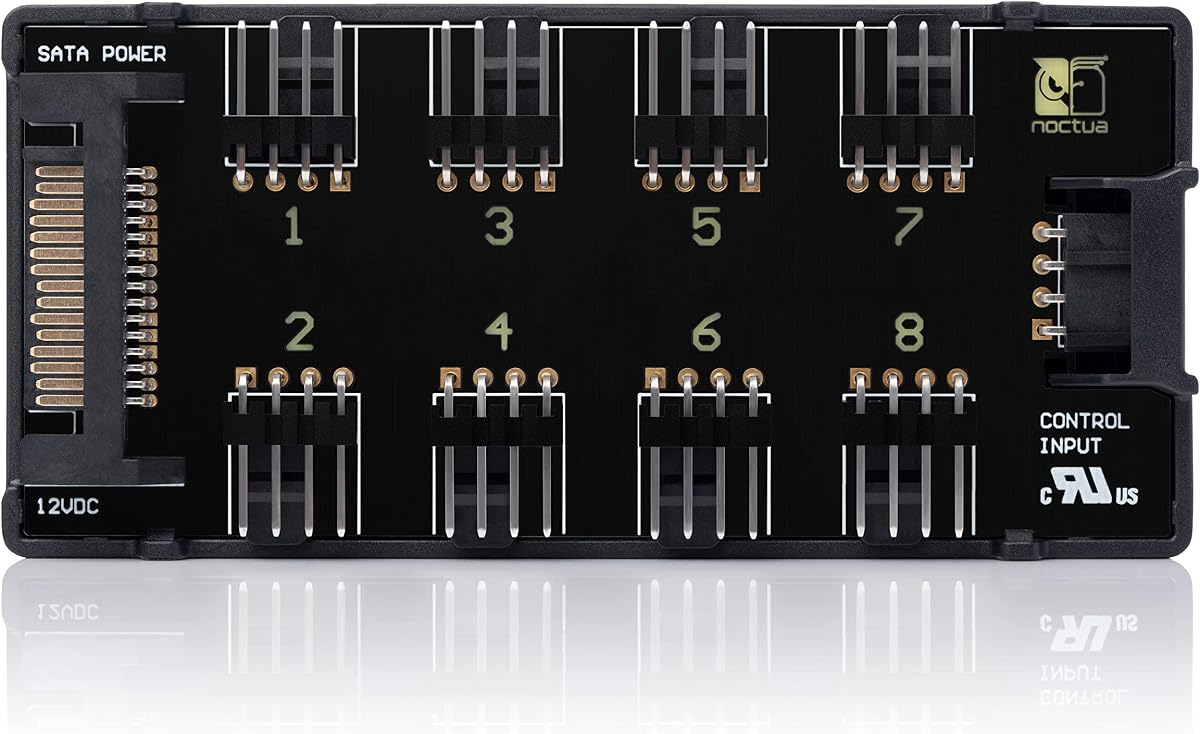
The Noctua NA-FH1 is a high-capacity fan hub designed for systems with numerous compatible cooling fans. Its 4.6 rating, eight-port layout, magnetic installation, and protection features make it one of the most refined options in this guide. Unlike simpler powered splitters, it is designed to distribute both power and PWM control signals from a motherboard header or compatible controller.
We may earn a commission when you buy through this link, at no additional cost to you.
A major strength is the flexibility of its inputs. The four-pin interface can provide power, RPM monitoring, and PWM signals for 5-volt or 12-volt fans, while the SATA connection can supply 12-volt power. The listed limits are up to 54 watts through SATA and 24 watts through the four-pin interface. These separate limits are important because they determine which input should carry power for a particular fan arrangement.
Safety is another distinguishing point. The hub uses fuses and short-circuit protection, and the stated safety certifications include EN 62368-1, EN 55035, EN 55032, and UL 507, along with CE and UKCA certification. Magnetic mounting makes placement in a steel case straightforward and allows the hub to be repositioned without screws, although it will not stay attached reliably to an aluminum or nonmagnetic surface.
The NA-FH1 is best for a serious desktop build, workstation, or multi-fan enclosure that needs more than a basic three-fan splitter. Its six-year manufacturer warranty also adds reassurance for long-term PC ownership. Buyers should carefully follow the separate power limits for SATA and four-pin operation, and confirm that the selected fans support the voltage and control method being used.
Eight ports accommodate larger fan groups, but the specified wattage limits differ by input. Understanding those limits before connecting equipment helps prevent overloads and keeps the hub within its intended operating envelope.
Four strong magnets allow the hub to attach to suitable steel case panels without permanent fasteners. This is particularly convenient when internal routing or component access may change during a build.
We may earn a commission when you buy through this link, at no additional cost to you.
This compact controller offers a straightforward way to regulate compatible 4-pin PWM fans with a physical dial. Its 4.8 rating indicates especially strong user satisfaction, and the included 12-volt 2-amp adapter simplifies setup for a single-fan or modest multi-fan project. The control range extends from zero percent, which stops the fan, to full speed.
We may earn a commission when you buy through this link, at no additional cost to you.
Its main appeal is the clear, immediate relationship between the dial and the fan speed. A backlight makes the selected position easier to see in a dark case or equipment cabinet, while a separate switch allows the indicator light to be turned off. The controller accepts DC5521 input at several supported voltage and current combinations, including 5, 12, and 24 volts, but the output voltage matches the input rather than converting between voltage levels.
That distinction matters for installers. A 5-volt input does not become 12 volts, and a 24-volt input does not become 12 volts. Fans must be selected to match the supplied supply, and the total connected fan load must stay within the output capacity of the actual adapter. Additional fans can be attached with a splitter or hub, although that accessory is sold separately.
This controller is a good fit for a router, mini PC, soft router, or conventional desktop where manual adjustment is preferred over automated temperature control. It is not appropriate for 2-pin or 3-pin fans, and buyers wanting automatic fan curves should choose a temperature-controlled model. For a simple, visually accessible controller with an included adapter, it offers an appealing combination of ease and flexibility.
The dial spans the complete operating range from fan off to full output. This makes it easy to find a practical balance between cooling performance and acoustic comfort without navigating firmware menus.
Because the controller does not convert input voltage, every connected fan should match the selected DC5521 supply. The included 12-volt 2-amp adapter provides a convenient starting point for compatible 12-volt hardware.
We may earn a commission when you buy through this link, at no additional cost to you.
The NA-FC1 is a compact manual controller intended to give users direct control over 4-pin PWM fans. It holds a 4.8 rating and is especially useful when motherboard software does not provide the desired fan curve, or when a quieter setting is needed for periods of low workload. Its compact format also makes it less intrusive than a multi-port hub.
We may earn a commission when you buy through this link, at no additional cost to you.
A notable feature is its ability to operate as a manual speed reducer alongside automatic motherboard fan control. The controller's no-stop mode prevents the fan from dropping below 300 RPM, which can help avoid BIOS fan errors. The included three-way splitter extends control to up to three compatible fans, making the device more versatile than a controller designed for a single header.
The limitations are deliberate and easy to understand. It controls no more than three fans through the included splitter, and it does not display temperature or RPM information. Users who need an eight-port hub, automatic thermal response, or detailed digital monitoring should look to the other products in this guide rather than expecting the NA-FC1 to provide those features.
This is a particularly strong choice for a quiet workstation or enthusiast desktop where a simple physical control is valued. It offers the familiar benefits of a high-quality desktop controller, including a 300-RPM safeguard and a six-year manufacturer warranty, without adding a large display or hub board. It works best with compatible 4-pin PWM fans and a motherboard connection capable of supplying the required control and power.
The no-stop function keeps controlled fans at or above 300 RPM. This reduces the chance that a motherboard or BIOS will interpret a very slow or stopped fan as a hardware fault.
The bundled three-way splitter allows a single manual setting to govern up to three compatible fans. That capacity is ample for a compact case, auxiliary cooling area, or focused set of case fans.
We may earn a commission when you buy through this link, at no additional cost to you.
The Delinx controller is the most feature-rich option in this roundup, combining automatic thermal control, manual PWM adjustment, digital monitoring, and a five-fan hub. Its 4.9 rating makes it a strong all-around recommendation for users who want more than a basic knob. It is especially relevant to NAS builds, server cabinets, cooling projects, and other systems where temperature-driven operation is useful.
We may earn a commission when you buy through this link, at no additional cost to you.
The included kit contains a USB-C PD-to-12-volt adapter cable with an on-off switch, a temperature probe, adhesive for probe placement, and a five-channel fan hub. The digital display can alternate between real-time temperature and fan speed, while adjustable low and high temperature points and a 0-to-27-degree hysteresis let the user define how the automatic fan curve behaves.
The controller accepts a broad 5-to-30-volt input range, supports 5-, 12-, and 24-volt four-pin PWM fans, and is rated for up to 5 amps of output. Protection against over-voltage, over-current, and reverse polarity adds useful safeguards, while power-off memory preserves settings. The temperature probe also gives the automatic mode a clear place to monitor, and the device automatically reverts to manual control if that probe is disconnected.
This is our Editor's Choice because it combines several functions that otherwise require separate devices. It may be more elaborate than a user with one small fan needs, and the product works with any suitable PD USB-C charger rather than including one. Even so, it delivers exceptional stated feedback and broad application support, making it an excellent choice for a properly sized cooling project.
Adjustable start and full-speed temperatures, combined with adjustable hysteresis, let the controller respond differently to changing workloads. The result is a thermal response that can be tailored rather than forced into one fixed curve.
The package includes the adapter cable, temperature probe, mounting adhesive, and five-channel hub. This reduces the need to source basic accessories separately, although a suitable PD charger remains an external requirement.
We may earn a commission when you buy through this link, at no additional cost to you.
This controller combines a USB-C power input, a boost circuit for 12-volt output, PWM generation, and a five-way fan hub. Its 4.6 rating reflects solid user feedback, and the integrated approach is convenient for routers, small hosts, soft-routing systems, and other compact projects where a standard five-volt charger is more accessible than a desktop power supply.
We may earn a commission when you buy through this link, at no additional cost to you.
The product accepts five volts through its female Type-C port and uses a built-in DC-DC boost circuit to produce a 12-volt output for a four-pin PWM fan. The PWM duty cycle can be adjusted across the full zero-to-100-percent range. The included four-pin five-way splitter allows multiple compatible fans to run under the controller, making it a more complete solution than a single-output USB speed controller.
Its most important specification is also its most important caveat: maximum output depends on the capabilities of the connected charger. The stated output range is approximately 15 to 18 watts, or 1.2 to 1.5 amps, and full-speed operation requires a charger capable of supplying the total fan demand. Users should not treat the included cable as evidence that every USB-C charger will be adequate.
This controller is a practical choice for a project already designed around USB-C power and 12-volt four-pin PWM fans. It is not suitable for two-wire or three-wire fans, and it does not include the charger itself. For small installations where the total draw remains within the available output, it provides a tidy, integrated way to power and control a group of fans.
A five-volt Type-C input simplifies use with common charging equipment. The integrated boost circuit then provides the required 12-volt fan output without requiring a separate desktop power adapter.
The controller cannot create unlimited power from its source. A charger with adequate current is needed to run several fans, particularly when the PWM duty cycle approaches full speed.
We may earn a commission when you buy through this link, at no additional cost to you.
This hub is aimed at desktop PC builders who want to control up to six compatible 4-pin PWM fans from one power knob. It supports SATA and DC5525 12-volt inputs, provides a stated combined output of 60 watts at 5 amps, and allows PWM duty-cycle adjustment from one to 99 percent. Its 4.3 rating is the lowest among the ten products, so buyers should consider the detailed specifications carefully.
We may earn a commission when you buy through this link, at no additional cost to you.
SATA power is a familiar option in desktop cases and removes the need to route a separate barrel connector for the hub. The DC5525 input provides an alternative for other 12-volt installations. Indicator lighting communicates the input-voltage state, helping identify a normal 12-volt source, a source below 11.8 volts that may produce low fan speed, or one below 8.4 volts that is considered unusable.
As with other high-capacity hubs, the electrical limits are the central consideration. Each port supports up to 2 amps, but all six ports combined must remain under 5 amps. Fans are not included, and 2-pin and 3-pin fans are not compatible. The hub also offers no temperature probe or automatic fan curve, so it is better suited to users who prefer direct manual control.
This product makes sense for a completed desktop with several case fans and convenient access to SATA power. Its fine adjustment range can help tune noise and cooling, while the voltage indicators provide useful diagnostics. The lower customer rating should prompt buyers to confirm connector dimensions and total fan current before ordering.
SATA input is convenient inside a conventional PC case, while the DC5525 connection offers flexibility for other 12-volt arrangements. Users should select the input that best suits their cable routing and available power.
A one-to-99-percent duty-cycle range offers more granularity than a controller with coarse preset positions. That is useful when balancing the acoustic character of several fans against their cooling contribution.
We may earn a commission when you buy through this link, at no additional cost to you.
The OwlTree adapter is a compact USB-C controller designed for low-power 12-volt PWM fan applications. Its 4.5 rating indicates moderate positive feedback, while the stated eight-watt maximum output makes its intended scale clear. It is best suited to a small fan, a modest group powered through careful loading, or a custom enclosure project rather than a bank of high-draw case fans.
We may earn a commission when you buy through this link, at no additional cost to you.
The device takes five-volt power through a Type-C port and uses a DC-DC boost circuit to provide a 12-volt four-pin PWM output. Speed regulation is handled by generating PWM signals, giving the user continuous control over compatible fan speed. The standard Type-C connection is convenient for prototypes and projects that already use USB power, and the product can also be used with pumps or similar PWM-controlled equipment that fit the electrical requirements.
The eight-watt ceiling is restrictive, and users should calculate the combined demand of anything they plan to connect. A charger must be able to exceed the total load for full-speed operation, and the connected equipment must be compatible with four-pin PWM control. The product explicitly does not support two-pin or three-pin fans. Its single output socket also means that adding several fans requires additional power-distribution planning.
For a maker building a small custom cooling project, this controller offers a clean starting point. The stated ability to use a custom three-dimensional-printed enclosure is a particular advantage for builders who want a neat, purpose-made installation. It is not the right choice for a full desktop fan wall, but within its eight-watt limit it is a focused and affordable way to add manual PWM control.
The controller is designed to fit inside a custom enclosure, making it appealing for small NAS, router, or instrument projects where a standard desktop control unit would be too large.
The eight-watt limit suits low-power cooling hardware and carefully sized single-fan arrangements. It should not be selected for multiple high-current case fans without verifying the total draw.
We may earn a commission when you buy through this link, at no additional cost to you.
This controller combines a 12-volt PWM output with a user-friendly backlit dial and flexible USB-C power input. Its 4.9 rating makes it one of the strongest customer-response options in the guide. It is a good fit for a single fan or a small group of compatible fans in a router, mini PC, soft router, or conventional desktop.
We may earn a commission when you buy through this link, at no additional cost to you.
The controller can accept 12-volt power through PD or QC over USB-C with a stated maximum of 60 watts, or five-volt USB-C input with a maximum of 20 watts. A dial provides manual speed control from zero to 100 percent, and the backlight makes the setting visible in dim installations. The indicator light can be switched off when a less conspicuous appearance is preferred.
The product does not include an automatic temperature mode, so users who want a dynamic fan curve must use the manual setting or rely on external control. Additional fans can be connected using a splitter or hub, but the hub is sold separately. Total connected fan power must remain within the actual output capacity of the selected power supply, and only four-pin 12-volt PWM fans are supported.
This controller is best for buyers who value a polished, simple interface and flexible modern power input. Its large stated output ceiling provides room for more than one fan when the source and wiring support it, while the manual dial gives immediate feedback. It is less appropriate for a fully automated cooling cabinet, but for a desktop or compact system it provides a strong balance of usability and feedback.
PD and QC USB-C input makes it possible to use suitable 12-volt power sources while retaining access to a five-volt fallback. The output limit changes with the input, so the source must be selected for the intended load.
A backlit dial gives a clear visual indication of the selected output level, and the light can be disabled for a cleaner appearance. The full manual range also includes a complete stop position.
We may earn a commission when you buy through this link, at no additional cost to you.
The ICSTATION module is a temperature-controlled governor for 4-wire PWM fans, with a digital display, a wired probe, and both automatic and manual modes. Its 4.5 rating reflects positive user feedback, and its monitoring features are useful for systems where seeing both temperature and fan speed is as important as changing the speed automatically.
We may earn a commission when you buy through this link, at no additional cost to you.
The 42-centimeter NTC10KB probe provides a flexible way to position temperature sensing near a heat-sensitive component or within a cabinet. The display shows the current temperature and the fan's rotational speed in increments of 100 RPM, with a maximum readable value of 30,000 RPM. That scale is suitable for high-speed or specialized fans where a conventional low-range display might be less useful.
Users can choose between automatic temperature-based adjustment and direct manual control. The controller produces a 25-kilohertz, 5-volt PWM signal, but it can only regulate a 4-wire fan using that specification. Two-wire and three-wire fans are not supported. The working voltage must also equal the voltage of the connected fan, so this is a precision-matching device rather than a universal voltage converter.
This module is best for builders who want a compact automatic controller with a local display, especially in PC, industrial, or specialized cooling arrangements. It provides more visibility than a simple dial and more automation than a basic knob, although it does not include a multi-fan hub. Confirm the fan's voltage and wire count, position the probe deliberately, and test the selected thresholds before relying on unattended operation.
Showing temperature and RPM together gives useful context for tuning a cooling system. Users can see how the fan responds to temperature rather than adjusting the control without any performance feedback.
The extended probe cable allows the sensing point to be moved away from the controller and closer to a critical component. More representative placement can produce a more useful automatic response.
We may earn a commission when you buy through this link, at no additional cost to you.
The right PWM fan controller depends on fan voltage, connector type, electrical load, desired control method, and the physical demands of the installation. Review these factors before choosing a model, because features that are useful in one cooling project can be unnecessary or limiting in another.
Most products in this guide support 4-pin PWM fans, but that does not mean every fan can be connected safely. Several controllers expressly exclude 3-pin and 2-pin fans, and the output voltage must match the installed hardware. Most standard PC case fans use 12 volts, but some specialized products use 5 or 24 volts, while the ICSTATION module requires the working voltage to equal the fan voltage.
A controller's maximum output is a limit, not a promise that every connected fan can run at full speed. The 60-watt, 5-amp hubs can support substantial groups, while the OwlTree adapter is limited to eight watts. Multiply the current draw of each connected fan by its operating voltage, then compare the result with both the controller's rating and the attached power supply's capability.
Input methods range from SATA and DC5521 or DC5525 connections to USB-C PD, QC, and basic five-volt input. USB-C does not automatically mean any charger will work. A five-volt source may support a smaller load, while a suitable PD or QC source may provide the 12 volts needed for a larger controller. Products that boost five volts to 12 volts also remain constrained by the source's current capability.
Manual controllers offer direct control through a knob or dial, which is useful for fixed workloads and easy acoustic tuning. Automatic governors add a temperature probe, adjustable thresholds, and hysteresis for systems that experience changing heat loads. The Delinx controller and ICSTATION module support both approaches, while the basic hubs and Noctua NA-FC1 focus on direct manual adjustment.
Controller capacity is more than the number of sockets. Check both the supported fan count and the current available through the selected power input. The Noctua NA-FH1 supports eight fans, several hubs support five or six, and the Noctua NA-FC1 includes a splitter for up to three. Products with one output may still support more through an additional hub, but that accessory is not always included.
Protection features can matter in multi-fan systems where several devices draw from one source. The Noctua NA-FH1 includes fuses and short-circuit protection, while the Delinx controller offers over-voltage, over-current, and reverse-polarity protection. Indicator lights that show low input voltage, as found on the 12-volt six-fan hubs, can also help diagnose an underpowered or unsuitable supply.
A controller may need room for a dial, display, wiring, or a multi-port board. The Noctua NA-FH1 uses magnetic mounting for convenient placement on suitable steel panels, while the OwlTree module is intended to fit inside a custom three-dimensional-printed enclosure. Consider cable routing, access to the adjustment control, heat, and whether the mounting surface is magnetic before finalizing the build.
A digital display is valuable when temperature, RPM, and control state need to be visible locally. The Delinx controller alternates between temperature and fan speed and includes temperature-based thresholds, while the ICSTATION module shows temperature and RPM in 100-RPM units. Basic dial controllers remain simpler and can be preferable when the goal is straightforward operation without an active display.
Before connecting anything, identify the voltage and connector type of every fan. Check the controller's supported input and output specifications, calculate the combined current, and confirm that the power source matches. Connect the controller before the fans when the installation instructions call for that sequence, and never connect 2-pin or 3-pin fans to a controller that supports only 4-pin PWM devices.
For a manual controller, begin at zero or the lowest operating level, then increase the speed gradually while listening for changes in airflow and noise. On an automatic model, install the temperature probe in a representative location, select sensible start and full-speed thresholds, and set an appropriate hysteresis value. Give the system time to respond before making another adjustment so the behavior can be evaluated properly.
During routine care, inspect cables for pin damage, loose connectors, and signs of overheating. Keep the controller and hub away from obstructed airflow and avoid exceeding the stated per-port or combined current limits. A controller that repeatedly drops fans, changes brightness unexpectedly, or shows a low-voltage warning should be disconnected and checked for an inadequate power supply or incompatible fan.
Most controllers in this guide are designed specifically for 4-pin PWM fans and explicitly exclude 3-pin and 2-pin models. A 3-wire fan may be voltage-controlled, while a 2-wire fan lacks a dedicated control connection, so connecting either to a PWM-only controller can produce unreliable operation. Always verify compatibility before purchasing or connecting a fan.
Yes, if both the controller and its power source can handle the combined load. Several products support five or six fans, and the Noctua NA-FH1 supports eight, but the listed per-port and total wattage limits still apply. Use the included splitter or hub when it is designed for the controller and ensure the cables and connectors are rated properly.
No. USB-C describes the connector, not the voltage, current, or protocol. A controller may require PD, QC, 12-volt input, or only five-volt input, and the source must deliver enough current for the connected fans. The five-volt-to-12-volt controllers still depend on the charger's total output capability.
Manual control changes output directly through a knob, dial, or button and remains at the selected level until changed. Automatic control uses a temperature probe and adjustable thresholds to vary fan speed as heat changes. Manual control is simple and predictable, while automatic control is generally more useful in systems with changing workloads.
First confirm that the fan is actually connected to the correct header and that the controller is receiving adequate power. The Noctua NA-FC1 specifically includes a no-stop mode that prevents its controlled fan from falling below 300 RPM, which is designed to reduce this type of error. Other controllers may not have an equivalent minimum-speed function.
Hysteresis is the difference between the temperature at which a fan changes state and the temperature at which it may change back. A larger gap can prevent rapid cycling, while a smaller gap produces more responsive adjustment. The Delinx controller offers an adjustable range of zero to 27 degrees for this purpose.
Every connected fan contributes to the controller's total draw, and startup behavior can place additional stress on a power source. Exceeding the adapter or controller rating can cause instability, unexpected shutdowns, or insufficient voltage at the fans. The total wattage should remain below both the controller's output rating and the power source's usable capacity.
Some PWM-controlled pumps may work with products that generate a standard four-pin PWM output, but compatibility still depends on voltage, connector type, signal requirements, and current draw. The Type C USB product specifically mentions USB fans and pumps among possible applications. Confirm the pump manufacturer's control requirements before connecting it.
The strongest all-around choice is the Delinx 12V 4-Pin PWM PC Fan Speed Controller because it combines automatic and manual modes, temperature and RPM monitoring, protection features, and an included five-fan hub. The Noctua NA-FH1 stands out as the premium option for eight-fan capacity, magnetic installation, and detailed safety provisions, while the OwlTree adapter offers a compact budget solution for carefully sized DIY cooling projects.
For a simpler setup, the backlit USB Fan Controller and the PC Fan 12V Controller both provide straightforward manual adjustment. The latter includes a 12-volt adapter, while the former accepts modern PD or QC USB-C power. The Noctua NA-FC1 is ideal when compact manual control for up to three fans is enough, and the ICSTATION module fits users who specifically want local temperature and RPM monitoring.
Before ordering, verify connector type, fan voltage, total current, power-input format, and whether you want manual or automatic control. Multi-fan systems need particular attention to combined power limits and hub capacity. Product ratings, availability, and prices can change, so review the current listing and seller information before making a final purchase.