
ULTRARM Extra-Tall Heavy-Duty Monitor Arm
4.6Editor score
33.4-inch maximum height
22-inch extended arm reach
Supports 17–40 inch screens
Expandable to four monitors
A tall monitor arm raises your display higher, extends it farther across the desk, and can make a crowded workstation feel considerably more organized. The right model also supports your screen securely, provides smooth movement, and allows comfortable positioning whether you sit, stand, game, create, or work.
This guide compares 10 tall monitor arms based on pole height, reach, load capacity, VESA compatibility, motion range, mounting methods, cable management, and desk requirements. It includes compact everyday options, extra-long designs, heavy-duty supports, and arms designed for large curved or ultrawide displays.
Each pick reveals what makes it most useful, from a 39-inch pole for flexible sitting-to-standing placement to heavy-duty construction for oversized screens. Ratings and specifications reflect the supplied product information, while prices and availability can change, so compare current listings before purchasing.
4.6Editor score

4.6Editor score
4.7Editor score
As an Amazon Associate we earn from qualifying purchases.
The comparison below highlights the major differences in vertical reach, horizontal extension, supported screen size, weight capacity, and installation options. These specifications make it easier to identify the tall monitor arm that matches your display, desk, and preferred working style.


The HUANUO Single Monitor Arm with a 39-inch extra-tall pole is the most versatile general-purpose choice in this guide. Its 4.6 rating reflects a well-rounded product that combines substantial vertical adjustment, broad display compatibility, and straightforward installation. Most importantly, the unusually tall center pole gives users room to move between seated and standing positions without relying on a separate riser.
We may earn a commission when you buy through this link, at no additional cost to you.
The arm supports standard 13-to-32-inch screens, ultrawide displays up to 38 inches, and monitors weighing as much as 22 pounds. Standard 75x75mm and 100x100mm VESA patterns are supported through a detachable plate. Motion is generous for a single-monitor design, with 180-degree tilt, 180-degree swivel, and 360-degree rotation. Those movements make it possible to share a display, bring the image closer, or turn the panel vertically for documents and narrow applications.
Two installation paths are included: a C-clamp for thicker desks and a grommet base for a more permanent-looking installation. Integrated cable management helps keep power and signal cables from spreading across the desktop. The trade-offs are that this is a single-screen system, so buyers planning a multi-monitor setup will need additional arms, and the grommet option is limited to desks up to 2.75 inches thick. These restrictions are reasonable for a flexible pole focused on height rather than multi-screen expansion.
This is the best general recommendation for someone who wants one arm to handle everything from a standard office display to a large ultrawide monitor. It is especially suitable for standing desks, creative workstations, and users who switch frequently between sitting and standing. Verify the desk thickness, underside clearance, VESA pattern, and monitor weight before ordering, but for most conventional setups this arm offers an excellent balance of reach, stability, and everyday usability.
The 39-inch center pole is the defining feature. It offers substantially more vertical travel than standard monitor arms, making the mount useful for sit-stand desks and for users who want the top of a large display closer to eye level without stacking books or blocks beneath the base.
The combination of swivel, tilt, rotation, and a detachable VESA plate gives this arm more useful positioning options than a fixed stand. It can shift between work, media viewing, and portrait-oriented tasks while freeing the space beneath the display.
We may earn a commission when you buy through this link, at no additional cost to you.
The VIVO Extra Tall Single Monitor Desk Mount, model STAND-V011, is a polished alternative to the HUANUO arm for users who value straightforward height adjustment. It carries a 4.5 rating and uses the same broad 39-inch pole concept, making it a natural choice for standing workspaces and large monitors that need more clearance than a traditional arm provides.
We may earn a commission when you buy through this link, at no additional cost to you.
The mount accepts most 13-to-32-inch screens and ultrawide monitors up to 38 inches, with a maximum load of 22 pounds. Its 75x75mm and 100x100mm VESA compatibility covers many popular displays. Adjustment includes plus-90- to minus-90-degree tilt, 360-degree swivel, 360-degree rotation, and movement along the center pole. The display can therefore move from landscape into portrait mode while also moving closer to or farther from the user.
Installation does not require drilling when the C-clamp is used, and the supplied clamp can accommodate surfaces up to 4 inches thick. A grommet base is also available for users who prefer that configuration. Cable clips run along the arm and pole to organize AV and power leads. The main limitation is its single-monitor format, which does not suit a growing multi-display workstation, and buyers interested in the grommet setup may need to confirm whether it is included with the particular package offered.
Choose the VIVO STAND-V011 when the priority is a tall, stable pole with extensive articulation and easy drill-free attachment. It works particularly well for standing desks, home offices, and users who alternate between detailed close-up work and viewing a screen from farther away. Confirm the included mounting components and your monitor's specifications before purchase.
The long center pole lets the display travel through a broad vertical range. That makes the arm useful for shared standing desks, adjustable workstations, and users who prefer not to add a separate monitor riser to an already busy desktop.
Integrated clips along the arm and pole provide a practical route for power and AV cords. This keeps essential cables from dropping directly onto the work surface and makes it easier to reposition the display without pulling wiring across the desk.
We may earn a commission when you buy through this link, at no additional cost to you.
The WALI Tall Monitor Arm Mount is a straightforward workspace organizer for 13-to-34-inch flat-panel displays. It supports up to 22 pounds and uses detachable mounting plates compatible with 75x75mm and 100x100mm VESA patterns. Unlike products with a visible numerical rating, this listing does not provide one, so its evaluation must rest on the stated specifications and design features rather than a customer score.
We may earn a commission when you buy through this link, at no additional cost to you.
Its 31.5-inch pole provides useful vertical travel, while the arm extends, retracts, tilts plus or minus 90 degrees, swivels, and rotates 360 degrees. The result is a monitor that can be moved out of the way, brought closer for focused work, or turned into portrait orientation. A two-stage locking system and a 3.5-inch-diameter grommet base add installation flexibility for desks up to 3 inches thick.
Lifting the display creates usable space for a keyboard, notebook, docking station, or other accessories. Built-in cable management keeps cords along the arm rather than across the desktop. Compared with the 39-inch HUANUO and VIVO models, this WALI arm offers less extreme vertical reach, and the 34-inch screen limit is narrower than several ultrawide-focused options. Those limitations may matter in a large standing setup, but it remains a capable choice for conventional office displays.
This arm is best for buyers who want to declutter a standard desk while retaining broad movement and reliable VESA support. It is a sensible option for home-office users, students, programmers, and anyone who needs the monitor to disappear when not in use. Check the desk's edge clearance, choose the appropriate mounting base, and confirm that the display falls within the stated size and weight limits.
Removing the monitor's factory base creates a clearer work zone for keyboards, laptops, docking stations, and accessories. The result is especially helpful on compact desks where every horizontal inch affects mouse movement and general organization.
The C-clamp and grommet base provide alternatives for different desk styles. A locking mechanism helps hold the arm in place, while the two-stage base system adds support beneath the pole.
We may earn a commission when you buy through this link, at no additional cost to you.
The ULTRARM Extra-Tall Heavy-Duty Monitor Arm is the best budget pick because it combines a high rating, an expandable modular design, and compatibility with large curved screens. Its 4.6 rating makes it one of the strongest-rated products in the list, while the gas-spring mechanism offers a smoother alternative to manually lifting a rigid arm.
We may earn a commission when you buy through this link, at no additional cost to you.
Maximum vertical height reaches 33.4 inches, while the extended arm measures 22 inches. Each arm supports displays from 17 to 40 inches and loads between 2.2 and 26.4 pounds. The product is designed for flat, curved, 21:9, 32:9, and 1000R displays, making it unusually adaptable for modern ultrawide setups. Most notably, its modular pole can grow from a single screen to dual, triple, or quad-monitor configurations.
The mechanical spring structure is intended to provide consistent tilt resistance without noticeable drift, while the gas spring handles fluid vertical changes. The tradeoff is that the configuration shown is a single-arm setup; realizing the advertised multi-monitor potential requires additional compatible arms and appropriate hardware. It is also more mechanically complex than a conventional single-screen mount, so buyers should follow the assembly instructions carefully.
This product is a strong fit for gamers, creative professionals, and productivity users who may begin with one ultrawide and expand later. Its long reach and 33.4-inch height make it effective on deep desks and in setups with stacked or elevated screens. It is a particularly compelling choice when expandability and ultrawide support matter more than having the tallest possible pole.
The modular pole can support as many as four displays over time, which makes this more than a one-purpose arm. Users can begin with a single ultrawide and add screens as their workflow, budget, or available desk area changes.
A gas spring assists vertical movement, reducing the effort required to reposition a large display. The mechanical spring structure adds controlled resistance and is designed to avoid the looseness or drift that can develop in simpler joints.
We may earn a commission when you buy through this link, at no additional cost to you.
The WALI Extra Long Single Monitor Arm is built for deep workspaces where horizontal reach matters as much as height. It supports flat or curved LCD and LED displays from 17 to 38 inches, carries up to 26.4 pounds, and accepts standard 75x75mm and 100x100mm mounting patterns. Its 4.3 rating places it among the stronger-rated options without making it the highest-rated model.
We may earn a commission when you buy through this link, at no additional cost to you.
The arm extends 26.77 inches and raises the display as high as 29.13 inches above the desktop. That reach is the most extensive horizontal extension in this guide, making the mount useful for pulling a large display toward the user, moving it aside, or positioning it around equipment on a broad desk. Adjustment includes plus-180- to minus-180-degree swivel, plus-70- to minus-45-degree tilt, and 360-degree rotation.
Cable management runs along the arm, and a wider VESA head with a tighter-fitting panel is intended to improve stability. The core has been tested through more than 20,000 adjustment cycles. Both C-clamp and grommet mounting support desks measuring 0.39 to 2.76 inches thick. The principal drawback is that the 29.13-inch height is lower than the 33.4- and 39-inch poles in this guide, and installation is specifically recommended for wooden desks without obstructive crossbeams.
This WALI model is a good match for users with a deep desk who want to reclaim the center of the workspace or share a large screen across a table. It is especially appealing for gaming and entertainment displays because of the long reach and broad size support. Confirm the desktop material, thickness, underside clearance, VESA pattern, and display weight before committing to the installation.
A 26.77-inch extension gives the display more freedom to move toward the viewer and away from wall-side equipment. This is particularly useful when a large ultrawide would otherwise sit too far away or occupy most of the usable desktop.
The wider VESA head and tighter panel fit are intended to limit movement at the connection point. For a heavy display, that additional interface stability is important because a loose joint can translate directly into visible wobble while typing or using the mouse.
We may earn a commission when you buy through this link, at no additional cost to you.
The MOUNT PRO Single Long Monitor Arm combines 27.76 inches of horizontal extension with a pole that can place a display 28.5 inches above the desktop. Its 4.5 rating and detailed range of adjustments make it a practical alternative for users who want a long-reach arm with more vertical placement than a conventional desk mount.
We may earn a commission when you buy through this link, at no additional cost to you.
Compatibility covers most flat or curved LCD and LED displays from 13 to 32 inches, including screens from brands such as ASUS, Acer, Samsung, LG, AOC, and Dell. The arm holds between 4.4 and 19.8 pounds and supports 75x75mm and 100x100mm VESA patterns. It offers plus-90- to minus-90-degree swivel, plus-85- to minus-45-degree tilt, and 360-degree rotation.
A major limitation is the exclusion of 1000R, 1500R, and 1800R curved monitors, so buyers with highly curved displays should look elsewhere. The 19.8-pound load ceiling is also lower than that of several heavy-duty competitors. On the positive side, the arm is tested through 20,000 motion cycles, includes integrated cable routing, and offers clamp and grommet mounting for different desk thicknesses.
This mount is best for taller users who want the monitor closer to eye level and value long horizontal positioning. It works well on larger desks where the arm must clear a laptop, docking station, or other central equipment. It is a sensible all-around choice for standard and moderately curved monitors, but confirm the display's curvature and weight before installation.
The extended column is particularly useful for taller people who find ordinary monitor arms too low. Reaching 28.5 inches above the desktop creates more options for aligning the screen naturally without introducing a separate riser.
A 27.76-inch arm can move a display over or around a laptop, keyboard, or docking station. This creates a cleaner central work zone and gives the user more freedom to alternate between a close working position and a pulled-back viewing position.
We may earn a commission when you buy through this link, at no additional cost to you.
The ErGear Heavy Duty Monitor Arm is designed for large and heavy screens, with a 37.4-pound capacity and compatibility for monitors from 13 to 49 inches. Its 4.4 rating reflects a capable design, especially for users who need a secure support system more than an exceptionally tall pole.
We may earn a commission when you buy through this link, at no additional cost to you.
The arm supports standard 75x75mm and 100x100mm VESA patterns and accommodates ultrawide, curved, and super-wide displays. A dual C-clamp spreads the load for greater stability, while the thickened steel arm is intended to resist shaking during typing, rapid mouse movement, and screen repositioning. It extends 21.2 inches and raises the display 22.2 inches above the desktop.
Motion includes plus-30- to minus-40-degree tilt, plus-90- to minus-90-degree swivel, and 360-degree rotation. The C-clamp accommodates desks from 0.39 to 3.15 inches thick, while the grommet option supports 0.39 to 2 inches. The trade-off is that its 22.2-inch maximum height is considerably shorter than the tall poles offered by the HUANUO, VIVO, and ULTRARM products. It is therefore better suited to heavy displays than to users seeking extreme standing-desk height.
Choose the ErGear arm for a large gaming monitor, a workstation display, or an ultrawide panel whose weight demands stronger support than a conventional arm offers. The pre-assembled design and clear installation process make it practical for users who value stability over complex adjustment. Confirm the monitor's weight, VESA layout, and desk dimensions before installation.
A 37.4-pound capacity provides meaningful headroom for large displays. The thickened steel arm and dual-clamp base work together to reduce movement, which is especially valuable when a large screen is positioned above an active typing surface.
The 13-to-49-inch range covers standard panels as well as large ultrawide and super-wide formats. Standard VESA support makes the arm relevant to many modern gaming and productivity screens, though every display's size, weight, and hole pattern should still be verified.
We may earn a commission when you buy through this link, at no additional cost to you.
The Extra Long Arm Monitor Mount is a capable long-reach option for standard-sized flat and curved screens. Its 4.2 rating is lower than those of many alternatives, but the stated design offers 27.76 inches of horizontal extension, 28.5 inches of maximum height, and broad angular movement for a straightforward single-screen setup.
We may earn a commission when you buy through this link, at no additional cost to you.
The mount fits most LCD and LED displays from 13 to 32 inches, supports weights from 4.4 to 19.8 pounds, and works with 75x75mm and 100x100mm VESA patterns. Its listed compatibility includes popular ASUS, Acer, Samsung, LG, AOC, and Dell monitors. Adjustment includes plus-90- to minus-90-degree swivel, plus-85- to minus-45-degree tilt, and 360-degree rotation for landscape or portrait viewing.
The extended pole provides 30 percent more height than other monitor mounts according to the product information, which is useful for taller users and standing arrangements. Cable management is integrated, and the arm has reportedly been tested through 20,000 motion cycles. Both clamp and grommet installations support desktops from 0.39 to 2.76 inches thick. The limited 32-inch maximum and modest 19.8-pound capacity restrict use with larger ultrawides.
This product is a sensible option for users who want the MOUNT PRO-style reach and height in a simpler single-screen package. It fits home-office, gaming, and creative setups that use conventional screen sizes. It is not the right choice for a 38-inch ultrawide or a particularly heavy display, so check specifications before buying.
A 28.5-inch maximum height can bring a standard display closer to the user's eye line, especially on a tall desk. The extra vertical range is also useful when a monitor is mounted above a laptop or docking station.
The 27.76-inch reach allows the display to move across a deep workspace and away from central accessories. For users with limited desk area, pulling the screen toward the edge can open a more usable surface for the keyboard and mouse.
We may earn a commission when you buy through this link, at no additional cost to you.
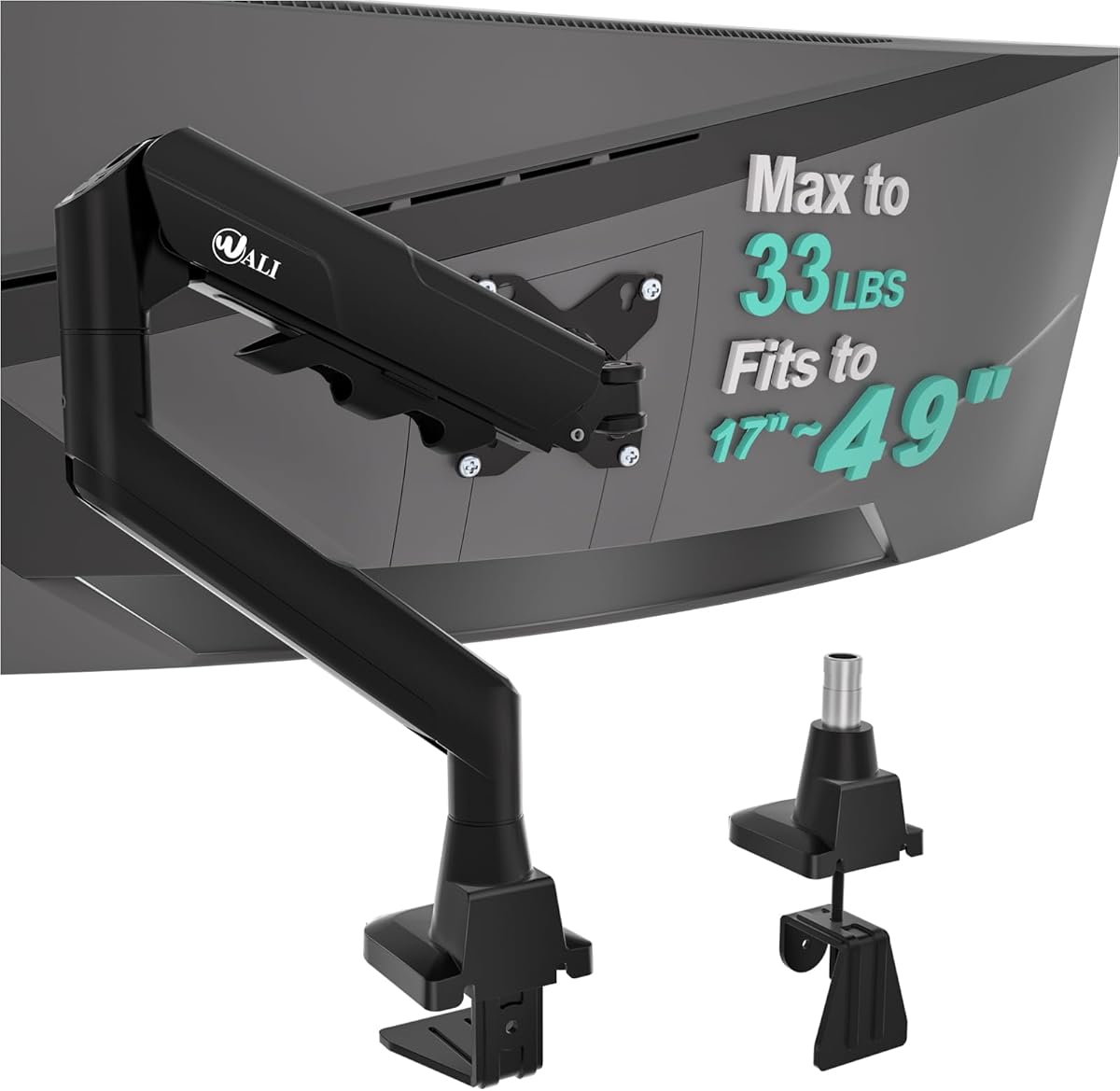
The WALI Ultrawide Single Monitor Arm is built around large-screen compatibility. It supports flat and 1800R curved LCD or LED displays from 17 to 49 inches, with a maximum load of 33 pounds and standard 75x75mm or 100x100mm VESA patterns. Its 4.3 rating makes it a solid option for a large ultrawide workstation or gaming display.
We may earn a commission when you buy through this link, at no additional cost to you.
The arm extends 21.14 inches and raises the monitor 20.59 inches above the desktop. Motion includes plus-90- to minus-90-degree swivel, plus-75- to minus-75-degree tilt, and 360-degree rotation. A wider VESA head and tighter-fitting panel help maintain stability, while the durable core has reportedly been tested through more than 20,000 adjustment cycles. Built-in cable management keeps wiring routed along the arm.
C-clamp and grommet base options both support wooden desks from 0.39 to 1.96 inches thick, and the manufacturer recommends avoiding an obstructing crossbeam beneath the desk. The 1800R curvature limit means it is not suitable for more aggressively curved 1000R or 1500R screens. Its 20.59-inch maximum height is also lower than the tallest dedicated poles in this guide.
Choose this model when the priority is supporting a very large, moderately curved display with a higher load ceiling than ordinary arms offer. It is well suited to immersive gaming, detailed timelines, and wide productivity layouts. Ensure the display falls within the supported curvature, weight, VESA, and desk requirements before ordering.
The 33-pound capacity and reinforced VESA interface are designed for large displays. This creates a more appropriate support structure for an expansive gaming monitor or a wide professional screen than a lightweight general-purpose arm.
Symmetrical 75-degree tilt in both directions and 90-degree swivel provide useful flexibility. A 360-degree rotation also supports portrait orientation, giving the mount more versatility than a simple fixed stand.
We may earn a commission when you buy through this link, at no additional cost to you.
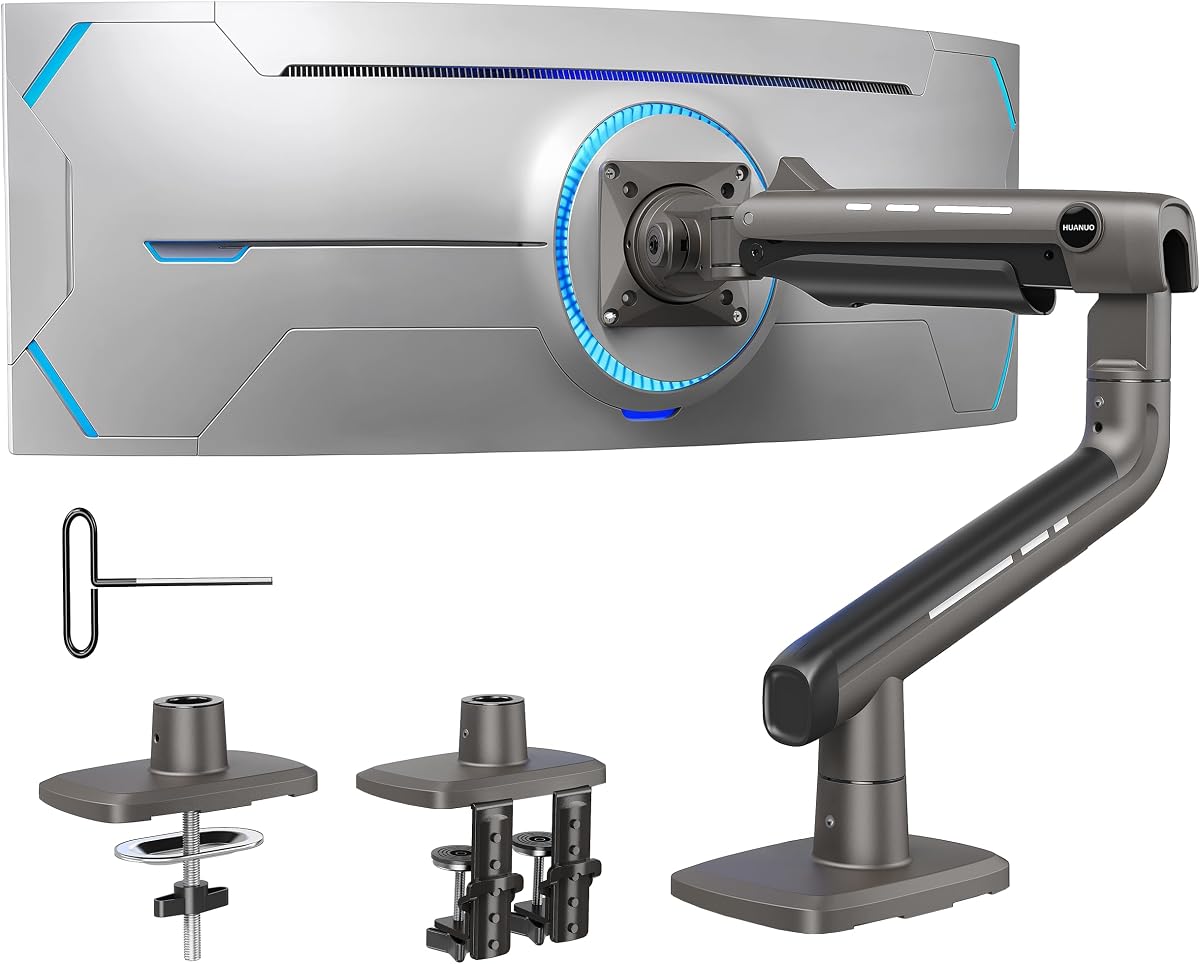
The HUANUO TitanLift Heavy Duty Monitor Arm is the premium selection in this guide. It has a 4.7 rating, the highest numerical rating among the listed products, and a substantial 44-pound load capacity. The aluminum construction and reinforced components make it a strong candidate for a large gaming display, heavyweight ultrawide, or demanding creative workstation.
We may earn a commission when you buy through this link, at no additional cost to you.
Compatibility extends from 17 to 49-inch screens weighing between 6.6 and 44 pounds. The VESA head supports 75x75mm and 100x100mm patterns, with maximum VESA compatibility stated as 100x100mm. The arm extends up to 22.5 inches and adjusts vertically by 19.6 inches, measured from the desktop to the VESA mount's center. Tilt covers plus-50- to minus-50 degrees, swivel reaches 180 degrees in either direction, and 360-degree rotation is supported for screens up to 35 inches.
The high-strength aluminum alloy arm, VESA head, and base have been reinforced, and the product has reportedly passed 50,000 motion cycles and a three-times load test. A dual C-clamp system spreads the installation load. The key caveat is desk compatibility: the manufacturer recommends wooden desks between 0.8 and 3.5 inches thick with no crossbeams or panels interfering with the clamp. Plastic and glass desks are not recommended.
The TitanLift is best for buyers who want substantial strength, refined adjustment, and a premium construction rather than the tallest possible pole. The simple Allen-key tension system is a notable convenience for fine-tuning movement. Select it when your large display is near the upper capacity limit or when long-term stability is the top priority, and complete all three desk checks before installation.
A 44-pound ceiling, reinforced aluminum components, and a wider base provide a high level of support for oversized screens. The reported cycle and load testing adds confidence for users who expect frequent movement rather than occasional adjustments.
The side-mounted Allen key allows the arm's tension to be adjusted by hand. This makes it easier to fine-tune the feel of the joint after installation, particularly when working with a large panel near the mount's load limit.
We may earn a commission when you buy through this link, at no additional cost to you.
A tall monitor arm should match your screen's size and weight, fit your desk, and provide the exact range of motion you need. Before comparing poles and arm lengths, verify VESA support, mounting clearance, and the physical demands of your display.
In short, confirm screen compatibility, desk thickness, and underside clearance before buying.
In short, prioritize a 33-inch-plus pole for broad sit-stand positioning, but balance that need against reach and load capacity.
In short, leave meaningful weight headroom and pay particular attention to load limits for large ultrawide displays.
In short, choose longer reach for deep desks and crowded equipment, or a more compact arm for a straightforward single-screen setup.
In short, look for 360-degree rotation, useful swivel range, and enough tilt to match your preferred viewing angle.
In short, use a clamp for flexibility and grommets for permanence, and verify which hardware is actually included in the package.
In short, check both the VESA pattern and exact curvature requirement rather than assuming every large monitor will fit.
In short, choose a design with integrated routing so cables follow the arm and remain tidy during daily adjustments.
Before installation, unload the monitor from the arm, identify every included component, and compare the mounting hardware with the desk and display requirements. Check the rear VESA holes, select the correct plate, and position the base where the arm can move without contacting a wall, drawer, monitor edge, or desk frame. Keeping the display supported during assembly also reduces the chance of twisting the panel connection.
Attach the chosen base firmly, but do not overtighten the clamp against a fragile desktop. If using a grommet base, confirm the hole diameter and tighten the assembly evenly so the pole remains vertical. Fit the VESA plate to the display, connect the necessary cables, and then attach the arm. Before fully tightening every joint, move the display through its intended range to check for binding or cable tension.
For daily use, move the arm slowly and within the manufacturer's stated limits. Avoid hanging objects from the arm, and do not use it as a handhold. Periodically inspect the clamp, bolts, and VESA connection for loosening, particularly if the monitor is adjusted frequently. Clean the arm and desk with a soft, dry cloth, and route cables so they cannot be pinched during rotation.
A tall monitor arm uses a longer vertical pole to provide more height adjustment than a conventional arm. That extra range is useful for standing desks, high seating positions, large ultrawide displays, and setups where the monitor must sit above a laptop or other equipment. The tallest options in this guide reach 33.4 to 39 inches.
Check the display's diagonal size, weight, and rear VESA mounting pattern. Most arms in this guide use 75x75mm or 100x100mm holes, but each product has its own size and weight limits. Curved displays also require checking the supported curvature because some highly curved formats are explicitly excluded.
A C-clamp is usually easier to install and does not require drilling a hole in the desk. A grommet base can provide a cleaner permanent installation, but it requires the correct opening and adequate desktop thickness. Check whether the selected package includes both options, and ensure there are no crossbeams or panels that prevent the clamp from attaching.
Yes, and a tall pole is especially useful because it lets the display move through a wider range as the desk changes height. Choose an arm that extends high enough to maintain a comfortable viewing angle in both seated and standing positions. Stability and smooth tension adjustment become particularly important when the desk is moving.
A longer pole can amplify movement if the base, joints, or VESA connection are loose, but a properly installed and correctly sized arm should remain stable. Look for a strong base, suitable load capacity, secure clamping, and a tight VESA fit. Heavy displays benefit from arms with reinforced steel or aluminum components and multiple clamp support.
Most of the arms reviewed offer 360-degree rotation and can place a compatible display in portrait orientation. The HUANUO TitanLift notes that full horizontal and vertical rotation is compatible with screens up to 35 inches, so larger users should confirm the model's detailed rotation guidance before installation.
Wooden desks are the safest general recommendation because they provide a secure clamping surface and allow the base to be installed as intended. The TitanLift specifically recommends wooden desks between 0.8 and 3.5 inches thick and does not recommend plastic or glass. Check each product's own requirements and avoid a crossbeam that interferes with the clamp.
Yes. Removing the monitor's factory stand opens space beneath the display for a keyboard, laptop, docking station, or accessories. The improvement is most noticeable on compact desks, while the added reach of a long arm also allows the screen to move toward the edge of a larger workspace when it is not being viewed.
The HUANUO 39-inch extra-tall arm is the strongest general choice because it combines excellent height, broad motion, familiar VESA support, and two installation methods. The ULTRARM is the best budget-oriented pick, offering gas-spring movement and unusual expansion potential, while the HUANUO TitanLift is the premium option for very heavy and oversized displays.
Prioritize compatibility before features: confirm the monitor's VESA holes, weight, screen size, curvature, and the desk's material, thickness, and underside clearance. From there, choose the amount of vertical reach and horizontal extension that fits your work style. Cable routing, portrait rotation, and whether you need one screen or a modular multi-screen system should shape the final decision.
Product ratings, availability, and prices can change, so review the current listing before ordering. Comparing the present specifications with your display and desk will help prevent an incompatible purchase and ensure that the chosen tall monitor arm delivers the position, stability, and workspace benefits you want.