
Noctua NF-R8 redux-1800 PWM
4.8Editor score
450–1800 RPM control
Maximum 17.1 dB(A)
Four-pin PWM connector
80 x 80 x 25 mm
This guide compares the best 80mm case fans for noise, airflow, static pressure, PWM control, fit, durability, and overall value.
The right 80mm case fan can improve airflow, lower component temperatures, and keep a compact computer quiet. Important considerations include frame thickness, bearing type, connector format, speed control, static pressure, and whether the fan is designed for open case positions or restrictive heatsinks and radiators.
We compared ten 80mm case fans using the supplied specifications, customer ratings, airflow claims, acoustic figures, mounting formats, and control features. The list covers single fans and multipacks, from quiet 3-pin models to high-speed PWM options, with an emphasis on practical fit and thermal performance.
Each review explains where the fan is strongest, where compromises appear, and which type of builder may benefit most. Ratings and technical specifications can change over time, and current prices fluctuate, so shoppers should confirm the latest listing details before making a purchase.
4.8Editor score

4.9Editor score

4.8Editor score
The table below compares all ten fans by their core design, control method, speed, acoustic specification, and strongest use case.



The Noctua NF-A8 PWM is our most balanced recommendation because it combines a 4.9 rating with a practical maximum speed of 2200 RPM and a stated maximum noise level of 17.7 dB(A). Its 80 x 80 x 25 mm frame fits the conventional 80mm mounting pattern, while the PWM connector allows motherboard control over a broad 450–2200 RPM range.
We may earn a commission when you buy through this link, at no additional cost to you.
Noctua's Flow Acceleration Channels and Advanced Acoustic Optimisation frame are central to the fan's appeal. Rather than emphasizing a single extreme specification, the NF-A8 targets a balanced result: enough speed for meaningful case ventilation and a low-noise profile suitable for offices, home theaters, and compact daily-use computers.
The accessory package also improves its suitability for multi-fan installations. It includes anti-vibration mounts, fan screws, a Low-Noise Adaptor, an extension cable, and a y-cable for running two PWM fans from one header. These parts can make installation neater while helping control vibration and cable strain.
The main trade-off is that buyers paying for a single fan receive less obvious value than they might from a multipack. Nevertheless, the NF-A8's strong rating, refined acoustics, and flexible speed range make it the most versatile standalone choice for builders who want one dependable 80mm PWM fan.
The broad speed range lets the fan remain subdued during light workloads and increase airflow when temperatures rise. Automatic control through a compatible motherboard header is convenient for systems that are frequently left on, while the Low-Noise Adaptor can provide an even more restrained operating profile when required.
The standard 25mm depth makes the NF-A8 suitable for HTPCs, ITX systems, small-form-factor cases, NAS enclosures, and other compact chassis. It is also a capable replacement for an existing 80mm case or device fan when the mounting pattern and connector are compatible.
We may earn a commission when you buy through this link, at no additional cost to you.
The ARCTIC P8 5-Pack is a practical choice for builders replacing several case fans at once. It combines a 4.6 rating with a 3000 RPM maximum speed and specified airflow of 23.4 CFM, making it well suited to positions that need a meaningful increase in cooling capacity. The pack format also simplifies matching multiple intake or exhaust positions.
We may earn a commission when you buy through this link, at no additional cost to you.
Static-pressure optimization is the standout feature. The redesigned blades are intended to move air through restrictive areas such as heatsinks and radiators, where fan performance can deteriorate if the motor merely spins quickly. ARCTIC's fluid dynamic bearing includes an oil capsule intended to reduce lubricant leakage and extend service life.
The fan uses a 3-pin connector and a stated noise level of 0.3 Sone at 3000 RPM. That configuration is less flexible for quiet systems than a four-pin PWM model, because motherboard fan curves cannot directly regulate the motor through PWM signals. Noise and pitch may also be more prominent than the lower-speed P8 Silent alternatives in this guide.
This multipack is best for a performance-oriented build with several 80mm mounting locations, especially when those locations include a radiator or other high-resistance component. For a silent office PC, however, a controllable PWM model will usually be easier to tune and more appropriate.
Buying five matching fans removes the need to source individual units of the same model. The set is useful for filling every available opening in a mid-tower, creating symmetrical intake and exhaust arrangements, or replacing a group of aging case fans.
The pressure-optimized design gives the P8 a stronger case for heatsink and radiator placement than a basic open-air case fan. Its fluid dynamic bearing and redesigned blades support consistent operation while reducing the likelihood of lubricant leakage.
We may earn a commission when you buy through this link, at no additional cost to you.
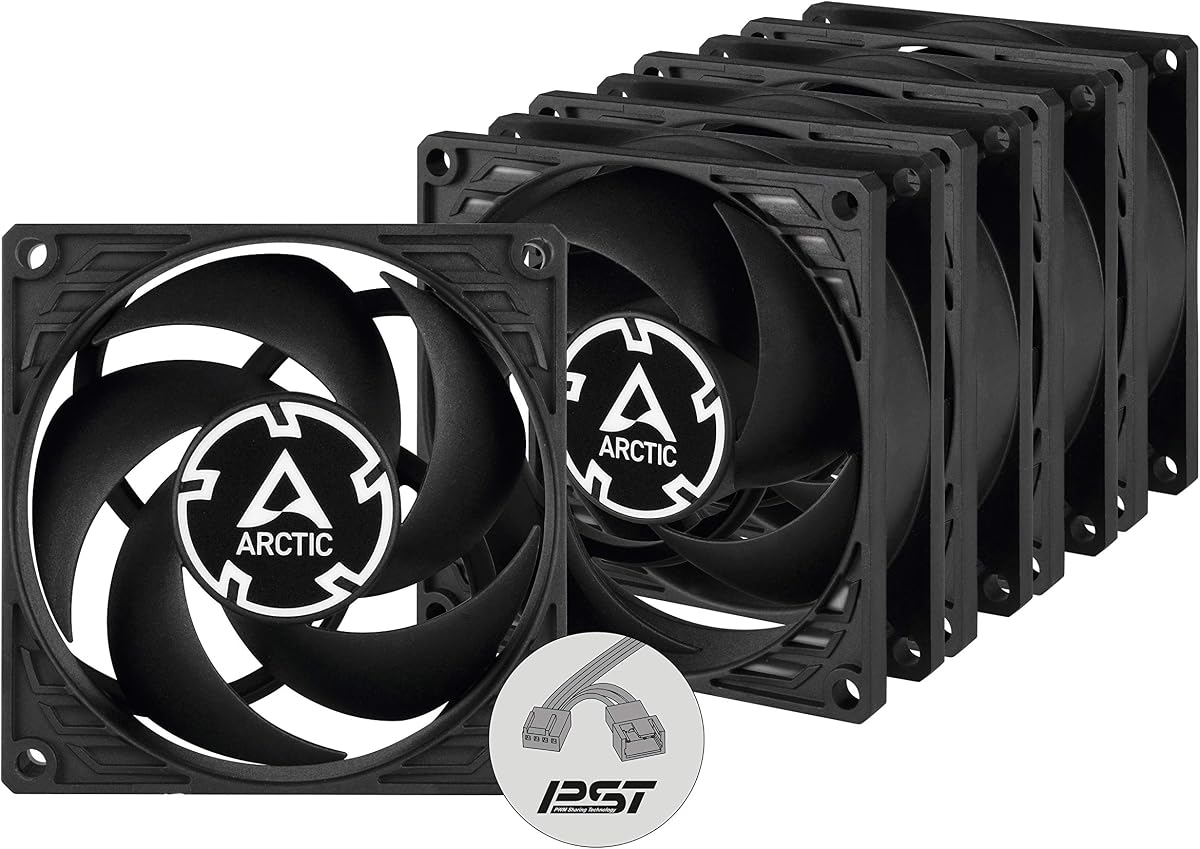
The ARCTIC P8 PWM PST delivers the basic P8's pressure-oriented design with 4-pin PWM control and PWM Sharing Technology. Its 4.7 rating, 200–3000 RPM range, and five-fan package make it one of the most flexible choices for a new system that will use several synchronized 80mm fans.
We may earn a commission when you buy through this link, at no additional cost to you.
PST allows a group of compatible fans to respond together, which is particularly valuable in a case containing multiple intake and exhaust units. The motor can also stop below 5 percent PWM, supporting semi-passive behavior during light loads. Static pressure of 1.90 mmH₂O and airflow of 23.4 CFM broaden its suitability beyond open case positions.
There are limits to that convenience. PST synchronization depends on compatible hardware and software rather than being a universal standard, while 3-pin-only headers and older boards may not provide a straightforward control path. At the upper end of the speed range, the fan can be heard more clearly than the low-speed models designed expressly for quietness.
The P8 PWM PST is an attractive all-around option for a modern PC with several available PWM headers. It combines multipack convenience, broad regulation, strong pressure performance, and a stop capability. Buyers who need absolute silence should ensure their motherboard can implement a suitably low and stable fan curve.
PST lets compatible fans follow the same speed changes, reducing the need to tune each header independently. That consistency can also make intake and exhaust balance easier to understand when several matching fans are installed.
The 1.90 mmH₂O static-pressure specification and 23.4 CFM airflow figure make this pack suitable for restrictive components as well as ordinary case ventilation. The wide 200–3000 RPM range provides room for both quiet idle operation and stronger cooling demand.
We may earn a commission when you buy through this link, at no additional cost to you.
The Noctua NF-R8 redux-1800 is a compelling value-oriented choice because it combines a 4.8 rating with a four-pin PWM connector and a maximum speed of 1800 RPM. Its stated maximum noise level of 17.1 dB(A) is among the lowest figures in the guide, making it well suited to quiet offices and compact computers.
We may earn a commission when you buy through this link, at no additional cost to you.
The streamlined redux version retains the core characteristics associated with Noctua's R-series: an optimized low-noise design, useful airflow and static-pressure performance, and automatic control through a compatible motherboard. A lower ceiling of 1800 RPM can also make the fan less conspicuous than faster 2200–3000 RPM alternatives in demanding positions.
The tradeoff is reduced maximum headroom. A radiator, dense heatsink, or heavily obstructed case position may benefit from the additional speed offered by the NF-A8 or P8 Max. The redux model also includes fewer bundled accessories than the full NF-A8 package, although optional anti-vibration mounts, adapters, splitters, and extension cables are available for the platform.
For a single replacement fan or a modest case refresh, the NF-R8 redux-1800 offers an excellent balance of quiet operation, PWM control, and value. It is particularly appropriate for users who do not need extreme speed and prefer a fan that can settle into a low, unobtrusive operating level.
Capping the maximum at 1800 RPM helps the fan avoid the harsher tonal character associated with very fast 80mm models. That makes it easier to create a calm acoustic environment while still allowing automatic control when additional cooling is required.
The standard 25mm frame and four-pin connector suit conventional 80mm mounts and modern PWM headers. It is a straightforward replacement for an aging case fan when the builder wants improved acoustics without the complexity of a multipack.
We may earn a commission when you buy through this link, at no additional cost to you.
The Kingwin 80mm Silent Fan is a practical general-purpose option with a 4.5 rating and a straightforward 80mm format. Its listing emphasizes low-noise operation, optimized blades, a long-life bearing, and compatibility with computer cases, CPU coolers, custom water-cooling radiators, servers, and mining rigs.
We may earn a commission when you buy through this link, at no additional cost to you.
The product's strongest appeal is its versatility as a replacement. Builders can use it in common 80mm mounting locations without committing to a specialized premium model. A rugged black frame suits standard black cases, and the bearing is intended to provide consistent operation over extended service periods.
The available product information is less precise than for several competitors. It does not provide a detailed maximum RPM figure, airflow measurement, sound-pressure value, static-pressure rating, or explicit connector and PWM information. Those omissions make it harder to compare the fan precisely with models offering detailed engineering specifications.
The Kingwin fan is most appropriate for straightforward cooling duties, replacement needs, and multi-computer projects where several standard 80mm positions must be filled. Builders making a high-stakes purchase for a restrictive radiator or acoustically sensitive workstation may prefer a model with clearly published performance and control specifications.
The fan is presented as compatible with cases, CPU coolers, radiators, home servers, and other high-heat environments. That broad positioning makes it useful for builders maintaining several different systems with conventional 80mm mounting points.
Its black frame blends easily into typical case interiors, and the long-life bearing addresses the durability needs of continuously operating systems. The straightforward format avoids the complexity of digital monitoring or specialized control features.
We may earn a commission when you buy through this link, at no additional cost to you.
The ARCTIC P8 Silent is designed around restrained operation, with a 4.6 rating, 1600 RPM speed, and a stated noise level of 0.08 Sone. That makes it especially interesting for offices, recording rooms, quiet home computers, and systems where the sound of the fans is more noticeable than their raw speed.
We may earn a commission when you buy through this link, at no additional cost to you.
The motor and bearing were developed to reduce friction and unwanted noise at low operating speeds. The blades remain optimized for static pressure, allowing the fan to remain effective against heatsinks and other high-resistance positions. This matters because a silent fan that loses most of its performance behind a dense fin stack would not be especially useful.
The main limitation is its 3-pin connection. Without four-pin PWM support, automatic motherboard fan-curve control is unavailable, and the fan must rely on a fixed voltage, manual controller, or other compatible setup. Maximum airflow of 15.6 CFM is also lower than that of the faster P8 versions.
This is a strong choice for a quiet, low-airflow installation where the fan can run continuously at a moderate speed. For automatic control, broader performance headroom, or a group of synchronized case fans, one of the PWM models is the more versatile option.
The 0.08 Sone specification and 1600 RPM speed target applications where continuous fan noise would be distracting. A quiet operating motor can be especially valuable in a compact office desktop or home theater system placed near a seating area.
Static-pressure optimization ensures that the quiet operating concept is not limited to open case locations. The P8 Silent remains suitable for heatsinks and higher-resistance airflow paths when the maximum speed is adequate for the component.
We may earn a commission when you buy through this link, at no additional cost to you.
The Noctua NF-A8 PWM chromax.black.swap is the premium finishing option in this guide, combining a 4.8 rating with the established NF-A8 platform. Its maximum speed of 2200 RPM, 17.7 dB(A) stated maximum noise, and 4-pin PWM control provide the same core performance strengths associated with the standard NF-A8.
We may earn a commission when you buy through this link, at no additional cost to you.
The defining addition is its all-black appearance and customizable anti-vibration pads. The package includes pads in red, black, white, blue, yellow, and green, allowing the color to be changed to coordinate with a build. This is particularly useful for builders who want dark, uniform components without sacrificing the practical vibration-control benefits of the mounting system.
The fan can stop at 0 percent PWM for semi-passive systems, allowing it to remain motionless during periods of low thermal demand. Its broader 450–2200 RPM range gives the motherboard room to balance quiet operation against rising temperatures, while Flow Acceleration Channels and the acoustic frame support the NF-A8's cooling design.
The trade-off is cost and, depending on the exact package contents, the possibility that some accessories may need to be purchased separately. It remains an excellent fit for enthusiasts who value appearance, refinement, and accessory flexibility as much as raw cooling performance.
The swappable pads offer more flexibility than a single fixed color. Builders can keep the frame uniformly black while introducing a small accent that matches other components, and the anti-vibration material still helps reduce the transmission of frame movement into the chassis.
Stopping at 0 percent PWM can make a desktop effectively silent when thermal demand is low. A suitable motherboard fan curve can then wake the fan when temperatures increase, combining a quiet default state with active cooling under load.
We may earn a commission when you buy through this link, at no additional cost to you.
The ARCTIC P8 Silent 5-Pack combines a quiet motor design with the convenience of installing five matching 80mm fans. Its 4.4 rating is the lowest among the ten products, but the central concept remains attractive for builders who want several pressure-optimized fans without assembling a collection of different models.
We may earn a commission when you buy through this link, at no additional cost to you.
Static-pressure optimization makes the pack relevant to heatsinks and radiators as well as ordinary case intake and exhaust positions. The 1600 RPM operating speed and virtually silent motor direction align the product with quieter workstation, office, and home-computer configurations where every additional fan can contribute to the overall noise floor.
The supplied description contains less detail than the single P8 Silent entry. It does not repeat the complete airflow, sound, connector, and bearing figures, so buyers should consult the current product listing for final specifications. Its lower rating may also warrant more attention to recent customer feedback and warranty information.
This multipack is best for builders replacing five compatible positions in a quiet system. If the case supports PWM and the goal is broader control, the P8 PWM PST may be the better five-fan choice because it offers a wider speed range and synchronized control.
A five-fan bundle is convenient for filling a tower case or creating a balanced layout with matched intake and exhaust components. The consistent model also simplifies replacement planning if a fan eventually needs servicing.
The 1600 RPM design and quiet motor favor systems with moderate thermal loads and a strong preference for low sound. It is less compelling for very high heat density, where the greater speed and pressure capability of higher-performance models would be advantageous.
We may earn a commission when you buy through this link, at no additional cost to you.
The ARCTIC P8 Max is the performance specialist in this roundup, with a 4.7 rating and an exceptional maximum speed of 5000 RPM. Its 4-pin PWM control offers a broad 500–5000 RPM operating range, while its high static-pressure design targets heatsinks, radiators, and compact high-density equipment.
We may earn a commission when you buy through this link, at no additional cost to you.
The fan can stop below 5 percent PWM, allowing it to remain stationary in a semi-passive system until demand increases. Once active, its very high maximum speed creates substantial headroom for difficult airflow paths. ARCTIC also identifies the P8 Max as suitable for 2U server racks, where dense component layouts make conventional case cooling inadequate.
That performance comes with an obvious acoustic consideration. A fan capable of 5000 RPM will not be subtle under sustained maximum load, and even a moderate fan curve may reveal a sharper sound character than slower models. Good mounting isolation, a carefully tuned curve, and realistic expectations are important.
The P8 Max is best for constrained server-style systems, powerful compact PCs, radiators, and other demanding positions. For a typical office case or quiet home build, the extra speed is unlikely to provide enough benefit to justify prioritizing it over the more subdued NF-A8 or P8 Silent options.
A 5000 RPM ceiling offers far more adjustment range than standard 80mm fans. This is valuable where the fan must overcome dense fins, a small radiator, or a narrow intake path and the system cannot tolerate a larger-diameter fan.
The ability to stop below 5 percent PWM supports quiet idle states, while continuous adjustment across the remaining range allows the builder to balance heat and noise. A direct 4-pin connection makes the fan straightforward to manage through a compatible motherboard header.
We may earn a commission when you buy through this link, at no additional cost to you.
The Thermalright TL-8015 is the narrow-profile specialist, measuring 80 x 80 x 15 mm rather than the common 25mm depth. Its 4.5 rating is supported by a 2200 RPM maximum speed, 28.4 CFM maximum airflow, 1.25 mmH₂O wind pressure, and 4-pin PWM control.
We may earn a commission when you buy through this link, at no additional cost to you.
The slim frame makes it useful in compact cases, thin radiators, and other locations where a standard 25mm fan would not fit. Despite its reduced depth, the specification claims substantial airflow and pressure, making it a credible option for joining case ventilation with a downward CPU cooler when the product listing confirms compatibility with that arrangement.
Thermalright identifies an S-FDB V2 bearing designed to limit blade vibration and support durability. The maximum noise specification of 23.3 dBA is higher than the figures published for the Noctua models, so this fan is more likely to be noticed in a deliberately quiet system, particularly at higher speed.
This is a good choice when depth is the deciding constraint. It may also suit builders who value the claimed 28.4 CFM airflow and direct PWM control. If the case accepts a full-depth fan and silence is the priority, one of the Noctua options offers a more clearly low-noise specification.
The 15mm depth can make the difference between a clean installation and an impossible one in a thin chassis or compact cooler. It is a particularly useful dimension for builders constrained by radiator thickness or the available gap behind a front panel.
The stated 28.4 CFM maximum airflow and 1.25 mmH₂O pressure show that the TL-8015 is not simply a low-output fan. Four-pin PWM control allows the speed to respond to the motherboard's thermal management rather than remaining fixed.
We may earn a commission when you buy through this link, at no additional cost to you.
The right choice depends on case clearance, airflow restrictions, noise expectations, connector support, and the number of fans required.
Most 80mm case fans use either a 25mm or 15mm frame. The 25mm format is the conventional choice and offers more room for blades and structural features, while a 15mm fan can fit where a standard-depth model is blocked by a radiator, drive cage, front panel, or slim CPU cooler. Measure the actual mounting area rather than assuming every 80mm position has the same clearance.
Also check the square 80mm mounting pattern and the screw locations. A fan can have the correct nominal diameter while still conflicting with nearby cables, headers, drive cages, or intake filters. Confirm the available thickness before comparing electrical and acoustic specifications.
A fan installed behind a dense heatsink or compact radiator needs meaningful static pressure. Open intake and exhaust positions generally benefit from good airflow, but pressure-oriented blades can also work well there. Fans advertising 80mm airflow figures such as CFM are most useful when their pressure specifications and intended positions are also considered.
High-speed fans are not automatically the best choice. They can move more air but may produce a sharper sound and consume more power. In a quiet system, a lower-speed model that maintains pressure against the component may deliver a better overall result than a much louder alternative.
A four-pin PWM fan can be controlled by many motherboards through a fan curve, allowing speed to rise with temperature. A three-pin fan is typically speed-controlled through voltage rather than PWM and may run continuously at a fixed level. Confirm that the case header and motherboard can provide the appropriate signal and power connection.
PWM Sharing Technology, found in the ARCTIC P8 PWM PST, lets compatible fans respond together. It is not the same as a universal standard, so check the motherboard and software requirements before planning a synchronized installation. Semi-passive behavior is also useful, but only when the connected controller can command the fan to a true zero-speed state.
Noise specifications are not directly interchangeable across every manufacturer, so compare the type of metric and operating speed used. A maximum sound-pressure figure does not tell the entire story because the RPM range, blade design, motor tone, and mounting vibration all influence the perceived result. Lower-speed fans generally create a more benign sound profile than fans forced to operate near their maximum.
For office desktops, media centers, and quiet home PCs, the Noctua NF-R8 redux-1800 and ARCTIC P8 Silent are more compelling than high-speed models. For a performance build where some noise is acceptable, the broader speed and pressure capabilities of the P8 Max may justify its higher maximum output.
A quality bearing supports stable rotation, reduces friction, and helps control vibration over long service periods. ARCTIC's P8 options use a fluid dynamic bearing with an oil capsule intended to prevent leakage, while the Noctua products publish an MTTF of more than 150,000 hours. The Thermalright TL-8015 uses an S-FDB V2 bearing designed to reduce blade shaking.
Longevity claims should not be treated as guaranteed service lives, since operating conditions, dust, humidity, and mounting quality matter. Regardless of the advertised bearing, regularly cleaning vents and avoiding obstructed airflow helps extend practical service life.
A quiet design can be undermined by poor cable management. A four-wire PWM cable may be too thick to pass neatly through a tight case opening, and bundled splitters or extension cables can help. Noctua's NF-A8 includes an extension cable and a y-cable, while a P8 PST installation may require enough compatible headers to avoid overloading a single splitter.
Plan the route from each fan to the motherboard before installation. Avoid sharp bends, keep connectors accessible, and secure cables away from rotating blades. Good airflow around the connector and strain relief also reduces vibration that might otherwise be transmitted into the chassis.
A single fan is appropriate for a replacement or a system with one open mounting location. A multipack is more convenient for a full case refresh, balanced intake and exhaust layouts, or systems with several radiator positions. It can also simplify visual consistency because every opening uses the same model and finish.
Multipacks do not guarantee better value because connector type, acoustics, and maximum speed differ between bundles. Compare the individual fan specifications and the number of positions that need to be filled. Five quieter fans are not necessarily preferable to three high-speed fans for a system with only three available mounts.
Fan color becomes relevant in systems with tempered glass panels, visible radiators, and coordinated component themes. The Noctua NF-A8 PWM chromax.black.swap uses an all-black frame and swappable anti-vibration pads in six colors, allowing the accent to match the rest of the build. The standard Noctua NF-A8 uses the recognizable brown-and-beige color scheme.
Appearance should remain secondary to fit, acoustics, and control. A visually coordinated fan is not automatically quieter or more capable, and brighter colors can make dust and vibration more noticeable. Confirm the physical and electrical specifications before making the final decision.
Before installation, shut down the computer, disconnect the power supply, and allow internal components to cool. Remove the old fan, note the orientation of its airflow arrow, and compare the replacement with the available mounting holes. If the frame depth differs, verify that the fan will not obstruct a radiator, drive cage, shroud, cable, or nearby CPU cooler.
Mount the fan with the correct screws and use anti-vibration pads where they are provided. Connect a four-pin fan to a compatible four-pin PWM header, or use the supplied splitter, extension, or sharing cable as appropriate. Route the cable behind the motherboard tray when possible, secure it away from blades, and configure a gentle fan curve through the motherboard software.
After starting the system, listen for scraping, rubbing, clicking, or cable interference. Confirm that the fan responds to the temperature-based control curve and that the intake and exhaust directions are consistent with the case design. Keep vents and fan frames clean, use filtered air where practical, and inspect bearings periodically for unusual noise or reduced speed.
Yes, especially in older cases, compact HTPC and ITX systems, NAS enclosures, and equipment with numerous 80mm mounting positions. They can be particularly useful where a larger 120mm or 140mm fan will not fit. In a modern full-size case, larger fans may offer more airflow with fewer units, so case dimensions and available mounting positions should guide the decision.
A 3-pin fan provides ground, power, and speed sensing, and is generally controlled by adjusting voltage. A 4-pin PWM fan adds a dedicated control pin, allowing the motherboard to vary the duty cycle and regulate speed more precisely. The four-pin approach usually makes it easier to create quiet low-load behavior and an effective thermal fan curve.
No. Higher speed can increase airflow and help overcome static pressure, but it may also create more noise, vibration, and power consumption. A slower, pressure-focused fan can provide a better result in a quiet system if it maintains adequate airflow through the component it serves.
Only when the cooler manufacturer supports that fan size and mounting pattern. Some low-profile CPU coolers accept 80mm fans, while many tower coolers use 120mm or 140mm fans. The Thermalright TL-8015 is also described as suitable for certain downward coolers, but the cooler instructions should be checked before installation.
The right count depends on the chassis layout and airflow path. A common approach pairs more intake capacity with slightly less exhaust capacity, but restrictions and component placement can reverse that logic. Fill the useful positions rather than every available hole, and check that cables and drive cages do not block the intended intake path.
Not always. Both can use the same 80mm mounting-hole pattern, but the 15mm design occupies much less depth. A thicker 25mm fan may not fit where a 15mm model can, while a thin fan may provide less clearance for cables or perform differently behind a restrictive component. Measure the available space before swapping.
A hub or splitter is useful when several fans need to share one header, but it may reduce the available current per fan and can complicate individual speed control. Motherboards with several PWM headers can connect fans directly. If a splitter is required, confirm the current rating and use a high-quality model that does not interfere with the fan signal.
Start with a proper PWM fan curve that allows the fan to remain at a low speed during light loads. Higher-quality bearings and anti-vibration mounts can also reduce perceived sound. Keep the fan unobstructed, select a model with an appropriate static-pressure rating, and avoid running it continuously at a high speed unless the thermal load truly requires it.
The Noctua NF-A8 PWM is the strongest all-around recommendation because it combines an excellent rating, useful PWM control, refined acoustics, and a generous accessory package. The ARCTIC P8 PWM PST stands out for synchronized five-fan setups, while the NF-R8 redux-1800 offers an especially attractive balance of quiet operation, quality, and value.
Choose according to the installation rather than maximum specifications alone. A 15mm model may solve a clearance problem, a 3-pin quiet fan may suit a simple fixed-speed setup, and the P8 Max may be justified by a restrictive radiator or high-density equipment. Confirm physical dimensions, connector type, static pressure, and expected noise before ordering.
Current prices and listing details can change, so shoppers should review the latest product pages, customer feedback, and compatibility information before purchasing. The right 80mm case fan is the one that fits the chassis, satisfies the thermal demand, and maintains an operating level that suits the room.
