
1080P60 HDMI Video Encoder
4.0Editor score
Dedicated 1080p60 hardware encoding
Wide protocol compatibility
Browser-based configuration
Our H265 H264 HDMI Iptv Encoders guide compares ten hardware encoders for 4K or 1080p live streaming, protocol support, overlays, and easier deployment.
H265 H264 HDMI IPTV encoders convert an HDMI video source into compressed network streams for live broadcasting, monitoring, digital signage, and IPTV distribution. A capable encoder should support the resolution and frame rate you need, provide suitable streaming protocols, and remain easy to configure without requiring a dedicated streaming computer.
We compared the ten encoders in this guide by examining their stated H.265 and H.264 support, maximum video specifications, protocol range, simultaneous outputs, audio options, overlays, network features, and physical design. The list includes dedicated 4K-capable units, compact 1080p models, and a PoE option for more flexible installations.
Each numbered review identifies the configuration that best suits a particular use, while the side-by-side table makes protocol and resolution differences easier to compare. Ratings reflect the customer feedback supplied with the products, and product availability, specifications, and pricing can change, so verify the current listing before purchasing.
4.0Editor score

5.0Editor score

4.4Editor score
This comparison covers resolution, frame-rate targets, supported streaming methods, and installation features across all ten encoders, helping distinguish dedicated 4K models from compact 1080p and multi-channel alternatives.




This 4K-capable HDMI encoder combines H.265 and H.264 hardware encoding with one of the broadest protocol selections in the guide. It accepts 3840-by-2160 HDMI video, supports up to 30fps at that resolution, and can reach higher frame rates at 2K and lower output levels. Its supplied customer rating is 4.5, reflecting generally favorable feedback without representing a perfect score.
We may earn a commission when you buy through this link, at no additional cost to you.
The standout feature is simultaneous output. A single source can be distributed through four streams using different protocols, including HTTP, RTSP, RTMP and RTMPS, SRT, HLS, MP4, multicast formats, FLV, WebRTC, TRTC, and ICECAST. That makes the unit suitable for multi-platform publishing, IPTV distribution, and facilities where several systems need different stream formats. HDCP 1.4 decoding helps with compatible protected HDMI sources.
Customization is unusually thorough for a standalone encoder. Static text, scrolling captions, logos, and timestamps can be added to the output. Resolution, frame rate, and bitrate are adjustable, while crop, rotate, flip, and mirror functions can correct orientation or tailor the image. HDMI embedded audio and line-in audio are both supported, giving operators more choice when a presentation computer does not carry the desired program sound.
This is a strong choice for integrators, churches, production teams, and serious live-event operators who need flexible outputs rather than a minimal streaming box. The interface can be managed from computers or mobile devices, and the stream status is available through a URL. Configuring four simultaneous destinations is more involved than setting up a single stream, so the best candidate should understand LAN addressing, protocols, and destination requirements.
The ability to publish four streams simultaneously reduces the need for duplicate capture hardware when the same event must reach different platforms or formats. Each output can use its own protocol and settings, allowing a high-quality main stream and separate delivery paths for compatible receivers.
Text, logos, captions, timestamps, and image adjustments make the encoder more useful for professional presentation output. Dual audio inputs also help avoid awkward compromises when program audio comes from an external mixer rather than the HDMI source.
We may earn a commission when you buy through this link, at no additional cost to you.
This encoder is one of the strongest all-around choices because it combines 4K HDMI input, H.265 and H.264 encoding, four simultaneous outputs, and an extensive range of delivery protocols. Its supplied rating of 4.7 is the highest among the products that have a numeric customer score. It can stream to services such as YouTube, Facebook, Twitch, and Vimeo while also supporting standards-based IPTV and recorder workflows.
We may earn a commission when you buy through this link, at no additional cost to you.
Its protocol list covers HTTP, RTSP, RTMP and RTMPS, SRT, HLS with M3U8, MP4, multicast UDP, RTP, PTL, ONVIF, FLV, WebRTC, TRTC, and ICECAST. This is valuable in broadcast and enterprise environments because there is rarely a single universal delivery format. Four streams can run at once, each with a different protocol, so the same encoder can support a public platform, an internal RTSP workflow, and additional distribution paths.
The encoder accepts 4K UHD input and output at up to 30fps, with higher frame-rate capability stated for lower resolutions. Users can add static text, scrolling captions, logos, and timestamps. Cropping, rotation, flipping, mirroring, and detailed control over resolution, frame rate, and bitrate are also available, alongside HDMI embedded audio and adjustable line-in audio.
Best suited to live-event operators, IPTV integrators, and users who already understand streaming workflows, it offers excellent breadth without an obvious narrowing of core features. A newcomer should consult the destination platform's ingest requirements and network documentation. Even so, the combination of rating, 4K capability, simultaneous outputs, and protocol coverage makes this one of the most convincing all-purpose encoders in the guide.
The balance between resolution, output count, and protocol coverage makes this encoder suitable for both conventional channel distribution and live streaming. ONVIF and RTSP support are particularly relevant to networks that integrate with IPTV systems, NVRs, and compatible third-party receivers.
Four simultaneous streams allow teams to separate their main and secondary outputs without cloning the source. Different frame rates, formats, or destinations can be assigned, reducing the need for several single-purpose units when the installation can justify more demanding network configuration.
We may earn a commission when you buy through this link, at no additional cost to you.
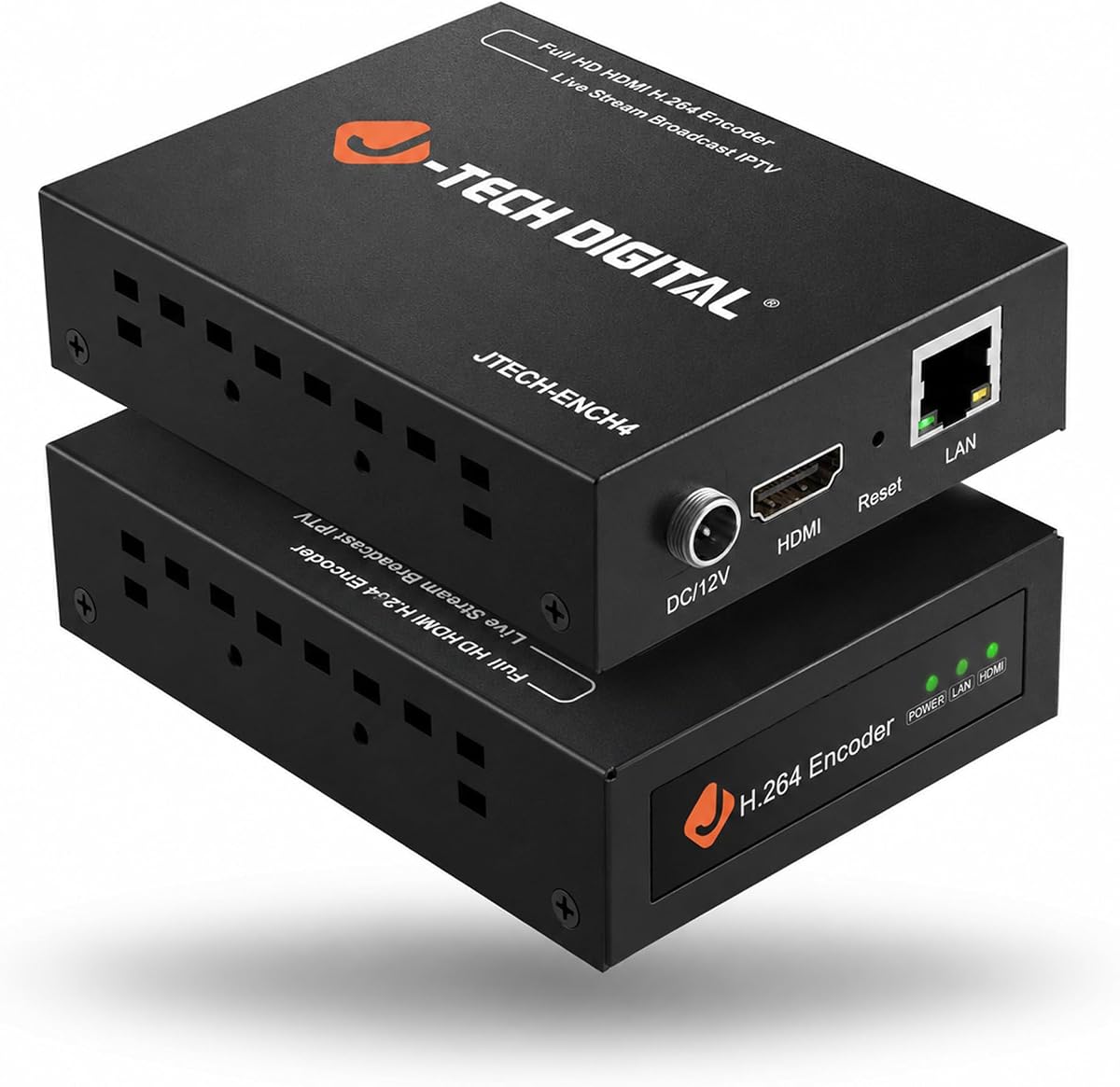
The J-Tech Digital JTECH-ENCH4 accepts HDMI input up to 4K at 60Hz and encodes output at up to 1080p 60Hz. This distinction matters when the source is a high-frame-rate computer display, game feed, or presentation device, while the destination network is better suited to Full HD streaming. Its supplied rating is 4.1, placing it behind the highest-rated options but still within the competitive middle of this list.
We may earn a commission when you buy through this link, at no additional cost to you.
The main advantage is its stream structure. One main stream can operate alongside three substreams, with the substreams offering lower resolution than the main output. This is useful for feeding different types of receivers without operating several encoders. Supported methods include RTMP and RTMPS, HLS, FLV, TS, MP4, RTSP, UDP, SRT, and TRTC, and the device is compatible with VLC playback through a direct HTTP stream address.
Remote web-GUI controls cover bitrate, frames per second, IP settings, and several image parameters. Operators can add text or logos as on-screen displays and use flip, rotate, crop, contrast, and brightness adjustments. MPEG1 Audio Layer 2 and CBR or VBR rate management from 32 Kbps to 32 Mbps provide additional control over the audio and stream configuration.
This encoder fits installations that need 4K source compatibility but intentionally distribute 1080p video. It is particularly relevant to AV integrators who want a conventional network encoder with multiple outputs. The 4K-to-1080p limitation may disappoint buyers expecting a native 4K encoded output, while the 4.1 rating calls for careful review of current customer feedback.
Running a main output with three lower-resolution substreams provides practical flexibility for devices with different display or network capabilities. It also lets operators reserve lower-bandwidth feeds for monitoring while preserving a stronger main stream for primary distribution.
The 4K 60Hz input specification broadens source compatibility, including high-refresh displays and laptops. Because the encoded output is specified at 1080p 60Hz, users should treat this as a high-resolution input encoder rather than a full 4K streaming encoder.
We may earn a commission when you buy through this link, at no additional cost to you.
This compact encoder provides a straightforward route to dedicated H.265 and H.264 live streaming without installing capture software on a computer. It supports 1080p60 and its supplied rating is 4.0. While that is the lowest numerical score among the rated products in the guide, the unit's straightforward browser setup and broad protocol support make it a practical option for straightforward 1080p workflows.
We may earn a commission when you buy through this link, at no additional cost to you.
The encoder supports SRT, RTMP and RTMPS, RTSP, UDP, HTTP, HLS, WebRTC, TRTC, ICECAST, and SHOUTcast. It can therefore work with CDNs, surveillance NVRs, IPTV systems, and browser-based monitoring dashboards rather than being tied to one streaming platform. Configuration occurs through a browser, avoiding software, driver, and operating-system compatibility issues associated with many software encoders.
Its approximate dimensions of 90 by 54 by 29 millimeters make it easy to position behind monitors, on shelves, or within equipment racks. The design is particularly useful for permanent installations with limited space. Low power consumption is also favorable for around-the-clock operation in live-event, remote-monitoring, and digital-signage roles.
Professional finishing features include embedded HDMI audio, a 3.5mm external input, and an OSD generator for scrolling text, logos, and timestamps. A one-year warranty and 24/7 online technical support are listed. The trade-off is its 1080p ceiling, which rules it out for native 4K distribution, and the setup still benefits from basic familiarity with IP addresses and streaming protocols.
Browser-based operation removes the need to dedicate and maintain a streaming computer. The encoder connects to the network, receives HDMI video, and becomes the source that destinations pull or push to, making it useful for small venues and temporary production setups.
The small enclosure can be placed close to a display or source cable without occupying a full equipment shelf. That makes it easier to maintain as a discreet component in digital signage, monitoring, and recurring live-event installations.
We may earn a commission when you buy through this link, at no additional cost to you.
The Multi-channel MPEG4 H.265 H.264 Video Encoder is aimed at users who need more sophisticated source and output management than a simple one-box streaming converter. It handles 1080p HD HDMI input and provides dual video stream outputs for each HDMI input. Its supplied customer rating is 4.3, placing it above the middle of the guide.
We may earn a commission when you buy through this link, at no additional cost to you.
Its protocol coverage is particularly notable: HTTP, RTSP, RTMP and RTMPS, SRT, HLS with M3U8, UDP, RTP, MP4, ONVIF, multicast, unitcast, and FLV are listed, along with WebRTC in the product title. Two streams from an input can use different protocols and reach different servers simultaneously. This supports broadcast workflows, IPTV, NVR environments, and simultaneous publication to services including YouTube, Facebook, Twitch, Vimeo, Streamspot, Dacast, and other named destinations.
Each output can be personalized with static text, scrolling text, a logo, or a clock. Operators can adjust resolution, frame rate, and bitrate, and can crop, rotate, flip, or mirror the image. Audio output is also adjustable, allowing the streams to be tuned for different delivery conditions instead of applying one configuration universally.
The development-oriented support is an important distinction. SDK and API information, CGI control protocol documentation, and customization options for shell patterns, control-panel logos, firmware, and hardware functions are offered. This makes the encoder attractive to integrators developing managed systems, but more demanding than a basic plug-and-play device. Buyers needing a straightforward single stream should compare it carefully with the more accessible compact models.
SDK, API, and CGI documentation can reduce the effort required to incorporate the encoder into a custom control environment. For organizations standardizing equipment across multiple channels, these resources may be more valuable than the extra flexibility of a consumer-oriented converter.
Dual stream output allows two delivery paths to be created for each HDMI source. One stream may favor high quality for recording, while another can use a protocol or bitrate better matched to a particular network, receiver, or streaming platform.
We may earn a commission when you buy through this link, at no additional cost to you.
This 1080p hardware encoder is designed around smooth Full HD output and simultaneous distribution. It supports 1920-by-1080 input and output at up to 60fps and carries a supplied rating of 4.5. It is a compelling option for users who need dependable high-definition streaming but have no requirement to distribute native 4K video.
We may earn a commission when you buy through this link, at no additional cost to you.
Four streams can be output simultaneously using different protocols. Supported formats include HTTP, RTSP, RTMP and RTMPS, SRT, HLS, MP4, multicast UDP, RTP, PTL, ONVIF, and FLV. This gives operators considerable freedom when connecting public streaming platforms, private IPTV systems, and compatible receivers. The encoder is also positioned for YouTube, Facebook, Twitch, Vimeo, OBS-oriented workflows, and NVR use.
Image and branding tools are comprehensive. Operators can add static text, scrolling captions, logos, and timestamps, then adjust resolution, frame rate, and bitrate. Cropping, rotation, flipping, and mirroring help accommodate unusual camera angles and installation arrangements. HDMI embedded audio and line-in audio give the unit more flexibility for content sourced from a separate mixer.
This is a strong recommendation for churches, event venues, corporate AV teams, and broadcast users who prioritize Full HD frame rates and multiple destinations. HDCP 1.4 decoding supports compatible protected sources, while computer and mobile management makes status checks convenient. Buyers should not mistake it for a 4K encoder, and those intending to run four simultaneous outputs should design the network and destinations before installation.
The specified 60fps Full HD capability suits live presentations, sports, fast motion, and screen content where smoother movement is valuable. It provides a useful middle ground between standard-definition workflows and more demanding native 4K distribution.
The overlay and image tools help transform a basic camera or computer feed into a branded presentation. Combining text, logos, timestamps, and orientation adjustments can reduce the need for separate graphics processing in simpler installations.
We may earn a commission when you buy through this link, at no additional cost to you.
The JTECH-ENCH4AP combines 4K 60Hz HDMI input, 1080p 60Hz output, analog audio, and Power over Ethernet in one network encoder. Its supplied rating is 4.4. The PoE feature is the standout for professional installations because power and network data can travel through one Ethernet cable, reducing outlet requirements and cable clutter near ceiling-mounted cameras, displays, and presentation stations.
We may earn a commission when you buy through this link, at no additional cost to you.
H.264, H.265, and MJPEG compression options allow operators to match codec choices to network and receiver requirements. Supported delivery methods include RTSP, RTP, RTMP, RTMPS, HTTP, UDP, TS, and ONVIF, covering common IPTV and live-streaming workflows. The unit can broadcast to as many as four platforms, including YouTube, Facebook Live, Twitch, and other destinations.
A 3.5mm analog audio input can be embedded into the HDMI video, which is valuable when the visual source is a camera or playback device without the required audio. The encoder can also add text overlays, logos, and a custom no-signal image. That last function gives operators a more professional appearance when a connected source is inactive or disconnected.
This model is ideal for integrators who want fewer site cables and a professional presentation. It can also suit churches and live-event venues using mixers, provided the analog audio can be connected correctly. The main caveat is that PoE requires a compatible network switch; without one, the convenience that distinguishes this model disappears. Its 1080p encoded output should also be considered before using it for native 4K distribution.
PoE removes the need for a separate power connection at the encoder location, which is particularly valuable for cameras or encoders mounted above ceilings, behind large displays, or in permanent audiovisual installations. A PoE-capable network switch remains a necessary part of the system.
Text, logos, and a custom no-signal screen help maintain a consistent broadcast appearance. These built-in graphics features can simplify deployments where a separate overlay generator would add complexity, cost, and another point of failure.
We may earn a commission when you buy through this link, at no additional cost to you.
This hardware encoder supports 4K UHD HDMI input and output, with a maximum frame rate of 30fps at 3840 by 2160 and up to 120fps at 2K and lower resolutions. Its supplied rating is 4.4. The broad codec and protocol support makes it a credible option for users who need to distribute detailed 4K content while retaining compatibility with established H.264 systems.
We may earn a commission when you buy through this link, at no additional cost to you.
Protocol support is extensive: HTTP, RTSP, RTMP and RTMPS, SRT, HLS, MP4, multicast UDP, RTP, PTL, ONVIF, FLV, WebRTC, TRTC, and ICECAST are all listed. Four video streams can be sent simultaneously using different protocols, including direct publication to YouTube, Facebook, Twitch, and Vimeo. This flexibility is especially relevant to organizations that simultaneously feed streaming services, recording systems, and internal viewers.
Operators can customize each stream with static text, scrolling captions, brand logos, and timestamps. Resolution, frame rate, and bitrate are adjustable, and the image can be cropped, rotated, flipped, or mirrored. HDMI embedded audio and line-in audio are both supported, with adjustable sound quality. HDCP 1.4 decoding can also broaden the range of compatible ultra-HD sources.
The encoder is most appropriate for production teams with suitable network capacity and a clear multi-stream plan. A 4K workflow may require more careful bandwidth and storage consideration than 1080p, even when H.265 is used. For those who can manage that infrastructure, the device combines native 4K output, four destinations, extensive customization, and straightforward browser or mobile-based status monitoring.
Supporting 4K at 30fps gives the encoder a distinct advantage when source detail or large-screen presentation matters. H.265 can reduce bandwidth needs relative to legacy workflows, although actual results depend on content, bitrate, network conditions, and the decoder receiving the stream.
Simultaneous outputs eliminate the need for four separate capture appliances when several destinations are required. The flexibility is valuable for live productions that need both public-facing streams and private feeds for recording, monitoring, or distribution.
We may earn a commission when you buy through this link, at no additional cost to you.
The DDMALL CEV-2K is built for portability, with dimensions of 75 by 32 by 22 millimeters and a stated weight of 32 grams. It supports 1080p60 HDMI input and 1080p60 encoded output, using H.265 or H.264 with SRT, RTSP, RTMP, RTMPS, TCP, and UDP. No numerical customer rating was supplied, so its evaluation here rests on the documented specifications rather than a score.
We may earn a commission when you buy through this link, at no additional cost to you.
Its energy use is listed at 2.4 watts. The encoder can draw power from compatible HDMI ports or operate through USB connected to a source or mobile power bank. This removes much of the bulk associated with conventional capture hardware and makes the device appealing for mobile productions, temporary streaming points, and installations with limited space.
The maximum video bitrate is listed at 16Mbps, and the encoder is described as suitable for third-party decoders. Real-time OSD editing lets users place custom text, images, or logos anywhere on the stream. Management is available through a web interface and the DDMALL Cloud System, which enables remote control and monitoring when an internet connection is available.
This is a strong fit for portable live events, compact installations, and operators who want cloud-assisted remote management. It is not the right choice for native 4K workflows, and the lack of a supplied rating means buyers should examine current customer feedback and verify compatibility with their chosen decoder or platform. The cloud feature also requires an appropriate connection and account for remote operations.
The tiny enclosure and flexible power options make the encoder easy to carry and position near a laptop, camera, switcher, or display. That portability is valuable when the production location is temporary or when cabling space is limited.
Cloud-based control can simplify checking an encoder that is not beside the operator. Web and cloud access are especially helpful for distributed installations, provided the device has reliable internet access and the required service is available.
We may earn a commission when you buy through this link, at no additional cost to you.
The TBS2604v2 UHD encoder combines native 4K support, H.264 and H.265 encoding, two separately configurable streams, and broad IP delivery support. It can encode at up to 3840 by 2160 at 30fps. Its supplied rating is 5.0, the highest numerical score among the products, making it an especially attractive pick when customer satisfaction and a broad feature set are priorities.
We may earn a commission when you buy through this link, at no additional cost to you.
Its protocol list includes HTTP, HLS with M3U8, RTSP, UDP unicast and multicast, RTMP and RTMPS, and SRT. These choices cover browser-oriented playback, channel-style distribution, live platforms, contribution links, and multicast environments. Dual-stream encoding lets the main and substream use different resolutions and bitrates, making it possible to adapt one HDMI source to different terminals and network conditions.
Management is available through a web user interface, while Telnet remote access provides another method for controlling the encoder. That combination can make the device approachable for routine operation while preserving a more direct network-access option for technically experienced integrators. The encoder is specifically positioned for IPTV applications in which independent main and secondary feeds are valuable.
This encoder is a strong all-around recommendation for IPTV operators, broadcast integrators, and professional live-streaming teams that need 4K input and output with efficient H.265 or broadly compatible H.264 delivery. The specification list is less explicit about overlays and external analog audio than some alternatives, so buyers needing those features should confirm compatibility. Within its core IPTV role, however, it offers a focused and attractive feature set.
Encoding the same source twice with separate resolution and bitrate settings allows a high-quality primary feed and a lighter secondary feed to coexist. This is useful when different receivers, platforms, or network paths have different capabilities.
Native 4K UHD at 30fps supports detailed source material and high-resolution displays. H.265 encoding offers an efficient option for constrained networks, while H.264 remains available for compatibility with established infrastructure.
We may earn a commission when you buy through this link, at no additional cost to you.
The right encoder depends on your source resolution, destination protocols, audio system, number of outputs, installation environment, and level of network control. Review these factors before comparing models or assuming that every 4K input device also produces a native 4K stream.
Check both the maximum HDMI input and the actual encoded output rather than looking at the word 4K alone. Some encoders accept 4K 60Hz sources but encode them at 1080p 60Hz, while others support 4K UHD output at 30fps. High-frame-rate 1080p can be sufficient for presentations, surveillance, and many live events, but native 4K output is important for large displays, detailed source material, or workflows that explicitly require UHD distribution.
Choose a model whose input and output specifications match your source and destination. Also consider whether the advertised frame rate applies at 4K or only at lower resolutions.
H.265 can deliver comparable visual quality at lower bitrates than H.264 in many workflows, which helps when bandwidth is limited. H.264 remains valuable because it is broadly supported by streaming platforms, cameras, decoders, NVRs, and legacy playback systems. An encoder that supports both codecs gives operators more freedom to match the stream to each destination.
Confirm that your selected destination accepts the codec and protocol combination you intend to use. A versatile encoder still needs compatible receiving infrastructure.
Protocols determine how a stream travels and where it can be received. RTSP and RTP are common in professional AV and IPTV systems, RTMP and RTMPS are widely used for platform contribution, SRT is useful for resilient contribution over unpredictable networks, HLS supports browser-based playback, and UDP multicast can serve efficient one-to-many distribution. ONVIF support may also matter for integrated camera and NVR environments.
List every required destination before purchasing, then verify the protocol and, where applicable, ONVIF support in the product specifications.
Single-stream encoders are easy to configure but can become limiting when a presentation must reach a public platform, a private recorder, and an internal monitoring system. Devices offering two or four outputs can assign separate destinations, frame rates, resolutions, or bitrates. The main-and-substream model is especially useful for supporting receivers with different capabilities.
Remember that simultaneous outputs increase configuration demands and may require more network capacity. Four-output support is useful only when the destinations genuinely require separate feeds.
HDMI embedded audio is convenient when the video source carries its own soundtrack, but live productions often use a mixer, microphone system, or other analog source. Encoders with a 3.5mm or line-in option can embed that external audio into the outgoing video, improving synchronization and reducing the need for separate mixing equipment.
Check whether audio controls, codec options, and channel handling are specified. For professional broadcasts, verify the required audio format before installation.
Built-in OSD features can add logos, static or scrolling text, timestamps, and custom no-signal screens without a separate graphics processor. These are valuable for church broadcasts, digital signage, corporate presentations, security monitoring, and event branding. Crop, rotate, flip, mirror, brightness, and contrast controls can also correct source orientation and presentation details.
Prioritize encoders whose overlay tools fit your actual branding workflow. A simple menu is more useful than a large feature set that cannot be configured easily.
Consider how the encoder receives power, connects to the network, and is physically positioned. Browser-based management avoids dedicated software, while PoE can carry data and power through one cable when a PoE switch is available. Compact units suit mobile and space-constrained deployments, whereas equipment-rack planning may be necessary for multi-channel systems.
Look for DHCP support, real-time status monitoring, and remote management. For fixed installations, cable distance, ventilation, switch capacity, and service access are equally important.
Manufacturer support can be decisive when a live production depends on quick troubleshooting or integration with a specific control system. Warranty length, replacement coverage, technical-support hours, documentation, APIs, and firmware customization should be evaluated separately. Some products include a one-year replacement warranty, while others advertise lifetime technical support and more extensive development resources.
Check the current listing and seller page for exact support terms. Also verify whether development documents and secondary-development assistance apply to the purchased model and intended use.
Begin by confirming that the encoder's HDMI input resolution and frame rate match the source device. Connect the source with a suitable HDMI cable, attach the encoder to the network, and power it using the method specified for that model. Open its web interface from a computer or mobile device on the same network, then review the network address, output resolution, frame rate, codec, and bitrate before enabling the stream.
Create the required destination one at a time. For a push workflow, enter the stream key or server information supplied by the destination. For RTSP, SRT, UDP, or multicast delivery, obtain the correct address, port, and connection details from the receiving system. Test a single output before enabling additional streams, and verify embedded or external audio, overlays, orientation, and frame rate on the actual receiving device.
For ongoing operation, keep the encoder ventilated, avoid stacking it beneath equipment that can trap heat, and protect Ethernet and HDMI connections from strain. Save configuration details for each program or event, document network settings, and periodically confirm that the stream remains stable and the receiving service accepts the selected codec and protocol. Update or replace the unit only after checking whether the change affects saved profiles, destination credentials, and live schedules.
An HDMI encoder is a dedicated hardware device that receives HDMI video, compresses it with H.265 or H.264, and sends it through IP-based streaming protocols. A streaming computer usually performs the same functions with software and may offer greater editing flexibility, but it requires more setup, operating-system compatibility, and ongoing maintenance. Hardware encoders are particularly useful for permanent installations, recurring events, and locations where a small dedicated device is preferable.
No. Some products accept 4K 60Hz input but encode their output at up to 1080p 60Hz, while others support native 4K UHD output at 30fps. Always check both specifications. The desired source resolution, source refresh rate, encoded output resolution, and output frame rate are separate considerations when planning an installation.
H.265 is attractive when bandwidth is constrained because it can achieve similar perceived quality at lower bitrates, but H.264 often has broader compatibility. Choose H.265 when every encoder, receiver, player, and platform in the chain supports it. Choose H.264 when legacy equipment, browser compatibility, or platform requirements make it the safer option.
A broad protocol list allows one device to serve different systems and destinations. RTSP may be appropriate for an NVR or private IPTV receiver, RTMP for a streaming platform, SRT for contribution, and HLS for browser playback. Using only the protocols your receivers understand can simplify configuration, but the extra compatibility creates flexibility when an installation changes.
They can be, but each output should have a clear purpose and adequate network capacity. A main stream may feed a recording system while a substream reaches a browser player or remote viewer. For a simple one-destination event, a single output is easier to configure and troubleshoot. Multiple outputs are most valuable when the same event genuinely needs several delivery paths.
It creates two versions of the same HDMI source, usually with separate resolution and bitrate settings. The main stream can provide higher quality for primary recording or broadcast, while the substream uses less bandwidth for monitoring or a less capable receiver. This design is useful for IPTV and live-event workflows because both outputs remain synchronized.
Many models in this guide include an OSD generator for text, logos, timestamps, scrolling captions, or no-signal screens. The exact controls vary by product, so confirm which elements can be positioned and edited. An encoder with a good OSD system can reduce the need for a separate overlay generator in straightforward installations.
PoE is optional and primarily improves installation flexibility. It can carry both power and network data through one Ethernet cable, reducing clutter at locations such as ceilings, camera positions, and behind displays. The network switch must support PoE, and the chosen model must include compatible PoE. Otherwise, a conventional power connection and Ethernet link are appropriate.
The TBS2604v2 UHD encoder is a polished choice for 4K IPTV work because it combines a 5.0 supplied rating, native 4K UHD at 30fps, two independently configurable streams, and broad protocol support. The 4K HDMI IP Network Encoder offers similarly extensive output and customization options, while the compact 1080P60 model is the most accessible choice for dedicated Full HD streaming with browser-based management.
Prioritize the parts of the workflow that cannot be changed after installation. Match native output resolution to the source, ensure every receiving device supports the selected codec and protocol, and verify that simultaneous outputs have sufficient network capacity. Audio inputs, OSD branding, PoE, remote management, and multi-channel support should be selected according to the production environment rather than feature count alone.
Before ordering, recheck the current product listing, customer feedback, warranty terms, and supported configuration. Hardware specifications, firmware capabilities, service availability, and pricing can change over time. A careful compatibility check will usually deliver a more dependable result than choosing solely by the largest advertised resolution or the broadest protocol list.