
Removable Magnetic Laptop Phone Holder Mount, Foldable Hidden Side Mount
4.4Editor score
Detachable magnetic base
360-degree angle adjustment
Concealed folding construction
Works with MagSafe cases
Compare 10 Phone Holder for MacBook, with key specifications, product ratings, pros and cons to help you choose.
A phone holder for MacBook can transform a compact screen into a more flexible workstation by keeping a smartphone visible beside the display. The best models combine secure magnetic attachment, easy angle adjustment, broad phone compatibility, and a mount that does not interfere with opening or closing the laptop.
We compared ten holders based on their mounting systems, magnetic strength, adjustment range, folding or removal options, supported devices, included accessories, and suitability for work, study, travel, or vehicle use. The list includes dedicated side mounts, rotating designs, detachable stands, and a multifunctional portable riser.
Each recommendation highlights a different practical advantage, such as dependable N52 magnetic attachment, a removable base, a low-profile foldable profile, or 360-degree positioning. Ratings and product details can change over time, and current prices, availability, compatibility, and retailer policies should be checked before purchasing.
4.4Editor score

4.5Editor score

3.9Editor score
The comparison below covers every holder's principal design, compatibility, adjustment system, portability, and mounting method. Each model offers a different balance between everyday convenience, flexibility, and how permanently it attaches to a MacBook or monitor.


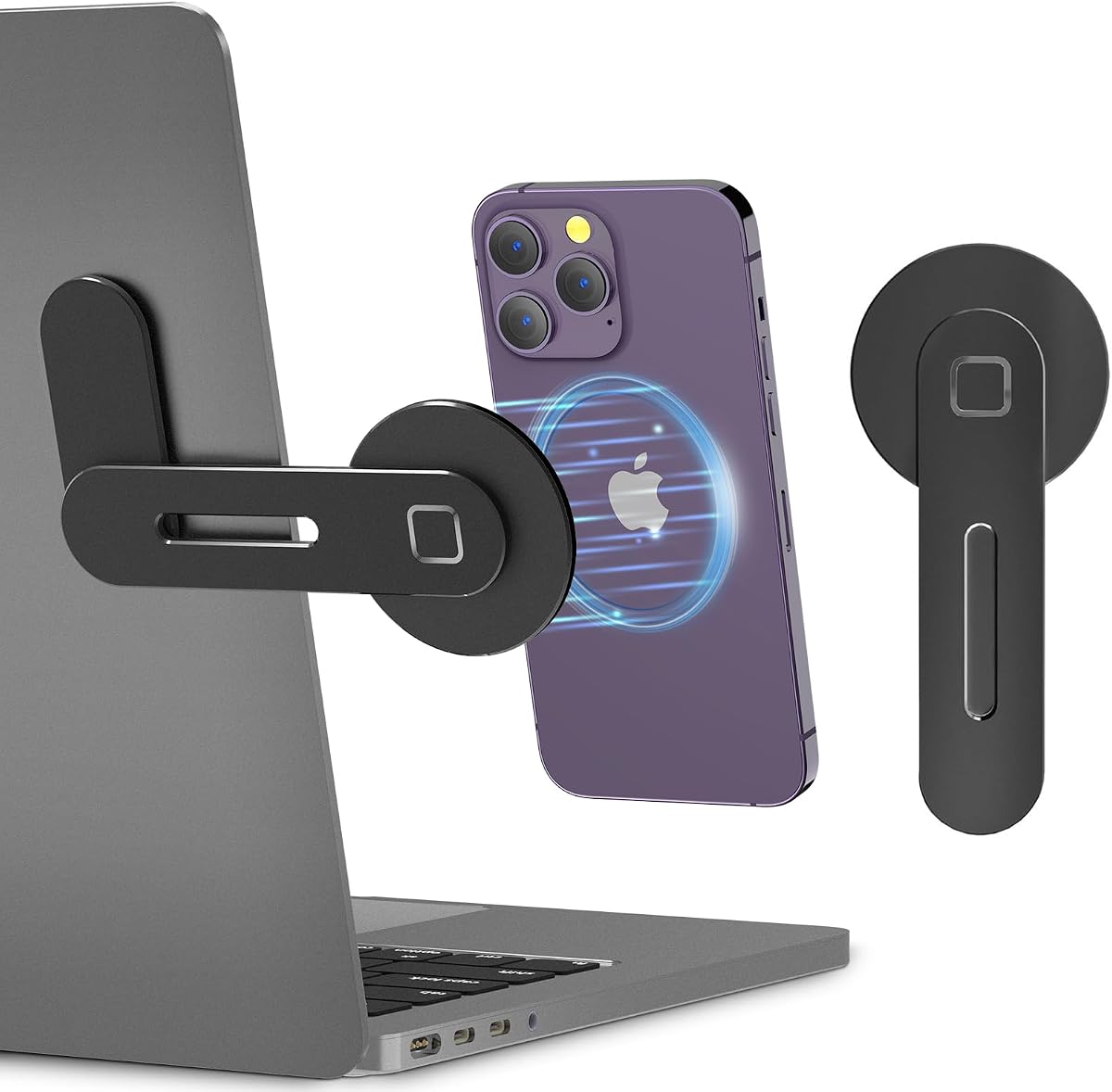


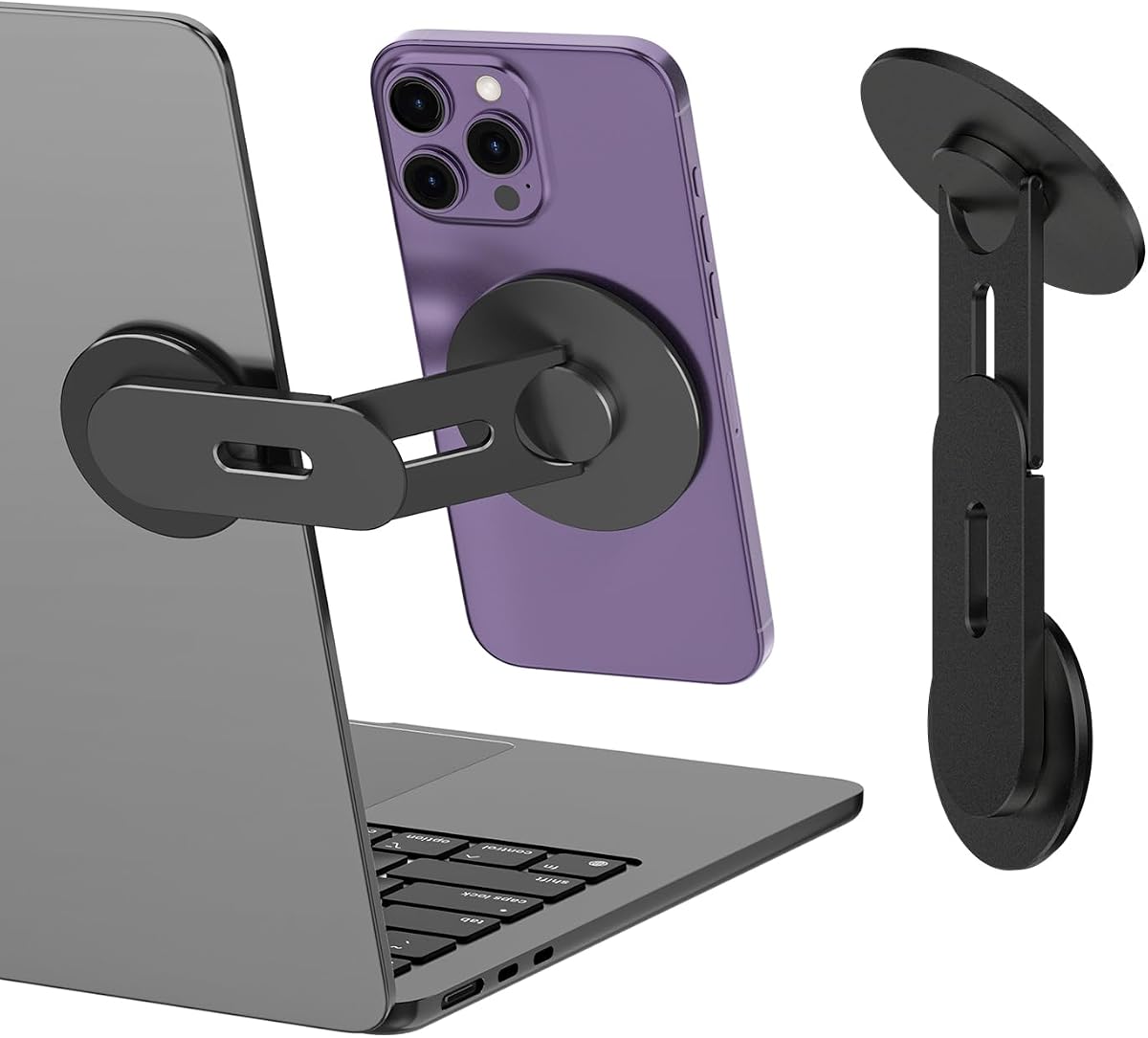
The CloudValley Magnetic Laptop Phone Holder has a 4.3 rating and combines a lightweight aluminum construction with a simple side-mounted design. Its magnetic platform is intended for MagSafe-compatible iPhones, while the included secondary metal ring broadens support for phones and cases without magnetic attachment.
We may earn a commission when you buy through this link, at no additional cost to you.
The defining benefit is flexibility. It can sit beside a MacBook, desktop monitor, or iPad and provides an adjustable angle for calls, messaging, reference material, and other lightweight multitasking. Its compact folding form is particularly useful for people who regularly move between home, office, and meeting spaces.
Installation relies on adhesive attached to a smooth, flat surface. That makes placement straightforward, but it also means the base is not designed to be repeatedly relocated. The product does not include wireless charging, so users should not expect the magnetic connection to provide power.
This is a strong choice for a user who values a refined, portable side mount without needing complex moving parts. It is especially effective for MagSafe-equipped iPhones and for people who want one compact accessory to support calls, notifications, and a second information screen.
The foldable aluminum body is easy to carry between locations, while the adjustable magnetic mount keeps the phone close enough for quick reference. This makes the holder useful for hybrid workers, travelers, and students who want their phone visible without occupying the MacBook keyboard area.
MagSafe-compatible phones can attach directly, and the supplied metal ring creates a magnetic connection for other phones or non-magnetic cases. That broader support is valuable for households or teams that do not use one phone brand exclusively.
We may earn a commission when you buy through this link, at no additional cost to you.
This magnetic laptop mount has a 4.5 rating and stands out for its multi-axis adjustment system. Instead of offering only a narrow tilt or swivel, it lets users reposition the phone more freely, making it easy to switch between portrait, landscape, and side-facing viewing positions.
We may earn a commission when you buy through this link, at no additional cost to you.
The phone mount supports iPhone 12 through 18 models and phones fitted with metal rings. It can be attached to a laptop, desktop monitor, or compatible Tesla screen, giving it value beyond the MacBook desk. Its aluminum alloy construction keeps the overall appearance compact and professional.
The adhesive base is strong but difficult to remove or transfer between devices, and an extra adhesive pad is included for reinstallation. Users should attach the phone first to confirm clearance, keep the arrow facing upward, and allow the adhesive to settle before placing the mount into regular use.
For someone who regularly changes viewing angle or moves between work and travel environments, this is the most versatile dedicated side mount in the group. Its combination of broad compatibility, strong construction, and precise positioning makes it our leading overall recommendation.
Multi-axis movement reduces the need to remove and reposition the phone whenever the task changes. It can remain useful for reading a vertical document, watching a wide video, or attending a call while the MacBook continues displaying the main workspace.
Compatibility with laptops, desktop monitors, and Tesla displays broadens the holder's practical uses. The included rings allow phones without native magnetic systems to use the same magnetic mount, provided the ring is properly positioned.
We may earn a commission when you buy through this link, at no additional cost to you.
The gray 180° Adjustable Magnetic Phone Mount carries a 4.3 rating and centers on stable N52 magnetic attachment. It is designed for bare iPhones in supported series, MagSafe cases, and other phones fitted with the included magnetic ring.
We may earn a commission when you buy through this link, at no additional cost to you.
Its alignment card is a thoughtful installation aid, reducing uncertainty when matching the phone to the mount. The 180-degree range is less elaborate than the multi-axis design in the top-ranked position, but it covers the common needs of a side-mounted second display.
The product uses a non-removable 3M adhesive base, so placement should be chosen carefully. Installation instructions call for the arrow to face upward and at least six hours before use. It also explicitly lacks wireless charging, an important distinction for users expecting a charging stand.
This is a good option for someone who prioritizes magnetic stability and straightforward setup. It is particularly useful for MacBook users who want notifications, a chat window, or a reference application visible beside the primary screen and who does not need advanced multi-axis movement.
The supplied alignment card helps users locate the magnetic attachment point accurately. This reduces guesswork when attaching a bare phone, a case-equipped phone, or a device using the included ring.
The holder can also work with compatible Tesla screens, making it relevant for people who divide navigation and phone tasks between a MacBook and a vehicle. That versatility adds value without changing the core laptop mounting design.
We may earn a commission when you buy through this link, at no additional cost to you.
The CloudValley Adjustable Laptop Stand has a 4.3 rating and is built around CNC-machined aluminum alloy with a wear-resistant matte finish. Its understated black appearance is designed to blend into a professional desk rather than resemble a separate charging dock.
We may earn a commission when you buy through this link, at no additional cost to you.
An upgraded magnet provides the primary connection, and the ring-shaped design around the mount is intended to aid heat dissipation without interfering with the phone's signal. The holder supports an adjustable viewing angle and can be used with a MacBook, desktop monitor, iPad, or compatible Tesla display.
Its metal rings allow non-magnetic phones and cases to benefit from the magnetic connection, while the folding construction makes it more convenient to carry. However, installation uses 3M adhesive on a smooth surface, and the product does not provide wireless charging.
This model suits buyers who care about materials, finish, and a compact profile as much as basic functionality. It is a polished alternative to simpler mounts, especially for professionals who want the phone to appear integrated with the MacBook display.
CNC machining and matte plating give the holder a more refined appearance than many plastic alternatives. The neutral finish allows it to coordinate with aluminum laptops, desktop monitors, and other metal accessories without drawing unnecessary attention.
The aluminum arm folds into a compact form for travel, meetings, and changing workspaces. Users who take their setup on the road can carry the holder separately and install it when a suitable smooth mounting surface is available.
We may earn a commission when you buy through this link, at no additional cost to you.
The Rotating Dual-Screen Phone Mount has a 3.9 rating and emphasizes straightforward functionality. Its 360-degree rotating head can move between portrait and landscape, while the magnetic connection keeps the phone positioned beside a MacBook, laptop, or monitor.
We may earn a commission when you buy through this link, at no additional cost to you.
The holder uses an N52 magnetic array and supports MagSafe-equipped iPhones as well as Samsung, Google Pixel, OnePlus, and other phones through the supplied rings. Its stated compatibility covers screen sizes from 4.0 to 6.9 inches, and it can also serve as a Tesla screen mount.
Its slim profile is a notable advantage. According to the product information, the folded bracket measures 0.34 inches thick, making it easier to slide into a sleeve than a bulky stand. Installation nevertheless requires cleaning the surface, applying the adhesive, pressing for 15 seconds, and waiting six hours.
This is the practical budget-oriented choice in the group for users who value rotation, portability, and universal phone support more than a refined desktop aesthetic. Its lower rating warrants checking recent customer feedback, but the core feature set is well matched to dual-screen workflows.
A 360-degree head makes it straightforward to switch the phone between document reading and video viewing. This flexibility is useful for shared screens, mobile tutorials, and communication applications that work better in one orientation.
The thin folding construction is suited to people who use coffee shops, airports, and shared offices. Once installed, the magnetic puck can also function as a standalone desktop stand according to the product description.
We may earn a commission when you buy through this link, at no additional cost to you.
The Black 180° Magnetic Phone Mount has a 4.3 rating and offers a restrained way to add a smartphone beside a MacBook. Its N52 magnet is designed to hold supported phones securely while an included alignment card helps with accurate placement.
We may earn a commission when you buy through this link, at no additional cost to you.
The mount supports iPhone 12 through 18 models, MagSafe cases, and other phones using the included magnetic ring. It can also be attached to a desktop or vehicle display, including compatible Tesla screens, which broadens its appeal for mobile workers.
As with the other 180-degree model, the adhesive base is non-removable and installation should be planned around a smooth surface. Six hours of settling time are recommended before use, and the holder does not provide wireless charging.
It is a sensible choice for users seeking a simple black side mount with stable magnetic attachment and broad phone support. Those who require more elaborate angle control should look toward the 360-degree and multi-axis alternatives in this guide.
The magnetic design keeps the phone within easy view for calls, notifications, and reference information. It is especially helpful when the MacBook screen is already occupied with a document, editing timeline, or other detailed task.
The black finish and compact form are intended to blend into a workstation. Because the holder folds into a relatively small package, it can be transported separately when the adhesive base is installed permanently on one device.
We may earn a commission when you buy through this link, at no additional cost to you.
The Removable Foldable Hidden Side Mount has a 4.4 rating and offers one of the most adaptable mounting systems in the comparison. Its double-sided magnetic base can detach from the laptop and serve as a standalone desktop stand or attach to a suitable metal surface.
We may earn a commission when you buy through this link, at no additional cost to you.
The concealed folding design helps it remain visually unobtrusive when it is not in use. Its stated folded thickness is 0.67 inches, and the 360-degree adjustment allows the phone to be placed at different angles for video calls, tutorials, messages, or shared content.
Compatibility covers bare iPhones from the 12 through 17 series and phones in MagSafe cases. Non-MagSafe devices use the included metal ring. Although the base can be removed from the device, the supplied 3M adhesive is described as non-removable and requires at least six hours before use.
This is the strongest recommendation for anyone who wants more flexibility than a permanently attached side mount provides. It works well for people who alternate between a MacBook setup and a freestanding desk location, or who want the holder concealed while traveling.
The detachable base distinguishes this model from adhesive-only side mounts. Users can remove the magnetic portion without removing the adhesive layer, then reposition the holder for desktop use or another suitable metal location.
The concealed hinge allows the holder to sit close to the back of the MacBook or iMac when inactive. This is useful in shared workspaces, client meetings, and travel situations where a protruding mount would be inconvenient.
We may earn a commission when you buy through this link, at no additional cost to you.
The CloudValley Adjustable Magnetic Stand has a 4.3 rating and combines an N52 magnet with a CNC-machined aluminum body. It is intended for iPhone 18 through 12 models, including Pro Max and Mini variants, and can also support phones fitted with one of the two included rings.
We may earn a commission when you buy through this link, at no additional cost to you.
Its ring-shaped heat-dissipation design is intended to prevent overheating and avoid signal interference. The holder supports adjustable viewing, works with laptops, desktop monitors, MacBooks, iPads, and compatible Tesla screens, and folds into a compact package for transport.
The adhesive installation needs a longer settling period than several competing products, with the description recommending 24 hours after sticking. It is therefore better to decide on the final location before installation rather than expecting an immediate change of setup.
This model is well suited to users who want a refined material finish and broad compatibility in one accessory. It combines a professional appearance with flexible device support, though buyers who frequently relocate their setup should account for the adhesive requirements.
The N52 magnetic system is intended to resist slipping as the user types, adjusts the laptop display, or handles the phone. A stable connection is important because a loosely positioned phone can become distracting during a meeting or video call.
CNC machining, high-hardness aluminum alloy, and matte plating create a finish intended to resist wear and scratches. The result is a holder that looks coordinated with premium notebooks and desktop monitors.
We may earn a commission when you buy through this link, at no additional cost to you.
The Portable Tablet and Laptop Riser has a 4.5 rating and is the most fundamentally different option in the guide. Rather than functioning only as a phone side mount, it converts among a laptop riser, tablet easel, magnetic desk phone holder, and handheld selfie stick.
We may earn a commission when you buy through this link, at no additional cost to you.
Its aerospace aluminum frame is designed to hold 15.6-inch to 17-inch laptops and iPad Pro models without wobbling. An open X-frame promotes airflow, while eight height settings raise the display by as much as 5.5 inches to support a more natural line of sight.
The integrated N52 magnetic mount works with MagSafe cases and iPhone 12 through 15 models. Magnetic ring stickers support compatible phones that do not use MagSafe. Its main trade-off is size: the folded baton measures 5.9 by 1.4 by 0.5 inches, making it larger than a dedicated clip-on phone holder.
This is the best selection for someone who wants more than one desktop accessory in a portable package. MacBook users who regularly alternate between raising the laptop screen, supporting a tablet, or mounting a phone will get more functionality from it than from a single-purpose side mount.
The eight-level riser can raise a laptop or tablet to a more comfortable viewing height. Combined with the open frame, it creates a more organized workstation and can improve screen positioning without requiring a separate stand.
The convertible design reduces the need to carry separate laptop, tablet, phone, and handheld accessories. A microfiber travel pouch is included, making the riser convenient for offices, hotels, and temporary shared workspaces.
We may earn a commission when you buy through this link, at no additional cost to you.
The CloudValley 360° Rotating Phone Mount has a 4.4 rating and provides a simple combination of magnetic attachment, rotation, and portability. Its lightweight aluminum body is designed for laptops, desktop monitors, compatible Tesla displays, and travel setups.
We may earn a commission when you buy through this link, at no additional cost to you.
The phone can rotate through a full range of positions, which is useful for switching between upright messaging, landscape video, and angled call viewing. MagSafe-compatible phones attach directly, while the two included metal plates support phones with or without MagSafe.
Installation uses a strong adhesive base and requires the phone to be attached first to verify clearance. The description recommends waiting at least six hours before use. Once mounted, the holder is intended to remain firmly attached rather than be routinely relocated.
It is a worthwhile option for users who want full rotation in a compact design. The main distinction from the leading multi-axis holder is its simpler adjustment system, but it remains a flexible choice for calls, notifications, video viewing, and dual-screen tasks.
Full rotation makes the holder adaptable to both vertical and horizontal content without repositioning the base. The phone can be angled for a more comfortable view or turned to share a video, chart, or message during a conversation.
The compact aluminum construction is intended to save space in a bag or laptop sleeve. Although the adhesive base remains attached, the folding form makes it easier to carry when moving between temporary workspaces.
We may earn a commission when you buy through this link, at no additional cost to you.
The most suitable phone holder for MacBook depends on how you work, which phone you use, how much you adjust the viewing angle, and whether you need to move the mount. The following factors help separate a convenient daily accessory from one that becomes an obstacle.
A MagSafe-compatible iPhone can generally connect directly to a magnetic holder without an additional accessory. Android devices and iPhones without native magnetic attachment usually need the supplied metal ring or plate installed on a suitable case. Placement matters because the ring should create a centered magnetic connection without preventing normal case use.
Always confirm the listed phone and case compatibility before buying. If you regularly alternate between two devices, check whether the included rings are sufficient and whether the case thickness or surface texture may affect attachment.
A fixed or narrow-angle holder may work for basic notifications, but a rotating head offers much more flexibility. Multi-axis systems are particularly useful for video calls, vertical documents, and landscape media because they can be moved without repeatedly pulling the phone off the mount.
Consider the tasks you perform most often. Light message checking may not justify a complex mechanism, while frequent calls, screen sharing, and following mobile content make 180- or 360-degree positioning genuinely useful.
Most adhesive mounts work best on smooth, flat, clean surfaces. The display back of a MacBook or desktop monitor is the intended location, but textured finishes, curved surfaces, ports, vents, and case materials can affect adhesion or placement. Leave room around the hinge and ensure the arm does not block the lid from closing.
Permanent holders are convenient once positioned, while detachable systems are easier to move. If you switch laptops frequently or travel between desks, a removable base or adhesive-free alternative may be worth prioritizing.
Adhesive quality determines how securely the holder remains attached during typing, laptop-angle adjustments, and repeated contact with the phone. Some products require several hours before use, with stated settling periods ranging from six hours to a full day. Longer waits generally allow the adhesive to establish a more dependable bond.
Review whether the pad is described as removable or non-removable before installation. Because laptop shells and display backs can show residue or discoloration, the final location should be selected with care.
A foldable or detachable holder is easier to carry between home, office, meetings, and travel. The relevant dimensions are the thickness when folded and the overall length of the extended arm. Low-profile construction is especially helpful when the MacBook must be placed in a narrow sleeve or carried in a tightly packed bag.
A portable design is only useful if the phone can remain securely connected during transport. Check whether the magnetic face locks against another object or whether the holder must be removed and stored separately.
Aluminum alloy is common because it provides a rigid arm without excessive weight. CNC machining, reinforced hinges, and a matte coating can improve durability and reduce visible wear. Ring-shaped structures around the magnetic connection may also promote heat dissipation while avoiding signal interference.
Do not interpret magnetic attachment as a charging solution unless the product explicitly confirms charging capability. Several products in this guide provide structural support only and do not supply power.
Many laptop phone holders also support desktop monitors, iPads, and compatible Tesla displays. That versatility can justify choosing one accessory for several environments, especially for people who work remotely or travel between office and vehicle.
Vehicle compatibility should be checked carefully. The physical fit does not guarantee that every driving position offers a safe or legal view, so the mount should never encourage handling the phone while driving.
Metal rings, alignment cards, cleaning kits, replacement adhesive pads, instruction sheets, and travel pouches can make installation easier and improve the overall experience. A model that includes a cleaning kit is helpful because the surface must be prepared carefully before the adhesive is applied.
Check the contents against the use case. Two or more rings are useful for multiple phones, while replacement adhesive matters if the base needs to be reinstalled. A travel pouch is particularly valuable for compact folding stands.
Begin by deciding where the phone should sit relative to the MacBook display. Consider hinge clearance, viewing distance, typing space, and whether the arm will interfere with closing the lid. Clean the chosen smooth surface with the supplied wipe or suitable cleaner, allow it to dry fully, and avoid mounting over vents, ports, labels, or textured areas.
Remove the protective film from the adhesive base, position the mount with the arrow facing upward as instructed, and press it firmly into place. Attach the phone before fully committing to the location so that clearance can be checked. For a non-MagSafe phone, position the supplied metal ring centrally on the compatible case, then wait for the adhesive settling period stated in the product instructions.
After installation, set the viewing angle with gentle, controlled movements and avoid pulling the phone away sideways because that can detach it from the magnet. To reposition the entire holder, lift the magnetic phone away first rather than twisting it against the mount. When traveling, fold the arm where supported, remove the phone if necessary, and store the holder in a sleeve or the supplied pouch.
It should not if the mount is positioned carefully and is compatible with the specific MacBook model. Leave sufficient clearance around the hinge and display, and check the folded thickness before installation. Folding designs with very low profiles are generally the safest choice for frequent laptop closing, but actual clearance can vary with the phone, case, and MacBook size.
No. Every product identified as wireless charging compatible in this guide supports magnetic attachment without providing power. A phone will remain physically supported beside the MacBook, but it must be charged separately. Buyers who want a charging dock should confirm both magnetic alignment and charging certification before purchasing.
Most do when the included metal ring or plate is attached to a compatible phone case. The ring creates the magnetic surface needed for attachment. Follow the included positioning instructions carefully, and avoid placing the ring where it interferes with buttons, camera functions, or a case that must be removed for wireless charging.
The adhesive is intended for smooth surfaces, but removal methods and possible residue vary by model and installation duration. Some products use non-removable pads, while others emphasize residue-free removal. Choose the final position before applying the mount, avoid heat or textured finishes, and test the adhesive on a less visible compatible surface when appropriate.
Several models in this guide are explicitly compatible with Tesla Model 3, X, Y, and S screens. Their magnetic designs can also attach to other supported laptops and monitors. Drivers should follow local laws and use the holder only when positioning the phone does not encourage interaction with the device while the vehicle is moving.
A 180-degree mount generally tilts or pivots through a half-circle, while a 360-degree mount allows a full rotation. The latter is usually more useful for switching completely between portrait and landscape positions or rotating the phone toward another person. Multi-axis models add another dimension of positioning beyond basic swivel movement.
The required wait depends on the specific product. Several holders recommend at least six hours, while one CloudValley model specifies 24 hours for the best bond. During this period, avoid pulling on the arm or repeatedly attaching and removing the phone. Following the longer listed waiting period can produce a more stable installation.
The holders use magnetic attachment, and one product's description specifically mentions a ring-shaped heat-dissipation design intended to avoid signal interference. Magnetic accessories can sometimes affect certain older devices or accessories, so users should discontinue use if they notice unusual behavior. Modern phones are generally designed to coexist with common magnetic accessories.
The 360° Adjustable Magnetic Laptop Mount is the strongest all-around dedicated choice because it combines a 4.5 rating, multi-axis positioning, broad phone support, and use with laptops, monitors, and compatible Tesla screens. The Removable Foldable Hidden Side Mount stands out for users who value detachment and concealment, while the Rotating Dual-Screen Phone Mount offers a budget-oriented path to 360-degree positioning and broad device compatibility.
Prioritize the features that match your actual workflow. MagSafe users can focus on direct magnetic attachment, while Android owners should confirm ring compatibility. Frequent video calls benefit from flexible angle adjustment, travelers may prefer a thin folding profile, and anyone changing laptops should pay particular attention to adhesive type and portability.
Before purchasing, confirm the exact phone, case, MacBook model, and intended mounting surface. Also verify the included accessories and recommended adhesive waiting time. Ratings, product information, availability, and prices can change, so check current retailer listings before making a final decision.