
UNIFAMILY 8-Piece Inflatable Monitor Bags
3.5Editor score
Eight inflatable monitor sleeves
Designed for 27-inch displays
Includes portable hand pump
Shipping a computer monitor requires more than placing a screen in an oversized carton. A useful shipping box for computer monitors must control movement, absorb bumps, protect the display surface, and accommodate the monitor’s stand, cables, and accessories without exceeding carrier limits. The right choice depends heavily on screen size and packing style.
We compared the included options by examining monitor compatibility, dimensions, materials, cushioning systems, quantity, portability, and intended shipping or moving use. The list includes inflatable protective sleeves designed specifically for desktop displays, corrugated laptop mailers with foam, and multipurpose moving boxes for larger screens and framed electronics.
Each review shows which shipping scenario the product best serves, along with its principal strengths and limitations. Product availability, ratings, and prices can change, so confirm the current listing, exact dimensions, and screen compatibility before purchasing for your particular monitor.
3.5Editor score

4.0Editor score

4.1Editor score
As an Amazon Associate we earn from qualifying purchases.
The table below compares all ten options by product type, screen or device compatibility, cushioning approach, and package quantity, helping distinguish shipping sleeves from complete mailers and moving boxes.



The UNIFAMILY 8-Piece Inflatable Monitor Bags are a budget-oriented screen protection kit rated 3.5 stars. Eight inflatable sleeves are included, with two intended for each 27-inch display. Each bag is engineered to cover the screen area while creating a 3.5-inch inflated depth that provides room for some protruding components.
We may earn a commission when you buy through this link, at no additional cost to you.
The construction combines PE flexibility and impact resistance with PA tensile and abrasion resistance. Multiple independent air chambers distribute force through the sleeve and allow neighboring columns to retain cushioning if one chamber is damaged. When deflated, the bags become compact enough for storage in a drawer, cabinet, or equipment case, making them practical for repeated office or household moves.
The primary trade-off is that this is a sleeve rather than a complete corrugated shipping carton. Users will need an appropriately sized outer box or another rigid shipping container. Its 3.5-star rating also trails the other inflatable monitor kits, so buyers should pay particular attention to complete inflation and inspect the material before each shipment.
This is a sensible choice for moving several 27-inch monitors on a limited budget, particularly when a conventional monitor box would be bulky or unnecessarily costly to store. It is best for buyers who understand the bag as one layer in a complete packing system rather than as a stand-alone parcel.
Eight sleeves cover the packing needs of four 27-inch screens when used in pairs. That makes the set useful for home relocations, office refreshes, equipment transfers, and maintaining backup stock of protective sleeves.
Separate air chambers spread impact across the display and continue cushioning neighboring areas if a chamber leaks. Fully inflate every column and inspect the bag before placing the packed monitor in its outer shipping container.
We may earn a commission when you buy through this link, at no additional cost to you.
The Chunful 32-Inch Inflatable Bags provide a screen-specific option for larger desktop displays and carry a 4.0-star rating. The package includes six PE and PA sleeves and one pump. Two bags can protect a 32-inch screen, allowing the full set to handle three displays in the manufacturer’s intended configuration.
We may earn a commission when you buy through this link, at no additional cost to you.
The inflated dimensions are approximately 19.5 by 15 by 3.3 inches, with material described as roughly 2.4 mil thick. Independent air tubes absorb vibration, drops, and compression, while a self-sealing valve simplifies packing after inflation. The sleeves may be filled with the included hand pump or connected to a common air compressor for faster preparation.
Its size specificity is the main limitation. These bags are not the right choice for a 27-inch display, and users should verify the monitor’s complete dimensions, including any wide bezel or stand arrangement. As with other inflatable sleeves, the product does not replace a rigid outer carton and should be handled with care at sharp corners.
Choose this kit when transporting multiple 32-inch monitors, especially for a relocation, business migration, or equipment refresh. It offers a more targeted alternative than a general moving box and gives buyers a convenient way to protect several larger screens at once.
The 32-inch sizing gives these sleeves a useful advantage over generic protective bags. Their flexible air columns conform around the display area and create a soft barrier against vibration, impact, and accidental pressure during transport.
A hand pump is included, while compatibility with a common air compressor offers a faster option for repeated shipments. The valve seals after inflation, reducing the need for separate ties or additional sealing materials.
We may earn a commission when you buy through this link, at no additional cost to you.
The Chunful 27-Inch Inflatable Bags are a balanced option for anyone packing several standard desktop monitors. They hold a 4.0-star rating and include six PE and PA sleeves, with two sleeves used for each 27-inch screen. A portable hand pump is also included for preparing the packages.
We may earn a commission when you buy through this link, at no additional cost to you.
At approximately 16.5 by 15 by 2.36 inches after inflation, the sleeves are designed to cover the display area while leaving enough room for the stand and minor protrusions. The material offers flexibility, impact resistance, and abrasion resistance, helping protect the screen from friction as well as movement inside a carton.
Buyers must still provide an appropriate corrugated shipping box and avoid puncturing the thin film against sharp edges. The size is specifically aimed at 27-inch displays, so a larger monitor may not receive complete coverage. Correct inflation is also essential because incompletely filled columns provide less consistent cushioning.
This kit is well suited to a home move, office relocation, or batch shipment of three 27-inch monitors. It balances useful quantity with compact storage and straightforward inflation, making it one of the more practical monitor-specific options in the guide.
Six sleeves and one pump provide the materials needed to prepare three 27-inch screens using two sleeves per display. This avoids the need to purchase individual protective components separately for a small multi-monitor shipment.
The PE and PA film flex around the display and resists abrasion from contact with the packing area. That flexibility also allows the sleeve to serve as cushioning rather than a rigid shell that could concentrate force on the panel.
We may earn a commission when you buy through this link, at no additional cost to you.
The Chunful 24-Inch Inflatable Bags focus on smaller desktop monitors and carry a 4.0-star rating. Six sleeves are supplied, enough for three 24-inch screens when paired. Their inflated dimensions are approximately 16.5 by 12 by 1.8 inches, making them less bulky than sleeves designed for larger displays.
We may earn a commission when you buy through this link, at no additional cost to you.
PE and PA materials provide a flexible, abrasion-resistant barrier around the screen. Independent air tubes cushion vibration, collision, and squeezing, and the dedicated valve seals after filling. A compact hand pump is included, although a common air compressor can also be used when the user wants quicker inflation.
The limited 1.8-inch depth may be less accommodating for deeper stands or unusually wide bezels, so checking the monitor’s full dimensions is essential. The thin inflatable film can also be damaged by sharp carton edges, and the product is not a rigid shipping container by itself.
This set is a good fit for offices with several 24-inch displays, student moves, and smaller equipment refreshes. It provides focused protection without the storage volume associated with larger monitor sleeves and remains easy for one person to prepare.
The reduced inflated depth can make outer cartons easier to size and store. Buyers shipping compact 24-inch panels may also need less void fill than they would with a much larger general-purpose moving carton.
The included hand pump means the kit is self-contained for basic preparation. Users can inflate one sleeve at a time, check the air columns, and repeat the process without purchasing a separate tool.
We may earn a commission when you buy through this link, at no additional cost to you.
The Chunful 10-Bag 27-Inch Monitor Kit is the most complete multi-monitor inflatable set in the guide. It has a 4.0-star rating and includes ten sleeves plus a hand pump, allowing two sleeves for each of five 27-inch screens. That capacity makes it especially attractive for office moves and larger equipment migrations.
We may earn a commission when you buy through this link, at no additional cost to you.
Each inflated sleeve measures approximately 16.5 by 15 by 2.36 inches and uses flexible PE and PA material. Independent air columns help absorb vibration, impacts, and compression, while their separate construction allows most of the bag to retain protective function if an individual tube is damaged. The valve is designed to seal automatically after inflation.
The set still needs rigid outer cartons, and the film should be protected from sharp edges. Its 27-inch focus also makes exact size verification important, particularly for displays with unusually broad bezels or deep stands. Despite these caveats, the quantity, consistent construction, and included pump create a strong overall package.
This is the recommendation for buyers who regularly move multiple 27-inch monitors or want enough sleeves on hand for repeated shipments. It combines the largest useful inventory with a straightforward inflation process and a compact profile for storage between moves.
Ten sleeves give administrators enough material to protect five 27-inch monitors in the standard two-bag arrangement. The quantity is useful for staged relocations where several displays must be packed simultaneously.
The edge-mounted inflation port uses a valve that is intended to seal after filling. This reduces a step in the packing process and helps keep the inflated bag stable while it is placed into an outer carton.
We may earn a commission when you buy through this link, at no additional cost to you.
The Bankers Box 4-Pack Medium TV/Picture/Mirror Moving Boxes is a rigid option designed primarily for relocation rather than parcel shipping. It carries a 4.5-star rating, the highest listed rating, and includes four medium boxes intended for TVs up to 40 inches, framed pictures, artwork, mirrors, and similar wall-hangings.
We may earn a commission when you buy through this link, at no additional cost to you.
The strong cardboard construction provides structure and can be combined with blankets, bubble wrap, or foam for additional protection. The boxes break down for organized storage and can be reused for future moves, while their recyclable construction offers another advantage over disposable packing materials.
The key limitation is explicit: these are moving boxes, not shipping boxes. Carrier handling, vibration, and parcel drops are different from the controlled conditions of a household move. A monitor should also be wrapped, cushioned, and secured so it cannot shift inside the box.
This set is best for people moving a large monitor locally within their own home or between nearby locations. It offers rigid structure and reusable storage, but it should not be selected for sending a monitor through a shipping carrier without adding substantial protective packing.
The boxes are sized for displays up to 40 inches, extending beyond the focus of the smaller monitor sleeves in this guide. Their rigidity is useful when a monitor must be protected from pressure and shifting during a move.
The cardboard packs flat between uses and can be reassembled for another move. This makes the set more sustainable and convenient for households that want storage ready without keeping bulky boxes permanently assembled.
We may earn a commission when you buy through this link, at no additional cost to you.
The 5-Set Laptop Shipping Box with Inflatable Protective Bags is a complete packing system for portable computers rather than desktop monitors. It has a 3.2-star rating and includes five corrugated shipping boxes, five inflatable protective bags, five foam pouches, and a mini hand pump.
We may earn a commission when you buy through this link, at no additional cost to you.
Each corrugated mailer is approximately 16.93 by 12.01 by 3.94 inches and is designed to fit most 15- to 17-inch laptops along with chargers, mice, and accessories. Reinforced corners add compression resistance, while the inner inflatable sleeves and foam pouches help protect against drops, bumps, vibration, and scratches.
This product is not suitable for a conventional desktop monitor because the box is much smaller and shaped around portable computers. Its 3.2-star rating is also the lowest in the group, and the collection of all five kits may be more than a one-device owner needs. The included mini pump is convenient but may take more effort than a larger pump.
The kit makes sense for a small business shipping several laptops, a family preparing multiple portable computers, or a user who values a ready-made combination of outer box and inner cushioning. It is not a monitor solution, but it is a strong alternative for laptop-focused shipping.
Combining a reinforced corrugated carton, inflatable sleeve, and foam pouch creates protection against several different shipping hazards. Each layer serves a distinct purpose, from structural support to movement control and scratch prevention.
The box is intended to hold a laptop together with chargers, a mouse, and other small accessories. That makes it more useful for a complete device shipment than an empty box sized only around the computer itself.
We may earn a commission when you buy through this link, at no additional cost to you.
The AIRPAKPRO 27-Inch Inflatable Monitor Bags hold a 4.1-star rating, making them the highest-rated inflatable monitor option in this comparison. The package contains six protective sleeves and one hand pump, enough for three 27-inch displays when two sleeves are used per screen.
We may earn a commission when you buy through this link, at no additional cost to you.
The inflated dimensions are approximately 17.7 by 12.8 by 2.36 inches. PE and PA materials produce a light yet sturdy sleeve, while separate air tubes absorb falls and pressure. If one tube loses air, the remaining columns continue supporting the package, preserving more protection than a single-chamber design would.
The film still needs careful handling around sharp edges and should be fully inflated before the monitor is placed inside. Users must supply a rigid outer box, and the kit is specifically designed for 27-inch screens rather than larger desktop displays. These limitations are common to inflatable protective sleeves and are easy to account for in the packing plan.
This is a strong pick for buyers who want monitor-specific cushioning with a proven multi-column structure. It works particularly well for batch shipments, office relocations, and storage periods where screens must be protected from impact, vibration, dust, and accidental contact.
The independent tubes distribute force and preserve cushioning when an individual chamber is punctured. This redundancy is a meaningful advantage over relying on one enclosed air space during a drop or compression event.
The included hand pump supports basic use, and the sleeves can also be connected to an air compressor. This flexibility is useful for occasional shipments as well as workflows that prepare many screens in sequence.
We may earn a commission when you buy through this link, at no additional cost to you.
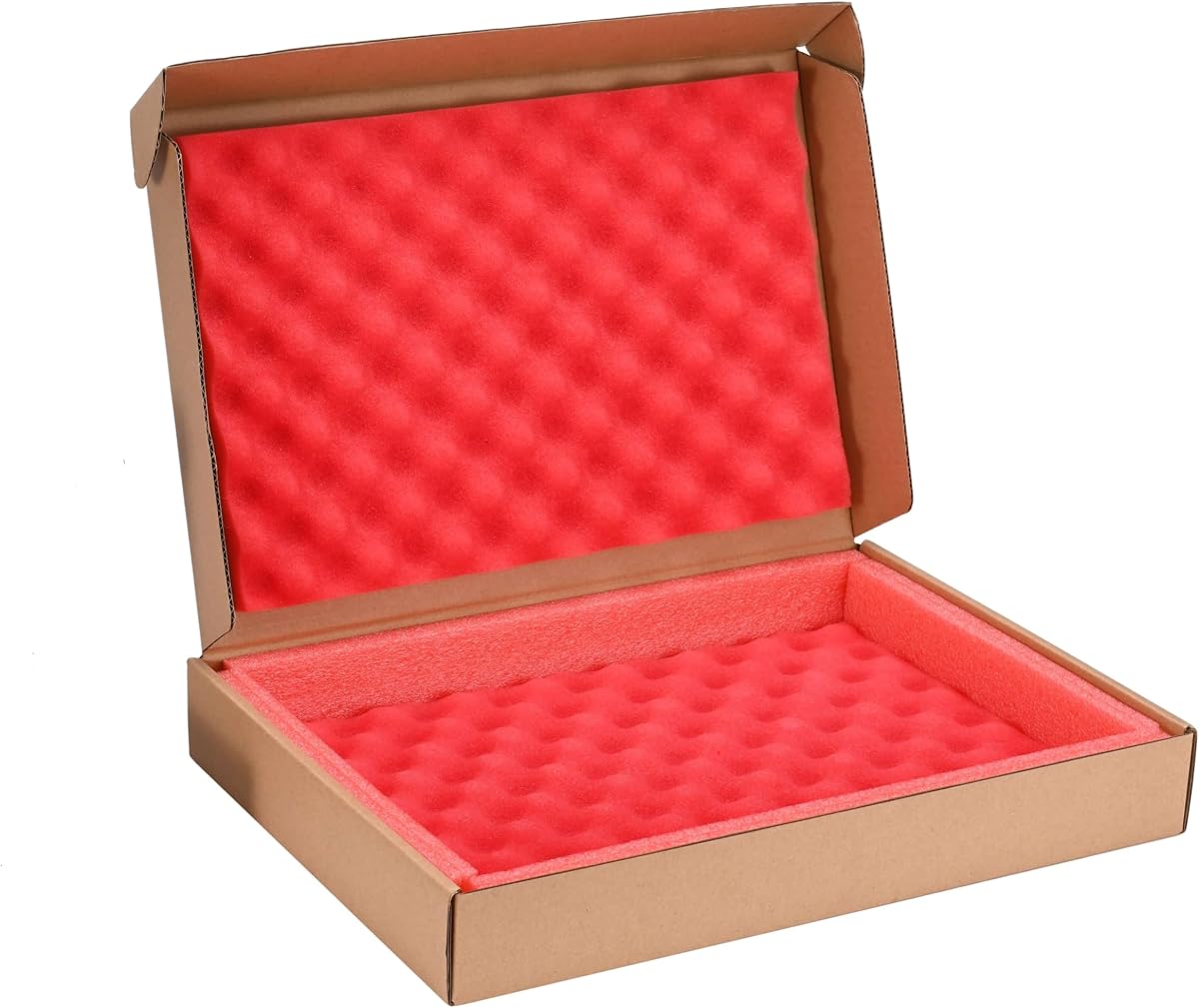
The Foam Laptop Shipping Box is a compact corrugated mailer with a 4.5-star rating. It is intended for laptops, electronic parts, crafts, artwork, glass items, and other valuable objects, making it a versatile packing box even though it is not designed for desktop monitors.
We may earn a commission when you buy through this link, at no additional cost to you.
High-density wave-shaped foam absorbs shock around the device. The box is made from quality cardboard and has an external size of approximately 16.9 by 11.5 by 2.3 inches. A UN label and a seal label are included inside, helping streamline preparation for parcel shipment.
Its fit is limited to laptops measuring up to 15.1 by 10.2 by 0.6 inches, and there is no available room for a charger or cables. The stated testing and suitability for transport should also not be mistaken for independent professional evaluation, so buyers should test-fit their device before sealing the box.
This option is useful when shipping a thin laptop, electronic accessories, or another similarly sized valuable item. It offers a quick, straightforward corrugated solution, but it does not solve the dimensional and structural requirements of a full-size monitor shipment.
The wave-shaped foam provides a soft layer around a thin device and helps absorb everyday shipping impacts. It is a straightforward alternative to inflatable sleeves when the item being protected is already small enough to fit.
Including a UN label and a seal label reduces the need to source those items separately. Users can still confirm that the labels meet the requirements of their chosen shipping carrier before applying them.
We may earn a commission when you buy through this link, at no additional cost to you.
The Two-Compartment Laptop Shipping Box with Protection Foam is designed for laptops up to 17 inches and carries a 4.4-star rating. The corrugated carton measures 17 by 12 by 4 inches, with a large bottom foam piece and a smaller top foam piece protecting the device and accessories.
We may earn a commission when you buy through this link, at no additional cost to you.
A separate upper compartment keeps chargers and cables organized rather than allowing them to crowd or tangle around the computer. The cuttable internal foam can be adjusted to reduce lateral movement for smaller laptops, while carrying handles make the packed carton easier to transport from one room or location to another.
The stated construction and testing information comes from the product description, not from personal testing in this guide. Buyers should verify the laptop’s exact dimensions, the available internal clearance, and the carrier’s packaging rules. It is also a laptop mailer, not a full-size monitor shipping container.
This box is best for a 17-inch laptop that needs a dedicated accessory area and a more organized internal layout. It provides a strong alternative to a standard laptop mailer, particularly for users who value separate storage for cables and chargers.
Separating chargers and cables into an upper compartment reduces crowding around the laptop. It also makes items easier to find when the recipient opens the shipment and reduces the chance of small accessories scratching the computer.
The foam can be cut to fit smaller devices more closely. A snugger fit limits side-to-side movement, helping lower the chance that impact is transferred directly to the laptop during handling.
We may earn a commission when you buy through this link, at no additional cost to you.
The right packaging depends on the device, screen size, carrier, and shipping frequency. Use the following factors to compare monitor-specific inflatable sleeves with corrugated mailers and rigid moving boxes.
Measure the panel, bezel, stand, and any protruding cables rather than relying only on the marketed screen size. A 27-inch display can vary considerably in width and depth, and a narrow inflatable sleeve may not fully cover every model. Compare the monitor with the product’s stated inflated dimensions, then add room for any stand that will be removed or secured separately.
Measure the device before buying, and allow room for packing clearance.
Inflatable sleeves are monitor-specific cushions that usually need a corrugated outer box. Corrugated mailers are complete containers intended for smaller electronics, while rigid moving boxes are better suited to controlled household or office moves. Match the product to the journey rather than treating a moving box as an interchangeable carrier parcel.
Use sleeves inside a rigid carton for shipping.
Strong cushioning should protect the screen from vibration, pressure, and impact without concentrating force on a corner. Independent air columns offer a useful redundancy, while corrugated cardboard supplies structural resistance and foam or bubble wrap fills voids and limits movement. A good system combines rigid support with flexible cushioning around the device.
Prioritize rigid support and controlled movement.
Decide whether the stand, power adapter, cables, and desktop remote will travel with the monitor. Some compact mailers have no room for accessories, while larger boxes or separate accessory pouches keep components organized. Loose items should not be allowed to press against the panel during transit.
Pack accessories separately when space is limited.
Multi-screen kits can be more efficient than buying individual sleeves because they often include a pump and enough material for several displays. The listed sets range from six sleeves to ten, while some products provide complete laptop packing kits. Select a quantity that matches the number of shipments you expect to make and the number of screens involved.
Match the set size to your shipping volume.
PE and PA inflatable sleeves combine flexibility with impact and abrasion resistance, but thin film can be punctured by sharp carton edges. Corrugated mailers depend on board strength, reinforced corners, and internal foam. Inspect packaging materials for tears, splits, or sharp hardware before placing the monitor inside.
Check every surface before contact.
Inflatable bags require a hand pump or compatible air compressor, careful alignment at the valve, and complete inflation of every air column. Corrugated boxes instead require wrapping, foam placement, and closure preparation. A simple process that you can repeat consistently is often more useful than a complex system you may rush.
Follow the full inflation or wrapping sequence.
A package that protects a monitor well may still need to meet carrier requirements for box strength, labeling, and routing. The Bankers Box option is explicitly intended for moving rather than shipping, and the inflatable sleeves do not include outer cartons. Check current carrier guidance and avoid labeling a rigid moving carton as parcel packaging without adequate protection.
Verify carrier rules before final packing.
Begin by disconnecting the monitor and removing or securing the stand according to the manufacturer’s instructions. Photograph the connections, wrap loose cables separately, and place them in a protective pouch. Never leave a power adapter pressing against the screen surface, and do not place packing tape directly on the display.
For an inflatable sleeve, place the monitor inside carefully, align the inflation port, and pump steadily until every visible air column is fully expanded. Press across the columns to identify any soft areas, then add more air where needed. Place the sleeved monitor in a properly sized corrugated outer carton and fill remaining space so it cannot shift.
After shipping, open the outer box carefully, release the air through the valve, and inspect both the monitor and the sleeve for moisture, abrasion, or punctures. Let reusable cardboard air out and store it flat, while keeping inflatable sleeves dry and away from sharp tools. Replace damaged packing materials before the next shipment.
Inflatable monitor bags are designed to cushion a display against vibration, impact, and pressure during transport. Their protective performance depends on complete inflation, correct placement, and use inside a suitable rigid outer box. The listed products use PE and PA materials with independent air columns, but no inflatable sleeve should be treated as a replacement for a corrugated shipping carton.
No, the manufacturer’s stated compatibility is specific, so a 27-inch sleeve should not be assumed to fit a 32-inch display. The 32-inch Chunful set is designed for larger screens, while the 24-inch set is intended for smaller displays. Measure the entire monitor, including the bezel and stand, before choosing a size.
Yes, an appropriate corrugated outer box is strongly recommended for monitor shipping. The inflatable bags provide internal cushioning, while the outer box supplies rigidity, puncture resistance, and structural support. A correctly sized carton should hold the protected monitor without allowing it to move freely, and remaining voids should be filled with appropriate packing material.
The Bankers Box moving set is the most relevant option for a local move because its rigid construction is intended for TVs, framed pictures, and similar items. It is not labeled for shipping, so it should be used for controlled relocation rather than carrier transport. The monitor still needs wrapping and secure positioning inside the box.
The laptop-focused kits are better suited to that need. The five-set corrugated and inflatable package is designed for most 15- to 17-inch laptops with accessories, and the two-compartment model provides a separate space for chargers and cables. The smaller foam mailer explicitly does not include room for a charger or cords.
Insert the pump nozzle into the edge-mounted inflation port, pinch the port closed, and pump steadily. Continue until all visible air columns appear fully inflated, then press over the surface to identify any remaining soft areas. Inflate the bag fully before placing it into the outer carton, and avoid overinflating beyond the manufacturer’s instructions.
They are generally designed for repeated use because they deflate to a compact size. After unpacking, release the air, check for punctures or abrasion, and store the sleeves dry in a location away from sharp tools. Replace a damaged sleeve before shipping another monitor, and follow the product’s specific care instructions.
Removing the stand is often useful because it reduces weight, prevents leverage against the panel, and makes it easier to fit the display in a protective sleeve. Secure the removed base and any loose hardware separately, and follow the manufacturer’s instructions. If the stand cannot be removed, protect and immobilize it so it cannot press into the screen.
The UNIFAMILY eight-piece set is the budget-oriented choice for several 27-inch displays, while the Chunful ten-bag kit stands out as the best overall option for larger multi-monitor moves. AIRPAKPRO earns the premium designation for its monitor-specific construction, independent air columns, and strong 4.1-star rating. For 32-inch and 24-inch screens, the corresponding Chunful sets provide more targeted sizing.
Prioritize measured compatibility, complete inflation, and a rigid outer carton over quantity alone. Laptop mailers and foam boxes serve smaller electronics rather than desktop monitors, while the Bankers Box set is designed for local moving instead of carrier shipping. Whichever format you choose, protect the panel surface, prevent internal movement, and account for the stand and accessories.
Check the current listing, dimensions, ratings, included components, and shipping requirements before buying, since availability and prices change. The most effective solution is the one that fits the complete monitor, provides enough cushioning, and can be packed correctly by the person preparing the shipment.