
SABRENT 74-in-1 Internal Reader
4.0Editor score
Broad legacy card support
Front USB 2.0 port
Internal power connection
This Internal Media Card Reader guide compares ten models for bay fit, card support, USB speed, connectivity, ease of setup, and everyday usefulness.
An internal media card reader brings memory card slots directly into a desktop computer, giving photographers, creators, and builders a convenient way to transfer files without repeatedly connecting an external adapter. A worthwhile model should combine broad card compatibility, dependable internal connections, useful front access, and a form factor that suits the available drive bay.
We compared the ten readers in this guide by examining their stated formats, mounting requirements, USB connectivity, operating-system support, simultaneous-access features, construction details, and practical extras such as audio ports, status lights, and front-facing USB connections. The list covers basic 3.5-inch readers as well as feature-rich 5.25-inch dashboards and specialized multi-slot models.
Each review identifies the product's strongest use case and any meaningful trade-offs, while the comparison table makes the differences easier to scan. Ratings reflect the supplied customer feedback, not personal testing, and specifications come from the available product information. Prices and availability can change, so shoppers should verify current listings before purchasing.
4.0Editor score

4.5Editor score

5.0Editor score
This side-by-side comparison highlights each reader's mounting style, card coverage, interface speed, and distinguishing features. It is designed to help you narrow the field before checking current listings, connector requirements, operating-system details, and physical clearance inside your case.


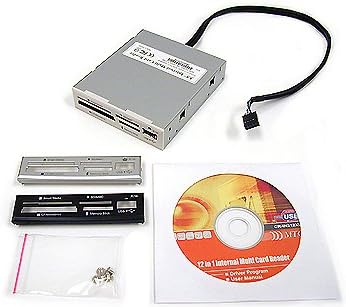
The SABRENT CR-USNT is a basic internal reader built around exceptional media coverage and a 3.5-inch desktop form factor. Its supplied rating is 4.0, but the more important selling point is the claimed support for 74 types of memory cards. It gives users a familiar front-panel solution without the expense or complexity of a full multimedia dashboard.
We may earn a commission when you buy through this link, at no additional cost to you.
Six reader slots cover M2, XD, SD, SDHC, SDXC, MMC, microSD, CompactFlash, MD, and Memory Stick variants. A front USB 2.0 port provides a secondary route for USB devices, while an internal power connection is designed to ensure adequate bus power for attached external USB hardware. The reader/writer designation also makes it more useful than a strictly read-only design for everyday file management.
The principal compromises are the dated USB 2.0 speed and the possible need for adapters with certain cards. Legacy formats remain useful in photography workflows and older systems, but users handling large modern video files will get more from a USB 3.0 model. Operating-system support is also listed for older Windows releases, Linux, and Mac OS X, so current compatibility should be confirmed in the listing and with the computer manufacturer.
This is a sensible budget choice for a desktop that needs broad access to common and older memory cards. It is less compelling as a high-speed workflow solution, but its format coverage, front USB port, and straightforward 3.5-inch installation make it a practical generalist for basic transfers.
The headline advantage is breadth. Supporting both full-size and micro formats alongside older standards reduces the need to keep a drawer full of separate adapters. That versatility is particularly useful for photographers or technicians who still encounter legacy media.
The front USB 2.0 port adds convenience beyond memory cards. It can support flash drives or USB-enabled mobile devices, although its older interface speed means it is better suited to light transfers than large multimedia workflows.
We may earn a commission when you buy through this link, at no additional cost to you.
The StarTech 35FCREADBU3 is the most balanced model in this guide, combining a 4.5 rating with USB 3.0 performance, extensive card compatibility, and clean cross-platform support. It fits a standard 3.5-inch drive bay and connects to a 20-pin motherboard header, offering a cleaner result than leaving a reader permanently dangling from a front USB port.
We may earn a commission when you buy through this link, at no additional cost to you.
Its four slots can handle different cards simultaneously, excluding multiple cards of the same type. Supported media include CompactFlash Type I, the SD and microSD families, numerous MMC standards, extensive Memory Stick variants, and xD-Picture cards. A front-facing USB 3.0 port adds useful connectivity, while built-in power and activity LEDs make operation easier to understand.
Installation is more involved than plugging a reader into a front USB port, but the supplied 20-pin IDC cable and screws support a tidy installation. The reader is described as operating independently across Windows, macOS, and Linux, which is valuable for users who move between different systems. Its TAA compliance and two-year backing further distinguish it as an option oriented toward professional deployments.
Choose this model when you want modern transfer performance without giving up legacy media support or spending space on a full 5.25-inch dashboard. It is well suited to photographers, editors, podcasters, and IT professionals, making it our Editor's Choice for the category.
Simultaneous access to four different card types is a major workflow advantage. A photographer can move images from one card format to another while keeping other media connected, reducing connector wear and unnecessary removal.
Support for Windows, macOS, and Linux makes the reader less dependent on a particular ecosystem. Its professional orientation, status indicators, and two-year coverage also suit managed office and editing environments.
We may earn a commission when you buy through this link, at no additional cost to you.
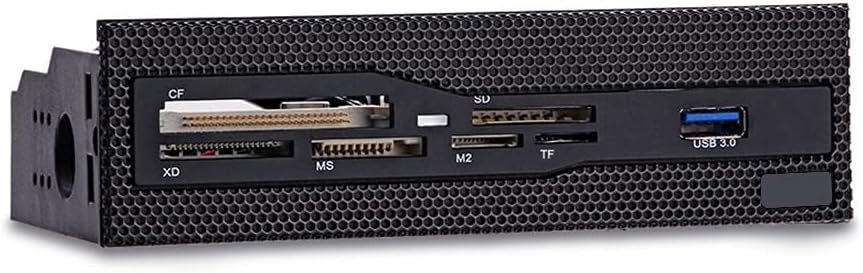
This 5.25-inch reader offers a straightforward way to add front-facing USB 3.0 and six card slots to a desktop. Its supplied rating is 4.3, placing it among the stronger options in the roundup. It is particularly attractive for cases with an open or mesh 5.25-inch bay where a larger front panel would look out of place.
We may earn a commission when you buy through this link, at no additional cost to you.
The reader supports CompactFlash, XD, Memory Stick, M2, TF, and other commonly used formats. Copper-plated card slots are intended to improve stability during transfers, while the USB 3.0 interface supports faster transfer rates than older USB 2.0 designs. Installation is described as neat and straightforward in a standard desktop 5.25-inch bay.
It does not provide the eSATA, audio, or multiple USB connections found on larger multimedia dashboards. That keeps the design focused, but it also means the total functionality is less broad. Buyers should confirm the available bay space and ensure that the front grille or mesh panel will not obstruct card insertion.
For a builder who wants useful card access and a front USB 3.0 port without adding a full feature panel, this is a balanced option. It provides more modern connectivity than the SABRENT while remaining simpler than the multifunction dashboards later in the list.
The restrained design concentrates on the features most likely to be used every day: card access and one fast USB port. That makes it a good fit for creative workstations that do not need duplicate audio jacks or drive connectivity.
Copper-plated slots are intended to support dependable communication with inserted media. Although the reader does not claim simultaneous card access, its broad common-format support still makes it useful for routine transfers.
We may earn a commission when you buy through this link, at no additional cost to you.
The 5.25-inch Media Dashboard is the most connectivity-focused product in this list, combining memory card access, front USB, eSATA, and audio connections in one panel. Its supplied rating is 3.8, the lowest numerical rating among the rated models, yet its feature set can make it exceptionally useful for custom desktop builds.
We may earn a commission when you buy through this link, at no additional cost to you.
The built-in USB 3.0 hub is listed at up to 5Gbps, alongside a USB 2.0 port rated at 480Mbps. An eSATA connection adds another option for storage workflows, while dedicated microphone and speaker jacks remove the need to reach behind the chassis. The card reader supports M2, TF, SD, MMC, Memory Stick, and CompactFlash, with simultaneous multi-card access.
The main limitation is the stated card capacity of up to 64GB. That restriction may be significant for modern photographers and video creators who routinely use larger SD or microSD cards. The installation also requires several motherboard connections, including 20-pin USB 3.0, four-pin power, USB 2.0, and audio leads, so cable management and header availability deserve careful attention.
This dashboard is best for a builder who wants to consolidate front-panel functions in a full-size bay. Its breadth is appealing, but prospective buyers should confirm card-capacity requirements and ensure their motherboard offers the necessary internal headers.
Combining card slots with USB and audio connections reduces the need for separate front accessories. It is a polished approach for a clean custom build, especially where convenient access to microphone and speaker connections matters.
The USB 3.0, USB 2.0, and eSATA combination gives users several ways to move data. Simultaneous card access further improves efficiency when transferring files from multiple media formats.
We may earn a commission when you buy through this link, at no additional cost to you.
The Vantec UGT-CR940 earns the Best Premium distinction because it combines a perfect supplied rating with unusually extensive compatibility specifications. It uses a compact internal design, connects through a 20-pin USB header, and supports many generations of CompactFlash, Secure Digital, MMC, eMMC, Memory Stick, and xD media.
We may earn a commission when you buy through this link, at no additional cost to you.
Its Secure Digital support includes UHS-I and capacity claims up to 2TB, along with numerous SD speed classes and variants. The listed Memory Stick coverage spans PRO, Duo, Micro or M2, PRO-HG, and additional specification families. Four-bit quad access is specified for PRO-HG media, while CompactFlash support extends across legacy and high-performance variants.
The breadth can be overwhelming if judged only from the specification list, but it is a major advantage for users who maintain equipment spanning multiple eras. Buyers should still verify the physical card format, capacity, operating-system behavior, and whether an adapter is required for media such as M2. Installation depends on a compatible 20-pin motherboard header.
For a professional workflow involving many card standards, the Vantec offers the strongest combination of compatibility and customer feedback in this roundup. It is the premium choice for users who value breadth over the extra audio and storage connections offered by multimedia dashboards.
The model covers both current and legacy media families, reducing adapter dependence. This makes it especially relevant to photographers, archivists, repair technicians, and studios that still encounter older camera cards.
Secure Digital support extends to UHS-I and high-speed classes, which matters for current camera workflows. The USB 3.0 header connection provides a more appropriate path for transferring larger modern media files.
We may earn a commission when you buy through this link, at no additional cost to you.
The TCC-QL5E is a full 5.25-inch multifunction dashboard that combines card reading with USB, SATA, eSATA, and audio connections. No numerical customer rating is supplied, so its recommendation depends more heavily on its stated feature set and compatibility with a particular desktop build.
We may earn a commission when you buy through this link, at no additional cost to you.
The front USB 3.0 port is listed at up to 5Gbps, while USB 2.0 is listed at up to 480Mbps. The dashboard also offers SATA and eSATA ports, front speaker and microphone connections, and LED indicators for power and drive activity. Its five-in-one card reader supports M2, TF, SD, MMC, Memory Stick, and CompactFlash, with card support stated up to 64GB.
Its cable set includes a 20-pin USB 3.0 lead, four-pin power, USB 2.0, two SATA data cables, and an audio cable. That is a substantial amount of internal wiring, and users should compare available motherboard headers and drive connectors before buying. The 64GB card limit also falls short of many modern workflows.
This model makes sense for a builder who wants a multi-use 5.25-inch panel and values storage connectivity as much as card access. It is less suitable for simple installations because of its wiring demands and the absence of supplied rating information.
The dashboard consolidates several connection types into a single accessible panel. That can simplify a custom workstation where users regularly move drives, connect peripherals, and manage audio cables.
Power and read/write LEDs offer visible status feedback. While not a substitute for detailed monitoring software, they help confirm that the connected device and card reader are active.
We may earn a commission when you buy through this link, at no additional cost to you.
The Sony MRW620/U1/181 is an internal 17-in-1 reader/writer with a supplied rating of 4.0. It offers a recognizable branded design and the ability to both read and write memory cards, making it a potential fit for older desktops that need front access to several card standards.
We may earn a commission when you buy through this link, at no additional cost to you.
Black and ivory faceplates are included, allowing the reader to blend more closely with different case finishes. Drive Letter Recognition software is another convenience, simplifying how the computer presents connected cards and removable media after installation.
The product information specifically calls out compatibility with Microsoft Vista and Windows XP Home and Professional. That makes the reader most attractive for legacy or retro-computing systems, but current buyers should verify hardware support and driver behavior with their operating system. The listing also does not provide the detailed card-format breakdown found in some newer alternatives.
Choose the Sony model when a vintage workstation, specific case aesthetic, or legacy software compatibility is the priority. For a modern build, a reader with clearly documented USB 3.0 and current operating-system support may be a more straightforward choice.
Explicit Vista and Windows XP compatibility distinguishes this reader from newer models. It may be particularly useful for restoring or maintaining older photo and media workstations.
Drive Letter Recognition software reduces the complexity of accessing multiple media types. The reader/writer capability also allows users to manage content rather than simply view it.
We may earn a commission when you buy through this link, at no additional cost to you.
The MTG All-in-One stands out for its compact 2.5-inch format and flexible appearance options. It carries a perfect supplied rating of 5.0, and the product information emphasizes a straightforward internal installation with black, silver, and white bezels available to match different desktops.
We may earn a commission when you buy through this link, at no additional cost to you.
Its smaller mounting requirement may be the decisive benefit for a compact case that cannot accommodate a 3.5-inch reader. The multiple faceplate finishes also make it easier to integrate with a case that does not use the common black or silver appearance.
The supplied information is much less detailed than for the newer competition. It does not list supported card formats, USB generation, transfer speed, operating systems, or simultaneous-access capability. As a result, buyers should treat the listing as a starting point and verify those technical requirements before relying on it for a particular workflow.
This reader is most appropriate for a builder who prioritizes physical fit, visual integration, and a compact internal solution. Its excellent supplied rating is encouraging, but the incomplete specification sheet makes direct comparison with thoroughly documented models difficult.
The 2.5-inch format can be valuable in compact cases or builds where the 3.5-inch bay is already occupied. It creates a simple front-mounted solution without requiring the depth of a full-size reader.
Black, silver, and white bezels give users more visual options than a single-color model. This is a practical consideration for systems where visual consistency matters.
We may earn a commission when you buy through this link, at no additional cost to you.
The Akasa AK-ICR-07 is a six-port 3.5-inch reader designed to place popular memory cards at the front of a PC. Its supplied rating is 4.2, and the product information provides a clear account of its physical design, status lights, and useful front connectivity.
We may earn a commission when you buy through this link, at no additional cost to you.
Its dedicated adapter ports are intended to eliminate the need to insert microSD or M2 cards directly, which can be convenient when using full-size adapters. SDHC compatibility provides support for higher-capacity cards, while an additional front USB port allows USB memory sticks and USB-enabled mobile phones to be connected for data transfer.
Two LEDs indicate power, card insertion, and data-transfer activity. Black and Classic White front fascia panels are offered for different case styles. However, the reader belongs to an older design generation and does not specify a modern USB generation, so buyers focused on high-speed transfers should verify its interface details before purchase.
The AK-ICR-07 is a good match for a straightforward desktop build that needs multiple card formats and visible operating status. It is less compelling for users who require the latest media standards or maximum transfer throughput.
Multiple dedicated ports reduce the need to juggle adapters or guess which slot accepts a particular format. That makes the reader approachable for everyday users as well as experienced photographers.
Separate LEDs communicate power, card insertion, and transfer activity. These visible cues help users confirm that the reader is functioning and that data is moving.
We may earn a commission when you buy through this link, at no additional cost to you.
The MTG CR-IN212XU-1 is a classic USB 2.0 internal reader with a 22-in-1 concept and four usable card slots. No numerical rating is supplied, so its appeal rests on the documented hot-swappable design, bus-powered operation, and ability to exchange data across multiple cards at once.
We may earn a commission when you buy through this link, at no additional cost to you.
The metal case is designed to fit a 3.5-inch bay. It supports CompactFlash, IBM Microdrive, SmartMedia, SD, MMC, and the Memory Stick family, among others. Four slots can be used simultaneously for data exchange, while Plug & Play and hot-swappable operation simplify media changes.
Bus-powered operation means no external power supply is required, which can simplify installation. The trade-off is USB 2.0 performance, listed at up to 4.5MB per second, which is modest for large photo libraries or high-resolution video. SmartMedia and IBM Microdrive support may also be more relevant to older equipment than current workflows.
This reader makes sense for legacy systems, restoration projects, or users who need several card formats and hot-swapping more than high throughput. A USB 3.0 reader is a better starting point for a contemporary desktop with large modern media files.
Cards can be changed while the system remains in use, supporting continuous workflows. This convenience is especially valuable when transferring batches of media from several cards.
Using four slots at the same time makes it possible to exchange data between different card types. The metal enclosure also provides a practical foundation for an internal desktop installation.
We may earn a commission when you buy through this link, at no additional cost to you.
The best internal media card reader is the one that fits your case, supports the cards you actually use, connects cleanly to your motherboard, and provides an interface fast enough for your files. The following factors help narrow the options without paying for unused ports or obsolete formats.
In short, select the mounting size your chassis can physically accommodate and leave enough clearance for every card and cable.
In short, prioritize the exact formats in your camera kit rather than choosing solely by the largest advertised in-one number.
In short, use USB 3.0 for modern high-volume workflows and reserve USB 2.0 for simpler transfers or older systems.
In short, confirm that the motherboard provides every required internal connector and that the case leaves room for the attached cables.
In short, choose simultaneous access if your workflow regularly transfers between several cards at once; otherwise, compatible slots may be sufficient.
In short, add front-panel ports only when they replace separate accessories or simplify your build rather than merely increasing the specification list.
In short, match the reader's generation to your computer and media, especially when maintaining legacy equipment.
In short, favor a well-documented model with suitable construction and credible user feedback, then verify fit and connector details.
Install the reader with the computer powered off and disconnected from mains power. Remove the case side panel, identify the required drive bay, and compare the reader's mounting shape and depth with the available space. Connect the specified USB, power, SATA, or audio leads to the correct motherboard headers, route them away from fans and drive cages, and secure the faceplate with the supplied screws before replacing the panel.
Power on the computer and let the operating system detect the new hardware. Confirm that the installed card appears with the expected drive letter and that the front status lights respond when a card is inserted. Copy important files to the system drive or another storage device before formatting or erasing the card. When removing media, use the operating system's safe-eject process rather than pulling it out while data is being transferred.
Handle cards by their edges and keep the contacts clean and dry. Do not force a card into an unfamiliar slot, and follow the adapter instructions whenever a smaller card requires one. For a new card, format it using the file system and allocation settings recommended by the device that will use it. Keep the internal cables secure, leave the card slots unobstructed, and inspect the reader periodically for loose screws, connector strain, or unusually slow performance.
An internal reader is usually more convenient in a fixed desktop because it remains connected and avoids occupying a front USB port. It can also use a faster internal interface and provide dedicated status lights. External readers are more portable and easier to share between systems, so the better choice depends on whether convenience, portability, or cross-system use matters more.
No. The case must have the required 3.5-inch, 5.25-inch, or 2.5-inch opening, and the motherboard must provide compatible internal headers. The operating system must also support the reader and any required drivers. Check the case manual, motherboard manual, and product specifications before installing or purchasing.
USB 3.0 provides a substantially higher theoretical transfer rate than USB 2.0 and is better suited to modern high-resolution photos and video. The card itself, internal cables, computer storage, and file sizes also affect actual performance. For routine small transfers, the difference may be less noticeable, while large media libraries benefit much more from USB 3.0.
You should not assume that larger cards will work if the product information explicitly states a 64GB maximum. That restriction may reflect the reader's controller, firmware, or original test specification. Look for a model whose listed capacity clearly covers your cards or confirm compatibility with the manufacturer before use.
No. A number like 22-in-1 counts variants within supported families rather than meaning there are 22 physically different slots. Check the listed formats, card generations, capacity limits, and adapter requirements. The physical slot count is often more useful for judging front-panel access than the advertised in-one total.
Some models are read-only, while others explicitly support writing and card formatting. The SABRENT and Sony products are described as reader/writers, while other listings focus on reading. If writing or formatting is essential, verify that function in the product information and use the card's recommended formatting procedure.
An internal reader usually obtains data through a motherboard USB header rather than the external ports on the case. The header must match the reader's connector type and supported USB generation. Using a visually similar but electrically different header can cause failure, so confirm the exact 20-pin or other connection specified by both manuals.
First check that the internal cables are fully seated and connected to the correct headers. Then confirm that the reader has power, the card is inserted correctly, and the slot supports that format. Review the operating system's device and disk-management views, and compare the reader and computer with the relevant manufacturer requirements. Moving the card to another compatible computer can help isolate whether the issue is the reader, card, or installation.
The StarTech Internal USB 3.0 Reader is the strongest all-around recommendation because it combines modern speed, extensive card support, four simultaneous slots, clear status indicators, and cross-platform operation. The SABRENT 74-in-1 Reader serves as the budget-friendly choice for broad format coverage, while the Vantec Link USB 3.0 Reader stands out as the premium option for unusually detailed compatibility across many card generations.
Your priority should be physical fit first, followed by the exact media formats and capacities you use. USB 3.0 is the safer choice for modern creative files, whereas older readers may be better suited to legacy equipment. Extra front USB, eSATA, SATA, and audio ports can be valuable in a full custom build, but they add complexity and should be matched to the headers available on your motherboard.
Finally, check current prices, availability, card-capacity limits, operating-system support, and included installation hardware before ordering. Product details and market conditions can change, and a reader that looks ideal on paper still needs to match your chassis and workflow to deliver a satisfying result.