
Satisfye ZenGrip 2
4.7Editor score
Asymmetrical ergonomic support
Dock-compatible console design
Floating anti-scratch silicone tabs
Handheld-style controller handling
Our Switch 2 Joycon Grips guide compares ten ergonomic, thumb-grip, charging, and quick-release options for Switch 2 comfort, control, fit, and compatibility.
Switch 2 Joycon Grips can make the smaller Joy-Con 2 controllers easier to hold, especially during extended handheld sessions. The right accessory may add palm support, reduce slipping, extend the analog sticks, or add convenient charging, but the best choice depends on grip style, controller compatibility, and how you play.
We compared all ten products by examining their stated compatibility, ergonomic design, materials, installation method, control access, protective features, and suitability for handheld or docked play. The list covers full controller handles, compact split grips, charging grips, silicone thumb caps, and textured stick covers rather than treating every accessory as a direct alternative.
Each review explains what the product does best, where its compromises may matter, and which players should consider it. Ratings and specifications reflect the supplied product information, while availability and pricing can change, so compare the current listing details before making a final purchase decision.
4.7Editor score

4.7Editor score

4.8Editor score
The comparison below separates full-size ergonomic grips from lightweight split handles, magnetic charging grips, and thumb-stick caps. It highlights the central trade-offs in comfort, control, charging, portability, protection, and compatibility so the right accessory matches your preferred play style.
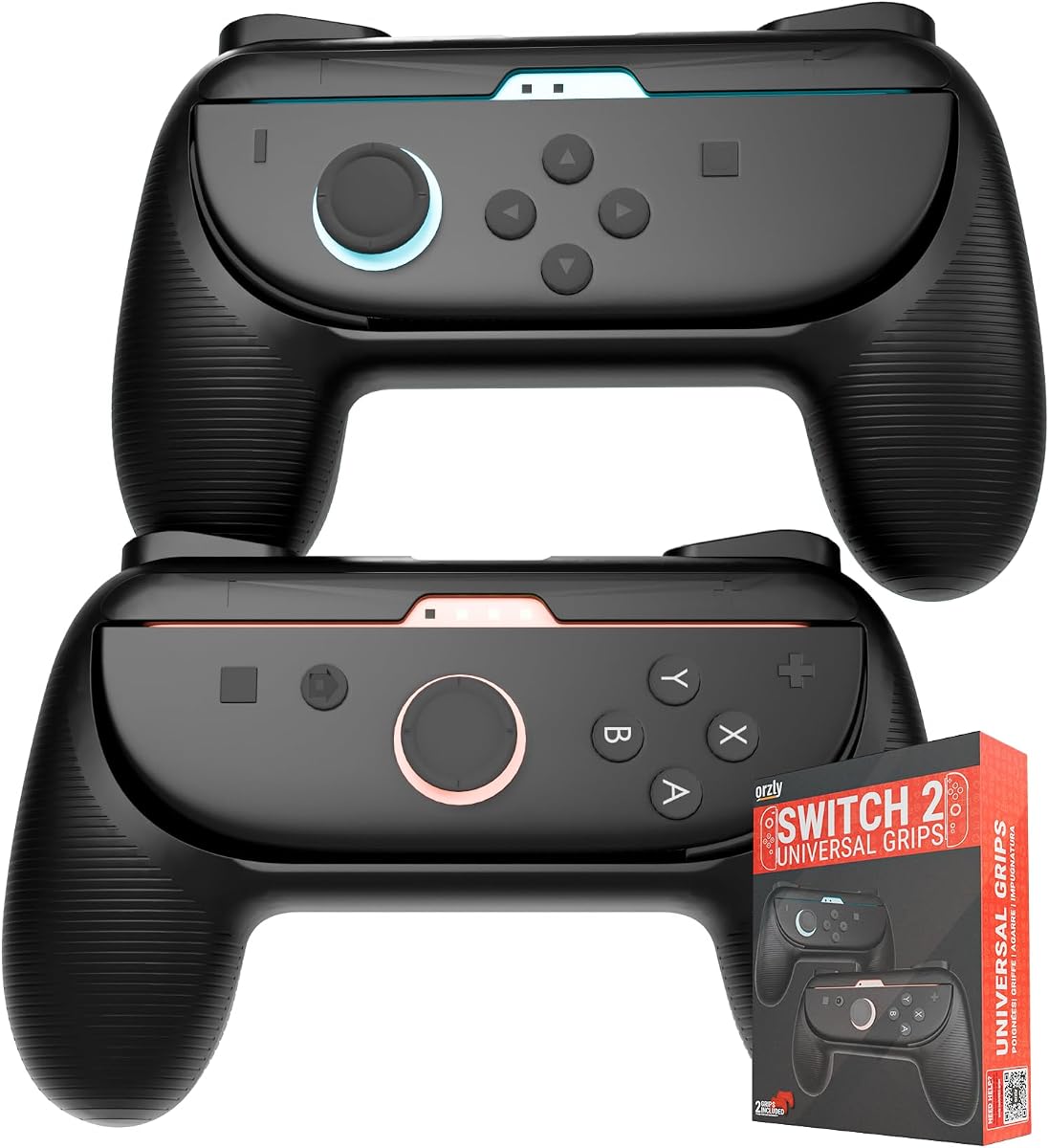


The Orzly Joycon Grips are a two-piece ergonomic accessory designed specifically for the Switch 2 generation of Joy-Con controllers. With a 4.6 rating, the product appears aimed at players who want a fuller grip than the standard small Joy-Con 2 shape provides, particularly when playing in handheld mode. Its defining feature is the extended shoulder-button design mentioned in the listing.
We may earn a commission when you buy through this link, at no additional cost to you.
Extending the shoulder-button area can make the controller feel more substantial while giving the hands additional places to rest. That additional support may be helpful in action games, platformers, and competitive titles where rapid inputs can otherwise make the narrow Joy-Con 2 shape feel less secure. The two-pack format also suggests that both left and right sides are covered, allowing a consistent grip rather than supporting only one hand.
The principal limitation is that the supplied information does not mention docking, charging, wrist-strap clearance, or a particular surface material. Those omissions matter because a grip that feels excellent in handheld play may create friction when moving between docked and tabletop arrangements. The listing title also gives no indication that the extended elements add new commands; they appear to be ergonomic extensions rather than programmable buttons.
This is a sensible choice for Switch 2 owners whose main complaint is that the standard Joy-Con 2 controllers feel too small during longer handheld sessions. It is less compelling for players who prioritize simultaneous charging or want verified docking support. Confirm the included parts and current fit for your exact controllers before ordering.
The extended shape gives each hand a clearer resting point, which can reduce the pinched feeling that some players experience with the compact standard Joy-Con 2 layout. It is especially useful when a game demands frequent camera movement, directional input, and face-button action at the same time.
Because the grips are designed around the shoulder-button area, the useful next step is to confirm that the extensions do not press unintentionally during play. Checking the product's included diagrams can also clarify how each piece attaches and whether the controllers remain easy to remove.
We may earn a commission when you buy through this link, at no additional cost to you.
This six-piece thumb-grip set gives Switch 2 players three height choices: low, mid, and high. The set carries a 4.7 rating and focuses on analog-stick feel rather than changing the shape of the entire Joy-Con 2 controller. Low profiles favor quick movements, the middle option balances control and comfort, and the tall option is intended to provide more leverage for aiming.
We may earn a commission when you buy through this link, at no additional cost to you.
The textured silicone construction is intended to reduce thumb movement caused by sweat while also shielding the original joystick caps from scratches, dust, and wear. Installation requires no tools or adhesive, so the covers stretch over the sticks and can be added or exchanged without modifying the controller. A storage case adds a practical way to organize the three pairs.
Compatibility is broader than products labeled exclusively for Switch 2 because the listing says the caps are designed for Joy-Con 2 and Switch 1 or Switch 2 Pro Controllers. That versatility is useful for households with more than one supported controller. However, buyers should not assume the caps will fit every Nintendo controller or third-party controller without checking the dimensions.
Choose this set if you want to fine-tune analog input rather than transform the controller into a full grip. It is less suitable if your main issue is wrist fatigue, insufficient palm support, or the need to charge while playing. Trying more than one height is the best way to identify the level that feels natural in your favorite games.
Low caps preserve a light touch and suit movement-heavy games, while high caps can give the thumb more leverage for precise aiming. Because changing the physical height can change the input feel, an adjustment period is normal even when the caps fit correctly.
Thumb caps are removable and do not require permanent alteration of the controller. They are an easy way to improve texture, replace worn stick caps, and discover which profile feels best before investing in a larger ergonomic grip.
We may earn a commission when you buy through this link, at no additional cost to you.
The PowerA Joy Con Comfort Grips use a lightweight ergonomic design and double-injected rubber to make the original Switch Joy-Con form more comfortable to hold. They carry a 4.7 rating and use a simple slide-in design, with visible openings for the player indicator lights. The black finish also matches the standard controller color scheme.
We may earn a commission when you buy through this link, at no additional cost to you.
The main advantage is straightforward comfort. A rubber grip can provide a softer, higher-friction contact surface than bare glossy plastic, and the slide-on construction avoids complicated latches or tools. The player-light openings are a particularly thoughtful detail because they preserve a useful way of identifying which controller belongs to which player.
The important caveat is compatibility. The supplied title identifies these grips for Nintendo Switch rather than explicitly for the larger Switch 2 Joy-Con 2 controllers. Their original Switch designation does not automatically establish a fit for the newer system, particularly around the revised shoulder-button area and the newer analog sticks. Buyers should treat this as an original Switch accessory until current documentation confirms otherwise.
For an owner of the original Switch who wants a lightweight comfort upgrade, the design remains attractive. For a Switch 2 buyer, it is not one of the safest choices in this list because fit is not clearly confirmed. Checking the dimensions, controller generation, and customer-fit information is essential before purchase.
Double-injected rubber can improve the feel of a controller without adding the large frame required by a full-shell grip. The result may be particularly attractive for players who travel with a Switch and prioritize low weight over charging features or desktop support.
The visual similarity between Switch and Switch 2 controllers can make compatibility labels easy to overlook. Verify the exact model, analog-stick size, shoulder-button layout, and any included-case fit before relying on an accessory labeled for the original system.
We may earn a commission when you buy through this link, at no additional cost to you.
The MystiForge Split Grips offer a balanced approach to Switch 2 comfort, weighing approximately 53 grams per pair according to the product information. That lightweight construction, paired with curved TPU shapes, is intended to reduce hand fatigue without producing the bulk associated with a rigid controller case. The product carries a 4.7 rating.
We may earn a commission when you buy through this link, at no additional cost to you.
The split format is the key practical advantage. Each Joy-Con snaps on or off quickly, allowing the controllers to be removed for tabletop play without taking apart a full grip system. The laser-textured back supplies sweat-resistant friction, while precision cutouts preserve access to the front and shoulder buttons. The listing also says the grips remain compatible with the dock and attached wrist straps.
Compared with a complete grip case, the MystiForge design provides less structural support around the console and Joy-Cons. It also does not solve battery life or add charging hardware. Its appeal lies in preserving the familiar Switch 2 layout while improving how the small controllers sit in the hands, especially for players who alternate often between handheld, docked, and tabletop modes.
This is the strongest all-around recommendation for buyers who want meaningful ergonomic improvement without giving up flexibility. It suits commuters, shared households, and players who regularly move between play positions. Verify the fit and included hardware before ordering, but the stated combination of low weight, quick release, docking support, and strap compatibility makes it a balanced choice.
The quick-release split design allows each controller to leave the grip without dismantling a larger frame. That makes the product practical for tabletop sessions, social play, and players who alternate between the display and the console's built-in screen.
The stated weight of roughly 53 grams per pair keeps the accessories from overwhelming the small controllers. Curved edges and a textured TPU surface add support and friction, helping compensate for the narrow shape of the standard Joy-Con 2.
We may earn a commission when you buy through this link, at no additional cost to you.
The NEWDERY LIFE Magnetic Charging Grip is built around a practical problem: Joy-Con 2 batteries may not last through a long handheld session. Its magnetic grip holds the controllers in a more conventional horizontal arrangement, charges them while you play, and uses an angled handle to encourage a natural wrist position. The product has a 4.8 rating.
We may earn a commission when you buy through this link, at no additional cost to you.
Charging during use is the central benefit. Instead of stopping when the controllers run low, players can maintain a wired power connection while continuing a game. The magnetic system is described as attaching when brought near the grip and remaining secure during longer sessions. An included 4.9-foot cable and intelligent protection against over-current, over-voltage, and over-charging add practical value.
The grip is also portable and compatible with Joy-Con 2 protective cases, according to the listing. That combination is useful for travel, although the cable and grip make the package bulkier than simple silicone caps. The product is also explicitly limited to Nintendo Switch 2, so it is unsuitable for original Switch or Switch Lite owners.
This is an excellent pick for players who want both improved ergonomics and the ability to keep playing without monitoring battery levels. It may be less attractive if you always play near a dock, dislike using a cable, or want a grip that can be removed instantly for tabletop multiplayer. Even so, the combination of charging, magnetic attachment, and angled handling makes it unusually useful.
Keeping the Joy-Con 2 controllers connected to power while gaming addresses the most visible limitation of the battery life. A short interruption to connect a cable can break concentration, particularly in competitive or story-driven sessions where uninterrupted play matters.
The magnetic layout makes the controllers easy to bring into position and remove when the player changes modes. A snug, correctly aligned connection is important, so the controllers should be seated fully rather than placed near the charging contacts.
We may earn a commission when you buy through this link, at no additional cost to you.
The Satisfye ZenGrip 2 is a full ergonomic accessory built around the idea that the compact Joy-Con arrangement does not feel as natural as a traditional handheld controller. It has a 4.7 rating and an asymmetrical shape designed to support the hands over extended play. The product also includes floating silicone tabs intended to keep the console from contacting the grip frame directly.
We may earn a commission when you buy through this link, at no additional cost to you.
Those anti-scratch tabs represent more than cosmetic refinement. They allow separation between the grip and console while leaving space for warm air to move along the back. The listing also emphasizes a dock-compatible design, allowing the console and grip to enter the original dock without requiring disassembly. This is useful for Switch 2 owners who alternate between tabletop and television play.
As a full-frame grip, the ZenGrip 2 necessarily feels bulkier than silicone caps or lightweight split attachments. It does not provide the magnetic charging convenience of the NEWDERY option, and the design is specifically marked as fitting Switch 2 only. Players who frequently travel may also find the larger structure less convenient than small add-on grips.
The premium recommendation belongs to players who prioritize long-session comfort and a console-like grip most strongly. Its combination of asymmetrical support, scratch protection, and dock compatibility addresses several common complaints about full-size controller grips. Those who value portability, charging, or rapid controller removal should compare it with the more modular alternatives in this guide.
The asymmetric frame supports each hand in a different but intentional position, bringing the Joy-Con 2 closer to the feel of a conventional handheld. This can reduce the sense that the small controllers are being squeezed between the fingers during sustained play.
Floating silicone tabs create a deliberate buffer between the console and the grip frame. That design addresses scratches while preserving space behind the console, making it more suitable for extended use than a hard frame pressed directly against the system.
We may earn a commission when you buy through this link, at no additional cost to you.
The Belkin Nintendo Switch 2 Grip Case combines an ergonomic handle, a full protective shell, and quick-release sockets for the Joy-Con 2 controllers. Its 4.2 rating is lower than those of the other products in the guide, but the design offers a clear all-in-one proposition for players who want more support and organization than a pair of small caps.
We may earn a commission when you buy through this link, at no additional cost to you.
The textured, non-slip surface is designed to support comfortable handling during long sessions. Quick-release mechanisms allow the Joy-Cons to be removed without taking off the grip, and the kickstand remains available for tabletop play. According to the listing, the grip can remain attached while the console's protective case is used and while the system is docked, which reduces the need for repeated setup changes.
The product is made with a minimum of 75 percent recycled plastic and includes two-year coverage. Those details may appeal to buyers who value manufacturer support and material choices. The grip case is still a substantially larger accessory than a thumb cap or split grip, so it is less ideal for players who regularly carry a Switch 2 in a small bag.
This Belkin model is most appropriate for a player who wants one accessory to support the console, provide a full grip, and preserve the system's case. It is worth considering over simpler options for a home setup, though the lower rating makes it prudent to review recent customer feedback about fit and button access before purchasing.
Dock compatibility, quick-release Joy-Con removal, and kickstand access cover the Switch 2's major play configurations. The result is convenient for households that regularly alternate among handheld, television, and tabletop gaming.
A full grip case provides a larger protective structure around the console and controllers than caps or split handles. Buyers should still confirm whether they want to keep any separate console case installed, as the listing says the Belkin grip is designed to work with it.
We may earn a commission when you buy through this link, at no additional cost to you.
The RAVEtone Hand Grips are a two-pack of curved, textured handles designed specifically for the Switch 2 Joy-Con controllers. The product does not have a supplied star rating, so the available feedback is insufficient for a reliable numerical assessment. Its stated strengths instead center on secure attachment, palm comfort, trigger access, and controller protection.
We may earn a commission when you buy through this link, at no additional cost to you.
The grips use a rubber blend with a matte-textured surface that the listing describes as sweat-resistant and wear-resistant. Four internal rubber pads hold each Joy-Con in position and help prevent both slipping and scratches. An extended pin design is intended to support access to the SL and SR buttons without forcing the player to shift hand position awkwardly.
Installation is tool-free and relies on sliding the Joy-Cons into place. That makes the grips approachable, but the listing does not discuss quick release, docking, charging, or wrist-strap compatibility. Those omissions become important if the accessory is expected to work across several play positions or alongside a magnetic charging handle.
The RAVEtone grips are worth considering for players who prioritize a textured, close-fitting hold and uncomplicated installation. Because the product lacks a supplied rating and several practical specifications are not stated, shoppers should examine current customer feedback and the package illustration carefully. Confirm that the model and trigger clearance are right for your controllers.
A matte exterior can improve confidence when the hands become damp, while internal pads keep the controller from shifting inside the grip. Together, those features address two common sources of distraction during fast or competitive sessions.
Every grip that surrounds the shoulder-button area must leave the SL and SR controls easy to reach. The extended internal supports are intended to do that, but players who rely heavily on those buttons should check fitment and button travel before committing to long play.
We may earn a commission when you buy through this link, at no additional cost to you.
The NEWDERY Replacement Thumb Grips are a ten-piece set of black caps made for the larger analog sticks found on the 2025 Switch 2 Joy-Con 2 controllers. With a 4.5 rating, the set focuses narrowly on replacing worn or damaged stick caps while adding a diamond-textured surface for more secure thumb contact.
We may earn a commission when you buy through this link, at no additional cost to you.
Flexible TPU provides a smoother feel than bare worn plastic and can help protect the original joystick caps from additional scratches. The textured design is intended to limit slipping and support accurate control during long or competitive sessions. Ten pieces provide a useful supply of replacements, whether you are refreshing both controllers or keeping backups ready.
Compatibility is narrow and should be checked carefully. The listing explicitly says the caps are not designed for Switch 1, OLED, Lite, or Pro Controller. Their larger fit is intended specifically for the upgraded Switch 2 sticks, and attempting to stretch them onto smaller sticks may not produce a secure result.
This is a strong option for Switch 2 players whose original thumb caps are peeling, smooth, or worn down. It is not a solution for hand fatigue or controller shape, because it does not add palm support. If your priority is stick texture and inexpensive replacement, the ten-pack is a focused solution; if you need a larger grip, consider a controller handle instead.
Replacement caps are useful when the original joystick tops have become smooth, cracked, or slippery. A fresh textured surface can restore tactile feedback without replacing the entire analog stick assembly or controller.
Ten caps leave enough replacements for both Joy-Cons and future backups. Keeping a few in a case can prevent a worn cap from interrupting a session or make it easy to switch to a different feel when experimenting with control styles.
We may earn a commission when you buy through this link, at no additional cost to you.
The WEOTOO set includes eight thumb grips designed for the Nintendo Switch 2's 2025 controller sticks. Its 4.3 rating reflects a product that delivers a focused control upgrade rather than a complete ergonomic overhaul. The central feature is a choice between low caps for quick reactions and tall caps for greater precision.
We may earn a commission when you buy through this link, at no additional cost to you.
The textured surfaces are designed to improve thumb stability and accuracy during aiming, steering, and other precise inputs. Flexible materials also shield the original Joy-Con joystick tops from wear, dust, and minor damage. Including both low and tall options makes the set useful for players whose preferences change between fast action games and more deliberate controls.
The set is explicitly limited to the Switch 2, so it should not be assumed to fit original Switch, OLED, Lite, Pro Controller, or third-party sticks. It also does nothing to improve the width of the Joy-Con 2 controllers. A player who feels wrist fatigue because the entire controller is too small will need a handle-style grip rather than thumb caps.
The WEOTOO set is a practical choice for Switch 2 owners who want to experiment with analog input and protect their sticks at the same time. Its 4.3 rating suggests a solid but less universally favored option than the highest-rated picks. Test the low caps first, then try the tall profile in a precision-focused game to determine which feels more natural.
Low-profile caps minimize the change to familiar movement and may suit action games requiring fast directional inputs. Taller caps add a raised edge for the thumb, which can make deliberate aiming and adjustments feel more controlled.
The flexible covers create a removable barrier between the thumb and the original joystick cap. They are easy to clean and replace, making them a low-maintenance way to reduce everyday wear on the controller's most frequently touched surface.
We may earn a commission when you buy through this link, at no additional cost to you.
The best Switch 2 Joycon Grips depend on whether your priority is palm support, analog precision, charging, portability, or a protective frame. Evaluate the controller generation, fit, play modes, attachment method, and control access before choosing an accessory.
Switch 2 Joy-Con 2 controllers are not interchangeable with every earlier controller accessory. Pay close attention to wording that specifically identifies Nintendo Switch 2 or the 2025 controller generation, and review the product images for the larger analog sticks and revised shoulder-button area. A listing for the original Switch should not be assumed to fit Switch 2, while a Pro Controller accessory is a separate fit entirely. Thumb caps, full handles, and split grips each make contact with different parts of the controller, so the required compatibility can vary even within the same product family.
Thumb-grip caps improve stick texture and leverage but do not change the narrow shape of the Joy-Con 2. Full handles and split grips support the palms, improve security, and may reduce fatigue during long sessions. If your main problem is a smooth or worn stick cap, choose caps. If your fingers cramp around the small controllers or the system feels uncomfortable to hold, choose a handle-style grip instead. Some players use both, but adding a large grip can change the feel of the analog sticks, so the complete setup should be evaluated for balance and button access.
Look for contours that support the natural position of the hand rather than simply adding a hard shell. Curved edges can distribute pressure more evenly, while textured or sweat-resistant surfaces can help prevent slipping during long sessions. Soft rubber may feel gentler than rigid plastic, but it can collect more oil and debris over time. The best ergonomic grip is one that reduces tension without pressing into the palms, obstructing the shoulder buttons, or forcing an unnatural thumb angle. Product photographs and diagrams can reveal the general shape, but hands vary, so recent buyer feedback is also useful.
A player who uses the Switch 2 exclusively at a television may need little more than the standard controllers. Handheld players benefit most from added palm support, while tabletop players may value quick-release controllers or a kickstand. Docking compatibility is useful if you want to keep the grip attached, but it is not essential if removal is simple. Travel players should consider weight, volume, and the need for a charging cable. A grip that is excellent at home can still be inconvenient on a train, at an airport, or in a crowded gaming event.
Charging grips solve a different problem from ergonomic grips. The NEWDERY Magnetic Charging Grip in this list connects power while the controllers remain in use, which is valuable for long handheld sessions. Most other products are passive and do not charge the Joy-Con 2. If you choose a charging model, confirm the included cable, connector arrangement, magnetic contact stability, and charging-protection features. Also consider whether another grip, case, or charging accessory could occupy the same space or interfere with the contacts.
A secure fit is essential, but the grips must also be convenient to remove. Slide-in designs are straightforward, while quick-release and magnetic systems can be faster when moving between handheld, docked, and tabletop play. Look for internal pads or locking features that keep each Joy-Con from shifting. At the same time, check whether the attachment can interfere with wrist straps, cases, the kickstand, or a charging cable. A grip that requires careful alignment every time may create more friction than it removes.
A good grip should shield the controllers from scratches without covering the controls you need. Precision cutouts help preserve shoulder-button, trigger, and front-button access, while raised frames can protect the edges of the Joy-Con 2. Floating silicone tabs, used by the Satisfye ZenGrip 2, can also reduce direct contact with the console. Caps offer a smaller form of protection by covering the analog sticks, but they do not protect the controller body. Choose based on whether you are more concerned with the sticks, the controller shells, or the console itself.
Full frames and cases generally add more size and weight than small silicone caps or split grips. That is a worthwhile trade for stationary or long-session play, but it may not be for travel. Check the stated weight when available, and include the size of the console in your packing plans. A compact grip that fits into an existing Switch 2 case can be more valuable than a marginally more comfortable model that requires a separate bag. The best choice is the one you will consistently use rather than one that stays at home because it is awkward to carry.
Before installation, confirm that the accessory is intended for your exact Joy-Con 2 model and compare the included pieces with the product images. Remove the controllers from the console, wipe the grip surfaces and attachment points with a dry microfiber cloth, and read any included instructions. For thumb caps, begin with the low-profile option and stretch it over the joystick with a gentle, even pressure rather than pulling from one edge.
For handles, align each controller with the correct grip channel and slide or snap it into place until the internal pads or locking points are fully seated. Check the SL and SR buttons, front buttons, rail attachments, wrist-strap paths, charging connections, and case clearances before beginning a game. Remove the controllers from a charging grip or another accessory before attaching a conflicting handle, and never force a component into an opening that does not align.
Clean removable silicone and TPU parts with mild soap and lukewarm water when the manufacturer allows it, then let them dry completely before reinstalling them. Avoid harsh chemicals, abrasive pads, and direct heat, which can degrade rubber or distort fitted surfaces. Inspect the caps and pads for stretching, tearing, or buildup, and replace worn parts when possible. Store the accessory in a clean, dry place rather than leaving it compressed inside a bag, and remove it periodically if you notice stick drag, unusual resistance, or heat buildup.
No. The Switch 2 introduced larger analog sticks and changes around the shoulder-button area, so many accessories made for the original Switch do not fit correctly. Look for wording that names Nintendo Switch 2 or the 2025 Joy-Con 2 specifically. Accessories for the Pro Controller are also separate because that controller has a different body and shape.
They can improve control by adding texture and creating a raised edge for the thumb. Low profiles generally preserve quick movement, while taller caps offer more leverage for precise aiming. The change is subtle and depends on personal preference, so trying different heights is usually better than assuming a taller cap is automatically better.
It depends on the grip and how you dock the system. Some full handles and split grips are explicitly designed to remain attached while docking, while others require controller removal. If dock compatibility is important, confirm that the product supports your preferred docking arrangement and that its case or cable does not interfere with the dock.
A charging grip is better if your main concern is keeping the controllers powered during long handheld sessions. A regular ergonomic grip is better if your main concern is hand comfort, grip security, and controller protection. Charging grips also require a cable and take up more space, so they do not automatically replace a conventional comfort accessory.
A properly designed grip should leave the shoulder buttons accessible, but fitment and clearance still matter. Look for mentions of precision cutouts, extended trigger supports, or full button access. After installation, test every button and ensure the grip does not press a shoulder control unintentionally when the controllers are held naturally.
Choose thumb caps when your main issue is a slippery, worn, or uncomfortable analog-stick surface. Choose a full grip when the narrow Joy-Con 2 shape causes hand fatigue or feels insecure. Players can use both, but a large handle may change the stick angle, so it is best to test the complete combination before settling on a setup.
Follow the manufacturer's care instructions first. Where permitted, remove the parts, wash them gently with mild soap and lukewarm water, rinse away residue, and allow them to dry fully before use. Avoid alcohol-based cleaners, abrasive materials, boiling water, and direct heat unless the manufacturer specifically states that they are safe.
Some designs are designed to preserve wrist-strap clearance, and others can remain attached while a protective case is used. Compatibility is model-specific, so read the product details rather than assuming every grip supports every arrangement. Check strap routing, case thickness, controller removal, and charging-port access before committing to a model.
The MystiForge Split Grips offer the strongest balance of comfort, low weight, quick release, and play-mode flexibility. The Satisfye ZenGrip 2 is the premium option for players who want the most substantial handheld-style support and a protective frame, while the NEWDERY Magnetic Charging Grip is the best value pick for anyone whose priority is charging the controllers during longer sessions.
Above all, prioritize exact controller compatibility, the way you play, and the problem you want the accessory to solve. Thumb caps are best for stick texture and replacement, split grips are convenient and flexible, full cases offer broader protection, and charging grips prioritize uninterrupted power. A more elaborate accessory is not automatically better if it is bulky, difficult to remove, or incompatible with your preferred setup.
Finally, check the current listing details and recent customer feedback before purchasing, especially for fit, button clearance, and dock compatibility. Product specifications, availability, and pricing can change, and hands differ in size and grip preference. Comparing the latest information with the use you expect will lead to the most satisfying Switch 2 Joycon Grips choice.