
TONGVEO 20X AI Tracking PTZ Camera
4.2Editor score
1080P at 60 frames
20X optical zoom
USB and HDMI connectivity
Compare the best PTZ cameras for live streaming, including 4K resolution, optical zoom, AI tracking, NDI, PoE, and essential connectivity options.
A PTZ camera gives live producers the reach and precision of a professionally operated studio camera without requiring an operator at every movement. The right model combines dependable pan, tilt, and zoom controls with sharp optics, useful tracking, and outputs that fit your streaming software. Venues, presenters, and production teams can benefit from more consistent framing and cleaner cable management.
This guide compares ten PTZ cameras suitable for live streaming, churches, education, conferences, weddings, events, and broadcast-style production. We evaluated the supplied specifications for output resolution, optical zoom, AI tracking modes, network capabilities, control options, installation flexibility, and compatibility with platforms such as OBS, vMix, Zoom, YouTube, and Microsoft Teams. Bundles are also distinguished from standalone cameras.
Each review highlights the strongest use case, practical advantages, and limitations that should influence your decision. The list covers both straightforward USB and HDMI setups and sophisticated NDI, SDI, PoE, multi-camera, and controller-based systems. Ratings and specifications reflect the supplied product information, while availability and prices can change, so compare current listing details before making a final purchase.
4.2Editor score
4.7Editor score

4.7Editor score
The comparison covers each camera's headline resolution, optical zoom, AI tracking approach, principal outputs, and ideal production environment, revealing meaningful differences between simple installations and professional multi-camera systems.


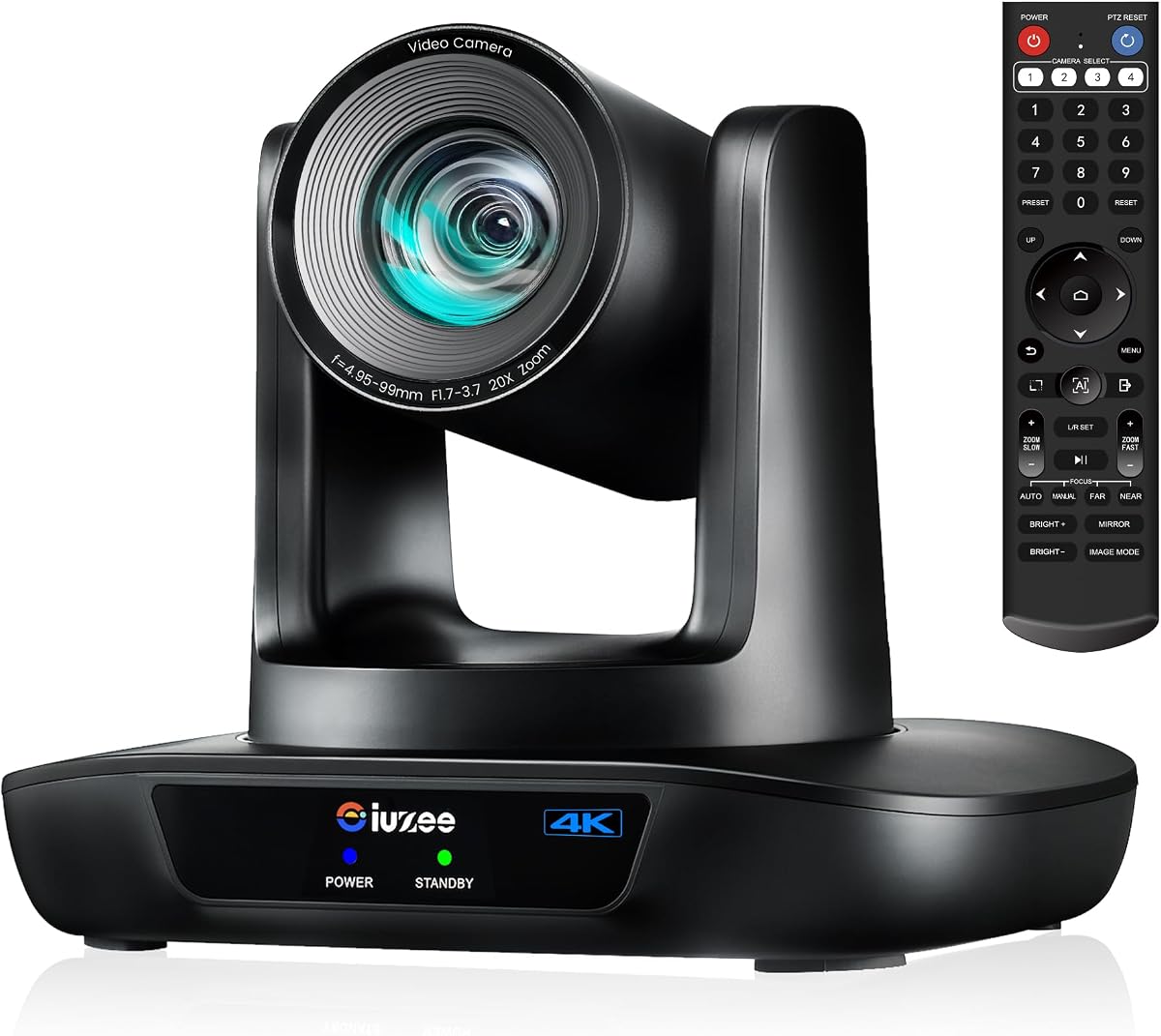
The iuZee 4K AI Auto-Tracking PTZ Camera is the most balanced standalone selection in this guide, combining a 4K UHD sensor with 20X optical zoom and a broad selection of professional outputs. Its supplied rating is 4.7, reflecting a favorable reception among buyers. Rather than focusing on only one production method, it can support USB 3.0 computer capture, HDMI production feeds, and LAN-based streaming through MJPEG, YUY2, H.264, or H.265 encoding.
We may earn a commission when you buy through this link, at no additional cost to you.
Its most attractive feature is the tracking system, which uses facial and human-body recognition with fast response and automatic framing. Presenter Mode is appropriate when one person needs to remain the visual focus, while Auto Framing Mode can adapt more broadly to a presentation area. The listed 2D and 3D noise-reduction processing also shows attention to image clarity in less-than-perfect lighting, an important concern for churches, schools, and evening events.
The connection options make this camera practical for both simpler and more advanced workflows. USB and HDMI enable familiar plug-and-style integration, while LAN, RTMP, RTSP, SRT, and PoE support more flexible network production. PoE is not automatically included as a complete networking solution, so a compatible PoE switch may need to be added. The camera also has no built-in microphone, meaning separate audio capture remains necessary.
This is a strong choice for a producer who wants 4K quality, AI-assisted operation, and professional I/O without buying a complete multi-camera package. It is particularly suited to worship services, classrooms, conferences, weddings, and streamed events. Users wanting preinstalled NDI, broadcast SDI, or a bundled controller may prefer another model, but for a flexible standalone PTZ camera, this offers the most convincing all-around feature set.
AI face and figure recognition can follow a speaker and automatically reframe the shot, reducing the need for constant manual corrections. Presenter Mode suits a principal speaker, while Auto Framing Mode offers greater flexibility for moving participants and presentation areas.
Simultaneous USB 3.0, HDMI, and LAN outputs let the camera feed a computer, local display, and networked production system at once. That versatility supports both classroom streaming and more involved church or event workflows.
We may earn a commission when you buy through this link, at no additional cost to you.
The Tenveo 4K NDI Two-Camera Kit is built for producers who want more than a single isolated webcam. It includes two 20X optical-zoom PTZ cameras with AI humanoid and face tracking, plus a 7-inch LCD joystick controller. Its supplied rating is 4.4, and the complete package is particularly relevant to church services, conferences, education, and live productions where alternate angles and visual monitoring matter.
We may earn a commission when you buy through this link, at no additional cost to you.
The controller is a major differentiator. Its quad-screen display can monitor up to four camera feeds, while the 4D joystick handles pan, tilt, zoom, focus, iris, backlight, presets, PTZ speed, and camera selection. The operator can turn AI tracking on or off, record tracking sessions, and replay them with the specified compatible camera and controller firmware. This provides a more tactile and repeatable way to manage a production than relying exclusively on a web interface.
Both cameras support HDMI, USB 3.0, and IP/NDI output. HDMI and USB can deliver 4K, while the network NDI output is listed at up to 1080P. RTSP, RTMP, ONVIF, GB28181, VISCA over IP, multicast, H.264, H.265, MJPEG, and YUY2 support provide a broad production foundation. AI gesture control adds another hands-free layer, with listed gestures for changing modes and adjusting zoom.
The trade-off is setup complexity and the need for appropriate network infrastructure. The bundle does not list a PoE switch, and NDI production also depends on a sound network design and compatible software such as vMix or OBS. It also lacks a built-in microphone. For teams prepared to manage a proper multi-camera workflow, however, the coordinated cameras, controller, and extensive control features make this kit substantially more complete than a standalone model.
The 7-inch quad-screen controller lets an operator view several feeds and adjust cameras without returning to a software interface. Camera selection, presets, focus, zoom, and tracking can all be managed from one hardware unit.
NDI is useful when production software needs to receive low-latency camera video over the network. The included controller and matching cameras make this bundle a coherent choice for churches and event teams building beyond a one-camera setup.
We may earn a commission when you buy through this link, at no additional cost to you.
The TONGVEO 4K NDI SDI PTZ Camera stands out because it combines several connection standards that are often offered separately. It provides HDMI, USB 3.0, SDI, IP/NDI, and PoE alongside 20X optical zoom and AI tracking. Its supplied rating is 4.5, making it one of the stronger-rated standalone models in the comparison.
We may earn a commission when you buy through this link, at no additional cost to you.
The included NDI license is especially valuable for streamers already working with OBS, vMix, Streamlabs, ProPresenter, Wirecast, or Zoom. HDMI and USB can provide 4K at 30 frames, while IP/NDI output is listed at up to 1080P. That distinction is important: a 4K label applies to the physical HDMI and USB outputs, while network workflows operate at a lower listed resolution.
SDI output makes this model especially relevant to established production environments. The listing describes locking connectors and cable runs of up to 300 feet, as well as compatibility with ATEM Series video switchers. HDMI and SDI can therefore serve different parts of a production chain, while PoE handles power and network data through one Ethernet cable when the required switch is available.
AI tracking supports Presenter Tracking and Auto-Framing modes using facial and body recognition. The stated limitation is important: it tracks one person at a time and is not intended for high-speed motion. That makes it appropriate for a lecturer, pastor, or presenter but less suited to rapidly moving athletes. Overall, this is an excellent match for a production team wanting 4K, NDI, SDI, PoE, and AI tracking in one camera without a bundled joystick or multi-camera kit.
The SDI output offers a familiar professional path into switchers and longer cable runs. It is a major advantage over models limited to HDMI, USB, and IP, particularly for established church and event control rooms.
The included NDI license avoids a separate licensing step for compatible production software. The camera can still function through HDMI or USB, giving teams several routes into the same workflow.
We may earn a commission when you buy through this link, at no additional cost to you.
The Tenveo Three-Camera NDI Production Kit is the most fully integrated multi-camera package in the list. It combines three 20X AI tracking PTZ cameras, a 7-inch quad-screen joystick controller, and an eight-port full-gigabit PoE switch. Its 4.3 rating reflects a different proposition from the standalone cameras: this package is aimed at teams that want a scalable production infrastructure from the outset.
We may earn a commission when you buy through this link, at no additional cost to you.
Three cameras allow a church, school, auditorium, or event team to cover a stage, room, and audience without buying separate control equipment. Every camera supports HDMI, USB 3.0, and LAN, with listed 4K output through HDMI and USB and 1080P IP/NDI output. The included PoE switch addresses a key infrastructure need, allowing the cameras to receive power and network connectivity over one Ethernet connection each.
The same 7-inch controller used in the smaller Tenveo bundle provides quad-screen monitoring and direct control over pan, tilt, zoom, focus, iris, backlight, presets, and speed. It can also toggle AI tracking and record or replay tracking activity with the stated compatible firmware. This makes the package useful for operators who value fast physical adjustments and immediate visual feedback.
Despite those advantages, the package requires more planning, cabling, configuration, and operator training. It also has no built-in microphone, and the network output resolution is lower than the maximum HDMI and USB resolution. It is best for institutional or professional multi-camera work where three angles and centralized control justify the added complexity. A smaller production may be better served by the two-camera bundle or a standalone model.
Multiple angles give producers the ability to alternate between a presenter, a wider stage view, and the audience. This is particularly useful in houses of worship, auditoriums, and educational venues where a single angle cannot serve the entire event.
The bundled eight-port PoE switch is a practical part of the system rather than a minor accessory. It can support cleaner camera installation by carrying network data and power through each camera's Ethernet connection.
We may earn a commission when you buy through this link, at no additional cost to you.
The TONGVEO Conference Room PTZ Camera System is a straightforward choice for live streaming where 1080P at 60 frames is sufficient and USB simplicity matters more than advanced network connectivity. It has a supplied rating of 4.2 and combines a 20X optical zoom with AI tracking, USB 3.0, HDMI, and a 255-preset system.
We may earn a commission when you buy through this link, at no additional cost to you.
The 60-frame output is useful for presenters who move, gesture, or appear on screens with visible motion. Its 20X lens allows the camera to capture distant subjects without relying on digital zoom, while the stated image processing supports stable brightness and accurate color. AI tracking offers single-person tracking and multi-person auto framing, automatically adjusting pan, tilt, and zoom to maintain centering.
Installation should be straightforward. The camera uses plug-and-play USB and HDMI connections and requires no drivers, with listed compatibility for OBS, vMix, Zoom, Microsoft Teams, and YouTube. It supports 350-degree pan and 180-degree tilt, and the included remote makes it easy to save and recall camera positions. The near-silent motor operation is a thoughtful feature in lecture rooms, churches, and offices.
The limitation is its narrower connection strategy. Unlike several other cameras in the guide, there is no listed LAN, RTSP, RTMP, or PoE capability, so it cannot independently act as a networked IP camera. It also tops out at 1080P rather than 4K. For a presenter-focused installation with a computer close by, those limitations are manageable; for multi-camera IP workflows, another model would be more flexible.
The 1080P 60-frame mode gives live viewers smoother movement than a standard 30-frame configuration. That can make a difference for a teacher, preacher, presenter, or panel participant who gestures frequently.
With support for up to 255 stored positions, the camera can move quickly between the stage, lectern, screen, and audience. Ten presets can be managed through the remote, while the wider preset capacity suits advanced control setups.
We may earn a commission when you buy through this link, at no additional cost to you.
The TONGVEO AI 4K PTZ Camera is an appealing choice for a straightforward webcam upgrade that still needs motorized movement and automatic subject tracking. It carries a supplied rating of 4.7 and offers 4K UHD, 10X optical zoom, USB 3.0, HDMI, and AI human recognition in a single camera.
We may earn a commission when you buy through this link, at no additional cost to you.
Its 10X optical zoom is aimed at medium and large rooms, with the listing specifically noting useful capture from approximately 30 to 50 feet. The camera's AI system recognizes a person and can keep a pastor, teacher, or presenter centered as they move. This provides a meaningful upgrade from a fixed laptop webcam without requiring a network specialist to configure IP settings.
USB 3.0 is presented as a genuinely plug-and-play route into Zoom, Microsoft Teams, OBS, and similar software. HDMI can provide a simultaneous feed to a television, projector, or video switcher. Preset positions support fast transitions between speakers, audiences, and presentation areas, while the motorized pan, tilt, and zoom are described as smooth and quiet for professional environments.
The main compromise is reach. A 10X lens is less capable of isolating subjects in a very large auditorium than the 20X and 30X models here. There is also no listed NDI, SDI, PoE, RTSP, or RTMP support. This camera is best for organizations that prioritize 4K clarity, simple USB operation, and dependable tracking in a classroom, meeting room, or moderately sized worship space.
The camera brings 4K output to a setup that can begin with a USB connection to a computer and an HDMI connection to a local display. That makes it approachable for teams without a dedicated network or switcher.
Automatic human recognition keeps a moving speaker within the frame, reducing the need to follow the action manually. The included remote also provides quick access to saved angles for audience and presentation views.
We may earn a commission when you buy through this link, at no additional cost to you.
The PTZ Camera 4K UHD with 20X Optical Zoom is a flexible option for venues that need both strong reach and a choice of local and network connections. Its supplied rating is 4.4, and the listed feature set combines 4K at 30 frames, a 20X lens, USB, HDMI, IP, and PoE.
We may earn a commission when you buy through this link, at no additional cost to you.
Its movement range is particularly notable for a room or stage camera, with 340-degree pan and 120-degree tilt. The stated transmission distance reaches up to 320 feet, or 100 meters, while the 58.7-degree field of view provides a wider view than many telephoto-only cameras. Together, these characteristics make it plausible for churches, worship halls, conference spaces, and educational venues.
The camera supports PoE, RTSP, RTMP, H.264, and H.265, alongside USB 3.0 and HDMI. That allows it to work as a conventional computer webcam, feed local production equipment, or operate as an IP camera. Compatibility is listed across numerous Windows and Mac systems, along with Zoom, Skype, WebEx, Microsoft Teams, GoToMeeting, and BlueJeans. The listing also mentions vMix, OBS, YouTube, and Facebook livestreaming.
What is less clearly developed is AI-assisted tracking. Unlike several leading options in this guide, the supplied information does not prominently describe automatic subject recognition, presenter modes, or auto-framing. That makes manual PTZ operation, presets, or external automation more relevant. For a buyer who prioritizes connectivity, range, and compatibility over intelligent tracking, this model offers a broad and practical foundation.
The 340-degree pan and 120-degree tilt range allow the camera to cover more of a stage or meeting room without moving its mounting position. This reduces the need for multiple cameras when the venue is wide but not exceptionally large.
USB supports direct computer capture, HDMI supports local displays and switchers, and LAN with PoE supports network-based streaming. The choice of workflow can be adapted as the production environment grows.
We may earn a commission when you buy through this link, at no additional cost to you.
The 4K HDMI 20X Tracking PTZ Camera is a well-rounded standalone model with a supplied rating of 4.6. It combines a 1/2.8-inch CMOS sensor, 20X optical zoom, autofocus, AI human tracking, and simultaneous HDMI, USB, and IP output, making it a practical middle ground between a basic conference camera and a fully networked production system.
We may earn a commission when you buy through this link, at no additional cost to you.
Its default HDMI output is listed at 4K, while the output can also be configured for 1080P at 60 frames. A 4K-capable display is required to view the higher HDMI resolution, which is worth considering before installation. The 54-degree distortion-free wide angle gives operators a broad view of meeting rooms, worship stages, and classrooms, while the 20X zoom handles distant subjects.
Control is unusually comprehensive for a single camera. The included IR remote is supplemented by RS232 and RS485 serial ports, and the camera supports VISCA, Pelco-D, and Pelco-P control protocols. Network protocols include ONVIF, SRT, RTSP, and RTMP. Compatibility is listed with Zoom, Skype, Teams, FaceTime, OBS, YouTube, Facebook Messenger, GoToMeeting, Windows, and Mac systems.
The tracking feature uses monocular human recognition, making it appropriate for following a presenter rather than tracking several people independently. The camera can be suspended, wall-mounted, or placed on a tripod, and the package includes the relevant mount and cabling. It is a strong choice for integrators and institutions that already use serial control systems or want more control options than a basic remote provides.
IR, RS232, RS485, VISCA, and Pelco control options let the camera integrate with existing room systems. This is valuable where an operator or automation system needs more precise commands than a consumer remote can offer.
HDMI, USB 3.0, and IP streams can operate simultaneously, allowing the camera to serve local viewing, computer capture, and network streaming. The camera remains adaptable as production requirements become more sophisticated.
We may earn a commission when you buy through this link, at no additional cost to you.
The Prisual 5th Gen AI Auto Tracking PTZ Camera is the premium selection because it combines the longest optical zoom in the guide with a professional broadcast connection set. Its supplied rating is 4.7, and the 30X lens is designed to bring distant speakers, performers, and stage details into clear view in large churches, auditoriums, conference halls, and stages.
We may earn a commission when you buy through this link, at no additional cost to you.
Its maximum stated output is Full HD at 60 frames, with selectable 1080p, 1080i, and 720p broadcast formats. That differs from the 4K HDMI and USB models here, but the lower resolution is paired with extensive integration options. The camera can simultaneously output HDMI, 3G-SDI, USB 3.0, and LAN, allowing it to participate in conventional production chains rather than relying on a single workflow.
The tracking system includes Presenter, Zone, and Auto Frame modes, along with an adjustable close-up ratio and Anti-Lost Lock behavior. The latter can maintain a shot or return to a preset when the subject is lost, useful in venues where a presenter may move behind an obstruction. PoE carries power and network data through a single Ethernet connection, simplifying permanent installations.
Serial and network control support is extensive, including RS232, RS485, VISCA, VISCA over IP, Pelco-D, RTSP, RTMP, SRT, ONVIF, H.264, and H.265. A free NDI upgrade is available with a valid order ID, although that upgrade should be confirmed during setup. For buyers who prioritize reach, broadcast formats, reliable outputs, and institutional support over 4K, this is the most specialized and premium choice.
A 30X optical zoom gives this camera substantially more reach than the 10X and 20X models in the guide. It is well suited to isolating a speaker on a deep stage or across a large auditorium without digital cropping.
Simultaneous HDMI, 3G-SDI, USB, and LAN outputs allow this camera to fit established switching, recording, streaming, and monitoring systems. The extensive control protocols also support integration with professional room infrastructure.
We may earn a commission when you buy through this link, at no additional cost to you.
The Tenveo HDMI/USB3.0/LAN(PoE) PTZ Camera is a capable 1080p60 model whose distinguishing feature is AI gesture control. It receives a supplied rating of 4.3 and combines a 20X optical zoom, face and body tracking, automatic framing, USB, HDMI, LAN, and PoE in a standalone camera.
We may earn a commission when you buy through this link, at no additional cost to you.
The gesture system can toggle AI mode, enter or exit Presenter Mode, zoom in or out, and lock or unlock gesture control with the listed hand signals. The stated effective range is up to five to eight meters, provided the user remains at least 30 centimeters from the camera and faces it directly. These features can reduce reliance on the remote during presentations or live services.
Video output reaches 1080P at 60 frames, using a 1/2.8-inch CMOS sensor with 2.07 megapixels and advanced ISP processing. Simultaneous USB, HDMI, and IP streams offer flexibility, while RTSP, RTMP, and PoE support networked workflows. Compatibility is listed with Zoom, YouTube, Facebook Messenger, Teams, FaceTime, Google Hangouts, OBS, Google Meet, Windows, macOS, Linux, and Android systems.
Movement coverage is also strong, with 350-degree horizontal and 180-degree vertical rotation. The remote supports 10 presets, while RS232 and RS485 interfaces can access up to 255. As with the other Tenveo models, there is no built-in microphone, and the maximum resolution is Full HD. This camera is well suited to presenters who value hands-free operation and network flexibility without needing 4K or SDI.
Gesture control offers a quick way to switch tracking behavior or adjust the shot without approaching the camera. It is especially useful for a presenter who must remain visible and cannot easily operate a handheld remote.
The long list of listed conferencing, streaming, and operating-system compatibility makes this camera adaptable to mixed production environments. USB offers a familiar direct path, while LAN and PoE provide additional options for permanent installations.
We may earn a commission when you buy through this link, at no additional cost to you.
The most useful PTZ camera is the one whose resolution, tracking behavior, outputs, controls, and installation requirements align with the actual production. Reviewing room size, software, network design, operator skill, and camera movement before shopping prevents an otherwise capable camera from becoming an awkward part of the workflow.
Resolution determines how much fine detail the camera can deliver, while frame rate affects how smoothly movement appears. The 4K models in this guide provide 4K at 30 frames through HDMI or USB, whereas several other cameras focus on 1080P at 60 frames. Neither is universally superior: 4K benefits detailed views and large displays, while 60-frame Full HD can provide smoother motion and may be easier for a streaming platform or production system to handle.
Choose based on the final output, not just the camera label. Check whether the streaming service accepts 4K, whether the monitor or capture system supports it, and whether the network workflow needs a lower resolution. In every case, confirm which output carries the maximum resolution.
Optical zoom determines how tightly a camera can isolate a distant subject without the loss of detail associated with digital enlargement. Models here range from 10X to 30X. The 10X option is generally more appropriate for medium rooms, 20X provides a useful balance for many churches and venues, and 30X offers greater reach for deep stages, large auditoriums, and long halls.
Measure the distance from the camera position to the subject and consider the width of the area that must be covered. A longer lens also makes framing more sensitive to placement, so the camera must be mounted steadily and pointed accurately.
AI tracking can keep a presenter centered, but the implementation matters. Presenter Mode is suited to one principal speaker, while Auto Framing or multi-person framing can adapt to small groups. Some models can reacquire a subject after temporary obstruction, and the TONGVEO NDI model explicitly tracks one person at a time and is not intended for high-speed motion.
Look for the modes your event actually requires and test them with realistic movement. A teacher walking normally is a different challenge from an athlete sprinting or several people crossing a stage simultaneously.
USB 3.0 and HDMI are the most familiar routes into a live workflow. USB generally connects directly to a computer for applications such as OBS or Zoom, while HDMI feeds local displays, recorders, and switchers. IP, RTSP, RTMP, SRT, and NDI support more advanced network production, while SDI is valuable for broadcast switchers and longer professional runs.
Match the output to the software and hardware already in use. A camera can support several standards, but the maximum resolution may differ between them. Do not assume that a 4K HDMI output also means 4K NDI or IP streaming.
A remote control is sufficient for many single-camera installations, but multi-camera events benefit from a joystick controller. The Tenveo bundles provide a 7-inch quad-screen display, variable-speed joystick, camera selection, and direct access to focus, presets, backlight, and tracking. VISCA, RS232, RS485, and Pelco protocols matter when the camera must integrate with a control room or automated system.
Consider who will operate the equipment. A simple IR remote is easier for occasional use, while a production controller provides faster feedback and clearer multi-camera management. Gesture control can also help presenters adjust a camera without leaving the shot.
Power over Ethernet can reduce cable clutter by carrying power and data over a network connection. It is especially useful in permanent installations with cameras mounted on walls or ceilings. However, the network switch and ports must support the required PoE standard, and some listings require a compatible PoE switch that is not included.
Other wired options remain important. USB and HDMI have recommended distance limits in the supplied specifications, while LAN and SDI can better suit longer runs. Confirm the planned cable route, mounting position, available outlets, and distance from the production computer.
A camera can have excellent hardware and still be awkward to use if it is not supported cleanly by the production platform. Many models here list OBS, vMix, Zoom, Teams, YouTube, Facebook, Wirecast, ProPresenter, and other common services. NDI support is specifically listed for the Tenveo and TONGVEO NDI models, while SDI compatibility is emphasized for ATEM Series switchers on the TONGVEO SDI camera.
Confirm the software version, operating system, capture method, and streaming platform before ordering. The listed compatibility indicates intended support, but installation details such as drivers, NDI licensing, and firmware should still be checked.
Presets make repeated live operation much faster by allowing an operator to return to known camera angles. Depending on the model, the remote may offer a smaller set while serial control exposes up to 255 positions. Wall, ceiling, tripod, desktop, and monitor mounting options determine whether the camera suits a permanent venue or a temporary production.
Choose a mount that keeps the lens stable and leaves room for service access. Quiet motor operation, preset recall, and included mounting hardware contribute more to daily usability than an extra specification that the production will never use.
Begin by planning the camera position, subject distance, required output, and production software before mounting or connecting anything. Confirm whether the workflow uses USB, HDMI, IP, NDI, SDI, or a combination of them. For PoE installations, verify that the switch and ports support the camera's PoE requirement, and assign a stable network address when the camera will be accessed through LAN or a browser.
After connecting, test autofocus, framing, tracking, presets, and the complete signal path at the intended resolution and frame rate. Run a rehearsal with the actual presenter, lighting, and software. Save separate presenter, audience, stage, and wide shots, then verify that AI tracking reacquires the subject after a temporary obstruction and that no movement exceeds the camera's intended tracking use.
For maintenance, keep the lens and vents free from dust, use a dry soft cloth, and avoid pointing the camera at a very bright light without checking its exposure behavior. Mount the unit securely, leave room around moving parts, and route cables so they cannot be pulled or pinched. Update firmware when advised, protect the network login, and periodically confirm that the camera, controller, and software remain on compatible versions.
A PTZ camera is better when a production needs motorized movement, long-distance framing, presets, or automatic tracking of a presenter. A fixed webcam is usually simpler and can be sufficient for a stationary desk-based stream. The best choice depends on room size, movement, operator availability, and the number of outputs required.
A 20X optical zoom lets the camera magnify a distant subject using the lens rather than digital enlargement. This generally preserves more detail and produces a tighter view of a speaker on a stage or at the back of a room. Actual framing still depends on mounting distance, available light, and the selected output resolution.
Many of the cameras listed here support OBS and are designed for streaming to YouTube. USB cameras can usually be selected directly as a video source, while IP, RTSP, RTMP, SRT, and NDI models require appropriate source or output configuration. Always verify the specific operating system and software version before installation.
NDI transmits video and control over an IP network and is convenient for software-based production. SDI is a dedicated professional video connection commonly used with switchers, recorders, and long cable runs. The TONGVEO 4K NDI SDI camera supports both, allowing it to participate in network and traditional broadcast workflows.
Only if you choose to power and connect the camera through PoE. Several models also include a conventional power adapter, allowing USB or HDMI operation without PoE. If using PoE, the network switch must provide compatible PoE on the port connected to the camera.
Most models in this guide include some form of AI human tracking, commonly with Presenter Mode and Auto Framing. Tracking performance varies by model, and one camera generally follows one principal subject or presentation area at a time. The TONGVEO NDI model specifically notes that it tracks one person and is not intended for high-speed motion.
Choose 4K when fine detail, large displays, cropping, or high-resolution recording are important. Choose 1080P 60FPS when smoother motion is more valuable and the platform or production chain is optimized for Full HD. Some cameras offer 4K through HDMI or USB but limit NDI or IP output to 1080P, so compare the resolution on the connection you intend to use.
The supplied information explicitly states that the Tenveo models have no built-in microphone, and none of the listings describes an integrated microphone as a feature. Production audio should therefore be captured separately through a dedicated microphone, mixer, or audio interface. This also allows operators to tailor the sound to the venue and number of speakers.
The iuZee 4K AI Auto-Tracking PTZ Camera is the strongest overall standalone choice because it combines 4K, 20X optical zoom, useful AI modes, and simultaneous USB, HDMI, LAN, and PoE outputs. The TONGVEO 1080P 60FPS model is a straightforward option for smooth, USB-based streaming, while the Prisual 30X model is the premium selection for large venues, broadcast integrations, and exceptional optical reach.
For multi-camera work, the Tenveo kits add substantial operational value through matching cameras, quad-screen controllers, and network infrastructure. The two-camera bundle is a more focused production system, while the three-camera kit includes an eight-port PoE switch. The TONGVEO NDI SDI camera sits between a standalone unit and a full bundle, providing professional outputs without multiple cameras.
Before ordering, verify the exact resolution of each output, the tracking mode appropriate for your presenter, the software and network requirements, and the availability of any required PoE switch or controller. Ratings and specifications can help narrow the field, but current listing details, compatibility, availability, and prices should be checked on the product page before making the final purchasing decision.