
ASUS ROG Strix XG27ACDNG
4.5Editor score
QHD QD-OLED display
360Hz refresh rate
0.03ms response time
A monitor can materially change how a Valorant match feels, particularly when the action shifts rapidly between distant enemies, smoke screens, and bright ability effects. The strongest choices combine a high refresh rate, low response time, adaptive synchronization, accurate color, and an image that remains easy to read during fast movement.
This guide compares ten gaming monitors using the specifications supplied for each model, including panel type, resolution, refresh rate, response time, synchronization support, HDR capability, color coverage, stand adjustment, and connectivity. The list includes fast IPS and TN displays, curved models, and several OLED options for different competitive priorities and budgets.
Each review explains where a monitor stands out and where trade-offs may matter. The three leading recommendations cover an all-around high-refresh OLED, a maximum-speed premium OLED, and a well-regarded QHD OLED alternative, while the remaining entries show how lower-resolution, faster, curved, or more conventional designs can still serve Valorant players well. Prices and offers change.
4.5Editor score

4.6Editor score

4.6Editor score
As an Amazon Associate we earn from qualifying purchases.
The comparison below places all ten monitors on the factors that most affect competitive Valorant, including motion speed, resolution, adaptive synchronization, image technology, and practical adjustment options.




The ASUS ROG XG27AQDMGR is a 26.5-inch glossy WOLED gaming monitor rated 4.6 out of 5. It combines a 2560×1440 resolution, 240Hz refresh rate, and 0.03ms gray-to-gray response time, creating a specification set well suited to fast competitive play. For Valorant, the QHD panel preserves more spatial detail than a conventional Full HD screen without moving into the demands of 4K.
We may earn a commission when you buy through this link, at no additional cost to you.
Its principal strength is motion clarity. The 0.03ms response specification allows rapidly moving silhouettes, weapon outlines, and HUD elements to appear sharply defined, while 240Hz gives the display plenty of headroom for high-frame-rate matches. VESA DisplayHDR 400 True Black compliance, 99% DCI-P3 coverage, true 10-bit color, and a Delta E below 2 support both vivid ability effects and accurately differentiated map details.
The glossy surface is the main compromise. It can make the picture feel vivid and premium, but reflections may be distracting in a bright room or when the monitor faces a window. ASUS addresses long-term OLED concerns with OLED Care Pro, a Neo Proximity Sensor that switches the display to black when the user leaves, and a three-year warranty that includes burn-in coverage. Those measures make the technology more practical for regular gaming.
This is the strongest recommendation for a player who wants a single display for competitive Valorant, detailed character models, and visually rich games such as Valorant. It does not reach the maximum refresh rate of the ASUS ROG Strix XG27ACDNG, but it balances speed, resolution, image quality, and protection features particularly well. The ROG XG27AQDMGR is the monitor most buyers in this guide should examine first.
A 240Hz refresh rate and 0.03ms response time make this display well suited to rapid strafing, peeking around corners, and tracking distant opponents. The combination helps preserve clean outlines without the softer appearance associated with some slower gaming panels.
The 2560×1440 panel offers noticeably more room than Full HD for weapon models, minimap details, and distant environmental elements. That additional information can help players identify subtle movement while preserving a manageable pixel density for competitive settings.
We may earn a commission when you buy through this link, at no additional cost to you.
The ASUS TUF VG249QML5A is a compact 23.8-inch Fast IPS monitor rated 4.4 out of 5. Its 240Hz refresh rate and 0.3ms minimum response time place it firmly among the quickest conventional gaming displays in the list. The Full HD resolution makes it a practical option for players who value speed, familiar scaling, and a smaller desk footprint.
We may earn a commission when you buy through this link, at no additional cost to you.
Adaptive synchronization is unusually flexible for this category. FreeSync Premium and G-SYNC compatibility support smooth frame delivery with compatible AMD and NVIDIA systems, while Extreme Low Motion Blur Sync can operate with variable refresh rate to reduce ghosting. The 99% sRGB gamut provides clear, accurate color for Valorant without requiring the wider gamut associated with premium QD-OLED models.
The resolution is the key limitation. At 1920×1080, characters and small environmental details occupy fewer pixels than they do on a QHD model, so competitive players may need to rely on visual cues more heavily. It also lacks the deep blacks and exceptional contrast of OLED. Nevertheless, a Fast IPS panel generally offers a more conventional, less reflective viewing surface than the glossy OLED choices here.
The TUF VG249QML5A is a strong fit for competitive players on a smaller desk, a dual-monitor setup, or a system where Full HD is the preferred resolution. Its height-adjustable stand, mouse-based DisplayWidget Center controls, and three-year warranty make it a practical all-around esports display. It is not the most detailed option, but its speed and synchronization support make it a convincing competitive choice.
At 23.8 inches, the monitor can sit closer to the player without overwhelming a compact desk. That arrangement can make it easier to scan the full screen quickly and build a clean multi-monitor setup where every display is in view.
Support for both FreeSync Premium and G-SYNC compatibility broadens its appeal across different graphics-card ecosystems. ELMB Sync adds another route to cleaner motion when the computer and display are operating within their supported ranges.
We may earn a commission when you buy through this link, at no additional cost to you.
The ASUS ROG Strix XG27ACDNG is a 26.5-inch QD-OLED monitor rated 4.5 out of 5. Its defining combination is a 360Hz refresh rate, 2560×1440 resolution, and 0.03ms response time. For a player who wants maximum motion headroom, this is the most performance-focused recommendation in the guide.
We may earn a commission when you buy through this link, at no additional cost to you.
The QD-OLED panel also delivers the visual characteristics competitive players often want: near-instant pixel response, high contrast, true 10-bit color, 99% DCI-P3 coverage, and DisplayHDR 400 True Black compliance. G-SYNC Compatible support helps synchronize the display with compatible NVIDIA systems, reducing tearing and keeping frame delivery as consistent as possible.
Its sophisticated thermal design and ASUS OLED Care+ functions address the realities of operating a high-refresh OLED. A custom heatsink and advanced airflow support sustained performance, while OLED anti-flicker technology is designed to reduce visible flicker during refresh-rate changes. The included three-year warranty provides burn-in coverage, which helps reduce the long-term concern associated with static game menus and HUD elements.
The XG27ACDNG is ideal for enthusiasts who play Valorant alongside other fast-paced games, own capable hardware, and want a monitor that will not need to be upgraded when frame-rate targets rise. Its 360Hz capability is more than many systems will regularly use, so the practical benefit over a 240Hz display depends on the player's hardware and competitive ambitions. For those who want the highest motion specification, however, it is the clear premium choice.
A 360Hz refresh rate can show more frames during the same interval than a lower-refresh display, reducing the amount of motion information skipped by the viewer. The benefit is most visible in games and settings where the PC can consistently deliver a very high frame rate.
The custom heatsink, airflow design, OLED Care+, anti-flicker technology, and burn-in warranty work together to support long-term use. These protections are especially relevant for a monitor expected to remain on a desk for years of gaming.
We may earn a commission when you buy through this link, at no additional cost to you.
The Samsung Odyssey G55C is a 32-inch 1000R curved gaming monitor rated 4.4 out of 5. It offers a 2560×1440 resolution, 165Hz refresh rate, and 1ms MPRT response. The specification is less aggressive than the fastest models in this list, but its large curved screen gives it a distinct role for players who prefer an immersive field of view.
We may earn a commission when you buy through this link, at no additional cost to you.
The 1000R curvature brings the edges of the display closer to the viewer, which can make the game world feel more encompassing. QHD resolution gives Valorant players more usable detail than Full HD, while the 165Hz refresh rate is adequate for a smooth competitive experience when supported by the connected PC. AMD Radeon FreeSync helps reduce tearing by synchronizing the display and graphics card.
HDR10 support adds brighter highlights and more nuanced shadows, while Eye Saver Mode and reduced screen flicker are intended to improve comfort during extended sessions. Its main competitive drawback is speed: 165Hz trails the 240Hz, 260Hz, 300Hz, 360Hz, and 400Hz alternatives. The larger size also means the display requires more desk space and may pull the viewer closer to certain UI elements.
Choose the Odyssey G55C if immersion, screen size, and a moderate refresh rate matter more than pursuing the highest possible frame rate. It is also a practical selection for players who want one larger screen for Valorant and everyday entertainment. Competitive players running very high frame rates will generally find a faster 24-inch or 27-inch option more responsive.
The 1000R curve is subtle enough for office-style use while still giving the gaming experience a more enveloping presentation. Players who like wide peripheral visibility may find this geometry more satisfying than a flat panel.
A 32-inch QHD display can show useful peripheral information and maintain more detail than a standard Full HD setup. The larger format may also be easier on the eyes for players who prefer not to rely on very small interface elements.
We may earn a commission when you buy through this link, at no additional cost to you.
The Samsung Odyssey OLED G6, identified as the G61SH, is a 27-inch QD-OLED monitor with a 4.7-out-of-5 rating, the highest among the listed products. It combines QHD resolution with a 240Hz refresh rate and 0.03ms response time, creating one of the most balanced specifications for competitive Valorant.
We may earn a commission when you buy through this link, at no additional cost to you.
Its 240Hz rate offers ample room for fast movement, while the 0.03ms response helps maintain clean edges during sudden direction changes. AMD FreeSync Premium is included to reduce choppiness, screen lag, and image tearing with compatible graphics hardware. The monitor also provides HDR10, high brightness, and a wide range of colors, allowing map lighting and ability effects to appear vivid and distinct.
One thoughtful detail is the Glare Free technology, which is designed to limit reflections from external light sources. That makes the OLED easier to use in a bright room than a highly reflective alternative. Color accuracy is another strength: the Pantone Validated screen reproduces more than 2,100 colors and more than 110 skin-tone shades. OLED Safeguard thermal modulation actively helps protect the panel from burn-in.
The G6 is an excellent recommendation for a player who wants the speed and contrast of OLED without moving to a 360Hz specification. Its 27-inch size, QHD resolution, and 240Hz refresh rate form a versatile combination for both Valorant and general entertainment. The height-adjustable stand pivots, tilts, and swivels, helping users place the display comfortably. It is arguably the most balanced recommendation in the entire guide.
The combination of 240Hz, 0.03ms response, QHD resolution, and adaptive synchronization covers the essential needs of a competitive Valorant display. It does not maximize one specification at the expense of everything else.
Glare Free technology is a meaningful advantage for a glossy OLED panel. It can reduce distracting reflections from windows, room lights, or pale walls, helping the screen remain clear without asking players to sit in a completely dark environment.
We may earn a commission when you buy through this link, at no additional cost to you.
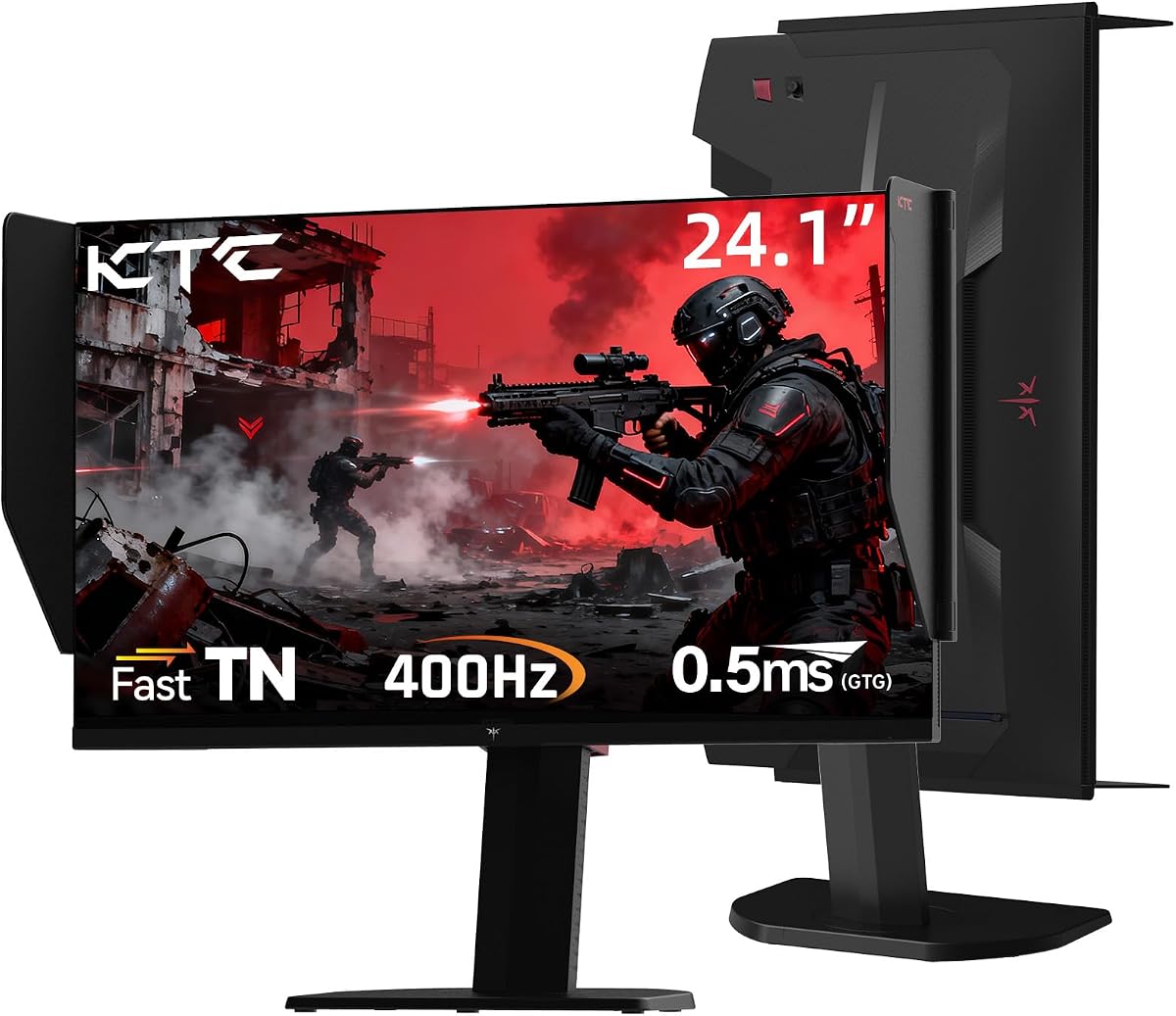
The KTC 25M1 is a 24.1-inch Fast TN gaming monitor rated 4.3 out of 5. Its defining feature is a 400Hz refresh rate, the highest in this guide, paired with 0.5ms GTG response and adaptive synchronization. The product information specifically identifies CS2, Valorant, and Overwatch as suitable competitive titles.
We may earn a commission when you buy through this link, at no additional cost to you.
A 400Hz display can reveal substantially more frames per second than a conventional 165Hz or 240Hz screen, provided the PC can generate a matching frame rate. For Valorant, that creates a strong foundation for reducing visual information loss during rapid movement. The 24.1-inch Full HD size also keeps interface elements compact and may make it easier for a player to see every corner without moving their eyes as much.
The panel trades some visual refinement for speed. Fast TN generally provides narrower viewing angles and less nuanced color than IPS or QD-OLED, which can matter on a large monitor viewed from an angle. Its shielding hood, however, helps absorb light and reduce frame reflections. The included external controller offers a convenient way to switch gaming modes, and DisplayPort 1.4 supports the full 400Hz rate.
The KTC 25M1 is built for the most speed-focused competitive setup. It is a compelling choice when frame rate, compact dimensions, and minimal motion blur matter more than QHD detail or premium color reproduction. Players should confirm that their graphics card and system can sustain the intended frame rate; otherwise, the monitor's headline refresh rate will not be fully used. For dedicated esports competition, it is the guide's maximum-speed option.
At 400Hz, the monitor can show up to four times as many refresh cycles per second as a 100Hz display. The practical gain becomes most apparent when the PC produces hundreds of frames per second during simple scenes or favorable fights.
The 24.1-inch size, shielding hood, and extensive ergonomic adjustments support a dedicated competitive setup. Height, tilt, swivel, pivot, and VESA mounting options make it easier to align the screen precisely with the player's position.
We may earn a commission when you buy through this link, at no additional cost to you.
The LG UltraGear 27GX704A-B is a 27-inch glossy OLED gaming monitor rated 4.5 out of 5. It pairs a 2560×1440 panel with a 240Hz refresh rate and 0.03ms response time, then adds broad synchronization, modern ports, HDR support, and extensive stand adjustment. That makes it a particularly complete general-purpose gaming display.
We may earn a commission when you buy through this link, at no additional cost to you.
Picture quality is one of its strongest attributes. The OLED reaches 275 nits standard brightness and peaks at 1,300 nits, with a 1.5M:1 contrast ratio and up to 98.5% DCI-P3 coverage. VESA DisplayHDR True Black 400 certification supports bright highlights and detailed shadows, which can make enemy silhouettes and environmental edges stand out in Valorant maps.
Connectivity is unusually thorough for a PC-focused gaming monitor. Dual HDMI 2.1, DisplayPort 1.4, USB 3.2 upstream, two USB 3.2 downstream ports, and a headphone jack cover both high-end PC and console connections. The monitor supports NVIDIA G-SYNC Compatible and AMD FreeSync Premium Pro, while automatic pixel-care cycles and adjustable OLED protection features help manage long-term image retention.
The LG is a strong recommendation for someone who wants a single monitor to handle Valorant, HDR games, and general desktop work. Its glossy finish may be distracting in a bright environment, and its headline brightness is only attainable in small highlights rather than across the full screen. Still, the combination of speed, color, contrast, connectivity, and adjustment options makes it one of the most complete picks in the list.
OLED contrast can make dark corners, bright explosions, and character outlines visually distinct. In a shooter, this strong tonal separation can help important elements register more clearly against a complex map.
Multiple HDMI and USB connections simplify a setup that includes a console, streaming accessory, keyboard, mouse, or other peripherals. The range makes the monitor easier to integrate into a broader gaming workstation.
We may earn a commission when you buy through this link, at no additional cost to you.
The AOC Q27GAZD is a 27-inch QD-OLED gaming monitor rated 4.4 out of 5. Its core competitive specifications are a 2560×1440 resolution, 240Hz refresh rate, and 0.03ms GtG response time. These characteristics place it alongside the strongest conventional high-refresh options without moving to an extreme 360Hz or 400Hz configuration.
We may earn a commission when you buy through this link, at no additional cost to you.
The QD-OLED panel provides 147.6% sRGB and 110.2% DCI-P3 gamut coverage, giving Valorant a colorful and high-contrast presentation. HDR400 True Black certification adds deeper blacks and brighter highlights, helping dark map areas retain detail while luminous effects stand out. Adaptive-Sync compatibility supports smoother frame presentation and helps reduce tearing and stuttering.
The 0.03ms response time is especially useful in fast exchanges, where it minimizes ghosting as a player strafes, peeks, or tracks an opponent crossing the screen. At the same time, 240Hz leaves more processing headroom than the 165Hz Odyssey G55C, while QHD preserves more information than the Full HD ASUS and KTC alternatives.
The AOC Q27GAZD is a good fit for a player attracted to vivid OLED imagery who does not need the absolute maximum refresh rate. Its supplied specifications are less extensive than those of some premium rivals, and buyers should verify stand adjustment and port details for their setup. Within the core gaming package, however, it delivers a strong mix of speed, color, contrast, and competitive resolution.
The wide color coverage is useful for separating agents, projectiles, and environmental materials. In practical terms, it can make map elements easier to distinguish beyond what a basic office monitor can display.
The combination of 240Hz and 0.03ms GtG response gives the display a strong foundation for rapid movement. Adaptive synchronization then helps keep the image fluid when frame timing varies.
We may earn a commission when you buy through this link, at no additional cost to you.
The AOC Q27G41ZE is a 27-inch IPS gaming monitor rated 4.6 out of 5. It combines a 2560×1440 resolution with a 240Hz native refresh rate that can be overclocked to 260Hz, a 0.3ms MPRT response time, and adaptive synchronization. Those specifications make it a particularly compelling value-oriented choice for Valorant.
We may earn a commission when you buy through this link, at no additional cost to you.
QHD resolution is the standout feature at this level. It provides more space for minimap information, weapon icons, and distant map details than a Full HD gaming display, while the fast refresh rate handles rapid movement. DisplayPort can deliver the 260Hz overclocked setting, giving owners a modest speed advantage when their system and graphics application support it.
The monitor also includes Shadow Control, Game Mode presets, and a graphical on-screen display for tuning the image. Its 300-nit brightness and 1000:1 contrast ratio produce a conventional but clear gaming picture. A 1.4:1-style specification is not claimed; instead, the supplied data confirms wide-angle IPS presentation, adaptive sync, one DisplayPort 1.4 connection, and two HDMI 2.0 ports.
The Q27G41ZE is the best value-oriented recommendation here for a player who prioritizes QHD detail and high refresh rate without moving to OLED. Its limitation is that 260Hz is an overclocked figure rather than the standard 240Hz mode, and the supplied feature set is less extensive than some premium alternatives. Even so, it delivers the core qualities competitive players seek at a notably practical configuration.
The conventional IPS panel avoids the reflection-management and image-retention considerations that come with OLED. It is a straightforward option for a player who wants sharp QHD output and a high refresh rate rather than a premium panel technology.
Shadow Control can reveal information in dark areas, while Game Mode presets reduce the need for extensive manual adjustment. A graphical OSD makes these controls easier to navigate during setup.
We may earn a commission when you buy through this link, at no additional cost to you.
The ASUS TUF VG27AQM5A is a 27-inch Fast IPS gaming monitor rated 4.4 out of 5. It offers a 2560×1440 resolution, 300Hz refresh rate, and 0.3ms minimum GTG response time. The result is a particularly competitive specification set that prioritizes both motion speed and visual detail.
We may earn a commission when you buy through this link, at no additional cost to you.
At 300Hz, the display has more than enough capability for extremely high frame rates, while Fast IPS technology seeks to keep transitions clean and sharp. Extreme Low Motion Blur Sync can work with variable refresh rate to reduce ghosting and tearing. Shadow Boost is another useful competitive feature, brightening dark areas to improve visibility without overexposing already bright sections.
The 95% DCI-P3 gamut exceeds basic sRGB coverage and supports vibrant color, though it does not match the wider gamut or contrast of the OLED options in this guide. Integrated speakers are included for convenient everyday audio, and DisplayWidget Center enables mouse-based adjustment of settings. A three-year manufacturer warranty adds support for a display expected to remain in a competitive setup for years.
The VG27AQM5A is a compelling alternative for players who want a high-refresh IPS panel instead of an OLED. It falls short of the KTC 25M1's 400Hz maximum and the ROG Strix's 360Hz, but it offers a 27-inch QHD screen that is easier to position and read than a smaller or more specialized esports display. It is especially suitable for a PC capable of driving high frame rates.
QHD provides more readable information than Full HD, while 300Hz supports very smooth motion. The combination suits players who want competitive precision without switching to a more reflective OLED panel.
Shadow Boost can make dim corridors and tucked-away opponents easier to examine by lifting dark detail. It should be adjusted carefully so that brighter areas do not lose definition while the image remains comfortable.
We may earn a commission when you buy through this link, at no additional cost to you.
The right Valorant monitor depends on how you play, what your computer can output, and how much value you place on maximum speed, detail, image quality, and desk-friendly dimensions. The following factors are more useful than any single headline specification.
Refresh rate determines how many times the display redraws each second, and it should be matched as closely as possible to the frame rate your computer can consistently produce. A 240Hz monitor is an excellent competitive target, a 300Hz model offers additional headroom for demanding matches, and 360Hz or 400Hz designs are most useful when a powerful system can maintain those frame rates. A high-rated monitor cannot create additional frames, so CPU and graphics-card performance remain essential.
Prioritize a refresh rate you can sustain, not simply the largest number printed on the box. Stable frame delivery often feels better than an extreme refresh rate that the system reaches only in simple situations.
Full HD at 1920×1080 is straightforward to drive and remains popular for competitive shooters. QHD at 2560×1440 provides finer detail, more visible map information, and a more natural desktop experience, but it demands more from the graphics card. In Valorant, the extra resolution can make small interface elements and distant environmental details easier to inspect. A larger monitor can further improve peripheral awareness.
Choose Full HD when speed, a small display, and strong frame rates are the priority. Choose QHD when detail, comfort, and general-purpose versatility matter without requiring the processing power of 4K.
Fast response times help characters and weapon outlines remain distinct during rapid movement. OLED models provide exceptionally low stated response times, while the Fast IPS and TN options in this guide reach 0.3ms minimum GTG or 0.5ms GTG. Motion blur reduction can make movement look cleaner, but it should be evaluated together with adaptive synchronization because aggressive blur reduction does not fix inconsistent frame timing.
Look for a monitor that combines a low response specification with stable frame delivery. A smooth, readable enemy outline is more useful than a fast theoretical response that is undermined by stutter or tearing.
Adaptive synchronization keeps the display refresh timing coordinated with the graphics output, helping reduce tearing, stuttering, and choppiness. The products here include combinations of G-SYNC compatibility, FreeSync Premium, FreeSync Premium Pro, and general Adaptive-Sync support. Your choice should work with the graphics card you own or plan to buy, and it should be activated through the correct game or driver setting.
Prioritize broad support when the GPU may change, but verify the monitor and graphics card in your actual setup. Synchronization works best when the game honors the relevant feature and the system can maintain a frame rate within the supported range.
OLED delivers near-instant response, deep blacks, high contrast, and rich color, making it a compelling choice for competitive shooters and immersive games. QD-OLED adds a quantum-dot layer for broad color coverage, while glossy finishes can produce vivid images but may reflect room lighting. Fast IPS provides a conventional, versatile alternative with good viewing angles and less concern about reflection. Fast TN prioritizes speed and compact competitive use but can offer narrower viewing angles and less refined color.
Choose OLED for the strongest picture quality and motion performance, IPS for a balanced, practical setup, or TN for maximum-speed esports priorities. Consider the room, viewing position, and willingness to manage panel care before selecting OLED.
HDR adds brighter highlights, more nuanced shadows, and stronger overall contrast, while color-gamut figures indicate how much of a defined color space the display can reproduce. Valorant is not the only reason to consider these features: a monitor with good color and contrast can also improve maps, menus, and other games. The OLED choices here cover approximately 99% DCI-P3 or more, while some high-refresh IPS models provide more modest wide-gamut coverage.
Treat the headline gamut number as one part of the picture rather than a complete quality measure. HDR certification, calibration, brightness, viewing environment, and panel behavior all influence the final result.
Height adjustment, tilt, swivel, pivot, VESA mounting, and a compact footprint can make a large difference during long sessions. A 24-inch monitor is often easier to place directly in a player's line of sight, while a 32-inch curved display can create more peripheral immersion but requires additional desk width. Glossy screens are best positioned to minimize direct reflections, and a monitor with a shielding hood can be helpful in bright environments.
Measure the available desk area and compare it with the monitor's stand and screen dimensions before buying. A technically strong monitor is less enjoyable if it forces an awkward viewing angle or crowds a keyboard.
DisplayPort is essential for the highest refresh rates on many gaming monitors, while modern HDMI and USB connections can simplify console or peripheral setups. OLED buyers should look for panel-protection tools, burn-in coverage, and a suitable warranty. Fast IPS and TN products may not have the same burn-in concern, but warranty length and reliable control software remain useful. Confirm the exact port versions and supported input modes before installation.
A monitor with the right connections and protection features is easier to integrate and maintain. These details often matter more in daily use than a small difference in an advertised color-gamut figure.
Begin by connecting the PC with the appropriate high-bandwidth cable, usually DisplayPort for a high-refresh PC setup, and install the monitor's control software and graphics-card drivers. In the game, select the exact display mode supported by the connection, enable the appropriate adaptive-sync feature, and set the operating system's refresh rate to the chosen value rather than leaving it on a generic default. Keep in-game frame rates close to the selected refresh rate for the smoothest experience.
For OLED models, activate the available OLED protection or pixel-care functions and use sensible brightness settings. Avoid leaving static screens, menus, or dashboards displayed for long periods, and use screensavers or short screen-off intervals when taking a break. On IPS and TN displays, adjust brightness to the ambient room and verify that motion blur reduction, game presets, and adaptive synchronization work well together rather than enabling every processing option simultaneously.
Set the monitor using clear, neutral test patterns and familiar game content, then fine-tune it for your room rather than maximizing every setting. Maintain ventilation around the panel and avoid placing fabric or objects against it. For long gaming sessions, position the top of the screen near or slightly below eye level, keep the viewing distance comfortable, and take regular breaks to reduce eye strain. Finally, update firmware and utility software when instructed and consult the included documentation before changing advanced image controls.
A 240Hz monitor can present more frames per second than a 165Hz display, making rapid movement and aiming feel smoother when the PC can drive a matching frame rate. The difference is most noticeable in a direct comparison or at consistently high frame rates. If the computer is limited to a much lower rate, a 165Hz display will still provide smooth play, but a faster model offers more room for future hardware upgrades.
QHD offers more pixels and finer detail than Full HD, which can make small HUD elements, distant objects, and character outlines easier to inspect. It also provides a roomier desktop for communication applications and other games. The trade-off is greater graphics-card demand, so a capable PC and settings that maintain high frame rates are important for competitive play.
No. Fast IPS and TN monitors can provide excellent motion performance, high refresh rates, adaptive synchronization, and low response times. OLED is appealing when you also value deep blacks, strong contrast, wide color, and minimal motion blur. Consider the glossy finish, room lighting, panel protection, and your budget as well as raw competitive speed.
You can use the monitor, but it will only display the number of frames the system produces up to its supported maximum. A high-refresh screen cannot generate extra game frames by itself. A capable CPU is especially important in Valorant, so a 360Hz or 400Hz display is most beneficial on a system that can consistently sustain a very high frame rate.
Enable the adaptive-sync mode that is supported by both your graphics card and monitor, and make sure the feature is active in the graphics control panel. It can reduce tearing and keep frame presentation smoother when frame rates fluctuate. If results feel inconsistent, update the drivers, check the supported refresh range, and test the game in both variable and fixed frame-rate modes.
Curvature can create a more immersive picture and bring peripheral areas closer to the viewer, but it does not inherently improve aim or response time. A flat monitor may be easier to position precisely, while a curved model can feel more encompassing. Consider screen size, desk depth, reflections, and your preferred viewing distance before choosing the geometry.
Full HD remains a legitimate competitive choice because it places less demand on the graphics card and often enables very high frame rates. QHD is the stronger all-around option when your PC can maintain the desired frame rate, because it provides additional detail without the extreme processing requirements of 4K. The best choice depends on the balance between image information, system performance, and personal preference.
Use the monitor's built-in pixel-care, refresh, or panel-protection functions and avoid leaving bright static elements on screen for extended periods. Manage brightness according to the room, use screen-off or screensaver features during breaks, and keep the supplied protection software active. Models with burn-in warranty coverage, such as several of the ASUS OLED recommendations here, also provide additional reassurance.
The ASUS ROG XG27AQDMGR is the most balanced overall recommendation because it pairs a sharp 2560×1440 panel with 240Hz, a 0.03ms response time, wide color, and thoughtful OLED protection. The ASUS ROG Strix XG27ACDNG is the performance leader for systems that can exploit its 360Hz refresh rate, while the AOC Q27G41ZE delivers a compelling mix of QHD detail, a 260Hz overclocked mode, and conventional IPS practicality.
Your priorities should guide the final choice. Pick a small 400Hz KTC 25M1 for maximum esports speed, the 32-inch Samsung Odyssey G55C for a large curved experience, or a 240Hz OLED such as the Samsung Odyssey G6 for strong contrast and color. If your computer cannot sustain the target frame rate, prioritize a stable setup over the largest refresh number and verify synchronization support before purchasing.
Finally, check current prices, retailer promotions, warranty details, and the exact display modes available through your preferred connection. Pricing and deals change, but the core selection criteria remain consistent: a high refresh rate your PC can use, low response time, stable adaptive synchronization, clear detail, and a panel and physical design suited to your desk and room.