
Micro-USB Ethernet Adapter for Amazon Fire TV Devices
4.5Editor score
Broad Fire TV compatibility
Simple direct Ethernet connection
Works with Fire TV power adapter
This Fire TV Stick Ethernet Adapter guide compares 10 options for speed, ports, compatibility, power delivery, and ease of setup.
A Fire TV Stick Ethernet Adapter can turn a compatible streaming stick into a wired streaming device, helping reduce buffering and keep performance steady on crowded home networks. The important details are not just speed: connector type, supported Fire TV models, power requirements, physical design, and installation method all affect whether an adapter works well.
The products in this guide were compared using their supplied specifications, stated device compatibility, connection standards, power arrangements, and customer ratings. The list covers micro-USB and USB-C solutions, compact adapters, powered hubs, and models designed for different generations of Fire TV hardware. It also highlights important exclusions so buyers can identify an incompatible model before ordering.
Each review explains the adapter's strongest qualities, practical limitations, and best-suited user, followed by a side-by-side comparison and buying advice. The top selections provide different reasons to choose them, including broad Fire TV compatibility, useful hub features, or a compact power-and-network solution. Product availability and prices can change, so confirm the current listing and your device's port before purchasing.
4.5Editor score

4.4Editor score
4.6Editor score
This comparison highlights each adapter's connector, wired speed, power approach, and stated device compatibility. Because the underlying Fire TV hardware uses different ports, the most important first step is identifying whether your streaming stick has micro-USB or USB-C.


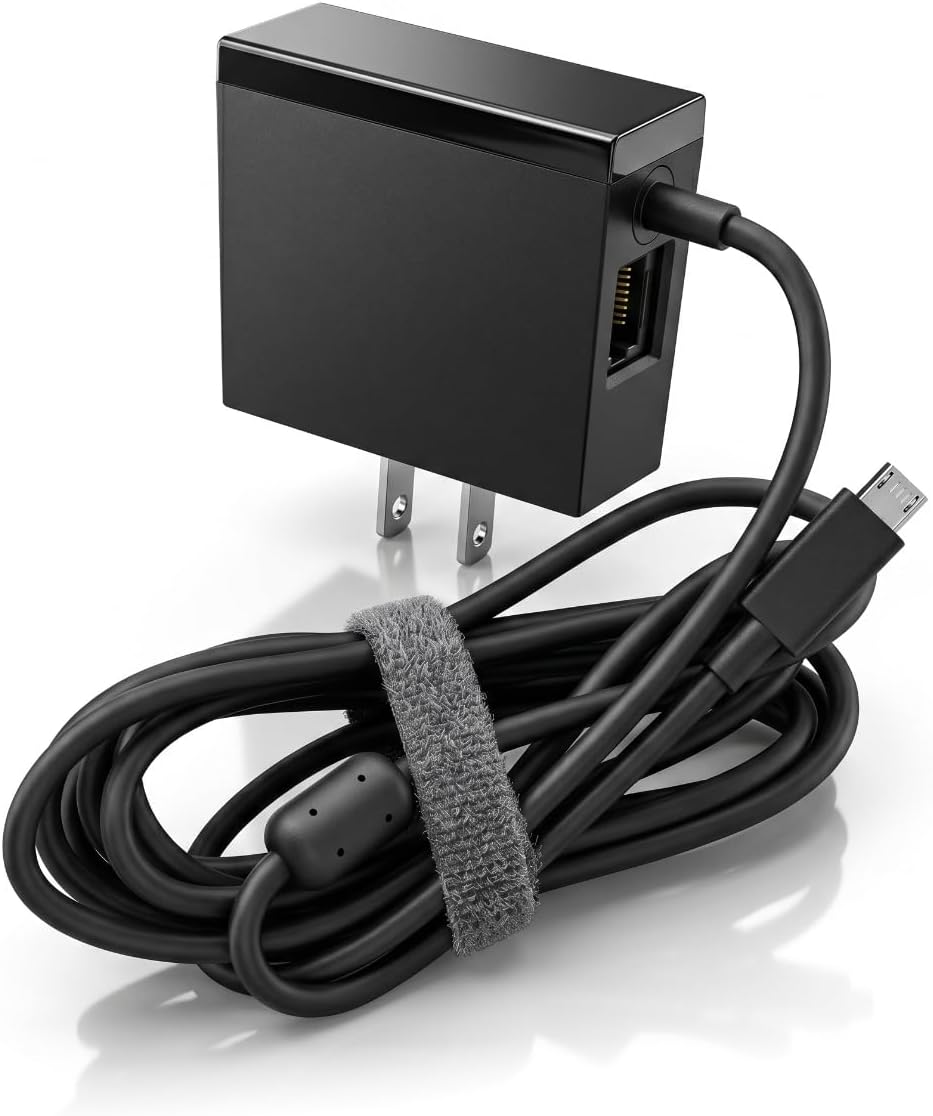
The Micro-USB Ethernet Adapter for Amazon Fire TV Devices is a straightforward way to add a wired network connection to many compatible Fire TV devices. Its 4.5 customer rating reflects a generally positive experience, while the clearest attraction is the unusually broad compatibility list. It supports Fire TV Stick Lite, several generations of Fire TV Stick, multiple 4K models, Fire TV Cube, and Amazon Fire TV in pendant design.
We may earn a commission when you buy through this link, at no additional cost to you.
The adapter connects through the device's micro-USB port, then accepts a standard Ethernet cable from the router. Its 10/100 Ethernet connection is not intended to compete with gigabit service, but it can be more than sufficient for common streaming workloads and avoids relying on a potentially congested Wi-Fi signal. The Fire TV power adapter can power the Ethernet adapter, reducing the need for an additional power supply and keeping the arrangement relatively uncluttered.
The principal trade-off is connector compatibility. This is the micro-USB version, so it does not work with the Fire TV Stick HD (2nd Gen) that uses USB-C. A 10/100 connection also represents an older standard compared with several alternatives in this guide. Nevertheless, those limitations are easy to accept when broad support across common micro-USB Fire TV models, simple setup, and use of the existing power supply matter more than maximum theoretical speed.
This is the strongest general recommendation for someone who owns one of the many listed micro-USB Fire TV models and wants a simple, dedicated Ethernet option. Before buying, check the physical port on the Fire TV and verify that the model appears in the stated compatibility list. If your device has USB-C, move to the right-angle USB-C option instead of trying to force a micro-USB connector into an incompatible port.
Installation requires only the compatible Fire TV port and a wired router connection. Because the existing Fire TV power adapter can also power the adapter, this model suits setups where minimizing extra wall connections is important.
The adapter supports a notably large collection of Fire TV hardware, from Stick Lite through 4K Max and Fire TV Cube. Check the exact model and connector rather than assuming every Fire TV device uses the same interface.
We may earn a commission when you buy through this link, at no additional cost to you.
The Right Angle USB-C Ethernet Adapter for Fire TV Stick HD is designed specifically for the Fire TV Stick HD (2nd Gen), which uses USB-C. Its 4.3 rating indicates generally positive customer reception, and the right-angle profile makes it especially useful where a straight connector would put unnecessary strain on the cable or occupy limited space behind a television.
We may earn a commission when you buy through this link, at no additional cost to you.
The listed performance reaches up to 480 Mbps when used with the supported Fire TV Stick HD model. That figure provides considerably more room than a basic 10/100 connection and should suit high-resolution streaming, browsing, and other routine network activity when the broadband service and local network support it. The targeted design also helps prevent buyers from confusing this USB-C accessory with the many micro-USB adapters in the category.
Its main limitation is intentional specialization. The adapter is incompatible with the Fire TV Stick HD (1st Gen), which uses micro-USB. It is therefore not a universal Fire TV solution, and buyers should not expect the same broad model coverage offered by the first product in this guide. The USB-C design also makes it unsuitable for older Fire TV Stick models unless they have a suitable USB-C port and support Ethernet over that interface.
Choose this adapter if you specifically own the second-generation Fire TV Stick HD and want a compact right-angle wired connection. It is a focused solution rather than a broad household adapter, but for the correct hardware it offers a simple installation and a useful speed advantage over older 10/100 options. Confirm the USB-C marking on the device before ordering.
This adapter avoids the connector mismatch common in Fire TV accessory searches. It is intended for the USB-C Fire TV Stick HD (2nd Gen), making model verification especially important before purchase.
The angled connector can make a side-mounted adapter easier to position behind a television. This helps avoid a sharply bent cable and may improve access in tightly arranged entertainment centers.
We may earn a commission when you buy through this link, at no additional cost to you.
The ELECTOP 1000 Mbps Ethernet Adapter combines a high advertised Ethernet rate with a micro-USB connector for compatible streaming sticks. It has a 4.1 rating, placing it behind several simpler options in customer feedback, but its technical proposition is clear for buyers who want a faster wired link from a micro-USB Fire TV Stick.
We may earn a commission when you buy through this link, at no additional cost to you.
Its headline feature is support for up to 1000 Mbps Ethernet. Actual home internet performance will still depend on the broadband plan, router, Ethernet cable, and the Fire TV's own networking capabilities, so the maximum figure should not be treated as guaranteed stream speed. The adapter uses an aluminum alloy body for heat dissipation and includes an LED that reports operating status. Two self-adhesive pads are also supplied, helping position the adapter so its weight does not pull directly on the Fire TV's port.
Compatibility needs careful attention. This is a micro-USB-to-RJ45 adapter, not a USB-C model, and the listing specifically says it does not fit Fire TV Stick 4K Max from 2021 onward or USB-C Chromecast models. It also excludes Fire TV Stick Gen 1, Roku devices, Fire HD tablets, and phones. The listing further notes that it is not intended for VPN use, another reason to check the product description if those features are important.
This adapter is best for a compatible micro-USB streaming stick whose owner values a high headline speed, protective housing, and a tidy installation. It may be overkill for ordinary HD streaming, and actual speed will vary. Buyers should confirm both the port type and generation of their device, and they should follow the suggestion to provide sufficient power when the Fire TV's available power output is limited.
The advertised 1000 Mbps capability can provide ample headroom, but internet speed is constrained by every part of the path. Router quality, the service plan, cable quality, and device support determine the result.
The aluminum housing is designed to dissipate heat during extended use, while the included adhesive pads can reduce strain on the Fire TV connection. Proper positioning also keeps the Ethernet cable from hanging unsupported.
We may earn a commission when you buy through this link, at no additional cost to you.
The Fire TV Stick Ethernet Adapter with Micro USB to RJ45 connection has the highest customer rating in this selection at 4.7. It offers a balanced combination of straightforward installation, a stated 10/100 Mbps wired connection, Micro USB 2.0 support, an LED indicator, and an aluminum alloy body. For common streaming, that package may be more than a typical home connection needs.
We may earn a commission when you buy through this link, at no additional cost to you.
The adapter follows a familiar plug-and-play arrangement: connect it to a streaming stick's micro-USB port and attach an Ethernet cable from the router. No drivers or complicated installations are required. The status light provides quick visual confirmation of activity, while the aluminum body is intended to handle heat during extended viewing sessions. Two self-adhesive tapes are included so the adapter can be secured and the Ethernet cable's weight kept away from the device port.
The listing is explicit that this is a micro-USB, not Type-C, product. It specifically warns against using it with Chromecast with Google TV. The 10/100 Mbps Ethernet specification also places it below the gigabit and 300+ Mbps alternatives, although real streaming requirements are often lower than those network limits. A buyer whose priority is abundant headroom and the newest connection standard may prefer a faster model.
For a compatible micro-USB Fire TV Stick, this is an attractive everyday option because it combines good customer feedback with simple installation and a tidy design. It works particularly well for users who want dependable Ethernet without needing the highest possible adapter speed. Verify the device's port and confirm that Chromecast with Google TV is not the model in hand before making the connection.
A 4.7 rating makes this the most favorably reviewed option in the group. Its straightforward 10/100 connection, visible status light, and simple setup suit users seeking dependable networking without extra complexity.
The included tape allows the adapter to be positioned securely behind the television. This is helpful because a heavy or hanging Ethernet cable can place unnecessary force on the streaming stick's connector.
We may earn a commission when you buy through this link, at no additional cost to you.
The ZEXMTE Ethernet Adapter for Fire TV Stick is a straightforward micro-USB-to-RJ45 solution with a 4.5 customer rating. It combines a 10/100 Mbps Ethernet connection with an aluminum alloy casing and status lights, offering a refined alternative to basic plastic adapters. Its stated Fire TV coverage includes Stick Lite, second- and third-generation Stick, 4K Stick, and 4K Max.
We may earn a commission when you buy through this link, at no additional cost to you.
The central benefit is the removal of dependence on Wi-Fi. A direct route from the streaming stick to the router can provide a more consistent connection in homes where wireless congestion, distance, or signal interference regularly affects playback. Installation is presented as a quick process: connect the adapter to the Fire TV's USB port and run an Ethernet cable to the router. The casing helps dissipate heat during long viewing periods, and the illumination confirms whether the network side is active.
The adapter's 10/100 Mbps rating is the main constraint. It is suitable for standard streaming and browsing, but it cannot offer the theoretical capacity of the gigabit options in this guide. Buyers should also verify the exact connector on their device. Although the listing identifies several Fire TV Stick generations and Chromecast Ultra, its micro-USB format makes it unsuitable for devices that require a USB-C Ethernet adapter.
This model is a good fit for a common micro-USB Fire TV Stick owner who values a tidy metal enclosure, visible connection feedback, and simple setup over maximum speed. It may serve as a better everyday choice than a more specialized accessory, provided the device is compatible. The 4.5 rating and stated construction make it a confident middle-ground recommendation.
This adapter focuses on a stable 10/100 wired connection rather than headline throughput. That balance can be sensible for standard streaming because the network link is less exposed to changing Wi-Fi conditions.
The built-in status lights help a new user determine whether the Ethernet side is operating. This reduces the uncertainty involved in checking a streaming stick that appears to have no network connection.
We may earn a commission when you buy through this link, at no additional cost to you.
The UGREEN Ethernet Adapter for Fire TV Stick differentiates itself with a 3.3-foot attached cable and a separate USB-A power lead. Its 4.4 rating reflects solid customer feedback, and the physical design is particularly thoughtful for installations where the Fire TV sits in a narrow entertainment unit or against a wall.
We may earn a commission when you buy through this link, at no additional cost to you.
The extended micro-USB and USB power cable gives the adapter more placement flexibility than a very short direct connector. The USB-A power cable can power both the network adapter and the TV stick at the same time. The listing says the power lead must connect to a USB wall charger over 5W rather than a television's USB port, which is an important distinction when planning the setup.
Network performance is listed at 10/100 Mbps, making this a Fast Ethernet solution rather than a gigabit one. Compatibility covers Fire TV Stick Basic, second-generation Stick, 4K, Lite, several Chromecast generations, Google Home Mini, and Fire TV 3 according to the listing. It does not support any Roku devices, the first-generation Fire TV Stick, Fire TV 4K Max, or USB-C devices such as Chromecast with Google TV.
This is a good recommendation for a compatible Fire TV owner who values cable reach, a bundled power solution, and a recognizable approach to external power. It is less suitable for recent USB-C hardware or anyone seeking higher network headroom. Because it can power the streaming stick and adapter together, the product also reduces cable clutter compared with setups requiring completely separate power arrangements.
The 3.3-foot attached cable makes it easier to reach a router or wall charger when the Fire TV is positioned in a confined area. It also gives the Ethernet adapter more freedom than a fixed, short plug.
The included USB-A cable can supply the adapter and Fire TV together when connected to a suitable wall charger. Use the specified charging connection rather than assuming any television USB port will provide adequate power.
We may earn a commission when you buy through this link, at no additional cost to you.
The ZEXMTE 1000 Mbps Ethernet Adapter offers a high-speed micro-USB connection with a stated maximum of 1000 Mbps. Its 3.7 rating is the lowest among the products reviewed, so buyers should give its compatibility details and user feedback more attention. Its technical design still includes several appealing elements, including a reinforced aluminum shell, green and yellow status indicators, and several electrical protections.
We may earn a commission when you buy through this link, at no additional cost to you.
A wired Gigabit connection can provide useful headroom for 4K streaming and other high-bandwidth activity, though the listing appropriately notes that actual speed depends on the broadband plan. The green indicator represents a successful connection, while yellow signals operational readiness, giving users a convenient way to diagnose the setup. Over-voltage, over-current, over-power, and short-circuit protection are additional features intended to support dependable operation.
The model is not compatible with the Fire TV Cube, Roku devices, tablets, cellphones, Fire HD 10, or VPN use according to the listing. Despite references to Fire TV Stick 4K Max, the connector is micro-USB, so the exact hardware version must be checked rather than relying on the model family name. Its lower rating may reflect setup or compatibility experiences that differ from the idealized specifications.
This adapter makes the most sense for a buyer with a confirmed compatible micro-USB device who values gigabit capacity, a metal enclosure, and clear status feedback. It is less appealing if Fire TV Cube support or USB-C is required, and the lower rating warrants more careful review of customer feedback. Confirming the exact device model before ordering can prevent the most likely source of dissatisfaction.
The gigabit ceiling offers meaningful headroom, but it cannot exceed the speed delivered by the internet service or router. View the rating as an adapter capability rather than a guaranteed streaming rate.
Green and yellow indicators provide quick feedback during setup. The colors can help determine whether the adapter is ready or has established a network connection without navigating deeply into television settings.
We may earn a commission when you buy through this link, at no additional cost to you.
The Cable Matters Micro USB to Ethernet Adapter stands out as a well-rounded option with a 4.4 rating and a stated Ethernet capability of up to 300+ Mbps. It supports Fire TV Stick, Fire TV Cube, Google Chromecast, Chromecast Ultra, Chromecast Audio, and Google Home Mini according to the product information, making its compatibility broader than many micro-USB-only competitors.
We may earn a commission when you buy through this link, at no additional cost to you.
Its network speed is the defining technical feature. The adapter is backward compatible with earlier Ethernet standards and offers a stated rate nearly five times that of traditional Fast Ethernet. That extra capacity provides more headroom than 10/100 models while remaining below the headline rates of the gigabit options. A three-foot USB power cable is included for powering the adapter or paired device, and no drivers or additional software are required.
The adapter remains limited by its micro-USB interface, and it cannot be assumed to support USB-C Fire TV hardware. It also calls for a suitable power connection, which may mean an extra cable if the streaming stick is not already powered from a convenient wall outlet. The product is not as compact as models with a shorter built-in lead because the separate three-foot cable requires thoughtful routing behind the television.
This is the strongest all-around choice for a compatible user who wants more speed than basic 10/100 adapters, broad device support, and simple installation. It balances useful performance with clear setup guidance, while the included power cable reduces one source of friction. Verify the connector and make room for the cable behind the television before ordering.
A stated 300+ Mbps rate creates comfortable headroom for modern streaming while remaining compatible with earlier standards. The network service and router remain the practical limits on delivered performance.
Support for Fire TV, Chromecast, and Google Home Mini makes the adapter useful across a broader collection of streaming hardware. Each device still needs a compatible micro-USB power and networking interface.
We may earn a commission when you buy through this link, at no additional cost to you.
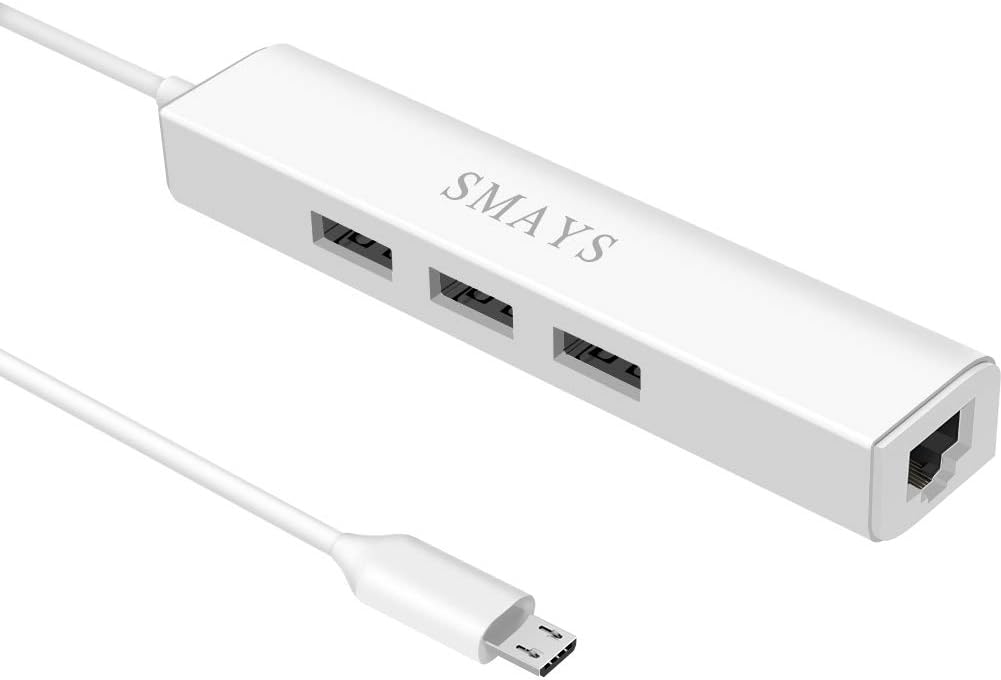
The Micro USB Hub with Ethernet Adapter combines a three-port OTG hub with a 10/100 Mbps Ethernet connection. Its 4.3 rating makes it a practical choice for Fire TV users who need more than a basic network adapter. The three female USB ports can accept accessories such as flash drives, mice, keyboards, solid-state drives, and memory card readers while Ethernet keeps the streaming device on a wired network.
We may earn a commission when you buy through this link, at no additional cost to you.
The product information lists compatibility with Fire Stick Lite, third-generation Firestick, 4K Max, second-generation Fire TV Stick with Alexa Voice Remote, 2017 Amazon Fire TV, Fire TV Cube, and selected Echo Show models. It also supports several Chromecast and Google Home Mini variants, onn Android TV Stick, and Shark Roku TV. A 5V DC power cord allows use with the user's own power adapter or a suitable wall charger.
The trade-off is complexity and physical bulk. A simple Ethernet adapter is generally easier to conceal and requires less power planning, whereas this hub provides extra connectivity at the cost of a larger assembly. Its 10/100 Ethernet speed is suitable for ordinary streaming but does not offer the capacity of the 300+ Mbps or gigabit options. Users should also check the detailed compatibility list rather than assuming every streaming device supports the same OTG functions.
Choose this model when your Fire TV setup would benefit from additional USB ports, such as storage, a keyboard, or another peripheral alongside Ethernet. It is less appropriate for a minimal installation where the only goal is a compact wired network connection. Its combination of ports makes it especially useful for owners of supported Fire TV Stick, Cube, Echo Show, and Chromecast hardware.
The defining benefit is the combination of a wired network port and three USB-A connections. That makes it possible to retain stable networking while adding storage or input accessories to a supported streaming device.
A 5V DC input lets the hub draw power from a suitable wall charger. This is useful for systems with several attached accessories, where relying on a single shared source may be less convenient.
We may earn a commission when you buy through this link, at no additional cost to you.
The Micro USB Port Fire Stick and Chromecast Ultra 4K Ethernet Power Adapter offers a particularly integrated approach: it combines an AC power supply with a 100 Mbps RJ45 Ethernet port. Its 4.6 rating is the second-highest in the guide, giving it strong customer feedback while distinguishing it from adapters that need a separate external power brick.
We may earn a commission when you buy through this link, at no additional cost to you.
The unit's stated input is 100–240V at 50/60Hz, while its output is 5V 1A. The RJ45 connection provides a standard 100 Mbps wired link intended to support stable 4K signal transmission without signal delay or loss. Because the power and Ethernet functions are combined, the arrangement can be cleaner for owners who want to replace the streaming stick's original power setup with one cable leading to the wall.
Compatibility is the main consideration. The product information lists second- and third-generation Fire TV Stick, Stick Lite, first-generation 4K Stick, first-generation 4K Max, first- and second-generation Fire TV Cube, pendant-design Fire TV, and Google 4K Chromecast Ultra. It explicitly does not support Fire TV Stick models with USB-C ports or Chromecast with Google TV. The 100 Mbps Ethernet rate also trails several alternatives, though the physical convenience may outweigh the extra theoretical speed for many users.
This is the best pick for a compatible micro-USB Fire TV owner who wants a compact, unified power-and-network arrangement. It is especially appealing when reducing wall connections matters or the original power adapter is being replaced. Confirm the connector and exact Fire TV generation before purchasing, and do not choose it for a USB-C-only device.
Combining the AC supply and Ethernet adapter reduces the number of separate components behind the television. The result is often a cleaner installation with one wall cable handling both power and wired networking.
The model supports many established micro-USB Fire TV devices and Chromecast Ultra. It does not support USB-C Fire TV Stick hardware or Chromecast with Google TV, so connector verification remains essential.
We may earn a commission when you buy through this link, at no additional cost to you.
The right Ethernet adapter depends primarily on your Fire TV's connector, power arrangement, and required speed. Use the following factors to narrow the choices before checking the final product listing.
Fire TV hardware has used both micro-USB and USB-C, and the connector must match both the adapter and the device's Ethernet-capable port. Most products in this guide use micro-USB, while the right-angle USB-C model is specifically intended for the Fire TV Stick HD (2nd Gen). Some streaming sticks have USB-C solely for power and do not support USB-C Ethernet accessories. Checking the label beside the physical port is safer than relying on the product family name, because Fire TV Stick, 4K Stick, 4K Max, and Stick HD models can otherwise appear interchangeable.
Bottom line: identify the exact model and port before buying. A micro-USB adapter cannot connect to a USB-C port, and a USB-C Ethernet adapter does not automatically work with every USB-C streaming device.
The adapters range from 10/100 Mbps to a stated 300+ Mbps and up to 1000 Mbps. A higher maximum provides more headroom for 4K video and other simultaneous network activity, but it does not guarantee faster streaming. The internet plan, router, Ethernet cable, local congestion, and the Fire TV's internal connection all influence the final result. For many households, 10/100 Mbps is sufficient for one or two high-definition streams, while users with gigabit service and several active devices may prefer more capacity.
Bottom line: treat adapter speed as a ceiling, not a guaranteed stream rate. Choose enough headroom for current and future use without paying attention to figures that cannot be delivered by the rest of the network.
A product's compatibility statement should be compared with the exact model in your home. Some adapters support Fire TV Stick models but exclude Fire TV Cube, first-generation hardware, Fire TV Stick 4K Max from later production years, or Fire HD tablets. Others mention Chromecast and Google Home Mini, but those claims can still be limited to specific generations and connector types. Compatibility warnings are particularly important when a listing uses broad names such as Fire TV Stick 4K Max in the title without making the connector distinction immediately obvious.
Bottom line: search the full compatibility section, not only the title. If your device is absent or mentioned as an exclusion, choose a purpose-built alternative rather than assuming the adapter will work.
Some Fire TV models can power an Ethernet adapter from their existing power supply, while others need a separate wall charger. The UGREEN option includes a USB-A power cable and warns that it must use a wall charger over 5W rather than a television's USB port. The Cable Matters adapter includes a three-foot USB power lead, and the integrated power adapter combines AC power with Ethernet. Additional power requirements affect cable routing, available wall outlets, and how neatly the setup can be hidden.
Bottom line: determine whether the Fire TV can share its original supply with the adapter. If not, include a suitable charger and cable routing in your plan before ordering.
The adapter will usually sit close to the streaming stick and behind a television, where space is limited. A right-angle connector can reduce strain on a side-facing port, while a longer attached cable provides more freedom when the router or charger is nearby. Aluminum housings are intended to dissipate heat, and adhesive pads can keep a hanging Ethernet cable from placing weight on the Fire TV connector. Conversely, a powered hub occupies more space and introduces more cables than a compact adapter.
Bottom line: measure the space and connector orientation before ordering. Favor a secure, ventilated placement that does not pull on the Fire TV or sharply bend the cables.
LED indicators provide a quick way to confirm whether an adapter is powered and whether a network connection is active. The ZEXMTE gigabit model uses green and yellow lights for different states, while the ELECTOP, Micro-USB to RJ45, and other adapters use a visible operating indicator. This feature is particularly useful during initial setup because a television may otherwise provide limited feedback through its on-screen menus. It does not diagnose every issue, but it can narrow down whether the problem is likely power, cabling, or network recognition.
Bottom line: a status light is a small convenience that makes installation easier. It is especially valuable on adapters that do not otherwise provide a separate network display.
Most of the selected products are described as plug-and-play and do not require drivers. In practice, installation still involves identifying the correct port, connecting Ethernet to the router, and making sure the Fire TV receives adequate power. An adapter that includes a suitable power lead, mounting tape, or a right-angle profile can make setup easier than a bare connector. Products with broad but confusing compatibility statements may require more verification than those focused on one clearly defined model.
Bottom line: favor a clear connection sequence and included accessories. Simple products are usually easier to maintain because they add fewer cables and fewer points of failure.
A basic Ethernet adapter fulfills one main purpose: connecting a compatible streaming device to a wired network. A powered OTG hub also provides three USB-A ports for storage or peripherals, which can be useful for keyboard navigation, flash-drive media, or file transfer. The additional functionality comes at the cost of bulk, a separate 5V power connection, and more exposed connections. Users whose only priority is dependable streaming are generally better served by a simpler model.
Bottom line: choose a multi-port hub only when you have a concrete accessory need. Otherwise, the dedicated adapter will be easier to position and less demanding to power.
Before connecting anything, identify the Fire TV model and its power or network port, then confirm that the adapter is designed for that connector. Read the product's compatibility list and gather a standard Ethernet cable from the router. If the adapter needs external power, connect its power lead to a suitable wall charger before or during installation, following the stated voltage and current requirements.
Attach the adapter to the compatible Fire TV port, plug the Ethernet cable into the adapter's RJ45 socket, and connect the other end to a router or network switch. If the adapter has a status light, use it to check for activity. Once the television is powered on, open its network settings and select the wired Ethernet option if it is not selected automatically. Restart the Fire TV if the connection does not appear immediately.
For maintenance, keep the adapter ventilated and avoid placing it beneath a blanket, inside a closed cabinet without airflow, or where a heavy cable can pull on the device. Secure the adapter with its supplied adhesive pad or a suitable support, and avoid sharply bending the Ethernet or power leads. Disconnect the power before changing cables, and periodically check that the connector remains firm and the status light behaves normally.
No. Support depends on the exact Fire TV model and the adapter's connector and software support. Most compatible options in this guide use micro-USB, while the Fire TV Stick HD (2nd Gen) requires the USB-C option. Some USB-C streaming devices use that port only for power and do not support Ethernet accessories, so verify the model and connector before ordering.
For a single stream and typical household use, a 100 Mbps connection can be sufficient. Several simultaneous streams, large downloads, or a gigabit internet plan can benefit from a faster 10/100, 300+ Mbps, or 1000 Mbps adapter. The available service and router may also limit the result, so advertised adapter speed is a maximum rather than a guaranteed streaming rate.
Ethernet can provide a more consistent connection than Wi-Fi, particularly when the wireless signal is weak or crowded. It does not automatically improve video quality beyond what the service and device already provide, but it can reduce buffering, connection drops, and variation caused by wireless conditions. A properly connected gigabit service may also be necessary to experience the benefits of a faster adapter.
It depends on the product and Fire TV model. Some micro-USB adapters can use the Fire TV's existing power adapter, while others include a USB power cable or require a suitable wall charger. The integrated power-and-Ethernet model replaces the normal supply in one unit. Always follow the product's instructions, and never assume a television's USB port can provide the required power.
It depends on the production version. Some listings support the first-generation Fire TV Stick 4K Max, which uses micro-USB, but later versions use USB-C and require a compatible USB-C Ethernet solution. Check the connector printed beside the port and compare it with the adapter before purchase rather than relying on the model's product-family name.
Several adapters in this guide state compatibility with Chromecast, Chromecast Ultra, Chromecast Audio, or Google Home Mini. The device must have the right connector and support Ethernet through it, so verify both the adapter and the specific device generation. The USB-C Chromecast with Google TV is explicitly excluded from the micro-USB models.
The products in this guide are generally described as plug-and-play and do not require additional drivers. You may still need to select a wired connection in the Fire TV's network settings, and the operating system must recognize Ethernet as a supported connection method. A missing network option can indicate incompatibility rather than a missing driver.
A powered OTG hub is better only when you need extra USB ports for accessories such as storage, a keyboard, or a mouse. If your sole goal is a stable wired connection, a dedicated adapter is smaller, simpler, and easier to power. The hub provides greater functionality, but its additional cables and 5V power requirement make it a more involved installation.
The Micro-USB Ethernet Adapter for Amazon Fire TV Devices is the best general pick because it combines a 4.5 rating with broad stated Fire TV compatibility and a simple way to reuse the existing power supply. The Cable Matters adapter earns the Editor's Choice distinction for its 300+ Mbps capability, included power cable, and broad support for Fire TV, Chromecast, and Google Home Mini devices.
The integrated Fire Stick Ethernet Power Adapter is the best premium-style option for anyone who wants power and Ethernet combined in one compact unit. If you own the Fire TV Stick HD (2nd Gen), the right-angle USB-C adapter is the necessary choice. If you need extra storage or peripheral connections, the three-port OTG hub adds useful functionality, while the other micro-USB models provide alternative speed, power, and construction options.
Before ordering, verify the exact Fire TV model, inspect the connector, and check whether the adapter needs external power. Then compare the stated Ethernet speed with your internet plan and the room available behind the television. Product listings and prices change over time, so confirm the current specifications, compatibility notes, customer feedback, and price directly on the product page before making a final purchase.