
ASRock B550M-ITX/AC
4.3Editor score
Compact AM4 processor support
DDR4 memory up to 4733+ OC
DisplayPort and HDMI outputs
Realtek 7.1-channel audio
Explore 10 best Mini Itx Motherboards for compact PCs, comparing AM5 and AM4 power delivery, memory, storage, networking, connectivity, and size.
Mini Itx Motherboards make it possible to assemble a capable desktop in a much smaller enclosure than a conventional ATX build. The best choices combine a standardized 170 by 170 millimeter footprint with strong power delivery, efficient cooling, useful networking, modern storage, and enough rear connectivity for everyday peripherals.
The products in this guide were compared by processor platform, socket support, memory configuration, power stages, expansion slots, M.2 options, networking, display outputs, USB connectivity, and practical Mini-ITX features. The list covers AMD AM5, AM4, and Intel LGA 1700 boards for gaming, compact workstations, home offices, and small-form-factor systems.
Each review explains the strongest reasons to consider the board, along with its meaningful limitations and the builders most likely to benefit. Ratings reflect the supplied customer feedback, while specifications describe the listed models. Product prices and availability change frequently, so confirm current listings and case compatibility before purchasing.
4.3Editor score

4.4Editor score

4.1Editor score
The comparison below highlights the major platform, memory, storage, networking, and connectivity differences among all ten boards, making it easier to identify the right foundation for a compact build.




The ASRock B650I Lightning WiFi combines a current AMD AM5 platform with a restrained set of features that should suit many compact gaming and productivity builds. Its customer rating is 4.1, reflecting generally positive feedback, while the specification sheet presents a capable combination of DDR5 support, fast storage, 2.5G Ethernet, and WiFi 6E.
We may earn a commission when you buy through this link, at no additional cost to you.
Power comes from an 8+2+1 phase design using premium Dr.MOS components, a reassuring starting point for supporting Ryzen 9000, 8000, and 7000 series processors. Two DDR5 DIMM slots can run in dual-channel configuration and are listed for speeds up to 7200+ when overclocked. Storage flexibility is particularly good, with one PCIe 5.0 x4 M.2 slot, one PCIe 4.0 slot, and two SATA3 connectors.
The networking arrangement is equally practical for a small system. Buyers receive 2.5G LAN, Intel WiFi 6E, and multiple USB 3.2 Gen2 Type-A and Type-C connections, including front-panel Type-C support according to the supplied information. Realtek ALC897 7.1-channel audio and Nahimic Audio cover ordinary entertainment needs, while BIOS Flashback and the ASRock Auto Driver Installer simplify setup and maintenance.
This is not the most elaborate board in the roundup, and its advertised memory ceiling is lower than several 8200+ capable rivals. It also has only one PCIe 5.0 M.2 position. Even so, it offers the most balanced mix of platform capability, connectivity, and everyday usefulness, making it a strong choice for a compact AM5 system that values practical features over specialized overclocking tools.
A PCIe 5.0 x4 M.2 slot provides headroom for a high-speed NVMe drive, while the second PCIe 4.0 slot and twin SATA connectors make it easier to combine a fast system drive with conventional storage. That flexibility is valuable in a compact case where every installed drive must earn its place.
Integrated 2.5G Ethernet and WiFi 6E reduce the need for added network adapters, whether the build uses wired or wireless connectivity. The inclusion of Type-C connections also makes modern monitors, storage enclosures, and front-panel accessories easier to integrate.
We may earn a commission when you buy through this link, at no additional cost to you.
The ASUS TUF Gaming B850I WiFi NEO stands out with a 5.0 customer rating and an extensive feature set for a board measuring just 170 millimeters square. It supports AMD Ryzen 9000, 8000, and 7000 series processors through AM5 and is aimed at builders who want fast networking, modern storage, flexible USB connectivity, and helpful setup features.
We may earn a commission when you buy through this link, at no additional cost to you.
Its 8(80A)+2(80A)+1(80A) DrMOS configuration, 10-layer PCB, and 8-pin ProCool power connection form a robust foundation. Memory support includes two DDR5 DIMM slots, while storage consists of one PCIe 5.0 M.2 and one PCIe 4.0 M.2 connection. The rear and front panel interfaces include a 20Gbps USB Type-C port, a 10Gbps front-panel Type-C connector, and two 10Gbps Type-A ports.
Network support combines WiFi 6E with Realtek 2.5Gb Ethernet, which is well suited to gaming, large file transfers, and routine desktop use. A pre-mounted I/O shield improves assembly convenience, while Q-Antenna, Q-Dashboard, Q-LED, Clear CMOS, and BIOS FlashBack support make installation and troubleshooting more approachable. The AI Advisor, AI Cache Boost, AI Cooling II, and AEMP tools add automated assistance.
The main trade-off is that the software and AI-oriented feature collection can feel more involved than necessary for a simple build. Two DIMM slots also limit memory expansion compared with larger form factors. Even so, the 5.0 rating, mature power design, convenient I/O shield, and broad connectivity make this an attractive choice for a new AM5 compact PC.
A pre-mounted I/O shield is a meaningful convenience in a Mini-ITX chassis, where access to the rear can be awkward. Q-LED diagnostic indicators, the Clear CMOS button, and BIOS FlashBack also make initial setup and later maintenance easier to manage.
The 10-stage DrMOS power design provides a confident foundation for current Ryzen processors, while AI Cooling II and Fan Xpert-style control features help simplify thermal configuration. The two-M.2 layout supports a fast boot drive and a second PCIe 4.0 drive without relying on SATA storage.
We may earn a commission when you buy through this link, at no additional cost to you.
The ASRock B550M-ITX/AC is a straightforward AM4 board for builders who already own compatible Ryzen processors and DDR4 memory. It carries a 4.3 rating and covers Ryzen 3000, 3000 G-Series, 4000 G-Series, 5000, and 5000 G-Series desktop processors, offering a mature platform for gaming and everyday compact systems.
We may earn a commission when you buy through this link, at no additional cost to you.
The supplied specification emphasizes DDR4 memory support up to 4733+ when overclocked, along with DisplayPort and HDMI outputs for processor-integrated graphics. Realtek ALC887 provides 7.1-channel high-definition audio, covering basic entertainment and general desktop requirements without requiring a separate sound card.
The strongest argument for this board is value and platform continuity. A buyer with an AM4 processor can avoid replacing both the CPU and memory while still obtaining a Mini-ITX board suited to a space-conscious system. It is also a natural option for an inexpensive home theater PC, office machine, or compact general-purpose computer when a discrete graphics card is unnecessary.
Its limitations reflect the platform generation. There is no listed WiFi, the memory standard is DDR4 rather than DDR5, and future processor upgrades are limited to the specified AM4 families. It also does not include Athlon compatibility. For the right owner, however, that is a reasonable trade-off for a simple, affordable board that performs familiar tasks without demanding the newest platform features.
The board can bring a Ryzen 3000-, 4000-, or 5000-series processor into a new Mini-ITX enclosure. That makes it especially attractive to builders reusing a known-good processor, cooler, and DDR4 memory kit rather than assembling an entirely new platform.
DisplayPort and HDMI outputs are useful when paired with a Ryzen processor that includes integrated graphics. They simplify office, media, and compact entertainment builds where adding a full-size graphics card would be unnecessary.
We may earn a commission when you buy through this link, at no additional cost to you.
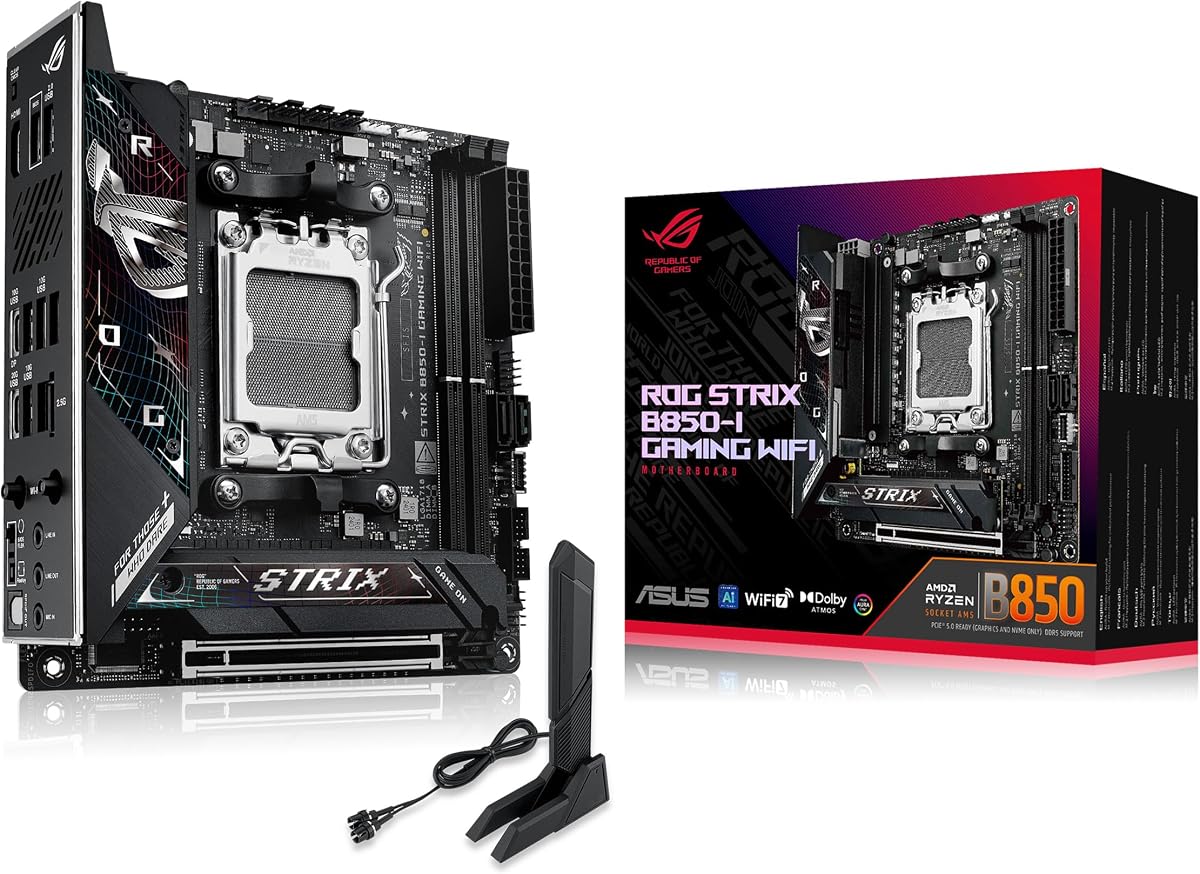
The ASUS ROG Strix B850-I Gaming WiFi is a premium Mini-ITX option for builders who want an AM5 platform, strong power delivery, and high-end features in a very small board. Its 4.3 rating and extensive specification list position it as a capable choice for a compact gaming system or enthusiast workstation.
We may earn a commission when you buy through this link, at no additional cost to you.
A 10+2+1 power solution rated for up to 70A per stage uses ProCool power connectors to support Ryzen 9000, 8000, and 7000 series processors. Thermal design includes large heatsinks, an integrated I/O cover, and high-conductivity thermal pads, all of which are valuable in a dense enclosure where airflow and surface area are restricted.
Storage is a major strength because both onboard M.2 connectors use PCIe 5.0. One is cooled by a large heatsink, allowing a high-performance drive to operate with better thermal headroom. The board also provides PCIe 5.0 x16 graphics connectivity, DDR5 memory, 2.5G LAN, WiFi 7, 20Gbps USB Type-C, and Aura Sync support.
The trade-off is cost and physical constraint. A premium motherboard still leaves only two DIMM slots and a single expansion slot in the Mini-ITX format, so it cannot substitute for a larger board in a heavily expanded workstation. For a builder prioritizing a polished AM5 foundation, modern wireless networking, and enthusiast controls, this ROG model delivers a particularly complete specification.
Large VRM heatsinks, an integrated I/O cover, and high-conductivity pads help manage heat in the restricted space of a small chassis. A dedicated cooling solution for one of the PCIe 5.0 M.2 positions similarly recognizes that fast SSDs generate meaningful heat.
WiFi 7 and 2.5G LAN provide modern network options, while AI Advisor, AI Overclocking, AI Networking II, and AEMP make configuration more accessible. The combination appeals to users who want advanced tuning without navigating every motherboard setting manually.
We may earn a commission when you buy through this link, at no additional cost to you.
The ASRock B850i Lightning WiFi delivers a specification-dense AM5 board in a 170 by 170 millimeter enclosure. Its 3.8 rating is the lowest among the products reviewed, so prospective buyers should examine recent customer feedback carefully, but the listed specifications target high-speed memory, modern graphics, and flexible networking.
We may earn a commission when you buy through this link, at no additional cost to you.
A 10+1+1 phase design with a 110A Smart Power Stage provides the core power foundation, while two DDR5 DIMM slots support dual-channel configurations and advertised overclocked speeds up to 8200+. The primary graphics slot uses PCIe 5.0 x16, and storage includes a Blazing PCIe Gen5 x4 M.2 slot plus a Hyper PCIe Gen4 x4 slot.
Connectivity is another major strength. Killer 2.5G LAN, WiFi 6E with Bluetooth, HDMI, and USB Type-C with DisplayPort Alt Mode allow flexible monitor arrangements. A 40Gbps USB 3.2 Gen2 Type-C connection is listed when used with a supported processor, alongside multiple high-speed Type-A ports.
The main concerns are its 3.8 customer rating and the planning required to fit a dense board, cooler, graphics card, and power supply into a small case. Some display and USB capabilities also depend on the chosen processor. Even with those caveats, the combination of 110A power hardware, 8200+ memory support, fast storage, and flexible networking makes this an appealing enthusiast-oriented AM5 option.
The two DDR5 slots are rated for overclocked speeds up to 8200+ when paired with a qualified CPU and memory kit. That makes the board relevant to builders interested in memory tuning, though a compact case can make tall heat spreaders difficult to install.
HDMI and USB Type-C with DisplayPort Alt Mode give the system more display choices than a basic board. The Type-C option is particularly useful with compatible monitors and can simplify a clean compact workstation or gaming setup.
We may earn a commission when you buy through this link, at no additional cost to you.
The ASUS ROG Strix X870-I Gaming WiFi is the most explicitly enthusiast-oriented board in this guide. It combines an AMD X870 platform with a 10+2+1 power solution rated at 110A per stage, premium ProCool II connectors, advanced overclocking tools, USB4, and WiFi 7 inside the standard Mini-ITX footprint.
We may earn a commission when you buy through this link, at no additional cost to you.
Compatibility covers Ryzen 7000, 8000, and 9000 series desktop processors, giving the board a broad AM5 foundation. Dynamic OC Switcher, Core Flex, Asynchronous Clock, and PBO Enhancement provide multiple ways to tune performance. AI Overclocking, AI Cooling II, AI Networking, and AEMP add automated assistance for buyers who do not want to manage every parameter manually.
The two-M.2 configuration and PCIe 5.0 support suit demanding gaming systems and compact workstations. The board's 10+2+1 design, alloy chokes, and durable capacitors are intended to support multi-core processors even when the system is densely packaged. Its feature set also includes ASUS-specific convenience tools such as Q-Release Slim.
This board is best treated as a premium foundation rather than a default recommendation for every compact build. Its cost is substantially above simpler AM4 and mainstream AM5 options, and some advanced functions will not be useful to a casual user. For a carefully planned enthusiast system, however, the combination of power capacity, modern connectivity, and specialized tuning tools is hard to ignore.
Dynamic OC Switcher, Core Flex, PBO Enhancement, and AI Overclocking offer a deeper tuning path than most compact boards. These features are most valuable when paired with capable cooling and a case designed to move enough air through a small enclosure.
The 110A-rated stages and ProCool II connections form a robust foundation for high-power Ryzen processors. That strength is particularly relevant in a small system, where stable power delivery and effective cooling work together to support sustained performance.
We may earn a commission when you buy through this link, at no additional cost to you.
The ASRock A620AI WiFi is an AM5 Mini-ITX board centered on connectivity. Its 4.0 rating is moderate, but the unusual inclusion of both Realtek 2.5G LAN and Gigabit Ethernet gives it a distinct advantage for network-heavy configurations, servers, virtual machines, or users who want a dedicated fallback connection.
We may earn a commission when you buy through this link, at no additional cost to you.
An 8+2+1 phase design with 80A DrMOS components supports Ryzen 9000, 8000, and 7000 series processors. Two DDR5 DIMM slots are listed for dual-channel operation and overclocked speeds up to 8200+. The primary graphics slot is PCIe 4.0 x16, while storage comprises one PCIe Gen4 x4 M.2 slot, one PCIe Gen3 x4 M.2 slot, and two SATA3 ports.
Wireless connectivity includes WiFi 6E and Bluetooth, complementing the two wired LAN ports. A front-facing USB 3.2 Gen2 Type-C connection and multiple high-speed USB ports cover common accessories, while BIOS Flashback allows firmware updates without requiring the processor to be installed.
The main limitation is the absence of a listed PCIe 5.0 M.2 position, making it less attractive for builders seeking the newest storage standard. The graphics slot also tops out at PCIe 4.0. For a networked compact workstation that does not require Gen5 storage, however, the combination of dual LAN, WiFi 6E, flexible storage, and strong memory specifications remains useful.
Two wired Ethernet ports can serve separate networks, provide a fallback path, or support link aggregation where the operating system and switch arrangement permit it. This is a rare feature in Mini-ITX form factor and gives the board a clear niche.
Both M.2 slots and the graphics slot use PCIe 4.0 or lower. Fast Gen4 NVMe drives remain very responsive, so the older interface is mainly relevant to buyers who require PCIe 5.0 storage for particular workflows or future-proofing priorities.
We may earn a commission when you buy through this link, at no additional cost to you.
The GIGABYTE B550I AORUS PRO AX is a well-equipped AM4 board with a 4.3 customer rating. It supports Ryzen 5000, 4000, and 3000 series processors and combines DDR4 memory, dual M.2 storage, WiFi 6, and 2.5Gb Ethernet in a compact Mini-ITX design.
We may earn a commission when you buy through this link, at no additional cost to you.
Its Pure Digital Direct eight-phase power solution uses an eight-layer PCB with premium chokes and capacitors. Thermal support includes an extended VRM heatsink and an aluminum backplate, while the integrated I/O shield helps simplify assembly. Extreme Memory Profile support is provided for compatible DDR4 kits and can simplify memory configuration.
Expansion includes a reinforced PCIe 4.0 x16 slot, a PCIe 4.0 M.2 position, and a PCIe 3.0 M.2 position. USB connectivity includes one USB 3.2 Gen2 Type-C, one USB 3.2 Gen2 Type-A, and four USB 3.2 Gen1 Type-A ports. Q-Flash Plus, WiFi EZ-Plug, and RGB Fusion add further convenience and customization.
The primary drawback is generational. AM4 is an established platform with a limited processor upgrade path, and DDR4 will not carry into AM5. Still, for someone with an existing Ryzen CPU and DDR4 memory, the B550I AORUS PRO AX provides a more richly connected and refined foundation than many basic AM4 alternatives.
WiFi 6 and 2.5Gb Ethernet provide both wireless and fast wired options without requiring separate adapters. That makes the board convenient for a compact general-purpose PC, family media system, or gaming build with flexible networking needs.
Q-Flash Plus can update the BIOS without the processor installed, while the integrated I/O shield and WiFi EZ-Plug reduce common assembly hurdles. These details are particularly helpful in a tight case where installation and maintenance are less comfortable.
We may earn a commission when you buy through this link, at no additional cost to you.
The ASUS PRIME H610I-PLUS D4 offers a compact Intel alternative with a 4.2 rating. Built for LGA 1700 and listed for 12th-generation Intel processors, it combines DDR4 memory, PCIe 4.0, several display outputs, and a useful set of diagnostic and management connectors in Mini-ITX form.
We may earn a commission when you buy through this link, at no additional cost to you.
Cooling provisions include a VRM heatsink, PCH heatsink, and Fan Xpert support, all useful for maintaining stable operation in a small enclosure. Storage and expansion are handled through a 32Gbps M.2 slot and a PCIe 4.0 interface, while USB 3.2 Gen1 Type-A connectivity covers many standard peripherals.
Display options include DisplayPort, HDMI, and VGA. A V-M.2 Key E slot supports a compatible wireless module, though the board does not list integrated WiFi as part of its standard connectivity. Networking is handled by Realtek 1Gb Ethernet, and additional features include Q-LED diagnostics, a mono-out header with an amplifier IC, and an SPI TPM header.
The 1Gb Ethernet connection and optional wireless module distinguish it from the faster-network boards elsewhere in the guide. It is most appropriate for an office, home, or media build where those limitations do not affect the workload. For users committed to Intel and seeking a straightforward Mini-ITX board, it remains a sensible option for everyday computing.
The board's 12th-generation Intel support, DDR4 memory, and familiar Mini-ITX layout provide a clear path to a small office or home PC. Its feature set favors practical operation rather than high-end networking or enthusiast overclocking.
DisplayPort, HDMI, and VGA outputs cover different monitor and legacy-display arrangements. Q-LED diagnostics and the SPI TPM header add practical management features for builders who want clearer setup feedback and platform options.
We may earn a commission when you buy through this link, at no additional cost to you.
The MSI MPG B850I Edge TI WiFi is a modern AM5 board that combines a 4.4 customer rating with several high-speed interfaces. It supports Ryzen 9000, 8000, and 7000 series processors and is designed for builders who want PCIe 5.0 expansion, fast memory options, and notably advanced networking in a compact enclosure.
We may earn a commission when you buy through this link, at no additional cost to you.
A Direct eight-phase 90A SPS VRM provides the power foundation. The two DDR5 DIMM slots are listed for up to 8200+ MT/s in a 1DPC 1R overclocked configuration, and the reinforced PCIe 5.0 x16 slot supports current high-performance graphics hardware. Storage includes a PCIe Gen5 x4 slot delivering a listed 128Gbps and a PCIe Gen4 x4 slot delivering 64Gbps.
Networking is the board's major distinguishing feature. It includes full-speed WiFi 7 with Bluetooth 5.4 and a 5Gbps LAN connection, placing it among the fastest wired options in this roundup. Rear connectivity also includes 20Gbps USB Type-C, while Audio Boost 5 and S/PDIF output support a range of listening setups.
Thermal planning remains important. The FROZR Guard system uses 7W/mK MOSFET thermal pads, additional choke thermal pads, an extended heatsink, and an M.2 Shield Frozr cooler. The board is also premium-priced, so it may be unnecessary for a modest office computer. For an AM5 gaming or content-creation system, though, its speed, cooling features, and 4.4 rating make it a compelling all-round choice.
A 5Gbps Ethernet connection is unusually fast for Mini-ITX and can benefit large file transfers, network storage, and high-bandwidth local workflows. WiFi 7 and Bluetooth 5.4 provide a capable wireless alternative for installations where cabling is inconvenient.
PCIe 5.0 appears in both the graphics and primary storage positions, allowing a system to use current high-speed hardware without relying on a larger board. The second PCIe Gen4 x4 M.2 connector provides room for additional NVMe storage.
We may earn a commission when you buy through this link, at no additional cost to you.
A Mini-ITX motherboard must combine platform support, power delivery, cooling, networking, and expansion in only 170 by 170 millimeters. The following factors are the most important to evaluate before matching a board with a processor, case, and complete system.
Begin with the processor family you intend to use because every board supports a specific socket and memory generation. The AM5 models here support Ryzen 9000, 8000, and 7000 series processors and use DDR5, while the two AM4 boards support listed Ryzen 3000 through 5000 families with DDR4. The ASUS PRIME H610I-PLUS D4 uses LGA 1700 with 12th-generation Intel processors and DDR4. Confirming both socket and memory before buying prevents a mismatch that cannot be corrected by selecting a different case or cooler.
Compact cases often restrict airflow, making the motherboard's power stages and thermal design particularly important. The stronger options use ten-stage layouts, 80A or 90A DrMOS components, 110A Smart Power Stages, or premium ProCool connections. These ratings are not the same as total processor wattage, but they indicate the board's intended power-handling class. Also consider VRM heatsinks, M.2 cooling, thermal pads, and the ability to position a tower cooler without conflicting with memory, graphics, or the case.
All Mini-ITX boards have only two memory slots, usually in a dual-channel arrangement, so installed memory capacity and upgrade flexibility are limited. Advertised overclocked speeds range from 4733+ on the ASRock B550M-ITX/AC to 8200+ on several AM5 boards. Those figures are conditional rather than guaranteed, depending on the processor, memory kit, board topology, and BIOS settings. For most users, a capacity-focused kit is more useful than chasing the highest listed frequency, particularly when a compact case restricts tall heat spreaders.
Mini-ITX provides one conventional full-length expansion slot, usually used by the graphics card, which means motherboard-based M.2 and SATA connectors carry much of the storage burden. The strongest boards here provide a PCIe 5.0 x16 graphics slot, while the ASRock A620AI and ASUS PRIME boards use PCIe 4.0. For storage, look for two M.2 positions, their PCIe generations, and available SATA ports. The ROG boards and MSI Edge TI offer PCIe 5.0 M.2 capability, while the ASRock A620AI provides two M.2 slots but no listed Gen5 position.
A 2.5G Ethernet connection is a practical middle ground for modern networks, while the MSI Edge TI raises the ceiling with 5Gbps LAN. The ASRock A620AI uniquely lists two wired ports, combining 2.5G and Gigabit Ethernet for flexible network roles. WiFi 6E appears on several AM5 boards, while the ROG B850-I, ROG X870-I, and MSI Edge TI list WiFi 7. The ASUS PRIME H610I has a V-M.2 Key E slot but does not list integrated wireless hardware, so a compatible module would need to be added.
The number of matching ports often determines how cleanly a compact system can be assembled. Type-C is particularly useful for modern monitors, front panels, and fast storage, while multiple USB 3.2 Type-A ports preserve compatibility with ordinary keyboards, mice, and peripherals. USB4 appears in the specification for the ROG X870-I. Display outputs vary substantially: some boards include DisplayPort, HDMI, and USB Type-C with DisplayPort Alt Mode, whereas the ASUS PRIME offers DisplayPort, HDMI, and VGA.
Mini-ITX describes the motherboard size, not the dimensions of every component around it. Before purchasing, compare the board's socket position, rear-panel arrangement, M.2 heatsink height, and overall layout with the chosen chassis. A full-size graphics card may conflict with a tall CPU cooler, large power supply, or long heat pipes. A low-profile processor cooler and carefully selected memory can make a much larger range of cases practical. The specification for the ASRock A620AI and B850i explicitly advises verifying chassis and cooler clearance.
Features such as BIOS Flashback, Q-Flash Plus, Clear CMOS buttons, pre-mounted I/O shields, and diagnostic LEDs can save considerable time during assembly and troubleshooting. The ASUS boards provide extensive control and monitoring utilities, ASRock includes BIOS Flashback and its Auto Driver Installer, and MSI's FROZR Guard focuses on thermal management. These extras do not determine raw performance, but they make ownership more convenient, especially in a dense system where debugging can otherwise be frustrating.
Begin by checking the processor and memory compatibility list before assembling the system. Install the CPU and cooler according to the motherboard instructions, mount the board in the case, and connect the power supply, storage, fans, and front-panel wires. Install the operating system with the fastest compatible M.2 drive first, then add secondary drives after the basic system is confirmed stable.
After the first boot, update the motherboard BIOS using the manufacturer's instructions. Some boards support BIOS Flashback or an equivalent function that allows updating without a processor installed, but the exact procedure varies. After updating, confirm memory training completes, storage appears correctly, and the network connection performs as expected before applying any memory or processor tuning.
For ongoing care, keep the case filters clean, confirm that every cooler and M.2 heatsink remains properly attached, and avoid leaving the system running in a closed or poorly ventilated enclosure. Monitor temperatures under realistic workloads, particularly during sustained gaming, rendering, or compilation. If instability appears, update the firmware, reseat memory and power connections, and revert manual tuning to conservative settings before changing other components.
No. Mini-ITX describes a motherboard form factor measuring 170 by 170 millimeters. A small form factor case is an enclosure that may support Mini-ITX, Micro-ATX, and ATX boards, depending on its design. The motherboard choice does not guarantee that the case will fit, so both dimensions and component clearances must be verified.
Yes. A capable Mini-ITX board can support high-performance processors, fast memory, PCIe 5.0 graphics, and NVMe storage in a much smaller enclosure than a standard tower. Cooling and power supply limits become more important in compact cases, so the case and CPU cooler should be selected together rather than chosen afterward.
Choose AM5 for a new system using DDR5, current Ryzen processors, and the option to move to future AM5-compatible Ryzen generations. Choose AM4 when reusing a supported Ryzen 3000, 4000, or 5000-series processor and DDR4 memory, or when the lower cost of an established platform is more important than long-term socket flexibility.
The number indicates the maximum theoretical wired network speed. 1Gb Ethernet is sufficient for many routine tasks, 2.5Gb is a versatile modern middle ground, and 5Gb is useful for demanding transfers or network storage. Real-world performance also depends on the router, switch, storage device, cables, and the rest of the network.
They can be sufficient when storage is concentrated on M.2 SSDs, because most boards include two M.2 positions and one full-length graphics slot. Additional SATA and expansion options are limited compared with ATX, so builds needing several hard drives, capture cards, or other add-in devices should account for that restriction before selecting a board.
No. Overclocked memory speeds depend on the processor's integrated memory controller, the board's BIOS, the DIMM layout, and the selected memory kit. A board may advertise 8200+ while a particular processor or two-DIMM configuration supports lower official speeds, so check the processor memory specifications and qualified memory list.
Only on boards that include the relevant wireless module. Most of the listed AM5 boards include WiFi 6E, while the ROG B850-I, ROG X870-I, and MSI Edge TI list WiFi 7. The ASUS PRIME H610I-PLUS D4 provides a V-M.2 Key E slot for a compatible module but does not list integrated wireless hardware.
Use a case with effective ventilation, choose a CPU cooler with an appropriate height, confirm that the motherboard VRM and M.2 heatsinks are unobstructed, and keep the graphics card from blocking case intake fans. Memory height, graphics length, power-supply position, and cable routing can also affect airflow, so a full compatibility check is essential.
The best choice depends on the platform and priorities. The ASRock B650I Lightning WiFi offers a balanced AM5 feature set, the ASUS TUF B850I WiFi NEO adds polished setup features and a 5.0 rating, and the MSI MPG B850I Edge TI WiFi stands out with 5Gbps Ethernet, WiFi 7, and PCIe 5.0 connectivity.
Budget builders can look to the ASRock B550M-ITX/AC or ASUS PRIME H610I-PLUS D4, while an existing AM4 system may benefit most from the GIGABYTE B550I AORUS PRO AX. Enthusiasts should compare the ASRock B850i Lightning, ASUS ROG Strix B850-I, and ROG Strix X870-I by power design, thermal provisions, storage support, and tuning features.
Before ordering, confirm socket compatibility, memory type, case dimensions, graphics length, cooler height, and required network or display connections. Product prices and availability change regularly, so review the current listing and manufacturer specifications before making a final purchasing decision.