
QAZIPO Core i3-8109U
5.0Editor score
Core i3-8109U processor
12GB memory and NVMe
Compact VESA-mountable design
Explore our Intel Core i3 Mini PC guide, comparing ten compact desktops for processor performance, memory, storage, connectivity, displays, and everyday use.
An Intel Core i3 Mini PC can deliver a surprisingly capable desktop in a fraction of the space taken by a conventional tower. The right model should balance processor speed, memory, storage, display support, and everyday connectivity without overwhelming your workspace or budget.
We compared all ten listed systems using their supplied specifications, focusing on processor generation, core count, memory, storage capacity, network options, ports, display capabilities, operating system, physical design, and intended work scenarios. The list ranges from basic office computers to compact business platforms.
Each review explains the strongest features, practical limitations, and ideal buyer. Ratings reflect the supplied customer feedback rather than personal testing, while prices and availability can change, so readers should verify current listings and configuration details before purchasing.
5.0Editor score

4.4Editor score
4.9Editor score
The table below places all ten compact desktops side by side, emphasizing processor class, memory, storage, and display support so buyers can quickly narrow the field before reading the detailed reviews.



The GMKtec G3 PRO is a compact Core i3 desktop built around the Intel Core i3-10110U, a four-core, eight-thread processor that remains well suited to browsing, office productivity, light multitasking, and common small-business tasks. Its supplied customer rating is 4.4 out of 5, and the strongest attraction is the balance between memory, storage, networking, and display capabilities.
We may earn a commission when you buy through this link, at no additional cost to you.
Memory is one of its major advantages. The included 16GB DDR4 is configured for dual-channel operation, which can improve practical responsiveness when moving between browser tabs, office applications, and background services. The primary M.2 slot accepts a 2280 PCIe or SATA drive, while a secondary M.2 2242 SATA slot provides an additional route for storage. A 512GB drive gives users enough room for an operating system, business files, communication apps, and a substantial working library.
Connectivity is unusually thorough for a mini PC. Four USB 3.2 ports support up to 5Gbps data transfer, while 2.5GbE networking provides a useful wired option for large file transfers, busy offices, and network-attached storage. WiFi 6 and Bluetooth 5.2 cover wireless peripherals and convenient network access. Two HDMI 2.0 outputs support two 4K displays at 60Hz, making the G3 PRO suitable for a compact dual-screen productivity station.
The main compromise is its processor generation. The Core i3-10110U is a 10th Gen part, so it does not offer the newer CPU, platform, or security features associated with the 12th, 13th, and 14th Gen models later in this list. Its integrated memory architecture and storage configuration should also be checked for upgradeability before purchase. Nevertheless, the combination of 16GB RAM, 2.5GbE, modern wireless support, and dual 4K output remains a compelling package for office and business users.
This is our Editor's Choice because it avoids obvious compromises for general small-business and home-office use. It suits users who want dependable everyday responsiveness, flexible dual-monitor output, and strong networking without moving into a full-size desktop. Buyers prioritizing the newest processor generation or a very large memory capacity should compare newer alternatives, but the G3 PRO is an excellent balanced recommendation for most Core i3 mini-PC buyers.
The 16GB dual-channel memory configuration gives the G3 PRO enough headroom for office suites, web research, video calls, and several active applications. Fast NVMe or SATA storage further improves boot time and file access, although the supplied listing includes a 512GB drive whose exact interface may vary by configuration.
The unusual 2.5GbE Ethernet connection distinguishes this model from many competitors, while WiFi 6, Bluetooth 5.2, four USB 3.2 ports, and dual HDMI outputs provide a practical foundation for offices, media setups, and light server roles.
We may earn a commission when you buy through this link, at no additional cost to you.
The QAZIPO Core i3-8109U is a compact, value-oriented mini desktop for basic office work, learning, home browsing, media playback, and light gaming. It carries a supplied rating of 5.0 out of 5, making it the highest-rated product in the group, although ratings should be considered alongside age, specifications, and the volume of customer feedback.
We may earn a commission when you buy through this link, at no additional cost to you.
Its Intel Core i3-8109U processor operates at a 3.0GHz base frequency and can turbo to 3.6GHz. A 28-watt thermal design allows the chip to sustain higher clock speeds longer than many 15-watt low-power processors. That distinction makes this system more relevant to active productivity tasks than a basic internet appliance, although the CPU still belongs to an older 8th Gen family.
The included 12GB of RAM and 256GB NVMe SSD are sensible for a compact general-purpose computer. More importantly, the machine has a second SSD slot and supports up to 4TB of total storage according to the supplied information. That makes it easier to create a larger media library, retain separate project files, or build a small storage-oriented setup without replacing the primary drive.
Display support is a major strength. HDMI and DisplayPort can operate a true dual-4K workspace, which is useful for research, spreadsheets, content review, and other side-by-side workflows. The port selection includes two USB 3.0 ports, two USB 2.0 ports, Gigabit Ethernet, an audio jack, dual-band WiFi, and Bluetooth. The included VESA mount makes it easy to place behind a monitor or beneath a display.
The trade-offs are modest but clear. The 256GB starting drive may fill quickly, and the processor and platform are not as current as several business-oriented alternatives. Users needing intensive editing, demanding games, or enterprise management tools should look farther up the list. For everyday productivity, remote learning, family browsing, and a tidy dual-monitor office, however, the QAZIPO offers an unusually useful balance. It earns our Best Budget designation for its compactness, dual-display flexibility, and favorable supplied rating.
The 28-watt Core i3-8109U is designed to maintain stronger sustained performance than lower-wattage chips, making the system better suited to office applications, communication tools, and light multitasking while still consuming relatively little power.
Dual 4K output, a VESA mount, and a 4.9-by-4.4-by-1.3-inch enclosure make this computer easy to integrate into a clean workspace. It can sit beside a display or mount behind one while preserving a wide viewing area.
We may earn a commission when you buy through this link, at no additional cost to you.
The C3 Core i3-5005U is a basic mini PC built for everyday documents, web access, digital signage, thin-client use, and home media services. Its supplied rating is 4.2 out of 5. While its 5th Gen Intel processor is clearly dated, the large starting storage, flexible expansion, and low-power continuous-operation design give the system a distinct niche.
We may earn a commission when you buy through this link, at no additional cost to you.
The Core i3-5005U is a dual-core, four-thread processor. It can handle the essential applications associated with browsing, schoolwork, office documents, and routine monitoring, but it is not a good choice for intensive multitasking, modern games, or demanding professional software. The supplied 8GB DDR4 can be expanded as high as 32GB, which is important because the base configuration is modest for contemporary browser-heavy use.
Storage is more generous. A 512GB M.2 2280 SSD is included, and the system supports an additional M.2 SATA or NVMe drive along with a 2.5-inch SATA SSD or hard drive. The supplied information indicates that these additions can bring total capacity to 4TB. That flexibility is valuable for media libraries, local backups, and projects that quickly outgrow a smaller primary drive.
Its 15-watt design and optimized cooling fan target steady operation. The product data specifically identifies digital signage, thin clients, home media servers, point-of-sale displays, and monitoring terminals as possible applications. Two HDMI outputs support screens up to 2560 by 1600 at 60Hz, while front USB 3.2, front USB Type-C data, rear USB 2.0, Gigabit Ethernet, WiFi 5, and Bluetooth 5.0 cover most basic peripheral needs.
The processor's age is the decisive limitation. It may still provide a low-cost, low-power endpoint for simple and continuous duties, but it lacks the headroom of nearly every newer system in this guide. A three-year limited warranty and technical support add some reassurance, but buyers should still confirm operating-system compatibility and application requirements. Choose the C3 when low-cost continuity matters more than processing headroom.
The combination of a 512GB M.2 drive, a second M.2 expansion path, and a 2.5-inch drive bay makes the C3 unusually adaptable for media storage, local backups, and kiosk-style applications that need more capacity than a basic office computer.
The low 15-watt processor, optimized cooling fan, and stated 7-by-24-hour operating focus make this system relevant to signage and monitoring. That continuous-use emphasis is more valuable here than maximum peak performance.
We may earn a commission when you buy through this link, at no additional cost to you.
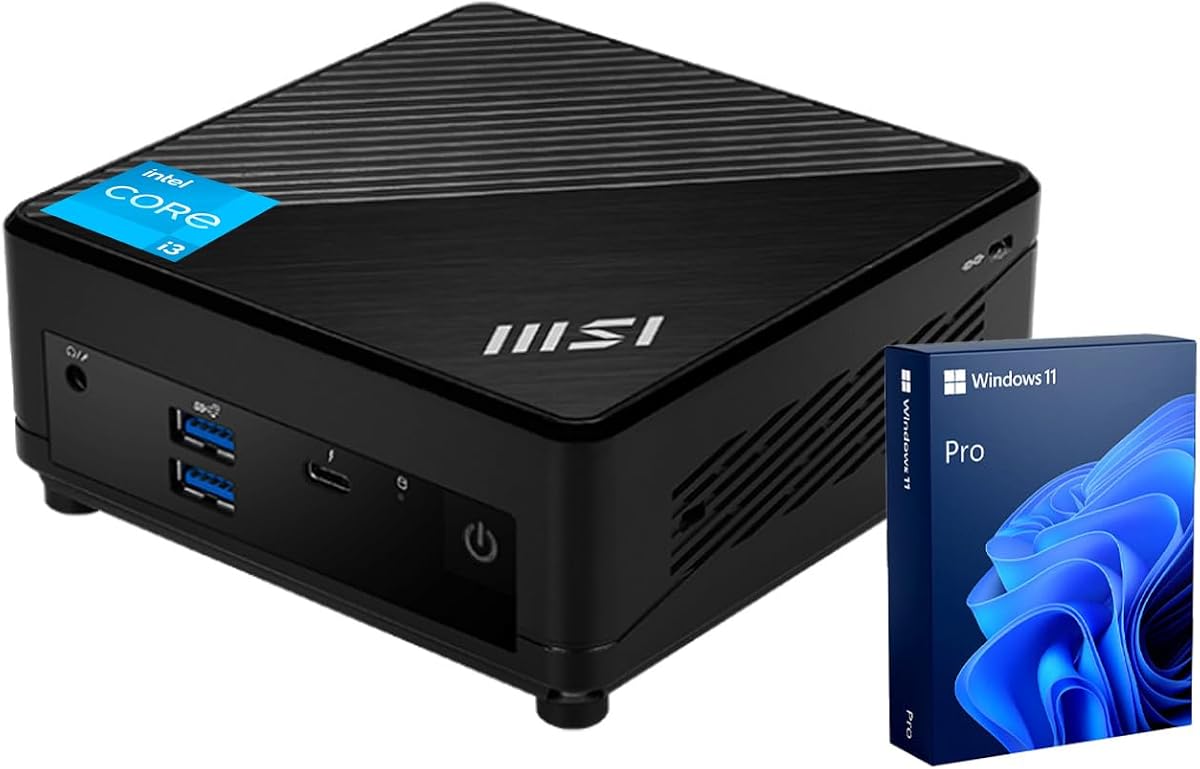
The MSI Cubi 5 Professional is a modern business mini PC centered on the Intel Core i3-1215U. Its supplied rating is 4.8 out of 5, and the system's combination of six cores, eight threads, 16GB RAM, Windows 11 Pro, and extensive connectivity makes it one of the strongest all-around choices for professional workspaces.
We may earn a commission when you buy through this link, at no additional cost to you.
The processor runs at a 3.3GHz base frequency and can reach 4.4GHz in turbo mode, with 10MB of cache. Compared with the older dual-core and quad-core models in this guide, six-core capability offers more flexibility for browser-heavy work, office multitasking, communications, and background applications. The processor is not intended to replace a high-end workstation, but it has sufficient headroom for mainstream professional demands.
Memory and storage are well matched to the CPU. The 16GB DDR4 SODIMM supports multiple applications and browser tabs, while the 512GB PCIe M.2 SSD improves startup, application loading, and file transfer performance. Users should still check whether the included memory and storage are fixed or configurable for their particular listing.
Connectivity is the Cubi 5's defining feature. The specification lists four USB 3.2 Gen2 Type-A ports, one Thunderbolt 4 port, DisplayPort, HDMI, a microphone and headphone combination jack, WiFi 6, and two RJ45 connections. It supports three 4K monitors, making it useful for financial dashboards, creative review, development, and multi-panel administrative setups. Windows 11 Pro adds BitLocker, Remote Desktop, and management-oriented features.
The trade-offs are the relatively premium placement of this system and a specification list that should be checked closely. Two RJ45 ports are unusual, and buyers may need to confirm their intended use. As with every Windows 11 Pro mini PC, software and subscription costs can add to the hardware investment. Even so, the Cubi 5 combines a current processor generation, good core count, Pro software, and premium I/O without requiring a full-size workstation. It is a particularly strong recommendation for hybrid workers and small professional teams.
Windows 11 Pro brings BitLocker, Remote Desktop, and improved multitasking features, while the six-core, eight-thread processor handles communication, browser, and office workloads with more concurrency than lower-end dual-core alternatives.
Thunderbolt 4, four high-speed USB-A ports, DisplayPort, HDMI, and WiFi 6 make the system well equipped for docks, fast peripherals, and three-monitor workflows. It is especially useful for users who regularly move between office and home setups.
We may earn a commission when you buy through this link, at no additional cost to you.
The renewed Dell OptiPlex 3060 Micro is a business-oriented mini desktop built around the Intel Core i3-8100T. It has a supplied rating of 4.2 out of 5 and combines Windows 11 Pro with a practical port layout. Its value-oriented position is strongest when an organization needs a familiar, expandable micro desktop rather than a premium workstation.
We may earn a commission when you buy through this link, at no additional cost to you.
The Core i3-8100T is a four-core processor operating at 3.1GHz, with 6MB of cache. It provides enough performance for document handling, browser applications, video calls, point-of-sale software, schoolwork, and routine enterprise connectivity. It is significantly more current than the C3's 5th Gen CPU, but it still has less performance potential than the 12th through 14th Gen systems elsewhere in the list.
The initial memory and storage capacities are the biggest concerns. With 8GB of 2666MHz DDR4 and a 128GB SSD, the system is best treated as a starting point that may require an immediate upgrade. The OptiPlex micro platform is designed for serviceability, but buyers should verify the available memory slots and supported storage form factors in the exact configuration they are purchasing.
Display and peripheral connectivity are solid for office use. The system has one RJ45 port, HDMI, DisplayPort, and six USB 3.0 ports. It supports two 4K displays, allowing users to expand a Windows workspace, mirror content, or place a single window across multiple screens. That is useful for administrative work, stock monitoring, and dual-screen productivity.
Because this is a renewed product, its appearance, warranty terms, and general condition may differ from a new unit. The system's dependable port selection and Pro operating system remain attractive, but limited storage and memory mean it is most compelling for value-conscious buyers with a specific need for a Dell micro desktop. Confirm the refurbishment terms and inspect what upgrades are already installed before finalizing the purchase.
OptiPlex micro systems are built around compact business use, and this configuration provides familiar connectivity, Pro software, and dual-display capability. It fits well where predictable physical design and useful ports matter more than cutting-edge performance.
Eight gigabytes of memory and a 128GB drive are modest for a modern office workload. Prospective buyers should consider a memory or storage upgrade, or choose a higher-capacity configuration, to avoid limiting the usefulness of the otherwise serviceable platform.
We may earn a commission when you buy through this link, at no additional cost to you.
The MSI PRO DP21 is a well-equipped office mini PC that pairs a 13th Gen Intel Core i3-13100 with 16GB of memory, a 512GB NVMe SSD, and Windows 11 Pro. Its supplied rating is 4.6 out of 5. The included keyboard and mouse add convenience, making it a potentially complete desk setup for work, study, or home-office use.
We may earn a commission when you buy through this link, at no additional cost to you.
The Core i3-13100 has four cores and eight threads, a 3.4GHz base frequency, a boost ceiling of 4.5GHz, and 12MB of L3 cache. Those specifications position it as a capable general-purpose processor with enough speed for office suites, browser work, communications, and moderate multitasking. It does not match the six-core MSI Cubi 5 in parallel processing, but its later generation and high clock speeds make it particularly responsive in common single-threaded tasks.
The 16GB of RAM and 512GB PCIe NVMe drive create a balanced configuration. Memory is sufficient for numerous browser tabs and standard business applications, while NVMe storage offers faster boot and application access than a basic SATA drive. For heavier virtualization, large project libraries, or specialist software, the four-core processor and 512GB capacity may eventually need careful management.
The port list includes four USB 2.0 Type-A ports, one USB 3.2 Gen2 Type-A port, two USB 3.2 Gen1 Type-A ports, USB Type-C, DisplayPort 1.4, HDMI 2.0b, RJ45, and audio connections. WiFi and Bluetooth provide wireless networking. Dual-monitor 4K support enables a side-by-side productivity arrangement without requiring a full tower.
The main limitation is that MSI states support for two monitors, whereas several alternatives support three. The 13th Gen platform also brings more performance per watt than older Core i3 models, but it does not offer the six physical cores of the Cubi 5. For users who value a current processor, generous memory, fast storage, Pro features, and included peripherals, the DP21 remains one of the most straightforward office choices in the guide.
A 4.5GHz maximum turbo frequency makes the Core i3-13100 well suited to interactive tasks, document editing, browsing, and video communication. The eight-thread design also provides reasonable multitasking capability despite having only four physical cores.
Windows 11 Pro and the included wired keyboard and mouse remove some of the friction associated with a first setup. Users can connect the included peripherals immediately and add a preferred display, webcam, or other accessories as needed.
We may earn a commission when you buy through this link, at no additional cost to you.
The ASUS ExpertCenter PB63 is a compact business mini PC designed for organizations that value managed deployment, physical security, current processing technology, and warranty support. Its supplied rating is 4.0 out of 5. Because the supplied listing does not state the exact processor model, memory capacity, storage configuration, or operating system, buyers should verify those details before comparing it with a fully specified system.
We may earn a commission when you buy through this link, at no additional cost to you.
At the platform level, the PB63 uses a 14th Gen Intel processor and supports 4K UHD resolution across two displays. Dynamic tuning technology automatically optimizes performance, which can be useful for standardized fleets where administrators want a system that manages workload demands without manual tuning. The system also includes Intel WiFi 6 and Bluetooth 5.2 for flexible network access and peripheral connections.
Physical security is another distinguishing feature. A built-in Kensington lock slot allows the mini PC to be secured to a desk or installation point, an important consideration for reception desks, shared offices, classrooms, and retail environments. The stated TAA orientation also makes the system relevant to government and institutional buyers who need procurement-aligned hardware.
The three-year warranty adds confidence for business use, while the compact form factor leaves room for monitors, docking stations, and other desk equipment. Dual-display support is suitable for most administrative and productivity environments, although users needing three screens should consider the MSI Cubi 5 or Dell OptiPlex 7020 MFF instead.
The lack of specified RAM and storage is the principal issue. It makes the PB63 a better fit for buyers who already know their deployment requirements or can select a clearly configured listing. Its 14th Gen foundation, enterprise features, security slot, and support period make it a promising business desktop, but it is not possible to recommend it confidently for memory-heavy work without confirming the final configuration.
Dynamic tuning, a three-year warranty, and a TAA-oriented configuration give organizational buyers useful reasons to consider the PB63. These features matter when a compact PC will be deployed repeatedly across different locations and managed as part of a larger fleet.
The integrated Kensington lock slot is a practical addition for reception areas, retail counters, classrooms, and shared workspaces. It provides a straightforward way to reduce the risk of the small desktop being moved or removed.
We may earn a commission when you buy through this link, at no additional cost to you.
The Lenovo ThinkCentre Neo 50q Gen4 1L combines a six-core Intel Core i3-1215U with 16GB of memory and a 512GB PCIe NVMe SSD. It has a supplied rating of 5.0 out of 5 and offers a particularly attractive combination of processing capacity and compact dimensions for office users, creative professionals, and home workers.
We may earn a commission when you buy through this link, at no additional cost to you.
The Core i3-1215U is the same 12th Gen, six-core architecture used in the MSI Cubi 5 Professional, with a maximum turbo frequency of 4.4GHz. That gives it more parallel processing capability than the four-core MSI PRO DP21 and older Core i3 options. It is well suited to multitasking, office productivity, research, software development, content review, and communication applications.
Storage is one of the system's clearest advantages. The supplied configuration includes a 512GB PCIe NVMe SSD, which offers fast boot times, application launches, and file transfers. Paired with 16GB of RAM, it creates a balanced platform for everyday professional work. The supplied listing also notes ENERGY STAR certification and eco-friendly materials, which can appeal to buyers focused on environmental impact.
Its enclosure measures just 1.4 inches tall, 7 inches wide, and 7.2 inches deep. It can be positioned upright, laid flat, or mounted with an optional VESA accessory behind a monitor or under a desk. Two simultaneous 4K displays are supported through HDMI and DisplayPort, providing enough screen space for documents, communication apps, and reference material.
The 5.0 supplied rating is encouraging, though the exact number of reviews and the identity of the specific Windows edition should be checked. Compared with the premium Dell OptiPlex 7020 MFF, this Lenovo lacks three-display support, larger DDR5 memory capacity, and USB Type-C front connectivity. Even so, it is an excellent general-purpose compact workstation with strong core count, fast storage, flexible placement, and an attractive rating. It is particularly well suited to users creating a two-monitor office or home workstation.
The six-core processor provides a useful degree of multitasking headroom while the compact enclosure preserves desk space. These qualities make the system attractive for small offices and home users who do not want a large tower.
Support for upright, flat, and optional VESA-mounted placement lets users optimize a two-monitor arrangement. Behind-monitor installation keeps the computer out of sight and leaves the main workspace uncluttered.
We may earn a commission when you buy through this link, at no additional cost to you.
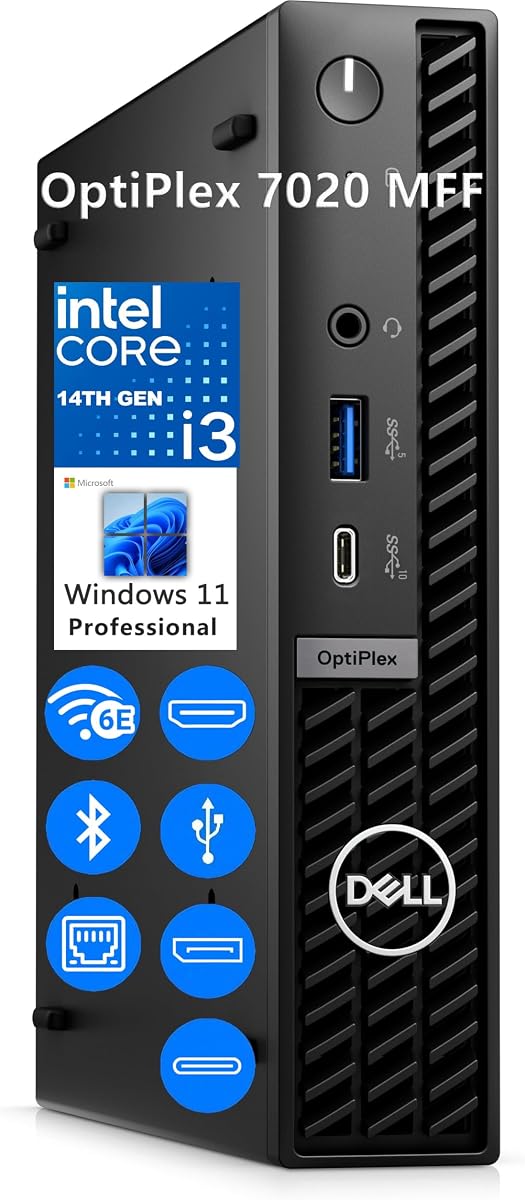
The Dell OptiPlex 7020 MFF is the most fully specified traditional business machine in this guide. It combines a 14th Gen Intel Core i3-14100T, 32GB DDR5 memory, a 1TB M.2 PCIe NVMe SSD, WiFi 6E, and Windows 11 Pro in a very small enclosure. Its supplied rating is 4.9 out of 5 reflects an exceptionally strong reception.
We may earn a commission when you buy through this link, at no additional cost to you.
The Core i3-14100T has four cores and eight threads, operates at 2.7GHz, and boosts to 4.4GHz with 12MB of cache. Its 32GB DDR5 memory is the largest confirmed capacity in the list and provides abundant room for heavy browser use, large business applications, communication tools, and background workloads. The 1TB NVMe drive adds enough room for extensive local files while delivering quick system and application access.
Display capability is another major benefit. Two DisplayPort 1.4a outputs and one HDMI 1.4b output support as many as three displays simultaneously. That makes the 7020 MFF a strong candidate for financial monitoring, administrative dashboards, development environments, content review, and productivity layouts that exceed a standard two-screen arrangement.
The port selection is equally comprehensive. The front includes a 10Gbps USB Type-C port, a 5Gbps USB-A port with PowerShare, and a universal audio jack. At the rear are two more 5Gbps USB-A ports, two USB 2.0 ports, RJ45 Ethernet, and three video outputs. Intel WiFi 6E and Bluetooth provide current wireless connectivity, while Windows 11 Pro adds BitLocker and Remote Desktop.
Its main disadvantage is the premium level of the complete configuration. The 1L micro form factor also offers less internal flexibility than a larger desktop, although the included high-capacity memory and storage reduce the need for immediate upgrades. The system weighs only 2.41 pounds and measures approximately 1.42 by 7.01 by 7.17 inches, making it easy to place behind a monitor or under a desk. For buyers seeking a ready-to-deploy premium business mini PC with ample memory, fast storage, and three-screen support, this Dell earns the Best Premium recommendation.
Thirty-two gigabytes of DDR5 and a 1TB NVMe drive remove many capacity constraints encountered by lower-end mini PCs. The configuration is particularly well matched to office suites, many browser tabs, communication platforms, and locally stored business documents.
Dual DisplayPort and HDMI support three simultaneous displays, while USB-C, five USB-A ports, Ethernet, WiFi 6E, and Bluetooth cover a broad range of peripherals. The system is well suited to permanent desks and professional monitoring setups.
We may earn a commission when you buy through this link, at no additional cost to you.
The Dell OptiPlex 7020 Micro is a compact 14th Gen business desktop that offers an attractive platform even before upgrades. It uses the same Core i3-14100T processor found in the higher-capacity Dell OptiPlex 7020 MFF, supports three displays, and includes current wireless and wired connectivity. Its supplied rating is 4.4 out of 5.
We may earn a commission when you buy through this link, at no additional cost to you.
The processor provides four cores, eight threads, a 2.7GHz base frequency, a 4.4GHz turbo ceiling, and 12MB of cache. This is enough performance for office applications, browser workloads, video communications, education, and routine business use. It also includes Intel UHD 730 integrated graphics, which the supplied listing describes as supporting high-quality visuals and real-time ray tracing in suitable lightweight applications.
The base memory and storage are the main limitations. Eight gigabytes of DDR5 and a 256GB M.2 PCIe NVMe SSD can support normal work, but numerous browser tabs and memory-heavy applications may quickly make the included capacity feel restrictive. The platform's value depends on whether the memory can be expanded and the storage replaced or added without changing the entire system.
Connectivity is strong. Front access includes a universal audio port, a 5Gbps USB-A port with PowerShare, and a 10Gbps USB Type-C port. Rear connectivity includes RJ45 Ethernet, two USB 2.0 ports, two 5Gbps USB-A ports, two DisplayPort 1.4a outputs, and HDMI. WiFi 6E and Bluetooth are included, and the system supports up to three displays.
Windows 11 Professional is included, and the compact enclosure can be mounted on a wall, under a desk, or behind a monitor with a separately purchased VESA mount. Compared with the 32GB and 1TB Dell configuration earlier in the list, this model is better viewed as an upgradeable foundation. It works well for organizations that standardize on the Dell platform and intend to customize memory and storage. For a buyer who wants a complete premium configuration without planning upgrades, the 7020 MFF is the more convenient selection.
The 14th Gen Core i3 processor, DDR5 memory, WiFi 6E, front USB-C, and three-display support create a current foundation for office use. The system feels designed for a long deployment cycle rather than a disposable general-purpose computer.
The included 8GB of memory and 256GB drive are the obvious bottlenecks in productivity-heavy environments. Buyers should check the maximum supported memory and storage options, then budget for an upgrade if browser-heavy multitasking is expected.
We may earn a commission when you buy through this link, at no additional cost to you.
The right Intel Core i3 Mini PC depends on workload, display needs, memory, storage, connectivity, and deployment environment. Comparing processors by generation alone is not enough, because each platform offers a different balance of cores, upgrade potential, power use, and business features.
Processor generation is the clearest dividing line in this category. The C3 uses a 5th Gen Core i3-5005U, the QAZIPO uses an 8th Gen Core i3-8109U, and the GMKtec uses a 10th Gen Core i3-10110U. The MSI Cubi 5 and Lenovo ThinkCentre use the 12th Gen Core i3-1215U, the MSI PRO DP21 uses the 13th Gen Core i3-13100, and the two premium Dell OptiPlex 7020 systems use the 14th Gen Core i3-14100T. Newer generations generally provide better efficiency, improved platform features, and stronger performance, although real-world results also depend on memory and cooling.
Choose a current processor when possible, but pay attention to core count as well. The six-core i3-1215U can handle more parallel work than four-core alternatives, while older dual- and quad-core chips may be adequate for basic web and office use. Do not equate a higher turbo clock with every kind of workload.
Memory is often the most important upgrade in a compact desktop because it affects browser workloads, office applications, communication tools, and multitasking. The list ranges from 8GB in the C3 and Dell OptiPlex 7020 Micro to 32GB in the Dell OptiPlex 7020 MFF. Several systems also support memory expansion, but the exact limits and slot configuration should be verified before purchase.
For general office use, prioritize at least 16GB when possible. Heavy browser use, large business applications, development, and virtualized workloads benefit from 32GB. Check whether installed memory is dual-channel and whether upgrading both modules together is practical, because matching capacity can help ensure predictable dual-channel performance.
A fast NVMe SSD materially improves boot time, application launches, and file operations, but the included capacity still determines how much can be stored locally. The Dell OptiPlex 7020 MFF has the largest stated drive at 1TB, while several alternatives provide 512GB. The QAZIPO starts with 256GB but includes a second SSD slot, and the C3 supports several expansion paths for larger media or backup-oriented use.
Look beyond the included drive and ask whether the model has replaceable or additional M.2 slots, a 2.5-inch bay, or external storage support. Choose capacity based on your file library, application requirements, backup plan, and whether the computer is expected to store media locally.
A mini PC's display support can determine whether it works with one monitor, a productive dual-screen setup, or a multi-panel command center. The QAZIPO, GMKtec, C3, MSI PRO DP21, and Lenovo ThinkCentre support two displays. The MSI Cubi 5 Professional and both Dell OptiPlex 7020 configurations support three, with the Dell models using two DisplayPort outputs plus HDMI.
Check both the number of outputs and their supported resolution. Dual 4K support is valuable for research, spreadsheets, editing, and communication, while three-screen capability is useful for monitoring, dashboards, and financial workflows. Also consider whether a docking station is available because desk setups often require more USB ports than the mini PC itself provides.
Port selection can determine whether a mini PC works with the accessories already in your workspace. USB 3.2 and USB 3.0 support fast external drives and peripherals, while USB Type-C adds flexibility for docking and modern accessories. DisplayPort and HDMI cover most monitors, but users of older or specialized equipment should verify adapters and docking requirements.
Network choice also matters. Gigabit Ethernet is sufficient for ordinary office use, while the GMKtec's 2.5GbE connection is better suited to fast large-file transfers and network storage. WiFi 6 or WiFi 6E provides convenient wireless access, and Bluetooth handles keyboards, mice, headphones, and other accessories. Check the number and placement of ports to ensure frequently used connectors are easy to reach.
The operating system affects setup, security, management, and software compatibility. Windows 11 Pro is included with the MSI Cubi 5, MSI PRO DP21, and Dell OptiPlex 7020 models, while the renewed Dell OptiPlex 3060 also lists Windows 11 Pro. The QAZIPO includes Windows 11 Home, and the C3 and ASUS listings require closer verification of the operating system included with the exact configuration.
Pro features such as BitLocker, Remote Desktop, and enterprise management options can be valuable for business users. Home editions may be sufficient for browsing, schoolwork, and standard consumer applications. Linux compatibility is mentioned for some systems, so confirm the intended operating system and peripheral support before installing an alternative.
Compact size is the defining benefit of the category, but the practical arrangement depends on dimensions, mounting support, and included accessories. The QAZIPO is approximately 4.9 by 4.4 by 1.3 inches and includes a VESA mount. The Lenovo ThinkCentre supports upright, flat, and optional VESA-mounted placement, while the Dell OptiPlex 7020 systems can also be mounted with a separately purchased accessory.
Consider where the system will live. Behind-monitor mounting is visually tidy, but ensure that ports remain accessible and that the enclosure has adequate ventilation. A separate VESA mount may be required even when the listing mentions mounting support, so verify what is included before planning an installation.
Business deployments benefit from a clear warranty, reliable support, security features, and standardized configurations. The GMKtec includes a one-year limited warranty, the QAZIPO states a 12-month warranty, the C3 includes a three-year limited warranty, and the ASUS ExpertCenter listing states a three-year warranty. The renewed Dell OptiPlex 3060 requires particular attention to refurbishment terms and included coverage.
For a home office, simple setup and adequate hardware may matter more. For an office fleet, remote-management functions, security locks, consistent support, and replaceable components deserve more attention. Read the warranty and support details on the current listing, and confirm that the configuration is appropriate for organizational requirements before ordering in quantity.
Begin by placing the mini PC on a stable surface with clearance around its vents, connecting the display, keyboard, mouse, and network, and then attaching the correct power adapter. If using VESA mounting, confirm that the mount is compatible and that cables can still reach the required ports. Complete the operating-system setup, connect to the desired network, and install only the applications required for the intended workload.
For routine care, keep the intake and exhaust areas free from dust, book pages, fabric, and other obstructions. Do not place the system on soft surfaces that can block ventilation. When moving it, shut it down fully and disconnect cables rather than pulling them from the socket. If storage or memory upgrades are planned, consult the product documentation, disconnect power, use appropriate anti-static precautions, and confirm that replacement parts are supported.
Use a task manager or system monitoring utility to check memory, storage, and processor use when performance declines. Keep the operating system and applications updated, and make regular backups to trusted external or network storage. For always-on roles, confirm that ventilation remains unobstructed and use the supplied remote-management features where appropriate, including Wake-on-LAN, PXE boot, or automatic power-on when supported.
Yes, a current Core i3 mini PC is generally well suited to document editing, spreadsheets, email, web applications, video calls, and routine multitasking. Performance depends heavily on having enough memory, so 16GB is a practical target for many offices. Older dual-core models remain usable for basic tasks, but they offer less headroom when several modern applications run simultaneously.
Most models in this guide support dual 4K output, although the C3's supplied information specifically lists dual displays at up to 2560 by 1600 rather than 4K. Users should verify the exact display specifications, adapters, operating-system support, and whether the graphics output is being used for extended displays rather than simple mirroring.
The Dell OptiPlex 7020 MFF has the strongest stated combination, with 32GB DDR5 memory and a 1TB NVMe SSD. The GMKtec G3 PRO and Lenovo ThinkCentre Neo 50q also offer a balanced 16GB and 512GB configuration. The best value ultimately depends on whether the computer will handle heavy multitasking, large files, or only light productivity tasks.
These systems are primarily intended for productivity, media playback, and light applications. Some integrated-graphics models can handle casual or older games, and the QAZIPO listing specifically mentions light online gaming, but modern demanding games generally require stronger graphics and more memory. A compact gaming desktop with a dedicated GPU is a better fit for serious gaming.
Windows 11 Pro adds useful capabilities such as BitLocker encryption, Remote Desktop, and broader management options, but they are not essential for every home user. Standard Home is sufficient for many personal tasks. Pro is more compelling for business ownership, managed work, multiple users, or a requirement to access a remote Windows workstation.
Most of the listed models include both technologies, including WiFi 6 on many newer systems and WiFi 6E on the Dell OptiPlex 7020 models. The C3 lists WiFi 5 and Bluetooth 5.0, while the ASUS listing states WiFi 6 and Bluetooth 5.2. Confirm the included wireless card in the exact configuration before making a purchase.
A renewed system can be worthwhile when affordability matters and the computer will handle standard business tasks. The renewed Dell OptiPlex 3060 provides Windows 11 Pro, a serviceable platform, dual 4K support, and six USB 3.0 ports. Buyers should review the refurbishment terms, included warranty, physical condition, and installed memory and storage before purchasing.
A 14th Gen processor is preferable when the budget allows because it represents a newer platform and supports current business-oriented features. A 12th Gen model can still provide excellent performance, especially with six cores, 16GB of memory, and fast storage. Compare the complete configuration rather than choosing solely by generation.
The GMKtec G3 PRO is the strongest balanced recommendation, combining 16GB of dual-channel memory, 512GB of storage, 2.5GbE, WiFi 6, and two 4K outputs. The QAZIPO Core i3-8109U stands out as the Best Budget option with a compact VESA-friendly body, dual 4K support, and a favorable supplied rating, while the Dell OptiPlex 7020 MFF earns Best Premium for its 32GB DDR5, 1TB NVMe, and three-display support.
For most buyers, prioritize sufficient memory, a modern processor generation, fast storage, and the exact display and port requirements of the intended workspace. Six-core systems offer additional multitasking headroom, while 16GB of RAM is a more useful baseline than a high-end label. Business buyers should also consider Pro features, security, support, and installation flexibility.
Ratings provide a useful signal, but they should be considered alongside configuration details and the volume of customer feedback. Prices, availability, and exact product options can change, so check the current listing before buying and confirm that the processor, memory, storage, operating system, included accessories, and warranty match your needs.
