
8mm Video8 Hi8 Camcorder VCR Tape Player Vintage Camera
8mm and Hi8 playback
USB computer transfer
Includes blank 8mm tape
Our Hi8 and 8mm Video Cassette Player guide compares playback, tape compatibility, transfers, outputs, features, and setup to help preserve vintage video.
Hi8 and 8mm video cassette players remain useful for watching, preserving, and digitizing decades of home-video recordings. A good unit should accept the tape formats you own, provide dependable playback, connect to modern displays, and offer a practical route for transferring analog footage without unnecessary complexity.
We compared the ten listed products by examining supported tape formats, playback capabilities, computer-transfer options, included accessories, output connections, recording limitations, and system compatibility. The guide covers dedicated players, camcorder-based playback devices, standalone digitizers, and one Digital8 recorder that also reads 8mm and Hi8 tapes.
Each review explains what the product is best suited for, who should consider it, and where its limitations matter. The first three entries represent a budget-oriented choice, an editor's choice, and a premium-featured option. Marketplace listings and availability can change, so confirm current specifications and compatibility before ordering.

4.0Editor score

4.7Editor score
The comparison below distinguishes true tape playback devices from capture-only converters and highlights format support, transfer methods, bundled equipment, and important operational limits.


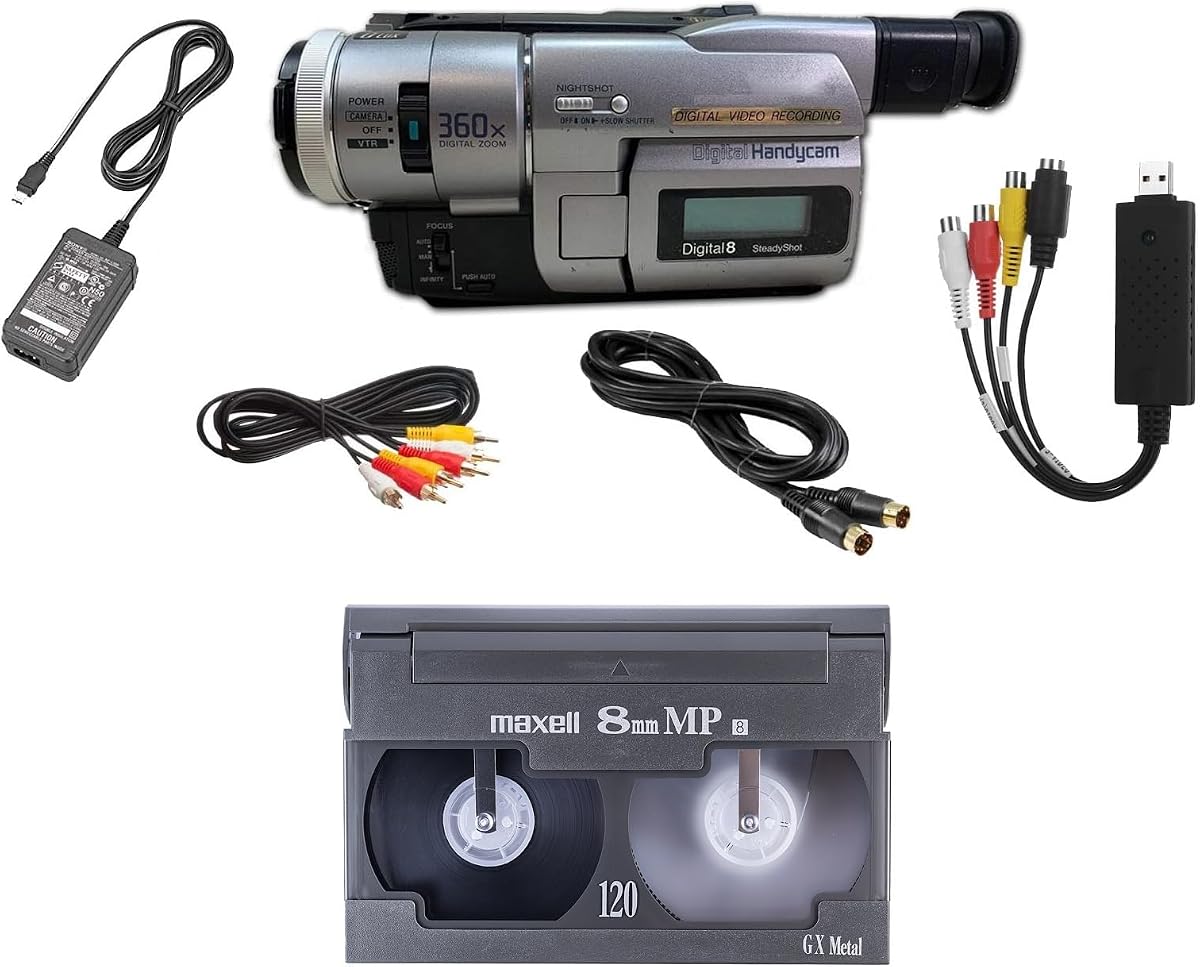

The 8mm Video8 Hi8 Camcorder VCR Tape Player Vintage Camera is an approachable combined playback, recording, and transfer device for collectors who want to explore Hi8 and 8mm media without buying a specialized deck. Its listing does not provide a customer rating, so the available feature set and stated guarantees are more useful than a numerical score when evaluating it.
We may earn a commission when you buy through this link, at no additional cost to you.
Its standout attraction is the combination of functions. It can play 8mm and Hi8 tapes, shoot new footage with a vintage aesthetic, and transfer tapes to a computer through the included USB capture device. A blank 8mm tape is also included, making the package useful for testing the hardware and creating short examples without requiring a separate starter tape.
The trade-offs are that the listing gives few technical details about outputs, software, and operating steps, and the absence of a published rating makes long-term performance harder to assess. Buyers should therefore pay close attention to the return policy and compatibility documentation, especially if they own a large and varied tape collection.
This is a sensible budget-oriented option for someone beginning a digitization project, experimenting with retro-style recording, or wanting one device that can handle both viewing and file transfer. It is less appropriate for a professional archive requiring published technical specifications, extensive manual controls, or confirmed compatibility with every legacy tape standard.
This package combines two common legacy formats with USB capture and a starter tape. That combination reduces the number of separate devices needed for a first transfer, while the recording function adds a creative use for the camcorder beyond recovering existing recordings.
The included tape makes initial setup easier and provides a basic way to evaluate the camcorder. Buyers should still preserve their original tapes and create separate working copies whenever possible.
We may earn a commission when you buy through this link, at no additional cost to you.
The Sony Camcorder for 8mm Digital8 Hi8 Tape Transfer to Computer USB and DVD is the most complete playback-oriented option in this guide. It carries a 4.0 customer rating and stands out for supporting regular 8mm, Video8, Hi8, and Digital8 tapes while providing several ways to move analog footage into a modern editing workflow.
We may earn a commission when you buy through this link, at no additional cost to you.
Playback versatility is matched by a thoughtful transfer bundle. The included USB capture device can save footage to computer files or burn it to DVD, while AV and S-Video cables support direct television viewing and alternative capture paths. The listing also states compatibility with Windows and Mac through USB, FireWire, and Thunderbolt, giving users options for older and newer systems.
There are two important limitations. The product has no PAL support, so it may not suit collections containing PAL recordings or users in regions where that standard is needed. It is also not intended for recording video, despite its camcorder form. Those restrictions make it more focused than some of the affordable camcorders in the list.
This is the top overall pick for a buyer who wants broad tape compatibility, a complete transfer path, and direct playback. It suits families preserving a mixed 8mm collection, hobbyists creating digital copies, and users who value S-Video and multiple computer interfaces more than the ability to record new tape-based footage.
Support for 8mm, Video8, Hi8, and Digital8 means one camcorder can cover several related tape families. This is particularly useful for collectors who inherited tapes recorded on different Sony, Canon, JVC, and other compatible camcorders over many years.
The USB capture hardware, computer file option, DVD burning capability, and included analog cables form an end-to-end solution. Buyers can preserve footage as editable files while retaining the option to create a directly viewable disc.
We may earn a commission when you buy through this link, at no additional cost to you.
The Hi8 8mm Tape Player Handycam CCD Camcorder w/Nightshot is a flexible choice for users who want both to recover family tapes and make new recordings with a deliberate retro appearance. Its 4.2 rating is the strongest among the general camcorder-style playback options presented here, making it an appealing alternative for creative experimentation.
We may earn a commission when you buy through this link, at no additional cost to you.
The device can play Hi8 and 8mm tapes, record directly to tape, and deliver a nostalgic VHS-style look without digital filters. Its USB adapter and digitizing software create a route from cassette to computer, while playback on a television or computer expands its usefulness beyond archiving. A blank tape and a one-year warranty add useful support to the package.
Its main limitation is that the supplied information specifies fewer tape families than the Sony multi-format camcorder. Digital8 and Video8 compatibility should not be assumed unless confirmed by the seller. The listing also provides less detail about capture resolution, software capabilities, and exact connection requirements than the more extensively documented transfer bundle.
This camcorder is best for creators who want the physical look and process of shooting analog video while still keeping a digitization route available. It also works for families with Hi8 or 8mm recordings who value a simple all-in-one package, provided they verify the exact formats and ports they need before purchase.
Direct-to-tape shooting gives this product a different role from a playback-only transfer unit. It lets users experience the pacing, texture, and limitations of physical media while retaining an easy path to digitize newly recorded material.
Nightshot is a notable feature for an inexpensive camcorder-style product. It can make dim scenes more practical, although the effect and final image quality will depend on the tapes used and the specific transfer process.
We may earn a commission when you buy through this link, at no additional cost to you.
The Tech Collector 8mm, Digital8, and Hi8 Transfer Bundle is a well-rounded digitizing kit for households that want to preserve a mixed family collection. Its 4.0 rating reflects a generally favorable reception, and the supplied information emphasizes both playback capability and a complete transfer package rather than relying on a bare playback deck.
We may earn a commission when you buy through this link, at no additional cost to you.
The camcorder is designed to play 8mm, Hi8, and Digital8 tapes. Its USB capture device can transfer recordings to computer files or burn them to DVD, and the included battery and AV cables support both mobile use and television playback. An 8mm tape is included as a practical starting point, while the seller advertises a working guarantee and free returns.
Video8 playback is not stated, which may matter for collections containing that related format. The listing also does not discuss PAL support, output resolution, software details, or Mac compatibility, so buyers should confirm those points if their collection includes region-specific recordings or if they want a tightly defined editing workflow.
This bundle is a strong candidate for family archivists who want a ready-to-use package with essential accessories included. It is particularly useful when the goal is to create computer files or DVDs from 8mm, Hi8, and Digital8 recordings without assembling a complex list of separate components.
The camcorder, USB capture device, battery, analog cables, and sample tape create a practical foundation for a first digitization session. That completeness is valuable for buyers who may not understand which connection methods or accessories legacy tape transfers require.
Computer files are the more flexible output for editing, backup, and sharing, while DVD provides a convenient way to create a directly playable copy. Having both pathways adds flexibility for different preservation goals.
We may earn a commission when you buy through this link, at no additional cost to you.
The Portta VHS to Digital Converter is not a tape player, but it is one of the most useful devices for anyone who already owns an 8mm or Hi8 player. Its 4.5 rating is strong, and its standalone design removes the need for a computer, capture driver, or editing application during recording.
We may earn a commission when you buy through this link, at no additional cost to you.
The converter accepts composite RCA, S-Video, and auxiliary audio inputs. It can record at up to 1080P 30Hz, store MP4 video and MP3 audio, and save recordings to a USB drive or TF card. A preview LCD and built-in speaker let users monitor the process without relying entirely on the source display.
Its most important limitation is also its defining one: it cannot play tapes or discs independently. Buyers must connect a compatible 8mm, Hi8, VHS, VCR, DVD, Mini DV, or other source player. This makes it ideal as the second half of an existing setup rather than a one-box solution for a new collection.
Choose this converter when you want simple, computer-free digitization and already have a working tape player. Its range of inputs and direct storage support make it especially attractive for users transferring several analog formats through a single compact workflow.
The unit records directly to removable storage without requiring a PC, software installation, or driver configuration. That simplicity is valuable for family members who want to preserve tapes with minimal technical setup.
Composite and S-Video connections offer alternatives for image transfer, while USB and TF storage allow capacity to scale with the collection. Users should confirm that their preferred storage medium is formatted compatibly before recording.
We may earn a commission when you buy through this link, at no additional cost to you.
The Tech Collector Sharp 8mm Tape Player Camcorder is an entry-oriented creative camcorder with a 3.9 rating. It can play 8mm material, record directly to tape, and provide a USB route for transferring footage to a computer. Its styling and operation are geared toward reproducing a familiar analog-video aesthetic.
We may earn a commission when you buy through this link, at no additional cost to you.
Direct-to-tape shooting can produce the deliberate VHS-like look described in the listing without relying on post-processing filters. The included USB adapter and digitizing software provide a path for moving recordings off tape, while the ability to play them on a television or computer makes the device useful for both capture and casual viewing.
The product data does not explicitly confirm Hi8 or Digital8 compatibility, so it should not be treated as a broad multi-format solution without checking the seller's detailed documentation. Capture quality, software capabilities, and connection standards are also described only generally, which limits certainty for technical buyers.
This camcorder is most suitable for beginners who want an inexpensive, approachable way to make retro-style recordings and digitize standard 8mm tapes. Existing owners of multiple tape formats should favor a model whose compatibility is stated more clearly.
Recording directly to tape recreates the texture and visual character associated with analog home video. The approach can be more satisfying than simulating the same appearance with a software filter because the recording process itself becomes part of the result.
The included digitizing software is intended to work with the USB adapter. Users should test a short tape first and confirm that the workflow is compatible with their computer before undertaking a full collection.
We may earn a commission when you buy through this link, at no additional cost to you.
The 8mm Digital8 Hi8 Tape Player Nightshot CCD Handycam is an ambitious inexpensive camcorder that combines playback, recording, computer transfer, and a low-light imaging feature. Its 3.3 rating is the lowest published score among the rated products, so buyers should approach it as a feature-heavy option whose results require careful evaluation.
We may earn a commission when you buy through this link, at no additional cost to you.
The listing names 8mm, Digital8, and Hi8 playback, direct-to-tape shooting, and USB transfer through an included adapter. Digitizing software and a blank tape are also included. These features make it possible to explore both archival playback and a nostalgic VHS-style recording style with one camcorder.
The lower rating indicates that some aspects of performance or fulfillment may not meet expectations, although the supplied information does not identify specific complaints. PAL compatibility, regular Video8 support, output resolution, and software requirements are not stated. Those omissions matter particularly for collectors with a large or internationally sourced archive.
This model is best for experimental users who value the combination of several tape formats and creative recording features over a strongly documented transfer package. Buyers should begin with a short test tape, inspect the included accessories, and confirm regional compatibility before using it on irreplaceable recordings.
Naming 8mm, Digital8, and Hi8 support gives the camcorder broader potential than standard 8mm-only models. It can serve users whose collection crosses analog and digital tape families without requiring several playback devices.
Nightshot supports shooting in dim conditions, while direct tape recording creates an intentionally older visual character. These features make the camcorder more useful for creative projects than for preservation alone.
We may earn a commission when you buy through this link, at no additional cost to you.
The 8mm Camcorder and 8mm Tape Player is a focused option for people whose immediate goal is recovering older 8mm recordings. Its 3.6 rating is lower than those of several comparable products, but the concise package includes a battery, AV cables, a blank 8mm tape, and the core playback and transfer functions.
We may earn a commission when you buy through this link, at no additional cost to you.
Its primary appeal is straightforwardness. The included camcorder can play old 8mm tapes and digitize them, while the supplied AV cables support television viewing or connection to a capture setup. The blank tape allows users to test the machine and provides a simple first recording without buying additional media immediately.
The supplied data does not confirm Hi8, Video8, or Digital8 playback, and it provides little detail about software, transfer quality, or computer compatibility. The lower rating also suggests that buyers should not assume this model will meet the expectations set by better-rated packages. Confirming the exact connections and workflow before purchase is essential.
This camcorder makes sense for a modest collection of standard 8mm tapes and a user who values a simple, included accessory set. It is less attractive as a long-term archival platform or a multi-format creative tool, particularly when important recordings depend on a successful transfer.
The camcorder, battery, cables, and sample tape cover the fundamental parts of an 8mm viewing or transfer setup. That makes the package approachable for users who are unfamiliar with legacy analog video equipment.
Because only standard 8mm is explicitly confirmed, users should check their tapes and collection labels before ordering. The simpler product can be effective when the requirement is narrow and accurately understood.
We may earn a commission when you buy through this link, at no additional cost to you.
The Panasonic PV-8450 Video Cassette Recorder is included as a traditional VCR option rather than a confirmed Hi8 and 8mm solution. It has a 3.9 rating and the supplied product information lists only the Panasonic brand and VCR type, so the listing offers very little technical guidance for buyers with a specific tape archive.
We may earn a commission when you buy through this link, at no additional cost to you.
As a dedicated videocassette recorder, it may appeal to someone who wants the familiar operation and permanent connections of a conventional home-video appliance. It could be used as part of an analog viewing chain if its inputs and outputs are compatible with another device, although no specific Hi8 or 8mm capabilities are stated in the available data.
The most important limitation is uncertainty. There is no confirmation of Hi8 or 8mm playback, no mention of USB or FireWire transfer, and no description of bundled cables. It should not be selected on the assumption that it performs the role of a modern multi-format tape player without checking the manufacturer's documentation and the seller's current details.
This product is best considered by collectors seeking a traditional Panasonic VCR for compatible media or as an analog component for a larger system. Buyers archiving Hi8 or 8mm tapes should favor a model with explicit format support and documented transfer outputs.
A dedicated VCR offers direct tactile controls and a simple appliance-like role. For users accustomed to physical media, that familiar experience can be preferable to navigating camcorder menus or computer software.
The available listing does not establish Hi8 or 8mm support. Checking technical documentation before purchase prevents an expensive mismatch and ensures that the recorder fits the intended tape collection.
We may earn a commission when you buy through this link, at no additional cost to you.
The Sony GV-D200 Digital 8mm Portable Video Recorder is the premium-featured selection in this guide and carries the highest customer rating at 4.7. Unlike products that only read tapes or transfer footage to a computer, it can record and play Digital8 videocassettes while also playing Hi8 and regular 8mm tapes.
We may earn a commission when you buy through this link, at no additional cost to you.
Its 20-segment assemble editing function allows users to combine as many as 20 assembled scenes in an editing sequence. A built-in IEEE 1394 FireWire iLink port offers direct editing connectivity, while composite ports allow the tapes to be viewed on a television. These features give the GV-D200 a more complete identity than a simple playback adapter.
The principal trade-off is its age. FireWire is not as convenient on modern computers as USB, and users may need compatible hardware or an intermediary workflow. The product also does not advertise direct DVD output, and its editing controls are centered on a compact portable form rather than a full editing suite.
This is the strongest choice for a buyer who values a complete Sony tape ecosystem, recording capability, and legacy editing connections. It is particularly suitable for users with Digital8 tapes who also own Hi8 or regular 8mm recordings and want one portable device that can read all three.
Digital8 recording capability gives the GV-D200 a more complete role than a transfer-only camcorder. It can preserve new footage on Digital8 media while remaining compatible with the earlier 8mm and Hi8 formats found in many family collections.
The integrated FireWire port was designed for direct digital video workflows and gives the recorder a specialized editing advantage. Modern users should verify that their computer or capture setup can accommodate this connection before relying on it.
We may earn a commission when you buy through this link, at no additional cost to you.
The right choice depends primarily on your tape formats, desired outputs, computer setup, and whether you need playback only, recording, or stand-alone digitization. Review these factors before ordering to avoid an incompatible or unnecessarily complicated system.
Regular 8mm, Video8, Hi8, and Digital8 are related but not interchangeable format labels. A product may read one or several of them, and a listing that says camcorder does not automatically establish support for all four families. Sort your collection by the labels printed on the cassette shells and note any tapes without clear markings. Pay special attention to Digital8, which uses a different tape structure from ordinary analog 8mm and Hi8 media.
Choose the narrowest player that explicitly covers your collection, or a broader multi-format model if you expect to acquire additional tapes. Do not infer compatibility solely from a product title.
Some camcorders can play legacy tapes but cannot record video, while others can record directly to tape and create a vintage visual style. A transfer-focused unit is usually simpler for archiving because you can connect it directly to a computer or converter. A recording-capable model is more useful for creative projects, original camcorder footage, or maintaining a collection of new tape-based recordings.
Choose playback and transfer if your priority is preserving existing memories. Choose recording capability only when you have a genuine need to produce new tape-based video.
USB is the most convenient modern connection, but compatibility depends on the included adapter, capture software, operating system, and available ports. FireWire can be excellent for older Digital8 workflows, while S-Video provides a useful analog connection to a converter or computer. Some packages can save editable files, burn DVDs, or do both. Confirm whether computer-free recording to USB or TF storage is important to you.
Match the output to your existing equipment rather than assuming every USB device will work without drivers or software.
A standalone video-to-digital converter can turn an existing tape player into a flexible digitization station. It often accepts composite and S-Video inputs, provides a preview screen, and records directly to USB or TF storage without a computer. This is useful for family members who do not want to install editing software. However, the converter does not itself play 8mm or Hi8 tapes, so a suitable source player remains necessary.
Use a capture box when you already own reliable playback hardware or want one converter to serve several analog formats.
Legacy analog video is sensitive to regional television standards. Some listings explicitly state that PAL is unsupported, while others list multiple NTSC and PAL inputs. If your tapes were recorded outside the country where you intend to view them, confirm the source and output standards before purchasing. A device can accept a tape mechanically yet still produce inconvenient playback or capture results.
Regional compatibility is especially important for international family archives and collections containing tapes with uncertain origins.
A useful package should include the power supply, cables, battery, blank tape, capture adapter, or software needed to begin. AV leads support direct television viewing, while S-Video can provide a better analog image path. USB adapters enable computer files, and DVD burning can create convenient discs. Note which accessories are truly included, because products with similar descriptions may require separate purchases.
Choose the package that reduces setup friction and provides outputs matching your intended destination.
Capture software determines how smoothly footage moves from tape to computer and whether it can be arranged into files suitable for editing. Windows and Mac compatibility is explicitly stated on some products, while others do not address platform support. A blank tape can help with an initial test, but software setup should also be checked before processing a large archive.
Favor clear, current documentation and an operating system your computer actually uses. Avoid assumptions based on the presence of a generic USB cable.
Legacy playback devices can vary in condition, and listing photographs may not reveal every limitation. A stated working guarantee, meaningful warranty, and free-return policy provide valuable protection when a unit arrives with mechanical or compatibility issues. Warranty coverage alone cannot guarantee that a device will read every damaged tape, so a return opportunity remains useful. Keep packaging, accessories, and the original media safely while evaluating a new purchase.
Stronger return support is especially helpful for first-time buyers choosing among camcorders with limited published specifications.
Before inserting a valuable tape, inspect the cassette shell for cracks, loose tape, warping, dirt, or evidence of a damaged tape path. Read the device manual, identify the correct input selection, and test with a known-good or included blank tape. This establishes that playback and the chosen output work before exposing irreplaceable family recordings.
For a computer transfer, connect the player to the capture device and computer using the supplied analog or digital leads. Launch the appropriate capture software, select the input matching your connection, and begin a short test recording. Check audio level, image stability, color, and whether the software is capturing the intended input rather than another source. Save the test before proceeding with a full tape.
Playback at normal speed and avoid leaving a tape engaged for long periods. Clean the device only with methods approved for its manual, and never force a stuck cassette. Store original tapes upright in a cool, dry environment away from direct sunlight, magnetic fields, and humidity. Work from copies whenever possible, preserve the originals, and maintain separate backups of the digital files you create.
Regular 8mm is an early analog videocassette family, while Video8 and Hi8 are related analog formats with different recording and playback characteristics. Digital8 records digital video on a tape shell similar to 8mm media. A player may support some but not all of these formats, so check the exact compatibility list rather than assuming that any camcorder labeled 8mm will read every related tape.
Usually, yes, because the player can send composite or S-Video video and analog audio to a television or modern converter. Some devices also include USB transfer hardware, but that is separate from direct television viewing. Check the included AV cables and output connectors, and use the appropriate input setting on the television.
It depends on the player. Several camcorder packages include a USB capture device and can save computer files or burn DVDs directly. A standalone converter is useful when you already own a compatible player, want computer-free recording to USB or TF storage, or need to digitize several analog formats through one device.
Test the equipment with a less important tape or included blank media first, then process the original once without interrupting the session. Keep the original cassette in good physical condition and create a separate working copy for later editing. The most important safeguard is making another backup of the resulting digital file outside the computer used for capture.
Some camcorder-style products in this category can record directly to tape, while others are playback-only for video. The Sony GV-D200 records Digital8, and several lower-cost camcorders advertise direct-to-tape shooting. Always check the product's recording format, because the ability to record on tape does not mean the device can record every type of tape.
A USB cable alone does not guarantee compatibility. The capture adapter and software must support your operating system, and some legacy equipment uses FireWire or proprietary drivers. The Sony multi-format camcorder lists broad Windows and Mac connectivity, while other listings provide less detail, so verify support before transferring an entire collection.
S-Video can provide a cleaner analog image than a basic composite connection when the source and capture equipment support it. The Sony multi-format camcorder includes both AV and S-Video cables, while the Portta converter accepts composite, S-Video, and auxiliary audio. Use the highest-quality common connection available and verify that the software selects the correct input.
Store cassettes upright in their original cases in a dry, cool place away from sunlight, heat, and strong magnetic fields. Keep them away from dust and avoid leaving them inside a vehicle or damp storage area. Proper storage reduces the risk of tape deterioration, while careful handling and separate digital backups protect the content.
The 8mm Video8 Hi8 Camcorder offers the most budget-oriented starting package, the Sony multi-format transfer camcorder stands out as the strongest all-around choice for mixed collections, and the Sony GV-D200 provides the premium feature set with Digital8 recording and built-in editing. Each serves a distinct need rather than representing a single universal solution.
Start with the tapes rather than the features. Confirm format support, inspect the available outputs, and determine whether you need standalone playback, computer capture, DVD creation, or new tape recording. A device that matches your actual archive and editing setup will be more useful than one with a longer specification list.
Before ordering, review the current listing, included accessories, regional standards, software requirements, warranty, and return terms. Marketplace availability and seller details can change over time, and those details determine how smoothly the chosen player will fit into your preservation workflow.