
Arsvita ARCD-04 Laser Lens Cleaner Disc
4.3Editor score
Two-brush lens cleaning process
Includes cloth and fluid
Designed for CD and DVD players
Explore the best DVD disc cleaners for discs and player lenses, comparing compatibility, cleaning method, included accessories, and safe care options today.
DVD disc cleaners fall into two useful categories: products that clean the surface of discs and kits designed to clean a player's laser lens. The right choice depends on whether the main problem is fingerprints and grime, playback errors caused by dirty optics, or a combination of both.
This guide compares ten cleaning options based on cleaning method, player compatibility, included tools, formulation, and intended use. It covers lens-cleaning discs, liquid cleaners, lint-free wipes, spray-and-buff kits, and multipurpose cleaning sets without making unsupported claims about personal testing.
Each review explains what makes the product distinct, where it fits best, and where a different approach may be more appropriate. Ratings and product details reflect the supplied listings, while prices and availability can change, so shoppers should confirm current listing information before buying.
4.3Editor score

4.6Editor score

4.5Editor score
The comparison below separates disc-surface cleaners from laser-lens cleaners and identifies the principal format, compatibility, and accessory differences among all ten products.



The Arsvita ARCD-04 is a laser-lens cleaning disc rated 4.3, making it a practical budget-oriented choice for CD, VCD, and DVD players. Its defining feature is a two-brush cleaning process intended to remove dust and deposits that can contribute to slow loading, skipping, freezing, audio dropouts, and image distortion.
We may earn a commission when you buy through this link, at no additional cost to you.
The set is more complete than a bare cleaner disc. It includes a cleaner disc, a glasses cloth, two units of disc-cleaning fluid, and an after-sales card. That combination gives buyers separate tools for maintaining the player optics and handling disc surfaces without purchasing several unrelated maintenance products.
Compatibility needs careful attention. Arsvita states that the disc works with CD, VCD, and DVD players, but explicitly excludes PS1, PS2, PS3, PS4, Xbox, Xbox 360, Xbox One, Xbox X, Wii, Wii U, and Bose players. Those exclusions make it less flexible than some competing lens cleaners, particularly for households with modern consoles.
This is a sensible choice for a dedicated DVD player, older optical-drive desktop, or compatible laptop whose symptoms point to a dirty lens. It is not a universal cleaner for every disc-based device, and the included fluid should not be confused with a player-lens treatment. For the stated compatibility and a convenient bundled setup, however, the ARCD-04 offers strong utility.
The two-brush design is intended to lift dust and accumulated deposits from the laser lens. Regular use may help reduce loading delays, playback freezes, and visible or audible interruptions associated with a dirty optical pickup.
The included cloth and two cleaning-fluid units make this more versatile than a lens disc alone. They also support routine care for discs and other compatible surfaces, although the disc remains the product's primary feature.
We may earn a commission when you buy through this link, at no additional cost to you.
The Arsvita CD Laser Lens Cleaner Disc Cleaning Set has a 4.2 rating and focuses on routine maintenance for compatible CD, VCD, and DVD players. Like the ARCD-04, it uses a two-brush process to address dust and deposits that may cause slow loading, skipping, freezing, or distorted playback.
We may earn a commission when you buy through this link, at no additional cost to you.
Its included accessories are simpler: one cleaner disc, one glasses cloth, and a user manual. This makes it a convenient choice for someone who primarily wants a lens-maintenance disc and a basic cloth rather than a larger collection of fluids. The manual is particularly relevant because the cleaning cycle should be performed correctly for effective results.
The major limitation is the same narrow device range listed by the manufacturer. It is not compatible with PS1 through PS4 systems, Xbox consoles, Wii or Wii U systems, or Bose players. Buyers should also recognize that this product addresses the player lens; it should not be expected to remove scratches or repair damaged disc data layers.
For a compatible standalone player, older computer optical drive, or DVD-equipped laptop, this set is easy to understand and use. It fits into a maintenance routine alongside a separate disc-surface cleaner. Those wanting a broader accessory bundle may prefer the ARCD-04, while those needing console support may find the Maxell DVD-LC more suitable.
This disc is designed to clean the laser lens rather than the printable or reflective surface of a DVD. That distinction matters when playback trouble persists despite cleaning the disc itself with a lint-free cloth.
A glasses cloth and user manual round out a compact package. The lack of cleaning fluid makes it less useful for disc-surface maintenance, but it also keeps the purchase focused on the lens-cleaning disc.
We may earn a commission when you buy through this link, at no additional cost to you.
The Maxell DVD-LC is a purpose-built lens cleaner with a 4.2 rating. Its Thunder on brush system uses ultra-fine synthetic fibers impregnated with copper, combining cleaning and demagnetization while also being positioned as a tool for reducing scratch-related playback problems.
We may earn a commission when you buy through this link, at no additional cost to you.
Compatibility is one of its strongest selling points. Maxell lists the cleaner for Blu-ray players, all DVD players, computers and laptops with DVD drives, Xbox and Xbox 360 systems, and PS1 and PS2 consoles. It is specifically not suitable for PS3, PS4, or Wii U, so buyers should still verify the exact device model.
The manufacturer recommends cleaning the lens about every ten hours of use and replacing the cleaner when the brush shows wear or after roughly twenty uses. Insertion is straightforward: place the disc graphics-side up with the arrow pointing forward, play it, and press stop if the goal is lens cleaning only.
This cleaner suits collectors and households maintaining older optical hardware, where one product may need to serve several device categories. It is less attractive for modern PS3, PS4, or Wii U owners, but it offers unusually broad support for legacy DVD, CD, and gaming equipment. Verify compatibility before ordering, and follow the listed operating guidance.
The Thunder on brush system is designed to clean and demagnetize the lens while addressing fine debris and scratch-related playback concerns. Its fine fibers make the disc more specialized than a simple household wipe.
Support for DVD, Blu-ray, computer optical drives, and several older game systems is valuable for mixed media collections. The exclusions remain important because device support is not universal.
We may earn a commission when you buy through this link, at no additional cost to you.
The Arsvita ARCD-02 carries a 4.1 rating and offers a straightforward laser-lens cleaning disc for CD, VCD, and DVD players. Its two-brush system is intended to remove dirt and dust deposits associated with slow loading, skipping, freezing, and playback distortion.
We may earn a commission when you buy through this link, at no additional cost to you.
This set includes one cleaner disc, one glasses cloth, one disc-cleaning fluid, and an after-sales card. It is therefore a more useful all-in-one maintenance option than a lens disc sold alone, particularly for users who want to clean both the disc surface and the player's optical pickup.
Its device compatibility is limited by the manufacturer's exclusions. The product is not listed for PlayStation systems from PS1 through PS4, Xbox systems through Xbox X, Wii or Wii U, or Bose players. It works best as a dedicated care tool for conventional CD, VCD, and DVD equipment.
The ARCD-02 is a reasonable choice for basic home maintenance, especially when a bundled fluid and cloth are desired. Buyers who prioritize the broadest legacy console support should examine the Maxell DVD-LC instead. As with any optical cleaner, correct use and compatible hardware are essential.
The cleaning disc addresses the player lens, while the included fluid and cloth can support routine care of disc surfaces. That combination is useful for users who want a compact maintenance kit.
The product follows the familiar lens-cleaner format: insert the disc in a compatible player and allow it to run its cleaning sequence. It should not be placed in excluded game consoles or used as a repair tool for physically damaged media.
We may earn a commission when you buy through this link, at no additional cost to you.
The Maxell CD & DVD Quick Wipes are rated 4.3 and focus on cleaning disc surfaces rather than the laser lens. Their 20-count package contains individually wrapped, soft, non-abrasive wipes designed to lift dirt, dust, smudges, and fingerprints from CDs and DVDs.
We may earn a commission when you buy through this link, at no additional cost to you.
This format is particularly convenient for a small collection, a media room, or anyone who wants a fast maintenance option without handling a liquid cleaner. Open one wipe, clean the disc, and discard it afterward. That simplicity is especially helpful when fingerprints or light grime are the main source of playback interruptions.
The wipes are positioned for routine maintenance and to help reduce skipping caused by surface contamination. They cannot repair deep scratches, restore damaged data layers, or remove dust from inside a player. The product description also mentions a separate Maxell CD lens cleaner for player maintenance, reinforcing the distinction between surface cleaning and internal optical care.
For discs that are generally in good condition but need a quick clean, this is one of the most approachable selections in the guide. It is less suitable for a heavily soiled collection because a dedicated spray, cloth, or thorough wipe may provide more control. For convenient handling of small messes, however, the 20-pack is highly functional.
Individually packed wipes eliminate the need for separate spray bottles or cloths. This makes the product easy to keep near a player, carry while traveling, or use for quick corrections.
The stated soft, non-abrasive material is appropriate for routine removal of dust and fingerprints. It offers a controlled way to clean discs without flooding the surface with liquid.
We may earn a commission when you buy through this link, at no additional cost to you.
This spray disc cleaner has a 4.5 rating and offers a straightforward spray-and-buff approach for optical media. The product description says it is used by libraries to maintain large disc collections, although that is a manufacturer claim rather than an independently verified conclusion.
We may earn a commission when you buy through this link, at no additional cost to you.
The package includes an eight-ounce bottle and a soft disc buffing cloth. Its formula is described as safe and effective, free of alcohol, and suitable for regular use across HD DVD, Blu-ray, book-on-disc, game discs, and other formats. That broad format support makes it useful for mixed collections that include both movies, music, and software.
The key benefit is control over coverage. A small amount can be applied to a dirty area and buffed with the supplied cloth, making the cleaner suitable for fingerprints, smudges, and general surface contamination. As with any wet cleaning process, avoiding excessive liquid and allowing the disc to dry before use are sensible precautions.
This product is best for users who maintain many discs and want a general-purpose surface cleaner. It should not be confused with a lens-cleaning disc, and the bottle should not be directed into a player. For a premium, residue-focused liquid formula, the TME cleaner is another option; for portable quick cleaning, Maxell wipes are more convenient.
Support for Blu-ray, HD DVD, game discs, and book-on-disc media broadens the cleaner's usefulness. The included cloth provides a dedicated buffer for removing residue after spraying.
The larger bottle and buffing-cloth format suit regular care of numerous discs. It offers more coverage than a single-use wipe, provided the liquid is applied sparingly.
We may earn a commission when you buy through this link, at no additional cost to you.
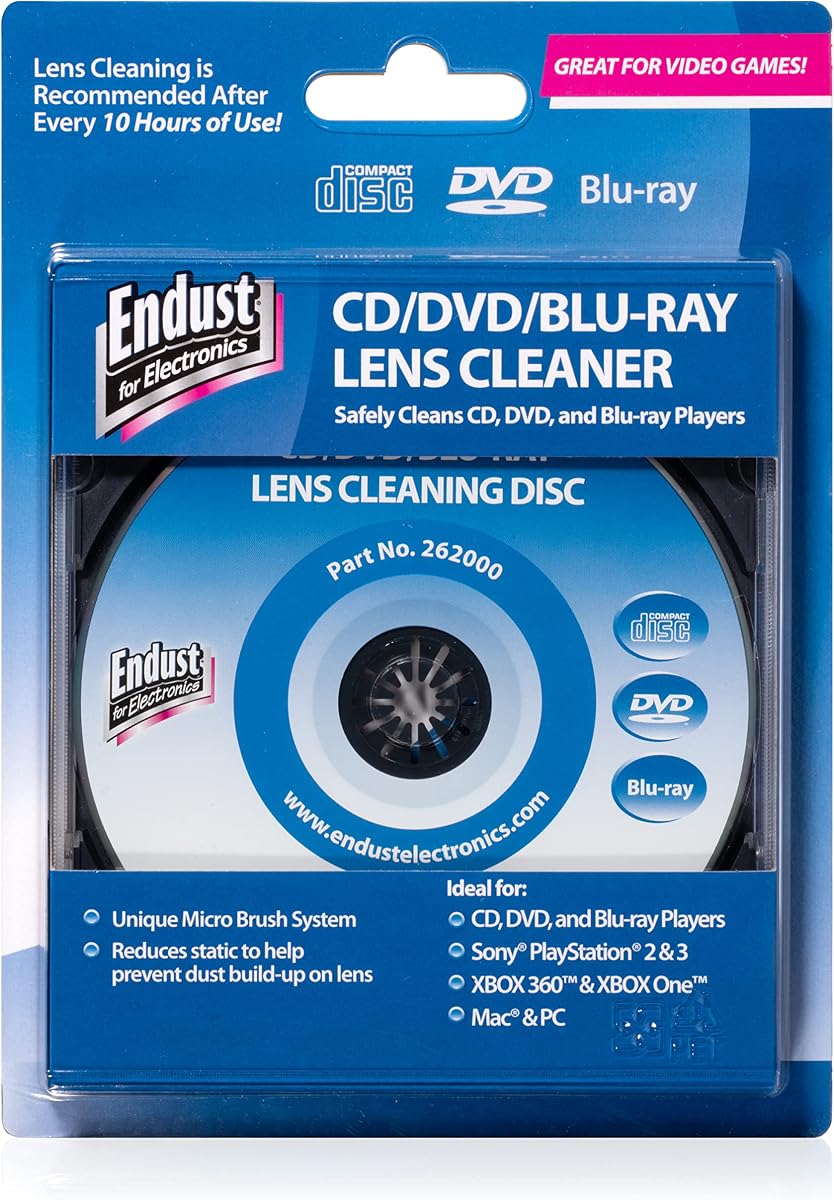
The Endust Electronics CD/DVD/Blu-Ray Lens Cleaner is rated 4.3 and is designed to remove dust and dirt from the lens of a compatible disc device. It is aimed particularly at office desktops, school environments, and home offices where shared optical equipment may accumulate dust.
We may earn a commission when you buy through this link, at no additional cost to you.
Its operation follows the lens-cleaner-disc format, but the instructions are delivered through audio after insertion. The product listing specifically notes that the device's audio should be turned on so users can hear the use instructions. This is a useful design for compact discs that have little room for printed instructions.
Compared with multifunction sprays and wipes, Endust stays focused on the internal laser lens. It cannot remove fingerprints from a disc, clean a scratched data layer, or address physical damage. Its value appears when a device loads discs slowly or struggles to read otherwise clean media.
The cleaner is a good fit for offices, classrooms, and homes with compatible CD, DVD, or Blu-ray equipment. Because device compatibility and menu behavior can vary, users should follow the prompt and stop the cycle as directed. For mixed legacy-device support, the Maxell DVD-LC offers a broader stated compatibility list.
Turning on player audio provides spoken instructions once the disc is inserted. This can make the process easier to follow without requiring a separate card or reading while the disc is running.
The stated office and school use cases reflect the product's compact, low-fuss design. Shared players that collect dust may benefit from occasional lens cleaning when compatible.
We may earn a commission when you buy through this link, at no additional cost to you.
The TME CD DVD Cleaning Solution Fluid earns a 4.5 rating and emphasizes careful disc-surface cleaning. Its eight-ounce spray bottle uses an ultra-pure water base that is described as 1-micron filtered, UV treated, and de-ionized, while the formula avoids alcohol and ammonia.
We may earn a commission when you buy through this link, at no additional cost to you.
Those details support a gentle cleaning process. The manufacturer says the fluid works down to the sub-micron level and can remove manufacturing haze from new discs. It is also described as residue free, although users should still wipe the surface dry with a clean, lint-free cloth as instructed.
The bottle is notably generous for collectors, libraries, or households that maintain many discs. The product is made in the USA from domestically sourced ingredients according to the listing. Its stated nonflammability and alcohol-free formulation also make it more approachable for users who prefer a minimal, water-based approach.
This is a premium-oriented surface cleaner for people who want formulation details and a larger quantity. It is explicitly not a scratch remover, so buyers with visibly damaged discs should not expect repair. For broader bundled convenience, the TME bottle would normally be paired with a separate lint-free cloth. It is an excellent choice for routine care and haze removal, but not for cleaning a player lens.
The stated filtration, UV treatment, and de-ionization distinguish this product from more generic sprays. It is designed to clean gently without relying on alcohol or ammonia that may weaken some discs.
An eight-ounce bottle provides enough solution for repeated maintenance when used sparingly. The residue-free claim makes it appealing for owners who want a clean surface without a visible oily film.
We may earn a commission when you buy through this link, at no additional cost to you.
The CD & DVD Cleaning Kit has a 4.3 rating and pairs an advanced cleaning solution with a reusable microfiber glove. The solution is designed to lift dust, smudges, and fingerprints without harsh chemicals, while the glove provides a soft surface for wiping discs and other delicate items.
We may earn a commission when you buy through this link, at no additional cost to you.
Its stated disc compatibility includes CDs, DVDs, Blu-rays, and game discs, making it suitable for mixed collections. The manufacturer also positions the glove and formula for screens, lenses, and other delicate electronics, although the product's main purpose remains optical-disc care. The included glove is reusable and should be kept clean between uses.
The kit claims to help reduce skipping and improve sound and picture clarity by cleaning dirty surfaces. It also states that the ingredients are non-toxic and leave no sticky residue or strong odor. Those features may appeal to users who want a multi-purpose maintenance setup rather than a single bottle and conventional cloth.
The main consideration is handling discipline. A glove that has collected dirt from one disc should not automatically be used on another without cleaning. A separate clean microfiber cloth may provide more precise control. Even so, the glove is a distinctive, reusable tool and the solution's stated versatility makes this a flexible option for mixed media and electronics.
The microfiber glove offers an alternative to a traditional cloth and can also be used on compatible screens and delicate electronics. It should be laundered or otherwise cleaned according to reasonable care practices to avoid transferring debris.
The solution's stated support for CDs, DVDs, Blu-rays, and game discs makes it appealing to owners of varied media. Its usefulness beyond discs adds further value for a general electronics-care kit.
We may earn a commission when you buy through this link, at no additional cost to you.
The Premium CD Cleaner Solution Spray holds the highest listed rating in this guide at 4.6. It combines a seven-ounce cleaning fluid with a seven-inch microfiber cloth, creating a ready-to-use kit for routine care of CDs, DVDs, Blu-rays, game discs, book-on-disc media, and other disc formats.
We may earn a commission when you buy through this link, at no additional cost to you.
The solution is positioned as a way to remove dust, fine particles, and dirt while helping restore optical tracking. Its included cloth is described as lint-free, streak-free, and non-abrasive, with an anti-static design. The cloth can also clean glasses, phones, and laptop screens, adding versatility beyond the disc collection.
The product listing calls the formula effective for reducing fine particles and restoring tracking on affected media. It also suggests the cleaner is useful for music enthusiasts and DJs who handle discs frequently. Since it cleans surfaces rather than internal optics, it should be paired with a separate lens cleaner when a player is unable to read clean-looking discs.
The combination of solution, dedicated cloth, broad format support, and the highest listed rating makes this a strong all-around surface-care choice. It may not address deep scratches, and buyers should still apply the fluid carefully before buffing. For routine cleaning of a varied disc collection, however, it offers a particularly complete and easy-to-understand package.
The seven-ounce bottle and seven-inch cloth mean buyers do not need to source a separate wiping material. The pairing also makes it easier to follow a gentle spray-and-buff process.
The microfiber cloth is suitable for glasses, cell phones, and laptop screens. That makes the kit a convenient choice for people who want one soft cloth for several delicate surfaces.
We may earn a commission when you buy through this link, at no additional cost to you.
The right DVD disc cleaner depends on the location of the dirt, the formats you own, and the player or console involved. Comparing cleaning purpose, compatibility, included accessories, and disc-safe materials prevents shoppers from choosing a surface cleaner when they actually need to maintain a laser lens.
Begin by identifying where cleaning is needed. A lens-cleaner disc is inserted into a compatible player and is intended to remove dust or deposits from the laser pickup. A spray, wipe, or microfiber cloth is used on the disc's exposed surface to lift fingerprints, smudges, and grime. These methods are not interchangeable, and neither category can repair a cracked disc or a damaged data layer.
Choose a lens cleaner when a compatible player loads media slowly or struggles with otherwise clean discs. Choose a surface cleaner when a disc shows marks, playback stutters intermittently, or a quick wipe may restore normal tracking.
Compatibility is critical for lens-cleaning discs because the product must be accepted and controlled by the target device. Arsvita's two-disc offerings are limited to CD, VCD, and DVD players and exclude the listed PlayStation, Xbox, Wii, Wii U, and Bose systems. Maxell supports a wider legacy range, including Blu-ray, Xbox, Xbox 360, PS1, and PS2, while excluding PS3, PS4, and Wii U.
Check the exact model before ordering. A cleaner disc that works in a DVD player does not necessarily work in a game console, and modern consoles may not recognize the disc or may display an incompatible-media message.
Sprays provide the greatest control over where liquid is placed but require careful application and a proper buffing cloth. Pre-moistened wipes offer the simplest touch-up process and reduce the chance of overapplication. Microfiber gloves can be comfortable for larger collections, while liquid lens-cleaning discs automate a short cleaning cycle inside compatible players.
Match the method to the task. Use a controlled spray for thorough surface cleaning, a wipe for convenient fingerprint removal, and a disc-based lens cleaner only when the hardware is explicitly compatible.
Look for products described as non-abrasive, lint-free, alcohol-free, or ammonia-free. These characteristics reduce the risk of damaging sensitive reflective layers, labels, or polycarbonate surfaces. TME and the spray-and-buff option both emphasize alcohol-free formulations, while several microfiber products are designed to avoid scratches and streaks.
Even a gentle product can cause problems if too much liquid is applied. Never spray directly onto a disc, never spray into a player, and allow the surface to dry fully before playback.
Bundles can be more convenient than standalone cleaners. The Arsvita ARCD-04 and ARCD-02 include a cleaning disc, cloth, and fluid, while the Premium CD Cleaner Solution includes a seven-ounce bottle and a dedicated microfiber cloth. TME offers a large bottle but expects users to supply a clean, lint-free cloth.
A useful bundle should provide the tools required for the intended task rather than unrelated extras. A cloth adds value to every liquid cleaner, while an audio-guided or manual-driven lens disc simplifies player maintenance.
A 20-pack of individually wrapped wipes is convenient for a small collection or travel. Larger bottles offer better coverage for extensive libraries, offices, schools, and frequent handling. A reusable glove or microfiber cloth can reduce ongoing consumable use when maintained properly, while lens discs are intended for periodic player servicing rather than cleaning every disc.
Estimate how often you handle media and how many pieces need care. Match the package size and accessory format to that routine instead of choosing the largest container for a single-disc need.
Residue matters because an oily film can itself interfere with playback or attract additional dust. TME emphasizes a de-ionized, filtered, and UV-treated water base and a residue-free result. The kit with the microfiber glove emphasizes non-toxic ingredients and no sticky residue, while the spray-and-buff cleaner highlights the absence of alcohol and harmful vapors.
A clean result depends on both formulation and technique. Use a clean cloth, avoid circular areas of concentrated grime, and buff gently until the disc is dry. Do not assume any surface cleaner also reaches the player's lens.
Begin by diagnosing the problem and matching the product to it. For a dirty disc, hold it by the edges, inspect the reflective surface under light, and use a soft lint-free cloth or cleaner wipe. For a player lens, confirm that the device is listed as compatible before inserting a lens-cleaning disc, and follow the on-screen or audio instructions provided by the manufacturer.
When using a liquid surface cleaner, place the disc on a clean, flat surface, apply a small amount to the cloth or lightly to the disc, and wipe from the center outward toward the edge. Avoid spraying the fluid directly onto media, never flood the disc, and let it dry before playback. A second clean pass can remove remaining haze or streaks when the product directions call for it.
For lens-cleaning discs, follow the stated orientation, usually graphics facing up and the arrow pointing forward. Allow the cleaning cycle to run, and use the stop instruction if the goal is to clean the lens rather than play content. Store liquid cleaners upright, keep cloths clean, and separate optical-disc maintenance from screen or electronics cleaning whenever possible.
A DVD disc cleaner removes dirt, dust, fingerprints, and smudges from the surface of the disc. A laser-lens cleaner is inserted into a compatible player to clean the optical pickup inside. Use the first for visibly dirty media and the second when a player cannot read discs that look clean. Neither product is designed to repair physical damage.
Only if the product and console manufacturer support that combination. The Maxell DVD-LC lists support for Xbox, Xbox 360, PS1, and PS2, but excludes PS3, PS4, and Wii U. Arsvita's lens cleaners exclude all the listed PlayStation, Xbox, Wii, Wii U, and Bose systems. Always check the exact device model before insertion.
A standard disc-surface cleaner may improve visibility and playback if fingerprints or grime are causing the problem, but it cannot repair deep scratches. TME explicitly identifies its product as not being a scratch remover. If a disc has deep grooves, cracks, or a damaged reflective layer, replacement may be the only reliable option.
It is generally better to apply a small amount of cleaner to a clean, lint-free cloth and then wipe the disc from the center outward. Direct spraying can leave excess liquid at the edge, where it may seep into a label or hub. Always follow the product's own directions and allow the disc to dry fully before use.
Cleaning frequency depends on the device, environment, and how often it is used. Maxell recommends cleaning its DVD-LC after approximately every ten hours of use and replacing the product after twenty uses or when the brush shows wear. For other devices, follow the cleaner manufacturer's guidance and avoid unnecessary cleaning if the player is operating normally.
Avoid alcohol unless the cleaner manufacturer specifically permits it. The TME product and the spray-and-buff option are described as alcohol-free, with TME noting that alcohol or ammonia can weaken or damage discs. A purpose-made cleaning fluid and lint-free cloth provide a more controlled approach than household chemicals.
The problem may be on the disc's data layer, where damage is not visible, or it may be caused by dust on the player's laser lens. Cleaning the disc surface is still worthwhile, but if multiple clean discs fail in the same player, a compatible lens cleaner or professional service may be more appropriate. Neither cleaning category can repair a damaged data layer.
Wipes are more convenient for quick touch-ups and are individually packaged, while reusable cloths are more economical for frequent cleaning and provide more control over liquid application. Both can work well if the material is soft, clean, and lint-free. A reusable cloth should be washed and fully dried before being used on another disc.
The Arsvita ARCD-04 stands out as a budget-friendly lens-maintenance option with a cloth and fluid included. The Premium CD Cleaner Solution earns the Editor's Choice distinction for its complete surface-care package, high listed rating, and useful microfiber cloth, while the TME solution is the premium pick for buyers who prioritize detailed purification, an alcohol-free water base, and a larger bottle.
Prioritize the cleaning target before comparing accessories. Choose a compatible lens disc when the player itself struggles to load or read clean media. Choose wipes, spray, or microfiber tools for surface dirt and fingerprints. From there, match the product to the formats, player types, and maintenance frequency that match your collection rather than choosing solely by the number of accessories.
Current prices, ratings, availability, and listing details can change, so shoppers should review the latest product information and verify device compatibility before purchasing. The right DVD disc cleaner is the one that addresses the actual source of the playback problem while treating the disc or player with an appropriate, controlled method.