
Epson Workforce ES-50
4.3Editor score
Single-sheet portable design
Scans pages up to 72 inches
Searchable PDF OCR creation
Windows and Mac compatibility
Compare the best scanner for legal size documents, including legal-capable feeders, portable models, duplex speed, OCR quality, and key office features.
Scanning legal-size documents requires more than basic image capture. A useful scanner should handle long pages reliably, preserve fine text, support searchable output, and move paperwork into a manageable digital workflow. The right choice depends on paper volume, portability needs, software, and how often both sides must be scanned.
We compared the featured scanners by examining their stated paper capabilities, feeder designs, scanning speeds, connectivity, OCR functions, image adjustments, and physical formats. The list covers wireless desktop models, compact portable scanners, sheet-fed devices, and a flatbed option whose letter-size limitation requires careful consideration.
Each review highlights the most useful qualities and the practical trade-offs for legal professionals, home offices, and businesses. The top selections range from a budget-friendly portable model to feature-rich desktop scanners, while every entry explains where it fits best. Current product availability and pricing can change.
4.3Editor score

4.3Editor score

4.5Editor score
This side-by-side comparison organizes all ten options by paper handling, speed, connectivity, and document-processing capabilities, making it easier to identify the most suitable scanner for long legal documents and routine office workflows.


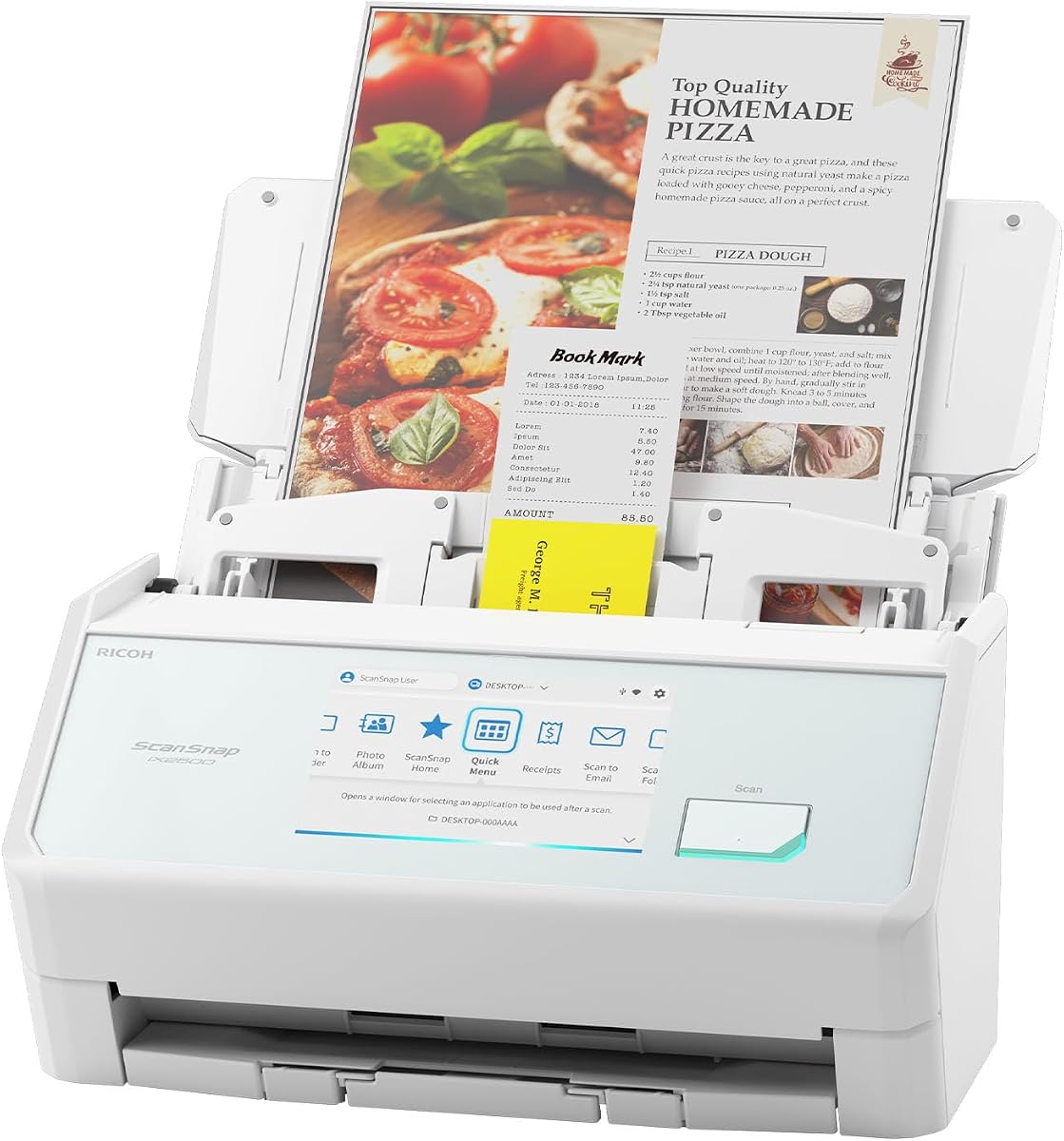
The ScanSnap iX2500 combines a fast 45-page-per-minute duplex engine, a 100-sheet automatic document feeder, and one of the most approachable control systems in this group. Its large touchscreen lets users select personalized scanning profiles without repeatedly navigating through menus. The supplied rating of 4.3 reflects a well-regarded feature set, although buyers should evaluate its physical dimensions against their available desk space.
We may earn a commission when you buy through this link, at no additional cost to you.
Connectivity is one of the iX2500's strongest distinctions. Built-in Wi-Fi 6 allows it to reach compatible computers, mobile devices, and cloud services, while USB-C provides a wired alternative. ScanSnap's QUICK MENU workflow supports sending scanned pages directly to favorite computer applications, and the scanner can organize, rename, edit, and sort documents, receipts, photos, and business cards after capture.
Its paper-handling system is designed for dependable feeding rather than simply raw speed. A brake roller system controls sheets as they enter the feeder, a multi-feed sensor detects pages stuck together, and skew detection helps avoid damaged or misplaced documents. Those protections are particularly relevant for long, mixed paper loads, although the published product information does not state a maximum legal-sheet length. Users with strict legal-size requirements should confirm compatibility before buying.
The iX2500 is best suited to a busy office that values speed, touchscreen operation, wireless access, and dependable automation. It is less convincing for someone wanting a compact travel scanner or a low-cost model with minimal controls. Even so, the combination of a 100-sheet feeder, 45 ppm duplex operation, Wi-Fi 6, and automated document organization makes it the most complete general-purpose option in this roundup.
Personalized profiles reduce the need to change destination and image settings for every batch. Legal offices can create a workflow for contracts, court records, exhibits, or other recurring document groups and then repeat it with a few taps.
Wi-Fi 6 lets the scanner operate without a directly attached computer and expands placement options within a legal office. USB-C remains useful for fixed workstations, while mobile and cloud destinations support distributed teams.
We may earn a commission when you buy through this link, at no additional cost to you.
The Epson Workforce ES-50 is a compact mobile scanner built for documents that extend beyond ordinary letter sheets. It can scan up to 8.5 by 72 inches, giving it one of the strongest explicit long-page capabilities in the roundup. Its 4.3 rating and feature-rich software package make it a practical choice for attorneys, field workers, travelers, and anyone who occasionally needs to digitize oversized records.
We may earn a commission when you buy through this link, at no additional cost to you.
Scanning a single page takes as quickly as 5.5 seconds, and automatic feeding mode combines multiple pages into one file. Rather than offering a conventional multi-sheet feeder, the ES-50 asks the user to insert each sheet directly. This keeps the device light and portable but makes bulk digitization slower and more hands-on than it would be with a 20-, 50-, or 100-sheet feeder.
The ES-50 includes Nuance OCR for creating searchable PDFs and editable Word and Excel files. Epson ScanSmart supports review and saving, while cloud scanning and a TWAIN driver broaden compatibility. It also handles receipts and identification cards, and its USB-powered design requires no batteries or separate power supply. Windows and Mac support broadens its usefulness across different office environments.
Choose the ES-50 when long legal documents are occasional rather than continuous, and portability matters more than automated duplex capture. It is a compelling budget choice for solo professionals, but a legal practice processing stacks of two-sided pleadings every day would be better served by a desktop automatic document feeder.
The 72-inch scanning length provides a clear advantage for unusually long forms, exhibits, and records. It also provides useful headroom when legal documents include lengthy attachments or multi-page agreements that would not fit a letter-only flatbed.
Nuance OCR creates searchable PDF files and editable Word and Excel documents. This makes the scanner more useful for later review, copying, and organization than a basic image-only capture would be.
We may earn a commission when you buy through this link, at no additional cost to you.
The Epson Workforce ES-400 II delivers the strongest overall balance for a fixed legal office, earning the highest supplied rating in the group at 4.5. It combines a 50-sheet automatic document feeder, duplex scanning, high throughput, and professional file-management features. The design is aimed at users who need consistent results more than a large interactive display.
We may earn a commission when you buy through this link, at no additional cost to you.
Epson ScanSmart allows users to preview scans, email files, upload to the cloud, and automatically name files. The included TWAIN driver supports integration with document-management software, while direct delivery to email, Dropbox, Evernote, Google Drive, and OneDrive reduces manual exporting. OCR can produce searchable PDFs and editable Word or Excel files, and automatic crop, blank-page removal, and background cleanup streamline batch output.
Paper protection comes from ultrasonic double-feed detection and dynamic skew correction. These features help identify stuck pages and straighten misaligned sheets, reducing the risk of missing content during long jobs. The trade-off is that its 50-sheet feeder is smaller than the 100-sheet feeders found in the ScanSnap iX2500 and Epson ES-580W, and the stated information does not identify a maximum legal-paper length.
This model is a strong recommendation for law offices and businesses seeking dependable duplex capture, OCR, cloud delivery, and document-management integration without a touchscreen. It may be less attractive for users who want direct control from a display or expect an explicitly stated legal-sheet maximum, but its balanced feature set and 4.5 rating make it one of the strongest all-around options here.
Ultrasonic detection helps identify two sheets entering the feeder at once, a common source of missing pages in legal archives. Dynamic skew correction also helps keep pages aligned for cleaner output.
Searchable PDFs and editable Word or Excel files make captured documents easier to search and repurpose. Automatic file naming further reduces the time spent sorting completed batches.
We may earn a commission when you buy through this link, at no additional cost to you.
The Brother DS-640 is built for users who want a scanner small enough to carry between a home, office, and client location. At less than one foot long and approximately 1.5 pounds, it occupies very little room. Its 4.3 rating indicates a well-regarded portable option, while a stated color speed of up to 16 pages per minute gives it an advantage over many minimalist mobile scanners.
We may earn a commission when you buy through this link, at no additional cost to you.
The included micro USB 3.0 cable powers the device from a PC or laptop, eliminating the need to search for an outlet. Brother's iPrint&Scan application supports scanning to a PC, network, cloud services, email, and OCR destinations. Compatibility extends to Windows, Mac, and Linux, with TWAIN and WIA support on PC, ICA support on Mac, and SANE drivers.
Image tools include automatic color detection and adjustment, image rotation on PC, bleed-through prevention, background removal, text enhancement, and color dropout. These features can make a noticeable difference on faded carbon copies, thin legal forms, or documents photographed on both sides. The DS-640 is a single-sheet scanner, however, and it does not automatically capture both sides in one pass.
The DS-640 makes the most sense for a mobile attorney, consultant, or real-estate professional who scans a moderate number of pages in different locations. Those who regularly process legal-size stacks should verify paper-length support and consider an automatic feeder instead. For the stated portable use case, however, its small footprint and broad software compatibility are compelling.
The short, lightweight body fits into a briefcase or bag without taking up much room. USB power also removes the need to carry a separate adapter, making setup straightforward after arriving at a client site or temporary office.
Bleed-through prevention and background removal can make older or thinner records easier to read. Text enhancement and automatic color adjustment help preserve the contrast required for accurate digital copies.
We may earn a commission when you buy through this link, at no additional cost to you.
The Canon imageFORMULA R10 is one of the clearest choices in this roundup for legal paperwork because its supplied product information explicitly identifies legal documents among the supported media. The 4.0 rating reflects a useful balance of portability, duplex capture, and straightforward software, while the compact body and USB power keep it suitable for mobile workspaces.
We may earn a commission when you buy through this link, at no additional cost to you.
It scans both sides at up to 12 pages per minute and includes a 20-sheet automatic feeder. That is enough automation to handle recurring files without the manual page insertion required by a pure single-sheet scanner. The R10 can also digitize receipts, business cards, plastic or embossed cards, and reports, giving it broader day-to-day value beyond legal files.
Built-in scanning software is a meaningful convenience because it requires no separate installation and updates automatically. Users can edit, straighten, and trim files, create custom buttons, and assign preferred scanning destinations. It works with both Windows and Mac systems, and Canon cites its imaging technology as the basis for color, monochrome, and grayscale output. One clear limitation is that the product is not intended to scan photographs on photo paper.
The R10 is a sensible recommendation when legal-document support is the priority and moderate paper volume is expected. It offers more automation than the ES-50 or DS-640 but processes pages more slowly than the higher-end desktop models. For a legal practice that values explicit media support and portable duplex operation, it is a particularly relevant choice.
Unlike several competitors whose supplied information does not state a maximum sheet length, the R10 explicitly includes legal documents among its supported media. That makes it easier to shortlist for legal workflows without assuming general-purpose feeder support.
The integrated application handles editing, straightening, trimming, and custom destination buttons without a separate installation. Automatic updates also help keep the workflow current without requiring the user to maintain another program.
We may earn a commission when you buy through this link, at no additional cost to you.
The ScanSnap iX1300 stands out for its upright, space-saving form, making it easier to place on a legal office desk than a traditional wide desktop scanner. It provides duplex color scanning at up to 30 pages per minute and carries a 4.2 rating. The result is a capable option for users who want ScanSnap automation without the larger footprint of the iX2500.
We may earn a commission when you buy through this link, at no additional cost to you.
Automatic de-skew, color optimization, and blank-page removal are applied without requiring advanced driver setup. A single touch starts scanning, and the exclusive QUICK MENU sends output to favored computer applications. The scanner also handles thick items and plastic cards in addition to ordinary documents, photographs, and receipts.
Users can connect through USB or Wi-Fi and route scans to a Mac, PC, mobile device, cloud service, or Chromebook through the mobile app. It can even operate without a computer. ScanSnap Home brings document organization, editing, photo capture, and business-card workflows together in one application, reducing the need for several separate utilities.
The iX1300 is best for small offices that need fast duplex scanning, flexible destinations, and a compact footprint. It does not provide a large touchscreen for saved profiles, and its supplied information does not confirm a legal-sheet maximum. Nevertheless, it is a flexible middle ground between simple portable sheet-fed devices and high-end desktop workflow scanners.
The vertical construction is especially helpful in crowded legal workspaces where a wide horizontal scanner would be inconvenient. It preserves much of the convenience of desktop scanning without requiring a large dedicated area.
Deskew, color optimization, and blank-page removal are handled automatically. These tools are valuable when mixed legal files contain photocopies, staples, or pages photographed at slightly different angles.
We may earn a commission when you buy through this link, at no additional cost to you.
The HP Small USB HPPS100 is a portable simplex scanner with an explicitly stated maximum size of 8.5 by 14 inches, making its legal-sheet capability easy to understand. Its 4.2 rating, 1200 dpi resolution, and 15-page-per-minute rate position it as a convenient choice for legal practices, tax preparers, and mobile professionals handling moderate quantities of one-sided documents.
We may earn a commission when you buy through this link, at no additional cost to you.
The scanner accepts media from 2 by 2.9 inches through 8.5 by 14 inches, allowing it to handle legal papers, letters, receipts, business cards, photographs, and bills. Simplex scanning captures only one side during each pass, but the operation is streamlined for users who routinely scan single-sided forms. The small body fits inside a bag or briefcase, while USB 2.0 power and the included cable simplify setup.
HP WorkScan provides automatic scanning and size detection, previews with zoom, cropping, edge and hole cleanup, background cleaning, and image optimization. It is available for Windows and macOS, and output can be saved as PDF, JPG, or other formats. These editing tools are valuable for cleaning scans of contracts, court forms, and reports before they are emailed or archived.
The HPPS100 is best for a mobile user who values a confirmed legal-size limit, 1200 dpi quality, and a simple USB workflow over automatic duplex capture. It is less suitable for high-volume archives or two-sided documents processed at speed. For its intended portable and small-to-medium-batch role, it remains a focused and useful option.
A stated 8.5 by 14-inch maximum directly addresses the central requirement of this roundup. Users can fit standard legal sheets without relying on assumptions about a manufacturer's general feeder capacity.
Automatic size detection, previewing, cropping, and background cleanup make it easier to produce consistent files away from a permanent office. The software also supports multiple output formats for email, filing, and archiving.
We may earn a commission when you buy through this link, at no additional cost to you.
The Epson Workforce ES-580W is a high-volume wireless desktop scanner with a 100-sheet automatic document feeder, 35-page-per-minute duplex capture, and a 4.3-inch touchscreen. Its 4.4 rating is the second highest among the featured products, and its feature set is particularly appropriate for legal teams that need to scan substantial quantities of paper without constant refilling.
We may earn a commission when you buy through this link, at no additional cost to you.
Wireless connectivity allows scans to move directly to a smartphone, tablet, computer, or cloud account. Users can also save to USB, email files, or services such as Dropbox, Evernote, Google Drive, and OneDrive without a computer being connected directly. The touchscreen makes these destinations and document settings more accessible than a small one-button or software-only interface.
Single-Step Technology captures both sides of each sheet, while OCR creates searchable PDFs and editable Word or Excel documents. Image processing includes automatic cropping, blank-page deletion, background removal, dirt detection, and skew correction. Together, these features are valuable for cleaning mixed stacks of contracts, pleadings, and correspondence before they enter an organization's document-management system.
The ES-580W is a strong recommendation for an established office handling regular batches of legal paperwork. Its 100-sheet feeder supports sustained work, while wireless placement options help shared teams scan from different locations. The main reservation is that the supplied data does not specify a maximum legal-paper length, so users should verify that requirement before purchasing.
The 100-sheet capacity reduces interruptions during long legal-document jobs. It also provides enough capacity for routine office material that must be digitized without being processed one sheet at a time.
Direct wireless delivery to computers, mobile devices, cloud accounts, email, and USB gives multiple users flexible ways to receive completed files. The touchscreen keeps destination selection visible and approachable.
We may earn a commission when you buy through this link, at no additional cost to you.
The Epson Perfection V19 II is fundamentally different from the sheet-fed models in this roundup. It is a flatbed scanner offering 4800 dpi optical resolution, a removable high-rise lid, and the ability to scan books, photo albums, artwork, and documents. Its 3.9 rating is the lowest supplied here, but that does not make it a poor choice for its more specialized purpose.
We may earn a commission when you buy through this link, at no additional cost to you.
A flatbed is safer than an automatic feeder for fragile, bound, or unusually shaped materials. Legal files often include bound case books, stapled exhibits, photographs, and records that could be damaged or pulled from a feeder. The V19 II avoids that risk, and its high resolution captures fine print, illustrations, and photographic detail with considerable detail.
Epson ScanSmart provides one-touch operation and can create searchable PDFs along with editable Word, Excel, and PowerPoint files through OCR. Easy Photo Fix restores color to faded photos. The scanner is USB powered, weighs 3.1 pounds, and includes a kickstand for vertical placement and storage. It can scan letter-sized documents in as fast as 10 seconds.
This model is the best fit for preserving bound records, photographs, and artwork, not for scanning stacks of legal-size paper. Its letter-size capability and manual flatbed operation make it a specialized companion to an office feeder rather than a legal-sheet replacement. Users prioritizing reliable long-document capture should choose the ES-50, Canon R10, or HPPS100 instead.
Books, case files, and stapled exhibits rest flat on the glass instead of being pulled through a narrow feeder. This is a major advantage when preserving older records that may be fragile.
The 4800 dpi optical resolution is especially useful for photographs, illustrations, and small print. It can also produce high-quality source images when documents need to be enlarged for review.
We may earn a commission when you buy through this link, at no additional cost to you.
The white ScanSnap iX2500 provides the same advanced scanning platform as the black version but stands out with a 4.4 supplied rating, slightly above the black model's score. It combines 45-page-per-minute duplex scanning, a 100-sheet feeder, a large touchscreen, Wi-Fi 6, and USB-C connectivity. The color finish makes it a practical option for a bright legal or creative office.
We may earn a commission when you buy through this link, at no additional cost to you.
Personalized profiles can be selected directly from the touchscreen, allowing recurring document types to be scanned and routed with minimal repetition. QUICK MENU sends files to favorite computer applications, while wireless connectivity supports compatible computers, mobile devices, and cloud services. Scanned documents, receipts, photos, and business cards can be optimized, named, and sorted automatically.
The feeding system includes a brake roller, a multi-feed sensor, and skew detection. These features are intended to maintain smooth movement through mixed stacks and prevent pages that stick together from being missed. They add value when documents vary in weight or condition, although a maximum legal-sheet length is not included in the supplied specifications.
The white iX2500 is recommended for users who want the highest-end workflow features in this group and prefer a light-colored desktop appliance. It is excessive for occasional scanning and less attractive where desk space is limited. For a legal office handling regular two-sided batches and routing files to several destinations, its speed, feeder, screen, and connectivity provide a complete solution.
The black and white models share the same 45-page-per-minute duplex engine, 100-sheet feeder, touchscreen, and wireless capabilities. Buyers can therefore choose the finish that suits their workspace without changing the core scanning workflow.
The scanner can optimize, name, and sort captured files, which is especially helpful when legal records arrive from several sources. Consistent naming makes later searches and document-system transfers more predictable.
We may earn a commission when you buy through this link, at no additional cost to you.
Choosing a scanner for legal-size documents requires balancing confirmed paper capacity, feeding method, output quality, and workflow needs. The most important distinction is whether you need a confirmed legal-sheet maximum, frequent duplex scanning, or a portable device for occasional use.
Legal paper measures 8.5 by 14 inches, so a scanner must be able to accept that full sheet without cropping the bottom portion of the page. Some product descriptions in this roundup explicitly confirm legal-size support: the Canon imageFORMULA R10 lists legal documents among its supported media, and the HP PS100 has a stated maximum of 8.5 by 14 inches. The Epson ES-50 goes further with a maximum scan length of 72 inches. Other models use automatic feeders and may serve legal workflows, but their supplied information does not establish a maximum legal-paper length.
Sheet-fed scanners are fast because they accept pages continuously, but a single-sheet model requires manual insertion for every page. The Epson ES-50, Brother DS-640, and HPPS100 use this approach, making them portable and simple while limiting unattended batch work. Automatic document feeders in the Canon R10, Epson ES-400 II, ES-580W, and ScanSnap models can process larger stacks with less intervention. A flatbed scanner offers a different advantage: it can capture books, albums, and fragile material without pulling them through rollers.
Duplex capture can nearly halve the handling time for two-sided legal documents because both sides are processed in one pass. The ScanSnap iX2500 leads the listed throughput at 45 ppm, followed by the Epson ES-400 II at 50 ppm as stated in its product features, the ES-580W at 35 ppm, the ScanSnap iX1300 at 30 ppm, and the Canon R10 at 12 ppm. The ES-50, DS-640, and HPPS100 feed one sheet at a time and do not provide automatic two-sided capture. Speed matters most when an office processes uninterrupted batches every day.
Optical character recognition converts captured text into searchable and editable content, which is essential when a legal document must be found, copied, or edited later. The Epson ES-50, ES-400 II, ES-580W, and Perfection V19 II explicitly support searchable PDF creation, while the ES-50 also creates editable Word and Excel files. The Brother DS-640 includes OCR destinations and document-management tools, and the ScanSnap models provide broad document organization and editing functions. Canon emphasizes searchable PDFs and editable image files in its built-in software. OCR quality should be tested with the actual mixture of fonts, handwriting, and faint copies used in your practice.
The best scanner should place files where legal staff already work. Epson ScanSmart supports previewing, emailing, cloud upload, automatic naming, and document-management integration. Canon R10 software updates automatically and provides custom buttons for settings and destinations. HP WorkScan handles automatic size detection, preview, zoom, cropping, edge and hole cleanup, and background cleaning. ScanSnap Home and QUICK MENU organize scans and send them to applications, mobile devices, and cloud services. Broader compatibility also matters: the ES-50, R10, and HPPS100 support both Windows and Mac, while the DS-640 additionally lists Linux support.
Wireless connectivity allows a scanner to be shared across a legal office or placed near the paper source rather than tethered to one workstation. The ScanSnap iX2500 uses Wi-Fi 6, the ES-580W offers wireless delivery, and the iX1300 can connect through Wi-Fi or USB. Some of these devices can scan to mobile devices or cloud services without a computer. Wireless convenience introduces setup considerations, including network compatibility and secure access to shared destinations, so offices should confirm that their infrastructure supports the selected model.
Long and mixed legal files can challenge a feeder, especially when pages vary in thickness, contain staples, or stick together. The ScanSnap iX2500 includes a brake roller, multi-feed sensor, and skew detection. The Epson ES-400 II uses ultrasonic double-feed detection and dynamic skew correction, while the ES-580W provides dirt detection and paper-skew correction. These protections can reduce missing pages and damaged originals. A flatbed may be safer for fragile documents because it avoids mechanical pulling, although it requires manual placement and therefore captures one page at a time.
A compact scanner is easy to carry but usually has a smaller feeder and slower workflow. The Epson ES-50, Brother DS-640, Canon R10, and HPPS100 are the most mobile-oriented products here, with USB power and small bodies. Desktop models trade portability for larger feeders, faster processing, more controls, and stronger batch features. The iX1300 minimizes desk space with a vertical design, while the two iX2500 models and ES-580W offer 100-sheet feeders. Consider how often files leave the office, how much desk space is available, and whether portability or uninterrupted batch processing matters more.
Begin by checking the scanner's stated maximum sheet dimensions and choosing a recognition mode appropriate for the document. Legal pages should be placed squarely in the feeder or aligned on the flatbed, with edges free of fasteners when possible. Before processing an important batch, scan several representative pages and confirm that the complete legal sheet appears in the preview, that text is upright, and that small print remains readable.
For automatic feeders, load pages in the order provided by the manufacturer and avoid mixing damaged, folded, or very thin sheets without checking compatibility first. Use the scanner's skew, double-feed, blank-page, and background-removal tools as appropriate, but review skipped pages and edges after each batch. Name files using a consistent matter, client, document type, and date convention so the OCR output can be located efficiently later.
Care for the equipment by using the supplied power method, keeping the feed path and optical surface clean, and following the manufacturer's cleaning instructions. Protect originals by avoiding forced paper, removing damaging staples when appropriate, and using a flatbed for fragile or bound records. Periodically verify scan quality, update software when the application manages updates automatically, and retain a backup of important digital files outside the scanner's destination folder.
The best choice depends on workload and portability. The Epson ES-50 offers the longest stated scan length, the Canon R10 explicitly supports legal documents with duplex automation, and the HPPS100 provides a confirmed 8.5 by 14-inch maximum in a portable simplex design. High-volume offices may prefer a fast desktop model with a larger feeder, but should verify legal-length support before buying.
Some can, but not every scanner accommodates a full 8.5 by 14-inch sheet. The supplied information explicitly confirms legal-media support for the Canon R10 and an 8.5 by 14-inch maximum for the HPPS100, while the Epson ES-50 supports even longer pages. For other models, consult the manufacturer's detailed paper specifications instead of assuming that a standard document feeder accepts legal paper.
Duplex is valuable when most records are printed on both sides. It captures both sides in one pass and reduces manual handling, especially in high-volume workflows. If documents are usually single-sided or the scanner will be used only occasionally, a compact simplex model such as the ES-50, DS-640, or HPPS100 may be sufficient and easier to carry.
Resolution should preserve small type while keeping files manageable. The HPPS100 provides 1200 dpi, which is a practical level for many text documents, while the Epson Perfection V19 II offers 4800 dpi for photographs, illustrations, and specialized archival capture. For everyday legal files, prioritize readable text, accurate edges, searchable output, and correct color or grayscale settings over maximum resolution alone.
Yes, several featured models explicitly support OCR-based searchable PDF creation, including the Epson ES-50, ES-400 II, ES-580W, and Perfection V19 II. The Canon R10 also produces searchable PDF files, while ScanSnap and Brother software include document organization and OCR functions. Test difficult originals because faint copies, small fonts, and poor alignment can affect recognition quality.
The Epson Perfection V19 II in this roundup has letter-size document capability, so it is not the primary choice for full legal sheets. Its strength is safely scanning books, albums, and fragile bound material at high resolution. For full legal pages, use a confirmed legal-capable sheet-fed model and reserve the flatbed for unusually fragile records that cannot pass safely through a feeder.
USB is simple, dependable, and often straightforward to secure at a fixed workstation. Wireless is more flexible when a team shares one scanner, users work from different locations, or files need to move directly to cloud services. The best choice depends on network reliability, security policies, destination software, and how many people will use the device.
Use a scanner with double-feed detection and skew correction for the most reliable automated workflow. The Epson ES-400 II and ScanSnap iX2500 offer these protections, while the ES-580W provides skew and dirt detection. Even with automatic sensors, review the output count against the source stack, inspect blanks and skew, and scan bound or fragile pages separately on a flatbed.
The ScanSnap iX2500 stands out as the most complete workflow option, combining 45 ppm duplex scanning, a 100-sheet feeder, a large touchscreen, Wi-Fi 6, and automatic document organization. The Epson ES-50 is the leading portable choice for unusually long pages, while the Epson ES-400 II provides a balanced desktop package with a 4.5 rating, strong OCR, and dependable paper protection.
Start with the paper requirement rather than speed alone. Choose the Canon R10 or HPPS100 when the manufacturer explicitly confirms legal-size support, and consider the ES-50 when a maximum scan length longer than legal paper is useful. For office throughput, prioritize duplex capture, feeder capacity, and searchable output; for mobile work, prioritize a compact body, USB power, and software that supports your operating system.
Before purchasing, verify the current paper specification, connection method, OCR format, and destination options against your actual legal workflow. Product features, software, availability, and pricing can change, so checking the latest listing and manufacturer documentation can prevent an incompatible purchase.