
Lenovo USB-C Slim Travel Dock
4.4Editor score
4K at 60Hz support
Eight-port travel design
Up to 65W power delivery
Compare 10 docking stations for Lenovo Yoga laptops by displays, power delivery, ports, portability, and compatibility in this October 2026 expert guide today.
A docking station can transform a Lenovo Yoga laptop into a more practical workstation, adding external displays, wired networking, faster USB connections, and convenient power delivery through one cable. The best model depends heavily on whether you travel frequently, work at a fixed desk, or need to support several demanding screens.
We compared all ten options by display output, charging capability, port selection, portability, included accessories, and relevant compatibility details. The list covers Lenovo-designed travel docks and larger ThinkPad workstations, plus universal USB-C models that explicitly support Lenovo systems, so readers can compare options for different routines.
Each review identifies the configuration that suits the product best while noting limitations that may affect a Yoga buyer. Customer ratings provide an additional perspective, but connector requirements, display modes, and power delivery remain the decisive details. Prices and availability change, so confirm the current listing and your specific Yoga model before purchasing.
4.4Editor score

4.2Editor score

4.2Editor score
The comparison below highlights the major differences in display support, power delivery, port selection, and intended use, making it easier to identify the right dock for a specific Lenovo Yoga workflow.


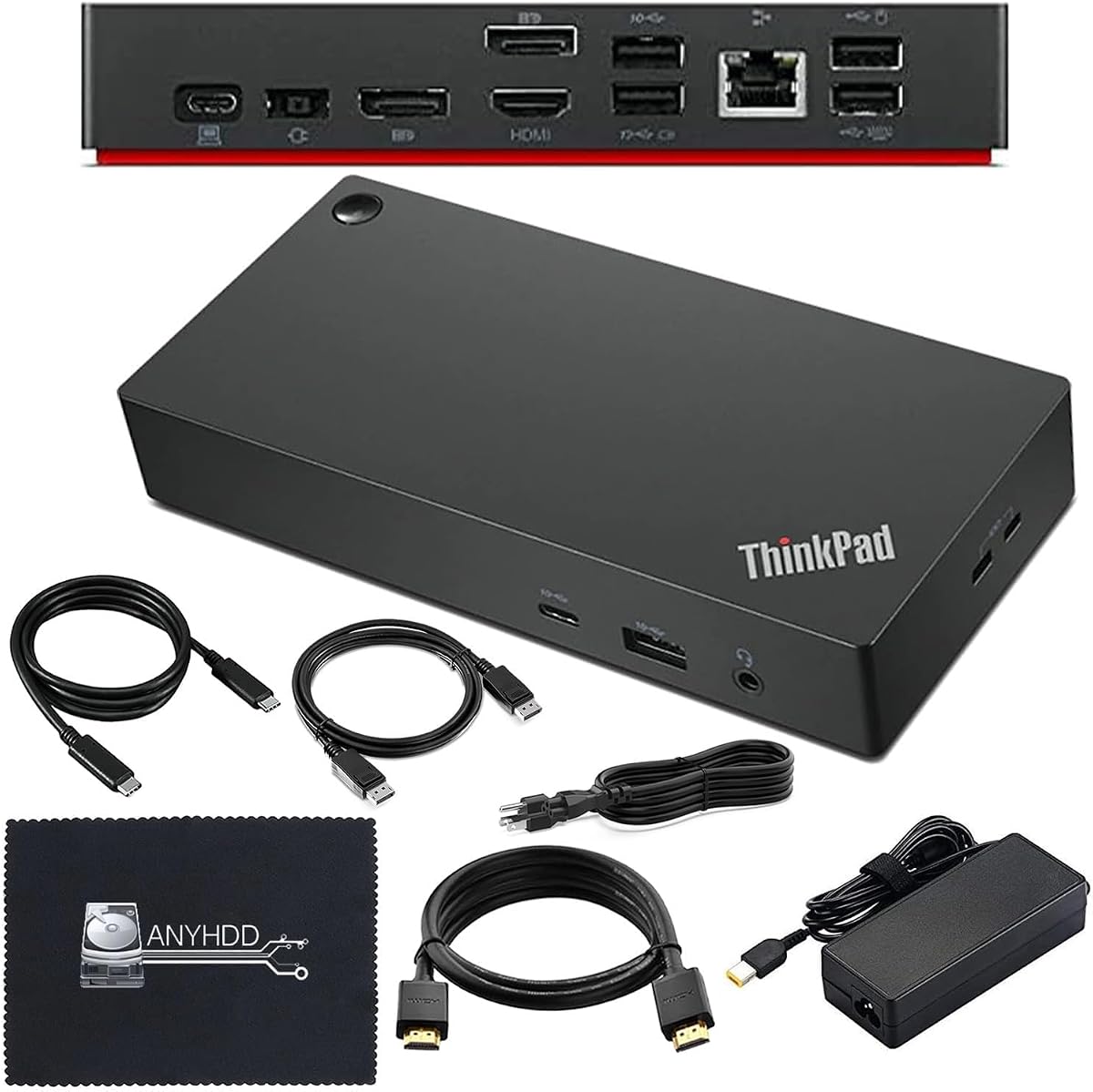


The Lenovo USB-C Dual Display Travel Dock combines seven ports, two 4K-capable video outputs, and charging in a relatively travel-conscious design. Its customer rating of 4.2 reflects a broadly capable option, although buyers should verify the display capabilities of their particular Lenovo Yoga model. The integrated cable and universal USB-C approach make it a strong general recommendation.
We may earn a commission when you buy through this link, at no additional cost to you.
Its standout feature is the combination of DisplayPort 1.4 and HDMI 2.0 for two external displays, supported at up to 4K according to the product information. The dock also adds a 10Gbps USB-A port, two 10Gbps USB-C ports, and Gigabit Ethernet. An always-on USB port can continue supplying power to a connected mobile device even when the notebook is disconnected, which is useful for travel and shared workspaces.
Power delivery reaches up to 100W when paired with the optional 135W charger, while the configuration described in the listing includes a 100W USB-C charger offering 65W power delivery. That distinction matters: buyers should confirm which power adapter is included with the version they intend to purchase. The modern Eclipse Black enclosure also contains 66% post-consumer recycled content in the chassis, adding an environmental design detail without reducing the port selection.
This is the most balanced recommendation for Yoga users who want a single dock for commuting, office work, and occasional dual-monitor use. It is less appropriate for someone who needs three or four video outputs, but it covers the most common productivity arrangement without demanding a large desktop workstation. For many Yoga owners, the integrated cable, fast USB connectivity, Ethernet, and two 4K outputs make it the most broadly useful option in this guide.
Seven ports may sound modest beside larger 13-in-1 and 14-in-1 docks, but this model prioritizes the connectors most often needed at a desk. Dual displays, high-speed USB, Ethernet, and device charging are all included without forcing the user to carry a large collection of separate adapters.
The included 100W USB-C charger provides 65W to the laptop, while the optional 135W adapter raises available power delivery to 100W. A Yoga owner should compare the system's charging requirements and the charger included with the current listing before choosing between the two power configurations.
We may earn a commission when you buy through this link, at no additional cost to you.
The Lenovo ThinkPad Thunderbolt 3 Dock Gen 2 is built for users who want extensive display and peripheral options at a permanent workstation. It carries a customer rating of 4.1 and includes a 135W power adapter, a power cord, a Thunderbolt 3 cable, and documentation. The four display outputs make it a convincing option for a Lenovo Yoga that supports compatible external-display configurations.
We may earn a commission when you buy through this link, at no additional cost to you.
Two HDMI and two DisplayPort connectors provide considerable flexibility for arranging multiple screens, while the dock's actual usable resolution depends on the connected Yoga and display hardware. It also includes a Thunderbolt 3 connection, four USB 3.1 Gen 2 ports, one additional always-on USB 3.1 Gen 2 port, Gigabit Ethernet, a 3.5mm audio connector, and a security-lock slot. The always-on port is particularly useful for charging peripherals independently of the laptop.
The main concern is platform age. It supports Windows 7 and Windows 10 according to the supplied information, and its compatibility list includes several ThinkPad models, including X1 Yoga generations, but it does not establish universal support for every current Lenovo Yoga laptop. Newer systems may work, yet buyers should check USB-C display capabilities, operating-system requirements, and firmware expectations before purchasing.
This dock is best for someone with a desk full of monitors, fast storage, Ethernet, and audio accessories. It may be excessive for a frequent traveler, and the older interface may be less attractive than a current USB-C or Thunderbolt alternative. If its listed connector and power configuration match the target Yoga, however, it provides one of the broadest traditional workstation port arrays here.
Two HDMI and two DisplayPort connectors let the user choose how screens are distributed instead of being limited to one fixed pair. Because the host notebook ultimately controls display bandwidth, compatibility with the exact Yoga model and selected monitors should be confirmed before installation.
The dedicated always-on USB 3.1 Gen 2 port can keep a phone, headset, or other compatible device charged even while the laptop is asleep or disconnected. This makes the dock easier to share between work sessions and less dependent on repeated manual charging.
We may earn a commission when you buy through this link, at no additional cost to you.
The Lenovo USB-C 7-in-1 Hub is a compact option for a Lenovo Yoga user who needs more than a simple adapter but does not require multiple monitors. Its 4.5 customer rating is the highest among the products in this guide. The hub combines one HDMI connection, three USB-A ports, SD and TF card readers, and USB-C power pass-through in a design intended for travel.
We may earn a commission when you buy through this link, at no additional cost to you.
The HDMI output supports 4K content, while the three USB-A connections handle peripherals such as a keyboard, mouse, storage drive, or other everyday accessories. Dual card readers are especially useful to photographers, filmmakers, and other creative professionals who want to move media without relying on a separate reader. Plug-and-play operation also reduces setup friction for temporary office or café workspaces.
Power pass-through is conditional. The hub can power a fully functional USB-C notebook when used with an appropriate 45W or 65W USB-C power adapter, but that adapter is not necessarily part of the core proposition. Users should not assume the hub itself includes a wall charger. Its single display output is the clearest limitation, making it less suitable for desk setups where a Yoga must drive two screens.
For mobile workers, students, and creative users, the hub's combination of card readers, USB-A connectivity, and a single 4K display is unusually practical. It is not the right choice for a multi-monitor command center, but it provides more functionality than a bare adapter without the bulk of a full workstation dock. Its rating and convenient feature set make it an attractive compact pick.
Built-in SD and TF readers let compatible cameras and mobile devices transfer files without occupying a USB port with a separate reader. This is especially useful when the available USB-C port is already handling the external display and power connection.
The product information describes straightforward plug-and-play operation without driver installation. As long as the Yoga has a fully functional USB-C system with the required video and power features, the hub can quickly become a compact productivity accessory.
We may earn a commission when you buy through this link, at no additional cost to you.
The Lenovo USB-C Slim Travel Dock is a focused eight-port option for users who want a tidy desk without a large charging brick or multi-monitor workstation. Its customer rating of 4.4 is strong, and the combination of an integrated USB-C cable, 4K at 60Hz video, and up to 65W power delivery aligns well with many Lenovo Yoga configurations.
We may earn a commission when you buy through this link, at no additional cost to you.
Its connectivity includes two USB-A 3.2 Gen 2 ports operating at 10Gbps, three USB-C 3.2 Gen 2 ports rated at 10Gbps, and one HDMI 2.1 output. One USB-C port is designated for power only. That selection is useful for fast storage, a keyboard and mouse, a phone, and a single external display, although the absence of Ethernet may matter for fixed office workstations.
The 65W pass-through limit is the key consideration. Some demanding Yoga configurations may require more power, and the dock is intended for USB-C laptops supported at that level. Users who need sustained maximum charging, multiple screens, or a wired network should consider a larger alternative. The slim enclosure and integrated cable also make the device more naturally suited to carrying between locations.
This is our budget recommendation for a Yoga owner who primarily needs one high-quality external display, fast USB expansion, and convenient charging. It offers a cleaner and more travel-friendly experience than a basic hub while remaining less bulky than a full desktop dock. Its 4.4 rating and focused feature set make it a particularly balanced choice for many users.
The integrated USB-C cable reduces the number of loose accessories needed to reach a full setup. A user can carry the dock by itself, connect it to the Yoga, and add a display and peripherals without searching for a separate host cable.
Two 10Gbps USB-A ports and three 10Gbps USB-C data ports provide ample bandwidth for everyday accessories and compatible high-speed storage. The port count is compact but versatile, with a dedicated power-only USB-C connection helping organize charging needs.
We may earn a commission when you buy through this link, at no additional cost to you.
The 40AY0090US ThinkPad Thunderbolt 4 Workstation Dock has a 4.6 customer rating and presents a polished route from a Lenovo Yoga to a full desktop setup. It supports 4K displays, includes a 90W AC adapter, and arrives with USB-C, HDMI, and DisplayPort cables. The result is a convenient package for users who do not want to source display leads separately.
We may earn a commission when you buy through this link, at no additional cost to you.
Thunderbolt 4 forms the backbone of the design, with HDMI and DisplayPort providing two-screen flexibility. The dock is positioned for USB-C or Thunderbolt-compatible computers, and the supplied information specifically advises updating firmware if compatibility problems appear. That recommendation is sensible because dock firmware and the host operating system can influence which displays and power features become available.
The 90W adapter is sufficient for many mainstream Lenovo Yoga systems, although it is not the highest-output option in this guide. A user whose notebook has unusually high power requirements should verify the supported charging profile. The included microfiber cloth is a minor but practical addition for maintaining the finish, while the supplied cables cover the basic two-monitor connection.
This dock is an excellent recommendation for a desk-based professional who values a simple setup, current connectivity, and strong customer feedback. It is less compelling for frequent travel because the complete workstation package is bulkier than an integrated-cable travel dock. For a compatible Yoga at a fixed office, though, the included hardware and dual-display support create an attractive overall package.
The included USB-C, HDMI, and DisplayPort cables cover the principal connection paths for a compatible Yoga and two-monitor arrangement. This reduces setup friction and makes moving the dock between a home office and a shared workspace less cumbersome.
The product guidance recommends checking USB-C or Thunderbolt compatibility and updating dock firmware if needed. A short compatibility check before installation can prevent avoidable display, power, or port-expansion issues.
We may earn a commission when you buy through this link, at no additional cost to you.
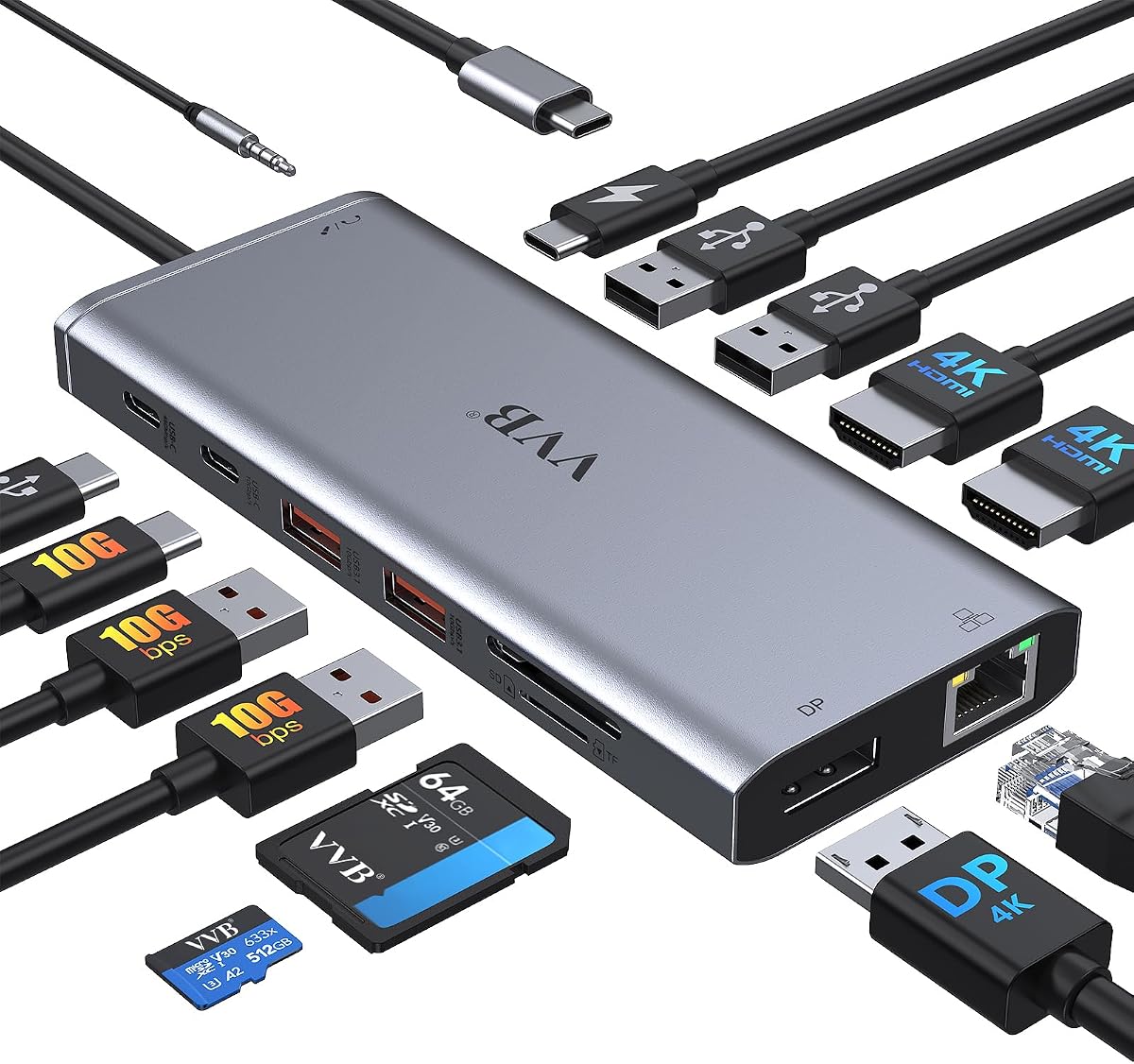
The 14-in-1 USB-C Docking Station is designed for users who want one box to handle displays, charging, networking, storage, and legacy accessories. Its 4.3 customer rating reflects a versatile feature set, while the supplied information explicitly lists Lenovo ThinkPad and Yoga systems among compatible types. Exact support still depends on the specific notebook, operating system, and selected display combination.
We may earn a commission when you buy through this link, at no additional cost to you.
The port array includes two HDMI ports, DisplayPort, 100W power-delivery input, Gigabit Ethernet, USB-C data connections, USB-A 3.1 and USB 2.0 connections, SD and microSD readers, and a 3.5mm microphone or audio jack. A single HDMI or DisplayPort output can reach 4K at 60Hz, while the detailed multi-screen combinations involve different refresh rates and resolutions. This makes monitor selection central to the purchase decision.
Input power can reach 100W, but safe output to the laptop is limited to 87W, and neither the charging cable nor adapter is included. That limitation can increase the total package size if the user already lacks a suitable USB-C charger. The dock also notes that not every USB-C device supports its display outputs, so the target Yoga must have compatible USB-C video functionality.
The dock is compelling for a desk that needs many different connectors, particularly when wired Ethernet, card readers, and mixed USB peripherals are all part of the workflow. It is less attractive for minimalist travel and for buyers who want a simple display experience. When the included port variety matches the user's actual equipment, it can serve as a capable and cost-conscious universal hub.
Dual-monitor operation can deliver 4K at 30Hz and 1080p at 60Hz through the described DisplayPort 1.4 arrangement, while triple-monitor output is listed at 1080p. Users should select monitors based on the exact mode they need rather than relying only on the dock's maximum headline resolution.
The dock accepts up to 100W of input but limits safe laptop charging to 87W, and it does not include a charging cable or adapter. Confirm that the existing Lenovo power setup can feed the dock correctly and that the required USB-C cable supports both data and the necessary power profile.
We may earn a commission when you buy through this link, at no additional cost to you.
The Anker Nano Docking Station stands out because it combines a 13-port desktop dock with a detachable six-port portable hub. Its 4.2 customer rating is respectable, and the two-part design directly addresses the conflict between a full home-office setup and the smaller kit needed for travel. It is a premium choice for Yoga users who move between both environments.
We may earn a commission when you buy through this link, at no additional cost to you.
The main unit supports up to three displays through two HDMI outputs and one DisplayPort connection. Listed modes include 4K at 60Hz for a single display, dual 2K at 60Hz, and triple 1080p at 60Hz. Two USB-C data ports provide 5Gbps and 10Gbps connections, while three USB-A ports, Gigabit Ethernet, a 3.5mm audio jack, and SD and TF slots cover common desk accessories.
Power delivery reaches 100W, and a 140W adapter is included to support stable operation under a substantial load. The detachable hub makes it possible to carry only the small travel component and leave the desktop dock at the office. One important operating note is that the dock's ports and blue light strip activate only when a laptop is connected through the upstream USB-C port.
This is our premium selection for users who value one ecosystem for both fixed and mobile work. The broad display support, 10Gbps data option, 100W charging, and included adapter create a particularly complete package. Buyers who only need a small travel hub may find it excessive, but a hybrid Lenovo Yoga user can gain flexibility from the two-piece arrangement.
The detachable portable hub provides six connections when the full desktop unit is impractical. Users can establish a monitor, keyboard, mouse, and charging arrangement at home while retaining a smaller accessory for the office, hotel, or shared workspace.
A 10Gbps USB-C data connection supports rapid transfer to compatible storage, while the 140W power adapter helps sustain a large connected workload. These features make the system more convincing for demanding creative or data-heavy setups than a basic media hub.
We may earn a commission when you buy through this link, at no additional cost to you.
The ThinkPad USB-C Dock Gen 2 is a conventional desktop dock for users who may need as many as three external displays. Its 4.3 customer rating indicates a solid reception, and the package includes a 90W AC adapter, power cord, and USB-C cable. It offers a familiar Lenovo approach to extending a compatible Yoga into a full workstation.
We may earn a commission when you buy through this link, at no additional cost to you.
The dock includes one HDMI and two DisplayPort connectors, along with three USB 3.1 ports, two USB 2.0 ports, a combo audio jack, and Gigabit Ethernet. DisplayPort 1.4 and HDMI 2.0 capabilities allow a maximum configuration of one 4K display at 60Hz, but the product information clearly notes that actual video output depends on the host system. That distinction is essential when comparing the dock with models that advertise multiple high-resolution screens.
A Yoga with limited display output, a system using a different USB-C implementation, or an operating-system configuration that does not support the intended modes may not reach the dock's maximum monitor count. The included 90W power adapter is appropriate for many mainstream notebooks, and the cable-and-adapter package reduces the need to buy accessories separately.
The dock is best for a permanent desk where three older or mixed-resolution monitors are useful but only one needs high refresh or 4K at 60Hz. It is less compelling for a modern user who requires two 4K displays simultaneously or values a compact travel form. Subject to Yoga compatibility, it remains a practical choice for wired networking, numerous USB peripherals, and flexible display connections.
One HDMI and two DisplayPort outputs provide enough physical connectors for a three-screen arrangement. Because notebook graphics and system firmware determine the usable combination, buyers should verify the target Yoga's supported external-display count before assuming all three outputs can operate as desired.
Gigabit Ethernet, three faster USB connections, two USB 2.0 ports, and a combo audio jack cover the core needs of most offices. The supplied adapter, cord, and USB-C cable create a more complete initial setup than an adapter-only dock.
We may earn a commission when you buy through this link, at no additional cost to you.
The renewed 40AF0135US ThinkPad Hybrid USB-C Dock combines high power delivery with an unusually large number of display connectors. Its customer rating of 4.1 and 135W adapter make it appealing for a power-conscious Lenovo Yoga user, while the included HDMI and DisplayPort cables simplify a multi-screen setup. Renewed status is the most important factor to consider.
We may earn a commission when you buy through this link, at no additional cost to you.
The docking station includes two DisplayPort 1.2 and two HDMI ports, one USB 3.1 Gen 2 Type-C port, three USB 3.1 Gen 2 Type-A ports, two USB 2.0 Type-A ports, and Gigabit Ethernet. Although there are four physical video connectors, the supplied information does not claim that every connected Yoga can drive all four displays at once. Display mode, resolution, and host compatibility remain decisive.
The included 135W AC adapter offers ample power for demanding notebooks, and the supplied USB-C, HDMI, and DisplayPort cables cover the principal connections. The listing notes that compatible notebooks have been internally tested and verified, but changes in hardware or software can alter functionality. That makes model verification and any available firmware updates particularly important before setup.
This is a practical option for a buyer who wants substantial power and broad connectivity from a renewed desktop dock. It may appeal to owners of compatible ThinkPad and Yoga systems who can confidently establish their exact display requirements. The one-year warranty and included accessories help offset some concerns, but physical condition, connector wear, and package completeness should be reviewed carefully.
A 135W adapter provides a generous power source for a compatible Lenovo Yoga and connected peripherals. It is particularly useful for owners who want headroom for a demanding notebook or a workstation that remains connected throughout the day.
Because the product is sold renewed, buyers should inspect the listing for condition details, included accessories, and warranty terms. A strong warranty and complete cable package help, but visual and connector condition should still be evaluated promptly after delivery.
We may earn a commission when you buy through this link, at no additional cost to you.
The Anker 8-in-1 USB-C PD Media Hub is a clear, approachable option for a Lenovo Yoga user who wants two external displays and several common accessories. Its 4.5 customer rating is among the strongest in this guide. The hub includes two HDMI ports, two USB-A data ports, Ethernet, a microSD/SD reader, and a USB-C power-delivery input.
We may earn a commission when you buy through this link, at no additional cost to you.
A single display can stream or mirror at 4K at 60Hz. With both HDMI outputs active, the listed maximum is 4K at 30Hz. On macOS, both external monitors show the same content, although that operating-system limitation is not the central concern for most Windows-based Yoga users. The 85W pass-through charging capability is useful for mainstream notebooks but is lower than the 87W, 90W, 100W, and 135W configurations offered by other docks in the guide.
A compatible 100W wall charger and a USB-C-to-C cable are required for the stated power-delivery use, and neither is included. The dock supports USB-C, USB4, and Thunderbolt connections, along with Windows 10, Windows 11, ChromeOS, and laptops equipped with DisplayPort Alternate Mode and Power Delivery. It is not listed as compatible with Linux.
This hub is a good choice for a dual-monitor office arrangement where 4K at 30Hz on each screen is acceptable, fast data transfer is not the main concern, and the owner already has suitable charging hardware. It is less suitable for color-sensitive high-refresh work, a laptop requiring maximum charging, or a user who needs USB-C data ports and newer connectors. Within those limits, it provides an attractive, well-rated package.
Two HDMI connectors make setup straightforward for users whose monitors rely on HDMI rather than DisplayPort. The trade-off is that simultaneous dual-screen use is limited to 4K at 30Hz, while a single screen can reach 4K at 60Hz.
Ethernet, two USB-A data connections, and a memory-card reader cover many routine desk needs. Because the specified 100W wall charger and USB-C-to-C cable are not included, existing accessories may be necessary to activate the full charging feature.
We may earn a commission when you buy through this link, at no additional cost to you.
The right Lenovo Yoga dock depends on display resolution, charging needs, connector layout, and whether the setup must travel. Review the following factors while keeping your exact Yoga model and intended peripherals in view.
A USB-C port does not automatically guarantee that every dock feature will work. A compatible Lenovo Yoga must support the required display mode, commonly DisplayPort Alternate Mode, and the host system's firmware must expose the intended number of external displays. Processor generation, operating system, selected ports, and display resolution can all affect the final result. Some docks also distinguish between USB-C data functionality, Thunderbolt functionality, and power delivery.
Single-screen users can often choose a compact 4K-capable hub without concern. Multi-screen users should examine the exact resolution and refresh rate in each supported mode rather than focusing only on the number of video ports. A dock may drive one 4K display at 60Hz but two 4K displays at 30Hz, or three displays at 1080p. Color-critical and high-refresh work may require direct display support or a more capable workstation connection.
Power delivery is determined by the dock, the included adapter, the host cable, and the Lenovo Yoga. A 65W dock may suit many standard configurations, while heavier systems or demanding workloads benefit from 90W or more. Input wattage and output wattage are not always the same, and some products require a separate charger or specify that a cable is not included. The wall adapter and USB-C cable should be considered part of the total purchase.
A high number of connectors is only useful when the needed devices are present. Fast 10Gbps USB ports matter for external storage and high-resolution transfers, while USB 2.0 is adequate for slower peripherals. Ethernet, card readers, audio, and an always-on charging port can be more valuable than several duplicate connectors. For a travel setup, fewer well-chosen ports and an integrated cable may be preferable to a bulky 13-in-1 or 14-in-1 design.
A travel dock should be easy to place in a laptop bag, protect its connectors, and operate without a large collection of loose cables. Integrated USB-C leads reduce clutter, while detachable designs can separate a small portable hub from a full desktop dock. Larger ThinkPad workstation docks make more sense when the equipment remains in one place. Weight, footprint, and the need to carry an adapter are worth comparing alongside port selection.
A good desk dock normally includes the host cable, power adapter, and relevant display leads, although this is not universal. Some universal hubs explicitly omit a charger and cable, while Lenovo workstation models often bundle a complete set. Consider warranty coverage and, for renewed products, the described condition and included components. A complete package can be more valuable than a marginally larger port count if it avoids additional purchases.
Customer ratings can indicate broad satisfaction, but they do not reveal whether a particular connector, display mode, or charging profile suits your notebook. A highly rated dock may still be a poor match for a Yoga that supports only one external display, while a lower-rated universal model may meet a multi-screen requirement better. Use ratings as a useful signal alongside the detailed specifications and compatibility information.
Begin by confirming that the Lenovo Yoga has the required USB-C video and power-delivery support, then install any dock firmware or operating-system updates recommended by the manufacturer. Place the dock where its cables will not strain the ports. Connect the host cable to the laptop first, followed by the display, Ethernet, and USB peripherals, and connect the appropriate power adapter when the dock requires external power.
After connection, open the operating system's display settings and select the intended arrangement. If the expected output does not appear, reconnect the host cable, test the display directly with the Yoga, and review the dock's compatibility notes. Avoid adapters that the dock manufacturer says are unsupported, and use the prescribed video cables and charger. For dual-screen configurations, select a mode that matches the resolution and refresh rate required by the work.
Keep the dock on a stable, ventilated surface and avoid placing liquids, direct heat, or heavy objects on it. Clean the enclosure with a soft dry or lightly damp cloth, disconnect cables before moving it, and avoid pulling on integrated leads. Periodically inspect connectors for dust or looseness, store unused cards and adapters in a labeled case, and update the dock firmware when the manufacturer provides a relevant release.
No. The Yoga must support the video mode, data features, and power-delivery profile required by the dock. USB-C is a physical connector, but its capabilities vary by laptop and system configuration. Check the exact Yoga model's specification and the dock's compatibility notes before purchasing.
Not necessarily. Many docks work through USB-C with DisplayPort Alternate Mode, while others are designed around Thunderbolt. Choose Thunderbolt or a dock with a stronger specified display mode if your workflow needs more bandwidth, multiple high-resolution monitors, or faster external storage. Otherwise, a compatible USB-C travel dock may be sufficient.
Many of the listed docks support dual displays, but the host laptop must also support the intended configuration. The supported resolution and refresh rate can vary by output and display combination. Review the dock's multi-monitor details and the Yoga model's external-display specifications before assuming both screens will work as intended.
It depends on the selected dock. Some Lenovo models include 90W or 135W adapters, while other travel and universal products require a separate charger. The dock may accept a certain input wattage but deliver a different amount to the laptop. Match the adapter, USB-C cable, and Yoga power requirement before use.
They can be, particularly if the dock offers your required display and USB connections. A travel model is usually smaller and may include an integrated cable, but it may have only one video output or less Ethernet connectivity. A permanent desk setup with multiple monitors usually benefits from a larger workstation dock.
First, confirm that the Yoga supports the dock's required USB-C video mode and that the correct display arrangement is selected. Reconnect the host cable, test the monitor directly, and check for firmware or driver updates. Also verify that the power adapter, host cable, and display cable meet the dock's requirements.
It depends on where and how you work. Ethernet can provide a stable, low-latency wired connection at a fixed office and may reduce reliance on crowded Wi-Fi networks. For frequent travel or locations with easy access to wireless networking, the lighter and more compact design of a dock without Ethernet may be preferable.
A renewed model can make sense when the included adapter, warranty, and port selection are attractive. Check the stated condition, connector integrity, complete accessory list, and return or warranty terms carefully. For a heavily used or mission-critical setup, a new unit may offer greater consistency and peace of mind.
The Lenovo USB-C Dual Display Travel Dock is the strongest all-around choice for most Yoga users, combining two 4K-capable displays, seven useful ports, fast USB connections, Gigabit Ethernet, and an integrated cable. The Lenovo USB-C Slim Travel Dock is the budget-oriented alternative for a simpler single-screen setup, while the Anker Nano offers the most premium hybrid approach with a detachable travel hub and a full desktop dock.
Start with the displays and power delivery you genuinely need, then narrow the field by checking your exact Yoga model. A smaller travel dock is best for mobility and a single monitor; a larger ThinkPad-style workstation suits multiple screens, Ethernet, and many permanent peripherals. Universal multiport hubs can be useful, but their more complicated display modes and omitted accessories deserve careful review.
Ratings and feature summaries provide a strong starting point, but the final decision depends on current availability, package contents, and current prices. Before buying, verify the connector requirements, supported display modes, charger inclusion, and compatibility details, and review the latest listing. Product configurations and promotional terms can change, so the current product page remains the most important source of truth.