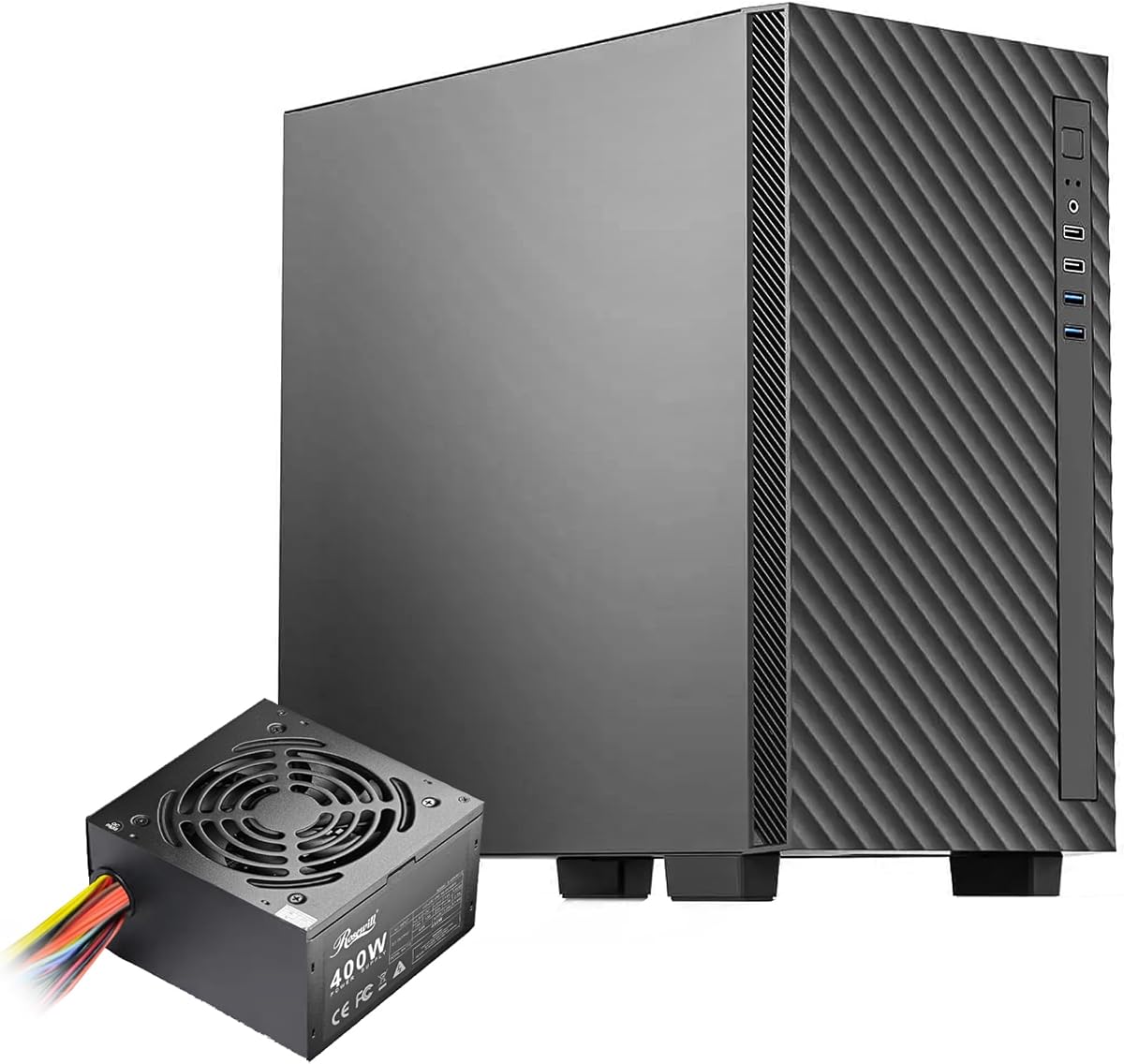
Rosewill FBM-X5
4.9Editor score
Pre-installed 400W power supply
Compact Micro-ATX steel chassis
Flexible 240mm radiator support
Discover the best PC case with power supply options for gaming, office, and compact builds, compared for fit, cooling, power, and expandability, plus features.
A PC case with power supply can simplify a build by combining the chassis and its internal power unit in one package. The right combination affects component clearance, cooling, cable routing, expandability, and convenience. Our guide covers compact office cases, airflow-focused mid-towers, glass-sided gaming models, and premium small-form-factor bundles.
We compared the included products using their published specifications, including motherboard support, power-supply capacity, cooling provisions, graphics-card clearance, front I/O, and included fans. The list also distinguishes bare case-and-PSU options from complete bundles with CPU coolers or riser cables, helping buyers understand exactly what arrives in the package.
Each pick highlights a different route into building a PC: efficient value, high-airflow gaming, extensive cooling, compact design, or specialized power delivery. Ratings and product details reflect the supplied listings, while availability and pricing can change. Always verify current component compatibility before purchasing.
4.9Editor score

4.7Editor score

4.4Editor score
The comparison below organizes all ten options by format, bundled power, cooling support, and practical build constraints, from compact office systems to feature-rich enthusiast enclosures.


The Rosewill FBM-X5 combines a compact Micro-ATX or Mini-ITX chassis with a pre-installed, CE/FCC-certified 400W power supply. Its 4.9 rating is the highest among the listed products, making it a strong all-around recommendation for buyers who want a straightforward case-and-PSU package without assembling the core chassis and power unit separately. Its compact format is especially suitable for office systems, mainstream gaming PCs, and first-time builders.
We may earn a commission when you buy through this link, at no additional cost to you.
The case uses a sturdy steel-and-plastic construction and provides four expansion slots, one 3.5-inch drive bay, and two 2.5-inch drive bays. Cooling begins with one included 120mm PWM rear fan, while the chassis supports two front 120mm fans, two top 120mm fans, or a single 240mm front radiator. This gives the buyer multiple upgrade paths despite the relatively compact proportions, and the 280mm AIO support noted in the listing broadens liquid-cooling flexibility further.
Cable management is described as straightforward rather than elaborate, and the included 400W supply is non-modular. Those characteristics mean excess cables may need to be tucked behind the drive area or motherboard tray, while builders planning a powerful modern graphics card should calculate their likely power requirements carefully. Neither limitation undermines the case for appropriately matched hardware, but they are important boundaries for anyone expecting a spacious, fully modular enthusiast system.
This is the most balanced pick for a compact build that still includes a power supply. It is especially persuasive for an office PC, a moderate-power gaming build, or a system using a graphics card that does not demand the highest-wattage supply. Buyers should verify the installed processor and graphics card against available power, but for the stated use cases, the FBM-X5 provides an unusually attractive combination of rating, included hardware, size, and flexibility.
Because the 400W power supply arrives installed, the builder can focus on the motherboard, processors, memory, storage, and graphics card. The non-modular wiring is the main compromise, so cable routing deserves attention during assembly.
The rear 120mm PWM fan handles baseline airflow, while extra fan and radiator positions allow the compact enclosure to scale with warmer components or a more ambitious cooling setup.
We may earn a commission when you buy through this link, at no additional cost to you.
The Cooler Master HAF 500 Pro Bundle is a comprehensive mid-tower package combining a PC case, 650W Gold power supply, and Hyper 212 Halo CPU air cooler. Its 4.7 rating reflects a favorable balance of features, and the bundle is particularly compelling for a gaming build that wants high airflow, coordinated ARGB illumination, and most of its core components selected in advance. The case accommodates standard ATX-class builds and offers far more room than a mini-tower.
We may earn a commission when you buy through this link, at no additional cost to you.
Cooling is the defining strength. The front panel uses a mesh design and comes with dual 200mm ARGB intake fans, while a 120mm ARGB rear fan and a rotatable 120mm GPU fan add support for the rest of the chassis. Top radiator positions cover 120mm, 140mm, 240mm, 280mm, and 360mm sizes, giving builders considerable freedom to choose between air and liquid cooling. The supplied Hyper 212 Halo includes a 120mm PWM ARGB fan and supports the listed Ryzen 7, Intel i7, AM4, AM5, LGA 1821, and LGA 1700 platforms.
The MWE 650W Gold supply is intended to provide efficient, quiet operation and adds a useful layer of convenience to the package. Cable management is supported by a dedicated system, and the case provides two USB 3.2 Gen 1 ports, one USB 3.2 Gen 2 Type-C port, and room for larger graphics cards. The listed VGA clearance is 410mm, with E-ATX support up to 12 by 14.1 inches. These figures make it suitable for ambitious gaming hardware, including long, high-end cards.
This bundle is best for a builder assembling a full-size gaming system and wanting strong airflow without sourcing the case, power supply, and CPU cooler separately. It is less suitable for someone who needs a small enclosure, already owns a CPU cooler, or wants a more minimalist front-panel design. Even so, the combination of cooling hardware, power capacity, connector selection, and spacious interior makes it our most versatile complete gaming bundle.
The mesh front and large 200mm intake fans move substantial air through the enclosure, while the rear and rotatable GPU fan help direct flow across heat-producing components.
The included 650W Gold power supply and Hyper 212 Halo reduce the number of separate purchases, although buyers must still confirm processor socket and cooler compatibility.
We may earn a commission when you buy through this link, at no additional cost to you.
The 650W Micro-ATX Mini-Tower Gaming PC Case is an unusual value-oriented bundle because it arrives with a 650W power supply and eight 120mm ARGB fans. Its 3.9 rating is the second-lowest among the listed products, so it does not lead on customer feedback, but the specification sheet presents a broad set of features for builders who want a visually dramatic, pre-equipped compact gaming enclosure.
We may earn a commission when you buy through this link, at no additional cost to you.
The case measures 16.54 by 11.22 by 14.17 inches and supports Micro-ATX and Mini-ITX motherboards, but not standard ATX boards. It accommodates graphics cards up to 400mm, CPU air coolers up to 170mm, and power supplies up to 200mm. Four horizontal expansion slots and a vertical GPU position offer installation flexibility. Dual tempered-glass panels provide a panoramic view, while the top accepts 120mm, 240mm, or 360mm radiators for a future liquid-cooling upgrade.
The eight included fans are specified to run at a consistent speed of approximately 1200 RPM rather than using variable PWM behavior. According to the supplied information, this steady operation is intended to reduce sudden speed changes, vibration, and resonance-related noise while maintaining steady airflow. The top I/O panel includes one USB 3.0 port, two USB 2.0 ports, separate headphone and microphone jacks, a reset button, and a power button, covering most routine peripheral connections.
This case is worth considering when visual lighting, numerous fans, and a high included power rating matter more than the highest customer rating. The main compatibility trap is motherboard form factor: standard ATX is not supported, so checking the board before buying is essential. The lower rating also warrants closer attention to recent customer feedback. Despite those cautions, the extensive bundled equipment and roomy component support make this a compelling option for a compact showcase build.
The large fan count gives the interior a dramatic RGB appearance while supplying intake and exhaust airflow from the first installation, reducing the need for immediate cooling purchases.
The case accepts Micro-ATX and Mini-ITX boards but excludes standard ATX. This restriction should be confirmed before the rest of the build is planned.
We may earn a commission when you buy through this link, at no additional cost to you.
The Rosewill FBM-Z1-650 pairs a compact Micro-ATX mini-tower with a pre-installed 80 Plus Gold 650W ATX 3.1 power supply. Its 3.4 rating is the lowest in this roundup, so buyers should consider recent reviews and verify fitment independently. Even so, the modern power specification, tempered-glass side panel, and support for a 360mm radiator make it relevant for compact builds using current graphics hardware.
We may earn a commission when you buy through this link, at no additional cost to you.
The front-mounted power supply frees the main chamber for components while supporting a stated maximum PSU length of 150mm. Other dimensional limits include 340mm for the graphics card and 160mm for the CPU cooler. A single 120mm PWM rear fan is included, which is more modest than the multi-fan configurations offered by several rivals. The case's front I/O includes one USB 3.0 port, one USB Type-C port, and HD audio connections.
The black tempered-glass left panel gives the enclosure a finished, display-oriented appearance, while steel construction supplies a durable foundation. Radiator support of up to 360mm appears generous for a mini-tower, though actual placement and fan orientation should be confirmed against the case layout and the selected cooling hardware. The included 650W ATX 3.1 supply is the headline feature for builders who want current platform support without sourcing a power supply separately.
This model makes sense for a compact gaming or productivity system where power density and physical size are priorities. Its limitations are the low customer rating and the fact that only one fan is provided, making additional cooling likely. Prospective buyers should examine the current listing carefully, confirm that their processor, graphics card, motherboard, and cooling hardware all fit, and judge whether the compact layout suits their assembly skills.
The pre-installed 650W ATX 3.1 supply adds useful modern headroom while the front-mounted layout preserves interior space for a Micro-ATX board and graphics card.
Only one 120mm PWM rear fan is listed as included. Buyers using higher-power processors or graphics cards may want to budget for additional case fans.
We may earn a commission when you buy through this link, at no additional cost to you.
The Raidmax i802 Vibe Series Bundle combines an ATX mid-tower case, a 700W 80 Plus power supply, an AM1204 digital-display CPU air cooler, and five pre-installed FRGB fans. Its 4.0 rating indicates solid customer reception without reaching the top of this list. The bundle is especially useful for builders who want several essential components arranged in a colorful gaming chassis without researching each accessory separately.
We may earn a commission when you buy through this link, at no additional cost to you.
Five fixed-RGB fans provide both cooling and immediate visual impact, removing the need to buy a basic fan set. The AM1204 cooler adds a practical digital display for monitoring CPU temperature while serving as the processor's air cooling solution. The tool-less tempered-glass side panel makes it easier to view the internal lighting and components, which complements the Vibe Series focus on a noticeable finished appearance.
Color choice is another distinctive element. The listing describes vivid blue, green, pink, and purple options, allowing the chassis to match an individual theme rather than following the conventional black-and-white aesthetic. The RX700ACV 700W supply is specified as supporting modern GPUs and CPUs, while the ATX mid-tower format offers more room than the compact cases elsewhere in the list. It is a broader platform format for mainstream and enthusiast components.
The bundle is a good fit for a colorful gaming build that prioritizes included cooling, lighting, and power capacity. Fixed RGB is less flexible than configurable ARGB because it does not offer the same synchronization or lighting-control options. Buyers should also verify exact motherboard and cooler compatibility, as the supplied information does not list every socket detail. Within those constraints, the combination is practical, visually focused, and saves several separate selections.
The case, 700W supply, digital-display CPU cooler, and five lighting fans create a convenient starter package for a mid-tower gaming system.
The included fans produce a coordinated light effect immediately, though fixed RGB offers less personalization than addressable lighting systems with motherboard software control.
We may earn a commission when you buy through this link, at no additional cost to you.
The Cooler Master Q300L V1 is included because it represents a different approach to the category: it is a case without a power supply. For experienced builders who want to select the exact PSU their components require, that freedom can outweigh the convenience of a bundled supply. The case carries a 4.5 rating and focuses on compact Micro-ATX builds, open thermal design, and flexible component positioning.
We may earn a commission when you buy through this link, at no additional cost to you.
The interior supports Micro-ATX and Mini-ITX motherboards, graphics cards up to 360mm, CPU coolers up to 159mm, and power supplies up to 160mm in length. Cooling can be configured with a 240mm liquid cooler and up to five fans, depending on the available mounting positions. Perforated panels on all sides promote airflow and heat dissipation, while magnetic dust filters add both protection and a distinctive visual detail.
One of its most useful features is the modular I/O panel, which can be positioned at the front, top, or bottom on either side. That flexibility allows the builder to align ports with the eventual placement of the case. The edge-to-edge transparent side panel displays the internal components, and the open panel design supports a clean, ventilated build even though fans are not listed as included.
This case is best for a knowledgeable buyer who already knows which power supply they need or wants to use a PSU from an existing system. It also suits builders who prefer to choose a specific efficiency level, modularity, warranty, or connector set. The main limitation is convenience: because no PSU is included, this is not a ready-to-build case-and-power solution. For that reason, it is a strong component rather than the most direct answer to the search phrase.
A separate PSU gives the buyer control over efficiency, modular cables, ATX generation, and wattage, but it also adds a component that must be sourced and installed independently.
The movable I/O panel can follow the case's final orientation, making front and top ports easier to reach regardless of where the system sits.
We may earn a commission when you buy through this link, at no additional cost to you.
The In Win CK722.FF300TB3 is a 9-liter Micro-ATX desktop case with a pre-installed Standard TFX 300W power supply and one 80mm fan. Its 3.8 rating puts it behind several other options in customer feedback, but its tiny volume and complete core configuration distinguish it from the larger gaming cases. It is aimed primarily at compact office, school, reception, and simple home-computer builds.
We may earn a commission when you buy through this link, at no additional cost to you.
The smart interior structure includes a detachable drive cage, while tool-free drive bays and PCI-E slots can make assembly and expansion more approachable. The supplied information emphasizes optimal thermal performance for the enclosure's size, although the single 80mm fan and 300W supply are modest compared with the multi-fan, higher-wattage alternatives in this guide. Buyers should select low-power components that comfortably suit the available power ceiling.
Because the enclosure is only 9 liters, compatibility is the central consideration. It supports motherboards up to Micro-ATX, but every large component must fit within a much smaller volume than in a conventional mid-tower. The listing does not provide detailed graphics-card, cooler, or drive-clearance figures, so buyers should consult the manufacturer or seller documentation for exact dimensions before finalizing a component list.
This model is most appropriate for a space-conscious office PC or a simple compact system that needs a case and power supply already installed together. It is not a strong choice for a high-end gaming PC, a large air cooler, or a system intended for extensive future expansion. Its attraction lies in making a complete, compact enclosure possible without requiring the buyer to design a bespoke small-form-factor layout.
At nine liters, the case can sit comfortably where a full mid-tower is impractical, making it useful for desks, shelves, and compact workstation areas.
The included 300W TFX supply suits appropriately matched office components, but high-power processors and graphics cards should not be assumed to fit the electrical or physical envelope.
We may earn a commission when you buy through this link, at no additional cost to you.
The CORSAIR 4000D RS ARGB is a customizable mid-tower case that does not include a power supply. Its 4.7 rating makes it one of the strongest customer-rated options here, and the FRAME modular system gives experienced builders a different approach to long-term case customization. It is best suited to enthusiasts who want to choose their own PSU, fans, components, and visual configuration.
We may earn a commission when you buy through this link, at no additional cost to you.
Three CORSAIR RS ARGB PWM fans are pre-installed at the front. They support daisy-chainable four-pin PWM connections, Zero RPM mode at low loads, and control through a motherboard's 5V ARGB connector. The InfiniRail steel mounting system allows fans to slide into positions across the front and roof, accommodating sizes up to 200mm in the front and 140mm in the roof. This unusual degree of movement makes it easier to tune intake, exhaust, and clearance for a particular build.
The three-dimensional Y-pattern steel front panel is perforated to reduce airflow restriction. Internally, the panel beside the motherboard tray can remain in place as a cable-management cover or be removed for additional side-mounted cooling. The FRAME system also allows future changes to parts such as the motherboard tray and front I/O panel, adding long-term flexibility beyond the initial specification sheet.
This case is ideal for a builder willing to source a separate power supply and wants exceptional fan placement and visual customization. It may be less convenient for a first-time builder because it does not provide the complete case-and-PSU convenience requested in this category. Nevertheless, its strong rating, pre-installed ARGB fans, thermal design, and adaptable interior make it one of the most capable chassis choices in the roundup.
InfiniRail rails let the installer reposition compatible fans along the front and roof, making it easier to direct airflow around large graphics cards or tall cooling hardware.
The modular FRAME approach allows selected case elements to change as the build evolves, while the removable side panel can shift between cable cover and cooling role.
We may earn a commission when you buy through this link, at no additional cost to you.
The Cooler Master NCORE 100 MAX is the most specialized bundle in the guide, combining a 15.7-liter Mini-ITX case, 850W 80 Plus Gold SFX power supply, 120mm AIO liquid cooler, and PCIe 4.0 riser cable. Its 4.4 rating reflects a positive reception, and the tightly integrated design offers an unusually complete solution for a compact, powerful small-form-factor system.
We may earn a commission when you buy through this link, at no additional cost to you.
The power delivery is designed around modern, high-end hardware. The SFX Gold ATX 3.0 supply is stated to deliver up to 600W to the graphics card through custom short-length cables, while a durable 90-degree 12V-2×6 PCIe 5.0 connector supports current GPU power requirements. The included riser enables vertical GPU mounting, and the case accommodates high-end cards up to 356mm, including the listed RTX 5080 and RX 9070 XT.
Cooling is integrated rather than left to the buyer. A purpose-fit 38mm-thick 120mm radiator, precision tubing, and a third-generation pump are designed to work with the constrained interior. The chassis draws air through its larger side surfaces, and an extendable frame can widen the overall case from 155mm to 172mm to create room for larger graphics cards. Vertical mounting and short custom cables help manage the otherwise dense collection of components.
The main limitation is motherboard compatibility: the design exclusively accepts Mini-ITX boards. It is therefore not a general-purpose case for standard ATX or Micro-ATX systems. For an enthusiast who has already chosen a compatible Mini-ITX platform, however, the NCORE 100 MAX offers an attractive combination of power, cooling, riser integration, and compact aesthetics. It is the strongest premium pick for a carefully planned small-form-factor build.
The custom 850W SFX supply, short cables, vertical mounting, and riser are designed together, allowing substantial power delivery without the bulk of a conventional tower layout.
The custom-fit radiator and pump are engineered for the 15.7-liter enclosure, making liquid cooling practical where a conventional tower CPU cooler would be difficult to fit.
We may earn a commission when you buy through this link, at no additional cost to you.
The CORSAIR RM750e is a standalone 750W power supply rather than a case bundle, but it rounds out the guide for readers who already own a chassis or want complete control over the case and PSU combination. Its 4.6 rating is among the strongest in the list, while the ATX 3.1 certification and PCIe 5.1 platform support make it well aligned with current graphics hardware.
We may earn a commission when you buy through this link, at no additional cost to you.
Its fully modular cabling is a major practical benefit. Only the cables needed by the finished system are connected, reducing clutter behind the motherboard tray and eliminating unnecessary cable bundles. This is particularly useful in compact cases or visually oriented builds where cable management affects both appearance and airflow. The 120mm rifle-bearing fan uses a calculated fan curve to reduce noise, including when the supply operates at full load.
The power supply is designed for transient behavior associated with modern GPUs and supports two transient power excursions from the graphics card. Modern Standby compatibility is also listed, supporting faster wake-from-sleep behavior and better low-load efficiency. Internal reliability features include 105°C-rated capacitors, which the manufacturer positions as contributors to steady electrical performance and dependable operation over time.
This product is a strong choice for a builder who needs a modern 750W supply but already has a suitable case, or who wants to pair it with one of the case-only options in this guide. Its limitation is obvious: no enclosure is included. As a result, it is less convenient than the bundled alternatives but offers superior flexibility and a clear purpose. For a high-power custom build, choosing the case and power supply separately can produce a cleaner and better-balanced result.
ATX 3.1 certification, PCIe 5.1 readiness, and transient-excursion support position the RM750e for current high-end graphics hardware.
The removable cable approach reduces clutter and makes it easier to route only the required leads, particularly valuable in compact or display-oriented systems.
We may earn a commission when you buy through this link, at no additional cost to you.
Choosing the right case-and-power bundle means balancing chassis size, motherboard format, component dimensions, cooling strategy, and the electrical demands of your hardware. The most important first step is to list the parts you already own or plan to purchase, then compare their physical and power requirements with the enclosure.
The case must support the exact motherboard standard used by the build. The FBM-X5 and FBM-Z1-650 support Micro-ATX and Mini-ITX, while the NCORE 100 MAX accepts Mini-ITX only. The Q300L V1 and 4000D RS ARGB provide alternatives for builders who want to select their own chassis separately. Standard ATX support is explicitly absent from the 650W Micro-ATX gaming case, so checking this specification before buying other parts is essential.
Mini-towers can reduce desk and shelf space, but they impose tighter limits on graphics-card length, cooler height, radiator placement, and drive arrangement. A 15.7-liter small-form-factor case is even more specialized, while standard mid-towers offer more room for cable routing and larger cooling hardware. Measure the intended location and compare the case dimensions with the depth of your components before committing.
The included wattage should cover the processor, graphics card, motherboard, memory, storage, and fans with sensible headroom. A 300W supply is intended for appropriately modest office components, 400W suits more restrained builds, and 650W to 750W options accommodate mainstream or powerful gaming systems. The 850W NCORE 100 MAX package targets dense small-form-factor hardware where significant graphics-card power is required.
Modern graphics cards can place more demanding requirements on a power supply than older hardware. ATX 3.1 support, transient-excursion handling, and the presence of a 90-degree 12V-2×6 connector can be important for recent high-end components. The FBM-Z1-650 and RM750e explicitly emphasize ATX 3.1, while the NCORE 100 MAX combines ATX 3.0 support with a 90-degree PCIe 5.0 connector. Always confirm the exact cable type required by the graphics card.
A case with only one fan may be sufficient for low-power hardware but often requires additional airflow in a compact enclosure. The HAF 500 Pro includes large 200mm intake fans, the 650W Micro-ATX case includes eight ARGB fans, and the Raidmax bundle includes five fixed-RGB fans. Radiator support is also important: some cases accommodate a 240mm unit, while the FBM-Z1-650 and HAF 500 Pro list support up to 360mm.
Long graphics cards and tall CPU coolers are among the most common reasons a compact case fails to accommodate a planned build. Published limits range from 340mm for the FBM-Z1-650 and 360mm for the Q300L V1 to 400mm for the 650W Micro-ATX case and 410mm for the HAF 500 Pro. The NCORE 100 MAX uses vertical mounting and supports cards up to 356mm. CPU cooler limits must also be checked independently.
A non-modular supply may leave unused cables in the chassis, while a fully modular design lets the builder remove them entirely. The FBM-X5 uses a non-modular 400W unit, the NCORE 100 MAX uses short custom cables, and the standalone RM750e is fully modular. Beyond the power supply, consider rear cable-routing space, drive-cage placement, and whether the case provides a dedicated cover.
Front-panel connections determine how conveniently you attach peripherals. The FBM-X5 provides two USB 2.0 and two USB 3.0 ports. The FBM-Z1-650 adds USB Type-C, the 650W Micro-ATX case includes separate headset and microphone jacks, and the HAF 500 Pro combines USB Type-C with multiple USB ports. For frequent use of fast external storage, headsets, or mobile devices, these details can materially improve daily usability.
Begin by assembling outside the case where possible. Install the processor and memory on the motherboard, mount the motherboard, and confirm that every standoff aligns with its mounting holes. Install storage and the graphics card before routing permanent cables, but keep the power supply disconnected until the wiring has been reviewed. Consult the manuals for both the chassis and power unit rather than relying on cable colors or shapes alone.
Connect the motherboard, processor, graphics card, storage devices, fans, and front panel with the correct supplied leads. Route cables behind the motherboard tray or through designated channels, avoid stretching connectors, and do not force modular plugs into an incompatible socket. Confirm that all fans can spin freely and that no cable blocks a fan, radiator, or removable panel. Before closing the case, perform a brief powered test to verify that the fans start and the system detects its components.
After installation, keep the intake and exhaust paths clear of dust and allow the case to stand on a stable surface with its underside openings unobstructed. Clean removable filters according to the manufacturer's instructions, and use gentle, dry methods around electronics. Inspect cables occasionally for damage, particularly around tight bends, and avoid adding components beyond the power supply's intended capacity. Periodically checking temperature, fan operation, and unusual noise helps identify blocked airflow or an installation issue early.
It can be, because the builder does not have to select and install a separate PSU. The enclosed power unit is already positioned, although cable routing may still take time and non-modular supplies can leave extra cables behind the motherboard tray. Confirm that the included wattage and connectors suit the chosen components.
A bundle is convenient for first-time builders, office systems, and projects with clearly matched components. Experienced builders may prefer to choose the PSU separately for better control over efficiency, modularity, connectors, and warranty. The best approach is to compare the complete bundle against the cost and convenience of assembling the two components independently.
Only if the chassis has sufficient space, the replacement matches the required form factor and mounting arrangement, and the case's warranty conditions permit it. Some case-only options are designed around a specific integrated power unit, so compatibility should be confirmed before removing or replacing supplied hardware.
Check whether the case supports ATX, Micro-ATX, or Mini-ITX. Most of the compact bundles in this guide accept Micro-ATX and Mini-ITX, while the NCORE 100 MAX is restricted to Mini-ITX. The 650W Micro-ATX gaming case explicitly does not support standard ATX, making this check especially important.
The correct amount depends on the processor, graphics card, memory, storage, and cooling equipment rather than on the case category alone. Higher-power gaming components generally justify a 650W or greater supply, while office builds may need considerably less. Include enough headroom for transient graphics-card demand and future upgrades.
It depends on component heat, room airflow, and the fan positions. The 650W Micro-ATX case includes eight ARGB fans, while the HAF 500 Pro and Raidmax bundle also provide substantial airflow. Cases with only one included fan may benefit from extra intake or exhaust, particularly when using a processor or graphics card that runs warm.
Compare the card's length with the case's published maximum GPU clearance, while also accounting for the power connector's bend and cable positioning. The listed limits vary from 340mm to 410mm among the mid-sized options, and the compact NCORE 100 MAX uses vertical mounting for cards up to 356mm.
Only if the case-and-PSU package does not include one. The HAF 500 Pro and Raidmax i802 bundles include CPU coolers, whereas most other listings are limited to the chassis and power supply. Check the processor socket, cooler height, thermal demands, and the case's listed CPU cooler clearance before choosing one.
The Rosewill FBM-X5 is the strongest overall value-oriented choice, combining a compact enclosure, an installed 400W supply, and a 4.9 rating. The Cooler Master HAF 500 Pro Bundle takes the lead for complete high-airflow gaming because it combines a spacious mid-tower, a 650W Gold supply, large ARGB intake fans, and a CPU cooler. For a premium compact system, the NCORE 100 MAX offers the most integrated solution with its 850W Gold SFX unit, liquid cooler, vertical GPU mounting, and riser.
Prioritize motherboard support, physical clearance, and power requirements before aesthetics or included fans. A visually exciting case can still be unsuitable if the board, graphics card, CPU cooler, or radiator does not fit, while excessive wattage does not compensate for a poorly sized chassis. Case-only alternatives and the standalone CORSAIR RM750e provide more flexibility for builders who prefer to choose each major component independently.
Ratings, component bundles, and product availability can change, and current pricing should be checked before buying. Compare the final component list with every published clearance and connector specification, read recent customer feedback, and confirm that the power supply is suitable for the planned processor and graphics card. Those checks will help turn a convenient bundle into a PC case with power supply that genuinely fits the build.