
ASRock DeskMeet X300
4.8Editor score
Broad AM4 processor support
Four DDR4 memory slots
PCIe 3.0 x16 expansion
Eight-liter compact chassis
Explore the best Barebone Pcs with Amd in this expert guide, comparing CPUs, memory, storage, displays, networking, cooling, and expansion options.
Barebone PCs with AMD processors offer a flexible way to build a compact desktop around components chosen for your particular needs. Unlike a ready-made computer, a barebone system normally includes a chassis, motherboard, and power supply, while the processor, memory, storage, and operating system must be added separately.
We compared all ten systems by processor generation, core count, graphics capability, memory support, storage options, display outputs, networking, cooling, external GPU support, and barebone package contents. The list covers compact gaming builds, office machines, creator workstations, ultra-small systems, and four-to-six-bay NAS platforms.
Each review explains where the model makes the most sense and where another option may be a better fit. Ratings reflect the supplied customer feedback, while technical specifications come from the product information. Availability, component compatibility, and prices can change, so verify the latest details before purchasing.
4.8Editor score

3.9Editor score

4.1Editor score
The comparison below places every barebone PC on the same practical criteria: processor class, memory architecture, expansion, connectivity, and intended use. It also distinguishes upgradeable AM4 platforms from systems using newer Ryzen processors and highlights dedicated NAS models with multiple drive bays.




The AOOSTAR MACO 8845HS is a performance-oriented barebone mini PC built around the AMD Ryzen 7 PRO 8845HS, an eight-core, 16-thread processor with a maximum boost of 5.1GHz. Its supplied rating is 4.0, but the stronger consideration is the breadth of the platform: Radeon 780M graphics, dual DDR5 memory, two PCIe 4.0 M.2 positions, OCuLink, dual USB4, and two 2.5G Ethernet ports all sit within a compact enclosure.
We may earn a commission when you buy through this link, at no additional cost to you.
Its standout strength is the balance between modern processor performance and professional connectivity. The processor includes 16 TOPS of AI performance and AV1 decoding, while the Radeon 780M can handle general content creation, media playback, and capable integrated gaming. For a system that later needs a more powerful graphics card, the dedicated OCuLink interface offers a higher-bandwidth path to an external GPU than a conventional USB4 connection.
The trade-offs come from the barebone format and compact dimensions. Buyers must supply compatible DDR5 SO-DIMMs, an M.2 SSD, and their own operating system, and should carefully plan the installation because only two M.2 2280 positions are listed. Its maximum 65W processor design also means that a severe sustained workload will depend heavily on the internal cooling and firmware settings.
This is an excellent general-purpose choice for a knowledgeable builder who wants current Ryzen PRO performance, fast networking, modern USB4 peripherals, and eGPU flexibility. It is especially appealing for compact gaming, development, media, and professional productivity systems. For a first-time builder, choose a simpler model with more straightforward memory and storage options.
The MACO is designed to grow with the builder. Dual DDR5 slots support up to 128GB, and two PCIe 4.0 M.2 slots provide room for high-speed storage, while OCuLink creates a route to dedicated graphics without relying on USB4 bandwidth.
Dual 2.5G LAN, Wi-Fi 6, Bluetooth 5.2, dual USB4, and display outputs make the system practical for network storage, high-resolution workstations, and multi-device offices. The included power supply, HDMI cable, cooling pad, and mounting hardware also reduce the number of additional items needed for installation.
We may earn a commission when you buy through this link, at no additional cost to you.
The AOOSTAR GEM12+ combines the Ryzen 7 PRO 8845HS with Radeon 780M graphics in a barebone mini PC aimed at gaming, business, and content creation. It carries a supplied rating of 4.5, the highest numerical rating among the listed models, and offers 8 cores, 16 threads, a 5.1GHz maximum boost, 16 TOPS of AI performance, and AV1 decoding.
We may earn a commission when you buy through this link, at no additional cost to you.
The most important feature is its dedicated 64Gbps OCuLink port operating on an independent channel without occupying an M.2 slot. That gives builders a direct PCIe-oriented path to a desktop graphics card, which is useful when integrated graphics are not sufficient. Two USB4 ports, dual Intel I226-V 2.5G LAN, Wi-Fi 6, and Bluetooth 5.2 complement the expansion capability.
Its trade-offs are predictable for a premium barebone system. Memory and storage are not included, and the chassis must accommodate compatible DDR5 and M.2 components despite its small size. OCuLink also does not support hot-swapping, so the system should be shut down before connecting or disconnecting an external graphics solution. Additional care is warranted when installing parts in such a compact enclosure.
The GEM12+ is a strong recommendation for enthusiasts and professionals who prioritize a Ryzen PRO processor, abundant high-speed ports, external GPU support, and a four-screen workspace. It is less convenient for a plug-and-play buyer or someone who wants a small NAS. Those priorities are better served by the dedicated storage enclosures and simpler AM4 alternatives elsewhere in this guide.
HDMI 2.1, DisplayPort 1.4, and two USB4 connections enable four simultaneous 4K displays according to the supplied specifications. This makes the GEM12+ useful for trading dashboards, editing suites, engineering workspaces, and control-room arrangements.
Silent, balanced, and performance BIOS modes let owners tune the system for quieter office work or greater sustained output. The vapor chamber and CPU fan are intended to maintain cooling during longer workloads.
We may earn a commission when you buy through this link, at no additional cost to you.
The AOOSTAR GEM12+ PRO is a Ryzen 7 PRO 8845HS barebone PC with a built-in fingerprint reader and customizable display. Its supplied rating is 4.1, and its eight-core, 16-thread processor, Radeon 780M graphics, and 16 TOPS AI capability position it as a capable compact system for office work, gaming, and creative applications.
We may earn a commission when you buy through this link, at no additional cost to you.
The fingerprint reader is the feature that distinguishes it most clearly from the standard GEM12+. Owners can authenticate without repeatedly entering a password, while the integrated screen can display real-time processor, graphics, and memory information or a custom background. The system also provides dual DDR5 slots, dual PCIe M.2 positions, a 64Gbps OCuLink port, and support for four 4K displays.
The principal downside is that these conveniences do not reduce the need to purchase RAM, storage, and an operating system. The compact internal layout may also require more care during assembly, particularly around cooling hardware and M.2 installation. As with the standard GEM12+, the OCuLink connection is not designed for hot-swapping.
This model makes the most sense for a builder who values fast login and at-a-glance system information in a small enclosure. It is also appealing for a polished home-office installation where a visible status display adds character. Buyers seeking only basic NAS functionality or the broadest internal upgrade path should compare it with the ASRock systems and AOOSTAR storage enclosures.
The dedicated display can present processor, GPU, and memory activity or a personalized background. This turns an otherwise decorative area of the chassis into a practical monitoring and customization feature.
The Ryzen 7 PRO 8845HS supports demanding multitasking, AV1 media workflows, and integrated graphics, while the three BIOS modes allow owners to balance quiet operation against performance.
We may earn a commission when you buy through this link, at no additional cost to you.
The ASRock DeskMeet X300 is a compact 8-liter barebone kit built around the AMD AM4 platform, with a supplied rating of 4.8. It accepts Ryzen 2000, 3000, 4000 G-Series, 5000, and 5000 G-Series desktop processors up to 65W, giving buyers a broad selection when assembling a custom system.
We may earn a commission when you buy through this link, at no additional cost to you.
Unlike many tiny mini PCs, the DeskMeet includes a full PCIe 3.0 x16 slot, two SATA connectors, an Ultra M.2 PCIe Gen3 x4 position, and four DDR4-3200 DIMM slots supporting as much as 128GB. That internal flexibility makes it attractive to builders who want a discrete graphics card, more memory, or multiple storage devices without moving to a conventional tower.
The compromises are associated with the mature platform and physical design. It uses DDR4 rather than the newest DDR5 standard, and adding a large graphics card may reduce the tidy desk footprint. The included 80 Plus Bronze 500W power supply is useful, although actual graphics-card requirements should always be considered separately.
This is a strong value-oriented choice for a builder who wants flexible AM4 component selection and conventional desktop expansion in a compact case. It is particularly appropriate for home labs, older game upgrades, and productivity systems. Buyers starting from scratch should still compare CPU, memory, and graphics costs carefully before deciding.
The full-length PCIe slot and SATA connectors distinguish the DeskMeet from minimalist mini PCs. It offers a practical path to dedicated graphics and conventional storage while retaining an eight-liter footprint.
AM4 support provides access to several generations of Ryzen desktop processors. That can make the platform appealing when a builder already owns compatible parts or wants to select a processor based on needs rather than a single fixed configuration.
We may earn a commission when you buy through this link, at no additional cost to you.
The MINISFORUM X1 Lite-255 pairs the AMD Ryzen 7 255 with Radeon 780M graphics in a modern barebone platform. Its supplied rating is 3.9, while the specification includes eight cores, 16 threads, a 16MB L3 cache, a maximum boost of 4.9GHz, and support for demanding office, creative, media, and light gaming workloads.
We may earn a commission when you buy through this link, at no additional cost to you.
The mini PC includes two DDR5 SO-DIMM slots with speeds up to 5600MHz and capacity up to 128GB, along with two PCIe 4.0 x4 M.2 positions. Display options are particularly strong: HDMI 2.1, DisplayPort 1.4, and USB4 can operate three independent displays, including high refresh-rate and high-resolution combinations listed in the product information.
Its main complication is OCuLink implementation. The port provides a 64Gbps PCIe 4.0 x4-style connection for an external GPU, but it requires the included adapter plate, does not support hot-swapping, and consumes one of the two M.2 2280 positions. Builders who want two internal SSDs plus an external GPU should confirm whether an alternative arrangement is possible before committing.
The X1 Lite-255 is a compelling recommendation for a compact gaming or productivity build with modern memory, fast networking, and flexible display support. It also works well for creative professionals who need more than the basic portability of a laptop but do not want a large tower. Its modest supplied rating does not diminish the appeal of its well-rounded platform.
The combination of HDMI 2.1, DisplayPort 1.4, and USB4 gives builders flexibility to connect high-resolution or high-refresh displays. That makes the system useful for creative work, simulation setups, and multi-monitor productivity.
Side and bottom ventilation creates a three-dimensional airflow path, while the CPU fan uses phase-change material. A separate lower fan is intended to cool memory and storage components during sustained activity.
We may earn a commission when you buy through this link, at no additional cost to you.
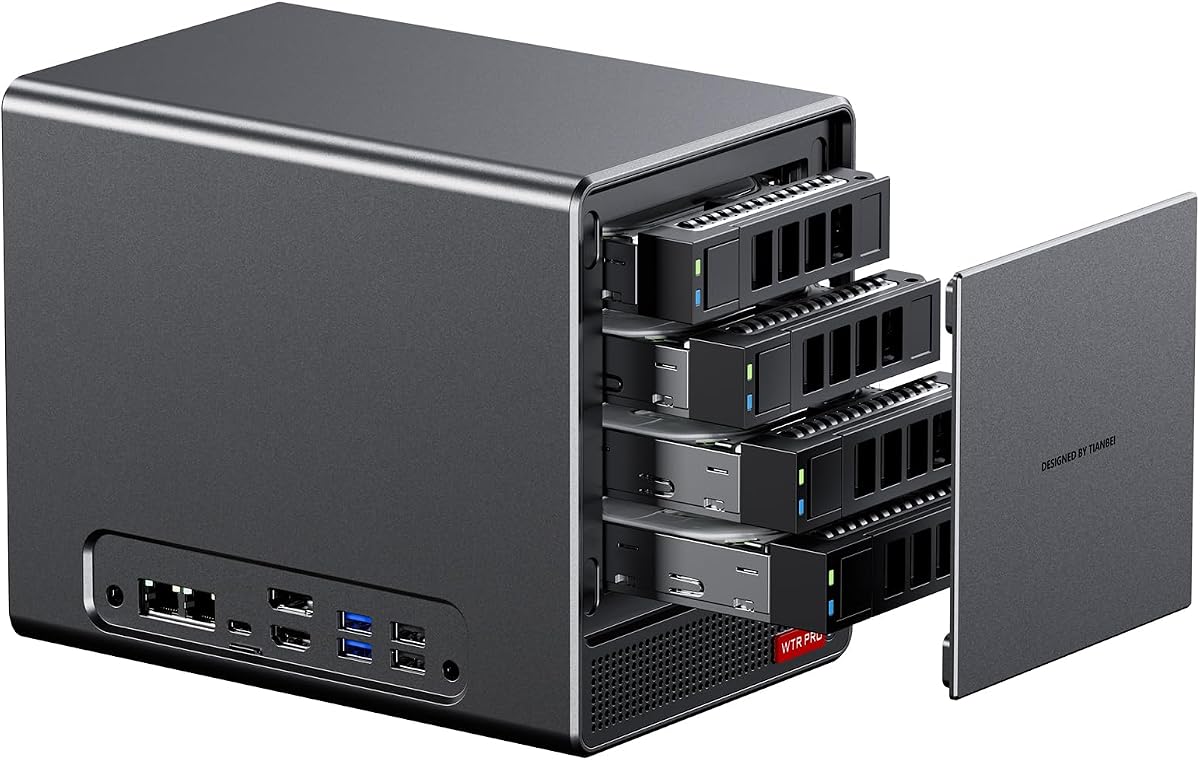
The AOOSTAR WTR PRO is a four-bay NAS barebone system powered by the AMD Ryzen 7 5825U, an eight-core, 16-thread Zen 3 processor. No numerical customer rating was supplied, but the hardware is clearly aimed at home servers, soft routers, and storage systems that may operate around the clock within a stated 15W to 25W power range.
We may earn a commission when you buy through this link, at no additional cost to you.
Storage is the defining feature. The enclosure accepts four 3.5-inch SATA drives, with stated maximum capacity of 22TB per bay, and adds two M.2 2280 NVMe positions. Dual-channel DDR4 runs at 3200MHz and supports up to 64GB, providing enough memory and storage bandwidth for a range of home-lab and small-business NAS duties.
The system is less attractive as a conventional general-purpose desktop because it prioritizes bays and cooling over a particularly compact design. A 12-centimeter fan and through-the-wall construction are intended to dissipate heat while limiting noise and dust accumulation. It also offers dual 2.5G LAN, WOL, Wake on LAN, and three high-resolution display outputs.
This is the right recommendation for a buyer whose priority is a compact multi-bay storage server rather than maximum gaming performance. It is less suitable for those who want a tiny display-oriented workstation or a current DDR5 platform. The absence of a customer rating should be considered, but the specialized drive layout and low-power design remain compelling.
Four SATA bays allow the WTR PRO to function as a centralized file server, backup target, or home-lab host. The stated 15W to 25W operating range suits long-duration service where higher desktop power draw would be less desirable.
Dual 2.5G Ethernet ports support fast transfers and can provide options for segmented networks, gateway duties, or redundant service arrangements. Wake on LAN also supports remote access and scheduled operation.
We may earn a commission when you buy through this link, at no additional cost to you.
The ASRock DeskMini X300 is a 1.92-liter barebone PC designed for the smallest possible footprint in the AM4 category. It has a supplied rating of 4.2 and supports Ryzen 5000, 4000, 3000, and 2000 series processors up to 65W, subject to the manufacturer's CPU compatibility list.
We may earn a commission when you buy through this link, at no additional cost to you.
Two DDR4 SO-DIMM slots support up to 128GB of memory at speeds up to 3200MHz with compatible processors. Storage can be installed in two Ultra M.2 NVMe positions and two 2.5-inch drive bays, with RAID 0 and RAID 1 listed as supported configurations. Display connectivity includes HDMI, DisplayPort, and D-Sub for up to three simultaneous screens.
The main limitation is the absence of a full-length graphics card slot. A builder seeking dedicated desktop graphics may need a larger enclosure, while a user relying entirely on integrated graphics will need to choose a compatible processor carefully. Wireless networking also requires adding a module in the M.2 Key-E slot.
This model is ideal for a discreet office, reception desk, living-room computer, or multi-monitor workstation where every liter matters. It offers more storage flexibility than many similarly small systems, making it a useful compromise between volume and expandability. For dedicated gaming, a model with OCuLink or a PCIe slot would be more appropriate.
At 1.92 liters, the DeskMini can be placed behind a display or on a compact workstation. Its small size does not prevent three-display operation, multiple NVMe drives, or 2.5-inch storage.
The Dragon RTL8125BG 2.5G LAN port supports fast file transfers and network use, while two M.2 and two 2.5-inch positions let an owner balance compact flash storage with larger magnetic drives.
We may earn a commission when you buy through this link, at no additional cost to you.
The ASUS ExpertCenter PN54 is a 0.6-liter barebone system aimed at professional, AI-assisted, and highly compact computing. It has a supplied rating of 3.1, the lowest numerical score in the group, but offers AMD Ryzen AI 300 series processors with six cores and an XDNA2 neural processing unit capable of up to 50 TOPS.
We may earn a commission when you buy through this link, at no additional cost to you.
Radeon 800M graphics can drive as many as four 4K displays, while the connection list includes six USB ports, dual 2.5G LAN, dual DisplayPort, Wi-Fi 7, and Bluetooth 5.4. The tool-free enclosure design is intended to make memory, storage, and other component upgrades easier than in systems with a more permanent chassis.
Potential drawbacks include the limited supplied customer feedback and the complexity of a newer AMD platform. Buyers should confirm which processor, memory, and storage configurations are supported in the exact barebone package, and whether all intended wireless features require optional modules or a particular configuration.
The PN54 is a compelling specialist choice for users who prioritize local AI acceleration, an exceptionally small 0.6-liter form factor, and a professional three-year warranty. It may appeal to compact office installations and AI experimentation. Those seeking a conventional gaming platform, more mature upgrade advice, or a multi-bay storage system should look elsewhere.
The dedicated neural processing unit is intended to accelerate compatible AI workloads independently of the main CPU and integrated graphics. That distinction can matter for locally processed AI applications where responsiveness and power efficiency are priorities.
The tool-free chassis and 24/7 reliability positioning make the PN54 suitable for long-duration professional use. Dual 2.5G networking and four-display support add useful management and productivity capabilities despite the 0.6-liter enclosure.
We may earn a commission when you buy through this link, at no additional cost to you.
The AOOSTAR WTR PRO 4+2 expands the NAS concept with four SATA drive bays and two M.2 NVMe slots, along with a maximum stated capacity of 96TB. Its Ryzen 7 5825U provides eight cores and 16 threads at a 4.5GHz maximum boost, and the supplied rating is 3.7.
We may earn a commission when you buy through this link, at no additional cost to you.
Dual Intel I226-V 2.5G LAN ports are the standout feature for a home server, allowing the unit to participate in a more sophisticated network topology. The system supports Windows 10 and 11, Ubuntu, OpenWrt, and OPNsense, along with VT-x and VT-d virtualization, allowing it to serve as a soft router, virtual machine platform, file server, or family backup system.
There is an important Linux caveat concerning SATA link power management. Under sustained heavy load, certain drive bays may experience speed reduction or CRC errors, and the supplied guidance recommends a udev rule to lock the link to full 6Gbps operation. This is a system-level power-management behavior, but administrators should understand it before deploying the unit as a critical server.
The WTR PRO 4+2 is recommended for technically confident buyers who need more drive capacity and dual high-speed networking than the four-bay WTR PRO. It is less suitable for a simple desktop or for someone unwilling to manage operating systems and storage settings. Its flexibility is substantial when the system will be configured carefully.
Two Intel 2.5G ports can separate storage traffic, management access, or router functions. This is valuable in a home lab or small office where a multi-homed server offers greater operational flexibility.
Support for mainstream desktop and router operating systems lets owners tailor the machine to the task. The same hardware can serve as a Windows workstation, Ubuntu file server, OpenWrt gateway, or virtualized lab environment.
We may earn a commission when you buy through this link, at no additional cost to you.
The ASUS ExpertCenter PN54-S1 is a slim barebone kit for buyers who want a polished, professional small-form-factor desktop. It uses AMD Ryzen 200 series processors with Radeon 740M graphics, supports up to four 4K displays, and has no numerical customer rating supplied, making its reputation harder to assess from feedback alone.
We may earn a commission when you buy through this link, at no additional cost to you.
Its specification emphasizes professional connectivity: six USB ports, dual 2.5G LAN, dual DisplayPort, Wi-Fi 7, and Bluetooth 5.4. The tool-free design is intended to simplify component upgrades, while the 34mm chassis and stated 24/7 operation target office, digital signage, and managed deployment environments.
As with every barebone system, buyers need to add a supported processor, memory, storage, and operating system. The processor family is also fixed within the current platform, so long-term flexibility is less than that offered by the ASRock AM4 models. Wireless functionality may also depend on the final configuration and included module.
The PN54-S1 is best for business users who value a slim ASUS enclosure, four-monitor productivity, fast dual networking, and a three-year warranty. It is less compelling for gamers seeking OCuLink or for storage-focused users needing multiple drive bays. Its understated design and practical connectivity make it a solid professional-office choice.
Radeon 740M graphics and support for as many as four 4K displays suit financial dashboards, design reviews, monitoring screens, and office productivity. Dual DisplayPort outputs complement the broader port selection.
The tool-free approach is intended to make internal component access more convenient. Combined with a 34mm chassis and three-year warranty, it targets installations where serviceability and professional presentation are equally important.
We may earn a commission when you buy through this link, at no additional cost to you.
Choosing an AMD barebone PC means balancing processor capability, chassis size, memory generation, storage layout, display needs, and networking. The right model is the one whose fixed components align with the parts you intend to add and the workload you plan to run.
Processor selection determines much of the system's eventual performance, power consumption, and upgrade horizon. The Ryzen 7 PRO 8845HS models use Zen 4 architecture, eight cores, 16 threads, Radeon 780M graphics, and up to 5.1GHz boost, while the Ryzen 7 255 offers a similar core arrangement with Radeon 780M graphics. The Ryzen 7 5825U systems use older Zen 3 architecture but excel in low-power server roles. The ASRock products accept multiple AM4 processor generations, giving the builder more selection, while the ASUS models are tied to a particular Ryzen family.
Barebone memory requirements vary substantially. DDR5 systems generally provide the newer memory standard and support up to 128GB across two SO-DIMM slots, while the ASRock DeskMeet X300 offers four DDR4 DIMM positions. The DeskMini X300 also accepts two DDR4 SO-DIMMs, and the AOOSTAR NAS systems use two DDR4 slots with a maximum of 64GB. Check supported module types, operating speed, and whether dual-channel operation requires a matched pair.
Compact gaming and productivity systems usually emphasize NVMe storage, with two M.2 2280 slots being common. The ASRock DeskMeet adds two SATA connectors and a full-length PCIe slot, while the ASRock DeskMini offers two M.2 and two 2.5-inch bays. AOOSTAR's WTR PRO models are built for hard drives, offering four SATA bays and two M.2 positions. OCuLink can also influence storage planning because some implementations use an M.2 slot for the adapter.
OCuLink provides a high-bandwidth PCIe connection for an external GPU and can transform a capable mini PC into a more serious gaming or graphics machine. The AOOSTAR GEM12+ and GEM12+ PRO use an independent 64Gbps channel, while the MINISFORUM X1 Lite-255 uses OCuLink with an included adapter plate and occupies one M.2 slot. None of the listed OCuLink systems supports hot-swapping, so power must be removed before changing the connection.
Display support should be evaluated by the number of monitors, resolution, refresh rate, and adapter requirements. Several models support three or four displays, including high-resolution output through HDMI 2.1, DisplayPort 1.4, and USB4. The ASUS PN54 models explicitly support up to four 4K displays, while the AOOSTAR GEM12+ family supports four-screen 4K operation. The ASRock DeskMini also offers three outputs, including legacy D-Sub for compatibility with older or specialized displays.
A barebone system may include some network hardware but leave wireless modules optional. Wi-Fi 6, Wi-Fi 6e, and Wi-Fi 7 options appear across the AOOSTAR, MINISFORUM, and ASUS models, while Bluetooth versions range from 5.2 to 5.4. Several systems provide dual 2.5G Ethernet ports, which is especially valuable for NAS use, local file transfers, and segmented networks. The ASRock DeskMeet includes an M.2 Key-E provision for wireless installation, and the DeskMini provides a dedicated Key-E slot as well.
Compact processors can generate substantial heat when allowed to sustain high performance. Several AOOSTAR and MINISFORUM systems use vapor chambers, phase-change cooling materials, bottom intake vents, and adjustable fan modes. The AOOSTAR NAS systems emphasize quiet, always-on operation with a 12-centimeter fan and a stated 15W to 25W range. Noise behavior also depends on the chosen processor, memory, storage, workload, BIOS settings, and ambient temperature.
A barebone listing may include the enclosure, motherboard, power supply, mounting hardware, and some cables, but it generally omits the processor, memory, storage, and operating system. The AOOSTAR MACO listing includes a power supply, HDMI cable, SSD cooling pad, and screws, while the GEM12+ packages include a VESA mount and related accessories. ASUS highlights a tool-free chassis, and MINISFORUM provides a three-year limited warranty. Compare included components and support terms before estimating the full build.
Begin by confirming compatibility before opening the chassis. Match the processor to the supported socket or product list, select the required memory generation and module format, and verify that every storage device uses the correct connector and protocol. For OCuLink systems, review the supplied adapter instructions and determine whether the connection will occupy an M.2 position. Assemble the system on a nonconductive, well-lit surface and consult the included documentation for processor, cooler, memory, and SSD installation order.
Install the operating system after the memory and storage are recognized. Connect a display through the correct output, attach a keyboard and mouse, and use wired Ethernet for the initial network setup when available. Install current operating-system updates, chipset or platform support software, and the latest AMD graphics driver appropriate to the chosen processor. For a NAS or server, complete the operating-system installation before adding large data drives, then configure storage pools, RAID, backup, and remote-access services carefully.
Maintain airflow by keeping side or bottom vents unobstructed, and avoid placing the system inside a closed cabinet without active ventilation. Use the BIOS performance modes to balance noise and thermal demand, and monitor processor temperatures during sustained tasks. Clean dust from vents periodically, particularly in a storage server running continuously. Back up important data, shut the system down before changing OCuLink hardware, and use a surge-protected source appropriate to the power supply and connected drives.
A barebone PC normally includes the chassis, motherboard, and power supply, but not the processor, memory, storage, or operating system. Some listings also include a power adapter, mounting hardware, display cables, or other accessories, so the package contents should be checked carefully. You must purchase every missing essential component and install it before the computer can be used.
The Ryzen 7 PRO 8845HS has eight cores, 16 threads, and Radeon 780M integrated graphics that can handle many mainstream games and lighter esports titles. More demanding games benefit from a dedicated GPU, which can be added through OCuLink on the AOOSTAR models. The resulting performance also depends on the game, memory configuration, cooling, and display settings.
A true barebone configuration normally does not include an operating system. The GEM12+, GEM12+ PRO, MACO, and ASRock listings specifically state that RAM, storage, or the operating system must be supplied separately, although the MACO listing also mentions a complimentary Windows 11 Pro product key claim. Verify the exact package wording before purchase and install the operating system of your choice.
OCuLink is designed as a dedicated high-bandwidth PCIe connection for external graphics, while USB4 is a general-purpose interface that can carry display, data, and power. The OCuLink models in this guide support high-performance external GPUs, but they require the proper adapter and do not support hot-swapping. On the MINISFORUM X1 Lite-255, OCuLink also uses one of the two M.2 storage positions.
Yes, if the model has enough drive bays and suitable networking. The AOOSTAR WTR PRO provides four SATA bays, two M.2 slots, and dual 2.5G LAN, while the WTR PRO 4+2 expands storage to a maximum stated 96TB. A NAS also requires compatible drives, memory, an operating system, and careful configuration of file services, permissions, and backups.
DDR5 systems generally use a newer memory standard and support the latest Ryzen platforms, while DDR4 models may offer a more mature or inexpensive component path. The ASRock DeskMeet and DeskMini use DDR4, whereas the AOOSTAR GEM12+, MACO, and MINISFORUM X1 Lite-255 use DDR5. Choose according to platform support, available components, capacity needs, and your comfort with mixing or upgrading memory.
No. Smaller systems can offer excellent desk savings, but they may limit cooling, internal expansion, storage options, and the ability to install a full-size graphics card. The 1.92-liter ASRock DeskMini is appropriate for display-oriented productivity, while the 8-liter DeskMeet offers more conventional expansion. Choose the smallest chassis that comfortably supports your storage, cooling, networking, and graphics requirements.
Check the processor socket, supported memory type and maximum capacity, cooler height, storage interface, and operating-system support list. For graphics, verify whether the system has a PCIe slot, OCuLink, or only integrated graphics. Also confirm that the power supply or adapter meets the planned processor and drive requirements and that all included cables match your selected components.
The AOOSTAR MACO 8845HS stands out as the strongest all-around option because it combines current Ryzen PRO performance, Radeon 780M graphics, dual USB4, dual 2.5G networking, and OCuLink in a compact platform. The AOOSTAR GEM12+ adds a four-screen emphasis and earned the highest supplied rating, while the MINISFORUM X1 Lite-255 brings modern Ryzen 7 hardware, flexible DDR5, strong display support, and external GPU capability.
Prioritize the parts of the platform that are difficult to change later. NAS buyers should focus on bay layout, drive support, and networking; office users should examine display outputs and power management; and gamers should confirm OCuLink behavior, power requirements, and storage-slot sharing. The ASRock DeskMeet and DeskMini remain compelling for builders who value AM4 processor choice, conventional expansion, or an exceptionally compact enclosure.
Finally, check current component compatibility, package contents, warranty terms, and prices before ordering. Barebone pricing alone does not reveal the final cost because memory, processors, SSDs, hard drives, and operating systems are separate purchases. Confirm that each added part is supported and that the assembled system fits the intended space, cooling arrangement, and workload.