
Honbay 40PCS Anti-Vibration Screws
4.6Editor score
Forty rubber mounting screws
Universal fit for most fans
Quick mounting and removal
Black finish blends discreetly
Discover the best PC Anti Vibration Fan Mounts, comparing compatibility, material, size, color, installation, and noise reduction for your build.
PC Anti Vibration Fan Mounts create a softer connection between cooling fans and the case, helping reduce structure-borne noise without changing the fan itself. A worthwhile set should provide secure retention, fit the intended fan frame, suit the build’s color, and remain easy to install in crowded or restricted spaces.
The products in this guide were compared using their stated materials, dimensions, mounting methods, compatibility, color options, ratings, and manufacturer support. The list covers Noctua mounting kits, silicone anti-vibration screws, and universal rubber alternatives for common case and CPU fans.
Each review identifies the mount’s strongest use case and relevant limitations, while the comparison table makes the differences easier to scan. Product availability and pricing can change, so readers should verify the current listing, dimensions, and case clearance before purchasing.
4.6Editor score
4.7Editor score

4.4Editor score
The table below compares all ten options by color, mounting style, material, quantity, and stated fan compatibility, making it easier to identify the right anti-vibration system for a particular PC configuration.


The Noctua NA-SAV2 chromax.Black combines a well-established mounting approach with a color that disappears into dark PC interiors. Its 4.7 rating reflects strong customer satisfaction, and the kit’s main appeal is predictable compatibility with standard 4.3mm mounting holes on Noctua and many third-party fans with open flange frames.
We may earn a commission when you buy through this link, at no additional cost to you.
The twenty included mounts are made from extra-soft, tear-resistant silicone rubber. Their purpose is to separate the fan frame from the case so that structure-borne vibration is less likely to travel through the chassis. A complete set can secure as many as five four-screw fans, making it practical for a multi-fan airflow upgrade.
The important limitation is frame geometry. The mounts are intended for fans with open flange frames and standard mounting-hole spacing; they are not designed around the closed corners found on certain thicker Noctua models. Users should therefore check both the hole diameter and the shape of the fan frame rather than assuming every 120mm fan is interchangeable.
This is the strongest all-around choice for builders who want proven isolation, a coordinated appearance, and enough hardware for several fans. The black finish is particularly suitable for restrained or all-black systems, while the stated six-year warranty adds confidence that the manufacturer stands behind the mounting system.
The premium silicone-rubber construction is intended to reduce the transfer of fan vibration into the case. That can make a system feel quieter without requiring a different fan or changes to its speed settings, although the exact improvement depends on the case, fan, and other vibration sources.
Black mounting hardware avoids the appearance of mismatched fasteners inside a dark chassis. This makes the kit particularly attractive for builds where even a small silver screw or rivet would be visually distracting.
We may earn a commission when you buy through this link, at no additional cost to you.
The Noctua NA-SAV4 is built for a cleaner, more refined installation than a conventional protruding anti-vibration mount. Its flat case-side end sits flush against the panel, while the 4.4 rating indicates generally positive user reception despite being more specialized than a basic rivet kit.
We may earn a commission when you buy through this link, at no additional cost to you.
The defining feature is its five defined, numbered pawls. The first is intended for standard open-corner fans, while pawls two through five accommodate specified closed-corner fan thicknesses of 10, 14, 15, 20, or 25mm. This approach gives the mounting hardware a more considered fit than a universal screw pressed through a single hole.
There are sixteen mounts in the set, enough for four fans. The flush format may require extra care during installation, and choosing the correct pawl is essential: using the wrong position could affect fit or retention. Builders with thick or closed-corner fans should read the installation guidance carefully before assembly.
The NA-SAV4 is best for a polished build in which visible fasteners would be undesirable, particularly when the fans have closed corners. It combines Noctua’s vibration-decoupling concept with a neater panel-side profile, making it the premium option for compatible systems.
The flat case-side end keeps the mounting point visually tidy and close to the panel. This is useful on side-panel-visible cases where projecting hardware could interrupt the build’s appearance.
Numbered pawl positions make it easier to select an installation method that corresponds to the fan’s frame. This focus on thickness distinguishes the kit from simpler screw-and-rivet alternatives.
We may earn a commission when you buy through this link, at no additional cost to you.
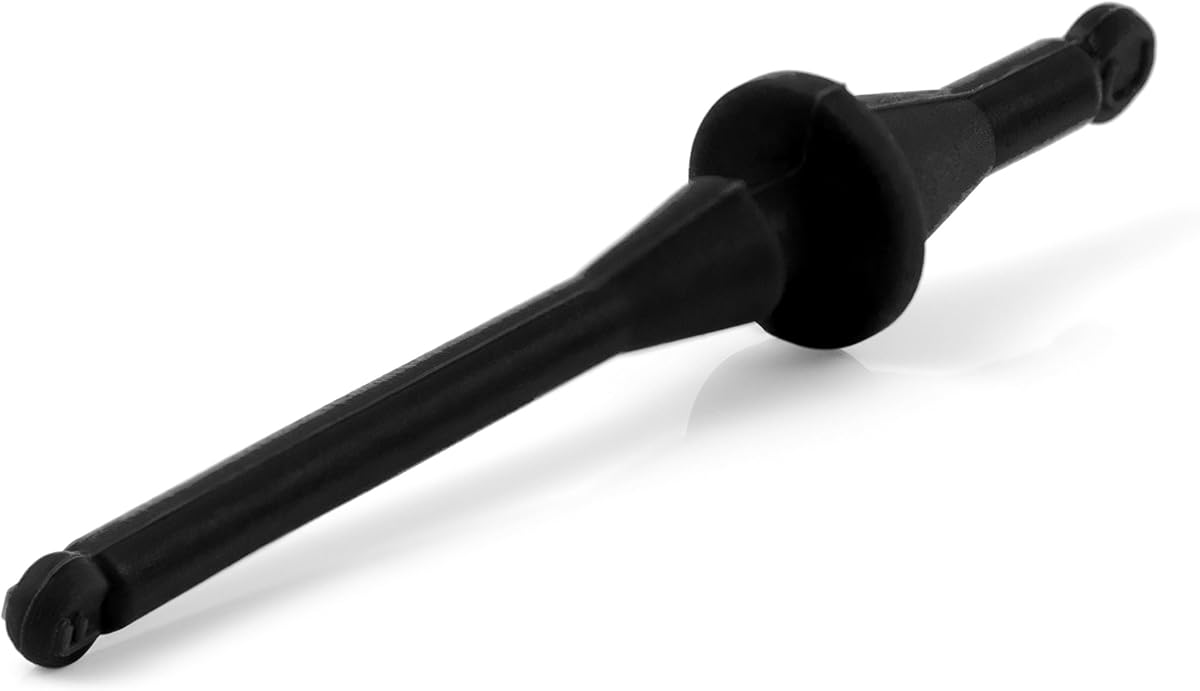
The Honbay 40PCS set offers one of the largest quantities in this guide, making it a practical choice for builders installing several case fans or wanting spare hardware available. It carries a 4.6 rating, and the straightforward rubber-screw design focuses on the core function of decoupling a fan from the case.
We may earn a commission when you buy through this link, at no additional cost to you.
Each fastener is approximately 11 by 30mm, and the set is intended to fit most fans. The rubber material helps reduce transmission of fan vibration through the mounting points. The manufacturer also describes the system as convenient for mounting and unmounting, which helps when servicing a build.
The tradeoff is that a universal screw does not offer the frame-specific positioning of the Noctua NA-SAV4. It also does not provide the color-coordinated finish of a chromax kit, although the black hardware remains visually discreet in most interiors. Buyers should confirm that the screw length and fan-hole geometry suit their equipment.
This is the best budget-oriented pick for users who prioritize quantity, quick installation, and a straightforward anti-vibration upgrade. It is especially useful when replacing conventional screws across a case, supplying enough pieces for ten four-screw fans, or maintaining spare mounts for future upgrades.
Forty screws provide exceptional flexibility for larger airflow configurations. Even after mounting a substantial number of fans, the installer can retain pieces for later replacement or use in a separate case or cooler.
Replacing rigid case screws with rubber anti-vibration hardware can reduce one path for structure-borne noise. The effect is most noticeable when the case panel or surrounding structure otherwise amplifies fan movement.
We may earn a commission when you buy through this link, at no additional cost to you.
This 20-piece anti-vibration screw set uses long, soft silicone-rubber pins to isolate fans from the case. Its 4.5 rating suggests a favorable balance of usefulness and value, while the stated 65mm length distinguishes it from the shorter Honbay and AUEAR alternatives.
We may earn a commission when you buy through this link, at no additional cost to you.
The flexible silicone is described as resistant to aging and suitable for high-temperature use. Its intended function is to replace rigid fan-fixing screws, absorb shock between the fan and case, and reduce box resonance. That makes it relevant to systems where a fan is mounted against a relatively large panel.
Length is the most important consideration. A 65mm pin can provide useful reach, but it may protrude farther behind the fan or encounter structural components. The stated application emphasizes open-case fan sizes, so users should check available depth and mounting-hole alignment before ordering.
This set is a sensible option for builders seeking a long soft-rubber fastener rather than a compact color-matched grommet. It offers a generous twenty-piece count and straightforward replacement, provided the case provides enough clearance for the longer mounting pin.
The extended pin can be advantageous when screws or rivets need to pass through a deeper bracket or reinforced mounting area. The trade-off is that longer hardware requires more attention to space behind the fan.
Soft silicone is intended to cushion the connection and reduce the transfer of vibration. Its listed aging resistance and high-temperature suitability make it a more specialized choice for long-mounted cooling hardware.
We may earn a commission when you buy through this link, at no additional cost to you.
The Honbay 20PCS kit provides a compact, conventional solution for reducing vibration at fan mounting points. Its 4.4 rating reflects positive customer feedback, and the product’s appeal lies in the balance between a moderate quantity, universal positioning, and soft silicone construction.
We may earn a commission when you buy through this link, at no additional cost to you.
The black screws measure approximately 44 by 7.5mm, using length and maximum diameter for the stated dimensions. They are designed to fit most fans and can be used for PC case or CPU fan mounting where the frame and hole arrangement permit. The material acts as a compliant layer between the fan and the mounting surface.
Because the fit is described in general terms, the set offers less certainty than a kit engineered around a specific hole pattern. A user with an unusual frame, a thick cooler, or a narrow mounting area should compare the physical dimensions and available clearance with the case and fan before installation.
This Honbay set is best for straightforward upgrades where the goal is to replace rigid screws with soft isolation hardware across one or more fans. It avoids the complexity of indexed pawls and provides a more manageable twenty-piece count than a large bulk pack.
The silicone fasteners provide compliance without requiring a complex mounting mechanism. Their familiar rivet form makes them a practical option for common case fans and straightforward maintenance.
Twenty pieces can cover five four-screw fans or ten two-screw installations, making the package useful for both individual upgrades and multi-fan arrangements.
We may earn a commission when you buy through this link, at no additional cost to you.
The AUEAR 50-Pack is the largest hardware set here and carries a 4.5 rating. It is built for builders who want ample anti-vibration mounting hardware available for numerous fans, repeated servicing, or several computers, without needing to purchase separate small packages.
We may earn a commission when you buy through this link, at no additional cost to you.
Each black rubber rivet is approximately 43 by 7.4mm. The manufacturer describes a universal design intended to fit most fans and reduce noise between the fan and case frame. The fasteners are presented as replacements for ordinary box-fan screws, with a focus on limiting resonance caused by fan vibration.
Quantity is the primary benefit, but it should be considered in context. A large inventory of rivets has limited value if the physical design does not suit a particular fan frame or mounting area. The package does not provide the frame-specific pawl positions of more specialized premium systems.
AUEAR’s set is most appealing to system builders, technicians, or enthusiasts who expect to install many fans and value having spares close at hand. For a single compact build, a smaller set may be easier to store and less likely to include unused hardware.
Fifty pieces cover a substantial number of mounting points and leave ample replacements available. This makes the set practical for workbench use, multiple cases, or builders who frequently revise their cooling layout.
The rivets replace rigid fan fixings with compliant rubber points. That direct approach suits standard case installations where the goal is to reduce resonance without adding specialized mounting hardware.
We may earn a commission when you buy through this link, at no additional cost to you.
The Noctua NA-SAV2 chromax.White offers the same core mounting concept as the black version in a finish suited to pale or black-and-white systems. It shares a 4.7 rating, one of the strongest ratings among the products compared, and is designed for quiet, coordinated installation.
We may earn a commission when you buy through this link, at no additional cost to you.
The twenty extra-soft, tear-resistant silicone-rubber mounts support up to five four-screw fans. They fit standard 4.3mm mounting holes on most Noctua fans and compatible third-party products with open flange frames. This makes the kit appropriate for users who value Noctua’s mounting ecosystem and want isolation hardware to blend into a light color scheme.
Color preference is the defining consideration. White fasteners can look deliberate and integrated in a light chassis, but they may be more noticeable against black panels or dark components. As with other NA-SAV2 variants, closed-corner fans are outside the stated basic compatibility.
This kit is an excellent match for a white-themed build or a deliberately mixed black-and-white aesthetic. It combines the brand’s straightforward installation system with a distinctive finish, making it more than a simple functional accessory.
White hardware creates a deliberate visual accent beside matching fans and pale case elements. It is especially useful when exposed screws would otherwise interrupt a carefully coordinated interior.
Support for standard 4.3mm holes and open flange frames gives the kit broad practical utility. Builders should still compare their fan frame design and mounting-hole spacing before installation.
We may earn a commission when you buy through this link, at no additional cost to you.
The standard Noctua NA-SAV2 uses a double-sided mount design that the manufacturer highlights for easier work in space-restricted environments. Its 4.3 rating remains favorable, and the practical distinction is installation access rather than color coordination.
We may earn a commission when you buy through this link, at no additional cost to you.
Twenty extra-soft, tear-resistant rubber mounts are included, enough for up to five fans. Compatibility covers most Noctua products and many third-party fans with open flange frames and standard 4.3mm mounting holes. The double-sided construction can make it easier to position and hold the soft isolation material during installation.
The kit lacks the indexed pawl system offered by the NA-SAV4, which is important for certain closed-corner or thick fan frames. Its 4.3 rating is slightly lower than the ratings attached to the chromax NA-SAV2 variants, although rating alone does not reveal the reason for any individual customer experience.
This standard NA-SAV2 is the most compelling when interior clearance is the primary concern or when a neutral color is preferred. It offers the established NA-SAV2 format without committing the build to a coordinated chromax color.
The double-sided design can make the soft mount easier to engage when a fan is close to another component. This is useful in compact cases where the installer has limited room to grip and align each fastener.
Because it does not carry a dedicated chromax color, the standard version can fit more varied visual themes. Its appeal is functional neutrality rather than decorative matching.
We may earn a commission when you buy through this link, at no additional cost to you.
The blue Noctua NA-SAV2 chromax.Blue is a color-coordinated isolation kit intended for blue-and-black or similarly accent-themed systems. It has a 4.7 rating and retains the same practical strengths as the other chromax NA-SAV2 options, including soft silicone-rubber construction and broad standard-hole compatibility.
We may earn a commission when you buy through this link, at no additional cost to you.
The set includes twenty mounts for up to five fans. Extra-soft, tear-resistant material helps isolate the fan frame from standard PC case mounting holes, while the open-flange design accommodates most Noctua fans and many third-party fans with standard 4.3mm holes.
As a visual accessory, blue is less universally neutral than black or white, although that can be precisely why a buyer chooses it. Compatibility remains limited to the stated open-frame format, and the kit does not provide the thickness-specific pawl positions found in the NA-SAV4.
This version is a strong fit for a build that already uses blue lighting, blue fan accents, or matching cables and components. It combines color coordination with the same established anti-vibration installation concept found in the higher-ranked chromax option.
Blue gives builders a way to coordinate mounting hardware with accent components while keeping the anti-vibration hardware visually purposeful. It works especially well in dark cases where a small color detail remains noticeable.
Twenty mounts cover a conventional four-screw fan arrangement across five fans. This supports a coordinated isolation treatment throughout a multi-fan system.
We may earn a commission when you buy through this link, at no additional cost to you.
The Noctua NA-SAV2 chromax.red is a bold mounting kit for red-and-black systems and builds that use warm accent lighting. It shares a 4.7 rating with the other chromax NA-SAV2 options and provides the familiar twenty-piece, multi-fan mounting arrangement.
We may earn a commission when you buy through this link, at no additional cost to you.
Made from premium-grade, extra-soft, tear-resistant silicone rubber, the mounts are intended to reduce vibration between the fan and case. They support most Noctua fans and third-party fans with open flange frames and standard 4.3mm mounting holes, with enough pieces for up to five fans.
The red finish is intentionally noticeable, so it works best when the rest of the build can carry that accent. It may look out of place in a restrained monochrome system, and users should remember that the kit is not engineered for closed-corner frames.
For a red-themed configuration, this version delivers both functional isolation and visual coordination. It is a particularly natural companion to red fan frames, accent lighting, cables, or other warm-colored components.
The red mounting points can complement matching cooling hardware and lighting. When installed in a coordinated build, the color reads as an intentional design element rather than mismatched hardware.
The compliant silicone-rubber material provides the same vibration-decoupling function as the neutral and darker chromax versions. Color changes the appearance, not the core mounting approach.
We may earn a commission when you buy through this link, at no additional cost to you.
The right anti-vibration fan mount depends on fan-frame design, available clearance, case layout, mounting-hole dimensions, and desired appearance. These factors determine whether a compact grommet, long screw, or indexed pawl system will install securely and suit the build.
Start with the shape of the fan’s corner and the way its mounting holes are formed. The NA-SAV2 family is stated for fans with open flange frames, while the NA-SAV4 uses separate pawl positions for specified closed-corner fan thicknesses. A product described as universal should still be checked against the actual frame, since an apparently matching hole may have a different surrounding structure.
In short, verify frame geometry before relying on a universal-fit claim.
Standard compatibility is most convenient, and several kits explicitly support 4.3mm diameter mounting holes. The screw-based alternatives provide overall length and maximum diameter rather than a clear hole specification, so users may need to compare those measurements directly with their fan and case hardware. Correct diameter helps the mount pass cleanly through the hole, while correct length influences how far it protrudes.
In short, compare both hole size and overall length.
Anti-vibration hardware adds thickness or changes the shape of the connection behind the fan. A long 65mm pin may work well on a reinforced panel but can conflict with a nearby drive cage, radiator, motherboard, or cable. Flush-style mounts may be preferable when the exterior appearance matters, while compact mounts can simplify installation around tight components.
In short, leave room for the entire mounting point, not only the fan.
Silicone rubber and general rubber are both intended to provide compliance between the fan and case. The listed Noctua chromax products emphasize premium-grade, extra-soft, tear-resistant silicone, while other sets describe flexible silicone or rubber designed to reduce resonance. Material alone cannot guarantee a particular noise reduction, but it is the mechanical feature that makes vibration isolation possible.
In short, prioritize soft, durable material for consistent isolation.
Count the total number of mounting points in the build. A 120mm fan commonly uses four screws, while smaller or compact fans may use fewer. The twenty-piece Noctua kits can cover as many as five four-screw fans, the sixteen-piece NA-SAV4 can cover four, and the Honbay and AUEAR screw sets provide 20, 40, or 50 pieces. Extra hardware can be useful for maintenance, but excessive quantity adds little to a single-fan upgrade.
In short, choose a quantity that covers present and planned fans.
Mounting fasteners are small, but they remain visible in many builds. Noctua’s NA-SAV2 options include black, white, blue, and red chromax finishes, allowing the hardware to coordinate with fans and other accent components. Black is the most discreet choice, white suits pale systems, and red or blue is better for builds intentionally using that color.
In short, match the mount finish to the visible theme.
Basic anti-vibration screws and rivets are usually intuitive to install, but specialized kits can require more attention. The NA-SAV4 asks users to select a numbered pawl appropriate to the fan’s frame and thickness. That added step can improve fit and appearance, although it may be unnecessary for a builder who values a simple replacement over a tailored installation.
In short, choose the simplest system your fan actually requires.
A manufacturer warranty can provide additional confidence in mounting hardware that is installed inside a case and may be difficult to inspect later. The Noctua products in this guide carry a stated six-year manufacturer warranty. Other options provide clear dimensions and materials but do not list the same support period in the supplied product information, making the difference another point to consider when products otherwise appear similar.
In short, check warranty terms alongside compatibility.
Before installation, power the system down, disconnect the power cable, and hold the fan stationary while removing its original screws. Compare the mount with the fan’s corner shape, hole diameter, frame thickness, and the space behind the panel. For a multi-fan case, install one fan completely and confirm that the opening, airflow direction, and mounting holes remain unobstructed before repeating the process.
Insert each soft mount or screw by hand and follow the manufacturer’s positioning instructions. With an indexed pawl kit, select the position specified for the fan’s frame and thickness. Tighten progressively rather than forcing the compliant material, and avoid pinching it between surfaces. The goal is secure retention with even contact, not compression that could pull the mount from its normal shape.
Reconnect power only after every fan is secure, cable routing is clear, and no loose hardware remains inside the case. Inspect the mounts during routine cleaning and whenever the case is moved significantly. Replace a mount that has split, pulled away, become excessively deformed, or no longer holds the fan squarely, and avoid tightening the mounting hardware aggressively in the hope of compensating for a poorly matched part.
They can reduce structure-borne noise by cushioning the connection between a fan and the case. The result varies with fan design, case construction, mounting location, and other noise sources, so they are not a substitute for a quieter fan. They are most useful in cases where a rigidly mounted fan transfers movement into a resonant panel.
A properly fitted anti-vibration mount should not meaningfully obstruct the fan or alter its intended airflow. Incorrect sizing, excessive compression, or a badly aligned hole can reduce clearance and should be corrected. Follow the mounting instructions and check that the fan spins freely before closing the case.
No. A universal description usually means the product fits a broad range of common fans, not that every frame and mounting point is guaranteed to work. Check the screw diameter, length, hole spacing, and available clearance, and compare the product dimensions with the fan and case before ordering.
The NA-SAV2 uses soft rubber mounts for standard fans with open flange frames and provides a double-sided design for easier access in restricted spaces. The NA-SAV4 offers a flush case-side end and numbered pawls for specified closed-corner fan thicknesses. Choosing between them depends mainly on frame shape, thickness, and desired exterior appearance.
Only when the cooler’s mounting hardware and frame are compatible with the selected anti-vibration system. Some products explicitly list CPU fan applications, but the CPU cooler may use a different retention bracket and have mounting demands that ordinary case-fan rivets cannot meet. Check the cooler manufacturer’s instructions and avoid altering essential heatsink retention hardware.
Add up the number of screws required by every fan you plan to install. A standard four-screw 120mm fan uses four mounts, so twenty pieces cover five such fans. Smaller fans may use fewer mounting points, while unusual frames may require a different quantity, so count from the actual hardware rather than estimating from fan diameter.
No. The compliant material should be held securely without being crushed or distorted. Follow the included guidance and tighten evenly until the fan is stable. Excess force can damage the mount, reduce its ability to isolate vibration, or cause the fan frame to sit unevenly.
No. Replacing the mounting points around a particular fan can provide useful isolation where it matters most. A full replacement may suit a multi-fan build or an installer who wants a consistent appearance, but users should prioritize the fans closest to noise-sensitive panels or those that transmit noticeable vibration.
The Noctua NA-SAV2 chromax.Black is the strongest overall choice because it combines soft silicone-rubber isolation, a coordinated finish, broad standard-hole compatibility, and hardware for several fans. The Honbay 40PCS set stands out for quantity and budget practicality, while the Noctua NA-SAV4 offers the most specialized premium installation with its flush profile and thickness-specific pawls.
Compatibility should matter more than color or count. Check the fan’s frame, mounting-hole dimensions, case clearance, and number of fans before choosing, because a nominally universal mount may not suit an unusual frame. Once those basics are confirmed, select the system that offers the appropriate retention method and the appearance that integrates with the build.
Product listings, availability, and pricing can change, so readers should review the current product page before buying. Confirm the included quantity, stated dimensions, compatibility notes, and any current manufacturer warranty to ensure the selected PC Anti Vibration Fan Mounts remain appropriate for the intended installation.