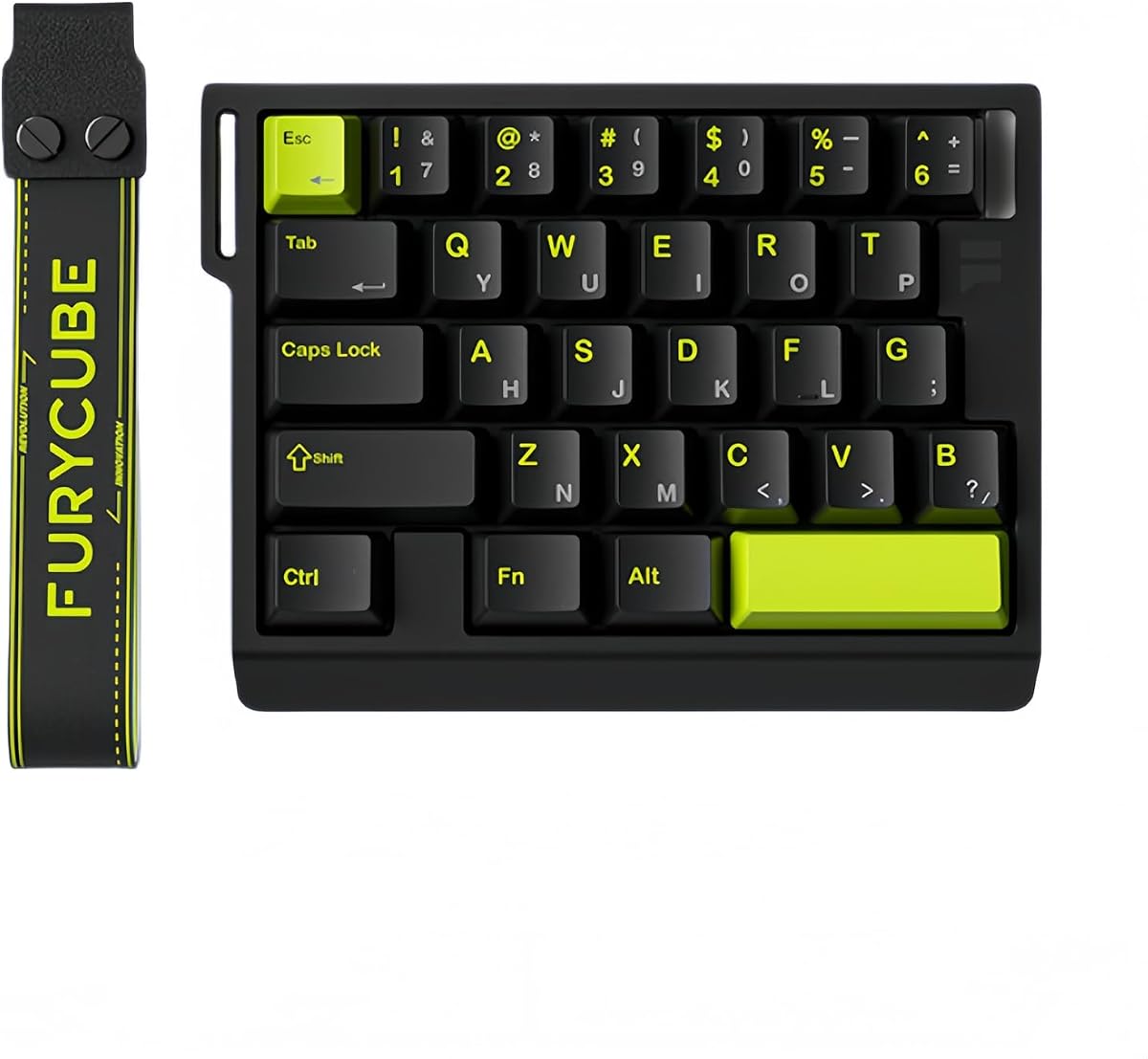
FKZ M30HE
4.0Editor score
Thirty-key left-hand gaming layout
Hall Effect rapid trigger controls
Eight kilohertz wired polling
Our best left handed gaming keyboards guide compares ten southpaw, ergonomic, and one-handed options for gaming comfort, speed, layout, and features.
Left-handed gaming keyboards place familiar controls closer to the mouse hand or move the numeric keypad out of the primary typing area. The best option depends on whether you want a complete southpaw board, a compact keypad, or a mouse-side game controller designed to reduce reach and improve access to movement commands.
We compared the ten products using the supplied specifications, focusing on layout, switch technology, connectivity, programmability, polling rate, rapid-trigger support, lighting, ergonomics, and intended gaming genres. The list includes full-size left-handed keyboards, wireless mechanical boards, wired mini keypads, Hall Effect controllers, and one-handed alternatives that may suit a left-handed mouse arrangement.
Each pick reveals a different way to improve a gaming setup: the top-ranked board combines a left-side numpad with wireless freedom, while the compact models emphasize fast inputs and dedicated mouse space. Ratings, features, and availability can change over time, so compare current listings and confirm compatibility before buying.
4.0Editor score

4.6Editor score

4.3Editor score
This side-by-side comparison covers the most practical left-handed and mouse-side gaming choices, from full southpaw keyboards to compact Hall Effect keypads and programmable one-handed controllers. It highlights the distinctions that matter most: physical layout, input technology, connection method, programmability, and gaming focus.



The RK Royal Kludge L98 is the most complete conventional gaming keyboard in this guide, earning a 4.6 rating while taking the top position. Its defining feature is the southpaw layout, which relocates the numeric keypad to the left and leaves the right side open for freer mouse movement. Unlike a tiny game keypad, it preserves a standard alphanumeric typing area, making it useful for gaming, everyday typing, shortcuts, and number entry.
We may earn a commission when you buy through this link, at no additional cost to you.
The keyboard combines a gasket-mounted structure, Cherry-profile PBT keycaps, and five internal damping layers. Those materials and construction details should produce a softer, quieter feel than an exposed entry-level mechanical board. A hot-swappable PCB accepts three-pin and five-pin switches, and the supplied options include linear, tactile, and silent RK switches, allowing buyers to change the feel without soldering.
Connectivity is another major strength. The L98 supports 2.4GHz wireless, Bluetooth 5.0, and USB-C wired modes, with multi-device connectivity for switching between a gaming computer and other devices. Its rated battery capacity is 8000 mAh, with listed endurance of up to 310 hours when RGB is off and 51 hours when lighting is on. That makes it a practical option when consistent charging or cable management matters.
The trade-off is size. A 98-key, 90-percent board still occupies far more desk area than a 29- or 30-key controller, so it will not provide the same open mouse space as the compact alternatives. It is nevertheless the strongest fit for a buyer who wants a genuine left-handed keyboard rather than a restricted gaming keypad. The recommendation is straightforward: choose the L98 when gaming, typing, and regular productivity all share the same station.
Moving the numpad to the left prevents it from occupying the area where a right-handed mouse naturally rests. This can reduce shoulder abduction during long sessions, although the position of the mouse and the board on the desk still require individual adjustment.
The combination of 2.4GHz, Bluetooth, and USB-C makes the L98 useful across desktop and portable setups. Wireless mode removes the cable during play, while wired mode provides a straightforward option when reliability, charging, or a stable desk setup takes priority.
We may earn a commission when you buy through this link, at no additional cost to you.
The RedThunder One Handed Gaming Keyboard is a 35-key portable keypad with a 4.4 rating and a straightforward focus on compact gaming. Its small footprint leaves substantial desk space for mouse movement, while the built-in wrist rest and curved shape are intended to make one-handed control more comfortable during extended play.
We may earn a commission when you buy through this link, at no additional cost to you.
All 35 keys support anti-ghosting, allowing multiple simultaneous inputs to register without the keyboard selecting an unintended combination. Two macro-recording keys are controlled through a simple FN-key process, giving the user a way to automate repeated inputs without navigating a more complex development environment. The stated response time is 3 milliseconds, which is suitable for ordinary gaming commands.
The device is also refreshingly simple to operate. It is driver-free and plug-and-play, with listed compatibility across Windows, Mac, Linux, and other common environments. RGB lighting offers seven colors with breathing and static modes. This is a small feature set compared with Hall Effect keypads, but it covers the essentials for a player who wants an extra control surface without a large configuration program.
Its limitations are equally clear. The RedThunder does not offer adjustable actuation, analog movement, advanced rapid trigger, or per-key remapping of the kind found in premium magnetic controllers. It is also not a full left-handed typing keyboard. The best use case is a player who already has a standard keyboard and wants a portable auxiliary pad for macros and compact mouse-side controls.
The compact housing and broad compatibility make this keypad easy to move between computers. Two macro slots can automate short, repetitive sequences, while the 35-key arrangement provides more controls than a bare macro pad without occupying a full keyboard footprint.
Driver-free plug-and-play operation reduces setup friction. Players who do not need analog controls, adjustable trigger points, or extensive profile management can begin using the included functions almost immediately after connecting the device.
We may earn a commission when you buy through this link, at no additional cost to you.
The AZERON Cyborg II is a premium one-handed controller with a 4.3 rating, combining 30 programmable keys with a Hall Effect analog thumbstick. Its adjustable construction and software ecosystem distinguish it from conventional keypads, making it particularly interesting for players who want dedicated movement and action controls rather than a simplified set of macros.
We may earn a commission when you buy through this link, at no additional cost to you.
The Hall Effect stick is designed to avoid drift and supports 360-degree analog movement in compatible games. Users can adjust dead zones, sensitivity, cone angles, directional zones, and analog smoothing, then calibrate the control. It may also function as a mouse and includes a mid-click function. This is a deep feature set for competitive shooters and other games that recognize analog input.
Every one of the 30 inputs is individually connected rather than sharing a connection matrix, which helps limit unwanted combinations during dense action. Inputs can represent keyboard commands, controller or mouse actions, and macros. Up to six control layouts can be stored directly on the keypad, while the Azeron software provides more extensive profile, lighting, diagonal-binding, and smoothing controls.
The important qualification is handedness. The supplied product description identifies the Cyborg II as a right-handed gaming keypad intended to replace the keyboard for left-hand use while the mouse remains on the right. It therefore serves a left-handed mouse arrangement rather than providing left-handed gaming. It is also a medium-size device, recommended for wrist-to-fingertip measurements of 6.3 to 7.5 inches, so hand size deserves attention before purchase.
Dead zones, cone angles, sensitivity, and smoothing can be tailored to individual movement habits. The result is a more involved setup than a conventional keyboard, but it gives supported games a level of analog precision that fixed digital controls cannot reproduce.
Storing up to six layouts on the keypad makes it easier to move between games, sensitivity profiles, or workflows. The software expands management options, while onboard storage helps preserve frequently used configurations without relying on a connected application.
We may earn a commission when you buy through this link, at no additional cost to you.
The AZERON Keyzen holds a 4.6 rating and offers 32 fully mappable keys, a 360-degree Hall Effect joystick, and genuine Cherry MX mechanical switches. It resembles a one-handed game controller and provides more conventional key input than a thumbstick-centered pad, making it a flexible choice for players who want familiar tactile switches alongside programmable controls.
We may earn a commission when you buy through this link, at no additional cost to you.
Each key can be assigned to keyboard, mouse, or controller functions, with macros also supported. Six onboard profiles are included, and the software allows additional profiles and RGB customization. The Hall Effect joystick is designed for drift-free analog movement, while N-key rollover helps the device register multiple simultaneous inputs in demanding games.
Ergonomics receive unusually detailed attention. The hand-shaped body includes two palm rests, adjustable finger angles, and swappable DSA-profile keycaps. This lets the user alter the angle and key feel rather than accepting one fixed configuration. The modular, replaceable components and three-dimensional printed construction also suit buyers interested in long-term maintenance and personalization.
Fit is the principal concern. The recommended wrist-to-fingertip length is 20 to 21 centimeters, or 7.9 to 8.3 inches, or more. A controller that is too large can create its own reach problems, so users should measure before committing. For a correctly sized hand, the Keyzen is a flexible programmable controller with a strong feature-to-rating balance.
Cherry MX Red, Brown, and Blue options let buyers choose linear, tactile, or clicky behavior. Swappable keycaps and fully programmable functions make the device more adaptable than a fixed controller, although the same mechanical-switch advantages and maintenance requirements apply.
Two palm rests, adjustable finger angles, and swappable DSA keycaps help bring the controls into a more natural position. The recommended size range should be checked carefully, since adjustability cannot fully solve a chassis that is fundamentally too large or too small for the user.
We may earn a commission when you buy through this link, at no additional cost to you.
The AJAZZ AK029 is a 29-key one-handed gaming keypad built around Hall Effect magnetic switches, rapid trigger, and an advertised 8KHz polling rate. Its 4.5 rating reflects a specification set aimed directly at competitive FPS, MOBA, and other fast-paced games, while the small layout creates a wide, uncluttered area for mouse movement.
We may earn a commission when you buy through this link, at no additional cost to you.
The magnetic switches provide 0.01 millimeter actuation precision and no bottom dead zone, allowing a key to reset almost as soon as it begins moving back. That behavior supports rapid trigger and quick repeated inputs. The stated 128KHz full-key scanning rate and response latency as low as 0.125 milliseconds make this one of the most performance-focused products in the guide.
Snap Key, or SOCD, and Dynamic Key Switch, or DKS, add advanced functions for movement combinations. The integrated wrist rest follows the palm shape to improve comfort, while the aluminum alloy plate and five-layer damping structure seek stable, low-noise feedback. RGB lighting includes 20 preset effects for visual personalization.
There are trade-offs. The AK029 is wired, which keeps latency and power predictable but prevents the freedom offered by the RK L98. Its advanced trigger and combination features also demand some setup and learning. Nevertheless, for a player who wants the smallest competitive keypad here and prioritizes response behavior over full typing or wireless flexibility, it is among the strongest choices.
A very low actuation point allows a key to register as soon as it crosses a chosen depth, and a near-zero reset point improves repeated movement inputs. The result is particularly relevant to games where short taps, counter-movement, and precise strafing demand consistent timing.
The listed eight-kilohertz polling rate means the keyboard checks for input at a much higher frequency than conventional 1,000-hertz devices. Together with 128KHz key scanning, it targets competitive consistency, though actual game performance also depends on the computer, connection, and game support.
We may earn a commission when you buy through this link, at no additional cost to you.
This Ergonomic Left Handed Keyboard for Business and Accounting is built around a genuine left-side numeric keypad and Natural-A keycap structure. It carries a 4.4 rating and targets users who spend long periods entering data, navigating software, or working in environments where keeping the left hand on the number pad and the right hand on the mouse reduces awkward reaching.
We may earn a commission when you buy through this link, at no additional cost to you.
The patented key shape is intended to guide finger placement more naturally than a standard flat keycap. Eight multimedia hotkeys provide quick access to common system controls, and a dedicated utility manages these functions. The design supports Windows XP, 7, 8, and 10 as well as Mac OS X, with PS/2 and USB connection options noted in the supplied information.
At 18.72 by 8.1 by 0.98 inches, the board is substantially more compact than a typical full-size desktop keyboard. That smaller footprint is valuable on a crowded work desk. Its visual and switch design, however, are aimed at productivity rather than competitive gaming, so it does not advertise mechanical switches, anti-ghosting, rapid trigger, or high polling rates.
It is best viewed as a left-handed ergonomic keyboard that can also handle casual gaming, not as a competitive gaming specialist. Players who spend equal time gaming and working may prefer a more responsive option. For accounting, administrative, or general office use, though, the left-side numpad, shaped keycaps, hotkeys, and compact proportions form a focused and practical package.
A numpad on the left keeps number entry and mouse operation under the same general hand arrangement. The shaped Natural-A keycaps are intended to support finger alignment during extended sessions, although comfort varies with hand size, desk height, and personal preference.
The stated dimensions keep the keyboard relatively close to a standard compact board while retaining a numeric keypad. Eight multimedia hotkeys add convenient system access without requiring users to navigate layers or memorize complex combinations.
We may earn a commission when you buy through this link, at no additional cost to you.
The Keychron C0 HE is a wired 35-key gaming keypad with a 4.2 rating, an eight-kilohertz polling rate, and Hall Effect magnetic switches that support rapid trigger. It provides a modern competitive keyboard layout without a thumbstick, which can appeal to players who prefer digital key input but still want adjustable actuation and fast resets.
We may earn a commission when you buy through this link, at no additional cost to you.
Each magnetic key can be configured with fine actuation precision down to 0.01 millimeters. Detecting input according to real-time travel allows users to tune the point at which a command registers, potentially improving repeated taps and movement timing in supported competitive titles such as Valorant and CS2. The compact design keeps essential actions close to one hand while preserving more mouse space than a full keyboard.
Its configuration approach is notably approachable. A browser-based configurator handles key mapping, actuation settings, and per-key RGB lighting without requiring a local software installation. Compatibility with both Windows and macOS broadens its use for mixed-system setups. The same programmability can support OBS scene changes, push-to-talk, editing shortcuts, macros, and other creator workflows.
The limitations are a wired-only design and the absence of an analog thumbstick. It also has the lowest rating in this particular list, though that does not make its feature set weak; it simply means the product has less of the broad user feedback behind it. It is a strong choice for a player who values browser-based setup, cross-platform use, and precise digital triggering more than analog movement.
Real-time travel detection gives each key a selectable actuation point. Users can move toward earlier, lighter triggering for fast repeated inputs or use a deeper point for deliberate actions, depending on the game and personal preference.
The web-based configurator removes the need to install and maintain a dedicated desktop utility. It also makes it easier to manage mappings, lighting, and actuation settings across compatible Windows and macOS systems, provided the browser can access the keypad.
We may earn a commission when you buy through this link, at no additional cost to you.
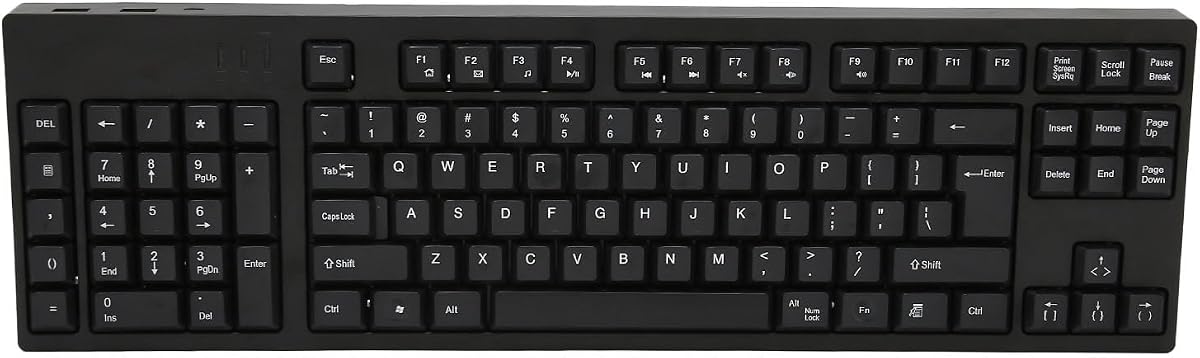
The 109-Key Left Handed Keyboard is the most traditional full-size option in the guide, and its supplied rating is 5.0. It retains a complete keyboard arrangement while relocating the numeric keypad to the left, allowing the right hand to remain over the mouse without the number pad taking up the right edge.
We may earn a commission when you buy through this link, at no additional cost to you.
The board uses an ABS construction and is described as stable and accurate for standard typing. Plug-and-play operation means no drivers or complicated configuration steps are required. Two additional USB interfaces provide convenient connection points for peripherals, reducing the need to move the main keyboard to reach devices on the desk.
This is a straightforward productivity keyboard rather than a feature-loaded competitive model. The supplied information does not indicate mechanical switches, Hall Effect actuation, rapid trigger, high polling, per-key lighting, or wireless connectivity. It may still serve casual games well, but a dedicated keypad can offer a much more noticeable advantage in timing-sensitive titles.
The ideal buyer is someone who needs a full typing and number-entry surface but works most comfortably with the numpad on the left. Its strong rating, straightforward setup, and 109-key completeness make it useful for general office tasks, accounting, and design work. Those seeking competitive gaming performance should look instead to the AJAZZ, FKZ, or Keychron models.
Unlike a one-handed game controller, this keyboard preserves the alphabet, function row, navigation area, and numeric keypad. Relocating the number section supports left-handed number entry while keeping the mouse area clear.
The keyboard works without a driver, reducing setup time on shared or frequently changing computers. Its two extra USB ports are useful for accessories, although the supplied micro-USB connection and lack of wireless support may matter to buyers with modern desk setups.
We may earn a commission when you buy through this link, at no additional cost to you.
The FKZ M30HE is a 30-key, left-handed gaming keypad with a 4.0 rating. It combines Hall Effect magnetic switches, rapid trigger, an advertised 8KHz polling rate, RGB lighting, and a web-based driver, making it an accessible option for players who want advanced input controls without moving to a full-size board.
We may earn a commission when you buy through this link, at no additional cost to you.
Each magnetic switch offers an adjustable trigger travel range of 0.1 to 3.4 millimeters and activation precision down to 0.01 millimeters. This allows users to select how early a command registers. Dynamic keystrokes can assign four distinct operations to one analog key, while the hot-swappable construction allows compatible magnetic switches to be exchanged without soldering.
The driver supports remapping, macros, hotkeys, lighting modes, custom effects, and actuation changes. Per-key RGB lighting is described as offering 24 million color choices, with north-facing LEDs intended to keep the illumination visible during gameplay. A 30-key arrangement concentrates frequently used controls on the left and leaves the remaining side open for mouse movement.
Its 4.0 rating is the lowest in the lineup, so buyers should not expect the same level of refinement or user feedback as the highest-rated models. It is also wired, and advanced features require the web driver. Still, for a value-focused buyer, the combination of magnetic switches, rapid trigger, dynamic keystrokes, and eight-kilohertz polling is notably capable.
The broad trigger-travel range lets players select how far a key must move before registering. Rapid reset behavior then supports short, repeated commands, which is valuable for movement inputs and quick action sequences in compatible games.
A web driver handles remaps, macros, hotkeys, and lighting effects, while dynamic keystrokes give one analog key several roles. This configurability makes the compact pad useful for more than a fixed cluster of WASD-style commands.
We may earn a commission when you buy through this link, at no additional cost to you.
The A4tech Ergoguys KBS-29BLK is a wired, black, left-handed keyboard designed for business and accounting work. It has a 4.3 rating and is part of A4tech's Ergoguys line, which places emphasis on reducing strain associated with repetitive number entry and asymmetric workstation habits.
We may earn a commission when you buy through this link, at no additional cost to you.
The supplied information identifies the KBS-29BLK as the left-handed wired USB model. Its core purpose is practical rather than competitive: positioning controls for left-handed number entry, supporting a more natural mouse position, and providing multimedia functions within an ergonomic productivity design.
The board does not advertise the technical features expected from a modern competitive peripheral, such as Hall Effect switches, rapid trigger, 8KHz polling, hot-swappable construction, or wireless connectivity. As a result, it should be judged on comfort, layout, and everyday usability rather than esports specifications.
This makes the A4tech most appropriate for a person who primarily works with spreadsheets, accounting systems, or business applications and only needs a keyboard that can handle occasional gaming. The left-handed Ergoguys format remains the deciding feature. It is a focused alternative to gaming keypads for users whose priority is sustained productivity and a familiar, wired setup.
The left-handed design moves numeric work away from the dominant mouse side. That can make spreadsheet and accounting tasks feel more natural for a left-handed user and may reduce the need to shift the mouse or stretch the arm between different input areas.
USB connectivity and a black wired configuration keep the design straightforward for office use. The absence of wireless convenience and gaming-oriented controls is acceptable when reliability, familiar operation, and ergonomic positioning matter more.
We may earn a commission when you buy through this link, at no additional cost to you.
The best left-handed gaming keyboard depends on how you use your hands, which games you play, and whether you need a complete typing surface. Compare the physical layout first, then examine input technology, configurability, connectivity, and the amount of desk space your setup can spare.
A southpaw keyboard moves the numeric keypad to the left but retains a full alphabet, navigation cluster, and number section. It is the most natural choice when you need to type, work, and game on one device. A one-handed keypad removes most conventional typing keys and instead places a smaller group of frequently used commands under one hand. These are excellent for movement and action keys, but they usually supplement rather than replace a standard keyboard.
Left-handed gaming setups can mean two different things. One arrangement uses a left-handed keyboard with the mouse on the right, keeping the right hand free for aiming. Another uses a compact game controller in the left hand and a mouse in the right, placing movement commands under the left hand. The AZERON Cyborg II described here is explicitly a right-handed-use controller designed for left-hand keyboard replacement, so it serves the second arrangement rather than acting as a left-handed typing keyboard.
Conventional mechanical switches offer a familiar tactile experience, while magnetic Hall Effect switches can detect movement at adjustable depths. Rapid trigger uses this measurement to reset a key sooner, which can assist quick repeated inputs. The AJAZZ AK029, Keychron C0 HE, and FKZ M30HE all highlight adjustable magnetic actuation. For noncompetitive play, RedThunder's simpler switch design may be sufficient, whereas enthusiasts may prefer the Cherry MX choices in the AZERON Keyzen.
Polling rate indicates how frequently a device checks for new input, while latency describes how quickly a detected change reaches the computer. The AJAZZ AK029 and Keychron C0 HE list an 8KHz polling rate, and the FKZ M30HE does as well. These figures are useful for comparing competitive designs, but they do not guarantee identical real-world performance because the computer, game, connection, and software can all influence the result.
Programmability turns a keypad into a personalized control surface. The AZERON devices support keyboard, mouse, and controller mappings, with onboard profiles and software for deeper control. The Keychron C0 HE uses a browser-based configurator, while the FKZ M30HE provides a web driver for remapping, macros, hotkeys, and lighting. The RedThunder includes two dedicated macro-recording keys, a simpler approach that requires less configuration.
Compact keypads keep the mouse center open for broad, precise movement and reduce unnecessary arm extension. Full southpaw boards are larger, but they preserve familiar typing positions. Adjustable palm rests, shaped keycaps, and included ergonomic components can improve a controller's fit, although the Keyzen's stated 20-to-21-centimeter recommended measurement and the Cyborg II's 6.3-to-7.5-inch hand range show why physical dimensions deserve close attention.
Wireless freedom can make a full keyboard easier to reposition and removes cable clutter from a gaming desk. The RK L98 supports 2.4GHz, Bluetooth 5.0, and USB-C, making it the clear leader in connectivity versatility. The RedThunder, AJAZZ, Keychron, and FKZ are wired designs. Wired operation keeps the connection simple and can be attractive for competitive setups, but it requires cable management and limits placement flexibility.
Competitive shooters benefit most from rapid trigger, low latency, and easy access to movement commands. MMOs and MOBAs may place greater value on macros, multiple profiles, and dedicated action keys. Streamers and editors can use programmable buttons for scene changes, push-to-talk, timeline controls, and other shortcuts. The AK029 emphasizes FPS and fast-paced titles, the Keychron C0 HE also supports creators, and the Azeron devices target competitive movement, FPS, MOBA, and RPG use.
Begin by placing the keyboard or keypad where it supports a relaxed shoulder and wrist position. For a southpaw board, position the number pad under the left hand and keep the right hand aligned with the mouse. For a one-handed controller, place it under the movement hand and use the opposite hand exclusively for aiming. Adjust the display, chair, and desk height before changing key assignments, because a comfortable physical setup is the foundation of consistent control.
Next, connect the device using its supported method and update or open the appropriate configuration utility. Hall Effect keypads should be tested with conservative actuation points before creating aggressive rapid-trigger profiles. Assign one function at a time, save separate layouts for different games, and confirm that every action works in actual play. Macro users should also verify that recorded sequences do not conflict with functions the game already recognizes or with another programmable key.
For maintenance, disconnect the keyboard before changing hot-swappable switches or adjusting removable components. Keep the underside vents and switch openings clear of dust, and clean the keycaps and wrist rest with a soft, slightly damp cloth rather than pouring liquid into the switches. Hall Effect pads should be kept free of metal debris and moisture. Wireless boards should be charged periodically according to the manufacturer's guidance, while wired models benefit from gentle cable management that avoids tension at the connector.
A left-handed gaming keyboard generally moves the numeric keypad to the left while preserving a complete typing layout. A one-handed gaming keypad removes most typing keys and concentrates gaming commands, movement functions, or an analog stick under one hand. The first is better for work and general computer use, while the second is better for compact setups and dedicated mouse-side controls.
It can be. The supplied RK L98 description notes that right-handed users may also appreciate the open space created on the right side of the desk. Comfort still depends on shoulder position, mouse placement, desk height, and personal preference, so anyone can try the layout even if they are not a left-handed user.
Rapid trigger is most useful in competitive games that reward fast, precise repeated inputs and short movement adjustments. It can be helpful in shooters, but it is not essential for every genre or skill level. Players who value standard mechanical feel, programmable macros, or a complete typing layout may gain more from a different feature set.
Usually not for typing, documents, messaging, or other extended text entry. A keypad is best used as a dedicated gaming controller alongside a standard keyboard, although the RK L98 and the full-size left-handed boards in this guide provide a more complete alternative. Some players place the keypad and keyboard on opposite sides of the desk to create a symmetrical gaming layout.
No. A controller that places movement keys under the left hand can complement a right-handed mouse, but it may not be a left-handed keyboard in the traditional sense. The AZERON Cyborg II in this guide is specifically described as designed for right-handed use with the mouse on the right, so buyers must read the handedness details carefully.
Wired devices provide a fixed connection and straightforward power, while wireless boards offer greater positioning freedom and less cable clutter. The competitive keypads reviewed here are wired, whereas the RK L98 supports three connection modes. Your choice depends on desk setup, battery management, and whether unrestricted placement matters more than a permanently connected configuration.
Smaller pads usually prioritize mouse space and common movement actions, while larger pads provide more programmable commands and closer access to secondary keys. The AJAZZ AK029 has 29 keys, the FKZ M30HE has 30, the AZERON Keyzen has 32, and the RedThunder and Keychron C0 HE have 35. A full-size southpaw board is preferable when you also need typing, document work, and complete number entry.
Software is generally needed to set actuation points, rapid-trigger behavior, remaps, macros, lighting, and profiles. The Keychron C0 HE performs these tasks through a browser-based configurator, while the FKZ M30HE uses a programmable web driver. The AZERON devices rely on their dedicated software, so check the supported operating system and connection method before purchase.
The RK Royal Kludge L98 is the most versatile choice because it combines a true southpaw number pad, a complete 98-key layout, hot-swappable switches, and three connection modes. For a compact competitive setup, the AJAZZ AK029 emphasizes rapid trigger and high polling, while the FKZ M30HE offers a similar advanced feature set in a value-focused package. The AZERON Cyborg II stands out for analog control and deep customization, with the important caveat that its supplied design is for right-handed use with the mouse on the right.
Prioritize the layout that matches your work and gaming habits before focusing on specifications. Choose a full left-handed board if you type, calculate, and game; choose a compact keypad if your priority is mouse space, timing, and dedicated movement commands. Then assess hand size, switch behavior, actuation controls, configuration software, compatibility, and wired or wireless operation according to the games you actually play.
Ratings, firmware behavior, software compatibility, and availability can change, and current prices should be compared before purchase. Checking the latest listing, warranty information, and system requirements can prevent avoidable surprises, particularly for specialized Hall Effect controllers that rely on dedicated configuration tools.