
GMKtec M8 Ryzen 5 PRO 6650H
Ryzen 5 PRO 6650H processor
16GB LPDDR5-6400 memory
Dual 2.5GbE networking
Our Mini PC with Oculink 2 guide compares 10 compact systems for eGPU expansion, gaming, networking, multi-display support, memory, storage, and everyday value.
A Mini PC with Oculink 2 gives compact computers a direct PCIe route to external graphics, network cards, and other high-speed expansion devices. Unlike a conventional USB connection, Oculink provides a dedicated link that can reduce bottlenecks, making these systems appealing for gaming, creative work, and specialized desk setups.
We compared all 10 products by processor, integrated graphics, memory, storage capacity, networking, display support, cooling, power controls, and Oculink implementation. The list includes AMD and Intel platforms, soldered and replaceable memory, and configurations ranging from practical everyday systems to compact AI and workstation-class machines.
Each review identifies the strongest feature of its mini PC and also explains the compromises buyers should consider. Product availability, bundles, and pricing can change, so confirm the current configuration and Oculink accessory support before making a final purchase.

4.4Editor score
4.1Editor score
The comparison below highlights the major hardware differences among all 10 Oculink-equipped mini PCs, including processor class, memory, integrated graphics, storage, networking, and the number of displays each model is designed to support.


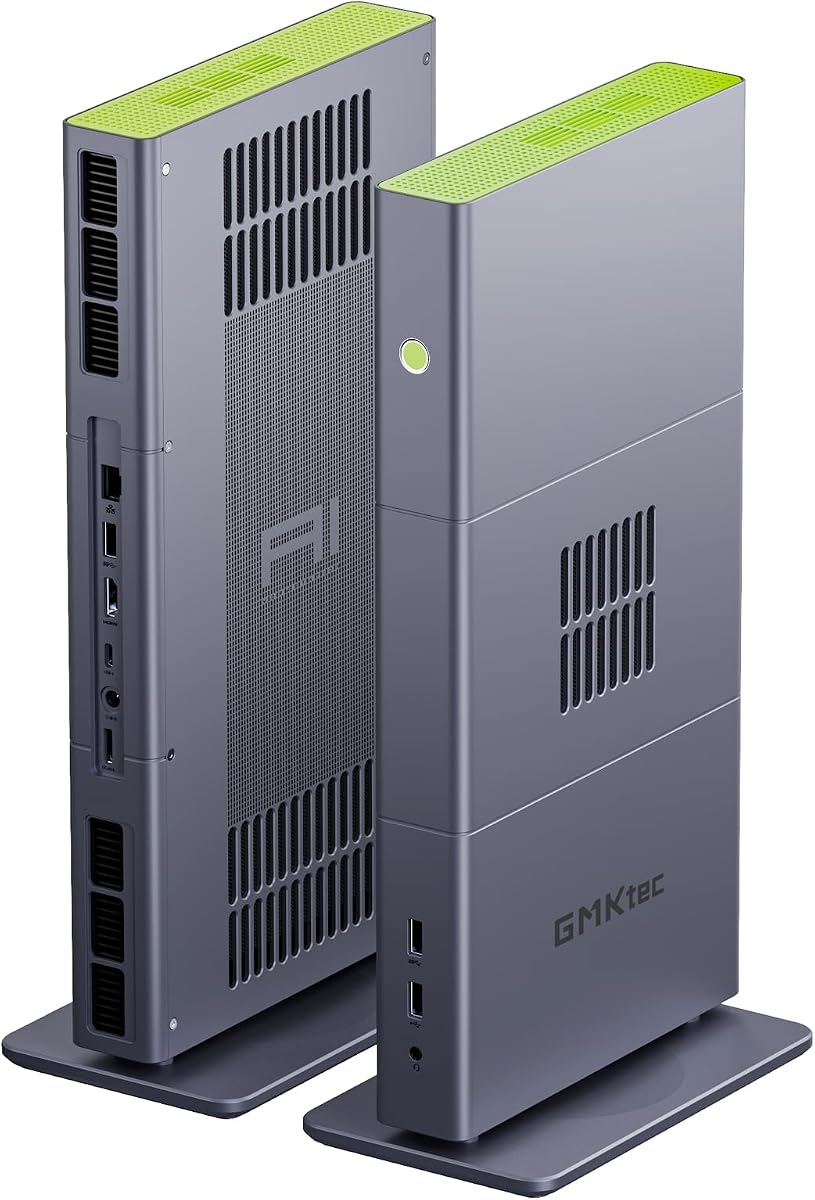
The GMKtec M8 Ryzen 5 PRO 6650H combines a compact six-core, 12-thread processor with Radeon 660M integrated graphics and a dedicated Oculink interface. Its rating is not listed in the supplied product information, but the underlying configuration is well suited to office work, media, light content creation, and buyers who want a small computer that can later accept a more powerful external GPU.
We may earn a commission when you buy through this link, at no additional cost to you.
Performance comes from a Ryzen 5 PRO 6650H capable of boosting to 4.5GHz, supported by 16GB of LPDDR5-6400 memory and a 512GB NVMe drive. The system also includes two 2.5GbE Ethernet ports, WiFi 6E, 10Gbps USB ports, and full-featured USB4. A three-display arrangement is supported through HDMI 2.0, DisplayPort 1.4, and USB4 video output.
The most attractive feature is Oculink itself, which provides a dedicated PCIe pathway for an external graphics card without relying on a general-purpose USB connection. That makes the M8 a sensible starting point for someone who wants strong integrated graphics now and a desktop-class graphics upgrade later. The trade-off is that 16GB of soldered memory may be limiting for advanced editing, large datasets, and virtualized workloads.
This is a strong recommendation for budget-conscious builders who can take advantage of a future eGPU, as well as for office and home-lab users who value dual Ethernet and flexible storage. Buyers who need substantial memory from day one should consider a 32GB alternative, while those expecting heavy gaming without an external GPU may find the Radeon 660M too modest.
Oculink gives the M8 a direct high-speed expansion route for compatible eGPU enclosures. It is especially useful when the integrated Radeon 660M is sufficient for routine work but a more capable graphics card is desirable for gaming, rendering, or GPU-accelerated applications.
Dual 2.5GbE ports support advanced network arrangements, while HDMI, DisplayPort, and USB4 allow three displays. Together, these features suit compact workstations, monitoring stations, and users who need separate network connections.
We may earn a commission when you buy through this link, at no additional cost to you.
This M8 configuration uses the same Ryzen 5 PRO 6650H platform and Radeon 660M graphics as the first-ranked model, making it another compelling option for compact productivity with future GPU expansion. The supplied listing does not include a customer rating, so the hardware specifications and intended use case are more useful guides than a numerical score.
We may earn a commission when you buy through this link, at no additional cost to you.
Its six cores and 12 threads provide a useful balance for browsing, office applications, video calls, high-resolution media, and light creative workloads. LPDDR5-6400 memory supports responsive multitasking, while the 512GB NVMe SSD provides room for applications and active files. Two M.2 2280 positions allow storage expansion to as much as 8TB in total, according to the product details.
Oculink and USB4 create a flexible pair of high-speed interfaces. Oculink is intended for a direct PCIe external device, whereas USB4 handles data transfer, power delivery, and display output. Dual 2.5GbE ports add uncommon network flexibility for a mini PC, and BIOS controls include quiet, balanced, and performance profiles along with VRAM allocation, auto power-on, and Wake-on-LAN.
Choose this model if you want a capable office or development system with flexible I/O and the option to add a discrete GPU later. The main limitations are the fixed 16GB memory and the need for suitable external hardware. Users whose workloads already demand 32GB should look toward the K16 or a system with replaceable DDR5 modules.
USB4 provides 40Gbps data transfer, charging, and video output, while Oculink provides a dedicated PCIe route. Using both interfaces together gives a compact system a broader range of peripheral and expansion options.
Quiet, balanced, and performance modes make it easier to tune the computer for office work, mixed workloads, or sustained demanding tasks. Auto Power On and Wake-on-LAN also support unattended and remote-access arrangements.
We may earn a commission when you buy through this link, at no additional cost to you.
The GMKtec K16 Ryzen 7 7735HS ranks as the strongest all-around choice because it combines eight cores, 16 threads, 32GB of fast memory, capable Radeon 680M graphics, and a dedicated Oculink port. Its 4.4 rating supports its position as a versatile compact system for work, creation, gaming, and server-related networking.
We may earn a commission when you buy through this link, at no additional cost to you.
The Zen 3+ processor boosts to 4.75GHz and should handle demanding office tasks, programming, content creation, and multitasking with greater headroom than the M8's six-core design. A 32GB LPDDR5-6400 configuration is particularly useful for creative applications, multiple virtual machines, large project folders, and smooth switching between many browser-heavy applications.
Expansion is one of the K16's major strengths. Oculink supports a direct PCIe external graphics connection, full-featured USB4 provides 40Gbps data and display capabilities, and dual 2.5GbE ports can support link aggregation, virtualization, or network separation. Storage starts at 512GB and can be expanded through two M.2 2280 slots. The main limitations are soldered memory and the fact that demanding games are better served by an external GPU.
This is the recommendation for buyers who want a single compact platform that can begin as a capable productivity computer and evolve into a stronger gaming or graphics workstation. It is also well suited to programmers, video editors, and technical users who will benefit from 32GB of memory and extensive I/O. Buyers who need maximum integrated graphics performance should consider the much more powerful X3.
The K16's 32GB of LPDDR5-6400 memory gives it substantially more room for large applications, creative timelines, development environments, and multitasking. It is a more future-resistant configuration than a typical 16GB compact PC.
Oculink, USB4, dual Ethernet, and three-display output make this more than a basic gaming mini PC. It can form the center of a compact productivity, rendering, or network-focused workstation when paired with appropriate peripherals.
We may earn a commission when you buy through this link, at no additional cost to you.
The 1TB M8 edition is the storage-focused version of GMKtec's Ryzen 5 PRO 6650H platform. It retains the six-core, 12-thread processor, Radeon 660M integrated graphics, 16GB of LPDDR5-6400 memory, and dedicated Oculink interface, but doubles the listed storage capacity for users who regularly work with large media collections or installed applications.
We may earn a commission when you buy through this link, at no additional cost to you.
The 1TB NVMe drive is the defining difference. It provides more room for project files, game installations, virtual environments, and creative assets without requiring an immediate storage upgrade. Two M.2 2280 slots support further expansion, with the product information listing combined capacity of up to 8TB. Networking is also unusually flexible because of the two 2.5GbE Ethernet ports.
As with other M8 configurations, the primary compromise is fixed 16GB memory. Advanced users working with large datasets, many browser tabs, video timelines, or virtualized services may need more capacity than this model offers. Its Radeon 660M is also suited more to media playback and mainstream applications than to demanding modern games without an external graphics card.
This configuration is ideal for buyers who value storage and future GPU expansion more than maximum integrated performance. It can serve as a compact office PC, development system, media center, or light workstation. If memory-intensive work is likely, a 32GB model would be a better long-term choice.
A 1TB NVMe drive gives applications and project files ample room while keeping startup and access times responsive. It is a meaningful advantage for creators who would otherwise divide their storage between an operating system and a separate external drive.
Dual M.2 positions, Oculink, full USB4, and dual Ethernet provide several upgrade paths. That makes the compact chassis capable of evolving as storage, graphics, or networking requirements change.
We may earn a commission when you buy through this link, at no additional cost to you.
The GMKtec K15 Core Ultra 5 125U brings an Intel-focused alternative to the Ryzen mini PCs in this roundup. It combines 12 cores, 16 threads, an Intel AI Boost NPU, Arc 140T integrated graphics, replaceable 32GB DDR5 memory, and Oculink in a compact enclosure. A customer rating is not supplied, so buyers should weigh the platform details directly.
We may earn a commission when you buy through this link, at no additional cost to you.
The Core Ultra 5 125U can boost to 4.3GHz and includes a 15W thermal design target, making it suitable for efficient productivity, video editing, and AI-assisted workflows. The product information describes a dedicated NPU capable of up to 13 TOPS for INT8 calculations. The system also includes an HDMI 2.1 output, DisplayPort 1.4, and USB Type-C with DisplayPort 1.4 support for as many as four displays.
One of the K15's best advantages is its memory arrangement. Two 16GB DDR5-4800 SO-DIMMs provide 32GB of total memory and can potentially be replaced or upgraded, unlike soldered LPDDR configurations. Three M.2 2280 slots offer substantial storage expansion, while Oculink uses PCIe x4 bandwidth for an external GPU or other compatible device.
Choose the K15 when you need an Intel platform, a dedicated NPU, replaceable memory, and four-display support in a compact system. The trade-off is that its DDR5-4800 speed is lower than the 6400MT/s LPDDR5 found in several AMD competitors. It is also a more specialized platform than a basic office mini PC, so buyers should confirm their software and accelerator requirements.
The use of dual DDR5 SO-DIMMs is valuable when workload requirements may grow. Users can potentially increase total memory later instead of being limited by a soldered 32GB package.
Support for four displays makes the K15 suitable for trading dashboards, editing suites, control rooms, and multi-panel productivity. The available outputs include HDMI 2.1, DisplayPort 1.4, and a USB Type-C display path.
We may earn a commission when you buy through this link, at no additional cost to you.
This 1TB K15 is a well-equipped Intel compact PC aimed at productivity, creative work, and AI-assisted applications. It carries a 4.2 rating and pairs the Core Ultra 5 125U with 32GB of DDR5 memory, a 1TB PCIe 4.0 SSD, Arc 140T graphics, a dedicated NPU, and an Oculink interface.
We may earn a commission when you buy through this link, at no additional cost to you.
The processor includes six performance cores, eight efficient cores, and two low-power efficient cores, providing 12 cores and 16 threads in total. Its Intel AI Boost NPU can handle INT8 AI operations up to 13 TOPS, while the Arc 140T includes eight Xe cores and media features such as Quick Sync and AV1 encoding and decoding. These capabilities suit AI development, media editing, and multi-application workflows.
The 1TB SSD and three M.2 2280 positions offer a strong storage foundation, with listed expansion up to 24TB. Quad-display support, dual 2.5GbE Ethernet, WiFi 6, Bluetooth 5.2, and Oculink add further flexibility. The trade-off is that this is not primarily a high-end gaming system, and the listed 4.2 rating is less established than that of some alternatives in the guide.
This K15 is a good fit for users who want compact AI hardware, Intel media acceleration, and a clear path to external graphics expansion. It also suits creative professionals who need a larger SSD and multiple displays. Those who primarily play demanding games should prioritize a stronger GPU path or a system with more powerful integrated graphics.
The NPU can offload supported AI inference tasks from the CPU and integrated GPU. Its practical value depends on application support, but it is a meaningful feature for developers exploring locally optimized AI workflows.
A 1TB PCIe 4.0 SSD provides useful working space, while the Arc 140T supports modern graphics APIs, Quick Sync, and AV1 workflows. These features make the system more relevant to creators than a basic display-and-browse mini PC.
We may earn a commission when you buy through this link, at no additional cost to you.
The AOOSTAR MACO stands out through its unusually broad port and storage selection. Its Ryzen 7 6850H offers eight cores and 16 threads up to 4.7GHz, while Radeon 680M graphics handle mainstream gaming and visual work. With a 4.5 rating and a 1TB PCIe 4.0 SSD, it targets users who want many peripherals attached to a very small system.
We may earn a commission when you buy through this link, at no additional cost to you.
Storage is the standout: three M.2 2280 PCIe 4.0 slots support up to 24TB in total, and RAID 0, 1, and 5 configurations are described. The system also carries 24GB of soldered LPDDR5-6400 memory, dual 2.5GbE Ethernet, WiFi 6, Bluetooth 5.2, two USB4 ports, and a one-touch fingerprint reader with Windows Hello support.
Its display configuration is equally flexible, with support for four 4K screens at up to 120Hz using DisplayPort, HDMI 2.1, and the two USB4 outputs. Oculink provides a dedicated 64Gbps PCIe x4 route for an external GPU and does not occupy an M.2 slot. The important limitation is that Oculink does not support hot-swapping, so the system must be powered off before connecting or removing a device.
This is a compelling recommendation for display-heavy professionals, system builders, and users who want extensive storage without occupying a large desk. The 24GB memory capacity is less standardized than 16GB or 32GB, and a case with limited future memory expansion may be less attractive. Buyers should also budget for a compatible enclosure, graphics card, and cabling for an external-GPU build.
Three PCIe 4.0 M.2 positions are unusual in this product category and allow a buyer to separate operating-system, project, and backup storage. RAID support adds another layer for users building a small local data server or redundant workstation.
Dual USB4, DisplayPort, and HDMI 2.1 provide several ways to build a four-monitor workstation. This is valuable for trading, media monitoring, engineering, and general office users who prefer more screen space.
We may earn a commission when you buy through this link, at no additional cost to you.
The GMKtec X3 is the premium workstation-class option in this collection, pairing the Ryzen AI Max+ 395 with 128GB of LPDDR5X, a 2TB PCIe 4.0 SSD, and Radeon 8060S integrated graphics. Its 4.1 rating reflects a powerful and distinctive platform, while its specifications target local AI, advanced content creation, 3D work, and external GPU expansion.
We may earn a commission when you buy through this link, at no additional cost to you.
The processor provides 16 Zen 5 CPU cores, 32 threads, boost speeds up to 5.1GHz, a 50-plus-TOPS XDNA 2 NPU, and integrated graphics with 40 RDNA 3.5 compute units. The 128GB unified memory pool is especially significant because capable integrated graphics can access a large shared memory allocation for workloads that would be difficult on conventional PCs.
Oculink adds a PCIe 4.0 x4 external expansion path for desktop-class graphics or compatible accelerator hardware. The system also includes 2.5GbE Ethernet, WiFi 7, and Bluetooth 5.4. These capabilities make it appropriate for demanding development, 8K media workflows, local language models, rendering, and professional multi-GPU experimentation. The trade-off is its substantially higher cost compared with mainstream compact PCs.
This is the recommendation for buyers who genuinely need the large memory pool and high-end integrated graphics rather than simply seeking a small office computer. It can act as a capable AI development system before an external GPU is added, and its Oculink interface provides an upgrade path for more specialized graphics workloads. Users wanting only basic browsing should look to a more economical Ryzen option.
The 128GB LPDDR5X pool provides a large shared resource for CPU, NPU, and integrated GPU workloads. That capacity is particularly relevant to local language models, large creative projects, and applications that exceed conventional onboard-memory limits.
Radeon 8060S graphics with 40 compute units deliver performance far beyond ordinary office mini PCs. Oculink then allows buyers to add a dedicated graphics card when an even higher graphics ceiling is required.
We may earn a commission when you buy through this link, at no additional cost to you.
The 16GB K15 is a lower-memory version of the Intel Core Ultra 5 platform, aimed at efficient productivity, networking, and AI-assisted applications. It retains the distinctive 12-core, 16-thread processor, Intel AI Boost NPU, Arc 140T graphics, dual 2.5GbE Ethernet, and dedicated Oculink port. No customer rating is supplied for this listing.
We may earn a commission when you buy through this link, at no additional cost to you.
Its principal advantages are flexibility and efficiency. The Core Ultra 5 125U boosts to 4.3GHz, the NPU is listed at 13 TOPS for INT8 operations, and the system can drive four displays through HDMI 2.1, DisplayPort 1.4, and dual USB4 Type-C outputs. The product also advertises expansion to as much as 128GB of memory and 24TB of storage across three M.2 slots.
Sixteen gigabytes is adequate for office work, browsing, communication, and moderate application use, but it is the weakest point for advanced multitasking, virtual machines, and local AI models. Users should also verify memory configuration and expansion support with the seller because the supplied listing contains inconsistent core-count terminology. Oculink is useful for external GPUs or 10GbE network cards, but it is not a substitute for every internal expansion scenario.
This configuration makes the most sense for a compact office or home-lab system that may grow over time. The replaceable memory platform is more flexible than many soldered competitors, while dual Ethernet and four-display support make it a capable small-business hub. For heavier creative or development work, choosing the 32GB K15 would be wiser.
The 15W processor design supports capable office performance without requiring a large desktop system. Its efficiency makes it relevant to always-available workstations, digital displays, and compact network appliances.
Oculink can accommodate compatible external GPUs or high-speed network adapters, extending the system beyond its integrated Intel graphics. It is particularly relevant for users creating a compact portable rendering or network-access setup.
We may earn a commission when you buy through this link, at no additional cost to you.
The 1TB K16 combines the Ryzen 7 7735HS, Radeon 680M graphics, 32GB of LPDDR5-6400 memory, and 1TB SSD in a compact metal chassis. Its 4.6 rating is the highest numerical customer score among the listed products, making it an especially compelling choice for productivity, content creation, programming, and mainstream gaming with integrated graphics.
We may earn a commission when you buy through this link, at no additional cost to you.
Its eight-core, 16-thread processor boosts to 4.75GHz and includes 16MB of L3 cache, giving it strong multitasking headroom. The Radeon 680M provides 12 graphics cores up to 2,200MHz, while the 32GB memory configuration supports demanding applications and multitasking. Storage can be expanded through two M.2 2280 PCIe 4.0 x4 positions to as much as 16TB in total.
Oculink provides a PCIe 4.0 x4 external expansion route, and the front USB4 port supports 40Gbps data, DisplayPort 1.4 video, and 100W USB-C power input. Two Realtek 2.5GbE controllers, WiFi 6E, Bluetooth 5.2, three-display support, and three BIOS power modes make it well suited to compact professional setups. As with the other K16, Oculink is not hot-swappable and the system should be powered down before changing devices.
This is the ideal recommendation for a buyer who wants a highly rated, well-rounded mini PC with ample memory and storage from the outset. It is strong enough for office work, research, media playback, video calls, and creative software, while Oculink creates a route to more demanding games. Those who need user-replaceable memory or a complete desktop graphics experience without an external upgrade should choose a different platform.
Pairing 32GB of fast memory with a 1TB SSD reduces the need for immediate upgrades. This makes the K16 a convenient choice for office, development, and creative users who want a balanced configuration out of the box.
The 4.21 by 4.37 by 2.48-inch metal enclosure and approximately 1.23-pound weight make the system easy to position on a desk or shelf. Its small footprint does not prevent a substantial port selection or multi-display use.
We may earn a commission when you buy through this link, at no additional cost to you.
Choosing the right Oculink-equipped mini PC requires balancing processor power, memory capacity, graphics, expansion support, display needs, and networking. The most important first step is deciding whether the system will rely on integrated graphics or include an external GPU as part of the intended setup.
The processor determines how quickly the system handles demanding work beyond simple browsing and office applications. AMD Ryzen 5 PRO 6650H and Ryzen 7 6850H models provide six or eight Zen 3-family cores, while the Ryzen 7 7735HS raises the ceiling with eight Zen 3+ cores and boost speeds up to 4.75GHz. Intel's Core Ultra 5 125U offers 12 cores and 16 threads with a 13 TOPS NPU, making it attractive for efficient mixed workloads and supported AI applications.
Choose more cores and threads for video editing, programming, many simultaneous applications, and virtualized environments. A six-core model is usually sufficient for office productivity, while eight cores provide more breathing room for sustained creative work.
Integrated graphics quality varies dramatically across this list. Radeon 660M is suitable for media playback, general productivity, and mainstream titles, while Radeon 680M offers a stronger step up for light gaming and creation. Radeon 8060S in the X3 is an entirely different class, providing 40 compute units and access to a large unified memory pool. Intel Arc 140T adds eight Xe cores, Quick Sync, and AV1 support.
Match the graphics to the role. Integrated graphics are ideal when the mini PC serves as a travel-friendly workstation, but demanding games and GPU-accelerated software benefit from an external graphics card connected through Oculink.
Memory determines how many applications can remain active at once and how large datasets can be handled. The roundup includes 16GB and 24GB soldered LPDDR5 configurations, 32GB onboard LPDDR5, 32GB replaceable DDR5, and the X3's exceptional 128GB unified LPDDR5X. LPDDR5-6400 is particularly fast, while the K15's DDR5-4800 modules offer upgrade flexibility that soldered memory cannot.
Prioritize 32GB for serious multitasking, development, and creative work. Choose replaceable SO-DIMM memory when future growth matters, and look to 128GB unified memory for large local AI models and advanced integrated-graphics workloads.
Oculink is a dedicated PCIe connection, usually described as PCIe 4.0 x4 or 64Gbps in these listings. It can provide a more direct route for an external GPU or compatible network card than a general USB interface. However, Oculink does not automatically include an enclosure, graphics card, adapter, or suitable cable, and several products explicitly do not support hot-swapping.
Verify the exact Oculink implementation, required accessories, power requirements, and operating-system support before purchasing. Power the system off before attaching or removing Oculink hardware unless the manufacturer explicitly states that hot-swapping is supported.
Storage needs vary by workload, and the available configurations range from 512GB to 2TB. Faster NVMe drives improve application loading and file transfers, while multiple M.2 slots make it easier to separate projects or add redundancy. The AOOSTAR MACO has three M.2 2280 positions and supports RAID configurations, while the K15 also provides three slots and the K16 offers two.
Consider both immediate capacity and future expansion. A larger starting drive is convenient for games and creative assets, while multiple slots provide a straightforward path to increase capacity after purchase.
Display support can determine whether a mini PC serves as a desk computer or a multi-screen command center. Most AMD models in this guide support three displays, while the K15 and AOOSTAR MACO support four. Output combinations include HDMI 2.0 or 2.1, DisplayPort 1.4, and USB4 with DisplayPort alternative mode. Maximum resolution and refresh rate also depend on the selected output, monitor, and cable.
Count the displays and resolutions you need before choosing a model. For a trading desk, editing suite, or engineering workspace, four-screen support is valuable, while standard office use rarely requires more than two or three.
Dual 2.5GbE Ethernet is a major strength of these systems because it supports separate networks, link aggregation, router or firewall projects, and faster file transfers than a single gigabit connection. The K15 and AOOSTAR list dual 2.5GbE ports, and the Ryzen M8 and K16 models do as well. Wireless options range from WiFi 6 to WiFi 6E and WiFi 7, with Bluetooth 5.2 or 5.4.
Choose dual Ethernet for network-intensive infrastructure and WiFi 7 for the newest compatible wireless equipment. For ordinary home internet and peripherals, the distinction may matter less than processor, memory, and graphics performance.
Compact computers generate heat because their processors and memory operate in a restricted enclosure. The M8 and K16 use larger dual-fan arrangements and copper heat pipes, while the K15 adds dedicated cooling for its CPU, memory, and storage. Adjustable BIOS modes let users balance quiet operation, balanced performance, and maximum performance. The K15's listed quiet-mode figure is 35dB, although real-world noise depends on the workload and environment.
Choose a quiet profile for offices and always-on systems, then switch to a performance profile during rendering, compiling, or gaming. Leave adequate clearance around the intake and exhaust openings, and avoid placing the mini PC inside a tightly enclosed cabinet.
Begin by identifying the operating system, BIOS settings, and intended power profile before connecting an Oculink accessory. Install the necessary graphics or network drivers, connect the external device with the system powered down, and follow the enclosure manufacturer's instructions for power delivery. Verify the full system in the BIOS or operating system before transferring important files.
For a typical external-GPU workstation, connect the display outputs you intend to use, attach power to the Oculink enclosure, and boot the mini PC. Use the system BIOS to allocate integrated graphics memory when required, install the correct graphics software, and confirm that the external GPU appears with its expected memory capacity. Keep the mini PC and enclosure on a hard surface with their vents unobstructed.
Maintain the system by keeping vents clear, using a stable power source, and avoiding exposed dust-prone locations. Monitor storage health and system temperatures, back up important data, and update the operating system and firmware on a regular schedule. Before changing any Oculink device, shut down and disconnect power because hot-swapping is not supported on multiple models in this roundup.
Oculink provides a dedicated high-speed PCIe connection for compatible expansion devices, most commonly external graphics cards and high-speed network cards. It is separate from USB4 and can offer a more direct pathway for demanding workloads. The external enclosure, graphics card, power supply, and any required adapter are generally additional purchases.
Oculink is generally the better fit when the goal is to reduce bandwidth limitations associated with a shared USB connection. It operates at PCIe x4 speeds in the listed systems, while many USB4 controllers provide a narrower PCIe allocation. Actual gaming performance still depends on the external GPU, enclosure, cooling, power delivery, and the workload.
No. The Oculink port must be paired with a compatible enclosure or adapter, and the enclosure must provide adequate power, cooling, and a supported graphics-card size. Operating-system and driver support also matter. Check the mini PC and enclosure documentation carefully before buying a card.
Several products in this roundup explicitly state that Oculink does not support hot-swapping. The safe procedure is to shut down the mini PC, disconnect its power, and then attach or remove the external device. Always follow the instructions supplied with the particular mini PC and enclosure.
It depends on the workload. Sixteen gigabytes is generally sufficient for browsing, office applications, communication, and light multitasking. Thirty-two gigabytes provides a safer margin for creative software, many browser tabs, development tools, virtual machines, and local AI applications. The 128GB X3 serves a more specialized workstation market.
Not necessarily. Soldered LPDDR5-6400 in the AMD models can offer a higher memory speed than the K15's DDR5-4800 modules. Replaceable SO-DIMM memory is not necessarily slower in every task, but its greater capacity flexibility may be more valuable. Compare speed, capacity, and upgradeability according to the applications you will run.
Yes, but the number of simultaneous displays depends on the specific model's display outputs. Most systems here support up to three displays, while the K15 and AOOSTAR MACO list support for four. The advertised maximum resolution and refresh rate can vary by HDMI, DisplayPort, and USB4 output, so compatible monitors and cables are important.
Yes. Two Ethernet ports can separate work and home networks, connect directly to a NAS, support a firewall or router project, or provide link aggregation with suitable network equipment. They can also simplify virtualized networking. For an ordinary internet-connected desktop, one port may be sufficient, but the additional hardware is valuable for network-focused users.
The GMKtec M8 Ryzen 5 PRO is the most balanced value-oriented choice when 16GB of memory and 512GB of storage are sufficient. The Ryzen 7 K16 is the strongest all-round performer, offering more CPU power, 32GB of fast memory, dual Ethernet, and a flexible Oculink and USB4 expansion platform, while the AOOSTAR MACO stands out for three storage slots and four-display support.
For advanced local AI, large creative projects, or serious integrated graphics, the GMKtec X3 Ryzen AI Max+ 395 is the premium selection. Its 128GB unified memory and Radeon 8060S graphics distinguish it sharply from the mainstream alternatives, while Oculink adds a route to even more graphics capability. In every case, prioritize the memory capacity, external-device compatibility, cooling, and networking features that match your actual workload.
Before ordering, verify the current configuration, Oculink accessory requirements, display limits, and warranty terms at the time of purchase. Product configurations and market conditions can change, so the most suitable mini PC is the one that offers the required processing, memory, expansion, and connectivity without paying for features you will never use.