
SMSL PO100 PRO MQA DDC
4.6Editor score
XMOS XU316 interface
USB-C digital input
Optical coaxial I2S outputs
PCM 32-bit/768kHz support
Audio Converters for Mac: compare 10 leading options for digital-to-analog conversion, headphone output, recording, high-resolution audio, and simple setup at
Audio converters for Mac can improve how digital music, recordings, and television audio reach your speakers or headphones. The right device may provide cleaner conversion, flexible inputs, balanced output, microphone support, or a convenient way to capture analog sound.
We compared all ten products by examining their converter direction, Mac connection methods, supported audio formats, output options, sampling capabilities, installation needs, and intended recording or listening applications. The list covers desktop DACs, headphone DAC-amplifiers, digital interfaces, capture devices, and USB audio adapters.
Each selection highlights the features that matter most to Mac users while noting important limitations. Ratings reflect the supplied customer feedback, and availability, configurations, technical revisions, and prices can change, so confirm the current listing and compatibility details before purchasing.
4.6Editor score

4.6Editor score

4.4Editor score
This side-by-side comparison covers the ten shortlisted converters, highlighting their primary conversion paths, Mac connection methods, output configurations, and highest-resolution audio claims so readers can identify the right device for listening, recording, or gaming.
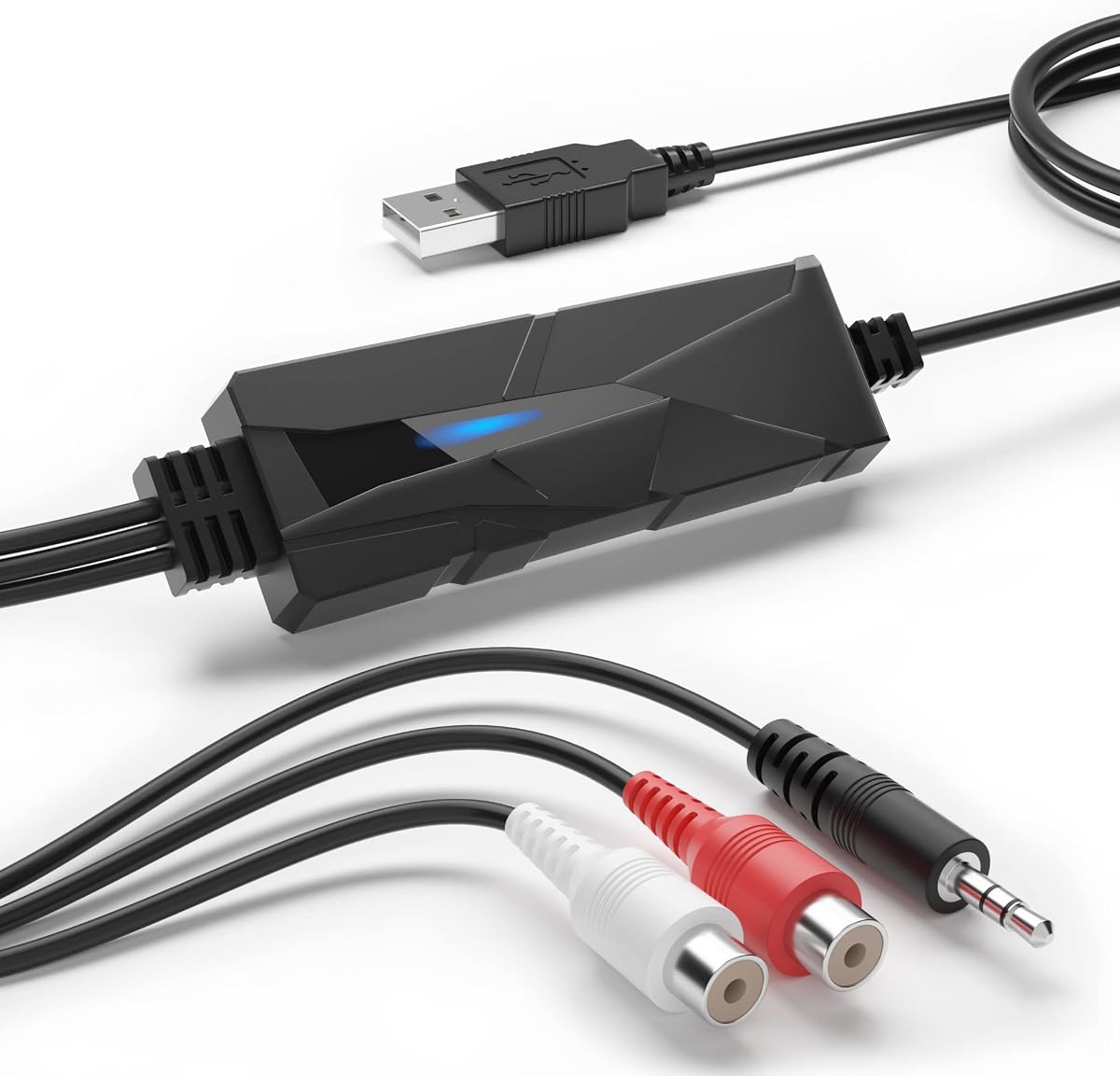


The DriverGenius AudioXfer is an analog audio capture device with a 4.2 rating. Rather than converting digital Mac audio into analog sound, it sends an analog 3.5mm input into the Mac and lets software record it as MP3, WAV, or another digital format. It is aimed particularly at preserving cassette tapes, records, radio broadcasts, and other analog sources.
We may earn a commission when you buy through this link, at no additional cost to you.
Its most appealing quality is the straightforward capture path. The device supports left and right 3.5mm inputs, and the included work light indicates when the unit is active. Supplied information states support for 44.1 and 48kHz at 16-bit resolution, which covers common music-recording needs without introducing a complicated signal chain. Audacity is included or made available through the official website for editing and saving captured audio.
The trade-offs are clear: this is not a DAC for improving a Mac's existing digital output, and its stated capture resolutions are modest compared with the high-resolution specifications of several digital converters in the list. Mac users should also install Audacity 2.3.1 or later, update the 64-bit LAME encoder as instructed, and verify their current macOS version against the stated compatibility.
Choose the AudioXfer when your priority is digitizing an existing analog collection. It is less suitable for someone seeking a polished desktop DAC, headphone amplifier, or high-resolution digital interface. Within that narrower role, its straightforward hardware, helpful indicator, and recognizable recording software make it a practical capture solution for a Mac-based archiving setup.
The 3.5mm left and right inputs make the AudioXfer useful for cassette decks, LP playback systems, radios, boomboxes, MiniDisc equipment, and other analog sources. A suitable output path and recording software are still required, but the converter handles the basic task of bringing the analog signal into the Mac.
The supplied instructions specifically call for Audacity 2.3.1 or later for 64-bit Mac users and recommend updating 64-bit LAME accordingly. Reviewing those requirements before setup can prevent avoidable recording or export issues.
We may earn a commission when you buy through this link, at no additional cost to you.
The Fosi Audio K5 Pro combines a digital-to-analog converter and headphone amplifier in a compact enclosure, earning a 4.3 rating. It is designed for Mac and computer users who want to bypass a computer's built-in audio output and drive headphones or powered speakers with a wider selection of analog connections.
We may earn a commission when you buy through this link, at no additional cost to you.
USB Type-C, optical, and coaxial inputs make it adaptable to computers, game consoles, and digital source components. The USB-C connection also serves as a two-in-one charging and audio input arrangement when appropriate, while RCA and 3.5mm outputs cover amplifiers, active speakers, and headphones. The headphone section is rated to drive impedances from 16 to 300 ohms and includes a microphone connection.
Signal quality is supported by the Texas Instruments NE5532 op-amp design, with a stated total harmonic distortion of no more than 0.003% and signal-to-noise ratio of at least 110dB. Maximum resolution is 24-bit/96kHz over USB and 24-bit/192kHz over optical or coaxial. Master volume, bass, and treble controls provide practical adjustment, though the interface is intentionally simple.
This is a strong fit for a Mac user who wants one small box to handle conversion, headphone amplification, and basic tone control. It may not satisfy someone seeking an exceptionally large desktop system, and source compatibility must be checked because the USB audio input must be connected to a compatible USB-A or USB-C port. For gaming, music, and everyday listening, however, it offers excellent functional value.
The combination of digital inputs, RCA output, 3.5mm headphone output, and microphone support reduces the number of separate boxes needed on a compact desk. It can serve as the central conversion point for a Mac-driven gaming or music setup.
The specified output power ranges from 1000mW at 16 ohms to 80mW at 300 ohms. This broad range allows the K5 Pro to accommodate different headphone designs, although sensitivity and sound preferences still influence the best final settings.
We may earn a commission when you buy through this link, at no additional cost to you.
The PROZOR 192KHz DAC is a digital-to-analog converter rated 4.4 stars. It is designed to translate digital PCM audio from optical or coaxial sources into analog left and right RCA output and a 3.5mm headphone connection, making it useful when a Mac-related audio setup needs to feed a television, amplifier, or stereo system.
We may earn a commission when you buy through this link, at no additional cost to you.
The converter supports uncompressed two-channel LPCM or PCM signals at 32, 44.1, 48, 96, and 192kHz with 24-bit incoming bit depth. Its updated amplifier chipset and dual-channel operational amplifier are intended to provide clearer output and lower distortion. An aluminum housing, gold-plated RCA connectors, and a detachable box add practical durability and serviceability to the compact format.
The important trade-off is that PROZOR is a DAC, not an analog-to-digital capture device. It must receive a digital signal rather than analog headphones or tape output. It also requires a 5V 1A power source, and the power adapter is not included. With some televisions, the remote may not change the optical output level, so volume must be adjusted in the television's sound settings.
For a Mac user who already has a suitable digital audio source and wants uncomplicated analog output, the PROZOR remains a persuasive choice. It works best after the source is configured for PCM or LPCM rather than a compressed or multichannel format. It is particularly useful for adding RCA or headphone connectivity to optical-equipped source equipment without installing drivers.
The supplied information emphasizes that the PROZOR does not require computer drivers. Setup involves connecting a digital source, supplying USB power, and selecting a compatible output, which keeps the converter approachable for basic Mac installations.
Setting the source to PCM or LPCM is central to obtaining a stable result. A TV's digital-output volume may also need adjustment within its settings, particularly when the remote does not directly control an optical output.
We may earn a commission when you buy through this link, at no additional cost to you.
The Douk Audio U2PRO is a USB digital interface with a 4.1 rating. It sits between a Mac or other USB source and a separate DAC, turning USB audio into simultaneous optical, coaxial, and I2S outputs. The result is a flexible bridge for users whose existing amplifier or DAC lacks a modern USB input.
We may earn a commission when you buy through this link, at no additional cost to you.
At the center of the device is an XMOS XU316 chipset, with supplied specifications claiming support for PCM up to 32-bit/768kHz and DSD512. A UAC mode switch offers a driver-free 1.0 option for compatible gaming consoles and a 2.0 option for advanced high-resolution playback. PCM and DSD indicators help users confirm the active signal format during operation.
Because it is a digital interface rather than a complete DAC, the U2PRO cannot directly power ordinary headphones or speakers. The computer is also converted into a digital transport, so an appropriate downstream DAC remains necessary. The expandable oscillator design is aimed at technically inclined users who may later install a compatible high-precision clock, but it adds complexity compared with a ready-made desktop converter.
This product is best for an enthusiast who wants to connect a Mac to a traditional DAC through optical, coaxial, or I2S and values format visibility. It may be unnecessary for a simple desktop setup because products with integrated analog outputs are easier to operate. The U2PRO rewards careful mode selection and compatibility checks, making it more specialized but also more adaptable.
The U2PRO provides a practical route from a Mac's USB audio to a DAC that accepts optical, coaxial, or I2S. That makes it useful when upgrading a digital transport without replacing a capable analog audio chain.
Mode 1.0 prioritizes broad plug-and-play compatibility, while mode 2.0 enables the stated high-resolution capabilities. Users should confirm that their playback software and connected DAC support the selected mode and format.
We may earn a commission when you buy through this link, at no additional cost to you.
The SMSL SU-1 is a high-resolution desktop DAC with a 4.2 rating. Its appeal to Mac users comes from the combination of USB input, MQA support, an XMOS XU316 processor, and an AKM AK4493S DAC chipset. It is intended for listeners who want a dedicated conversion component rather than a general-purpose capture adapter.
We may earn a commission when you buy through this link, at no additional cost to you.
MQA support can clean up the recording and encapsulate the audio for authenticated playback, while MQA-CD compatibility allows a compatible CD player's optical or coaxial output to enter the SU-1 for decoding and restoration of the original high-resolution signal. The stated AK4493S distortion figure is below 0.00013%, and maximum support extends to 32-bit/768kHz PCM and DSD512.
Mac compatibility is explicitly listed for Mac OS 10.6 and later. The device can also work with Windows, Linux, Android, and iOS systems, although a driver is required for the stated Windows versions. That platform breadth is useful, but the MQA and high-resolution features still depend on compatible source files, playback software, and an appropriate downstream amplifier or headphone system.
The SU-1 makes the most sense for a Mac listener building a dedicated desktop system around MQA, high-resolution PCM, or DSD. It is not an audio-capture device and does not serve as a simple mic interface. For users who do not need MQA-CD or very high-resolution formats, one of the simpler DACs in this guide may deliver a more convenient experience.
The SU-1 can accept USB MQA playback and digital output from a compatible CD player for MQA-CD decoding. These features are meaningful when the source material and software support the MQA workflow.
The AK4493S conversion chipset and XU316 interface support the device's high-resolution positioning. They are best paired with a clean source, appropriate software, and an amplifier capable of revealing the converted output.
We may earn a commission when you buy through this link, at no additional cost to you.
The SMSL PO100 PRO is a compact digital-to-digital converter with a strong 4.6 rating. It takes audio through a USB-C input and distributes it through optical, coaxial, and I2S outputs, allowing a Mac or another digital source to feed a DAC or receiver that lacks a suitable USB connection.
We may earn a commission when you buy through this link, at no additional cost to you.
The XMOS XU316 chipset supports asynchronous transmission, PCM up to 32-bit/768kHz, native DSD, and DoP64. Optical and coaxial outputs provide familiar compatibility with many audio components, while the I2S output supports LVDS-level signals at resolutions up to 32-bit/768kHz. Two switches allow the user to move between UAC and I2S operating modes.
A notable convenience is MQA playback without additional software. Compatible music players using ASIO or WASAPI can output MQA directly, and the supplied guidance recommends setting computer volume to maximum for the best result. The DoP64 configuration can also serve PS5 users when the playback software and receiving device support that format. The main limitation is that the PO100 PRO outputs only digital signals, so a separate DAC is required.
This is a premium choice for users who want a compact, format-flexible bridge between a Mac and a high-end digital audio chain. The switches demand more attention than a basic plug-and-play DAC, but the range of outputs and high-resolution support rewards careful setup. It is especially compelling for portable rigs, MQA listening, and systems built around an optical or coaxial DAC.
Optical, coaxial, and I2S outputs let the user adapt the PO100 PRO to different downstream components. Its small enclosure and USB power supply also make it easier to include in a compact listening or travel setup.
The device can decode MQA through a compatible player using ASIO or WASAPI rather than requiring dedicated decoding software. Maximum computer volume is recommended for MQA playback, while the digital chain preserves source control.
We may earn a commission when you buy through this link, at no additional cost to you.
The Sound Blaster Play! 3 is a USB audio adapter with a 4.5 rating. It is designed to give a Mac a dedicated analog headphone or headset connection, which can be useful when a built-in headphone jack is absent, inconvenient, or unable to accommodate a particular gaming headset.
We may earn a commission when you buy through this link, at no additional cost to you.
Its defining advantage is simplicity. The device works without drivers, so a Mac user can connect it and begin using a compatible headset. It accepts analog headsets ranging from ordinary mobile earbuds to gaming and studio-style headphones, and the supplied information notes that a single or split stereo-and-microphone connector can be used without a Y-splitter cable.
Resolution support is listed at 24-bit and 96kHz. Downloadable control-panel software provides audio enhancements and profiles for multiple earphone brands, adding some flexibility to an otherwise simple adapter. It does not offer digital inputs, a headphone-amplifier specification, or a high-end DAC architecture, and its 3.5mm-centric design is not intended for balanced studio connections.
The Play! 3 is best for straightforward headset use, online meetings, gaming, or adding an accessible analog headphone connection to a Mac. It is a practical alternative when a full desktop DAC would be excessive. Users seeking coaxial, optical, microphone-in, or multi-output options should choose a more specialized audio interface instead.
The adapter accepts common analog headsets and supports single or split stereo-and-mic plugs without requiring a separate Y-splitter. That makes it particularly convenient for gaming headsets and everyday communication.
The Play! 3 works directly without driver installation, reducing setup friction. Optional control software provides enhancements and preset profiles, but the core connection can be used without opening it.
We may earn a commission when you buy through this link, at no additional cost to you.
The iFi Audio Go Link Max is a portable USB-C headphone amplifier and DAC with a 4.5 rating. It is designed for Mac users who want a compact route from digital music to wired headphones, especially when a balanced connection and high-resolution playback matter more than a full desktop system.
We may earn a commission when you buy through this link, at no additional cost to you.
Two ESS Sabre DAC chips form a balanced circuit, and the device offers both conventional 3.5mm and balanced 4.4mm headphone outputs. The balanced output is specified at up to 241mW, giving it meaningful power for demanding headphones. Dynamic Range Enhancement and THD compensation are also included as signal-processing features.
Hi-res support reaches 32-bit/384kHz PCM and native DSD256 at 11.3MHz. Silver-plated copper conductors, a gold-plated USB-C connector, and gold-plated headphone sockets are intended to support signal purity and connection reliability. A flexible cable reduces mechanical stress on the Mac's USB socket, while the overall format is designed for easy transport.
The Go Link Max is an excellent fit for travel, a laptop-based listening setup, or a Mac with limited desk space. It does not provide optical, coaxial, or RCA inputs, so it cannot serve as a general-purpose desktop converter. It also requires compatible wired headphones and a Mac with a functioning USB-C audio connection. Within that focused role, it offers an unusually broad combination of portability, balanced output, and high-resolution support.
The 4.4mm balanced output is the standout feature for listeners with compatible headphones, while the 3.5mm connection preserves compatibility with more conventional models. The small dongle format makes it easy to carry between a desk, studio, and listening room.
Dual Sabre chips, native DSD256 support, and PCM up to 384kHz make the device more ambitious than a basic headset adapter. Achieving those formats still depends on the Mac, playback software, source material, and headphone sensitivity.
We may earn a commission when you buy through this link, at no additional cost to you.
The Fosi Audio Q6 is the most complete conventional DAC in this guide, combining a 4.6 rating with extensive input and output flexibility. It is designed to sit between a Mac or other digital source and a stereo amplifier, powered speakers, or a subwoofer, making it a natural centerpiece for a modern desktop audio system.
We may earn a commission when you buy through this link, at no additional cost to you.
The Q6 accepts USB-C, optical, and coaxial digital signals, then provides left and right RCA output plus a dedicated subwoofer output. Its AKM AK4493S DAC, XMOS XU316 processor, and OPA1612 op-amp form a high-resolution conversion path. Supplied specifications claim support for PCM up to 32-bit/768kHz and DSD512, with signal-to-noise ratio of at least 121dB and total harmonic distortion below 0.00012%.
The primary limitation concerns power rather than conversion. The Q6 cannot directly drive headphones or passive speakers, so users need a headphone amplifier, integrated amplifier, or powered speakers. Its full-size analog output also gives it more flexibility than a tiny headphone dongle. The compact aluminum housing helps it fit neatly on a desk without making it disappear entirely.
This is the strongest overall recommendation for a Mac user seeking one dedicated converter to serve music, television, streaming, and gaming sources. USB-C makes computer connection convenient, while optical and coaxial inputs preserve compatibility with other components. It is less suitable for someone who wants an all-in-one headphone amp, but for desktop conversion into a powered or amplified system, the Q6 offers an unusually balanced feature set.
USB-C, optical, and coaxial inputs allow the Q6 to serve a Mac alongside a TV, disc player, streamer, or tablet. This makes it easier to build one dependable analog output stage instead of changing connections whenever the source changes.
The AK4493S, XU316, and OPA1612 components support the Q6's high-resolution specifications. The stated low distortion and high signal-to-noise ratio are particularly relevant when the converter feeds a capable stereo amplifier or powered speakers.
We may earn a commission when you buy through this link, at no additional cost to you.
The Shure MVX2U Gen 2 is an XLR-to-USB-C audio interface with a 4.5 rating. It gives Mac-based podcasters, streamers, and recording users a direct way to connect an XLR microphone, while its onboard processing and app controls simplify the path from a live voice to a computer recording.
We may earn a commission when you buy through this link, at no additional cost to you.
Any connected dynamic or condenser XLR microphone can be used. The interface supplies up to 60dB of clean gain and 48V phantom power, covering the power requirements of conventional condenser microphones. Onboard Shure Digital Audio Processing includes Auto Level Mode, a real-time denoiser, and a Digital Popper Stopper, all intended to improve the captured signal with low-latency operation.
Auto Level Mode adjusts gain in real time to maintain a more consistent output, while Dark, Natural, and Bright tone options allow the user to alter the perceived character of the recording. MOTIV Mix, MOTIV Audio, and MOTIV Video applications expand control with tone, equalization, compression, and limiter settings across desktop, smartphone, and tablet devices.
This is not a general DAC for improving music playback. It has no listed headphone, RCA, optical, or coaxial outputs, and its purpose is to convert microphone audio for recording or streaming. It is best for a creator who wants a polished XLR microphone workflow on a Mac without assembling a larger desktop interface. For musicians seeking instrument inputs or monitor outputs, a more general-purpose recording interface would be a better match.
Onboard gain, level stabilization, denoising, and pop filtering help a creator shape a usable voice signal before it reaches the Mac. The processing is designed to work without turning the interface into a complex routing hub.
Support for dynamic and condenser microphones, clean gain, and 48V phantom power covers many common recording configurations. The MOTIV applications allow further sound shaping from a computer or mobile device.
We may earn a commission when you buy through this link, at no additional cost to you.
The right Mac audio converter depends on the direction of the signal, the equipment already in your setup, the formats you play, and whether your priority is listening, recording, or connecting a microphone. Use the factors below to narrow the field before choosing a model.
A digital-to-analog converter takes digital audio from a Mac, television, game console, or streamer and produces analog RCA or headphone output. A digital interface can instead translate USB into optical, coaxial, or I2S for a separate DAC. An analog-to-digital capture device performs the opposite task, bringing sound from a cassette, record, radio, or other analog source into the Mac. The DriverGenius AudioXfer is the only capture-focused product in this group, while the Fosi Q6 and similar desktop models are traditional DACs.
Inventory the connectors already present in your audio system before purchasing. USB-C is the most direct Mac-oriented digital input, while optical and coaxial inputs broaden compatibility with televisions, disc players, and game consoles. On the output side, RCA connectors suit most stereo amplifiers, a 3.5mm jack supports ordinary headphones, and a 4.4mm balanced socket serves compatible higher-end headphones. The Fosi Q6 accepts three digital inputs and offers RCA plus subwoofer output, while the K5 Pro adds a 3.5mm headphone section.
High sample rates and bit depths can be useful with high-resolution files and capable playback chains, but they do not automatically make every listening experience better. The list includes 192kHz/24-bit support in the PROZOR, 384kHz PCM in the iFi Go Link Max, and 768kHz or DSD512 claims in several XU316-based devices. Source material, software support, the downstream DAC, and output hardware all matter. If your music library is mostly ordinary lossless files and your existing system is modest, a simpler converter with the connections you need may be more appropriate.
Some converters include only analog line output, some add a headphone amplifier, and others output only digital signals. The Fosi Q6 cannot directly drive headphones or passive speakers, so it needs an amplifier or powered monitors. The K5 Pro can drive headphones from 16 to 300 ohms according to its specifications, and the iFi Go Link Max offers both 3.5mm and balanced 4.4mm outputs. The SMSL PO100 PRO and Douk U2PRO require a downstream DAC because they provide digital outputs only.
Driver-free operation is convenient, but high-resolution playback can still depend on the Mac operating system, audio application, and user-selectable device mode. The Douk U2PRO and SMSL PO100 PRO have switches that alter UAC or I2S behavior, so the correct mode must be selected. The DriverGenius requires specific Audacity and LAME guidance for 64-bit Mac users. The SMSL SU-1 explicitly lists Mac OS 10.6 and later. Always check current system requirements and the format controls offered by the playback application.
A desktop DAC generally provides more substantial analog connectivity, a larger enclosure, and room for dedicated controls. The Fosi Q6, SMSL SU-1, and K5 Pro are intended to remain near an amplifier or computer. The iFi Go Link Max is a portable dongle for wired headphones, while the PO100 PRO and U2PRO are compact digital interfaces that can travel with a separate DAC. Choose the form that suits your listening location, cable length, and available space rather than assuming a larger device is automatically better.
Music conversion and microphone recording solve different problems. The Shure MVX2U Gen 2 accepts an XLR microphone, provides 48V phantom power, and includes gain and voice-processing features for podcasting or livestreaming. It does not offer conventional music-playback outputs. By contrast, the Fosi Q6 and PROZOR are playback converters, and the DriverGenius captures analog sound rather than recording a studio microphone. Establishing the intended recording task prevents buying a polished DAC that has no microphone input.
Look beyond the headline specification to the power, cables, settings, and source adjustments needed for reliable use. The PROZOR requires a 5V 1A power source and its adapter is not included. Some televisions must be set to PCM or LPCM, and their optical-output volume may need to be changed in the settings menu. The K5 Pro includes a cable, optical cable, headphone splitter, and manual. The iFi Go Link Max depends on the Mac's USB-C connection, while desktop models generally benefit from stable placement and short, appropriate interconnects.
Begin by identifying the converter's direction and the path you want audio to follow. For a digital-to-analog setup, connect the Mac to USB-C, optical, or coaxial input, then route RCA, 3.5mm, 4.4mm, or digital output to the next device. For analog capture, connect the source's left and right output to the AudioXfer's 3.5mm input. For microphone recording, connect an XLR microphone to the Shure interface and attach the USB-C end to the Mac. Power the device as directed before opening the playback or recording application.
Once connected, select the converter as the Mac's output or input device in the system sound settings. Open the relevant audio application and choose the matching input mode, sample rate, and bit depth. High-resolution options should be enabled only when the source file, software, and connected hardware all support them. For digital television sources, select PCM or LPCM. When using the Fosi K5 Pro, choose the appropriate USB, optical, or coaxial source and connect the desired RCA or headphone output. Users of the U2PRO or PO100 PRO should verify UAC, I2S, DSD, or DoP settings carefully.
To keep the system performing well, use good-quality cables, avoid tightly coiling long analog leads, and provide stable power to converters that require it. Keep vents unobstructed and place desktop units away from sources of heat. Do not substitute a different power plug when a converter specifies 5V 1A. Update the relevant Mac application and any indicated audio drivers or encoders, but do not change settings unnecessarily. If there is silence, check the input direction, power indicator, output selection, digital format, and mode switch before concluding that the converter is faulty.
It depends on the Mac, your existing audio hardware, and what you listen to. A dedicated DAC can provide a more flexible connection, a cleaner output stage, or access to formats the built-in audio hardware does not support. It will not automatically improve every recording, so a converter is most useful when it solves a specific connection, power, format, or routing problem.
Some versatile devices can act as both input and output, but not every product does. The supplied list includes devices with different roles: desktop DACs convert digital audio to analog, digital interfaces route USB to another DAC, the DriverGenius captures analog sources, and the Shure interface records an XLR microphone. Check the input and output specifications before assuming a product is bidirectional.
Mac compatibility is explicitly stated for the DriverGenius AudioXfer, including macOS 15, and for the SMSL SU-1, which lists Mac OS 10.6 and later. Several other products include USB-C or USB digital inputs and are designed for computer use. Because operating-system support can change, buyers should check the current product listing and manufacturer instructions for their specific Mac model and macOS release.
A DAC converts a digital signal into analog audio that can feed amplifiers, powered speakers, or headphones. A digital interface, such as the Douk U2PRO or SMSL PO100 PRO, generally converts one digital connection format into another so that a separate DAC can complete the chain. A digital interface is useful when an existing DAC lacks USB but accepts optical, coaxial, or I2S.
Only if you intend to connect headphones directly. The Fosi K5 Pro and iFi Audio Go Link Max include headphone amplification, while the Fosi Q6 provides RCA and subwoofer outputs but cannot drive headphones or passive speakers. If you already own a quality headphone amplifier, a line-level DAC may be more appropriate. If you want the simplest single-box headphone setup, choose a model with a built-in amp.
The PROZOR is designed to convert compatible two-channel digital PCM or LPCM signals into analog output. Compressed surround formats and some multichannel television settings may not be decoded as intended. Changing the television to PCM or LPCM ensures that the converter receives an appropriate signal. Its output volume may also need to be adjusted in the television's settings if the remote does not control the optical level.
Use the native resolution of your source files whenever possible, and make sure the converter and downstream device support it. Higher settings do not add detail to a lower-resolution recording. The products in this guide offer capabilities ranging from 96kHz to 768kHz PCM, with some also supporting DSD, but the selected rate must be supported by the playback application and complete output chain.
First confirm that the Mac has selected the converter as its output or input device. Check the power light, cable connections, source selection, and any UAC or I2S mode switch. For television sources, verify PCM or LPCM output and adjust digital volume in the television's settings. For capture, confirm the correct left and right inputs and make sure the recording application is monitoring the proper device.
The Fosi Audio Q6 stands out as the most balanced overall choice, combining three digital inputs, RCA and subwoofer outputs, and high-resolution conversion in a compact desktop enclosure. The SMSL PO100 PRO is the premium option for users who want a portable digital bridge with optical, coaxial, and I2S outputs, while the PROZOR provides a simpler and more approachable route from optical or coaxial sources to analog audio.
For a different set of needs, the K5 Pro is attractive when a Mac user wants built-in headphone amplification, the iFi Go Link Max suits portable balanced listening, and the SMSL SU-1 appeals to MQA and high-resolution users. The Douk devices specialize in digital routing, the DriverGenius handles analog capture, the Sound Blaster simplifies headset access, and the Shure MVX2U Gen 2 serves podcast and livestream recording. Prioritize direction, connectors, power requirements, and downstream equipment before focusing on the largest specification number.
Ratings, product revisions, bundle contents, and prices can change over time, so review the current listing before buying. Confirm Mac compatibility, included cables, power needs, and the exact output required by your speakers, amplifier, headphones, or recording setup. With those details confirmed, one of these ten converters can provide a practical upgrade for a Mac-based audio system.