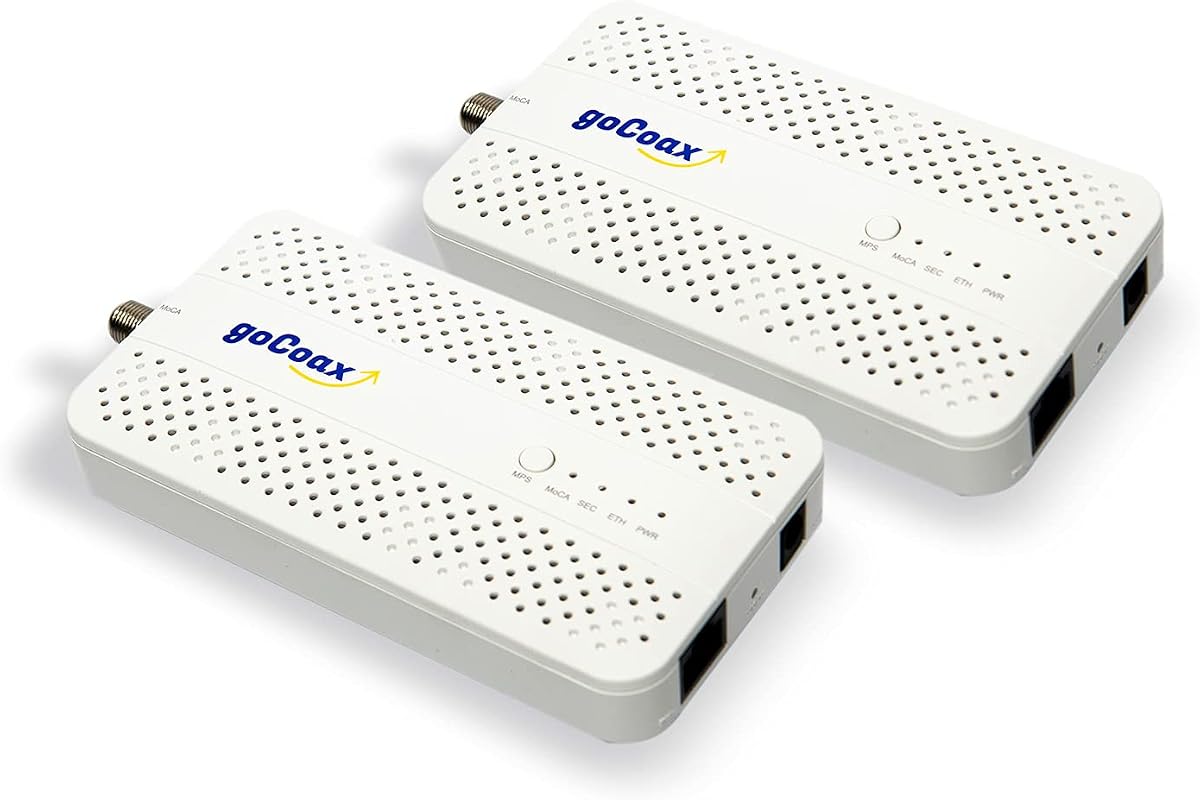
goCoax MA2500D
4.6Editor score
Dedicated 2.5GbE port
Two adapters with cables
Plug-and-play MoCA setup
Up to 16 supported nodes
Compare the best Coax to Ethernet Adapter options for speed, port capacity, compatibility, and installation ease in this expert buying guide for modern homes
A coax to Ethernet adapter can turn an existing coaxial cable network into a wired connection for routers, gaming consoles, smart TVs, computers, and access points. The right model depends on coax layout, provider compatibility, required speed, port count, and whether the installation needs PoE+ or a completely separate dark-coax network.
This guide compares ten Ethernet-over-coax products using their published specifications, stated compatibility, included components, port configurations, and customer ratings. It covers MoCA 2.5 and 2.0 adapters, a G.hn solution for unused coax, and a point-to-point PoE converter designed primarily for surveillance and voice applications.
The reviews show how each product fits into a practical home or office network and call out important limitations before purchase. Ratings and specifications can change as products evolve, so readers should verify current listing details, provider requirements, and coax wiring conditions before ordering.
4.6Editor score

4.8Editor score

4.6Editor score
The comparison below highlights each adapter's technology, Ethernet configuration, intended installation, and key purchasing consideration, from multi-gigabit MoCA kits to specialist PoE and dark-coax solutions.


The ScreenBeam ECB7250K02 is a bonded MoCA 2.5 starter kit for creating a wired network through compatible home coax. It carries a 4.4 rating and stands out for offering two complete adapters, 2.5Gbps Ethernet ports, power supplies, Ethernet cables, coax cables, splitters, and a quick-start guide. That package makes it particularly approachable for a first Ethernet-over-coax installation.
We may earn a commission when you buy through this link, at no additional cost to you.
Its main strength is the combination of MoCA 2.5 performance and a generous accessory package. The adapters can deliver internet service through existing coax and support connections to gaming systems, smart televisions, computers, switches, and remote wireless access points. Backwards compatibility with 10, 100, and 1000Mbps Ethernet also gives buyers more flexibility when connecting ordinary home-network equipment.
The trade-offs are important. ScreenBeam does not recommend the kit with DirecTV, Dish, or other satellite services, and it excludes AT&T internet and AT&T U-verse coax networks. Some DOCSIS 3.1 modems can also create frequency overlap that leads to random disconnections. Comcast support details differ by gateway, so users may need to disable the gateway's own MoCA function.
This kit is best for a homeowner with an interconnected cable or compatible fiber coax network who wants multi-gigabit wired links without opening walls. Buyers should confirm provider compatibility and modem behavior before installation. For those who pass the compatibility check, the ECB7250K02 provides one of the most complete MoCA 2.5 packages in this guide.
Because the product is rated at 4.4 stars rather than leading the entire field, its appeal comes from the kit rather than from customer-rating leadership. The included splitters and both kinds of cabling reduce the number of additional items required, while the 2.5GbE ports give it useful headroom for modern networks.
The kit includes two adapters and the cabling needed for a typical point-to-point link. Installing one adapter near the router and another near a destination device creates a wired path through existing coax, which can be useful in rooms where Wi-Fi performance is weak or new Ethernet cabling is inconvenient.
Support for up to 16 nodes allows a broader MoCA topology, and the adapters can connect to switches for additional Ethernet ports. The 2.5Gbps interface is particularly relevant for high-bandwidth devices, though actual throughput depends on coax quality, network conditions, and the service being delivered.
We may earn a commission when you buy through this link, at no additional cost to you.
The goCoax MA2500D is a two-pack MoCA 2.5 system designed to turn compatible coaxial wiring into a high-speed Ethernet backbone. Its 4.6 rating is among the strongest in the guide. Each adapter has a dedicated 2.5GbE Ethernet port, and the package includes coax cables, Ethernet cables, and power adapters for a straightforward initial installation.
We may earn a commission when you buy through this link, at no additional cost to you.
The product targets common household networking problems without requiring new cable routes. It can link computers, consoles, televisions, NAS drives, and wired backhaul for compatible mesh systems. Its stated MoCA 2.5 bandwidth is aimed at demanding activities such as 4K or 8K streaming, gaming, and video conferencing, while the two-pack arrangement supports the common router-to-room installation pattern.
Compatibility is the decisive limitation. The home needs an existing coax network connected through a splitter, and the system is not intended for DirecTV, DISH, or AT&T U-verse installations. A MoCA PoE filter at the cable entry point is recommended for optimal security and performance, but that filter is not included. Claims about very low latency and superior Wi-Fi performance should be considered in the context of each installation.
The MA2500D is a strong choice for cable or compatible fiber users who want an approachable multi-gigabit system with everything needed for two endpoints. It is especially attractive when a household wants one adapter near the router and another near a gaming console, media center, or access point. Confirming the provider and coax topology before ordering avoids the most common source of setup frustration.
Its two-pack design is more useful for most people than buying a lone adapter, because a useful Ethernet-over-coax link requires units at both ends. The dedicated 2.5GbE port also avoids the need to choose between this adapter and the lower Gigabit interfaces found on some competing products.
The package includes the two adapters, power supplies, Ethernet leads, and coax leads required for a typical link. This makes it easier to judge the project as a complete installation rather than planning each accessory separately.
Because the Ethernet side operates as a standard connection, the adapters can serve PCs, game consoles, smart TVs, NAS devices, and mesh Wi-Fi systems. Interoperability with other MoCA adapters is also stated, which can make a mixed-brand network less restrictive.
We may earn a commission when you buy through this link, at no additional cost to you.
The Kiwee KB-M3-02 stands apart with two 2.5GbE ports on each MoCA 2.5 adapter. It carries a 4.6 rating and includes a two-adapter kit, coax cables, and Ethernet cables. The dual-port arrangement offers more local connection options than the typical single-port MoCA unit and can suit a room containing two wired devices.
We may earn a commission when you buy through this link, at no additional cost to you.
Its advertised performance centers on stable multi-gigabit delivery over existing coaxial infrastructure. The product is positioned for 4K and 8K streaming, online gaming, video conferencing, large-file transfers, and wired mesh backhaul. Installation is presented as plug-and-play: one adapter connects toward the router, while the other occupies the room where wired Ethernet is needed.
Dual Ethernet does not mean the kit itself acts as a multi-port switch. Each adapter offers two physical 2.5GbE sockets, but a small Ethernet switch may still be needed if more than two remote devices require simultaneous connectivity. As with every MoCA product, real results also depend on the quality of the home's coax, the internet service, and the devices involved.
This is a good option for a user who values physical port flexibility and wants to avoid pulling new Ethernet through walls. It can serve smart TVs, consoles, PCs, and mesh access points, while the two adapters provide the normal endpoints for a complete link. It is less compelling for a single-device room because the added port flexibility is only valuable when there is a reason to use it.
The Kiwee's 4.6 rating and unusual dual-port design place it among the most attractive products for performance-conscious households. Its main appeal is not a fundamentally different networking standard, but a more generous hardware layout that can simplify connections around a television, desk, or networking cabinet.
Each adapter can accept two Ethernet cables, reducing the need to place the coax connection exactly where a single network device sits. A nearby television, console, and access point can share the same remote room more conveniently when multiple cables are already available.
The Kiwee adapters can carry a 2.5Gbps-class MoCA connection to a compatible mesh node or other Ethernet-equipped hardware. That can create a more stable backbone than relying entirely on wireless communication between the router and a distant access point.
We may earn a commission when you buy through this link, at no additional cost to you.
The TRENDnet TMO-313C2K is the highest-rated product in this guide at 4.8 stars. Its two-pack includes two MoCA 2.5 adapters, each with an F-Type female coax input and one 2.5GbE RJ45 LAN port. This is a focused design for homes and offices seeking a stable wired extension over existing coax rather than a large collection of connection types.
We may earn a commission when you buy through this link, at no additional cost to you.
The adapters use MoCA 2.5 with improved packet-error handling and lower latency, making them suitable for streaming, gaming, voice traffic, and 4K video. They also support older MoCA 2.0, 1.1, and 1.0 standards, which can be helpful in a mixed installation. No configuration is required, and each adapter is designed for use with routers, consoles, and other Ethernet-equipped devices.
The important exclusions are DirecTV, Dish Network, AT&T U-verse, and other non-MoCA-compliant subscription services. Each unit has only one Ethernet port, so users with multiple local devices will need an external switch. Despite that limitation, the 2.5GbE interface offers useful headroom over a standard Gigabit port when the coax network and service allow it.
This is a strong recommendation for a user with compatible coax wiring who values straightforward installation and high customer ratings. It can serve a remote office, entertainment center, or access-point location while preserving the convenience of the home's existing cable pathways. The compact housings also fit naturally beside a router, switch, or television cabinet.
TRENDnet also identifies the adapters as NDAA and TAA compliant for applicable government customers in the United States and Canada. That institutional requirement may make this kit more relevant than some alternatives for eligible projects, although ordinary residential buyers will primarily consider its speed, compatibility, and two-adapter package.
Support for MoCA 2.0, 1.1, and 1.0 allows the adapters to communicate with older compatible equipment. That can simplify phased upgrades or mixed-network arrangements, although all devices should still be checked for provider and wiring compatibility.
A wired MoCA path can provide a stable alternative to Wi-Fi for distant televisions, consoles, and working devices. The 2.5GbE port provides room for demanding traffic while its low-latency design suits interactive use.
We may earn a commission when you buy through this link, at no additional cost to you.
The Hitron HTEM5 is a MoCA 2.5 two-pack that clearly explains both its purpose and its limitations. With a 4.3 rating, it focuses on extending an existing router-and-internet connection over interconnected coax. It is explicitly not a modem, router, or wireless access point, which helps prevent buyers from expecting the kit to supply internet service on its own.
We may earn a commission when you buy through this link, at no additional cost to you.
Compatibility guidance is the HTEM5's defining feature. It supports cable services such as Xfinity, Spectrum, and Cox, along with most fiber services including Verizon Fios and Google Fiber where an active interconnected coax network exists. It does not work with AT&T Fiber because of signal interference, and it will not function on satellite coax runs that were cut or isolated when the home changed providers.
The kit includes two adapters, two Ethernet cables, two coax cables, two power adapters, and a setup guide. It provides up to 2.5Gbps Ethernet throughput and is intended for 4K streaming, gaming, and other high-bandwidth devices. A PoE filter may be needed for high-split DOCSIS systems but is sold separately, so buyers on those networks should account for that extra requirement.
This is a sensible choice for a household that has verified its coax outlets are connected to a common splitter and uses a compatible provider. The clear exclusions make it easier to assess suitability than a generic adapter, while free technical support can help identify wiring-related problems. People whose coax network was repurposed for satellite service should confirm reconnection before purchasing.
Those with an isolated or newer fiber-only installation should look for a different pathway, such as conventional Ethernet or a suitable wireless backhaul. For everyone else, the HTEM5 offers a conventional two-endpoint MoCA installation with solid multi-gigabit capability and unusually direct guidance about what the product cannot do.
The adapter requires round screw-on coax outlets linked to a main splitter, not separate coax runs or satellite-style connectors. Checking this basic condition before purchase can prevent the most common installation failure.
The HTEM5 can serve compatible cable and most fiber networks, including common Fios and Google Fiber arrangements where coax remains interconnected. It gives those users a way to extend Ethernet without opening walls or installing a complete new cable route.
We may earn a commission when you buy through this link, at no additional cost to you.
The LNOVISION LongReach is a specialist point-to-point Ethernet-over-coax converter designed around IP devices and Power over Ethernet. Its 4.4 rating reflects a different use case from the consumer MoCA kits in this guide. Instead of creating a general whole-home network, it carries data and power from a PoE switch or injector to a remote camera, phone, or other endpoint.
We may earn a commission when you buy through this link, at no additional cost to you.
The receiver must be powered by a PoE switch or PoE injector, while the transmitter connects to the PoE or non-PoE device. Both 802.3af PoE and 802.3at PoE+ are supported. The system works with RG59, RG6, and RG11 coaxial cables, allowing existing analog surveillance infrastructure to be repurposed for IP equipment in some installations.
A notable capability is conversion through BNC-to-twist-pair connectors. The stated bandwidth is 100Mbps over 330 feet of regular twisted pair or 10Mbps over 1,485 feet for both PoE and non-PoE devices. These figures make the product relevant to surveillance and voice installations, including an elevator cart, but they should not be compared directly with a multi-gigabit MoCA home adapter.
The unit is point-to-point rather than a multi-node network product. For multiple coax links, LNOVISION recommends its separate EOC-Switch Kit to reduce potential signal interference. The enclosure includes a heat sink and is intended for indoor use only, with listed dimensions of 3.1 by 2.0 by 0.9 inches.
Buyers should choose this product when remote PoE delivery is the primary requirement and the existing wiring is known to be suitable. It is less appropriate for an ordinary home trying to connect a television or console. Within its specialist purpose, however, the LongReach offers a convenient way to carry power and IP traffic over available cable infrastructure.
The converter combines Ethernet data delivery with PoE or PoE+ power, reducing the need for a local power connection at the remote endpoint. This is especially useful where an IP camera or VoIP phone is located where a new outlet would be inconvenient.
Compatibility with RG59, RG6, and RG11 coax gives installers options when older wiring is already present. The twist-pair option adds another route, although its reduced bandwidth and long-run figures must be considered against the application.
We may earn a commission when you buy through this link, at no additional cost to you.
The Nexuslink GCA-1200-KIT uses G.hn Ethernet over coax to create a high-speed connection on an unused or dark coax network. It has a 4.3 rating and is a notably different option from the MoCA products in this list. Rather than sharing active cable television or cable internet frequencies, it is intended for coax that has no active service.
We may earn a commission when you buy through this link, at no additional cost to you.
The stated performance reaches up to 1.2Gbps across as much as 800 meters, making the kit potentially useful for streaming, gaming, and general network extension in a large property. The adapters connect through existing coaxial wiring and offer a wired alternative to laying new Ethernet cable or depending on a wireless link.
The critical warning is that the kit will not work with cable television or cable internet services. Users must ensure their coax outlets form the correct unused network. The listing also recommends G.hn for fiber or satellite internet and MoCA for cable TV or internet, which reflects the different frequency behavior and installation requirements of these technologies.
This kit is best for a user with an isolated, inactive coax run and a compatible fiber or satellite-based internet service. It avoids conflicts with an active cable network, making it attractive in selected homes or buildings where old coax remains available. Buyers expecting 2.5Gbps performance should note that the product's stated maximum is lower than the leading MoCA 2.5 adapters.
Its two-unit format matches the standard point-to-point network arrangement: one adapter connects near the router and the other near the remote Ethernet device. As with all Ethernet-over-coax products, actual performance depends on cable condition and installation quality, but the dedicated dark-coax approach can be valuable when it avoids interference with an existing provider network.
The GCA-1200-KIT is designed for coax that is not carrying cable television or cable internet. That separation can provide a simpler installation than attempting to coordinate a dark-coax product with an active provider network.
A stated reach of 800 meters and throughput of up to 1.2Gbps make the kit suitable for extending wired connectivity across larger homes or buildings. Conditions along the entire cable route still matter, and speed will not exceed what the internet service and connected equipment can support.
We may earn a commission when you buy through this link, at no additional cost to you.
The PowerBridge KB-M3-03 is a MoCA 2.5 two-pack built around a 2.5G Ethernet port with integrated PoE+ power. Its 4.4 rating reflects a specialized but useful combination: the adapters can move multi-gigabit data over coax while delivering up to 30 watts of IEEE 802.3at power to a connected device.
We may earn a commission when you buy through this link, at no additional cost to you.
The primary target is a remote Wi-Fi 6E or Wi-Fi 7 access point that requires both a data connection and PoE+. Other stated applications include 4K or 8K IP cameras and VoIP phones. This integrated approach can simplify an installation by reducing the number of separate cables and local power requirements at the endpoint.
As a MoCA system, the kit supports existing MoCA 2.0 and 2.5 devices, mesh systems, and Ethernet-enabled smart-home equipment. Setup is described as a simple connection of coax, Ethernet, and power. The 2.5G interface gives users multi-gigabit capacity while the PoE+ feature creates a clean way to connect powered network equipment in a difficult-to-reach location.
The trade-off is specialization. A user connecting only a television, console, or ordinary computer may not need PoE+ and should consider whether the simpler single-port MoCA alternatives provide a more appropriate setup. Satellite television systems are excluded from the listed compatibility, and the underlying coax network still needs to be suitable for MoCA traffic.
This kit is a compelling choice for installers and advanced homeowners placing access points or powered cameras beyond convenient Ethernet reach. It combines a complete two-adapter package with a feature that ordinary MoCA adapters often lack. As long as the remote device supports the appropriate PoE standard and the coax environment is compatible, it offers a tidy wired-and-powered installation.
PoE+ delivery over the Ethernet side means a compatible access point or camera can receive both network connectivity and power through a single run. This is particularly helpful where installing a separate power outlet would be difficult.
The kit specifically targets Wi-Fi 6E and Wi-Fi 7 equipment, which can benefit from a stable multi-gigabit wired backhaul. It also suits higher-bandwidth IP cameras and VoIP endpoints that need remote power and data.
We may earn a commission when you buy through this link, at no additional cost to you.
The TRENDnet TMO-312C is a single MoCA 2.5 adapter with one Gigabit Ethernet port. It carries a 4.3 rating and is especially relevant to users who already own a compatible MoCA system and need one more node rather than a complete two-endpoint kit. Its simple F-Type coax input and RJ45 LAN interface fit into many existing installations.
We may earn a commission when you buy through this link, at no additional cost to you.
Although the adapter uses the MoCA 2.5 standard, its Ethernet port has a stated net throughput of up to 1Gbps. That remains suitable for many streaming, gaming, and working devices, although it is not the best choice when the local endpoint or switch specifically requires 2.5GbE. The lower port speed also means the device does not exploit the full potential of a 2.5Gbps MoCA link.
The adapter requires no configuration and can connect a router, game console, or other Ethernet-equipped device through existing coax. It supports up to 16 nodes on a network and is backward compatible with MoCA 2.0, 1.1, and 1.0 standards. This makes it a practical expansion option for a home that already has a compatible MoCA network.
Important exclusions remain: DirecTV, Dish Network, AT&T U-verse, and other non-MoCA-compliant subscription services are not supported. Because only one adapter is included, a new installation would require another compatible node, whether from this model, another TRENDnet model, or an interoperable MoCA product.
TRENDnet backs the TMO-312C with three years of manufacturer protection and offers technical support during normal business hours. Its compact, lightweight housing suits a desktop or entertainment center. Overall, it is a sensible add-on for established networks, though a two-pack with 2.5GbE ports is usually more practical for a new high-speed installation.
A single adapter is useful when a router-side node already exists and only one more room needs coverage. It avoids carrying unused equipment and lets the buyer expand gradually as connected locations are identified.
The Gigabit RJ45 interface is widely compatible with routers, consoles, televisions, and access points. While it lacks a 2.5GbE option, it remains appropriate wherever the endpoint and internet service do not require multi-gigabit Ethernet.
We may earn a commission when you buy through this link, at no additional cost to you.
The ScreenBeam ECB6200S02 is a single bonded MoCA 2.0 add-on adapter with a 4.2 rating. It is intended to extend an existing ScreenBeam MoCA network to another room or connected device, providing up to 1Gbps Ethernet-over-coax throughput. The package contains one adapter, one power adapter, one Ethernet cable, one coax cable, and a quick-start guide.
We may earn a commission when you buy through this link, at no additional cost to you.
Its most valuable use is incremental expansion. Homes with a compatible MoCA 2.0 starter setup can add another node without replacing the entire system. Every network device needs a MoCA adapter, so an additional unit at a coax-connected location can create a wired Ethernet access point for a computer, television, console, or switch.
The product's limitations are inherent in its older standard. Bonded MoCA 2.0 does not offer the 2.5Gbps capability of the newer MoCA 2.5 models in this guide. ScreenBeam also identifies DirecTV, Dish, and other satellite services as incompatible, along with AT&T internet and AT&T U-verse coax networks. Some DOCSIS 3.1 modems can create frequency overlap and random disconnections.
Comcast compatibility depends on the gateway, with the listing noting support for MoCA 2.0 with Xfinity XB8. Most Fios routers have built-in MoCA, but the adapter also requires the router or network to have suitable MoCA capability. Checking these conditions first can prevent an installation that appears correct physically but cannot form a stable network.
The ECB6200S02 is best for a household already committed to compatible bonded MoCA 2.0 equipment and seeking a lower-tier expansion path. For a new installation, a MoCA 2.5 two-pack offers more performance and a simpler complete package. Within an existing ScreenBeam network, however, this add-on can be a practical way to bring wired connectivity to another coax outlet.
The adapter is explicitly designed as an add-on rather than a standalone starter set. It makes sense when the home already has a compatible router-side MoCA node and only needs one additional endpoint.
A coax path can provide a more consistent connection for distant networked devices than an uncertain wireless signal. The 1Gbps ceiling still makes the model more suitable for conventional endpoints than current multi-gigabit hardware.
We may earn a commission when you buy through this link, at no additional cost to you.
The right Ethernet-over-coax adapter depends first on the coax already present in the building and the service using it. After confirming that foundation, compare the network standard, Ethernet speed, port count, power requirements, included accessories, and expansion needs.
Start by identifying whether the available coax is active, dark, isolated, or associated with satellite service. MoCA products generally require an interconnected home network and may conflict with an active cable provider's own MoCA function. G.hn products are designed for unused or dark coax and should not be connected to active cable television or cable internet. Satellite installations may have coax that was cut or isolated and therefore cannot support these systems without reconnection.
Choose based on wiring condition, not merely on the presence of a coax wall plate. Verify that outlets in different rooms connect to a common splitter and that the route is suitable. In short, confirm the network type before selecting a product.
Provider restrictions are among the most important compatibility checks for MoCA adapters. Products in this guide exclude or warn about DirecTV, Dish, AT&T internet, AT&T U-verse, and AT&T Fiber in different combinations. Cable provider gateways may also use MoCA, creating duplicate endpoints or frequency issues. ScreenBeam specifically notes that some DOCSIS 3.1 modems can cause random disconnects and recommends consulting the ISP.
Ask the provider whether its gateway supports the desired MoCA standard and whether its feature must be disabled. In short, the adapter must coexist correctly with both the internet service and the customer-premises gateway.
MoCA is the standard used by most whole-home products in this guide and is the appropriate choice for compatible cable or fiber coax networks. G.hn is intended for a dark coax system, especially one associated with fiber or satellite internet. A specialist point-to-point EoC converter serves remote PoE devices rather than a general household network. These technologies are not interchangeable simply because all use coax.
Match the technology to the network and intended role. In short, use MoCA for compatible active home networks, G.hn for a properly isolated dark-coax route, and point-to-point EoC for specialized PoE delivery.
A 2.5GbE port gives connected hardware more headroom for high-bandwidth traffic, fast local file transfers, and modern access-point backhaul. A standard Gigabit interface remains sufficient for many televisions, consoles, computers, and typical internet connections, but it caps throughput at a lower level. The Ethernet speed should match the endpoint, switch, router port, and actual service rather than being chosen solely from the largest number in the listing.
Choose 2.5GbE when the entire path supports it, and Gigabit when the connected devices do not need more. In short, avoid paying for unused port speed but do not let a lower port limit a deliberately multi-gigabit network.
Most MoCA adapters have one Ethernet port, while the Kiwee KB-M3-02 offers two 2.5GbE ports on each unit. A multi-port adapter can serve two local devices or connect to an external switch, but the adapter's Ethernet ports do not necessarily replace a fully featured switch. MoCA networks may support up to 16 nodes, but a two-pack only covers two endpoint locations.
Count the router-side and remote-side positions before buying. In short, purchase enough adapters for every required location, then add a switch only if several devices need local Ethernet access.
Power over Ethernet can deliver network data and electrical power through one Ethernet cable. The PowerBridge KB-M3-03 supports IEEE 802.3at PoE+ at up to 30 watts, making it relevant to Wi-Fi access points, IP cameras, and VoIP phones. The LNOVISION converter provides a more specialized point-to-point PoE and PoE+ solution over coax or twist pair. Most ordinary household media and gaming connections do not need powered Ethernet.
Use PoE+ when the remote endpoint has no practical power outlet or when one-cable installation is a priority. In short, ordinary consumers should pay for PoE only when the endpoint genuinely requires it.
A two-adapter kit is normally more useful than a single unit because Ethernet over coax requires compatible units at both ends. Several kits include coax leads, Ethernet leads, power supplies, and sometimes splitters. Others recommend a separate MoCA PoE filter at the cable entry point, which may be necessary on high-split DOCSIS systems. Included accessories simplify setup, but they do not replace a check of the building's wiring.
Compare the package with the connections you already have. In short, confirm that the box contains enough adapters, cables, and power supplies for the intended path before ordering extras.
A larger home may need Ethernet in more than two rooms, or may require a wired backbone for a mesh system. MoCA adapters that support up to 16 nodes and work across compatible vendors can make gradual expansion easier. Port speed, switch capacity, provider restrictions, and coax quality all affect the final design. A well-planned first link should use the same standard as any later additions.
Design for expansion without overbuying. In short, select a standard you can add consistently and plan each new room around a coax outlet, adapter, and suitable Ethernet endpoint.
Begin by confirming that the coax outlets at both ends are connected through the same appropriate network. Connect one MoCA adapter near the router or optical network terminal using Ethernet, and connect the second adapter at the remote location. For a G.hn kit, use only the separate dark-coax route specified by the manufacturer. Never connect equipment to an incompatible provider network without first checking the provider's guidance.
Attach the coax and Ethernet cables, then apply power to both adapters. Most consumer MoCA models are designed to configure their network automatically, while a PoE point-to-point converter requires the receiver to be connected to a PoE switch or injector. Once the link is active, test it with the target device, confirm that the wired device receives an address and internet access, and then add any switch or powered endpoint.
For care, keep the units indoors unless their documentation specifically permits another environment. Avoid placing them near unusually hot or damp locations, and do not modify the power supply or cabling. If performance declines, check connector seating, coax splitters, gateway settings, and device compatibility before assuming the adapter has failed. Update associated network hardware when security or compatibility updates become available.
A coax to Ethernet adapter converts data traveling over coaxial cable into a standard Ethernet connection. Most consumer versions use MoCA technology to create a wired network across rooms that already have interconnected coax. They require an existing router and internet connection; the adapter does not replace a modem, router, or Wi-Fi system.
It may work if the coax outlets form an interconnected network and the provider gateway is compatible. Some cable gateways include their own MoCA function, which can need to be disabled before using external MoCA 2.5 adapters. Certain DOCSIS 3.1 modems may also overlap in frequency, so checking the modem and provider requirements is essential.
Most MoCA options listed here are not compatible with DirecTV, Dish, and other satellite television networks. A satellite installation may also have coax runs that were cut or isolated, making them unusable for Ethernet over coax. Even if a coax outlet remains in a room, the complete signal path must be verified before buying an adapter.
Choose MoCA 2.5 for a compatible active cable or fiber coax network where you want a modern multi-gigabit wired backbone. Choose G.hn for a separate dark-coax system, particularly with fiber or satellite internet, and not with active cable television or cable internet. The two standards are intended for different coax environments.
A point-to-point Ethernet-over-coax link normally requires one adapter at the router or switch and another at the remote device. A two-pack covers that basic arrangement. Each additional room or endpoint location connected to the coax network usually needs another adapter, and an external Ethernet switch may be needed when several local devices share one room.
You do not need new in-wall Ethernet wiring, but you need an Ethernet connection between each adapter and its router, switch, or endpoint. Most two-packs include suitable Ethernet leads, though longer runs or additional devices may require more. Coax cables are also needed to connect each adapter to its wall outlet.
Only products with appropriate PoE or PoE+ support should be expected to power an access point through their Ethernet connection. The PowerBridge KB-M3-03 supports IEEE 802.3at PoE+ up to 30 watts, and the LNOVISION LongReach is designed for point-to-point powered Ethernet. A standard MoCA adapter without PoE requires a separate power supply for the access point.
Common causes include isolated coax, loose connectors, an active provider network in conflict with MoCA, unsuitable DOCSIS modem behavior, or a missing PoE filter on a high-split system. Confirm that both outlets connect to the correct splitter and review the provider's gateway guidance. Testing with a different coax outlet or compatible MoCA adapter can help distinguish wiring problems from an equipment fault.
The TRENDnet TMO-313C2K is the strongest all-around recommendation because of its 4.8 rating, MoCA 2.5 support, 2.5GbE ports, and complete two-adapter package. The goCoax MA2500D offers an accessible alternative with a dedicated 2.5GbE port and included installation hardware, while the Kiwee KB-M3-02 is ideal when two Ethernet connections per remote location justify its flexible port layout.
Compatibility should take priority over headline speed. Confirm the coax topology, provider, gateway, and modem before ordering, and decide whether you need standard MoCA, dark-coax G.hn, or specialist point-to-point PoE. For access points and IP cameras, the PowerBridge KB-M3-03 or LNOVISION LongReach may be more appropriate than a conventional media-oriented adapter.
Finally, recheck current product specifications, included accessories, and availability before making a purchase. Ratings and product details can change over time, but the core decision remains consistent: choose an adapter whose technology matches the coax network and whose Ethernet and power features meet the devices you need to connect.