
Logitech MX Ergo S
4.4Editor score
Up to 120 days per charge
One-minute charge for 24 hours
20-degree ergonomic tilt
Six customizable buttons
A trackball mouse can reduce the arm movement associated with conventional pointing devices while still providing accurate cursor control. Battery life is especially important for people who work long shifts, travel frequently, or prefer not to keep disposable batteries nearby. The strongest options combine efficient power use with a comfortable shape, responsive tracking, and flexible connectivity.
We compared the ten trackballs in this guide using their stated battery capabilities, supported connection methods, control options, ergonomics, ball size, and practical features. The list includes rechargeable models, battery-powered wireless designs, and mice that work with Bluetooth, USB receivers, or wired connections, giving readers a clear view of how each device fits a different workspace.
Each review explains the reasons a particular model earned its place while noting relevant limitations and ideal users. Battery claims are reproduced as supplied by the manufacturers and should be treated as comparative guidance rather than a promise for every setting. Product prices and availability can change, so shoppers should verify the current listing before purchasing.
4.4Editor score

4.5Editor score
4.6Editor score
As an Amazon Associate we earn from qualifying purchases.
The comparison below highlights the battery approach, connection flexibility, control layout, and ergonomic design of each trackball, helping you narrow the field before considering comfort preferences and workspace size.


The Nulea M501 is a compact wireless trackball that combines an integrated rechargeable battery, thumb-based operation, and support for up to three devices. Its 4.4 rating reflects a generally favorable reception, particularly among people who want a trackball that can operate on a couch, bed, drafting board, or crowded desk. The M501 also avoids the need to move a conventional mouse across a surface.
We may earn a commission when you buy through this link, at no additional cost to you.
Its most attractive feature is the combination of Bluetooth and a 2.4GHz USB receiver. Two Bluetooth connections and the included receiver allow the mouse to move between a computer, tablet, and another compatible device with a bottom-mounted switch. Four DPI levels support different cursor speeds, while the trackball itself is designed for smooth thumb control and accurate movement in confined areas. Six buttons provide back and forward navigation in addition to the standard controls.
The rechargeable design avoids routine disposable-battery changes, although the supplied information does not quantify exactly how many days the M501 can run on a full charge. It should be fully charged before first use and charged through the included cable or a suitable 5V source rather than a fast charger. Another limitation is that none of the buttons are programmable, which may matter for people who rely on application-specific shortcuts or extensive macro support.
The M501 suits buyers who want uncomplicated wireless switching, a small footprint, and a rechargeable setup without paying for a large feature set. It is especially useful for travel, shared workspaces, and compact desks. Those who need adjustable button mappings or a clearly stated maximum runtime may prefer a model with more explicit battery information and deeper software integration.
Supporting two Bluetooth channels and a USB receiver gives the M501 more flexibility than a basic single-device wireless mouse. The quick bottom-button switch is helpful for moving between a desktop computer and a tablet without reconnecting.
The integrated battery removes the need for disposable cells, while stationary thumb operation makes the mouse well suited to soft, irregular, or limited work surfaces where a conventional pointer would be inconvenient.
We may earn a commission when you buy through this link, at no additional cost to you.
The Logitech MX Ergo S is a premium wireless trackball with a 4.4 rating, a 20-degree tilt, a soft rubber grip, and extensive customization through Logi Options+. Its stated battery life of up to 120 days on a full charge makes it one of the strongest choices for users who want long intervals between charging sessions. A one-minute charge can provide up to 24 hours of use, which adds useful flexibility when the battery is unexpectedly low.
We may earn a commission when you buy through this link, at no additional cost to you.
The device supports Bluetooth and the included Logi Bolt receiver, with an Easy-Switch button for moving between computers. Its six customizable buttons can be assigned shortcuts and Smart Actions through the companion app. Users can also toggle between speed-oriented and high-precision tracking. The sculpted shape, tilted angle, and rubber grip are designed for medium- to large-sized hands, while the material contains 20% certified post-consumer recycled plastic.
Its charging system requires a compatible USB Type-C to Type-C or USB Type-A to Type-C cable, but that cable is not included. As with all battery claims, actual run time can depend on activity, sleep settings, connection method, and device use. The premium design, larger hand requirement, and broad software feature set may also be more than a casual user needs.
The MX Ergo S is a strong recommendation for professionals who value long battery life, fast charging, multi-computer workflows, and thoughtful customization. It stands out as a premium choice because it does not ask users to choose between sophisticated ergonomics and infrequent charging. Verify the included accessories and fit for your hand size before ordering.
The full-charge claim of up to 120 days is the defining advantage for this model. Rapid charging provides a practical fallback, while Bluetooth and Logi Bolt connectivity make the mouse easy to carry between workstations.
Six customizable buttons, Smart Actions, and selectable tracking modes make the MX Ergo S more adaptable than basic trackballs. These features are particularly useful for frequent multitaskers and users of demanding productivity applications.
We may earn a commission when you buy through this link, at no additional cost to you.
The Logitech ERGO M575S in black and blue earns a 4.6 rating, making it one of the most highly regarded products in this comparison. It is designed for people who want to keep their hand relatively still while navigating a small desk. Its sculpted ergonomic shape supports the hand and aims to realign the forearm into a more natural posture during extended work.
We may earn a commission when you buy through this link, at no additional cost to you.
The defining endurance benefit is the single-AA-battery design. One related listing of the M575S states up to 18 months of battery life, making the model an appealing choice for buyers who want to install it and forget about power for extended periods. The supplied Logi Bolt receiver and Bluetooth connectivity provide two wireless paths, and three buttons can be customized with shortcuts and Smart Actions through Logi Options+.
Battery longevity should still be understood in context. Actual life varies with usage, connection method, and power management, and the model does not use the quick-recharge convenience of the MX Ergo S. Its plastic components are made with certified post-consumer recycled plastic, but this does not change the need to replace an AA cell when it eventually expires. Users who prioritize a rechargeable design may prefer one of the USB-C models.
This M575S configuration is an excellent pick for offices, home workstations, and shared computers where long battery life and reliable wireless access matter more than rapid charging. Its high rating, broad device support, and proven trackball format make it a sensible all-around recommendation for a broad range of users.
Using a single AA battery makes power management unusually simple. The stated long runtime makes the M575S well suited to fixed desks and users who would rather not recharge or regularly replace batteries.
The M575S keeps the hand centered over a stationary trackball and is designed to fit most hand sizes. That makes it a practical option for small workspaces where arm movement and mouse movement can become tiring.
We may earn a commission when you buy through this link, at no additional cost to you.
The Logitech ERGO M575S with the black silver ball combines a 4.5 rating with a stated battery life of up to 18 months. It uses a single included AA battery, yet remains connected through Bluetooth or the included Logi Bolt receiver. For anyone searching primarily for long battery life, this is among the clearest matches in the guide because the runtime is stated in months rather than days.
We may earn a commission when you buy through this link, at no additional cost to you.
Ergonomics are central to the design. The sculpted shell supports a relaxed hand, and Logitech states that the shape can reduce forearm muscle strain by 25% and improve forearm posture. Quiet clicks help limit distractions, while three customizable buttons and Logi Options+ support allow users to create shortcuts and adjust cursor speed. The thumb-operated trackball can be used on virtually any surface and takes up relatively little desk space.
The main trade-off is that a disposable battery eventually requires replacement. Users who travel frequently or dislike handling batteries may value a rechargeable alternative more highly. It is also important to distinguish this listing from the other M575S configuration: this version provides the explicit 18-month claim and quiet-click emphasis, while the black and blue variant is described more generally. The shared platform and ergonomic concept make either relevant to the same comparison.
This model is a leading recommendation for fixed office use, home desks, and anyone who prioritizes minimal power maintenance. Its 18-month claim, quiet operation, and proven ergonomic design create an unusually balanced package. It is less compelling for people who require rapid USB-C charging, but it remains one of the most convincing long-battery choices available.
The supplied specification of up to 18 months distinguishes this M575S from rechargeable competitors. It is particularly attractive for users who want one-time setup and dependable wireless operation for an extended period.
Quiet clicks and a forearm-focused ergonomic shape make this trackball suitable for shared offices and prolonged sessions. The stationary thumb mechanism also reduces the repeated arm movement associated with a standard mouse.
We may earn a commission when you buy through this link, at no additional cost to you.
The TECKNET Wireless Trackball has a 4.5 rating and a rechargeable 500mAh battery that the manufacturer says can provide a full day of use after only 15 minutes of charging. That makes it appealing for busy users who need a reliable power reserve but do not want to wait for a complete charge before every work session. It also supports five DPI levels for different cursor speeds.
We may earn a commission when you buy through this link, at no additional cost to you.
Connectivity is similarly flexible. Two Bluetooth channels and a 2.4GHz connection allow pairing with up to three devices, and a button switches among them. The 16-degree vertical angle is intended to promote a natural palm position and better forearm posture. Measuring 5.5 by 4.1 by 2 inches, the mouse is intended for medium-to-large hands, with a recommended one-to-two-week adjustment period for new users.
TECKNET states that the angled design can reduce muscle strain by as much as 50%, but that figure should be understood as a product-specific estimate rather than a universal outcome. Individual comfort varies with hand size, desk height, work habits, and existing conditions. The model also has a relatively substantial body compared with very compact trackballs, although its stationary operation still saves the space needed to sweep a mouse around.
This trackball is a strong fit for users who alternate among several computers or tablets and want fast recharging. Larger hands and those comfortable learning a larger ergonomic shape may appreciate it most. Buyers seeking the longest stated runtime may favor the M575S, while those who regularly travel should consider how easily the rechargeable system fits into their charging routine.
The claim that 15 minutes of charging can supply a full day of use is especially useful for demanding schedules. Users can top up the battery during a brief break and return to work without waiting through a long charging cycle.
Two Bluetooth channels plus a 2.4GHz receiver cover several common working arrangements. Fast device switching can streamline a desktop, laptop, and tablet workflow while keeping the desk free of multiple pointing devices.
We may earn a commission when you buy through this link, at no additional cost to you.
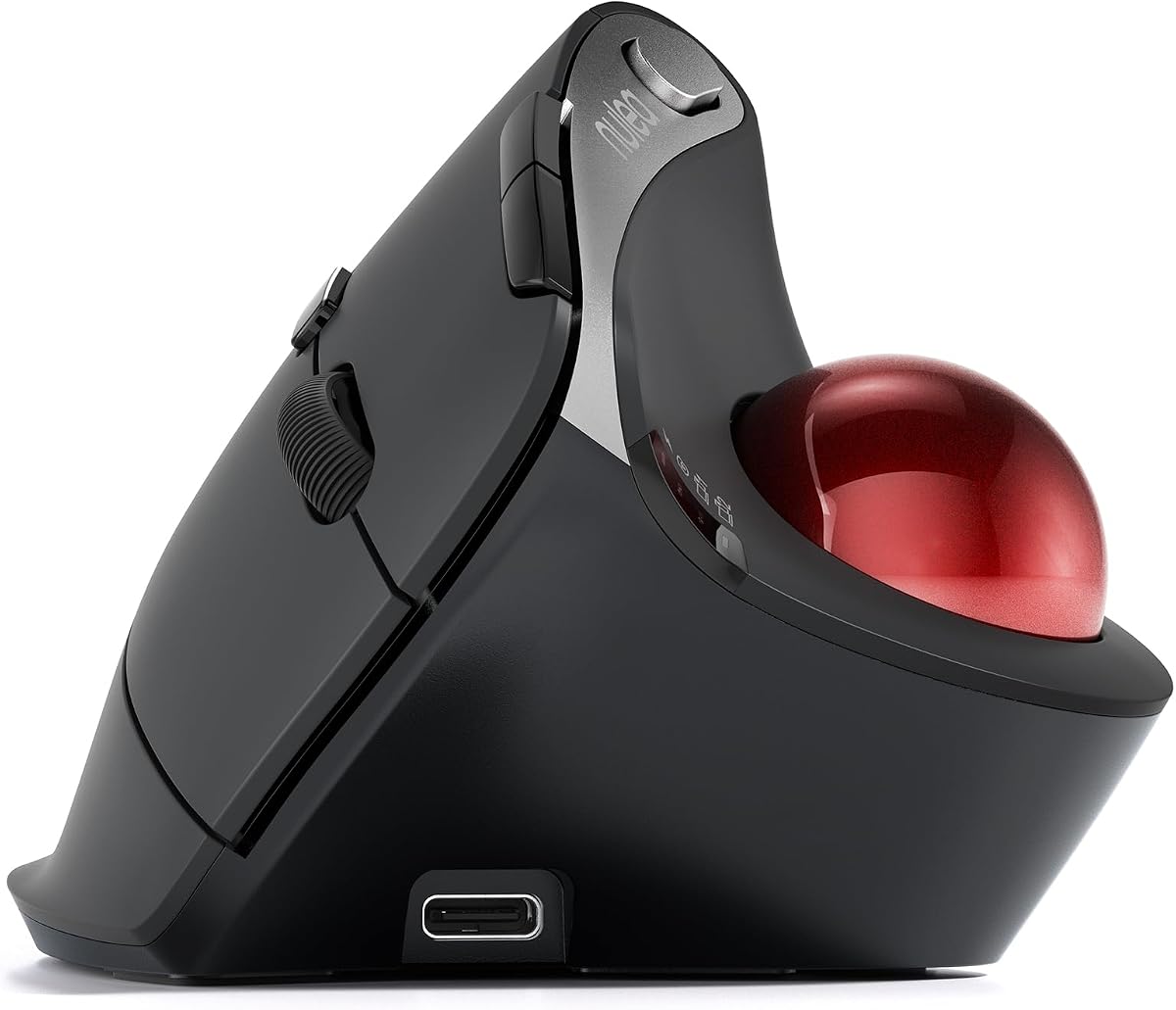
The Nulea M506 is a vertically angled wireless trackball with a 4.6 rating. Its 54-degree structure is designed to keep the wrist and forearm in a more natural, relaxed position, while the thumb-operated ball allows cursor movement with less hand and arm motion. The shell includes a textured palm surface for grip during office work, design tasks, and everyday browsing.
We may earn a commission when you buy through this link, at no additional cost to you.
Battery life is a central selling point. The built-in rechargeable cell is stated to run for up to 21 days after a full charge, making the M506 a practical middle ground between short-runtime rechargeable devices and long-running AA-powered designs. It can connect to two Bluetooth channels and one USB receiver, supporting up to three devices. Four DPI settings—400, 800, 1200, and 1600—cover precision work and faster navigation.
All essential controls, including navigation buttons, the scroll wheel, and function switches, sit within finger reach. The clicks are described as crisp and audible rather than silent, which is an important distinction in quiet offices. The removable trackball is a practical maintenance feature because it can be taken out without tools to clear dust and dirt. No software-based button customization is specified, so the M506 is better suited to users who value physical controls and straightforward operation.
The M506 is a strong recommendation for people who want a clearly rechargeable trackball, a pronounced vertical shape, and multi-device flexibility. It is particularly attractive for users who find flatter trackballs uncomfortable. Those working in shared spaces or highly quiet environments may want a silent-click alternative, and buyers needing extensive shortcut mapping should look for a model with dedicated app support.
The 54-degree structure gives the M506 a more upright profile than many trackballs. It may suit users who prefer a relaxed palm and a more neutral wrist position during sustained computer work.
The stated runtime of up to 21 days offers a useful balance for fixed and hybrid workspaces. It provides more freedom than a short-duration rechargeable mouse without requiring routine disposable-battery replacement.
We may earn a commission when you buy through this link, at no additional cost to you.
The ELECOM Huge Plus is the most feature-dense trackball in this guide, with a 4.0 rating, a large 52mm ball, ten programmable buttons, and support for Bluetooth, 2.4GHz wireless, and wired USB-C operation. Its built-in lithium-ion battery is stated to deliver up to five months of use per charge, placing it among the strongest rechargeable options for endurance.
We may earn a commission when you buy through this link, at no additional cost to you.
The large ball is designed to sit naturally in the hand and provide fluid control. MinebeaMitsumi steel bearings are swappable, and the system can be upgraded with ruby units according to the supplied information. Silent clicks reduce noise during long sessions. Ten programmable buttons offer a high level of command access, while the tri-mode design allows the mouse to shift among three devices and remain usable while charging through the included USB-C-to-USB-A cable.
Its complexity is the main drawback. Ten buttons and a large ball may feel excessive for someone seeking a simple pointing device, and the 4.0 rating is the lowest among the ten products here. The large ball also takes up more visual and physical space than a compact trackball. Compatibility is broad, covering major desktop, tablet, and mobile operating systems, but buyers should still verify their exact software version against the listed support.
The Huge Plus is best for productivity-focused users who want programmable controls, broad platform support, silent operation, and a long rechargeable runtime. It also suits people who appreciate the ability to upgrade internal ball components. For those who prioritize simplicity, a smaller model with fewer controls will be easier to manage.
The built-in lithium-ion battery is stated to last up to five months per charge, one of the strongest rechargeable claims in the guide. The wired mode also provides a reliable option during extended work sessions.
Ten programmable buttons make this mouse suitable for shortcut-heavy users. Swappable bearings add another layer of customization, allowing owners to maintain or upgrade the ball system rather than replacing the entire device.
We may earn a commission when you buy through this link, at no additional cost to you.
The Kensington Expert Wireless Trackball has a 4.2 rating and is built around a large 55mm ball, Diamond Eye optical tracking, and a patented scroll ring. The ring provides a dedicated way to move through long documents, while the optical system supports precise cursor positioning. Its ambidextrous form and detachable ergonomic wrist rest offer a different comfort approach from strongly right- or left-oriented trackballs.
We may earn a commission when you buy through this link, at no additional cost to you.
Two included AA batteries power the mouse, while auto-sleep and a configurable power-saving mode help conserve energy. Users can connect through built-in Bluetooth Low Energy or the included 2.4GHz USB dongle. Four customizable buttons, cursor speed, and scroll speed can be managed with KensingtonKonnect software. The detachable wrist rest supports the hand and wrist during extended use, and the product includes three-year coverage and lifetime technical support.
The Expert is not as flexible as several rechargeable competitors. Its four-button layout offers less command capacity, and the supplied data notes that Windows ARM-based computers and Linux are not supported. The product also occupies more space because of the large ball and substantial wrist-rest section, although the stationary mechanism still needs less operating room than a traditional mouse.
This trackball is a good fit for users who prefer a large ball, a physical scroll ring, and a detachable palm support. It works well for document-heavy work and long sessions where steady scrolling matters. Buyers should check operating-system compatibility first, while those wanting rechargeable power or extensive programmable buttons may prefer newer alternatives.
The 55mm ball gives the trackball a substantial, precise control surface. Combined with Diamond Eye optical tracking, it is aimed at users who value smooth movement and accurate cursor placement.
The removable wrist rest provides a place for the hand to settle during longer sessions. Its ambidextrous layout also broadens comfort options for users who do not prefer a strongly handed design.
We may earn a commission when you buy through this link, at no additional cost to you.
This Logitech MX Ergo S variant has a 4.4 rating and is distinguished by its encrypted Logi Bolt-style dongle option alongside Bluetooth. It shares the premium MX Ergo S platform, including up to 120 days of stated battery life, up to 24 hours of use from a one-minute charge, a 20-degree tilt, a soft rubber grip, and six programmable buttons.
We may earn a commission when you buy through this link, at no additional cost to you.
The connection choices serve different working environments. Bluetooth can be convenient when USB ports are limited, while the encrypted wireless receiver may be preferable in managed offices or shared corporate environments. Logi Options+ supports shortcut assignment and Smart Actions, and the trackball can switch between speed and precision modes. The shaped housing and soft grip are designed for medium-to-large hands and all-day use.
As with the graphite MX Ergo S, a compatible USB Type-C charging cable is not included. The 120-day figure represents a full-charge claim and can vary depending on usage and settings. Users with smaller hands may find the sculpted body too large, and the extensive control and software features are unnecessary for basic browsing or document viewing.
This listing is best for professionals who want exceptional rechargeable endurance, a secure receiver option, and extensive customization. It is a particularly good fit for corporate users handling sensitive workflows or anyone who alternates between Bluetooth and a dedicated receiver. The M575S may be more economical for basic use, while this MX model rewards users who value advanced controls.
Bluetooth and an encrypted dongle give users a choice between convenience and a dedicated wireless receiver. The included receiver also makes pairing straightforward in offices that standardize USB peripherals.
Six programmable buttons, Smart Actions, and selectable tracking speeds support demanding productivity workflows. The rapid-charge system also helps maintain a long battery life without requiring a full overnight charge every time.
We may earn a commission when you buy through this link, at no additional cost to you.
The Kensington SlimBlade Pro is a low-profile wireless trackball with a 4.1 rating, a rechargeable battery, and support for Bluetooth, 2.4GHz wireless, and wired operation. Its battery is stated to last four months on a single charge through USB-C, providing a useful balance between the M575S's disposable-battery approach and shorter-lived rechargeable designs.
We may earn a commission when you buy through this link, at no additional cost to you.
The 55mm ball is monitored by dual sensors for accurate cursor control and scrolling, while the body is designed for both right- and left-handed users. Its low profile reduces visual and physical bulk without requiring a traditional mouse arm movement. Setup can be as simple as plugging in the USB cable, and KensingtonWorks provides configuration options, while KensingtonKonnect can assign functions across eight sets of programmable buttons.
The 4.1 rating suggests that the feature set may not appeal equally to everyone, and extensive button programming can be unnecessary for basic users. The included package contains a 2.4GHz USB-A dongle, a USB-C-to-USB-A adapter, and a 1.5-meter USB-C charging cable. Bluetooth compatibility covers BT4.0 and BT5.0, but the low-profile shape and detachable-wrist-rest approach differ from the larger Kensington Expert.
The SlimBlade Pro is a sensible option for users who want rechargeable endurance, a low-profile design, and extensive controls without moving to a much larger trackball. It suits both-handed use and offers more connection choices than basic models. Those seeking fewer controls can use the standard buttons, while productivity users can benefit from the advanced button profiles.
A four-month stated runtime provides one of the stronger rechargeable figures in this comparison. USB-C charging adds a familiar power path, while wired operation can help maintain access during extended sessions.
The slim shape supports right- and left-handed users and needs less operating space than a conventional mouse. Dual sensors and the large 55mm ball help preserve accurate control despite the compact profile.
We may earn a commission when you buy through this link, at no additional cost to you.
Battery runtime is only one part of a useful trackball purchase. The right model should also fit your hand, match your devices, provide the controls you need, and remain comfortable through long working sessions.
Prioritize the longest clearly stated claim if uninterrupted operation is your main goal, but also consider charging convenience. Replaceable batteries are low-maintenance for months, while a rechargeable model is more convenient over repeated long-term use.
Choose rechargeable power for frequent travel and regular use, or replaceable batteries when you value a fixed setup that can remain untouched for long periods.
Check the number of devices, receiver type, operating-system support, and included cables before choosing a wireless connectivity configuration.
Try to test the ball size and sensitivity if possible, because a trackball that feels too small or too sensitive can be frustrating despite excellent battery life.
Prioritize a shape that matches your hand and neutral forearm position; no battery specification can compensate for a trackball that causes discomfort during long sessions.
Frequent multitaskers may benefit from programmable controls, while casual users should focus on a comfortable, straightforward layout with the navigation buttons they use most.
A stationary trackball saves operating room, but the body still needs a stable, unobstructed location that allows your hand and forearm to relax.
Choose silent clicks for shared spaces, and consider a removable ball if you work in dusty environments or want easier routine cleaning.
Begin by fully charging a rechargeable trackball according to the manufacturer's instructions, and install the included batteries if your model uses replaceable cells. Pair the mouse through Bluetooth or its supplied USB receiver, then use the underside or top control to select the intended device. If the model includes a companion application, install it and adjust cursor speed, button assignments, or tracking modes to match your work.
Place the trackball where your forearm can remain level and your hand can rest naturally. Move the ball with short thumb strokes rather than twisting the entire hand, and avoid applying excessive downward pressure. Learn the available buttons gradually, especially if the mouse has many programmable controls. A consistent cursor speed and sensitivity setting can make precise navigation easier across documents, design applications, and web pages.
For rechargeable models, use the specified cable and a suitable power source, and disconnect the cable after charging if the manufacturer recommends doing so. Replace AA batteries promptly when the low-battery warning appears. Keep the ball and openings free from dust, and clean removable components according to the product instructions. Periodic gentle cleaning helps preserve smooth tracking and reduces the need to troubleshoot cursor lag later.
The Logitech ERGO M575S listing with the black silver ball has the longest clearly stated runtime at up to 18 months on an included AA battery. Other notable options include the Logitech MX Ergo S at up to 120 days per full charge, the ELECOM Huge Plus at up to five months per charge, and the Kensington SlimBlade Pro at four months per charge. Actual results can vary with usage and settings.
Rechargeable models are usually more convenient for frequent travelers because they eliminate routine disposable-battery purchases. Replaceable-battery models can be preferable at a fixed desk because a single change may provide months of operation. The best choice depends on how often you use the mouse, how easily you can charge it, and how much you value a maintenance-free setup.
Yes. A trackball does not require a flat hard surface because the ball stays in the device and the thumb moves it directly. This makes trackballs useful on couches, beds, drafting boards, and crowded desks. Keeping the ball clean is important, as dust and fibers can reduce smoothness and tracking consistency.
A vertical trackball stands the hand at a steeper angle and may feel more natural for users who prefer a relaxed wrist and upright palm. A horizontal design keeps the hand flatter and is generally easier for some beginners to use. Personal comfort matters more than the category label, so consider hand size, desk height, and whether you already experience wrist discomfort.
No. Multi-device support varies substantially. The Nulea M501, Nulea M506, and TECKNET trackball support up to three devices, while the Logitech MX Ergo S and M575S families support easy switching between paired systems. The ELECOM Huge Plus also supports three-device operation. Always verify the exact connection modes and compatible operating systems on the selected listing.
Adjustable DPI changes how far the cursor moves for a given physical movement of the trackball. Lower sensitivity is useful for precise selection, while higher sensitivity allows faster navigation across large displays. The featured models offer different ranges, including four levels on the Nulea M501 and M506, five on the TECKNET, and configurable cursor speed through Logi Options+ on Logitech models.
First disconnect or switch off the mouse according to its instructions. Remove the ball if the model allows tool-free removal, clear away dust and debris, and wipe accessible components with a soft dry or lightly damp cloth. Avoid pushing debris into the ball openings and do not use harsh chemicals. Let every part dry fully before reassembling or reconnecting the device.
Programmable buttons are most useful for frequent multitaskers, programmers, designers, and users of software that supports custom commands. They can reduce reliance on the keyboard and speed up repeated actions. However, a simpler layout may be easier to maintain, and the Nulea M501 explicitly does not offer programmable buttons. Choose based on the shortcuts you actually use rather than the total button count.
The Logitech ERGO M575S stands out for its stated 18-month AA-battery runtime, while the Logitech MX Ergo S leads the rechargeable premium group with up to 120 days of battery life and rapid charging. The Nulea M506 offers a balanced middle path, combining up to 21 days per charge with a pronounced 54-degree vertical design and a removable trackball.
Prioritize the power system that matches your routine, then confirm that the shape supports your hand and the connection methods fit your devices. Ball size, DPI adjustment, programmable controls, silent clicks, and desktop footprint can matter more after the first day than maximum battery duration. The ELECOM Huge Plus and Kensington SlimBlade Pro are worth considering for large balls, while the TECKNET model offers fast charging and three-device switching.
Finally, verify the current product listing, included accessories, operating-system compatibility, and manufacturer battery conditions before ordering. Prices, promotions, and availability can change, and actual endurance varies with activity and settings. A careful comparison now can produce a more comfortable, reliable trackball that fits both your desk and your daily working pattern.