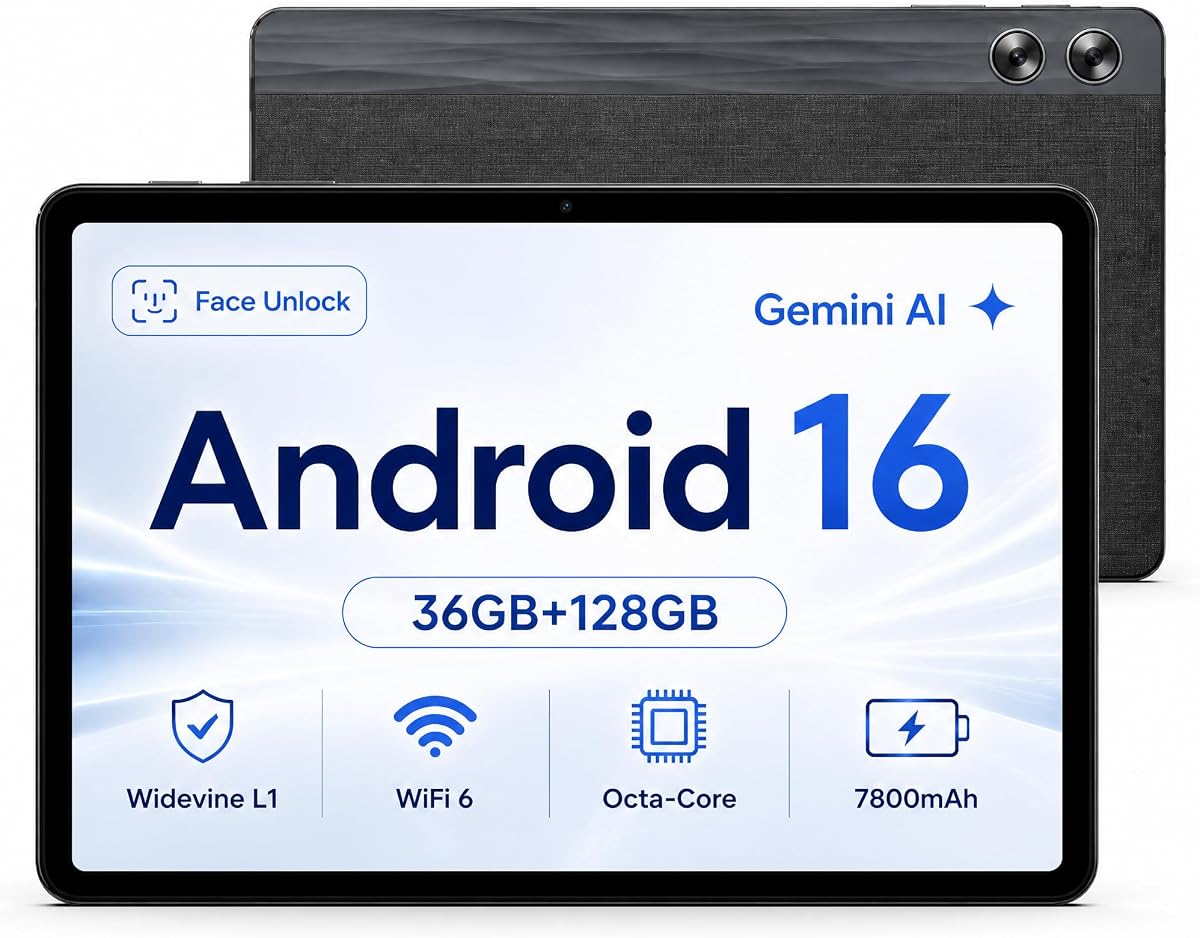
Jeazans X7 11-inch Android Tablet
4.8Editor score
36GB combined RAM
128GB built-in storage
Up to 1TB microSD
7800mAh battery
Android 16 with Gemini
Our tablet with expandable storage and memory guide compares 10 top models, covering RAM, built-in storage, microSD expansion, displays, batteries, and
A tablet with expandable storage and memory gives you more room for apps, documents, photos, videos, games, and offline media without constantly replacing the device. The best models pair useful built-in capacity with RAM for smoother multitasking, while selected models add microSD expansion for especially flexible storage management.
We compared all ten tablets across memory, internal storage, expansion support, display size, processor, battery features, audio, cameras, productivity accessories, and family or student functions. The list includes Android tablets from Samsung, Lenovo, and other brands, covering portable entertainment, note-taking, work, study, and hybrid keyboard setups.
Each review identifies the strongest reasons to consider a particular tablet and any meaningful trade-offs. Details can vary by configuration and region, while product listings and prices change over time, so readers should verify the current specifications and availability before purchasing.
4.8Editor score

4.6Editor score

4.6Editor score
The table below compares the ten tablets by their most important storage, memory, display, performance, and battery characteristics, with particular attention to models that support expandable memory.


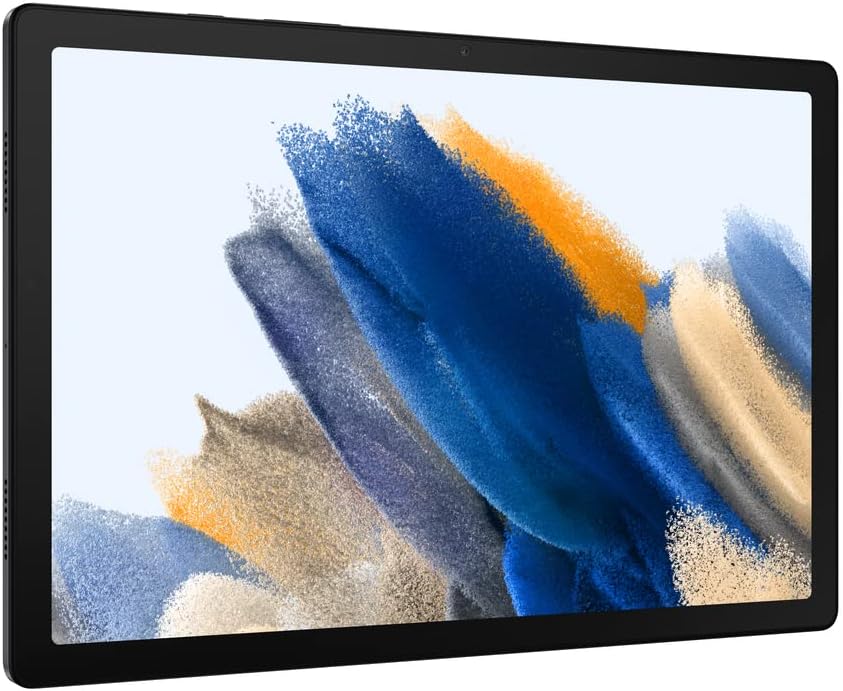

The Samsung Galaxy Tab A11+ 6GB/128GB combines a spacious 11-inch display, 6GB of memory, 128GB of internal storage, and expandable storage in a family-oriented Android tablet. Its 4.6 rating reflects a well-rounded package for streaming, browsing, gaming, video calls, reading, and everyday productivity.
We may earn a commission when you buy through this link, at no additional cost to you.
Its strongest qualities are the balance between portability and screen size, the fluid display with a refresh rate of up to 90Hz, and four speakers tuned with Dolby Atmos. The upgraded chipset is designed to keep routine tasks responsive, while fast charging helps limit downtime during travel or family outings. Google Gemini, Circle to Search, and a 5 MP front camera further improve the daily experience.
The main limitation is that 6GB of memory is less generous than the combined memory figures advertised by some competing models. The supplied listing references storage configurations reaching 256GB, so buyers should check the exact card support and maximum capacity for their selected Galaxy Tab A11+ variant. These are manageable trade-offs for users who value Samsung's software, audio, display, and update-oriented family experience.
This is the strongest all-around recommendation for households that want expandable storage, a large but portable screen, dependable media features, and useful Samsung software without moving to a premium workstation-style tablet. It is particularly attractive for shared family use, streaming, and light multitasking.
The 128GB starting point provides room for applications, cached media, photos, and documents, while expandable storage makes it easier to keep additional content locally. Buyers should confirm card specifications and formatting requirements for the exact configuration.
The 11-inch 90Hz screen gives videos, web pages, and casual games more visual room and smoother motion than a compact tablet. Quad Dolby Atmos speakers make the model especially well suited to shared media sessions.
We may earn a commission when you buy through this link, at no additional cost to you.
This 13-inch Android 16 tablet is built for buyers who want desktop-like screen space and unusually generous storage in one package. It combines a listed 36GB of combined RAM, 256GB of built-in storage, and support for up to a 2TB TF card, earning a 5.0 rating across the supplied catalog.
We may earn a commission when you buy through this link, at no additional cost to you.
The 2K IPS display measures 1920 by 1200 pixels and offers a much larger canvas for documents, videos, presentations, and multitasking. Gemini AI features support tasks such as summarization, email drafting, translation, content creation, and brainstorming. Dual-band Wi-Fi, Bluetooth 5.0, front and rear cameras, a 10000mAh battery, and a UNISOC T615 octa-core processor round out the feature set.
Its accessories are a major advantage: the package includes a keyboard, mouse, stylus, foldable protective case, screen protector, charger, and USB-C cable. The trade-offs are size and weight relative to a conventional family tablet, and the advertised 2TB expansion requires a TF card that is not included. Buyers should also account for the space needed for the keyboard when using the tablet as a portable workstation.
This model makes the most sense for remote work, students, travelers, and households that want one device to function as a large-screen Android tablet and a productivity system. It is a strong choice when expandability and bundled accessories matter more than pocketability.
The included keyboard, mouse, stylus, and folding case allow the tablet to shift quickly between touch-first use and a more conventional office arrangement. The 13-inch 2K panel provides especially useful working area for multitasking.
With 256GB built in and support for a TF card up to 2TB, this tablet can accommodate large media libraries and work files. Expansion cards are sold separately, so buyers should budget for that accessory if it is necessary from day one.
We may earn a commission when you buy through this link, at no additional cost to you.
The silver Samsung Galaxy Tab A11+ 8GB/256GB is the storage-heavy version of the same family-focused platform as the first-ranked model. With 8GB of memory and 256GB of internal storage, it offers more breathing room for multitasking and keeping large files on the device, while retaining a 4.6 rating.
We may earn a commission when you buy through this link, at no additional cost to you.
The 11-inch display supports refresh rates up to 90Hz, creating a fluid experience for streaming, browsing, and supported games. Four Dolby Atmos-tuned speakers are a meaningful advantage over tablets with only one or two speakers, especially for video viewing and shared family entertainment. Long-lasting battery life and fast charging help keep the device ready for extended use.
Compared with the 6GB/128GB configuration, this model costs more and may be unnecessary for casual browsing or streaming. Its appeal is strongest for users who install many applications, save photos and video locally, alternate between apps, or want a higher memory allowance. As with other configurations in the range, exact expansion limits should be verified against the seller listing.
Choose this model if your priority is maximum internal capacity and higher device memory within the Galaxy Tab A11+ family. It is a sensible option for students, parents, and casual creators who want large local storage without moving to a much more expensive premium tablet.
A 256GB starting capacity reduces the need to delete media or applications between uses. It is especially useful for downloaded videos, e-books, reference documents, and family photo collections.
The 8GB memory allocation is more comfortable when several apps remain open. This makes the tablet better suited to switching between browsing, messaging, streaming, and productivity tools.
We may earn a commission when you buy through this link, at no additional cost to you.
The Jeazans X7 stands out as a value-oriented Android 16 tablet with a listed 36GB of combined RAM, 128GB of built-in storage, and expansion up to 1TB via microSD. Its 4.8 rating is among the highest in this list and makes it an appealing choice for buyers who prioritize memory and flexibility.
We may earn a commission when you buy through this link, at no additional cost to you.
The octa-core processor and Mali-G57 MC1 GPU support multitasking, while Gemini AI adds voice control, real-time translation, and AI summarization. Widevine L1 certification supports HD streaming from popular services, and the USB-C 2.0 port handles charging, data transfer, and OTG connections for keyboards, mice, and USB drives.
Its 11-inch in-cell display has an 800 by 1280 resolution, which is less detailed than the 2K or 3K panels found elsewhere in the ranking. A 7800mAh battery and claimed 68 hours of continuous use are compelling, although real-world runtime varies with screen brightness, network conditions, and workload. Dual speakers and 5 MP front and 8 MP rear cameras round out the practical specification.
This is the top budget-oriented choice for students and casual users who want unusually high stated memory, microSD expansion, streaming certification, and USB-C OTG. It is less compelling for buyers who place display sharpness or long-term software support above storage flexibility.
The microSD slot can extend storage by as much as 1TB, allowing media and files to be moved off internal storage. This is useful for offline libraries and users who do not want to maintain a large cloud subscription.
Widevine L1 supports protected HD playback, while USB-C OTG opens the tablet to keyboards, mice, and flash storage. Those features make the X7 more versatile than its basic display might initially suggest.
We may earn a commission when you buy through this link, at no additional cost to you.
The Lenovo Idea Tab is designed around study and note-taking, pairing 4GB of memory and 128GB of storage with an included Tab Pen and folio case. Its 4.3 rating is the lowest among the products here, but the strong screen, stylus ecosystem, and learning features make it a focused choice rather than a generalist.
We may earn a commission when you buy through this link, at no additional cost to you.
The 11-inch 2.5K IPS touchscreen runs at 90Hz and includes TÜV Rheinland low-blue-light hardware. A MediaTek Dimensity 6300 processor, integrated Arm Mali-G57 MC2 graphics, and AI-enhanced multitasking support study apps and daily entertainment. Circle to Search can identify on-screen content with the pen or a fingertip, while Lenovo AI Note, Squid, Nebo, and MyScript Calculator support different learning workflows.
Quad Dolby Atmos-tuned speakers, up to 12 hours of stated YouTube playback, and 20W charging make it a credible entertainment and study device. The principal weakness is 4GB of memory, which is modest compared with the higher allocations in this roundup. The supplied data does not state a specific microSD maximum, so buyers needing expansion should check the exact listing and regional model before purchasing.
Choose the Idea Tab for students who will actively use the included pen, value a sharp 90Hz panel, and want learning applications without assembling a separate accessory kit. It is less suitable for demanding multitasking, although the product title identifies it as a college tablet focused on an approachable study experience.
The bundled Tab Pen makes handwriting, sketching, highlighting, and calculations more natural from the first use. Lenovo's included learning applications add structure to notes and course work.
A 2.5K panel provides more detail than a standard HD screen, while the 90Hz refresh rate keeps writing and scrolling fluid. Low-blue-light certification is useful for extended study periods.
We may earn a commission when you buy through this link, at no additional cost to you.
This Samsung Galaxy Tab A11+ package stands out for its claimed 2TB microSD expansion, 6GB of memory, and 128GB of internal storage. The listing also highlights a 4.8 rating and a configuration designed around Android 16, AI assistance, and long-term family or student use.
We may earn a commission when you buy through this link, at no additional cost to you.
Its 11-inch WUXGA display operates at up to 90Hz, which is suitable for classes, video, reading, and browsing. A MediaTek Dimensity 7300 MT8775 chip handles everyday multitask workloads, while a 7040mAh battery and 25W fast charging support travel and outdoor use. Stereo speakers add value for media, and seven years of system and security updates improve its long-term appeal.
The most important issue is verification. The supplied price field is formatted unusually compared with the other listings, and the description does not clearly identify the TGY accessories. Buyers should confirm the seller's package contents, warranty, exact card specifications, and current listing details before ordering. Expansion support is a major benefit, but the usable card capacity and file system can depend on the device and software version.
For a shopper seeking a Samsung tablet with generous expansion, modern software support, and a high-rated family configuration, this listing merits close attention. The potential combination of a 2TB ceiling and seven years of updates is especially valuable, provided the seller and accessory package meet expectations.
Seven years of system and security updates can make the tablet more appealing for students and families that keep devices for several years. Support longevity reduces the urgency of replacing a compatible tablet solely for software age.
Support for up to a 2TB microSD card can hold extensive study materials, media, and downloaded files. The card itself is not stated as included, and buyers should verify formatting and card requirements.
We may earn a commission when you buy through this link, at no additional cost to you.
The gray Samsung Galaxy Tab A11+ 8GB/256GB is a particularly balanced high-capacity configuration, with enough listed memory for multitasking and ample internal storage for downloaded media. Its 4.6 rating, 11-inch 90Hz screen, and four-speaker audio system make it a strong all-round entertainment and productivity choice.
We may earn a commission when you buy through this link, at no additional cost to you.
The upgraded chipset is intended to keep routine tasks responsive, while the long-lasting battery and fast charging support extended browsing, streaming, and play. Google Gemini and Circle to Search add convenient on-device assistance and visual search. A slim, light design makes the large screen easier to carry than the size initially suggests.
This configuration costs more than lower-memory versions and may be excessive for users who only browse and stream. Expansion capacity should also be checked for the exact regional and seller configuration. Even though 256GB is already generous, a tablet used for large downloads, offline media, or creative files benefits from any supported additional capacity.
This gray model is a good choice for users who want the Galaxy Tab A11+ experience without settling for the entry-level memory configuration. Its balance of storage, multitasking capacity, display smoothness, and audio makes it one of the strongest options for a shared family tablet or personal entertainment device.
The 256GB internal capacity makes it practical to retain large media collections and application data locally. That is helpful when connectivity is inconsistent or cloud storage does not fit the buyer's preferences.
A slim, light chassis reduces the burden of carrying an 11-inch display. The combination of smooth motion and quad speakers creates a polished experience for entertainment.
We may earn a commission when you buy through this link, at no additional cost to you.
The Lenovo Idea Tab Pro is the premium selection in this guide, combining 8GB of memory, 128GB of storage, a MediaTek Dimensity 8300 processor, and a large 12.7-inch 3K LCD. Its 4.6 rating reflects an ambitious mix of display quality, performance, gaming features, and study accessories.
We may earn a commission when you buy through this link, at no additional cost to you.
The 3K display offers a generous canvas for lectures, documents, creative work, and entertainment, while quad JBL Dolby Atmos speakers add a strong audio system. Wi-Fi 6E supports faster network performance on compatible networks, and the 360Hz touch sampling rate can improve responsiveness in supported games. Google Gemini, Circle to Search, and the included Tab Pen Plus support AI-assisted study and visual lookup.
The main trade-offs are the tablet's large footprint and 128GB starting storage. Heavy users of high-resolution video or large creative files may want to confirm expansion support for the exact model because the supplied details do not state a card limit. The listing also cites 11 hours of video streaming and 45W quick charging, which are useful for long study days but depend on real-world conditions.
This is the strongest premium recommendation for students, creators, and media enthusiasts who prioritize a vivid large display, fast processor, rich audio, and pen support. It delivers a more advanced experience than the standard Idea Tab, though buyers with a need for massive onboard storage should verify expansion before finalizing the purchase.
The 12.7-inch 3K panel provides both generous workspace and high pixel density. It is well suited to handwritten notes, detailed documents, media consumption, and light creative workflows.
The Dimensity 8300 and Wi-Fi 6E support demanding multitasking and quick network transfers. Quad JBL Dolby Atmos speakers make the tablet particularly attractive for videos and games.
We may earn a commission when you buy through this link, at no additional cost to you.
The dark gray Samsung Galaxy Tab A8 32GB remains a practical family tablet because it combines expandable memory with a 10.5-inch LCD, long battery life, fast charging, and the Samsung ecosystem. Its 4.5 rating reflects a mature device that many families may already understand and use easily.
We may earn a commission when you buy through this link, at no additional cost to you.
Smart Switch simplifies moving data from devices with different operating systems, while Galaxy connectivity can synchronize notes, to-do lists, and school work across phones, computers, watches, and the tablet. Samsung Kids supplies parent-approved games, books, and video content, adding a clear reason for families to consider this model.
The model is dated 2022, so buyers should not expect the newest processor, display specification, or software experience found among more recent competitors. Its 32GB internal capacity is also modest, making expansion particularly important. A long-lasting battery and USB-C fast charging remain useful, although actual runtime varies with network use and activity.
Choose this tablet if a proven Samsung family device, manageable 10.5-inch size, and expandable memory matter more than cutting-edge specifications. It is especially practical for children, households already invested in Galaxy devices, and buyers who value straightforward transfer and synchronization features.
Samsung Kids and the 10.5-inch display make the tablet approachable for younger users and shared family browsing. The dark gray finish also gives it a neutral appearance in common household settings.
Smart Switch reduces the friction of moving contacts, files, and other data from a different operating system. Galaxy connectivity makes it easier to keep notes and tasks synchronized across devices.
We may earn a commission when you buy through this link, at no additional cost to you.
The pink gold Samsung Galaxy Tab A8 64GB provides twice the starting storage of the 32GB version while preserving the same 10.5-inch form factor. Its 4.5 rating and expandable memory make it a sensible choice for buyers who want a compact Galaxy tablet with more room for local files.
We may earn a commission when you buy through this link, at no additional cost to you.
The tablet supports streaming, video chats, browsing, and everyday family use through a familiar Samsung software environment. Smart Switch makes transfers from other operating systems easier, while Galaxy connectivity can synchronize notes, tasks, and other content. Samsung Kids adds parent-approved educational entertainment for younger family members.
As a 2022 model, it is less current than the Galaxy Tab A11+ and Lenovo options in this guide. The supplied information does not state its RAM amount, so buyers should confirm that specification when comparing it with newer models. Its smaller screen may also feel less suitable for serious work, although it remains easier to carry than 11-inch, 12.7-inch, and 13-inch alternatives.
This model is a worthwhile choice when the priority is a familiar Samsung tablet, 64GB of internal storage, and expandable memory without moving to a large-screen device. It is especially appropriate for light users, travelers, and families who value a manageable form factor and straightforward setup.
The 64GB starting point offers more space for applications, photos, and offline media than the 32GB model. Expansion can extend that flexibility further when a compatible card is used.
Smart Switch, Galaxy connectivity, and Samsung Kids make setup and daily use approachable. These features are particularly useful for households with several Samsung devices or children.
We may earn a commission when you buy through this link, at no additional cost to you.
The most useful tablet balances three different kinds of capacity: device memory keeps apps responsive, internal storage holds installed content and files, and expansion provides a path to add capacity later. Comparing these factors alongside screen quality, battery life, and intended use produces a much better purchase decision.
Device memory, commonly called RAM, helps the operating system keep active applications in a fast-access state. A higher figure is valuable when switching among browsing, messaging, video, notes, and work apps, but it does not directly increase the amount of permanent media the tablet can store. In this list, some models advertise combined RAM that includes a virtual-memory component, so buyers should compare the underlying configuration rather than relying only on the largest headline number.
Internal storage holds apps, photos, videos, downloads, and offline files. 128GB is a sensible starting point for typical use, while 256GB is more comfortable for large media libraries, educational materials, and frequent offline video. A larger internal capacity is particularly valuable when the tablet must be used without a dependable internet connection or when cloud storage does not fit the buyer's preferences.
Expandable storage usually means support for a microSD or TF card, but the slot format and maximum capacity vary by model. The products in this guide include stated expansion as high as 1TB or 2TB, while other listings identify expandable memory without a precise limit. Always verify the card type, maximum supported size, formatting requirements, and whether the card is included. A card expands file capacity but does not increase device memory.
Display size and resolution determine how comfortably the tablet handles reading, video, drawing, documents, and typing. Compact 10.5-inch panels are portable, while 11-inch and 12.7-inch screens offer more room without becoming laptops. A 2K or 3K resolution provides noticeably more detail than HD, and 90Hz models generally feel smoother during scrolling, writing, and supported games.
The processor influences app launches, multitasking, gaming, and the tablet's ability to remain responsive under load. MediaTek Dimensity 6300, Dimensity 7300, and Dimensity 8300 chips offer different performance levels, while the Jeazans X7 and JJGJ models use octa-core processors and the Galaxy Tab A8 uses an upgraded chipset. A higher-rated chip is useful for intensive workflows, but ordinary reading, streaming, and browsing do not always require the fastest option in the list.
Battery capacity provides a useful indication of potential endurance, but real runtime depends on screen brightness, refresh rate, streaming quality, network strength, and workload. The list includes batteries ranging from 7040mAh to 10000mAh, along with stated all-day or extended-use figures. Fast charging is equally important because a large tablet used heavily can otherwise spend significant time connected to a cable. Review both the battery claim and the included charging wattage.
A tablet becomes a better entertainment device when it includes multiple speakers with Dolby Atmos or another recognized audio implementation. Accessories can materially improve productivity: the JJGJ 13-inch model includes a keyboard, mouse, stylus, case, and screen protector, while both Lenovo models include a pen and folio case. A keyboard and mouse are useful for document work, while a pen is especially valuable for handwritten notes, sketches, and precise navigation.
Software affects transfers, multitasking, updates, security, and access to family or learning features. Samsung's Smart Switch, Galaxy connectivity, Samsung Kids, Gemini, and Circle to Search support different parts of the ownership experience, while Lenovo bundles study applications and Smart Connect. The Galaxy Tab A11+ accessories listing states seven years of system and security updates, a significant benefit for long-term ownership. Compare the update commitment and ecosystem alongside hardware specifications.
After setup, review the storage settings before transferring large libraries. Keep frequently used applications and active projects on internal storage, while using a compatible microSD or TF card for downloaded films, reference documents, photographs, and other removable content. Check the manufacturer's guidance for supported card formats, formatting the card in the tablet when required, and avoiding abrupt removal while files are being written.
Manage device memory by closing applications that are no longer needed and installing updates through the tablet's official system tools. For balanced performance, keep storage from becoming completely full and review whether unused downloads, duplicate media, or abandoned applications can be removed. Use included battery and charging equipment as intended, avoid leaving the tablet exposed to excessive heat, and keep the charging port clear of dust and debris.
Protect the display and accessories with the supplied case or a suitable protective cover, and use a screen protector when the tablet is likely to be carried without one. Store the device in a dry, cool place, clean the screen with a soft lint-free cloth, and avoid exposing the microSD slot to moisture or dust. Regular software updates, cautious charging, and sensible storage management will help preserve a smooth experience over time.
No. Expandable storage adds file capacity through a microSD or TF card, while RAM temporarily holds applications and data needed for active tasks. A larger card may reduce internal-storage pressure, but it does not replace additional device memory. Both internal storage and expansion support should be checked when comparing tablets.
For web browsing, streaming, messaging, and a moderate number of applications, 128GB can be a workable starting point. Storage becomes tighter when many games, high-resolution videos, work projects, and downloaded media are kept locally. Buyers in that category should consider 256GB internal storage or a compatible expansion card.
Some listings describe 36GB as a combined total that includes a portion of virtual memory, while 8GB generally refers to physical device memory. These figures should not be treated as directly equivalent without checking the product's detailed specifications. Physical memory and processor performance are more useful for judging sustained multitasking.
You may be able to move or install some supported applications onto an expansion card, but app support varies by model and manufacturer. Media, documents, downloads, and offline content are generally the easiest files to manage externally. Follow the device's storage settings and the card manufacturer's formatting instructions.
The Lenovo Idea Tab and Idea Tab Pro both include a Tab Pen and folio case, making them especially practical for handwritten notes. The standard Idea Tab prioritizes a sharper 2.5K display and learning applications, while the Pro offers a larger 3K screen, stronger processor, and more advanced gaming features.
A 13-inch tablet offers excellent screen space but is less portable than a 10.5-inch or 11-inch model. It can still work well for travel and remote work when paired with a keyboard, mouse, and protective case, especially for users who value a large workspace more than minimal weight.
Streaming services generally require less local storage because video is usually cached temporarily rather than stored permanently. Downloaded films, offline television episodes, podcasts, and music can consume significant space, so users who download extensively benefit from 256GB internal storage or expansion support.
No. The keyword is central to the category, but the supplied listings explicitly describe expandable storage or expandable memory for several models. For the Lenovo Idea Tab and Idea Tab Pro, the provided information does not state a card limit or clearly confirm expansion, so buyers should verify those details on the exact product listing.
The Samsung Galaxy Tab A11+ 6GB/128GB is the most balanced overall choice because it combines an 11-inch 90Hz display, expandable storage, quad Dolby Atmos speakers, AI tools, and a family-friendly design. The Jeazans X7 is the leading budget option for buyers prioritizing 36GB of stated combined memory, 1TB expansion, Widevine L1 streaming, and USB-C OTG, while the Lenovo Idea Tab Pro is the premium pick for its 12.7-inch 3K display, Dimensity 8300 processor, rich JBL audio, and included pen.
Start by separating RAM, internal storage, and card expansion. Choose sufficient device memory for multitasking, at least 128GB of internal space for normal use, and a larger capacity when storing media offline. Display quality, battery life, accessories, and software support should then be matched to the intended tasks, whether that means note-taking, streaming, family use, remote work, or gaming.
Finally, verify the exact configuration before ordering because memory figures, card limits, bundled accessories, and seller packages can differ between listings. Product availability and prices change frequently, so checking the current listing details and current price is essential before making the final purchase.