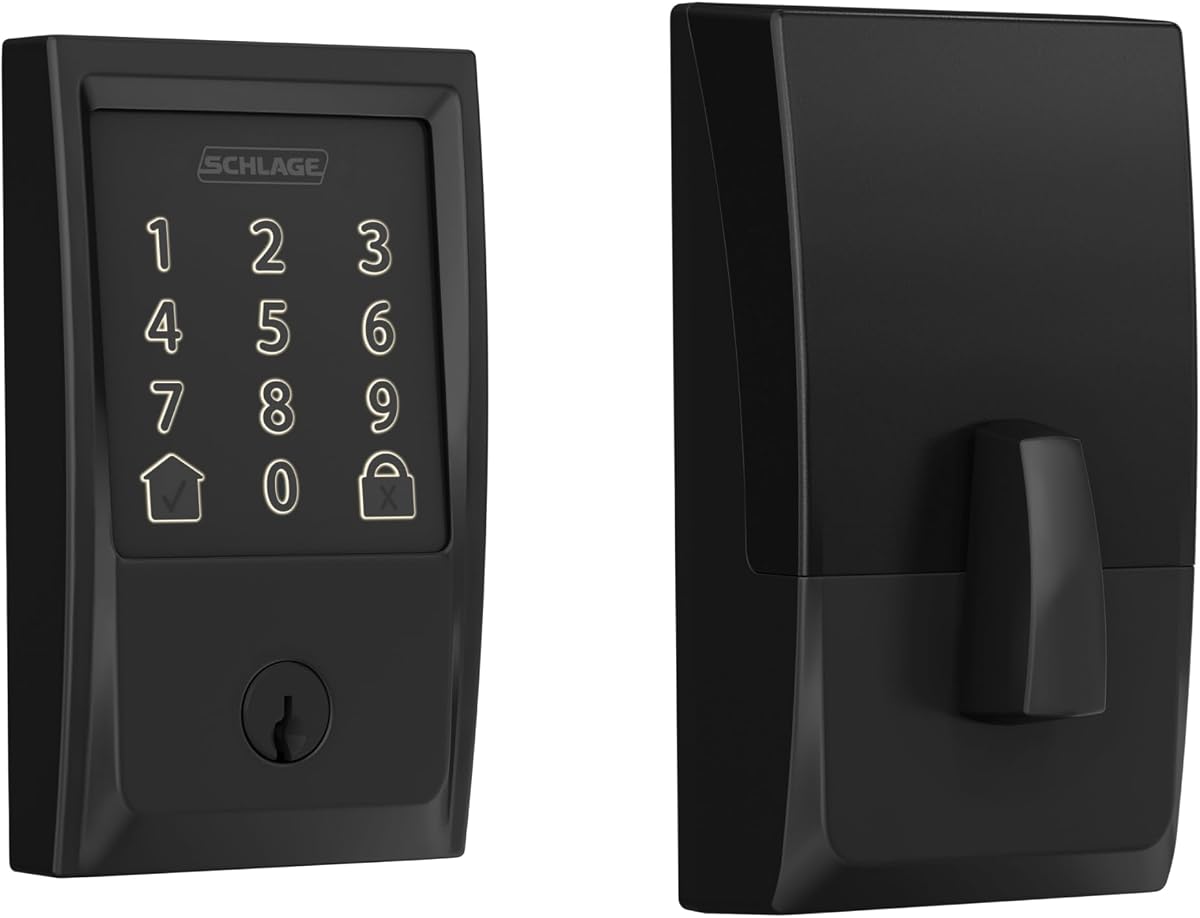
Schlage Encode Smart WiFi Deadbolt
4.2Editor score
Built-in encrypted Wi-Fi
One hundred access codes
BHMA residential certification
Our Digital Door Lock guide compares 10 smart deadbolts and keypad locks for app control, fingerprint entry, security, ease of installation, and more.
Digital door locks combine keyless entry with programmable access, remote control, and improved visibility into who enters your home. The best model depends on your door, compatible smart-home ecosystem, preferred entry methods, and willingness to manage batteries, gateway accessories, and temporary digital credentials.
We compared all ten products by examining their access options, connectivity, app features, code and fingerprint capacity, installation requirements, weather resistance, battery guidance, and physical security features. The list covers Wi-Fi deadbolts, Bluetooth locks, complete knob sets, and standalone keypad models.
Each pick highlights a different balance of features, from extensive remote-access controls to straightforward local keypads and budget-friendly fingerprint entry. Product ratings reflect the supplied marketplace feedback, while current features and availability can change. Compare specifications carefully, and check current prices before purchasing.
4.2Editor score
4.3Editor score
4.5Editor score
This side-by-side comparison highlights each lock's connectivity, access methods, installation scope, security features, and practical limitations, helping you identify the model that best matches your door and daily routine.



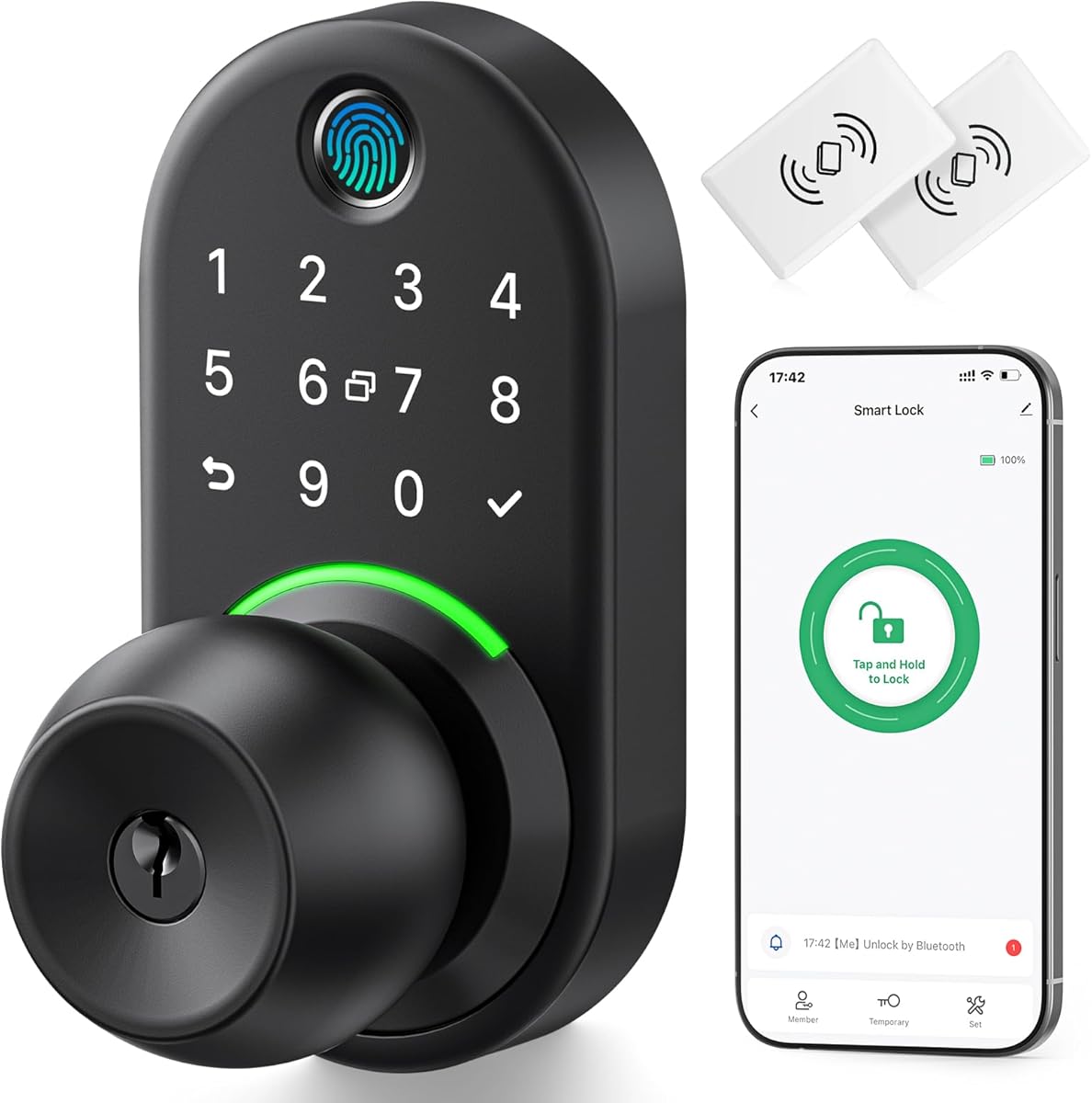


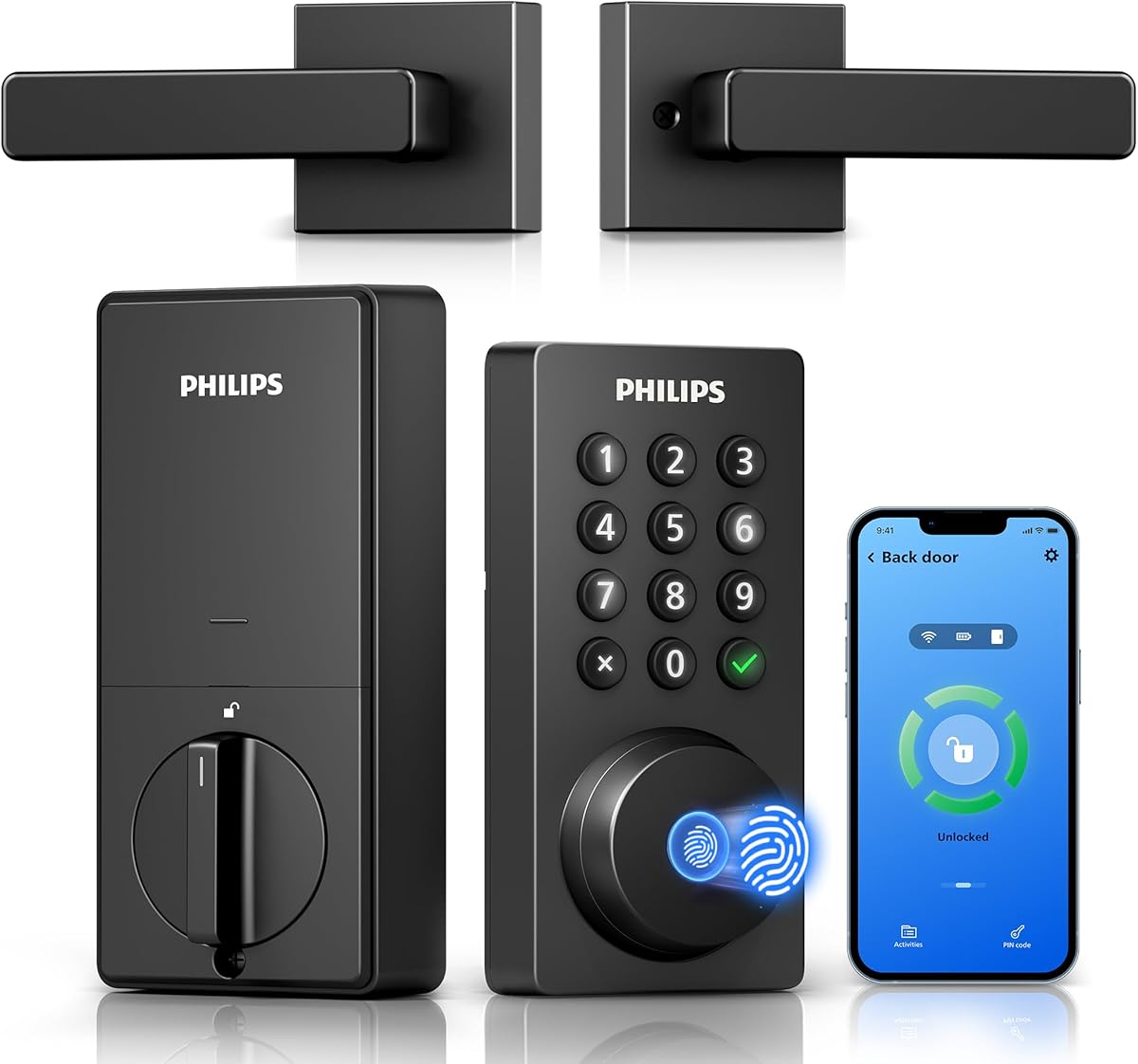
The Philips WiFi Keypad Deadbolt with Handle is our Editor's Choice because it combines a broad set of access controls, built-in Wi-Fi, fingerprint entry, and a complete matching handle in one front-door package. Its supplied rating is 4.3, and the feature set goes beyond basic keyless operation. Owners can manage the lock, inspect its status, and review access history through the Philips Home Access app.
We may earn a commission when you buy through this link, at no additional cost to you.
The lock supports permanent, one-time, periodic, and recurring passcodes, making it useful for families, household helpers, guests, and short-term rentals. It also stores multiple fingerprints and claims recognition in 0.3 seconds. Voice control through Alexa or Google Assistant adds another hands-free option, while app-based auto-lock timing can be adjusted from zero to 180 seconds. The included handle set distinguishes this model from deadbolt-only alternatives.
There are important setup conditions. Built-in Wi-Fi means no hub is needed, but the lock must connect to a 2.4GHz network and should remain within 33 feet of the router, with obstructions minimized. Auto-lock is off by default and must be enabled manually. Batteries are not included, and the manufacturer specifies standard 1.5V alkaline batteries rather than rechargeable or high-power lithium batteries. The door must also be between 1-3/8 and 1-3/4 inches thick.
This is the strongest all-around choice for someone who wants remote control, flexible credentials, fast fingerprint access, and a coordinated handle and deadbolt. The default right-opening configuration can be reset for left-opening doors, but measuring the door and confirming the installation instructions is essential. It is also a sensible choice for a new smart-home setup because the app, Wi-Fi, voice controls, and physical entry options are already integrated.
The four passcode styles give each household member or visitor a credential suited to their schedule. Temporary and recurring codes are especially useful when relatives, cleaners, delivery workers, or rental guests need controlled access without receiving a physical key.
Because the matching handle set is included, this option can serve as a coordinated front-door upgrade. It reduces the need to source a separate handle while giving the deadbolt a more finished, consistent appearance.
We may earn a commission when you buy through this link, at no additional cost to you.
The Philips Wi-Fi Smart Deadbolt is a versatile keyless deadbolt with a supplied rating of 4.2. It supports app, passcode, fingerprint, physical-key, and voice-assisted entry, giving household members several ways to unlock the door. Built-in Wi-Fi removes the need for a separate hub and permits remote locking and unlocking through a smartphone.
We may earn a commission when you buy through this link, at no additional cost to you.
The strongest feature is its user-management capacity. It can store up to 100 custom passcodes and permits sharing one-time or scheduled guest codes. Real-time notifications and access history provide a record of openings and lock activity, while Away Mode restricts all unlock methods except the master code when the household is away. Auto-lock timing can be set from 10 to 180 seconds.
Homeowners should note that the product has no door sensor, so it should not be treated as a complete door-position monitoring solution. The lock supports only 2.4GHz networks, and the supplied guidance recommends keeping the router and lock within 65 feet for reliable remote control. It uses AA alkaline batteries, although batteries are not included. The stated door thickness range is 1-3/8 to 2 inches.
This model is well suited to busy homes, shared properties, and hosts who need many programmable users. It is less compelling than the first Philips option for buyers prioritizing a bundled handle, and its lack of a door sensor may matter to someone who wants to know whether the door is physically open. Even so, its combination of credentials, remote control, voice access, and Away Mode makes it a capable general-purpose deadbolt.
The capacity for 100 custom passcodes separates this deadbolt from simpler keypad models. It can accommodate permanent family credentials alongside one-time and scheduled codes for visitors, helping reduce physical-key sharing.
Real-time access alerts and history are useful for monitoring arrivals. Away Mode provides a straightforward way to limit access to the master code when no one else should enter while the property is unattended.
We may earn a commission when you buy through this link, at no additional cost to you.
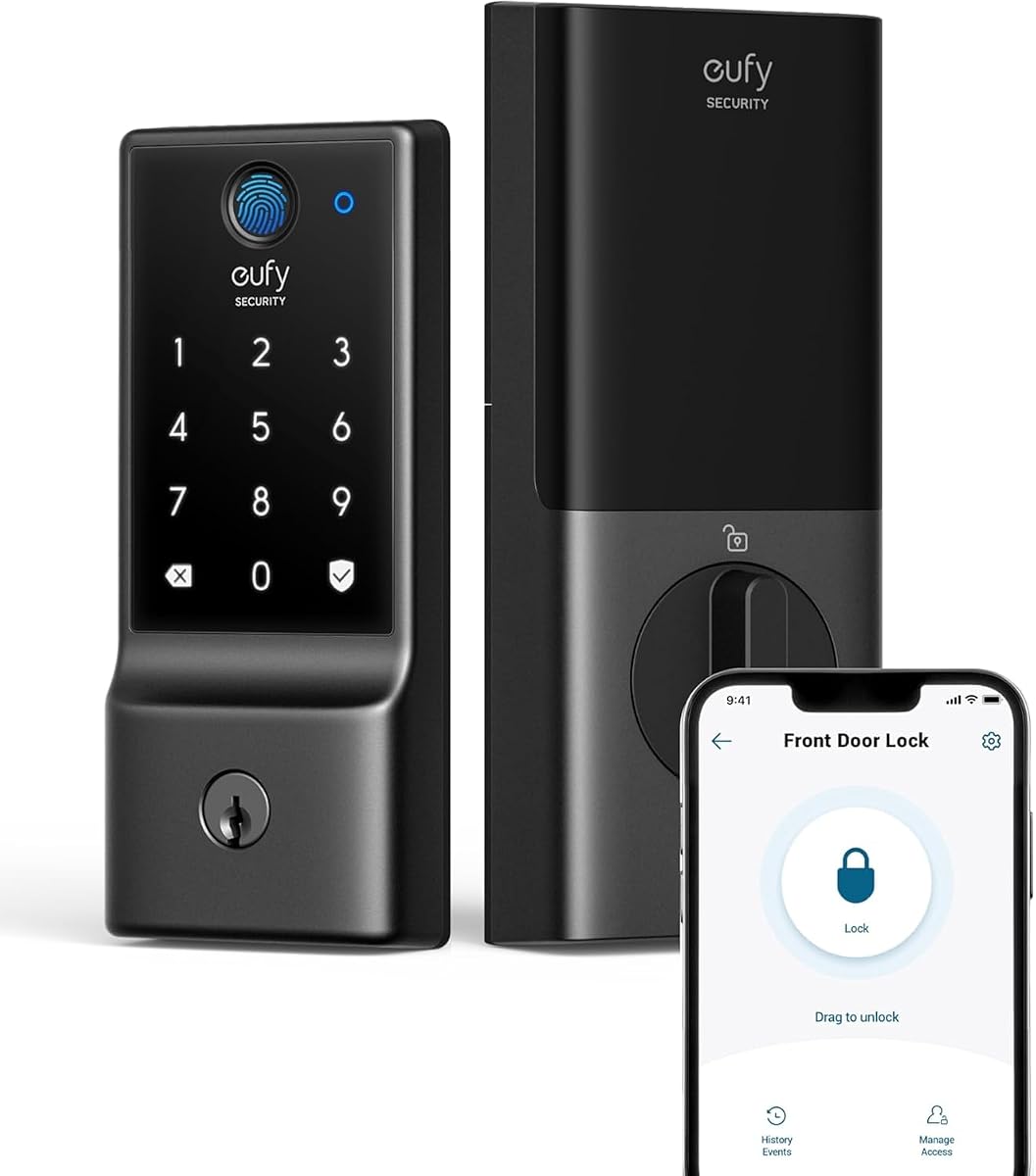
The eufy Security Smart Lock C220 has a supplied rating of 4.3 and is a strong choice for households that already use eufy devices. It combines built-in Wi-Fi, fingerprint recognition, keypad access, app control, a physical key, Apple Watch support, and voice control through Alexa or Google Voice Assistant. No separate bridge is required.
We may earn a commission when you buy through this link, at no additional cost to you.
Its fingerprint system uses self-learning AI, allowing recognition to become more precise with repeated use. The product supports eight AA batteries and is advertised as operating for around eight months, although actual duration varies with lock frequency. It also integrates with the eufy ecosystem, allowing the lock to be included in routines alongside compatible eufy doorbells and other devices through the eufy Security app.
Installation is positioned as a 15-minute process without drilling on most standard deadbolts. The lock fits bores under 54 millimeters after removing the included spacer, so checking the existing bore is essential. Its security and durability credentials include BHMA Grade 3 certification after more than 100,000 lock cycles, an unusual-attempt alarm, IP53 water protection, and an operating range of -22 to 158 degrees Fahrenheit.
This is an excellent fit for eufy users who want fingerprint-first entry with app and voice control but do not want a separate hub. It may be less attractive for users committed to another smart-home platform because the deepest feature integration is with eufy. The fingerprint response, broad entry-method selection, straightforward installation, and durable certification nevertheless make it one of the most balanced locks in this roundup.
The self-learning system is designed to improve recognition as authorized fingerprints are used repeatedly. That can make daily family access more consistent than a static fingerprint reader.
Existing eufy users can add the lock to routines in the eufy Security app, making it possible to coordinate keyless entry with compatible doorbells and other security devices rather than managing each product separately.
We may earn a commission when you buy through this link, at no additional cost to you.
The Schlage Encode Smart WiFi Deadbolt Lock with Century Trim in Matte Black is our premium selection. Its supplied rating is 4.2, and the product emphasizes security, polished design, and a mature smart-home management experience. Built-in Wi-Fi allows the deadbolt to connect directly to a home network for remote control and monitoring through the Schlage Home app.
We may earn a commission when you buy through this link, at no additional cost to you.
Owners can manage up to 100 access codes, view lock history, receive customizable notifications, and control multiple locks from the app. Security features include an encrypted connection, a fingerprint-resistant touchscreen, and a built-in customizable alarm for door movement and forced-entry attempts. The lock also holds the highest residential Security, Durability and Finish rating certified by BHMA industry experts.
Installation uses a screwdriver and requires no hardwiring. The Snap 'n Stay design is intended to keep the lock in position while the installer works with both hands. It fits standard doors between 1-3/8 and 1-3/4 inches thick and accepts 2-3/8 or 2-3/4-inch backsets. Four AA batteries are included, and a physical backup key is supplied. Battery life is stated as up to six months with typical use.
This deadbolt is most appropriate for someone who values established physical security, a restrained appearance, and a feature-rich app. The premium placement reflects the combination of certified construction, encrypted connectivity, included batteries, and considered installation design. Buyers should verify door thickness and backset before ordering, since the fit is more restrictive than some of the alternatives in this guide.
Customizable notifications, access history, multiple-lock management, and a forced-entry alarm provide a clear view of lock activity. These controls make the Schlage Home app particularly useful for monitoring more than one entrance.
The supported door thickness and two listed backset options should be confirmed before purchase. A screwdriver installation is convenient, but accurate measurements prevent the common disappointment of discovering a mismatch after the old lock has been removed.
We may earn a commission when you buy through this link, at no additional cost to you.
The Smart Door Handle Lock with Keypad and Yamiry Fingerprint Knob has a supplied rating of 4.3 and offers one of the most versatile entry selections in this guide. Household members can unlock it with fingerprint recognition, Bluetooth app control, a personalized passcode, a key fob, a mechanical key, or Alexa voice assistance.
We may earn a commission when you buy through this link, at no additional cost to you.
Remote app access is available, but remote locking and unlocking require a separately sold Wi-Fi gateway. The app supports permanent and temporary credentials, one-time visitor codes, and unlock records. Its access-management functions are particularly relevant to landlords, Airbnb hosts, short-term-rental managers, apartment supervisors, and residents who want to monitor multiple locks through one interface.
Installation is designed to take about 10 minutes on most standard American wooden front doors. The reversible handle works with left- and right-handed doors, and the lock can generally replace an existing handle, knob, or deadbolt with a screwdriver and without additional drilling. Buyers should still confirm the physical dimensions and door construction before beginning.
This lock makes the most sense for a household that values multiple ways to enter and already owns a compatible gateway or wants to add one later. It may be less convenient for someone who wants out-of-box internet control, since the required gateway is an extra purchase. Its flexible credentials, reversible hardware, and app-based management still make it a compelling complete handle-and-lock option.
Fingerprint, code, fob, app, mechanical key, and voice options accommodate different household members and visitors. A physical key also provides a practical fallback when batteries or electronics are unavailable.
Temporary codes and unlock records let hosts or property managers control visitor access without distributing permanent keys. Remote generation is especially convenient when the required Wi-Fi gateway is already installed.
We may earn a commission when you buy through this link, at no additional cost to you.
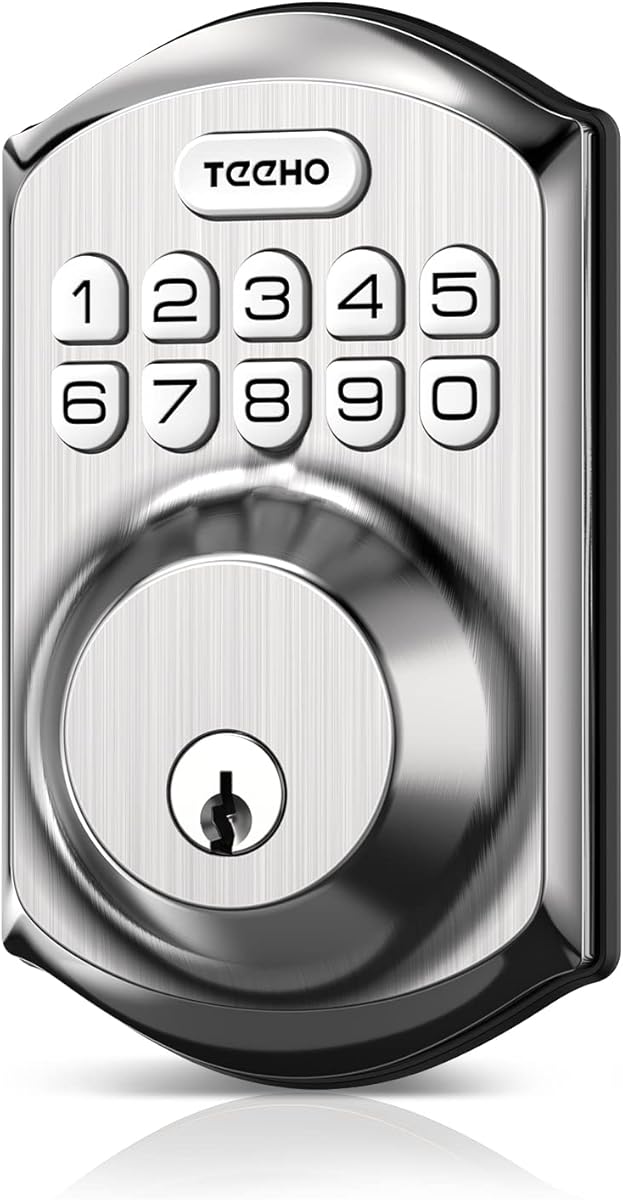
The TEEHO TE001 Keyless Entry Deadbolt has a supplied rating of 4.5, the highest among the ten products, and stands out as a focused keypad alternative to app-heavy smart locks. It provides up to 20 access codes for family members, plus a temporary one-time code that deletes itself after use.
We may earn a commission when you buy through this link, at no additional cost to you.
Auto-lock can be programmed from 10 to 99 seconds, although it is off by default. A one-touch locking method works by holding any keypad key for two seconds. The lock uses four AA batteries, which are not included, and is advertised as lasting up to 365 days. A red indicator warns users when the battery level falls below 15 percent.
Physical construction includes an aluminum alloy body, weather resistance rated IP54, anti-peeping code protection, a low-battery indicator, and a solid lock cylinder. Installation takes a screwdriver and a few minutes, but compatibility is narrower than many competing models: the lock fits a 2-1/8-inch, or 54mm, door hole and cannot be used with 38mm holes. It should be reset before first use so it can detect the door's opening direction.
This is the best budget choice for someone who wants dependable keypad entry without app connectivity, Wi-Fi, fingerprints, or a gateway. Its strengths are straightforward programming, a one-time guest code, a long stated battery interval, and a two-year warranty. The limited bore compatibility is the most important qualification, so measure the door before choosing it.
The lock provides a straightforward alternative to app-based models. Codes can be entered directly at the door, eliminating dependence on home internet connectivity for ordinary household entry.
A temporary code can be created for a single guest entry and is automatically deleted after use. This offers a convenient middle ground between sharing a permanent code and handing over a physical key.
We may earn a commission when you buy through this link, at no additional cost to you.
The Keypad Smart Door Knob Lock with Handle from Yamiry has a supplied rating of 4.4 and offers a simple, focused alternative for doors that need a handle rather than a conventional deadbolt. Its aluminum alloy construction is paired with a backlit keypad, a low-battery indicator, anti-prying code protection, and IP54 weather resistance.
We may earn a commission when you buy through this link, at no additional cost to you.
The lock stores up to 20 codes for family members and can also issue a one-time code for guests. A duplicated physical key remains available as a backup. Auto-lock timing is adjustable from five to 99 seconds, and the auto-lock function can also be disabled if the owner prefers to leave the door unlocked under specific circumstances.
Installation is described as taking less than 15 minutes with a screwdriver. Programming is handled through the keypad using four- to eight-digit codes, so no app, account setup, or network configuration is necessary. The product includes a 30-day money-back guarantee, one year of product coverage, and lifetime after-sales support.
This model is best for buyers who want keyless entry and temporary guest codes without the complexity of a connected lock. It also suits a door where a knob and handle are more appropriate than a deadbolt. Its main limitation is the lack of app-based remote access, so it cannot deliver the visibility and automation provided by the Wi-Fi models. Within a simpler feature set, however, it is clear and approachable.
The backlit keypad makes code entry easier in low-light conditions. Four- to eight-digit programming offers flexibility, while the physical key provides a practical fallback if the batteries run down.
Owners can select a delay between five and 99 seconds or disable auto-lock completely. This makes the lock suitable for households that need different behavior for quick exits and longer visits.
We may earn a commission when you buy through this link, at no additional cost to you.
The Yamiry Fingerprint Keyless Entry Handle Lock has a supplied rating of 4.3 and adds biometric entry to the basic keypad-knob format. It supports five unlock methods: the app, a password, a key fob, fingerprint recognition, and a physical key. The app can store up to 50 passwords, fingerprints, and key fobs in total.
We may earn a commission when you buy through this link, at no additional cost to you.
Bluetooth provides the basic app connection without requiring a separate hub for nearby control. A separately sold Wi-Fi gateway is needed for remote access from outside the home. Locking is available through auto-lock, the app, or a long press of the lock button, giving residents several ways to secure the door after leaving.
The lock is made from aluminum selected for hardness and corrosion resistance. A simple app makes credential programming manageable, and the product is designed for installation with a screwdriver on most American standard doors. As with any knob-style electronic lock, the existing door preparation and hardware dimensions should be checked before ordering.
This product is a good middle ground for someone who wants fingerprint entry and app-based credentials but does not necessarily need full remote control every day. Bluetooth-only operation keeps the setup relatively simple, while the optional gateway leaves a path to expanded access. It is less suitable for a household that requires immediate internet-based control without buying additional equipment.
Household members can move between fingerprint, password, fob, app, and physical-key access. This range makes it easier to accommodate visitors or family members who prefer not to use the same method.
The lock connects directly to a phone through Bluetooth for local app control. A separate Wi-Fi gateway is necessary only when the owner wants remote operation, allowing buyers to choose the level of connectivity they need.
We may earn a commission when you buy through this link, at no additional cost to you.
The Veise VE017 Fingerprint Smart Door Lock has a supplied rating of 4.3 and distinguishes itself through detailed user management and privacy features. It uses the KK Home app to let owners grant access, alter permissions, pause credentials, delete users, and review activity logs. The design specifically addresses multi-tenant properties as well as ordinary homes.
We may earn a commission when you buy through this link, at no additional cost to you.
Entry can occur through fingerprint, the app, authorized access, a fob card, a code, shared code, Alexa or Google voice assistance, or a mechanical key. The fingerprint system uses an on-device AI chip, claims verification in under 0.2 seconds, and supports self-learning recognition. Four password modes cover one-time, duration, permanent, and recurring access, while an anti-peeping privacy code can disguise the correct PIN with extra digits.
The product lists on-device AES128 encryption for access records, credentials, and fingerprints. It also includes intrusion alarms, temporary lockouts, Silent Mode, Away Mode, a low-battery indicator, and a USB-C emergency port. Four AA alkaline batteries provide about 12 months of operation, subject to use frequency. Remote access and voice control require the separately sold Veise G1 gateway.
This is a strong option for a landlord, host, or security-conscious homeowner who values credential permissions and activity records. It supports both 38mm and 54mm lock holes and fits standard door thicknesses from 1-3/8 to 2 inches, while automatically detecting door swing direction. Buyers should not expect out-of-box remote control, and the app's advanced features require careful setup.
Users can be added, renamed, modified, paused, or removed through the app, while detailed activity logs show who accessed the property and when. These tools are particularly helpful when several people need different levels of access.
The stated use of AES128 encryption for locally stored access data is a notable distinction. It gives privacy-conscious buyers a reason to consider the lock without assuming that all smart-access information must rely solely on cloud storage.
We may earn a commission when you buy through this link, at no additional cost to you.
The Veise VE027-K WiFi Smart Deadbolt Locks with 2 Knobs Set has a supplied rating of 4.5 and stands out because it combines a Wi-Fi smart deadbolt with two matching knobs. It provides a coordinated hardware package for a front door or an entry that benefits from both a deadbolt and additional knob hardware.
We may earn a commission when you buy through this link, at no additional cost to you.
Built-in 2.4GHz Wi-Fi allows hub-free remote control through an app. The lock offers eight entry methods: remote app, fingerprint, IC card, PIN code, physical key, voice control, user authorization, and code sharing. Alexa and Google Assistant compatibility adds hands-free operation, while auto-lock timing can be set from 10 to 180 seconds.
App management includes live status, battery monitoring, access logs, security alerts, and remote user management. Four password types include permanent, scheduled, one-time, and expiring credentials, with storage for up to 100 custom passcodes and unlimited one-time passwords. The fingerprint reader stores up to 20 fingerprints and claims 0.2-second recognition with a 608DPI sensor.
Eight AA batteries provide up to 240 days of use, although batteries are not included. The lock has IP65 weather protection and is built to BHMA/ANSI Grade 3 standards. Installation is estimated at 10 to 15 minutes with a screwdriver on doors between 1-3/8 and 2 inches thick. This model is a strong pick for buyers who want a complete knob-and-deadbolt arrangement with broad, direct Wi-Fi control.
The set includes a smart deadbolt and two knobs, making it easier to create a consistent entry setup without sourcing every visible piece separately. It is especially appealing for a new front-door installation.
Four password types, one-time sharing, live logs, and user controls make remote access management unusually flexible. A household can assign different credentials to family, visitors, helpers, or tenants and revoke them through the app.
We may earn a commission when you buy through this link, at no additional cost to you.
The right digital door lock depends on door fit, connectivity, access methods, and the level of oversight you need. Measure before shopping, compare battery requirements, and decide whether remote control is essential or optional.
A smart lock cannot be installed safely or reliably unless its hardware matches the door. Check door thickness, the diameter of the existing bore, the backset measurement, the direction the door opens, and the distance between the door edge and the frame. Most products in this guide target standard American doors, but the acceptable ranges differ. For example, the TEEHO TE001 requires a 2-1/8-inch, or 54mm, hole and excludes 38mm holes, while the Veise VE017 supports both sizes.
Choose a lock whose stated measurements comfortably cover your door. Measure the door while open, and compare every dimension with the manufacturer's installation guidance before removing the existing lock.
Local keypad or fingerprint locks work without a hub and can be useful when reliable internet access is unnecessary. Bluetooth models may support nearby app control, while remote control generally requires either built-in Wi-Fi or a separately purchased gateway. The Philips models, eufy C220, and Veise VE027-K use built-in 2.4GHz Wi-Fi. The Yamiry and Veise VE017 options require a gateway for remote functions.
Prioritize built-in Wi-Fi if you want to lock or unlock from anywhere without another device. If a gateway is acceptable, compare its cost and ecosystem compatibility before selecting a Bluetooth lock.
The products in this guide support combinations of passcodes, fingerprints, physical keys, key fobs, app controls, cards, and voice commands. A physical key is valuable as a backup, while a one-time code suits a single visitor. Fingerprints are convenient for regular residents but require a reliable reader and proper enrollment. Voice control is most useful when a phone or keypad is inconvenient to reach.
Choose at least two practical methods for daily use and one backup. Avoid selecting a model solely for a feature you will rarely use if it complicates installation or adds unnecessary equipment.
Code capacity indicates how many people can receive permanent or programmed access. The TEEHO TE001 and first Yamiry knob support 20 codes, the Philips Wi-Fi Smart Deadbolt and Schlage Encode support 100, and the Veise VE027-K supports up to 100 custom passcodes alongside unlimited one-time passwords. The Veise VE017 emphasizes permission management for multiple users rather than presenting one simple code limit.
Estimate the number of permanent household users, occasional helpers, and temporary visitors. For rentals or shared properties, unlimited one-time credentials and revocable user permissions may matter more than raw total-code capacity.
Digital locks run on replaceable alkaline batteries, and expected service life varies with usage. Listed expectations range from 365 days for the TEEHO TE001 to about eight months for the eufy C220, up to 240 days for the Veise VE027-K, and up to six months for the first Philips model and Schlage Encode. The Veise VE017 lists approximately 12 months. These are not guarantees, and heavy fingerprint or keypad use can shorten intervals.
Use the specified battery chemistry, keep a spare set, and respond to low-battery warnings. For connected models, confirm that your router offers 2.4GHz Wi-Fi and that walls or metal fixtures will not prevent a stable connection.
A digital lock should provide more than convenient entry. Look for anti-peeping code protection, durable cylinders, fingerprint-resistant touchscreens, intrusion alarms, and forced-entry notifications. The Schlage Encode offers a customizable alarm and a high residential BHMA rating. The eufy C220 is BHMA Grade 3 certified and includes an unusual-attempt alarm. The Veise models emphasize alarms, local encryption, and Grade 3 or ANSI-aligned construction.
Review security claims alongside the lock's normal operating features. A lock with a strong physical design can still benefit from alarms, access logs, Away Mode, and the ability to revoke digital credentials quickly.
For exterior doors, weather resistance and operating-temperature specifications matter. Listed ratings include IP53 for the eufy C220, IP54 for the TEEHO TE001 and first Yamiry knob, IP55 for the Veise VE017, and IP65 for the Veise VE027-K. The eufy C220 has a stated range of -22 to 158 degrees Fahrenheit, while the Veise VE017 lists a range of -35 to 160 degrees Fahrenheit.
Select a rating appropriate for direct rain, wind, and sun exposure. Even when a lock is suitable for an exterior entrance, confirm that the entire door and frame can operate freely in cold or wet conditions.
Most products claim screwdriver-only installation in roughly 10 to 15 minutes, but the wording does not replace the manufacturer's instructions. Some require resetting the lock to detect door direction, removing a spacer, positioning wires correctly, or changing the default right-hand configuration. Before beginning, identify the existing lock, measure all dimensions, read the manual, and watch the supplied installation material.
If you are uncomfortable with wiring, alignment, or strike-plate adjustments, professional installation can prevent lock misalignment. Also decide who will manage shared codes and check the app's interface before assigning permanent household access.
Begin by measuring the door and confirming that the lock supports its thickness, bore size, backset, and swing direction. Read the manual and installation video before removing the old hardware. Position the cable and tailpiece as directed, avoid overtightening screws, and test the latch, handle, keypad, fingerprint reader, and mechanical key while the door is still open. Reset models that automatically detect door direction only after installation, then use the prescribed method to confirm the correct setting.
Set up the manufacturer's app and connect the lock using the required network band. Most connected models here require 2.4GHz Wi-Fi, while Bluetooth locks need to be paired nearby. Create a master credential before adding family members or guests, name each user clearly, and limit permanent codes to people who need them. Use one-time or scheduled credentials for visitors, and test each new fingerprint or code before relying on it.
For care, use only the battery type specified in the manual and keep spare alkaline batteries available. Clean the keypad gently with a dry or lightly damp cloth, avoid pushing hard against the fingerprint sensor, and keep moisture and debris away from the battery compartment or charging port. Review access logs, replace temporary credentials after visitors leave, update the app and lock firmware when prompted, and arrange service if the latch, strike plate, or door alignment causes resistance.
It depends on the model. The Philips Wi-Fi models, eufy C220, and Veise VE027-K use built-in 2.4GHz Wi-Fi and do not require a separate hub for remote control. The Yamiry options and Veise VE017 can use Bluetooth app control, but their stated remote-access features require a compatible separately sold Wi-Fi gateway. Always confirm the exact connectivity requirements in the product listing before ordering.
Many models can replace a standard deadbolt or handle without drilling, provided the door's dimensions and bore match. Check the stated thickness, backset, bore diameter, opening direction, and existing hardware before removing anything. Some products fit common American doors but exclude particular sizes, such as the TEEHO TE001, which requires a 54mm hole and does not support 38mm holes.
Most digital locks warn through an indicator or app notification before the batteries are exhausted. Several models also provide a mechanical key backup, while the Veise VE017 lists a USB-C emergency port. Battery life varies with frequency of use, so owners should keep approved spare alkaline batteries available and respond promptly to low-battery warnings.
They can be because each code can be limited to a particular person, time period, or single use and then deleted. That reduces the need to distribute or recover a physical key. For the strongest control, create a unique one-time code for each visitor, avoid sharing permanent credentials, and review the lock's activity history after the visit.
Yes, but the number of stored fingerprints varies. The Veise VE027-K stores up to 20 fingerprints, while the Philips models and eufy C220 support multiple family fingerprints. Users should enroll each authorized person separately, test recognition under normal conditions, and use a passcode or physical key when a fingerprint is worn, dirty, or fails to read.
Away Mode is intended to restrict access while the home is unoccupied. The Philips Wi-Fi Smart Deadbolt disables all unlock methods except its master code, while the Veise VE017 limits access to master credentials, app control, or physical keys. Exact behavior varies by model, so check the instructions and test the setting before relying on it during a trip.
Local keypad entry, fingerprint access, and physical keys generally do not require internet connectivity on models that support them. Remote app control, voice commands, live notifications, and access logs do require the relevant connection. Bluetooth models may work locally through a phone, while remote functions over the internet generally require built-in Wi-Fi or a compatible gateway.
Change or revoke codes whenever a resident, tenant, helper, or guest no longer needs access. Temporary codes should be deleted after their intended use, and permanent family codes should be reviewed periodically. Unique one-time codes are preferable for short-term visitors because they limit the consequences if a credential is copied or shared.
The Philips WiFi Keypad Deadbolt with Handle stands out as the most complete overall choice, combining built-in Wi-Fi, flexible passcodes, fingerprint access, remote monitoring, and a matching handle. The Schlage Encode earns the premium recommendation for buyers who prioritize certified physical security and a polished deadbolt experience, while the TEEHO TE001 provides the most economical route to straightforward keypad entry.
Prioritize door fit before features, and choose connectivity based on how you actually use the door. Built-in Wi-Fi is most convenient for regular remote control, a gateway is acceptable for a flexible Bluetooth-first setup, and a local keypad may be sufficient for a straightforward household. Then compare credentials, physical key access, battery requirements, weather resistance, and installation details.
Marketplace ratings and product details can change over time, and current prices should be checked before purchase. Compare the final listing with the specifications in this guide, confirm included components and required accessories, and select the model that offers the access methods and remote visibility your household will genuinely use.