
YMOO Optical Bluetooth Transmitter Receiver
4.2Editor score
Optical and AUX audio support
AptX adaptive codec compatibility
Two-headphone sharing mode
Explore the 10 best Bluetooth adapter for Samsung TV options, comparing audio inputs, Bluetooth versions, latency, pairing, and setup ease for home viewing.
A Bluetooth adapter can give a Samsung TV wireless headphone support, but choosing the right model depends on the TV’s available audio outputs, the headphones you plan to use, and whether you need low-latency transmission. Some adapters only work with 3.5mm or RCA connections, while others also support optical audio and simultaneous listening.
This guide compares ten Bluetooth adapters using their stated Bluetooth version, supported inputs, connection modes, range, battery life, pairing capabilities, and compatibility limitations. It covers transmitter-only designs, USB-powered options, and two-in-one adapters that can also receive audio from a phone, tablet, or computer.
The picks highlight different priorities: the 1Mii B06TX for broad home-entertainment connections, the Bluetooth 6.0 options for newer wireless specifications, and the UGREEN adapter for travel-oriented flexibility. Product details and availability can change, so readers should verify their Samsung TV’s connections before purchasing.
4.2Editor score

5.0Editor score

3.9Editor score
The following comparison shows each adapter’s core connection options, wireless standard, listening features, and main compatibility limitation, making it easier to match an adapter to a Samsung TV and a pair of Bluetooth headphones.



The 1Mii B06TX is a dedicated Bluetooth 5.3 transmitter with a 4.1 rating and one of the broadest TV connection options in this guide. It accepts optical, coaxial, RCA, and 3.5mm audio, making it a strong candidate for Samsung TVs that provide digital audio, legacy stereo outputs, or a headphone jack. Its defining feature is the ability to connect two headphones or speakers at the same time.
We may earn a commission when you buy through this link, at no additional cost to you.
The adapter is particularly useful for households where two people want private television audio without replacing a Samsung TV that lacks convenient Bluetooth audio output. Pressing its two Bluetooth buttons establishes simultaneous connections, while the dual-antenna design is intended to strengthen the wireless signal. For gaming, dialogue, or action scenes, it supports aptX Low Latency when the connected headphones also support that codec.
There are some boundaries to consider. This is a transmitter only, so it cannot receive phone audio for a wired home theater system. The low-latency feature is conditional: headphones without aptX Low Latency may experience some delay. Users connecting through a TV’s optical or coaxial output must also set the television’s audio output to the appropriate digital setting. Those constraints are manageable for a TV-focused setup but should be checked before ordering.
Overall, the B06TX is the most complete choice for a Samsung TV that supports more than one wired-audio format. It suits users who prioritize stable TV-to-headphone transmission, dual listening, and codec-based latency control without needing an airplane adapter or receiver mode. It is our Editor’s Choice because its connection coverage and focused features are especially practical for home entertainment.
Optical, coaxial, RCA, and 3.5mm inputs mean the B06TX can adapt to several common Samsung TV configurations. Check the television’s output menu and physical ports before setup, especially when using digital audio.
The dual-listening function allows two compatible headphones or speakers to receive the same TV audio. This is useful for shared viewing, although both devices should support the same transmitter connection mode.
We may earn a commission when you buy through this link, at no additional cost to you.
This Pro Bluetooth 6.0 adapter combines transmitter and receiver functions in a compact 2-in-1 design. Its 4.3 rating reflects a versatile feature set for home and travel, while Bluetooth 6.0 positions it among the newer wireless specifications represented in this guide. In transmitter mode, it accepts AUX or RCA audio from a Samsung TV and sends that sound to Bluetooth headphones.
We may earn a commission when you buy through this link, at no additional cost to you.
The adapter can also work in reverse, receiving audio from a smartphone, tablet, or computer and playing it through a system without Bluetooth. Its automatic pairing and system memory are designed to simplify reconnections to devices such as AirPods, Bose, and Sony headphones. In TX mode, it can connect two sets of headphones for shared listening, while the RX mode is intended for effortless switching between two paired smartphones.
Battery life and charging are also important strengths. The stated playback time exceeds 20 hours, and a full recharge takes approximately 1.5 hours through USB-C. Clear indicators show connection and battery status, while dedicated buttons handle volume and mode changes. The included dual-prong AirFly-style adapter makes it useful beyond the home, although the product is not designed for live instruments, karaoke, 2.4GHz synchronized devices, or Bluetooth hearing aids.
This is a good match for someone who wants one compact adapter for both a Samsung TV and airplane entertainment. It does not offer optical audio according to the supplied specifications, so TVs without RCA or 3.5mm output may require another solution. For compatible TVs, however, its dual mode, battery life, and travel accessories make it particularly versatile.
TX mode sends Samsung TV audio to wireless headphones, while RX mode adds Bluetooth reception to a wired stereo. This flexibility makes the adapter useful beyond a single television setup.
The stated 20-plus-hour battery life and USB-C charging make the unit practical for long flights and travel days. Its dual-prong airplane adapter adds another familiar use case.
We may earn a commission when you buy through this link, at no additional cost to you.
The 1Mii Bluetooth 5.3 Transmitter Receiver is a flexible 2-in-1 adapter with a 4.0 rating. In transmitter mode, it can turn a Samsung TV, personal computer, gym device, or airplane entertainment system into a source for Bluetooth headphones. In receiver mode, it can receive phone, tablet, or computer audio and send it to a home stereo or other system without Bluetooth.
We may earn a commission when you buy through this link, at no additional cost to you.
Its aptX Low Latency support is one of its most important features for television. When paired with compatible headphones, the stated technology can reduce latency by as much as 80 percent, helping keep dialogue and effects aligned with on-screen action. The adapter also supports connecting two headphones at once, making it useful for couples or family members who want private audio during a film or program.
The main limitation is connection compatibility. The unit is designed for devices with a 3.5mm AUX output, headphone jack, or two RCA audio outputs rather than optical or coaxial connections. A Samsung TV that only exposes audio through a particular digital output may not work without a different adapter. The stated battery life is 18 hours in both transmitter and receiver modes, which is useful for portable use.
This 1Mii is a balanced choice for buyers who want both transmission and reception plus codec-based latency control. It is less accommodating than the B06TX regarding Samsung TV output formats, but it may be preferable when the television has a conventional 3.5mm or RCA connection and the same adapter is also needed for travel or a wired home stereo.
AptX Low Latency can improve synchronization when both the adapter and headphones support it. Check your headphone model before purchase to confirm codec compatibility.
The same unit can connect a non-Bluetooth source to headphones or add Bluetooth reception to an older stereo. That makes it more versatile than a dedicated TV transmitter.
We may earn a commission when you buy through this link, at no additional cost to you.
This USB Bluetooth 5.2 transmitter is a specialized option for Samsung TVs and other devices where either analog audio or USB digital audio is available. It carries a 3.6 rating, the lowest in this guide, but its two distinct audio paths set it apart from simpler 3.5mm-only adapters. One path uses a 3.5mm cable, while the other sends audio directly through USB without a driver.
We may earn a commission when you buy through this link, at no additional cost to you.
The USB audio function is particularly relevant to a Samsung television with compatible USB audio output, as well as PCs and game consoles. Power is supplied through the USB port, so the adapter does not need its own battery while in use. Its stable Bluetooth 5.2 connection is stated to reach up to 33 feet or 10 meters in a barrier-free environment, although real conditions can vary.
The adapter can connect two sets of AirPods or other wireless headsets at the same time, making shared private listening possible. Its synchronization claim is especially relevant for video, but the supplied details do not specify a particular low-latency codec. The main operational constraint is continuous USB power, which can be inconvenient if the available Samsung TV USB port does not supply adequate power.
This model is best for users whose Samsung TV has a working USB audio output or who want one adapter for both USB and 3.5mm sources. Its lower rating and limited listed input formats make it less flexible than the optical-capable alternatives. Still, for a compatible setup, the driver-free USB workflow is a meaningful convenience.
Compatible USB sources can transmit audio without installing a driver. Samsung TV users should verify that their television supports the required USB audio behavior before relying on this method.
The adapter draws power from a USB connection, making it suitable for fixed home viewing. It will not continue operating without a connected power source.
We may earn a commission when you buy through this link, at no additional cost to you.
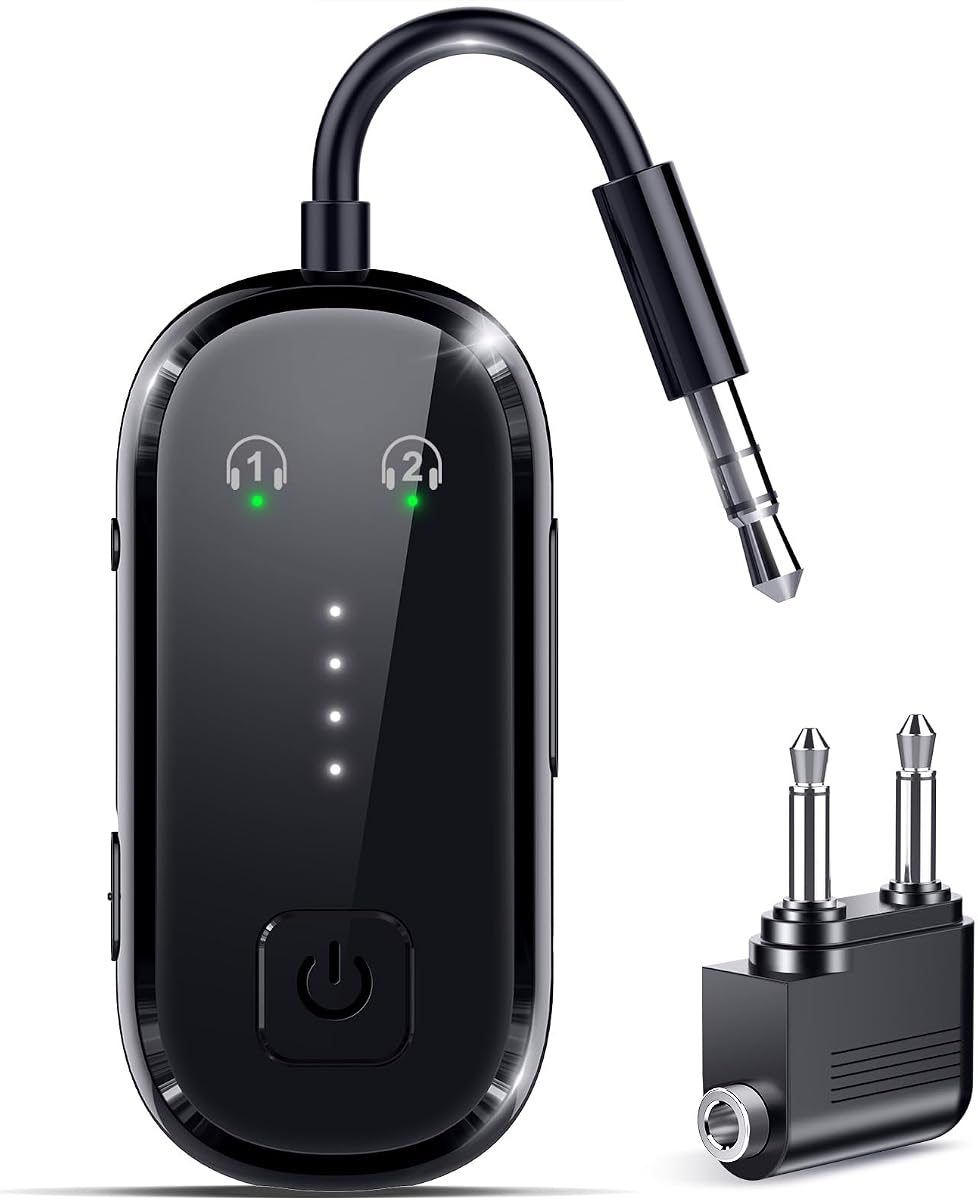
The Bluetooth 6.0 Transmitter Receiver stands out with a 5.0 rating, the highest among the products reviewed, and a feature set focused on modern wireless audio. It operates as either a transmitter or receiver, supports AUX and RCA television connections, and can pair two headphones for synchronized listening. Its stated 40-foot range gives it ample room for moving around a home while a Samsung TV plays.
We may earn a commission when you buy through this link, at no additional cost to you.
The supplied description highlights near-zero latency, 80 percent stronger signal stability, and support for 24-bit/96kHz audio when two headphones are connected. These claims make it appealing for users who view films, follow sports, or play games and want minimal delay between the television picture and wireless sound. One-touch pairing and automatic reconnection within five seconds reduce the friction of routine use.
The adapter also includes a dual-prong airplane headphone adapter, which broadens its use beyond the living room. Its battery lasts more than 24 hours and recharges in approximately 1.5 hours over USB-C. FCC, CE, RoHS, and BQB certification are listed, along with voltage, overcurrent, short-circuit, and overheat protection. These details suggest a travel-oriented design with attention to battery safety and everyday convenience.
This is the strongest all-around recommendation for a compatible Samsung TV with 3.5mm or RCA audio. It does not list optical or coaxial input, so buyers with a digital-only television should choose an optical-capable model instead. For TVs with analog output, its combination of Bluetooth 6.0, rapid reconnection, two-headphone support, and long battery life makes it a compelling option.
The adapter can keep two headphones synchronized for shared viewing. Its near-zero latency design is intended to preserve the relationship between screen action and dialogue.
Automatic reconnection within five seconds simplifies frequent use, while the included dual-prong adapter supports airplane entertainment. The rechargeable battery also avoids a disposable power source.
We may earn a commission when you buy through this link, at no additional cost to you.
The USB Bluetooth 5.0 adapter is a straightforward 2-in-1 solution for sending audio from a Samsung TV, computer, flight device, or gym unit to Bluetooth headphones. Its 3.8 rating reflects a basic feature set, but the uncomplicated setup may appeal to anyone who wants a compact adapter with clear operating-state lights and both transmitter and receiver functions.
We may earn a commission when you buy through this link, at no additional cost to you.
In TX mode, the adapter streams from a wired source to Bluetooth headphones or speakers. RX mode reverses that relationship, allowing a phone to send audio to a wired headset, speaker, car stereo, or home stereo. A blue light identifies reception mode, while a red light identifies transmission mode. A dedicated button changes modes, reducing confusion during setup.
The TV connection process is straightforward: the USB plug supplies power, the indicator should blink red for transmission, and a 3.5mm audio cable links the adapter to the TV’s audio output. The headphones then scan for and pair with the adapter. Bluetooth 5.0 provides the stated foundation for stable sound, low power consumption, and reduced interference, though no advanced low-latency codec is listed.
This model makes the most sense for a basic Samsung TV setup with a 3.5mm output and a preference for uncomplicated controls. It is not the best choice when a modern codec, optical input, or advanced dual-device features are priorities. Within those limits, it offers a practical way to add wireless headphones without replacing the television.
Red and blue lights show whether the adapter is transmitting or receiving. This visual feedback helps avoid sending TV audio in the wrong mode during initial setup.
The USB connector provides power while a 3.5mm cable carries the TV audio. This arrangement is easy to understand but requires a compatible analog output.
We may earn a commission when you buy through this link, at no additional cost to you.
The UGREEN Airplane Bluetooth 6.0 adapter combines home and travel utility with a 4.1 rating. It can transmit a Samsung TV, airplane, or other non-Bluetooth source to wireless headphones, while receiver mode can add Bluetooth to an older car stereo or speaker system. Its 3.5mm connection format and travel-oriented construction make it particularly easy to carry between uses.
We may earn a commission when you buy through this link, at no additional cost to you.
Bluetooth 6.0 is intended to improve connection speed and stability, which can reduce pairing delays and help keep video and sound synchronized. The stated transmission distance is 10 meters, or about 33 feet, sufficient for most living rooms and offices. Battery life is listed at 18 hours in RX mode and 16 hours in TX mode, while a built-in microphone allows a user to answer calls while mobile audio is playing.
Compatibility needs careful attention. The adapter is compatible with AirPods and AirPods Pro but explicitly excludes AirPods Pro 2, AirPods Pro 3, AirPods 4, and AirPods 4 ANC. It also cannot automatically reconnect with iPhone phones, requiring manual reconnection instead. If pairing fails, the manufacturer recommends powering the adapter off and holding the multifunction button for ten seconds to reset it.
UGREEN is most appropriate for a traveler who also wants to use the same compact adapter with a compatible Samsung TV. The 3.5mm output requirement and AirPods exclusions should be checked before ordering. For users with an eligible headset, its Bluetooth 6.0 specification, microphone, and dual-mode operation create a well-rounded travel accessory.
The same 3.5mm-based adapter can connect a Samsung TV at home or airplane entertainment in transit. Its compact design makes repeated travel use more practical.
Several specific AirPods generations are excluded, and iPhone reconnection is manual. Confirm that your headphones are supported and comfortable with the stated setup behavior.
We may earn a commission when you buy through this link, at no additional cost to you.
The SOOMFON Bluetooth 5.3 adapter combines broad input compatibility with a visible LCD and convenient volume controls. Its 4.0 rating and support for optical, AUX, and RCA audio make it a strong option for Samsung TVs that may use either digital or legacy analog audio. It is designed primarily to transmit television and computer sound to two Bluetooth headphones or speakers.
We may earn a commission when you buy through this link, at no additional cost to you.
After the initial successful pairing, the adapter can automatically reconnect two headsets or speakers. The stated range is 10 to 30 meters, with the lower portion applying when obstacles are present. A clear LCD reports connection status, and built-in volume buttons are particularly helpful for headphones such as AirPods that lack their own accessible volume control.
The package includes a 3.5mm-to-RCA cable, a 3.5mm audio cable, an optical cable, and a USB-C charging cable. Users of optical audio should set the Samsung TV’s output format to PCM. The adapter lacks a microphone and is unsuitable for instruments, karaoke, hearing aids, Echo Dot, Alexa, or similar smart devices. It also cannot pair with devices that require a PIN, and its volume control does not independently adjust two connected devices.
This adapter is best for a home viewer who wants optical support, two-device connection, and an easy-to-read status display. The absence of independent volume adjustment and the SBC-only encoding format are the main compromises. Nevertheless, its broad input selection and automatic reconnection make it a practical home-centered choice for compatible Samsung televisions.
Optical, AUX, and RCA inputs provide good coverage for different Samsung TV models. Set the television to PCM when using its optical output.
The LCD makes pairing and connection state easier to understand. Volume buttons help with some headsets, but both connected devices share the same volume adjustment.
We may earn a commission when you buy through this link, at no additional cost to you.
The YMOO Optical Bluetooth Transmitter Receiver is a 4.2-rated option for viewers who want digital audio and modern codec support. It can send a Samsung TV’s audio to Bluetooth headphones or speakers through optical or 3.5mm AUX connections. In receiver mode, it can receive phone audio and play it through wired speakers, stereo systems, or amplifiers.
We may earn a commission when you buy through this link, at no additional cost to you.
Optical audio is the central attraction. The product description says digital optical transmission can reduce interference and provide cleaner, more reliable sound. It also supports aptX Low Latency and aptX Adaptive when used with compatible devices, offering better synchronization for movies, shows, and games. Built-in volume buttons and a compact rechargeable format add to its home-entertainment appeal.
The adapter can pair two Bluetooth headphones simultaneously in transmitter mode, which is useful for couples or shared late-night viewing. That dual connection does not support aptX Low Latency, so users who prioritize perfect synchronization should use a single compatible pair of headphones. When connecting a Samsung TV through optical audio, the TV must be set to PCM output; otherwise there may be no sound or audible noise.
This is a premium-featured choice for a TV with optical or AUX output, particularly when clean digital audio and modern codec support matter. It cannot replace an HDMI audio extractor because it does not work with HDMI-only audio. Samsung TV owners should confirm that the television exposes a compatible optical or 3.5mm output before buying.
The optical connection can reduce interference compared with traditional analog audio. Correct PCM output settings are essential for reliable sound.
AptX Adaptive and aptX Low Latency support can improve synchronization with compatible headphones. These codec benefits do not apply to every device or to the two-headphone connection.
We may earn a commission when you buy through this link, at no additional cost to you.
The OiDiPi Bluetooth 5.3 adapter is a basic 2-in-1 solution with a 3.9 rating. It can transmit audio from a non-Bluetooth Samsung TV, computer, MP3 player, or airplane system to wireless headphones, speakers, or a soundbar. In receiver mode, it adds Bluetooth reception to wired headphones, car stereos, home stereo systems, projectors, and other 3.5mm equipment.
We may earn a commission when you buy through this link, at no additional cost to you.
Setup is designed to be approachable. The adapter plugs into a 3.5mm port, the multifunction button is held for three seconds to power it on, and status indicators show when it is ready to pair. Bluetooth 5.3 provides the stated foundation for fast, stable, and lower-power transmission. Battery life is listed at up to 10 hours in RX mode and eight hours in TX mode.
The important limitation is the type of Samsung TV connection available. The included package contains a 3.5mm audio cable, but an additional RCA cable is not included and must be obtained if the television uses red-and-white RCA output. Optical audio is also unsupported. Users should therefore check the physical audio outputs before choosing this model, particularly if their Samsung TV has no headphone or 3.5mm jack.
The adapter is not recommended for live music, electronic instruments, or karaoke because those applications can require more precise synchronization or 2.4GHz transmission. Within standard television viewing, however, it provides an uncomplicated way to connect wireless headphones. It is a fitting basic choice for buyers who want Bluetooth 5.3 and dual-mode operation without a more complex feature set.
Holding the multifunction button for three seconds activates pairing, while indicators provide status feedback. Once paired, the adapter can reconnect to compatible devices.
A 3.5mm cable is included, but an RCA cable is not. Samsung TV owners with only red-and-white audio outputs need to account for that additional connection.
We may earn a commission when you buy through this link, at no additional cost to you.
The right adapter depends primarily on your Samsung TV’s available audio output, your headphone type, and your tolerance for setup limitations. Review the connection format, supported codecs, power method, and simultaneous-listening features before making a choice.
Start by identifying every audio output on the television. The adapters in this guide use 3.5mm AUX, RCA, optical, coaxial, or USB connections, and no single option supports every possible arrangement. A TV with a 3.5mm headphone output is broadly compatible with analog adapters, while optical and coaxial outputs require a digital-capable model. A television that outputs audio only through HDMI needs a separate HDMI audio extractor before a Bluetooth adapter can receive that sound.
Choose an adapter whose listed input directly matches a port your Samsung TV actually has. Do not assume that Bluetooth support appears automatically when a TV has Bluetooth for a remote control; the relevant feature is usually a dedicated wireless audio transmitter.
Wireless audio can introduce a delay between what appears on screen and what is heard. For movies, sports, gaming, and dialogue-heavy programming, aptX Low Latency or aptX Adaptive support can help when the connected headphones also support the same codec. The 1Mii B06TX, 1Mii 5.3 model, and YMOO adapter list aptX Low Latency capabilities, while the YMOO also lists aptX Adaptive.
Match the codec carefully. A compatible codec on only the adapter cannot deliver its full latency benefit. Also note that some dual-headphone modes, including the YMOO’s, do not support aptX Low Latency, so a single pair of headphones may produce better synchronization.
Several adapters can connect two headphones at once, allowing partners or family members to share television audio privately. This is one of the most useful features for a Samsung TV in a shared room. Dual-listening models in this guide include the 1Mii B06TX, Pro Bluetooth 6.0, 1Mii Bluetooth 5.3, USB Bluetooth 5.2, Bluetooth 6.0 Transmitter Receiver, UGREEN, SOOMFON, and YMOO.
Check how shared volume is managed. The SOOMFON adapter explicitly states that its two connected devices do not have independent volume control. Other models may also have practical limits when pairing different headphone brands or when using advanced codecs.
A transmitter sends audio from a wired source to Bluetooth headphones, which is the central task for a Samsung TV. A receiver does the opposite, accepting Bluetooth from a phone and delivering it to a wired stereo. A 2-in-1 adapter is more versatile when you also travel by airplane or want to modernize an older home audio system.
A transmitter-only design can be simpler if the adapter will never leave the television area. The 1Mii B06TX is the clearest example in this group. If you expect to use one device for several audio roles, choose a model with clearly documented TX and RX switching.
Power requirements affect how an adapter fits into your setup. The USB Bluetooth 5.2 and USB Bluetooth 5.0 models draw continuous power from the Samsung TV or another USB power source. Rechargeable adapters provide more freedom and are useful for travel, but their battery life can be shorter than the transmitter’s operating time. The Pro Bluetooth 6.0, 1Mii Bluetooth 5.3, Bluetooth 6.0 Transmitter Receiver, UGREEN, SOOMFON, and OiDiPi models use rechargeable batteries.
For stationary viewing, continuous USB power may be entirely acceptable. For travel, compare the stated TX and RX runtimes, charging method, and included battery indicators rather than relying on a single headline battery figure.
Range helps determine whether you can move around a room while still hearing the Samsung TV. Stated figures range from about 10 meters for the UGREEN and 1Mii 5.3 model to 40 feet for the Bluetooth 6.0 Transmitter Receiver. SOOMFON states 10 to 30 meters depending on obstacles, illustrating why real conditions matter.
Treat the maximum range as a controlled specification rather than a guarantee. Walls, furniture, wireless interference, and the capabilities of the connected headphones can all affect stability. A shorter range is usually sufficient for a sofa or bedroom, while a larger home may benefit from an adapter with dual antennas or a higher stated range.
The correct television setting can determine whether the adapter produces sound. Models using optical or coaxial output generally require the TV to be set to the matching digital output, and several products specifically instruct users to select PCM when using optical audio. If you hear no sound or hear noise, review this setting before assuming the adapter has failed.
Also check whether the TV’s built-in speakers and audio output are configured correctly for the selected port. Some setups may require changing the television’s sound output, while others may play through both the speakers and the adapter. The manual for the chosen adapter and the Samsung TV’s audio menu should be used together.
Airplane entertainment systems commonly use a dual-prong connection, so an adapter designed for that format can serve both a Samsung TV and travel. The Pro Bluetooth 6.0, Bluetooth 6.0 Transmitter Receiver, 1Mii Bluetooth 5.3, and UGREEN options explicitly mention airplane use or include a dual-prong adapter. The UGREEN model also provides a built-in microphone for mobile calls.
Travel-oriented specifications should be balanced against compatibility needs. The UGREEN adapter excludes several newer AirPods models and requires manual iPhone reconnection, while the OiDiPi does not include an RCA cable. A useful travel adapter is one that supports both the devices and the connection formats you expect to encounter.
Begin by inspecting the Samsung TV’s audio outputs and selecting the matching connection. Connect the adapter’s 3.5mm, RCA, optical, coaxial, or USB cable as appropriate, then select the matching audio output in the TV settings. For optical or coaxial connections, set the output to the required digital format; for optical audio on the YMOO and SOOMFON models, use PCM.
Power on the adapter and choose transmitter mode. Put compatible Bluetooth headphones into pairing mode, then use the adapter’s pairing button or multifunction control as described in its manual. Once connected, play a short section of television audio to confirm sound, adjust the television and headphone volumes, and check for lip-sync delays. If there is no sound, verify the selected TV output, cable, mode indicator, and headphone pairing state.
For daily care, keep the adapter dry and away from excessive heat, and use its specified charging cable. Rechargeable models should be periodically charged even if they are used only occasionally. Store the adapter with its cables in a protected place, clean the connector gently when needed, and avoid using it for live instruments, karaoke, or hearing aids when the manufacturer marks those uses as unsupported.
It depends on the television’s available audio output. Most adapters require a 3.5mm, RCA, optical, coaxial, or compatible USB audio connection, so models with only HDMI audio output will not work directly. Check the TV’s ports and the adapter’s supported inputs before buying, and use an HDMI audio extractor if no compatible output is present.
The most common causes are an incorrect TV audio setting, an unsuitable cable, transmitter mode not being selected, or incomplete headphone pairing. For optical or coaxial connections, set the TV to the matching digital output, and use PCM when instructed by the adapter manual. Test the headphones with another Bluetooth device to confirm that they are working correctly.
Several adapters support two simultaneous listening connections, including the 1Mii B06TX, Bluetooth 6.0 models, SOOMFON, UGREEN, and YMOO. Put both headphone sets into pairing mode and follow the adapter’s dual-connection procedure. Note that some advanced latency codecs do not work in dual-listening mode, and shared volume control may be limited.
Some delay can occur, especially with standard Bluetooth codecs or when watching fast-moving content. Adapters supporting aptX Low Latency or aptX Adaptive can improve synchronization when paired with compatible headphones. Choose a single compatible headphone pair if precise timing is more important than dual listening.
You need the cable type that matches your Samsung TV and the adapter. A 3.5mm cable is included with some products, but the OiDiPi adapter does not include an RCA cable. The SOOMFON package includes 3.5mm, RCA, and optical cables, while the YMOO is designed for optical and 3.5mm connections. Confirm the package contents before ordering.
Yes, if you select a model with both transmitter mode and a compatible 3.5mm connection. Several products in this guide also include a dual-prong airplane adapter. Make sure the selected mode is transmitter mode, pair the headphones after connecting to the source, and carry enough battery power for the full journey.
A Bluetooth 6.0 specification may provide newer wireless capabilities, faster pairing, and the performance claimed by that particular product. However, the version number alone does not determine audio quality or latency. Output compatibility, codec support, power, and the connected headphones are often more important for day-to-day television viewing.
Automatic reconnection behavior depends on the adapter and operating system. The UGREEN adapter specifically states that iPhone phones require manual reconnection, while other products advertise automatic reconnection. Updating the adapter firmware if applicable, forgetting the old Bluetooth record, and pairing again can help establish a reliable connection.
The 1Mii B06TX is the most versatile option for a Samsung TV because it accepts optical, coaxial, RCA, and 3.5mm audio while supporting two listeners and aptX Low Latency. The Bluetooth 6.0 Transmitter Receiver is an excellent all-around alternative for analog-output TVs that value rapid reconnection, long battery life, and two-headphone synchronization.
Prioritize the connection your television actually provides before focusing on the Bluetooth version. Optical-capable models are best for compatible Samsung TVs with digital audio, 3.5mm and RCA models cover many analog setups, and USB options suit compatible sources. Then consider dual listening, codec support, continuous versus rechargeable power, and any stated headphone exclusions.
Product features, compatibility details, and prices can change, so confirm the adapter’s current instructions and compare the latest listing before purchasing. With the correct port, matching output settings, and compatible Bluetooth headphones, the right adapter can add convenient private or shared audio without requiring a new television.