
Upgraded for Apple Watch Charger, Foldable Travel Fast Charging Dock
4.4Editor score
Foldable travel-friendly design
Adjustable viewing angle
USB-C cable included
Our Apple Watch Dock guide compares ten magnetic charging stands and travel docks for compatibility, stability, nightstand mode, portability, and daily
An Apple Watch Dock can turn a loose charging cable into a convenient charging station that keeps your watch visible, aligned, and ready at a desk or bedside. The best options balance magnetic connection, stability, compatibility, cable control, portability, and support for the features you actually use each day.
We compared ten Apple Watch charging stands and travel docks based on their published specifications, compatibility claims, construction, charging approach, viewing angle, nightstand support, cable management, and intended use. The list includes simple charger holders, compact portable docks, an official-style magnetic charging dock, and a broader multi-device charging station.
Each pick reveals a different route to a more organized charging setup: the strongest stand for everyday charging, convenient travel options, polished metal designs, flexible viewing angles, and docks that combine an Apple Watch with other devices. Product listings and availability change over time, so confirm the current details and included accessories before ordering.
4.4Editor score

4.7Editor score

4.6Editor score
The comparison below covers every dock in the guide, highlighting charger style, compatibility, nightstand use, portability, and the most important practical distinction for each model.



The Lamicall Watch Stand for Apple Watch Magnetic Fast Charger earns a 4.7 rating and stands out as the most polished general-purpose stand in this guide. Rather than containing its own charging electronics, it provides a shaped aluminum platform into which the Apple Watch Magnetic Fast Charger can be fitted. Once installed, the watch sits upright at a comfortable 45-degree angle rather than lying flat against a surface.
We may earn a commission when you buy through this link, at no additional cost to you.
The strongest features are the aluminum alloy body, the silicone cushion surrounding the charger opening, and the bottom pad intended to prevent shaking and sliding. The silicone around the charging head also helps keep the watch from moving while protecting its case from scratches. A cable path allows the charging lead to be routed neatly, reducing the visual clutter created by a cable draped across a bedside table or work desk.
This is a holder rather than a complete charging solution, so buyers who do not already own a compatible magnetic fast charger will need to purchase one separately. Its fixed angle also offers less positioning flexibility than a travel dock with a folding hinge or an adjustable stand. Even so, the stable construction, elegant profile, broad case-size compatibility, and useful nightstand mode support make those limitations easy to accept.
It is an excellent choice for a permanent desk or nightstand setup, especially for anyone who wants an aluminum charging station without paying for a more complex multi-device system. The Lamicall is best for users who already understand the charger-holder format and want a clean, durable, widely compatible way to display their watch while it charges.
The fixed 45-degree profile creates a predictable viewing position for notifications, the clock, and Nightstand Mode. It is particularly useful beside a bed because the raised watch face is easier to read than a watch lying flat.
The snug charger opening, silicone cushioning, and weighted-looking aluminum construction help prevent the watch and charging head from shifting. Cable routing keeps the attached lead controlled instead of allowing it to slide onto the floor.
We may earn a commission when you buy through this link, at no additional cost to you.
The Spigen for Apple Watch Charger Stand has a 4.5 rating and provides a straightforward, flexible-construction alternative to rigid aluminum holders. Designed around the official Apple Watch charger, it creates a stable home for the charging puck while allowing the watch to be placed with either an open or closed strap. That makes it convenient for users who alternate between a loosely fastened band and a fully closed loop.
We may earn a commission when you buy through this link, at no additional cost to you.
The stand's TPU construction offers a softer contact surface than a hard metal frame. Its Nanotac foundation is designed to resist slipping, helping the charger and watch remain in place on a desk or nightstand. The product also supports Apple Watch Nightstand Mode, allowing the raised watch to display the time and alarm information while remaining connected to the charger.
Compatibility depends on using the official Apple Watch charger, and the charging cable is not supplied. The listing also notes that some bulky AirPods cases may not fit the accessory's additional compatible charging areas. As a result, shoppers should treat the AirPods references as a bonus rather than the main reason to choose this dock, particularly if their case has a thick protective shell.
This Spigen stand is best for buyers who prioritize a simple, protective, non-slip way to organize an existing official charger. It may not satisfy someone looking for an integrated power supply, adjustable angle, or travel folding mechanism, but it remains a durable and uncomplicated bedside or desktop holder.
The open platform accommodates a watch laid flat with its band unfastened, as well as a closed loop around the charger. This flexibility makes the stand useful across different daily wearing routines and charging positions.
The non-slip foundation is intended to keep the stand from moving during interactions such as checking the time or silencing an alarm. The TPU body also adds some protection where the watch and charger meet.
We may earn a commission when you buy through this link, at no additional cost to you.
The elago W2 Charger Stand for All Apple Watch Series carries a 4.6 rating and emphasizes precise charger retention and orderly cable placement. Its key design element is a specifically sized cutout that holds the compatible charging puck in position, addressing a common weakness of generic stands that allow the charger to wobble or shift.
We may earn a commission when you buy through this link, at no additional cost to you.
The premium silicone surrounding the contact area helps prevent scratching and limits movement on the supporting surface. A dedicated cable management opening keeps the lead controlled and the charging area uncluttered. The stand supports the broad range of Apple Watch models listed by the manufacturer, including current Series, SE, and Ultra families, along with several case sizes.
Like many dedicated stands in this category, it does not include an Apple Watch or charging adapter. It also maintains one raised position rather than offering an adjustable hinge or fold-flat travel design. Buyers should therefore view the W2 as a stationary accessory for a desk or nightstand, not as an all-in-one charger for a suitcase.
The W2 is a strong recommendation for users who dislike loose cables and want the charger held securely in a purpose-built opening. Its compatibility coverage and protective silicone construction make it a versatile choice for households that have used more than one Apple Watch generation or keep different band styles nearby.
The precision cutout is more important than it may initially appear because even slight movement can leave a magnetic watch charger less aligned. Holding the puck in a defined opening helps keep the watch consistently positioned.
A separate cable opening lets the attached lead pass through the body of the stand. That design makes the setup look more intentional and keeps the charging wire from spreading across the surrounding surface.
We may earn a commission when you buy through this link, at no additional cost to you.
The Upgraded for Apple Watch Charger, Foldable Travel Fast Charging Dock has a 4.4 rating and offers a different proposition from passive charger holders: it includes its own magnetic charging component and a USB-C cable. That makes it a more self-contained option for travel, offices, and other situations where carrying a separate charging puck would be inconvenient.
We may earn a commission when you buy through this link, at no additional cost to you.
Its folding body helps reduce the space it occupies in a bag, while the adjustable viewing position lets the user change the angle when the dock is used at a desk, on a counter, or beside a bed. The magnetic charger holds the watch in alignment, and placing the watch on the dock starts charging without a complicated installation process. The dock also supports Nightstand Mode when the feature is enabled in the watch settings.
The listing states that charging stops automatically when the watch is fully charged and includes overheating protection. It supports Series 2 through Series 12, SE models, Sport, Nike Plus, Hermes, and Edition versions, but it does not support Series 1. A power adapter is not included, although a 3.3-foot USB-C cable and user manual are provided.
This dock is the most practical pick for frequent travelers or users who want one compact charging accessory for several locations. It is less ideal for someone who wants a permanent decorative stand or already has a full official charging setup, but its portability and integrated magnetic design add clear convenience.
The folding structure is intended to protect and compact the dock during transport. Because the charging head is built in, users can carry a single useful charging unit instead of packing a watch, charger, holder, and several loose cables.
Users place the watch directly on the dock, allowing the magnetic connection to align it with the charging surface. This reduces setup steps and makes the dock practical for repeated use throughout the day.
We may earn a commission when you buy through this link, at no additional cost to you.
The Macally Apple Watch Charger Stand earns a 4.7 rating and combines a weighted metal base with an upright 45-degree display position. It is designed for users who want their watch to feel secure when the charger is touched, adjusted, or placed near the edge of a surface. Anti-slip grips help keep the watch snug, while the weighted base reduces unwanted movement.
We may earn a commission when you buy through this link, at no additional cost to you.
Its modern appearance is designed to coordinate with Apple products and fit naturally into a desk or countertop arrangement. A circular cutout and cable slot route the charging lead through the stand, hiding part of the wire and reducing the appearance of loose cable clutter. The angled face also makes information easier to view than a flat charging position.
The holder supports the extensive Apple Watch range identified in the product listing, including Series 1 through Series 11, SE, Ultra, and multiple case sizes. It does not include the actual charger, so it works best for people who already own a compatible magnetic charging puck or plan to add one to the setup.
The Macally stand is ideal for a permanent desktop or bedside location where stability and visual tidiness matter. It offers less flexibility than adjustable or folding docks, but the weighted construction makes it feel more settled and less likely to move during everyday use.
A weighted metal base and anti-slip gripping surfaces work together to limit sliding. This is useful on a frequently touched desk where a lighter holder might shift when checking messages or operating Nightstand Mode.
The black finish is intended to blend with contemporary electronics, while the cutout and slot conceal portions of the charging cable. Together, these details create a more finished appearance than a bare charger and loose wire.
We may earn a commission when you buy through this link, at no additional cost to you.
The AhaStyle iWatch Stand Silicone Charging Dock Holder has a 4.6 rating and centers on a soft, stable platform. Its silicone construction is intended to protect the watch from scratches while keeping the charger and watch from sliding on a desk, counter, or bedside table.
We may earn a commission when you buy through this link, at no additional cost to you.
The dock supports a broad selection of Apple Watch Series, SE, and Ultra models across numerous case sizes. It also supports Nightstand Mode, so the watch can remain raised and visible while displaying time and alarm information. The charging head is held securely in the center, and the cable can remain orderly around the base instead of spreading across the surface.
Compatibility is limited to original Apple Watch adapters, which is an important distinction for shoppers who may be using an unofficial magnetic charger. Neither the Apple Watch nor the charger is included, so this product is another holder-first option rather than a complete charging kit.
AhaStyle is a good fit for buyers who prefer a soft-touch holder that reduces cosmetic contact with the watch. It is best for someone who already owns a compatible original adapter and wants a protected, dedicated charging position without the complexity of an adjustable hinge.
Silicone offers a gentler resting surface than bare metal and helps keep the watch from sliding. That makes the dock attractive for users concerned about scratches during regular overnight charging.
The shaped platform keeps the compatible charger in position and supports the watch at an easy viewing angle. Nightstand Mode adds bedside utility without changing the basic charging routine.
We may earn a commission when you buy through this link, at no additional cost to you.
The Lamicall for Apple Watch Charger – iWatch Magnetic Fast Charging Dock Stand has a 4.7 rating and distinguishes itself with an adjustable hinge, strong N52 magnets, and integrated charging hardware. The magnetic charging surface helps snap the watch into alignment, while the viewing angle can be adjusted across a broad range from flat to upright.
We may earn a commission when you buy through this link, at no additional cost to you.
Its compact circular base and low-profile construction make it more portable than a permanent metal stand. The product includes a one-meter USB-C to USB-C cable, which makes setup straightforward, although a wall adapter is not included. A damping hinge is rated for more than 10,000 open-and-close cycles, suggesting that repeated angle changes are part of the intended use.
Safety features include temperature control, heat dispersion through a zinc alloy backplate, over-current protection, over-voltage protection, and short-circuit protection. The listing also recommends removing the watch case and using a steady 5V/1A power source for optimal results. An LED provides a visual indication, with blue shown for active charging and yellow for standby or a fully charged state.
This Lamicall dock is the strongest choice for users who want a single dock that moves between bedside, desk, and travel use. It supports all listed Apple Watch families and case sizes, including current Series, SE, and Ultra models. The case-related recommendation and missing adapter are the primary details to keep in mind.
The adjustable angle supports multiple viewing needs, from a flat orientation to a nearly upright one. It is particularly useful for switching between work notifications, bedside time checks, and compact travel storage.
Temperature control and electrical protection features are designed to manage heat and reduce charging risks. The zinc alloy backplate is intended to dissipate heat more effectively than a basic plastic charging surface.
We may earn a commission when you buy through this link, at no additional cost to you.
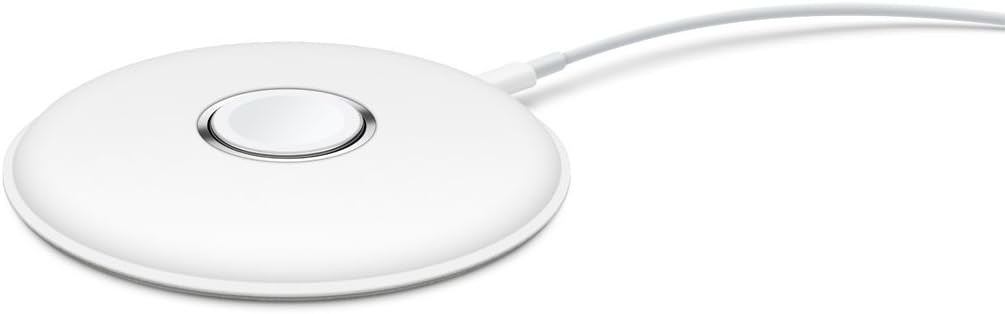
The Apple Watch Magnetic Charging Dock earns a 4.7 rating for its uncomplicated charging experience. It uses the same inductive charging connector associated with Apple Watch, allowing the watch to charge flat with the band open or rest on its side. The side position automatically activates Nightstand Mode, turning the dock into a simple bedside display.
We may earn a commission when you buy through this link, at no additional cost to you.
Unlike stands that merely hold a separate charger, this product provides a dedicated charging surface. That makes it approachable for new Apple Watch owners because there is no need to install a third-party charging puck into a frame or figure out whether the holder fits a particular charger shape.
The dock charges Apple Watch models and sizes broadly. Its supplied connection uses a Lightning-to-USB cable and an Apple 5-watt USB power adapter, according to the product information. Compared with newer USB-C-focused accessories, this older connection standard may be less relevant for buyers who have streamlined their travel kit around USB-C equipment.
This is a strong recommendation for users who value simplicity and want a dock that can charge flat or operate as a bedside clock. It offers less adjustable positioning than a folding travel model and less multi-device functionality than a three-in-one station, but its charging process is direct and familiar.
The watch can rest with its band open, which is convenient for a full look at the display, or sit on its side for bedside use. The side orientation automatically provides the familiar Nightstand Mode view.
The watch simply attaches to the magnetic charging surface. There is no separate charger to fit into the product, making this one of the most approachable docks for a new user.
We may earn a commission when you buy through this link, at no additional cost to you.
The Belkin Apple Watch Charger – Fast Wireless Charging Pad – Travel Charger with Nightstand Mode W/USB-C Cable Included for Apple Watch (Compatible with All Models) – Black has a 4.5 rating and focuses on fast charging in a compact format. It supports all Apple Watch models and uses a magnetic connection to hold the watch in the correct charging position.
We may earn a commission when you buy through this link, at no additional cost to you.
The product information states that Series 7 and Series 8 models can charge from zero to 80 percent in about 45 minutes. It also includes overvoltage protection and automatically stops charging when the watch reaches full capacity. These are useful characteristics for a charger that may remain connected overnight or sit unattended during parts of the day.
A 1.2-meter USB-C cable is included, along with a cable management feature. The wall adapter is not included. The flat pad design is compact enough for travel, although it does not provide the same raised bedside viewing position as a traditional stand or the adjustable angle offered by some folding docks.
Belkin is a good match for travelers who already carry a USB-C power adapter and want a dedicated fast-charging pad. It is less suitable as the centerpiece of a permanent nightstand display because the watch lies flat, but the magnetic alignment, broad compatibility, and compact construction make it a dependable travel-focused option.
The pad prioritizes a small footprint over elevated display positioning. Its magnetic connection maintains alignment while the watch charges, allowing it to fit into spaces where a larger stand would be inconvenient.
Automatic charging cutoff and certified overvoltage protection provide added safeguards for routine use. These features complement the automatic charging behavior of many modern watch accessories.
We may earn a commission when you buy through this link, at no additional cost to you.
The Anker MagSafe Charger Compatible, MagGo 3-in-1 Qi2 15W Charging Station has a 4.6 rating and is the most complete charging station in the guide. Instead of serving only Apple Watch, it combines a Qi2 charging surface for a phone with an Apple Watch charging area and a third device position in one compact desktop base.
We may earn a commission when you buy through this link, at no additional cost to you.
The phone section supports up to 15 watts of wireless charging, while the Apple Watch section is described as certified for fast charging. Anker states that a Series 10 can charge from zero to 100 percent in one hour and 13 minutes based on internal laboratory testing, though real charging times may vary. The watch platform adjusts vertically up to 45 degrees and can support landscape StandBy mode.
Unlike most options in this list, the package includes a 40-watt USB-C power adapter, a five-foot USB-C to USB-C cable, a welcome guide, and a 24-month warranty. That makes setup more complete, although the multi-device format naturally occupies more space than a single-watch holder.
This is the best choice for someone who wants one coordinated charging point for a phone, Apple Watch, and another Qi2-compatible device. It is less relevant for a traveler carrying only a watch or for a user who wants the smallest possible bedside accessory, but it offers the strongest overall functionality for a shared desk.
The three-device layout reduces the need for separate charging blocks and cables. It is particularly useful on a shared work desk where a phone and watch may need frequent charging throughout the day.
The watch section adjusts vertically to make the display easier to view, while the phone area supports MagSafe-style alignment and landscape StandBy viewing. Flexible positioning makes the station more than a basic set of charging pads.
We may earn a commission when you buy through this link, at no additional cost to you.
The right Apple Watch Dock depends on where you charge, whether you travel, which charger you already own, and whether you want the watch raised for bedside viewing. These factors help separate simple holders from complete charging stations.
A holder accepts an existing magnetic charging puck, while an integrated dock includes the charging hardware. Holders such as the Lamicall aluminum model, Spigen TPU stand, elago W2, Macally stand, and AhaStyle silicone dock are useful when you already own a compatible Apple Watch charger. Integrated models such as the foldable travel dock, adjustable Lamicall dock, Apple magnetic dock, Belkin pad, and Anker station can simplify packing or provide a complete setup, but they may require an additional wall adapter or have other accessory limitations.
Compatibility should cover the exact Apple Watch generation, case size, and band arrangement you use. Most products in this guide claim support for current Series, SE, and Ultra models, but one foldable dock explicitly excludes Series 1. Some listings also place limits on bulky protective watch cases or AirPods cases. Check whether the dock is designed around Apple's official charger or whether its built-in magnetic connector has been verified for your specific watch.
A raised dock is easier to read and more useful for Nightstand Mode, while a flat pad takes up less room and may be easier to pack. Fixed 45-degree stands provide a dependable bedside angle but cannot accommodate every preference. Adjustable hinges allow users to raise or lower the watch, and folding designs can collapse into a compact travel shape. Consider whether you read the watch often, whether alarms are your primary nighttime use, and how much room you have near the bed.
Charging speed varies among the integrated models. The Belkin pad advertises fast charging, the Anker station includes certified Apple Watch fast charging, and the Lamicall magnetic dock includes temperature and electrical protection. Apple's magnetic dock offers a familiar charging design, while the foldable travel dock states that it stops charging automatically when the watch is full. Consider not only speed but also the protection circuitry, the charging cable standard, and whether the included power supply meets your needs.
Travel users should prioritize a compact footprint, low weight, and secure magnetic connection. The foldable dock is explicitly designed to collapse, while the adjustable Lamicall dock weighs 52 grams and has a slim profile. Belkin's pad is also compact and intended for travel. By contrast, a permanent metal stand may look better on a desk but take up more room in a bag. A useful travel dock should protect its connector and charging surface while also making it easy to connect to a suitable power source.
A small charging cable can create a surprising amount of visual clutter. The elago W2 includes a dedicated management opening, the Macally stand uses a circular cutout and cable slot, and the Belkin pad incorporates cable management with its included USB-C lead. Other docks route the cable through their body or simply use a compact base. Look for a path that keeps the wire controlled without sharply bending it or creating a snag when the watch is lifted.
A dock remains visible throughout the day, so material and appearance matter as much as function. Aluminum gives the Lamicall and Macally stands a more substantial, coordinated appearance, while silicone options such as the Spigen and AhaStyle products provide a softer contact surface. The Anker station suits users who want multiple devices in one coordinated setup. Match the finish to your existing electronics and choose a footprint that leaves enough room for the watch band to rest naturally.
Most Apple Watch docks are focused on a single watch, which makes them easier to move and less demanding on available power. The Anker MagGo station expands the concept by adding a 15-watt phone charging area and a third Qi2 charging position. It is a compelling desktop solution if multiple devices are already charged together, but it is less efficient for a user who travels with only a watch. Consider both the number of devices and the available charging area before choosing a larger station.
Begin by identifying whether your dock is a passive holder or an integrated charger. For a holder, seat the compatible Apple Watch Magnetic Fast Charger securely in the opening and route the attached cable through the stand's opening or slot. For an integrated dock, connect the supplied or appropriate USB-C or Lightning cable to a suitable power source. If the product includes a wall adapter, use it when an adapter is not already available.
Place the watch on the charging surface with the band open or closed as the design permits. Allow the magnets to pull the watch into alignment rather than forcing it. When using Nightstand Mode, enable the feature in the watch settings before placing the watch on the dock. Lift the watch vertically when removing it to reduce the chance of dragging the charger out of a holder or pulling on the cable connection.
For cleaning, disconnect power and remove the watch before wiping the dock with a soft, dry or slightly damp cloth. Avoid abrasive pads, harsh chemicals, and excess moisture around charging contacts. Do not use a protective watch case if the dock manufacturer recommends removing it for optimal charging, and keep the charging surface free of dust. Periodically inspect the cable, connector, hinge, and base for looseness or damage, particularly if the dock is used while traveling.
No. Several stands in this guide are designed only to hold an existing Apple Watch Magnetic Fast Charger, so neither the charger nor its cable is included. Integrated products such as the foldable travel dock, Apple magnetic dock, Belkin pad, adjustable Lamicall dock, and Anker station include charging hardware, but some still require a wall power adapter. Check the included-accessories list before purchasing.
Most of the stands support the raised watch position needed for Nightstand Mode, but the feature must also be enabled in the watch settings. Flat pads may charge the watch without presenting the same upright bedside display. The Belkin listing includes Nightstand Mode in its product description, while the Lamicall, Spigen, elago, Macally, AhaStyle, and adjustable Lamicall products also describe support for the feature.
It depends on the dock and case. Some designs allow a watch to sit directly on the magnetic charging surface, while the adjustable Lamicall dock specifically recommends removing the case for optimal performance. A thick case can also interfere with a holder's charger cutout. If you regularly use a case, compare its thickness with the dock's charging opening and follow the manufacturer's guidance.
A holder is a passive support for the charging puck that comes with the watch. It may include silicone or metal, cable routing, and a stable base, but the user supplies the charger. An integrated dock includes its own magnetic charging surface and usually a cable, making it more convenient for travel or a complete setup but potentially bulkier or restricted to one charging position.
The foldable travel dock is the most explicitly portable option because it collapses for packing and includes its own magnetic charging component. The adjustable Lamicall dock is also compact and lightweight, while the Belkin wireless charging pad has a low-profile form intended for travel. The right choice depends on whether you prioritize folding, adjustability, or the smallest charging surface.
Both appear in this guide, depending on the model. The foldable dock, adjustable Lamicall dock, Belkin pad, and Anker station use USB-C connections, while the Apple magnetic dock is described as using a Lightning-to-USB cable. Check which cables and adapters you already carry, since a dock with the right connector is only convenient when you also have a compatible power source.
The products here are primarily designed for one Apple Watch. The Anker MagGo 3-in-1 station can charge an Apple Watch alongside a phone and another Qi2-compatible device, but it does not provide multiple Apple Watch charging positions. Users who regularly charge several watches may need separate docks and adequate power for each setup.
A fixed stand works well when you have one preferred viewing angle and want a permanent desk or bedside setup. An adjustable dock is more useful when you alternate between upright viewing, flat charging, and compact transport. The foldable travel dock and adjustable Lamicall dock provide more positional flexibility, while the metal and silicone stands generally emphasize a stable, tidy destination.
The Lamicall aluminum watch stand is the strongest all-around choice for a permanent setup because it combines a refined appearance, stable silicone support, broad compatibility, and effective cable organization. The foldable travel dock wins for portability and self-contained magnetic charging, while the Anker MagGo 3-in-1 station is the most capable choice for consolidating phone and watch charging on a shared desktop.
Prioritize the type of dock that matches your actual routine. Choose a passive holder if you already own a compatible charger and want a permanent display; select an integrated model if easier setup or travel convenience matters more. Check charger compatibility, case size, viewing angle, included cable, adapter requirements, and Nightstand Mode before making a final decision.
Product listings, accessories, and availability can change, so review the current listing details before ordering. Confirm whether your Apple Watch generation and protective case are supported, verify that the necessary cable and power adapter are included or already owned, and compare the dock's footprint with the intended desk or bedside space.