
20-in-1 Laptop Phone Screen Earbud Cleaning Kit
4.5Editor score
Twenty cleaning accessories included
Covers keyboards and screens
Adds earbud and port tools
Compact and highly portable
Laptop cleaning kits compared for screen care, keyboard cleaning, portability, included tools, and versatility across ten useful options.
Laptop cleaning kits combine the tools needed to remove dust, fingerprints, crumbs, and grime from screens, keyboards, ports, and other delicate surfaces. A useful set should offer soft cleaning materials, precise brushes, and safe options for the electronics you own without requiring a cumbersome collection of separate supplies.
We compared these kits by examining their stated components, cleaning methods, portability, screen and keyboard coverage, and suitability for laptops or related devices. The list covers comprehensive electronics kits, screen-focused bundles, a compact dual-ended cleaner, and options that include sprays, cloths, brushes, swabs, blowers, or precision tools.
Each review explains what distinguishes the kit from the alternatives, including its strongest use cases and practical limitations. Ratings reflect the supplied customer feedback, while tool selection and intended applications help determine which option may fit your routine best. Prices and promotions can change.
4.5Editor score

4.9Editor score

4.5Editor score
The comparison below highlights the main differences in coverage, screen-cleaning equipment, keyboard tools, portability, and included accessories. It helps distinguish compact routine-care kits from comprehensive electronics-cleaning bundles and larger screen-focused packages.



The iFixit Laptop Cleaning Kit earns the Editor's Choice position because it combines the highest customer rating in the group with a thoughtfully arranged collection of laptop-care tools. Its contents cover the main cleaning jobs encountered around a computer: screens, keyboards, cooling areas, exterior surfaces, and narrow spaces that are difficult to reach with a cloth.
We may earn a commission when you buy through this link, at no additional cost to you.
A screen saver and microfiber cloths support routine display care, while the dust blower is suited to moving loose debris away from keyboards and cooling fans. The anti-static brush targets more persistent grime, and the inclusion of wipes, swabs, picks, and brushes provides several levels of precision. Everything fits inside the included iFixit Tool Pouch, which is particularly useful for storage or travel.
The main limitation is that this is not primarily a keycap-removal system. It offers fewer components aimed specifically at lifting individual mechanical-keyboard keys than the Ordilend, All-in-1, or 20-in-1 options. Also, users should follow device guidance and apply liquid cleaners carefully rather than spraying liquid directly onto an electronic surface.
This kit is the most balanced recommendation for someone who wants dependable screen care and detailed keyboard cleaning without carrying numerous separate tools. Its broad coverage, organized pouch, and strong customer feedback make it an especially attractive choice for laptop owners, students, travelers, and repair-oriented users.
The compact pouch keeps the screen saver, cloths, blower, brush, wipes, swabs, and picks together instead of allowing them to disappear in a desk drawer. That makes the kit easier to use for frequent maintenance and convenient to pack with a laptop bag.
Different tools suit different levels of debris: a blower shifts loose dust, an anti-static brush loosens grime, and swabs or picks reach confined areas. Screen cloths complete the kit for the surfaces people touch most often.
We may earn a commission when you buy through this link, at no additional cost to you.
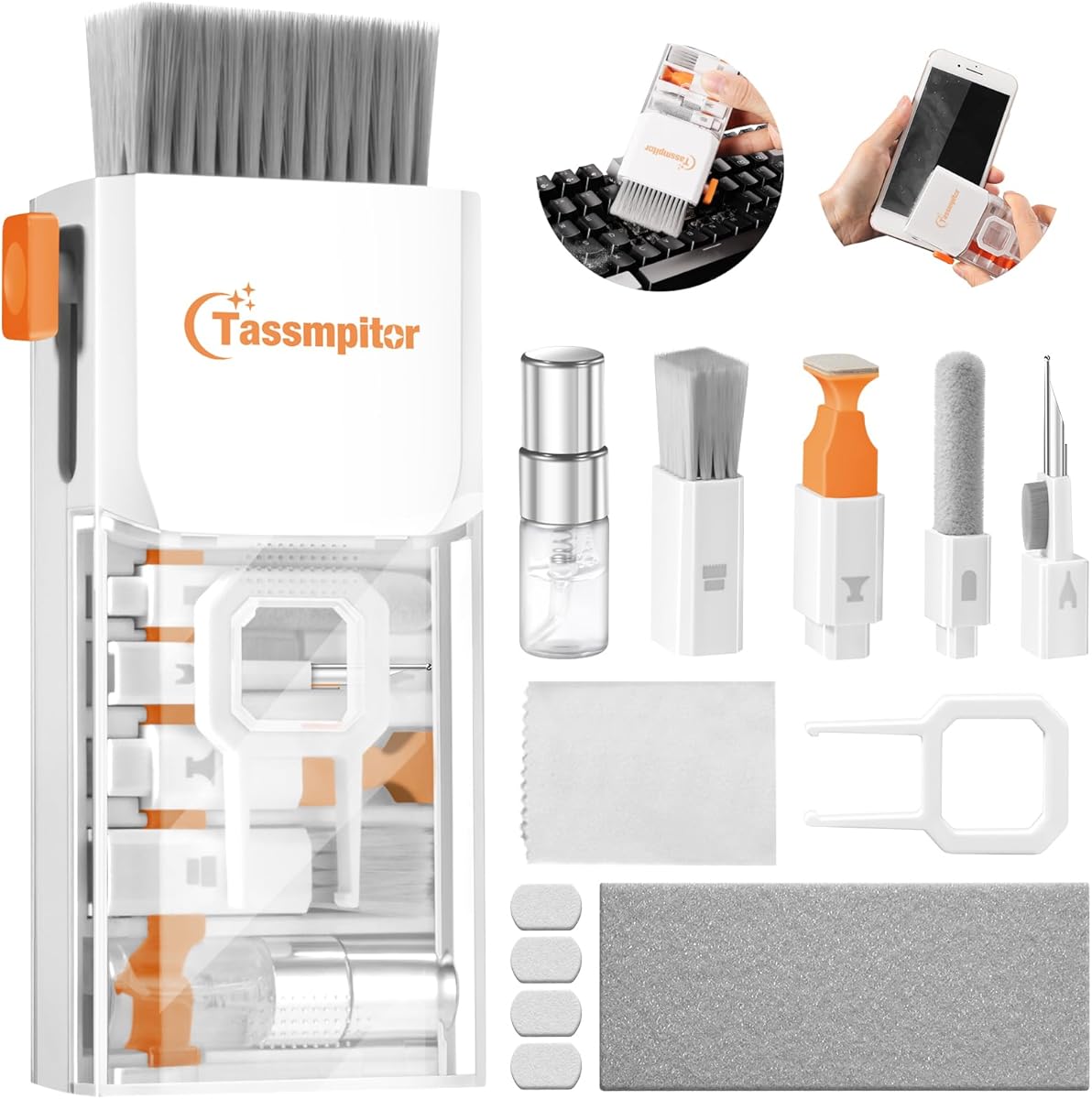
This 20-in-1 cleaning kit stands out for sheer accessory variety and is the Best Budget option in the guide. It includes a retractable large brush, extension-assisted cleaning implements, dual hard-and-soft bristle brushes, a blower, a screen cleaning cloth and spray, a keycap extractor, a shaft extractor, and a card removal pin.
We may earn a commission when you buy through this link, at no additional cost to you.
Its coverage extends well beyond a laptop. The product information specifically describes tools for phone and tablet screens, monitors, televisions, camera lenses, headphones, earbud cases, charging ports, and other narrow spaces. This makes it useful for households where one person maintains several kinds of electronics rather than only one computer.
The tradeoff is that twenty pieces can make the kit feel less streamlined than a focused screen-care product or a compact brush-and-cloth solution. Small components also need to be kept from separating in a bag. Users should apply the included spray to the cloth rather than directly onto a display, and they should avoid using the card pin in ways that could damage a device.
Despite those considerations, the kit offers strong value for buyers who want extensive coverage in a portable package. It is an appealing choice for students, shared households, travelers, and anyone who prefers having a purpose-built implement for each cleaning job.
Extension rods, small brushes, a metal cleaning pen, and a flocking sponge make it easier to address keyboard seams, earbud charging cases, speaker openings, and other places where fingers cannot reach.
Screen-care accessories work across laptops, tablets, phones, monitors, and televisions, while the separate precision tools suit headphones and camera equipment. The broad scope makes it more versatile than a laptop-only bundle.
We may earn a commission when you buy through this link, at no additional cost to you.
Altura Photo's five-piece bundle is the Best Premium recommendation because it balances screen cleaning, keyboard maintenance, and portable accessories in a simple package. It receives a 4.5 rating and includes a two-ounce screen cleaner spray, cleaning brush, air blower, 100g dust-cleaning gel, and a large 16-by-16-inch Magicfiber microfiber cloth.
We may earn a commission when you buy through this link, at no additional cost to you.
Each component addresses a different kind of mess. The spray and large cloth are intended for displays, the brush handles surface debris, the blower moves dust from less obvious areas, and the gel is intended to gather dust from confined spaces. Its stated compatibility with laptops, computers, keyboards, and display screens makes it a sensible choice for a mixed office or home setup.
It is less ambitious than the 20-piece electronics kit because it does not include a keycap puller, earbud tools, or numerous precision brushes. The gel can spread or pick up debris during storage, and users must keep the cloth clean and dry. As with any liquid screen product, the safer method is to spray the cloth rather than the screen.
This Altura Photo set is best for buyers who value a conventional, uncomplicated routine-care bundle with enough material for large displays. It is particularly suitable for frequent computer users who want a cleaner, brush, blower, and screen-care set without managing a large collection of tiny accessories.
The 16-by-16-inch microfiber cloth provides useful coverage for a laptop, desktop monitor, or television. Its size reduces the need for many small passes across wide screens.
The brush, blower, and cleaning gel provide distinct ways to approach loose dust. Using them appropriately can make keyboard maintenance less dependent on a cloth alone.
We may earn a commission when you buy through this link, at no additional cost to you.
The Ordilend all-in-one kit is a strong option for keyboard-focused laptop care, earning a 4.6 rating. Its accessory list includes a retractable large brush, two polishing cloths, a keycap puller, a metal pen tip, a flocking sponge, a thin soft brush, a soft plastic lens-cleaning pen, five replacement cloths, and a large microfiber cloth.
We may earn a commission when you buy through this link, at no additional cost to you.
The keycap puller gives it an advantage for mechanical and gaming keyboards, where removing keys can expose crumbs and grime that a brush cannot reach. Different brush sizes address both the spaces around keys and the narrow gaps between flatter laptop keys. The metal tip and flocking sponge extend the same attention to charging cases and small electronic openings.
The screen-care component is also substantial, with an angled, thickened polishing cloth intended to fit screen corners. The instruction to avoid discoloration, streaks, and fiber shedding should still be considered a design goal rather than a guarantee for every surface or technique. Many pieces must be stored together to remain practical.
Choose this kit if keyboard deep-cleaning, especially beneath keycaps, matters more than having a specialized blower, swabs, or an organizer pouch. It is a versatile choice for computer users who also maintain phones, cameras, earbuds, and other accessories.
The included keycap puller makes it possible to lift keys carefully and remove hidden debris. This is one of the most useful features for owners of mechanical or gaming keyboards with frequent crumbs and dust.
Two polishing cloths, five replacement cloths, and a large microfiber cloth give the kit substantial cleaning material. Having extras is useful when one cloth needs washing or replacement.
We may earn a commission when you buy through this link, at no additional cost to you.
The All-in-1 Keyboard Cleaner Laptop Cleaning Kit is a versatile option for people who regularly clean more than a display. With a 4.6 rating, it combines screen-care materials with tools for keyboards, cameras, smartphones, tablets, headphone cases, and earbud sound openings.
We may earn a commission when you buy through this link, at no additional cost to you.
Its retractable brush handles broader keyboard surfaces, while the high-density mini brush is intended for deeper spaces between keys. A keycap puller and metal pen tip support more detailed keyboard work, and the flocking sponge is intended for charging cases. Screen cleaning is supported by thick, wide polishing cloths shaped to reach screen corners.
The kit does not list a dedicated pouch, so keeping the many components together is the buyer's responsibility. Its cleaning instructions appropriately call for powering down and unplugging the computer, tipping the laptop to remove larger debris, and wiping screens gently in one direction. Users should avoid excessive pressure and circular scrubbing.
This is a strong choice for students and general technology users who want a single collection for several devices. It may be less attractive than a screen-focused option for someone who only wants to wipe a monitor, but its precision tools give it greater everyday flexibility.
The mini brush, metal tip, flocking sponge, and lens pen extend beyond laptop keyboards. They are useful for smartphone edges, camera screens and lenses, headphone cases, and other areas where a full-size cloth cannot provide control.
The included cloths are designed for gentle screen contact, but technique still matters. Cleaning in one direction with light pressure and keeping liquid away from the display reduces the chance of streaking or residue.
We may earn a commission when you buy through this link, at no additional cost to you.
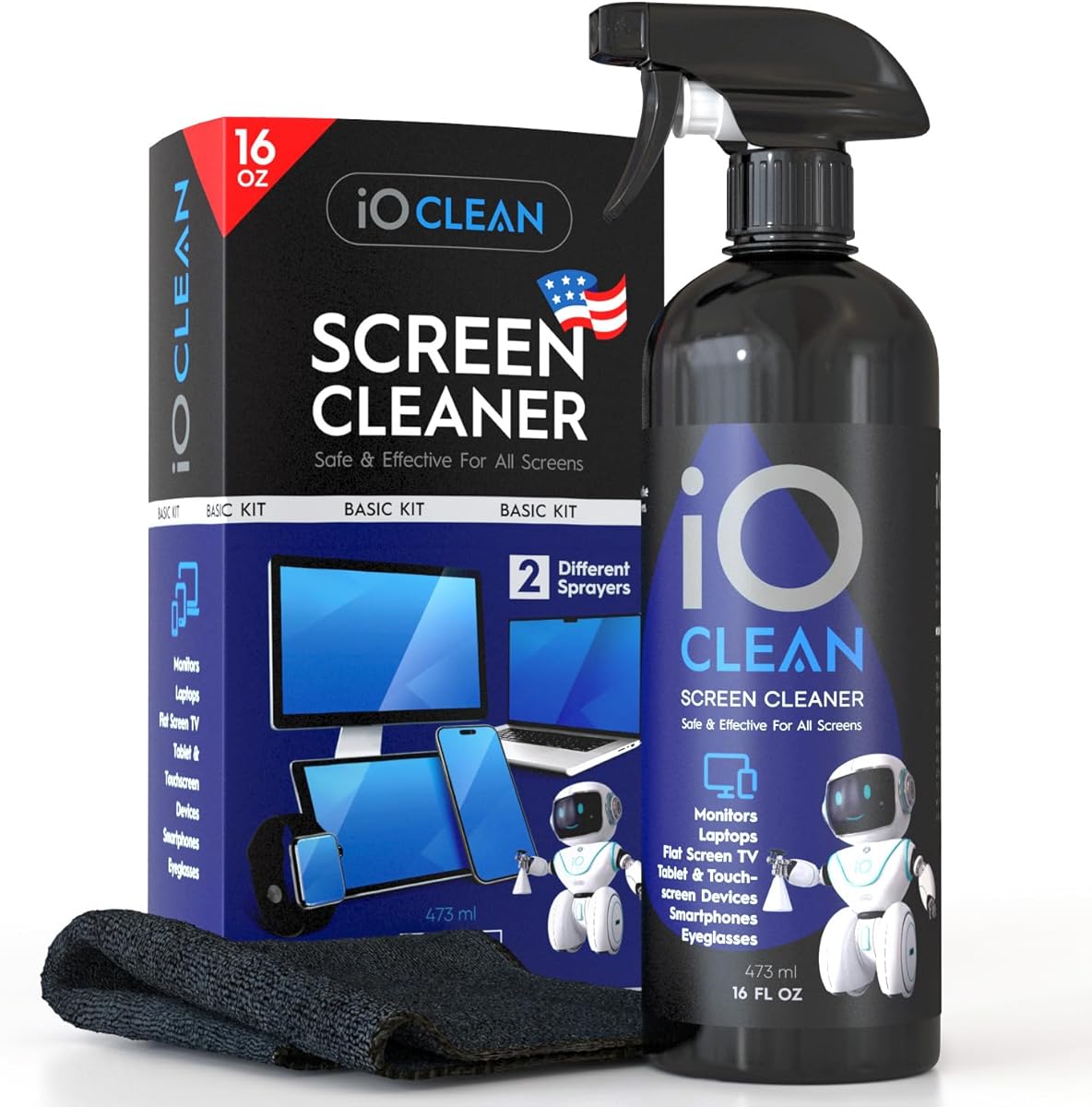
The iO CLEAN 16oz Screen Cleaner Spray is built for frequent screen care and multi-device households. It carries a 4.6 rating and includes a large recyclable bottle, two interchangeable nozzles, and a premium microfiber cloth. The push-button sprayer suits small devices, while the trigger sprayer is intended for larger screens.
We may earn a commission when you buy through this link, at no additional cost to you.
Its formula is described as biodegradable, non-toxic, and free from alcohol, ammonia, and phosphates. It also offers anti-static and anti-glare benefits according to the product information. The stated compatibility spans LCD, LED, and OLED displays, along with laptops, phones, tablets, monitors, projectors, e-readers, televisions, and screen protectors.
This is primarily a screen-cleaning solution rather than a comprehensive keyboard-repair kit. It lacks the keycap puller, small brushes, blower, and precision tools supplied by several higher-ranked alternatives. The large bottle also takes up more space than compact spray-and-cloth kits, which may matter for travel.
It is best for a user who cleans several large screens regularly, works across many device types, or wants a bottle that will last through many cleaning sessions. Laptop owners who also need deep keyboard access should look to one of the comprehensive tool kits instead.
The interchangeable nozzles let users choose between controlled application for a phone or tablet and broader coverage for a laptop or monitor. This flexibility adds convenience without requiring separate bottles.
The absence of alcohol and ammonia makes the solution appealing for routine use around family and pets. Its stated anti-static and anti-glare properties add further value for frequently handled screens.
We may earn a commission when you buy through this link, at no additional cost to you.
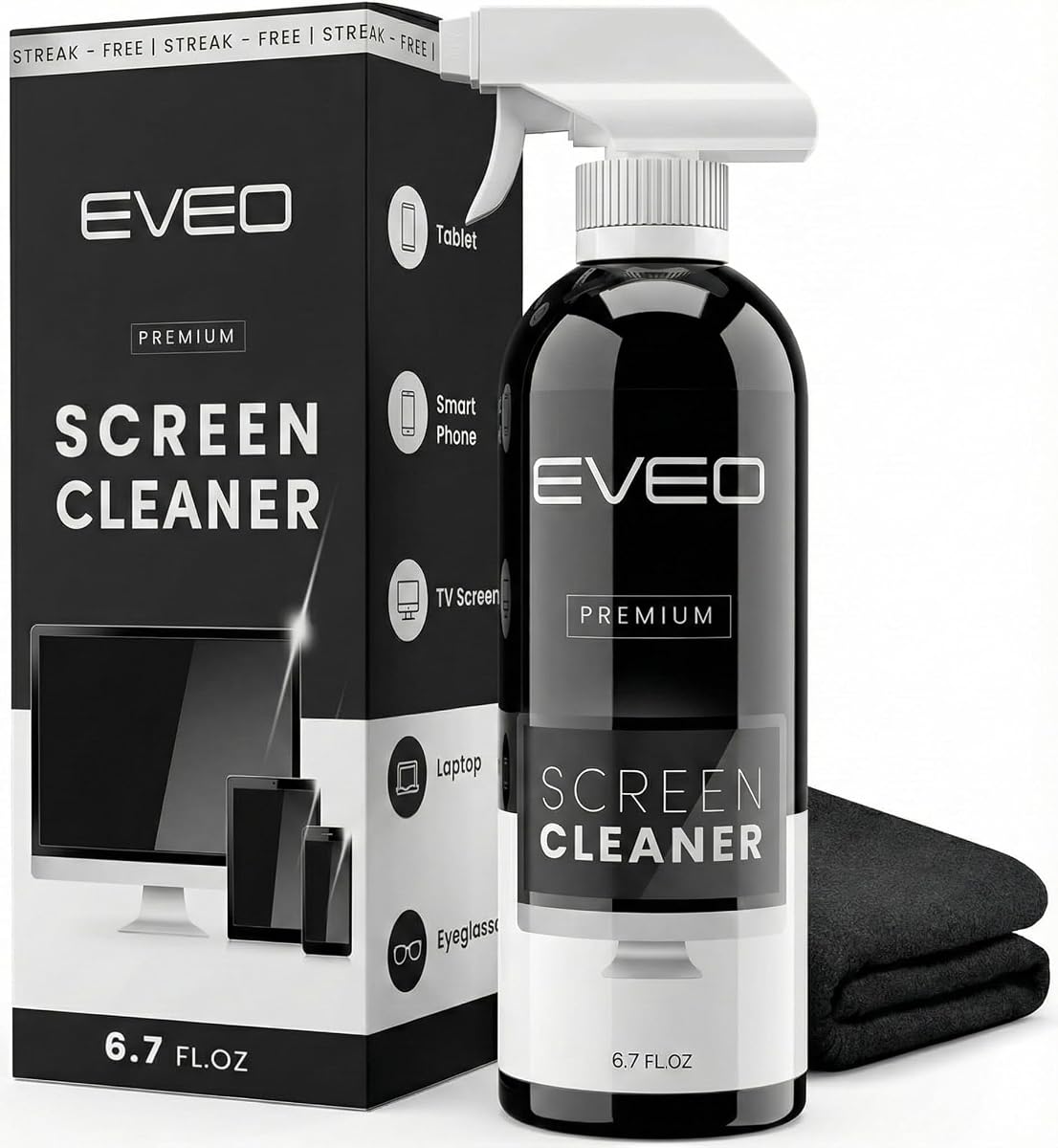
The EVEO Screen Cleaner Spray is a focused screen-care package for laptop users who want a simple bottle-and-cloth routine. It has a 4.6 rating and includes a large cleaning bottle with a trigger sprayer and a plush microfiber cloth designed to lift dust, fingerprints, and other smudges.
We may earn a commission when you buy through this link, at no additional cost to you.
The product information identifies compatibility with LCD, LED, CRT, and OLED screens, including devices from major brands such as LG, Sony, Samsung, Sharp, and several mobile or computing ecosystems. The cloth is intended to absorb stubborn marks while reducing streaks and fiber shedding, making the bundle practical for both a laptop and a larger monitor.
Its main limitation is scope. Unlike the Ordilend, iFixit, Altura Photo, and 20-in-1 kits, EVEO does not provide a keycap puller, detail brushes, blower, or swab assortment. It is therefore better suited to screen maintenance than deep keyboard cleaning. The included trigger sprayer is also less flexible than a two-nozzle design.
Choose this option for routine display cleaning when simplicity matters more than extensive device tools. It is particularly helpful for owners of multiple screens who want one larger bottle and a soft cloth rather than a complex collection of accessories.
The recommended method is to spray the cleaning liquid onto the microfiber cloth and then wipe the display. This reduces the amount of liquid that could seep into bezels or keyboard openings.
Stated support for LCD, LED, CRT, and OLED panels broadens the potential applications. Owners should still check their own device guidance before applying any screen-cleaning product.
We may earn a commission when you buy through this link, at no additional cost to you.
This 15ml all-in-one kit offers a balanced mix of screen, keyboard, and small-device tools. It receives a 4.6 rating and includes a retractable anti-static brush, a keycap puller, thick polishing cloths, cleaning spray, a three-in-one earbuds pen, a precision lens pen, and tools for speaker mesh and charging ports.
We may earn a commission when you buy through this link, at no additional cost to you.
The keycap puller distinguishes the set for mechanical keyboard owners, while the detail brush reaches between shallow laptop keys. Its high-density microfiber cloths are designed to provide a streak-free, residue-free finish. The screen spray has a smaller stated capacity than the bottles in the EVEO and iO CLEAN options, but the kit includes the cloth needed to apply it.
The main limitation is that no dedicated dust blower is listed, so loose debris must be handled with brushes rather than directed airflow. The 15ml spray may also require more frequent refills for someone cleaning several large displays. Users should not assume that a keycap puller makes every laptop or mechanical keyboard safe for key removal.
This is a strong recommendation for a balanced electronics-care routine. It suits laptop owners who also maintain an iPhone, earbuds, camera, or tablet and want enough precision tools to address narrow openings without moving to a 20-piece bundle.
A retractable anti-static brush handles routine debris, and the detail brush reaches narrow spaces around laptop keys. For mechanical keyboards, the puller enables deeper cleaning beneath removable keycaps.
The metal tip, soft brush, and three-in-one earbuds pen target charging ports, speaker mesh, and narrow case seams. These tools are valuable when a cloth cannot reach confined debris.
We may earn a commission when you buy through this link, at no additional cost to you.
The WHOOSH! Screen Shine Duo is designed around a useful distinction between home and mobile cleaning. It includes a larger Go XL bottle and a smaller Pocket bottle, along with two ultra-soft PROTX2 microfiber cloths. The set holds a 4.6 rating and focuses on clean, streak-free screen care.
We may earn a commission when you buy through this link, at no additional cost to you.
The larger bottle suits a desk or shared office, while the pocket version is convenient for quick touch-ups in a bag or vehicle. The product information states that the formula is alcohol-free and non-toxic, and that it is suitable for varied screen coatings, including glossy and anti-glare examples such as those found on tablets and MacBooks.
This is a narrow product with an important strength: it keeps screen care uncomplicated. It does not include a keycap puller, keyboard brush, blower, or precision tools, so it cannot replace a comprehensive electronics cleaning kit. Buyers who need more than a spray and cloth should choose a bundle designed around keyboard maintenance.
It is best for frequent travelers, students carrying a laptop between classes, and anyone who wants a dedicated small bottle for quick cleaning. The two-size format also makes it a practical choice for offices that want both a dispensable supply and a portable option.
The larger bottle is suited to routine cleaning at a desk or in the home, while the pocket bottle handles travel and quick touch-ups. Having both avoids carrying the full-size container everywhere.
The absence of alcohol and ammonia supports use on sensitive screens and coatings according to the listed product claims. The microfiber cloths are the intended means for applying and buffing the cleaner.
We may earn a commission when you buy through this link, at no additional cost to you.
The OXO Good Grips Sweep & Swipe is the most compact option in the guide, offering a double-ended design for screens and surfaces. Its 4.5 rating reflects a straightforward proposition: a microfiber pad removes fingerprints and smudges, while a soft brush sweeps away dust and dirt.
We may earn a commission when you buy through this link, at no additional cost to you.
Both working ends are protected by a retractable brush and storage cover, reducing the chance of accidental contact with a screen or other belongings. The tool is designed for laptops, tablets, and smartphones, making it a natural fit for someone who wants one lightweight implement to carry between work, school, and travel.
What it does not offer is depth. There is no spray, keycap puller, blower, swabs, or dedicated precision tool for ports and narrow keyboard gaps. The soft brush can remove surface debris, but it cannot perform the detailed cleaning supported by the larger kits. Users needing more power may also find that a dry brush needs a separate cloth for certain marks.
Choose the Sweep & Swipe for portability, simplicity, and fast touch-ups. It is the strongest fit for a minimal kit, while buyers with frequent crumbs, mechanical keyboards, or multiple device types should choose one of the comprehensive all-in-one alternatives.
Flipping the device between a microfiber pad and a soft brush lets users sweep debris first and then wipe away smudges. The sequence is efficient for quick care between work sessions.
The retractable brush and storage cover keep the cleaning surfaces protected. The compact format is easier to carry than a case containing a spray bottle, cloths, and multiple narrow implements.
We may earn a commission when you buy through this link, at no additional cost to you.
The right laptop cleaning kit depends on the surfaces you maintain, the types of debris you encounter, and how portable the set must be. Compare screen compatibility, keyboard tools, precision accessories, liquid handling, storage, and the number of devices you expect to clean.
Screen cleaners should be evaluated by the display technologies and coatings they claim to support. The listed products mention LCD, LED, OLED, and CRT screens, along with laptops, tablets, phones, monitors, televisions, projectors, e-readers, and protective films. Compatibility with a broad range of devices is convenient, but the device manufacturer's guidance should always take priority. Check whether the kit includes a clean microfiber cloth and whether it advises applying liquid to the cloth rather than spraying the display directly.
A soft brush is useful for ordinary surface debris, but a keycap puller changes what a keyboard kit can handle. Mechanical and gaming keyboard owners may need to lift keys to remove crumbs and grime underneath. Laptop users generally need a thin, high-density brush that can enter the spaces between shallow keys without catching. Some kits also include a metal pick, while the iFixit set adds swabs for confined areas. Compare the intended keyboard type rather than relying only on the number of pieces.
Liquid formulas vary in composition, package size, and intended application. Some options emphasize a biodegradable, non-toxic formula without alcohol, ammonia, or phosphates, while others include conventional screen-cleaning solutions. A small spray is convenient for an electronics kit, while a large bottle may better serve several displays. No matter the formula, avoid spraying directly onto a screen, do not allow liquid to enter vents or key openings, and use only enough to dampen the cloth.
Charging ports, speaker grilles, headphone cases, camera lenses, and keyboard seams can trap debris that a cloth cannot reach. Precision pens, metal tips, thin brushes, flocking sponges, swabs, and picks cover these jobs. They are especially valuable if you maintain earbuds, cameras, phones, or game controllers. Look for soft bristles on delicate surfaces, and avoid inserting hard or sharp tools farther than the manufacturer recommends.
Dust can be handled in different ways. A brush loosens surface dirt, a soft brush moves it away, and a blower can direct light air from keys, fans, or other recesses. A cleaning gel may collect dust from confined spaces but requires careful storage because it can collect additional debris. No method should be used while a laptop is powered on, and compressed air should never be directed forcefully into a laptop because that can move debris into the chassis.
Portability matters more for people who clean their devices in different locations. The iFixit set includes a dedicated pouch, while compact options such as the OXO Good Grips Sweep & Swipe use a protective cover. Large bottles consume more space, and kits with twenty small tools need a reliable case to prevent pieces from being lost. Consider whether the kit should live in a desk drawer, travel in a laptop bag, or remain beside a shared workstation.
A laptop-only user may find a screen sprayer, brush, and cloth sufficient, while a multi-device owner may prefer a 20-in-1 set with earbud tools, camera brushes, extension rods, and charging-port implements. Avoid paying for pieces you will never use. Conversely, a comprehensive kit can be worthwhile when one household shares cleaning duties across computers, phones, tablets, headphones, cameras, and televisions.
The cleaning cloth is as important as the solution because a rough or dirty cloth can leave fibers and residue. The Ordilend set includes several replacement cloths, the Altura Photo bundle has a large microfiber cloth, and other kits include one or more dedicated cloths. Look for microfiber material and enough supply to wash cloths without leaving the kit temporarily incomplete. Keep used cloths in a clean state and follow their care instructions.
Begin by shutting down and unplugging the laptop. For a closed device, check the manufacturer's guidance and make sure surfaces are cool. Remove larger crumbs by gently tipping or turning the computer over, but avoid shaking it forcefully. Use a soft brush, detail brush, blower, or cleaning gel according to the tool's intended purpose, working slowly so debris is moved out of the keyboard rather than deeper into it.
For screens, spray a small amount of suitable cleaner onto a clean microfiber cloth rather than directly onto the display. Wipe gently in one direction with light pressure, avoiding circular scrubbing. Clean the corners with the cloth's corner, and avoid pushing moisture into the bezel. Never use a wet cloth on a keyboard or allow liquid to approach openings, vents, speakers, ports, or battery areas.
After use, keep brushes retracted, return tools to their pouch or case, and store liquids upright with the nozzle closed. Wipe the metal tip and delicate pen surfaces so residue does not transfer to screens or storage surfaces. Wash reusable cloths according to their care instructions, and do not use a cloth that has become rough, heavily soiled, or contaminated with oily debris on a display.
Most comprehensive kits in this guide include both screen and keyboard tools, typically a microfiber cloth, brush, spray, and precision implements. Screen-only products are better for routine display care, while larger electronics kits also handle crumbs, ports, earbuds, and charging cases. Choose according to the devices and surfaces you actually maintain.
It can be safe when the product is compatible with the display and you follow the supplied directions. Turn off and unplug the laptop, spray the cloth rather than the screen, and use only a lightly dampened cloth. Avoid allowing moisture to enter the bezel, keyboard, vents, ports, or speakers.
A thin, soft-bristled detail brush is generally the safest choice for crumbs and dust between laptop keys. Turn the laptop upside down over a surface so larger pieces fall out, then brush gently toward the edge. Avoid hard metal picks on laptop keyboards, where they can damage membranes or the key structure.
A keycap puller can make deep keyboard cleaning easier because it allows keys to be removed so hidden debris can be reached. You should only pull keys that are designed to be removable and use a method appropriate for their design. A standard laptop keyboard generally should not have its keys pulled off.
A clean microfiber cloth and a compatible cleaning solution are generally effective at lifting fingerprints and oily smudges. Apply the solution to the cloth, use light pressure, and wipe in one direction. For stubborn marks, allow the cloth to absorb rather than increasing pressure or rubbing aggressively.
Microfiber is commonly used for delicate screens because its fine fibers lift dust without introducing coarse particles. Keep the cloth clean and dry, avoid fabric softener, and follow the display manufacturer's cleaning instructions. A cloth with grit trapped in it can scratch a screen, so it should not be stored in a dusty pocket.
Only use air very carefully and never direct a strong compressed-air stream into a laptop. The force can move debris deeper into the chassis or push it toward fans. A gentle dust blower or soft brush in the kit is usually more appropriate for routine external cleaning, followed by manufacturer-approved methods if vents require service.
Light-touch screens can usually be wiped as fingerprints appear, while keyboards benefit from routine inspection and light brushing. The exact frequency depends on use, dust, and eating habits. Cleaning small amounts of debris frequently is generally easier than waiting for a heavily soiled keyboard or screen to become caked with grime.
The iFixit Laptop Cleaning Kit is the strongest all-around choice because of its high customer rating, broad tool selection, and included storage pouch. The 20-in-1 kit leads for extensive accessory variety, while Altura Photo provides a particularly straightforward five-piece combination of spray, brush, blower, gel, and a large microfiber cloth.
Prioritize the surfaces you clean most often. A screen sprayer and microfiber cloth may be enough for display maintenance, a detail brush helps with laptop-key debris, and a keycap puller adds value for mechanical keyboards. Multi-device owners should consider precision brushes, swabs, earbud pens, and extension tools, while frequent travelers may prefer a compact two-ended or neatly packaged kit.
Before buying, check the device manufacturer's cleaning guidance, verify screen compatibility, and review the included components for your specific routine. Product ratings and customer feedback can also evolve over time. Prices, promotions, and availability change, so confirm current listing details before making a final purchase.