
16Piece Instant App Alerts Alarm System
4.7Editor score
No contracts or monthly fees
Support for 100 accessories
Smart Life and Tuya apps
Discover the best Alarm System without Monthly Fee options, compared for connectivity, sensors, alerts, expandability, installation, and home security needs.
An alarm system without a monthly fee can provide dependable home monitoring without introducing a recurring subscription. The strongest options combine wireless sensors, smartphone alerts, audible sirens, flexible arming modes, and simple DIY installation, while optional cellular connectivity can add resilience when Wi-Fi is unavailable.
We compared all ten systems using the supplied product details, focusing on sensor quantities, Wi-Fi and cellular support, app compatibility, alert methods, backup power, voice-control features, and expansion potential. The list covers compact kits, whole-home packages, touchscreen hubs, and systems designed for users who want direct control without professional monitoring fees.
Each pick explains its most useful features, practical limitations, and ideal installation setting. Ratings and specifications reflect the current product listings, but product configurations, accessory bundles, availability, and costs can change. Readers should confirm the included components and current listing details before making a final purchasing decision.
4.7Editor score
4.8Editor score

4.5Editor score
This side-by-side comparison highlights each system's connectivity, alert methods, included accessories, and expansion potential, making it easier to identify the right no-subscription option for your home.


This WiFi alarm system earns a 4.5 rating and stands out for a balanced package that can cover numerous entry points without requiring complex wiring. It includes a base station, keypad, motion sensor, ten door sensors, two remote controls, and an indoor siren. That combination is especially useful for apartments, townhouses, and medium-sized homes that want immediate entry alerts and app control.
We may earn a commission when you buy through this link, at no additional cost to you.
Its 120dB siren provides a strong audible deterrent, while smartphone notifications let users know when a sensor is triggered. The system connects to a 2.4GHz Wi-Fi network and does not support 5GHz networks. A rechargeable backup battery maintains operation for up to eight hours during a power interruption, adding a useful layer of resilience without requiring a monthly service plan.
The main limitation is its expansion ceiling. The hub supports up to 20 sensors and five remotes or keypads, which is ample for many homes but narrower than systems designed to accommodate larger accessory ecosystems. It also lacks the cellular failover options found in several competing picks. Buyers who need continuous cellular notifications should consider a WiFi+4G alternative.
This is a good choice for users who value a generous initial door-sensor count, straightforward wireless setup, and a siren that can be heard throughout most of a home. It may be less suitable for very large properties or anyone seeking support for a large number of future accessories. For those households, the system is recommended as a capable all-wireless foundation without recurring fees.
Ten included door sensors make this one of the more practical choices for monitoring exterior doors, interior rooms, or storage areas. Add the included motion detector to create a layered setup that can react to both entry and movement.
The built-in rechargeable battery is designed to keep the alarm operating for up to eight hours after power is lost. While it cannot replace a cellular backup connection, it provides valuable protection against short outages and unexpected interruptions.
We may earn a commission when you buy through this link, at no additional cost to you.
This 15-piece wireless alarm kit receives a 4.2 rating and offers a familiar combination of entry sensors, motion detection, app control, and an audible siren. The package contains a Wi-Fi base station, keypad, motion sensor, ten door sensors, and two remote controls, giving new users a substantial starting point for apartment or small-home coverage.
We may earn a commission when you buy through this link, at no additional cost to you.
The system sends real-time notifications through its app and can be managed remotely while users are away. Its 120dB siren is designed to deter intruders, while the keypad and remotes provide local ways to arm, disarm, or otherwise interact with the system. Alexa compatibility adds a voice-control option for compatible smart-home environments.
Its primary trade-off is connectivity. This unit relies on 2.4GHz Wi-Fi and does not support 5GHz networks, while no 4G failover is listed. Users in an area with inconsistent home internet may want a system that can transition to a cellular network. Expansion is also limited to 20 sensors and five remotes or keypads, so the included accessories should be selected carefully.
The kit is recommended for buyers who want an easy DIY introduction to wireless alarm systems, especially those with multiple monitored doors. It provides enough hardware to begin immediately, but users seeking advanced scheduling, a large accessory limit, or cellular redundancy should compare one of the more advanced PGST-based systems.
Users can arm and monitor the system through the app, while Alexa compatibility provides a hands-free way to work with the alarm. This makes the kit approachable for people who want smart-home control without complicated programming.
The absence of required monthly fees keeps the operating model straightforward. With no cellular path specified, however, dependable household Wi-Fi and a compatible 2.4GHz network remain important setup considerations.
We may earn a commission when you buy through this link, at no additional cost to you.
This 24-piece WiFi+GSM/4G alarm system carries a 4.3 rating and focuses on flexible connectivity and multi-channel alerts. It can operate over 2.4GHz Wi-Fi or accept a 4G SIM card for telephone and SMS alarm functions, giving users more than one route for receiving warnings when a sensor is triggered.
We may earn a commission when you buy through this link, at no additional cost to you.
The hub supports Smart Life or Tuya app control, custom sensor names, voice-assistant connection, and a color display that shows status, weather, and date. Its ten-language interface is useful for multilingual households. Physical tamper protection also distinguishes it from basic kits, as unauthorized removal can trigger an alarm and require a security code to disarm.
Connectivity choice involves a trade-off. The system is described as permanently free after activation without additional subscription charges, but telephone and SMS services depend on the SIM carrier and any applicable third-party rates. Users who do not need calling or messaging can still use its Wi-Fi and app functions, while those who do should review their carrier plan before activation.
This system is well suited to households seeking multiple alert channels and a cellular option for unreliable internet. Its 24-piece format, emergency SOS device, and remote-control SOS function are particularly relevant to families caring for older adults or children. It is recommended over simpler Wi-Fi-only models for users who value redundancy and broader communication methods.
App notifications, phone calls, and SMS messages can keep users informed even when one communication method is inconvenient. Multi-alarm support also gives the installer more control over which events produce each type of alert.
The included emergency SOS device triggers the main alarm, and the remote control carries a similar function. That makes emergency signaling accessible to children and older family members without requiring them to navigate the app.
We may earn a commission when you buy through this link, at no additional cost to you.
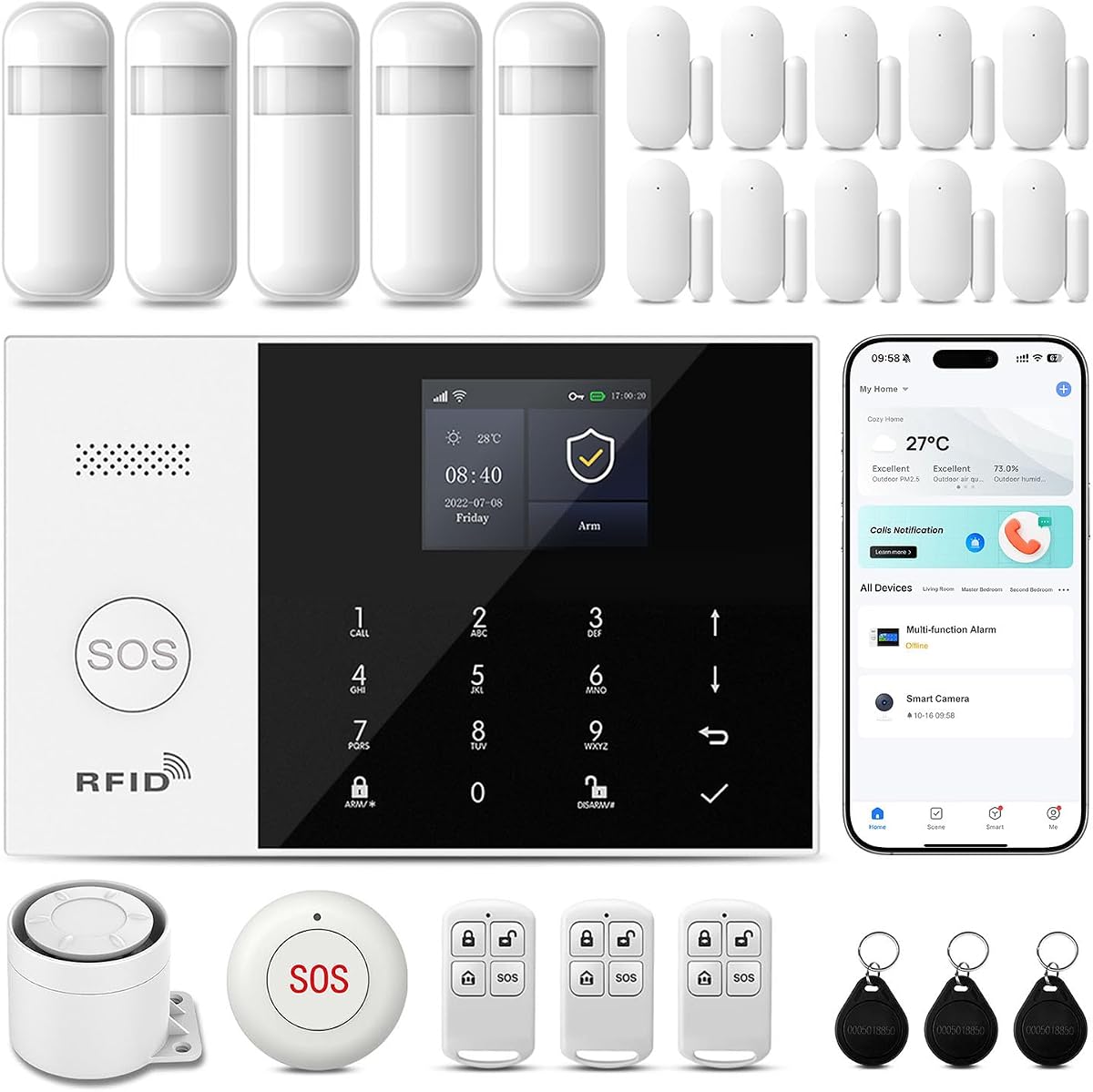
This 16-piece home alarm system has a 4.7 rating and stands out for its unusually high expansion capacity. It supports up to 100 wireless accessory locations, allowing users to add door sensors, motion detectors, remote controls, SOS buttons, doorbells, and outdoor sirens over time. That flexibility makes it a strong starting point for a growing or unusually large home.
We may earn a commission when you buy through this link, at no additional cost to you.
The system uses Smart Life or Tuya apps for remote control, parameter changes, arming modes, and synchronized accessory management. It supports WiFi and 4G GSM connectivity, while its multichannel alarm modes can cover app push, SMS, and voice monitoring. Preset phone and SMS groups can be configured separately, and the host can name different alarm types for clearer event identification.
Its extensive configuration options also demand more careful setup than a simple four-sensor starter kit. Users should consult the manual or operation video if pairing accessories feels challenging. A cellular module or SIM may also add setup complexity, and external carrier expenses may apply if voice or SMS functions are enabled. The no-contract, no-monthly-fee model remains attractive for users who only need app-based operation.
The system is recommended for buyers who want to begin with a complete kit but do not want to limit future expansion. It suits apartments, houses, and small businesses that can benefit from different sensors around many access points. The 100-accessory ceiling and multichannel alerts offer strong long-term flexibility, making this our top budget-oriented choice among the listed systems.
A limit of 100 accessory locations is far more generous than the 20-sensor maximum of several competing systems. Users can add compatible PGST accessories without replacing the hub as their security needs evolve.
The app supports arming, disarming, voice monitoring, intercom functions, and individual alarm settings. Naming different alarm types and assigning separate phone or SMS groups makes the system easier to manage in a busy household.
We may earn a commission when you buy through this link, at no additional cost to you.
This wireless DIY alarm kit has a 4.3 rating and combines a compact starting bundle with broad smart-home integration. It includes one alarm hub, four door and window sensors, and one remote control. Although smaller than the bundles offered by several other picks, it can expand to 100 accessories and is suitable for houses, apartments, garages, offices, stores, and warehouses.
We may earn a commission when you buy through this link, at no additional cost to you.
The hub supports a 120dB siren, a rechargeable backup battery, and a stable 433MHz wireless sensor connection. Users can operate Away Arm, Home Arm, and Disarm modes through Alexa or Google Home, while the Smart Life app handles remote arming, event records, and push notifications. The remote includes a one-touch SOS function for household members who need immediate access to an emergency trigger.
The main trade-off is its comparatively small initial package. Four entry sensors may not cover a multi-level home immediately, so additional sensors could be needed. It also relies on 2.4GHz Wi-Fi without listed cellular failover. Users should therefore consider both household Wi-Fi reliability and the number of entry points they want protected on installation day.
This kit is recommended for users who want a flexible, expandable system integrated with a broad smart-home ecosystem. It also suits those who need optional smoke, water-leak, motion, keypad, and outdoor-siren accessories later. The stated customer support, technical assistance, and replacement warranty add reassurance, while the absence of recurring charges keeps the long-term ownership model simple.
The accessory range extends beyond door sensors and motion detectors to include smoke detectors, water-leak sensors, keypads, remotes, and outdoor sirens. This gives users a practical path to building a broader home-safety network.
Alexa and Google Home support gives household members several ways to manage armed, home, and disarmed states. The app and one-touch remote SOS control add useful alternatives when a user cannot access a voice assistant.
We may earn a commission when you buy through this link, at no additional cost to you.
This 21-piece Wi-Fi alarm system earns a 4.4 rating and offers one of the more polished hub experiences in the group. It uses a color screen to display system status, weather, and date, supports ten languages, and works with Alexa. The dedicated screen and multilingual interface are useful for households that want local status information without opening an app.
We may earn a commission when you buy through this link, at no additional cost to you.
The system provides 48 hours of rechargeable battery backup during outages, considerably longer than the eight-hour figure associated with the first pick. A 120dB siren, app notifications, sensor-name customization, and remote arming and disarming form the core of its everyday operation. It operates on 2.4GHz Wi-Fi and requires no SIM card.
Compared with dual-network systems, its main limitation is the absence of a cellular path. It also depends entirely on its internal battery for backup, so maintaining the rechargeable power supply is important. Although the screen and multilingual support create a premium feel, buyers should not mistake those conveniences for professional monitoring or cellular alarm delivery.
The system is recommended for users who prioritize a clear local display, voice control, and useful outage resilience. It is also appropriate for multilingual homes and anyone seeking a discrete alarm hub with a straightforward app. Buyers wanting automatic cellular failover should choose a WiFi+4G or WiFi+GSM model instead.
The color display can show system status, weather, and the date, reducing the need to open the app for routine checks. Ten-language support also makes the interface approachable for a wider range of households.
A rechargeable battery that is advertised to provide 48 hours of backup gives the hub a useful operating cushion during outages. Users should test the backup periodically and replace the hub if the status no longer appears reliable.
We may earn a commission when you buy through this link, at no additional cost to you.
This PGST touchscreen alarm system has a 4.5 rating and delivers the most advanced central-hub experience among the picks. Its 4.3-inch color touchscreen provides a clear view of accessory status and allows direct adjustments, making the system easier for older adults and children to understand than a small button-only panel.
We may earn a commission when you buy through this link, at no additional cost to you.
Smart Life and Tuya app control, Alexa and Google support, scheduled operation, RFID access, a remote control, and the touchscreen provide several ways to manage the alarm. It connects to 2.4GHz Wi-Fi or accepts a SIM card for additional phone notifications, while the hub can produce an alarm exceeding 120dB when an intrusion is detected.
The many controls also require thoughtful configuration. Users must set up the app, networks, schedules, accessories, and any desired cellular pathway correctly. A SIM-based connection can introduce third-party carrier costs, and the silent-alarm mode may not provide the same immediate deterrence as sounding the internal siren. These are optional features rather than shortcomings.
This system is recommended for users who want a visually prominent hub, convenient local controls, and optional cellular resilience without recurring alarm-system fees. It is particularly appropriate for families seeking an easy-to-read interface and several methods of interaction. Those wanting the strongest premium experience should confirm that the selected bundle includes all desired sensors and accessories.
The large color touchscreen turns the hub into more than a siren controller. Users can inspect accessory status and change settings directly, reducing the learning curve for household members who are less comfortable with apps.
The hub supports a silent alarm mode for situations where users want notification without immediately announcing an intrusion through the siren. Homeowners can use that option alongside app, phone, or other configured alert methods as part of a tailored response plan.
We may earn a commission when you buy through this link, at no additional cost to you.
This 9-piece alarm system has a 4.0 rating and is designed as a compact starting package for homes with two or three bedrooms. The kit includes one base station, one keypad, four door and window sensors, two motion detectors, and two remote controls. Mounting screws, adhesive tape, a power cord, and an adapter are also included.
We may earn a commission when you buy through this link, at no additional cost to you.
Its standout feature is automatic connection switching. The system supports 2.4GHz Wi-Fi and 4G networks and moves to 4G when Wi-Fi disconnects, helping maintain notifications and alarm operation. Users receive mobile alerts, can manage PGST devices through Smart Life or Tuya, and can arm, disarm, or select stay, away, and emergency modes from the keypad.
The product listing describes 24/7 professional monitoring and states that compatible PGST cameras can be added separately. Because the cameras are not included, buyers should carefully distinguish the base system's stated monitoring from any additional equipment they may need. Expansion is also available through separately purchased sensors. The compact package is less comprehensive than the larger kits, although it covers the essential sensor types.
The system is recommended for users who want a straightforward alarm for a small home and specifically value automatic cellular failover. It offers more connection resilience than a Wi-Fi-only model without requiring the largest sensor bundle. Those seeking extensive starter equipment should compare the higher-capacity kits, while this one remains practical for a focused small-home installation.
Automatic movement to the 4G network is valuable in homes where internet service can be interrupted. Cellular continuity helps keep the hub and its notifications available, subject to the SIM and carrier configuration.
Four door sensors and two motion detectors form a sensible core for a two- or three-bedroom property. The keypad and two remotes provide local access, and the bundle can be expanded as additional areas need coverage.
We may earn a commission when you buy through this link, at no additional cost to you.
This 24-piece WiFi+GSM/4G alarm system receives a 4.8 rating, the highest among the ten products, and combines a large accessory package with resilient connectivity. It connects to 2.4GHz Wi-Fi and 4G, automatically shifting to the cellular network when Wi-Fi goes offline. That dual-path design offers stronger continuity for users who rely on timely remote notifications.
We may earn a commission when you buy through this link, at no additional cost to you.
Smart Life and Tuya app support enables remote status checks, event-history review, and system sharing with family members. Users can schedule automatic arming and disarming for nighttime, morning, naps, or other routines, reducing the chance of forgetting to change the system's state. Alexa and Google Assistant support adds hands-free control, while a portable emergency SOS device and remote-control SOS function support urgent household needs.
There is an important distinction in the no-fee claim. The hardware can be used without a subscription, but the listing explicitly advises against using in-app SMS or phone alarms because third-party fees apply. The core system is therefore not dependent on those channels for its no-monthly-fee operation, yet users should understand that optional cellular communication can introduce carrier charges.
This is our Editor's Choice because it combines the strongest rating, a substantial 24-piece format, automatic cellular failover, flexible scheduling, and accessible emergency controls. It is recommended for users who want a complete connected system and want to avoid routine arming or disarming. Buyers willing to use app notifications without paid calling or messaging receive the broadest feature set in this group.
The hub automatically moves from Wi-Fi to 4G when the home network becomes unavailable. This helps preserve app notifications and system status, making the package a strong option for users in areas with inconsistent internet service.
Programmable schedules can arm the system at bedtime, disarm it in the morning, and change states around daytime naps. Sharing access through the app also gives several family members a way to monitor and manage the property.
We may earn a commission when you buy through this link, at no additional cost to you.
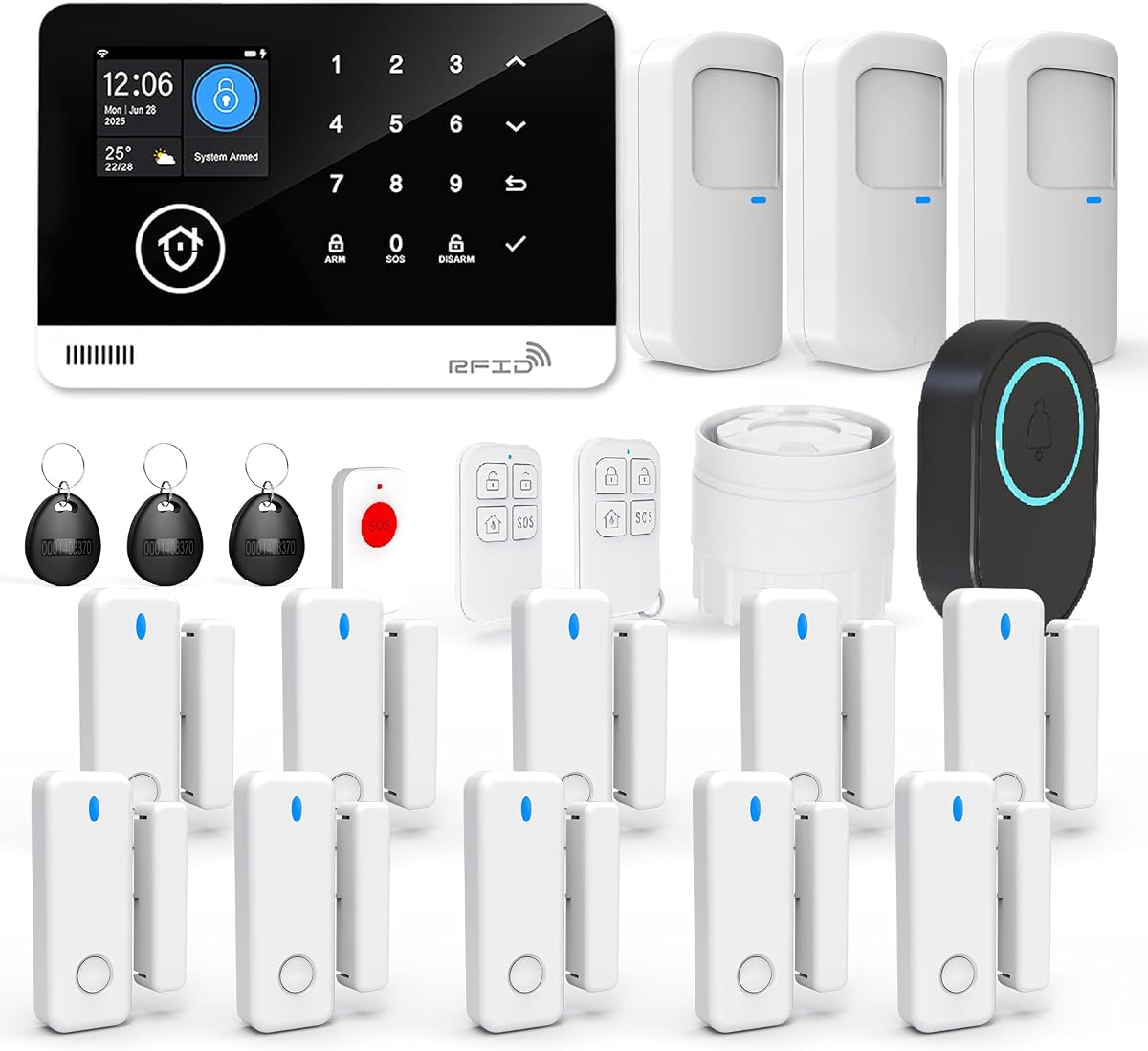
This 22-piece wireless alarm system has a 4.0 rating and offers one of the larger initial accessory packages in the group. It includes an alarm host, separate siren, three PIR motion detectors, ten door and window sensors, three RFID cards, two remote controls, an SOS button, and a doorbell push button. The variety of included controls makes it attractive for a comprehensive first installation.
We may earn a commission when you buy through this link, at no additional cost to you.
Programmable arming and disarming can be managed through the app or keyboard, and users can set time limits to reduce unwanted triggers while people are entering or leaving. The system also supports Tuya and Smart Life apps, Alexa, and Google. When triggered, it sounds an alarm, sends app notifications, and can make a call or send a message to a preset number.
Its cellular connection uses a 2G SIM rather than 4G, which is a significant compatibility consideration. Network availability and carrier support for 2G services may be more limited than newer cellular standards, so users should confirm service in their area. Telephone and messaging functions can also depend on the chosen provider. The no-subscription claim applies to the system itself, not necessarily to every carrier service.
The system is recommended for buyers who want many sensors, RFID access, a dedicated SOS button, and a doorbell control in one package. It suits homes where movement detection and entry-point monitoring are equally important. Users should verify 2G compatibility before buying, while those who require 4G continuity are better served by a newer dual-network model.
Three PIR detectors and ten door or window sensors create a broad initial network. The separate siren and multiple accessory types allow the system to protect both open entry points and larger movement areas.
Programmable arming, disarming, and entry-delay limits make it easier to accommodate residents entering or leaving. The result is less repetitive daily operation, provided the schedules are configured to match the household's actual routines.
We may earn a commission when you buy through this link, at no additional cost to you.
The right no-fee alarm system depends less on the number of advertised features than on how well its hub, sensors, connectivity, and alert methods fit your property. Consider installation constraints, communication reliability, and future expansion before comparing bundles.
Choose Wi-Fi-only for uncomplicated homes with stable internet, or dual-network for greater resilience. Check whether the cellular generation is supported locally. In particular, the 22-piece option requires a 2G SIM, which may not be available through every current mobile plan. Also distinguish recurring system subscriptions from optional carrier charges for calls or SMS.
Start with the sensors that cover the property's real entry points, then add motion detection where useful. Verify exactly what is included because descriptions may not count every mounting accessory as part of the piece total. Also check the number of remotes, keypads, RFID cards, SOS buttons, and sirens, because these affect convenience for every household member.
App push alerts are the cleanest no-fee path because they do not require a paid monitoring subscription. Phone and SMS alerts may require a SIM and carrier service, so confirm those costs before relying on them. Test the app with every family member who needs access and establish a clear response routine for false alarms, real entry events, and emergency SOS activation.
For homes with frequent outages, prioritize a hub with clearly stated backup duration and cellular failover. Check that the hub is plugged into a suitable outlet and that its battery remains healthy. Periodic power tests are advisable, and users should know whether the sensors continue reporting during a backup event or only the hub remains active.
A limit of 20 may be sufficient for a small home with a fixed set of doors. A 100-accessory system offers more freedom but should be paired with a clear accessory plan. Avoid buying several different accessory ecosystems that cannot communicate with the selected hub, and check the instruction materials before ordering add-ons.
Read the manual before pairing accessories, especially when the hub supports several alert types. Test every door, motion zone, remote, and emergency button before considering the setup complete. Keep the manual accessible for later additions, and periodically test the siren, app notifications, backup battery, and cellular transition if those functions are used.
Choose voice support if it simplifies your routine and your existing assistant works with the alarm. Confirm which commands are supported and whether additional routines are needed. Keep a physical control method accessible for children, older adults, visitors, and situations when the network or voice assistant is unavailable.
Read the current product details carefully and separate the no-fee system operation from optional carrier services. Homeowners interested only in app alerts can generally avoid paid communication channels. Those who need phone or SMS backups should compare the relevant carrier plan and confirm that the selected SIM generation and alert functions work in their area.
Begin by locating the hub in a central, dry area where its siren can be heard and the device can remain connected to the intended 2.4GHz Wi-Fi network. For dual-network models, install and activate the SIM before finalizing app setup. Download the stated Smart Life or Tuya app, connect the hub, and confirm the current time, date, notification recipients, and armed states before attaching sensors.
Install door and window sensors on the appropriate frame and moving section so magnet alignment is maintained. Position motion detectors according to the manual and away from obvious sources of false alerts, such as heating vents or frequently crossed pathways. Mount the siren and remote controls within easy reach, then test each device through both the app and a physical control method.
Create practical arming schedules based on when the home is occupied, then test the system with household members. Confirm that push notifications arrive, the siren sounds at an appropriate volume, and emergency SOS functions reach the intended recipients. Periodically test the backup battery, inspect sensor batteries, review app event logs, and recheck cellular service or SIM status for systems that use it.
Yes. The systems in this guide are designed to provide local siren activation, app-based arming, push notifications, and other functions without a required alarm-system subscription. The degree of service depends on the model and your setup.
Some optional phone, SMS, and cellular features may involve a SIM card, carrier charges, or third-party fees. A Wi-Fi-only system can avoid recurring costs by using app alerts, while a cellular-capable system adds resilience but may require more setup.
The supplied product information repeatedly specifies compatibility with 2.4GHz Wi-Fi and incompatibility with 5GHz networks. A dual-band router can still work if the 2.4GHz band is available separately or if compatible mixed-mode settings are configured.
Follow the manufacturer's setup instructions and avoid enabling settings that prevent older 2.4GHz devices from connecting. If the hub cannot join the network, separating the Wi-Fi bands is usually the first troubleshooting step.
It is not strictly necessary if household internet is stable and app notifications are your preferred alert method. Wi-Fi-only systems can provide local alarms, remote control, and push notifications without a cellular service.
Cellular backup is valuable if an outage takes down both power and internet. Systems with WiFi+4G or WiFi+GSM can switch to a cellular network, but they require a compatible SIM and may involve carrier charges for optional calls or messages.
The right count depends on the number of entry points and the size of the areas you want to monitor. A small apartment may be adequately served by several door sensors, while a larger house may need sensors for exterior doors, rear entrances, garages, storage areas, and accessible windows.
Motion detectors can cover larger spaces but should not replace entry sensors because they are generally triggered by movement within a zone. Start with the included bundle, map vulnerable openings, and add compatible accessories only where they add meaningful coverage.
Most models support expansion, but the limits vary considerably. Two listed systems support up to 20 sensors and five remotes or keypads, while others accept as many as 100 wireless accessory locations.
Use compatible accessories from the same supported ecosystem and check whether the desired component falls under the hub's accessory limit. Also consider whether the installation needs additional sensors, keypads, SOS buttons, outdoor sirens, or specialized environmental detectors.
App notifications are self-directed alerts sent by your alarm system, not automatically a professional monitoring service. You receive the message and decide whether to investigate, call emergency services, or ask another household member to respond.
Some product descriptions mention monitoring features, but you should verify what the current package includes and what additional equipment or service is required. Professional monitoring generally involves a separate service relationship and should not be assumed from app access alone.
Begin with correct sensor alignment, appropriate motion-detector placement, and deliberate arming schedules. If your alarm includes an entry-delay or time-limit setting, configure it around the way people normally enter and leave the property.
Test each sensor and teach household members how to disarm the system before it triggers. If a sensor repeatedly produces unwanted alerts, check its battery, position, and pairing rather than immediately ignoring the event.
Confirm the included hub, sensors, remotes, keypads, sirens, and mounting accessories, as well as the system's Wi-Fi band and expansion limit. If it supports cellular service, verify the required SIM generation and local carrier coverage.
Also compare app platform support, siren output, backup-power information, arming modes, and whether optional calls or SMS messages carry third-party fees. The current Amazon listing and included-component list are the best references before ordering.
The 24-piece WiFi+GSM/4G system stands out as the most complete connected choice, with a 4.8 rating, automatic cellular failover, flexible scheduling, voice-assistant support, and emergency controls. The 16-piece Instant App Alerts system is a strong budget pick because it combines a 4.7 rating with support for as many as 100 accessories, while the PGST touchscreen model offers the most refined central interface.
Prioritize the features your household will actually use. Stable 2.4GHz Wi-Fi is essential, dual-network support is valuable for outage resilience, and sensor coverage should match the property's real entry points. Users should also account for app access, physical controls, expansion limits, tamper resistance, and the possibility that optional calls or SMS messages may involve carrier charges.
Product bundles and technical details can change, so check the current listing before purchasing. In particular, verify the included accessories, network requirements, battery-backup details, app requirements, and any fees associated with optional communication features. Comparing the latest configuration with the priorities in this guide will help narrow the field without locking into an unnecessary recurring service.