
ASRock Steel Legend SL-850G
4.5Editor score
Fully modular flat cables
Native 12V-2×6 connector
850W continuous capacity
Explore the best fully modular power supplies for gaming PCs, comparing efficiency, wattage, connectors, acoustics, and build quality.
A fully modular power supply gives gaming PC builders a cleaner case, easier cable routing, and a more professional finished build. The right unit should also provide stable power, modern GPU connections, effective cooling, and enough capacity for a demanding processor and graphics card combination.
This guide compares ten fully modular power supplies across wattage, efficiency, ATX and PCIe standards, connector availability, acoustic features, component quality, dimensions, and warranty coverage. It includes practical options for mainstream gaming systems, high-end workstations, and enthusiast builds without claiming that every model suits every case.
The reviews show why the MSI MAG A850GL stands out for compact mainstream builds, why the CORSAIR RM850e and RM850x offer modern GPU readiness, and which premium and high-capacity designs serve specialized systems best. Product ratings and availability can change, and current prices should always be checked before purchasing.
4.5Editor score

4.7Editor score

4.8Editor score
This side-by-side comparison covers ten fully modular gaming PC power supplies with capacities from 850W to 1500W, highlighting modern standards, efficiency certifications, native GPU connectors, and acoustic features.
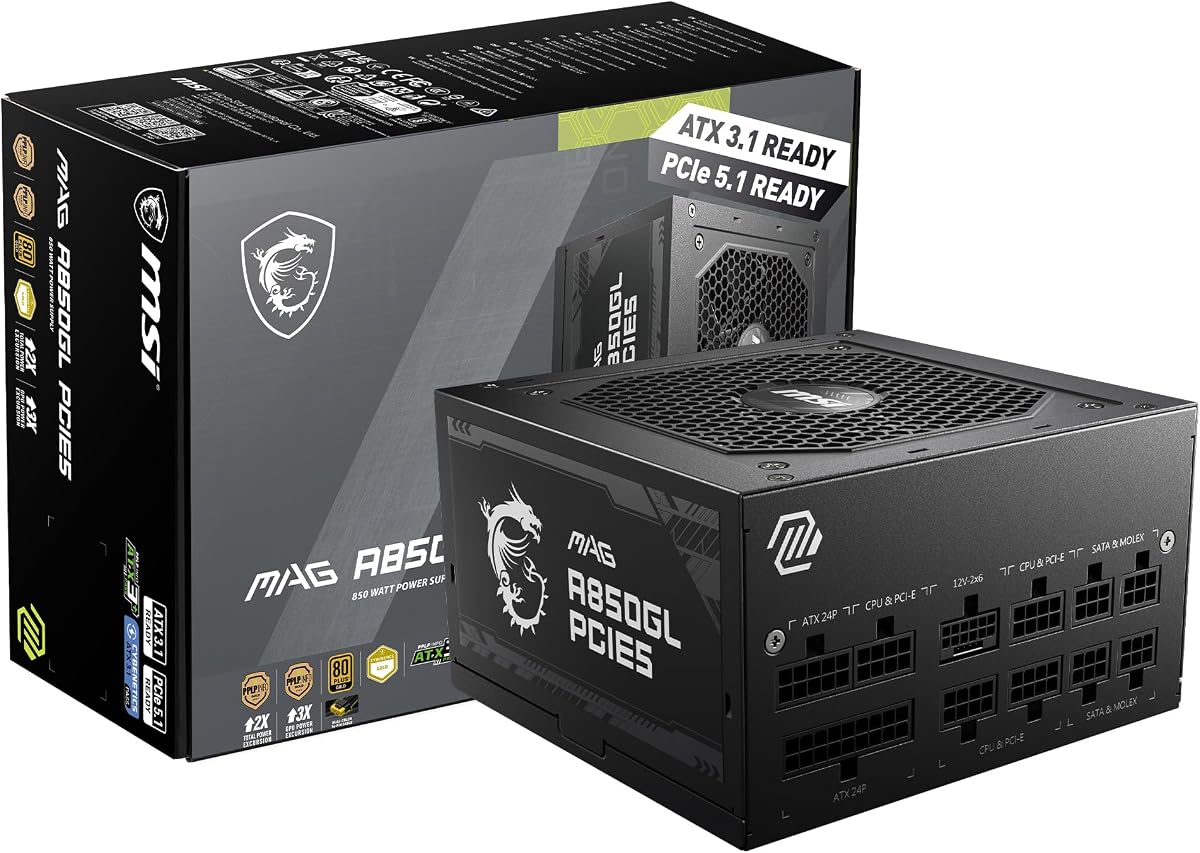


The MSI MAG A850GL PCIE5 is an 850W fully modular power supply aimed at modern gaming systems that need contemporary GPU power without moving into oversized high-capacity units. It carries a 4.5 rating, 80 Plus Gold certification, ATX 3.1 and PCIe 5.1 readiness, and a native dual-color 12V-2×6 cable. Its compact positioning and long warranty make it especially appealing for builders assembling a capable gaming PC in a space-conscious case.
We may earn a commission when you buy through this link, at no additional cost to you.
The fully modular design removes unused cables from the installation, improving airflow and making the finished system look cleaner. Its native 12V-2×6 connection avoids the need to route a separate GPU adapter for compatible graphics cards, while the stated ATX 3.1 and PCIe 5.1 readiness indicates preparation for the power demands and transient behavior associated with newer platforms. The 10-year limited warranty also provides useful long-term reassurance for a central component inside the case.
There is a trade-off in choosing 850W over a 1000W model, particularly for exceptionally power-hungry CPUs and GPUs or for a system expected to receive several major upgrades. The unit is also certified at Gold rather than Platinum, so it is better suited to value-conscious builders who want modern connectivity and modular convenience than to enthusiasts prioritizing the highest possible efficiency rating. A careful check of estimated system power remains essential.
This is a strong general recommendation for a mainstream enthusiast build with a high-end but conventionally powered graphics card. It may be particularly suitable for compact cases where a shorter power supply improves compatibility. Buyers planning a top-end multi-GPU workstation, a heavily upgraded platform, or unusually high sustained loads should consider a higher-capacity model instead. For most modern gaming configurations, however, it delivers an appealing mix of compactness, modularity, and modern power standards.
Because every cable is detachable, builders can connect only what the hardware requires. The result is a tidier interior, easier troubleshooting, and fewer cables competing for airflow in a compact gaming case.
The native dual-color 12V-2×6 cable and ATX 3.1 readiness simplify connections to compatible current-generation graphics cards. Builders should still check the PSU and GPU cable requirements before installation.
We may earn a commission when you buy through this link, at no additional cost to you.
The CORSAIR RM850e (2025) combines an 850W capacity with Intel ATX 3.1 certification and a fully modular platform. Its 4.7 rating reflects a favorable buyer response, while the updated specification makes it a practical choice for modern gaming PCs built around PCIe 5.1 graphics hardware. The design focuses on reliable transient-load handling, quiet cooling, and tidy installation rather than unnecessary excess capacity.
We may earn a commission when you buy through this link, at no additional cost to you.
ATX 3.1 compliance is particularly important because it allows the PSU to withstand GPU transient power excursions, reducing the likelihood of an unexpected shutdown during demanding workloads. The 120mm rifle bearing fan uses a calculated fan curve intended to keep noise under control even at full load. 105°C-rated capacitors, modern standby compatibility, and fast wake-from-sleep behavior add practical reliability and convenience for frequently used gaming systems.
The main limitation is that 850W may not be ideal for unusually demanding combinations of processor and graphics card, especially if the system is expected to be upgraded. The supplied information also does not highlight a specific efficiency certification for this model, so buyers who place efficiency certification at the center of their decision may need to examine the product listing more closely. None of that diminishes its value for a typical single-GPU gaming build.
The RM850e is well suited to gamers who want current standards without stepping into a much larger power-supply class. It is a particularly sensible match for a modern midrange or high-end CPU and mainstream high-end GPU, provided the calculated power draw remains comfortably within capacity. For compact, efficient, and relatively quiet builds, it works especially well. Enthusiasts planning significantly more than 850W should look to a 1000W alternative.
ATX 3.1 certification means the unit is designed around the power behavior expected from modern GPUs. This makes it a more future-conscious choice for systems that may face brief high-load spikes.
A rifle bearing fan with a calculated curve is designed to remain quiet during ordinary use while cooling the PSU under sustained load. Modern standby support can also improve transitions out of sleep.
We may earn a commission when you buy through this link, at no additional cost to you.
The CORSAIR RM850x ATX 3.1 is a fully modular 850W power supply that combines a 4.7 rating with modern PCIe readiness and a polished cable system. Its Cybenetics Gold efficiency can reach 91%, supporting lower power consumption, reduced heat, and quieter operation compared with less efficient alternatives. It is a natural fit for gamers who value a refined installation and a direct connection to compatible graphics cards.
We may earn a commission when you buy through this link, at no additional cost to you.
The native 12V-2×6 connector means compatible GPUs can connect directly to the PSU without an adapter, while ATX 3.1 compliance adds protection against transient spikes. Embossed cables are described as flexible, while the supplied low-profile combs help maintain a neat arrangement behind the motherboard tray. Those details can make a large difference in a showcase build where cable routing is almost as important as electrical performance.
As with other 850W models, the central compromise is capacity. It is sensible for a strong single-GPU system, but it offers less breathing room than 1000W or 1500W choices for power-hungry CPUs, multiple demanding expansion cards, or future platform upgrades. The Gold efficiency certification is also appropriate rather than exceptional, making this more of a balanced performance choice than the absolute efficiency leader.
The RM850x suits builders who want a familiar premium-style modular design, modern GPU compatibility, and a tidy presentation. It works particularly well when the graphics card has a native 12V-2×6 connection and the case has adequate space for the cable bend required by that plug. For a high-end but single-GPU gaming PC, it is a compelling all-around recommendation.
A native 12V-2×6 connection removes the need for a GPU power adapter on compatible cards. The cable still requires careful routing and a properly seated connector.
Embossed, ultra-flexible cables and low-profile combs make it easier to create even routes behind the tray. This improves both visual presentation and access to the installed components.
We may earn a commission when you buy through this link, at no additional cost to you.
The CORSAIR RM1000x ATX 3.1 raises the capacity of the modular RM family to 1000W while retaining Cybenetics Gold efficiency, ATX 3.1 compliance, and a native 12V-2×6 connection. Its 4.5 rating indicates solid buyer satisfaction, and the additional power headroom makes it a safer choice for high-end CPUs, powerful graphics cards, and systems likely to evolve over time.
We may earn a commission when you buy through this link, at no additional cost to you.
Efficiency can reach 91%, which helps reduce heat and power use while supporting lower acoustic output. The modular layout keeps unnecessary leads out of the case, and the direct GPU connection avoids an adapter for compatible cards. ATX 3.1 compliance provides the transient resistance expected by current platforms, reducing the chance that a momentary GPU power spike will interrupt a gaming session.
The obvious trade-off is physical and financial efficiency compared with an 850W model. Not every gaming PC needs 1000W, and using a substantially larger supply than the system requires can leave it operating in a less favorable efficiency range under light loads. The case must also offer suitable clearance, and the installer should account for the larger cable bundle when planning routes.
The RM1000x is an excellent choice for a high-end single-GPU system or a multi-GPU creation-oriented machine that needs comfortable headroom. It is less compelling for midrange gaming hardware, where 850W can provide sufficient power with less excess capacity. Even so, the combination of modern standards, modular construction, and strong efficiency makes it a versatile foundation for an enthusiast build.
A 1000W rating gives demanding processors and graphics cards more operating margin. This is useful for high-refresh displays, intensive workloads, and future component upgrades.
Up to 91% Cybenetics Gold efficiency can reduce waste heat, while ATX 3.1 compliance supports stable behavior during short high-power excursions from modern GPUs.
We may earn a commission when you buy through this link, at no additional cost to you.
The Thermaltake GF1 850W is a budget-conscious fully modular power supply with 80 Plus Gold certification, a high-amperage 12V rail, and a 4.4 rating. Its defining features are a fully modular layout, a 140mm fluid bearing fan, and Smart Zero RPM cooling. It provides a straightforward way to reduce cable clutter without paying for the newest ATX 3.1 platform.
We may earn a commission when you buy through this link, at no additional cost to you.
The single-rail DC-to-DC design provides a consolidated source of power for modern graphics cards and other 12V-oriented components. Intel C6, C7, and ErP readiness can improve low-load behavior, while the Smart Zero RPM system minimizes fan noise when possible. A large 140mm fan also offers a useful balance between moving plenty of air and remaining unobtrusive during ordinary gaming.
Its main limitation is the absence of supplied information about ATX 3.1, PCIe 5.1, or a native 12V-2×6 connection. That does not make it unsuitable for a modern GPU, but builders may need to use an appropriate adapter and should carefully follow the graphics card manufacturer's routing instructions. The 4.4 rating is also the lowest among the featured products, so prospective buyers should pay close attention to the listing's warranty and support details.
The GF1 is best for a conventional gaming PC build that values modularity, 850W capacity, and quiet operation at a restrained cost. It works well when the installed GPU does not require the latest native connector and when the builder wants a familiar, uncomplicated modular platform. For a new system centered on PCIe 5.1 hardware, one of the explicitly ATX 3.1-certified alternatives may be a more convenient choice.
Detachable cables make the GF1 easier to install and keep the case tidy. An 850W rating is sufficient for many mainstream gaming configurations when total demand remains comfortably below the limit.
The 140mm fluid bearing fan can move substantial airflow, while Smart Zero RPM mode stops it under appropriate low-load conditions. The result is a quieter system during everyday gaming.
We may earn a commission when you buy through this link, at no additional cost to you.
The be quiet! Pure Power 13 M 1000W is built for gaming PCs where silence and electrical performance matter equally. It has a 4.7 rating, 1000W of continuous capacity, ATX 3.1 compliance, and a native 12V-2×6 connection. Its 80 Plus Gold certification reaches an efficiency of up to 94.4%, while Cybenetics Platinum recognition adds further confidence in its efficiency profile.
We may earn a commission when you buy through this link, at no additional cost to you.
The supplied details emphasize its ability to handle massive transient loads, including excursions up to double its rated power. A single high-amperage 12V rail, LLC topology, and strong voltage regulation support stable operation with demanding processors and graphics cards. The connector package includes native 12V-2×6 and four PCIe 6+2-pin connectors, allowing the unit to serve both current and newer GPU configurations.
Semi-passive cooling is a major attraction for quiet builds. Under low load, the fan can stop completely, and the be quiet! fan is paired with airflow-optimized blades for lower sound when the PSU does need to cool. The only notable mismatch is that the unit's headline 80 Plus certification is Gold even though its stated efficiency and Cybenetics classification are exceptionally strong; buyers may therefore want to interpret both certification systems together.
This power supply is an excellent match for a silent enthusiast workstation or a high-end gaming PC with a power-hungry GPU. Its 1000W capacity offers upgrade headroom without reaching workstation scale, and the modern connector arrangement simplifies system planning. It is particularly compelling for builders who want the fan to remain genuinely still during lighter games or general desktop use.
Semi-passive zero-RPM cooling stops the fan when its services are not required. This can make a noticeable difference in a quiet gaming room where background fan noise would otherwise be distracting.
The unit can handle substantial short-term power excursions while maintaining a continuous 1000W rating. This behavior is particularly relevant to modern GPUs that can briefly demand considerably more power than their sustained load.
We may earn a commission when you buy through this link, at no additional cost to you.
The ASRock Steel Legend SL-850G combines an 850W rating with a surprisingly broad feature set, earning it a place as the budget-focused top pick. It is certified by both 80 Plus Gold and Cybenetics Platinum, supports ATX 3.1 and PCIe 5.1, and includes a native dual-color 12V-2×6 connection. The 4.5 rating further supports its position as a capable mainstream option.
We may earn a commission when you buy through this link, at no additional cost to you.
Its most notable advantage is the combination of efficiency certifications. Cybenetics Lambda A+ acoustic certification and average noise below 20 dBA indicate a design oriented toward quiet operation, while a 135mm fluid dynamic bearing fan supports cooling and longevity. iCool Intelligent Fan Control keeps the fan off during low-to-medium loads, reducing unnecessary sound in games and everyday use.
The electrical design also merits attention. A 70.9A output on the 12V rail provides 850W of continuous power, Japanese capacitors support long-term stability, and the built-in 5V BOOST function is designed to compensate for voltage drops during transient spikes. Low-profile flat cables complete the modular package, improving both cable routing and internal airflow.
The Steel Legend SL-850G is best for a mainstream high-performance gaming PC that wants modern connectors, quiet cooling, and strong efficiency without moving to 1000W. Its standard 150mm by 150mm by 86mm ATX dimensions should fit most mid-towers and full-towers, although case clearance and power requirements should be verified. Builders expecting exceptional sustained loads or extensive future expansion should consider more capacity.
Receiving both 80 Plus Gold and Cybenetics Platinum recognition gives the unit a strong efficiency foundation. Lower waste heat can support quieter cooling and reduce the power drawn from the wall.
The 135mm fluid dynamic bearing fan moves air effectively, while iCool control keeps it stopped at light and moderate loads. Cybenetics Lambda A+ recognition reinforces the focus on low acoustic output.
We may earn a commission when you buy through this link, at no additional cost to you.
The ASUS ROG Strix 1000W Platinum is the premium choice in this guide, combining a 4.8 rating with 1000W capacity, Platinum efficiency, and ATX 3.1 support. It is aimed at enthusiast systems where quiet operation, high-end graphics card stability, and premium internal component design are important. Fully modular cabling helps preserve the presentation expected of a flagship gaming build.
We may earn a commission when you buy through this link, at no additional cost to you.
Its most distinctive feature is GPU-first voltage sensing, paired with an intelligent voltage stabilizer that the manufacturer says can enhance graphics card voltage delivery by as much as 45%. The intent is steadier power during gameplay. GaN MOSFETs are claimed to improve efficiency by up to 30% and permit a more organized internal layout, which in turn supports the large ROG heatsinks covering critical components.
Cooling is handled by dual ball bearing fans, described as lasting up to twice as long as sleeve-bearing designs, and 0dB technology allows the fans to stop during light gaming. The combination of Platinum efficiency and large heatsinks is intended to produce lower temperatures and noise than reference designs. As with any premium hardware, the ROG visual identity and platform may be less attractive to builders wanting a completely understated system.
The ROG Strix 1000W Platinum is an excellent choice for an expensive gaming PC with a demanding GPU, particularly one built inside a case with a window or other visible interior. It suits builders who prioritize voltage stability and premium thermal engineering over a minimum-cost purchase. For ordinary midrange systems, the extra sophistication may go largely unused, but for a flagship build it can provide meaningful peace of mind.
GPU-first sensing watches the graphics card's power requirements and adjusts delivery through the intelligent stabilizer. The design targets smoother behavior when the GPU experiences rapidly changing demand.
GaN MOSFETs, large ROG heatsinks, dual ball bearing fans, and Platinum efficiency work together to control temperature and noise. The 0dB mode further reduces fan activity during lighter workloads.
We may earn a commission when you buy through this link, at no additional cost to you.
The ASUS TUF Gaming 1000W Gold is a fully modular 1000W PSU designed around durability, modern GPU support, and straightforward enthusiast performance. Its 4.7 rating suggests strong customer reception, while the ten-year warranty makes it suitable for long-lived gaming systems. ATX 3.1 compatibility and a bundled 16-pin PCIe cable place it firmly in the current high-end power supply category.
We may earn a commission when you buy through this link, at no additional cost to you.
Japanese capacitors and other premium components contribute to its 80 Plus Gold certification, and select capacitors and chokes have received military-grade certification. A protective PCB coating helps guard against moisture, dust, and temperature extremes, adding a different kind of robustness compared with a purely efficiency-focused model. The dual ball bearing fan is stated to last up to twice as long as sleeve bearing alternatives.
Although the PSU is fully modular, the feature set does not emphasize extreme silence in the way the ROG Strix or be quiet! Pure Power 13 M does. An Axial-tech fan provides cooling, but no dedicated zero-RPM behavior is highlighted in the supplied information. Gold efficiency also trails the Platinum-rated ROG model, though it remains a credible efficiency tier for a 1000W unit.
The TUF Gaming 1000W Gold fits builders who want generous capacity, modern power delivery, and durable internals without moving to the most elaborate premium platform. It is especially relevant for a power-hungry single-GPU PC or a system intended for component upgrades. Users who need near-silence should pay closer attention to the quieter alternatives, while those focused on longevity and ruggedness will find this model compelling.
Military-grade component testing, Japanese capacitors, dual ball bearing fans, and a protective PCB coating all contribute to reliability. The ten-year warranty makes the unit a sensible foundation for a gaming PC expected to remain in service for years.
ATX 3.1 compatibility and a bundled 16-pin PCIe cable support current high-power graphics cards. Cable routing should still be managed carefully to maintain a secure connection.
We may earn a commission when you buy through this link, at no additional cost to you.
The CORSAIR HX1500i (2025) is built for exceptional power requirements, offering 1500W of capacity in a fully modular ATX 3.1 design. It is the specialist option for workstations, heavily equipped multi-GPU systems, and specialized computing rigs rather than ordinary gaming PCs. Its 4.5 rating, zero-RPM mode, and 140mm fluid dynamic bearing fan add everyday refinement to the extraordinary power ceiling.
We may earn a commission when you buy through this link, at no additional cost to you.
Intel ATX 3.1 certification ensures support for the PCIe Gen 5 platform and resistance to transient spikes. Fully modular cabling helps control the substantial cable bundle associated with a unit of this class. The 140mm FDB fan is designed for quiet and long-lasting performance, while Zero RPM Fan Mode stops cooling at low and medium loads to keep otherwise idle or lightly used systems near silent.
The major practical consideration is that most gaming PCs do not need 1500W. Unless the build includes several power-hungry graphics cards, high-end accelerators, extensive cooling, and demanding processors, this unit can be unnecessarily large. A 1000W model may provide adequate headroom while producing less waste heat and fitting more comfortably in compact cases. Software control also adds a dependency on the appropriate iCUE environment.
The HX1500i makes sense for a specialized high-end rig where available power is the defining constraint. It offers the cleanest modular installation of the highest-capacity options here, modern transient protection, and useful monitoring through iCUE. It should be selected based on a documented power estimate rather than simply because more power seems safer. For a standard gaming PC, one of the 850W or 1000W units is usually the more proportionate choice.
A 1500W ceiling provides substantial room for multiple demanding components and future expansion. It is intended for specialized systems rather than ordinary gaming configurations.
iCUE software allows custom fan curves, power monitoring, and on-the-fly changes between single-rail and multi-rail overcurrent protection modes. Zero-RPM operation keeps the fan still under lighter loads.
We may earn a commission when you buy through this link, at no additional cost to you.
Choosing a gaming PC power supply requires balancing usable capacity, efficiency, connector support, acoustics, physical dimensions, and the quality of the modular cable system. The right choice is the one that comfortably supports the installed hardware without becoming unnecessarily large or difficult to route.
In practice, 850W is a common capacity for strong single-GPU systems, 1000W offers additional comfort for high-end CPUs and future upgrades, and 1500W is primarily relevant to specialized multi-component builds.
For a new gaming PC, choosing an ATX 3.1 model is the safer long-term decision, particularly when native GPU connectivity is also required.
A native 12V-2×6 cable is convenient, but connector selection must match the graphics card and the power supply's modular cable set exactly.
Choose the highest practical efficiency tier that suits the build, but do not treat certification as a substitute for capacity, protection, or reliable components.
For a quiet gaming room, prioritize zero-RPM behavior, a well-controlled fan curve, and efficiency that reduces internal heat.
Measure the available PSU bay and plan the bend radius of every native GPU cable before ordering, especially in compact cases.
Favor established component claims, reputable cooling hardware, and a long warranty, while confirming that the listed protections and connectors meet the build's needs.
Choose software control when it supports a specific need, such as detailed monitoring or custom thermal behavior; otherwise, prioritize electrical fundamentals and a clean build.
Before installation, read the power supply manual, identify every required modular cable, and compare the connectors with the components in the PC. Never force a plug or use a cable set unless it is explicitly compatible with the exact power supply model. Lay out the cables away from fans and sharp case edges, and confirm that the case has adequate clearance for the PSU, sockets, and cable bends.
Install the power supply in the intended orientation, secure it with the correct screws, and connect the motherboard, processor, graphics card, storage, and peripheral cables before switching the system on. For a 12V-2×6 or 16-pin GPU connection, insert the plug fully and route it so the cable is supported without a sharp bend close to the socket. Review the graphics card manufacturer's instructions because improper seating or cable stress can create connection problems.
After assembly, test the system under realistic gaming and CPU workloads while watching for abnormal noise, repeated restarts, or unstable behavior. Keep the PSU vents unobstructed, avoid placing the unit in a dust-prone dead zone, and use occasional powered-off cleaning to remove accumulated debris. Modular cables should remain disconnected when the system is off, and unused cables should be stored for future upgrades in a labeled, organized manner.
A fully modular power supply has detachable cables for every major connection, allowing the builder to use only the leads required by the installed hardware. This makes the case interior cleaner and can improve airflow. It does not increase the unit's electrical capacity, so the power rating still needs to match the system.
An 850W unit can be sufficient for many high-end single-GPU systems when the combined CPU and GPU consumption leaves comfortable headroom. It becomes less suitable with exceptionally power-hungry processors, multiple graphics cards, intensive expansion hardware, or planned upgrades. Calculating the system's likely peak demand is the most reliable way to choose.
For a newly assembled gaming PC, an ATX 3.1 model is generally a forward-looking choice. The standard is designed to handle modern transient loads associated with recent graphics cards and motherboards. It also pairs naturally with PCIe 5.1 hardware, though a native 12V-2×6 cable still needs to match the graphics card.
Not necessarily. A higher-capacity PSU does not automatically consume more power; actual consumption depends on the system and the unit's efficiency at that load. However, an oversized unit may operate less efficiently during light loads, and a larger unit can cost more and produce more heat under heavy use. Correct sizing remains the best approach.
They are not always required because some graphics cards support alternate power connections, but native cables are increasingly common and preferred. A compatible graphics card may include an adapter or accept a traditional multi-pin connection. Check the exact GPU and PSU documentation, and use only the cable specified for the power supply model.
Both systems assess PSU performance, but they use distinct methodologies and emphasize different characteristics. An 80 Plus label primarily communicates efficiency at standardized loads, while Cybenetics can also assess efficiency across a broader range and provide acoustic information. A PSU can perform well under either system, so both labels are useful rather than interchangeable.
The PSU fan can stop during sufficiently low-load conditions, but the computer as a whole may still produce sound from the CPU cooler, case fans, graphics card, and mechanical storage. Fan operation is also expected to resume as temperature or load increases. The feature is therefore helpful for reducing one source of noise rather than guaranteeing total silence.
Comfortable headroom helps the PSU remain stable and cool while accommodating brief component spikes and future upgrades. The ideal amount depends on the hardware, but many builders prefer to avoid operating near the unit's maximum rating. Include the graphics card, processor, motherboard, memory, storage, and accessories in the estimate rather than focusing on only one component.
The ASRock Steel Legend SL-850G stands out as the budget-focused selection because it combines Gold and Platinum efficiency certifications, ATX 3.1 support, a native 12V-2×6 cable, quiet cooling, and a long warranty. The CORSAIR RM850e (2025) offers the most balanced approach for a typical modern gaming PC, while the ASUS ROG Strix 1000W Platinum provides premium voltage monitoring, efficiency, and acoustic engineering.
Prioritize correct sizing, ATX 3.1 readiness, the correct native GPU connection, and a case with enough room for the PSU and its cables. Efficiency and quiet fan behavior matter for everyday comfort, while Japanese capacitors, quality bearings, and long warranty coverage matter for longevity. Extreme power should be reserved for specialized multi-GPU or workstation-style systems rather than added automatically to an ordinary gaming PC.
Ratings, product availability, and prices can change, so check the current listing and warranty information before ordering. Review the power supply's manual alongside the graphics card and motherboard instructions, and confirm that every modular cable belongs to the selected PSU. Those final checks help preserve both electrical reliability and a clean finished gaming build.