
WD 2TB My Passport
4.6Editor score
Hardware encryption with password protection
Included backup and ransomware-defense software
Portable USB 3.1 and 3.0 design
Our Encrypted Secure External Hard Drive guide compares 10 protected models, comparing encryption, validated security, capacity, portability, and setup for
An encrypted secure external hard drive protects valuable information when it is stored, carried, or connected to an unfamiliar computer. The right model should combine hardware-based encryption with reliable access controls, durable construction, sufficient capacity, and straightforward setup so important files remain protected without creating unnecessary daily friction.
This guide compares ten protected portable drives using the supplied product specifications, with particular attention to encryption standards, validation claims, access methods, administrator controls, physical resistance, capacity, connectivity, and operating-system compatibility. The list includes rugged Aegis models, password-protected WD My Passport drives, the IP56-rated diskAshur2, and a touchscreen-equipped encrypted SSD.
Each product review explains the features that matter most, along with practical trade-offs and the types of users most likely to benefit. Rankings reflect the information available for this guide rather than personal testing, and product availability, features, and pricing can change, so readers should confirm current specifications before making a final purchase.
4.6Editor score

4.3Editor score

The comparison below places all ten drives side by side, focusing on capacity, encryption approach, access-control features, physical protection, connectivity, and the kinds of users most likely to benefit from each model.



The Apricorn 1TB Aegis Padlock is a compact hardware-encrypted drive built around a physical PIN keypad and 256-bit AES XTS protection. It holds a 4.5 rating and stands out for offering genuine device-level encryption without requiring administrator access on the host computer. That combination makes it approachable for travelers, students, and home users who want a protected drive that works without installing management software.
We may earn a commission when you buy through this link, at no additional cost to you.
The drive's USB 3.0 interface provides a substantial transfer-speed improvement over USB 2.0, while the epoxy coating is intended to seal the enclosure against physical attacks. A brute-force self-destruct feature adds another layer of protection if someone repeatedly attempts to guess the PIN. Its compact, rugged construction and wear-resistant keypad are particularly useful for people who regularly carry sensitive documents or media between locations.
The principal limitation is capacity. One terabyte can comfortably hold documents, photos, and several important application or media collections, but it may not suit a large video archive, an expansive business backup, or users who routinely create multiple local copies. The product's published FIPS-related wording is also less granular than the level-specific validation claims associated with some other Aegis models in this guide.
Despite those limitations, this is a strong general-purpose choice for anyone seeking portable hardware encryption and keypad-based access without a complex administration process. It is particularly attractive as a secure everyday carry drive for confidential records, client materials, or a personal offline backup. Buyers who need much more room should compare the 2TB, 4TB, and 5TB alternatives, while those who require a specific current validation level should verify the certification status at purchase.
Hardware encryption is performed by the drive itself, so sensitive files are protected without depending on host-level encryption tools or administrator rights. This is particularly useful when the same drive must connect to work computers, shared machines, or systems where installing extra software would be inconvenient.
The tough epoxy coating, rugged enclosure, wear-resistant keypad, and brute-force self-destruct feature create a layered response to physical threats. These protections do not make the drive invulnerable, but they raise the effort required to bypass its access controls.
We may earn a commission when you buy through this link, at no additional cost to you.
The Apricorn 2TB Aegis Padlock Fortress combines 2TB of capacity with 256-bit AES XTS hardware encryption and a stated FIPS 140-2 Level 2 validation. Its 4.4 rating reflects a generally favorable response, while the keypad-based access model distinguishes it from conventional password-enabled hard drives. The integrated USB cable and rugged portable format make this a logical option for secure document transport.
We may earn a commission when you buy through this link, at no additional cost to you.
The model offers important administrative and physical safeguards without introducing a mandatory software workflow. Its keypad provides direct PIN access, and the integrated cable reduces the chance of leaving a required data cable behind. Brute-force self-destruct behavior adds a defensive response to repeated invalid access attempts, while the wear-resistant keypad is designed for repeated use in mobile environments.
Users should consider that a numeric or keypad interface is inherently less flexible for complex credentials than a full alphanumeric touchscreen. A four-digit PIN can also be easier to guess than a long passphrase, making the configured brute-force response especially important. Capacity is balanced better than the 1TB model, but two terabytes may still be inadequate for extensive media libraries or multiple backup sets.
This drive suits professionals and travelers who want a specific validation statement, hardware encryption, and straightforward PIN access. It is a particularly compelling option when the drive will be passed between locations or connected to shared systems. It is less compelling for users who prioritize password character flexibility, touchscreen setup, or very high storage capacity.
The stated FIPS 140-2 Level 2 validation provides a more concrete purchasing signal than a general encryption claim. Buyers in regulated or security-conscious environments can use that distinction when comparing the drive with validated alternatives, while still confirming that current certification documentation covers the exact model.
The integrated USB cable simplifies packing and reduces missing-accessory problems. A wear-resistant keypad and self-destruct response to brute-force attempts complement the encrypted processor and make the device well suited to mobile storage duties.
We may earn a commission when you buy through this link, at no additional cost to you.
The Apricorn 5TB Aegis Fortress L3 is a high-capacity portable drive aimed at users who need meaningful security controls without sacrificing storage space. It combines 256-bit AES XTS hardware encryption with a stated FIPS 140-2 Level 3 validation, USB 3.0 connectivity, and a rugged enclosure. Its 4.3 rating supports its position as a capable option for large encrypted backups and managed work environments.
We may earn a commission when you buy through this link, at no additional cost to you.
Separate administrator and user modes give an organization a way to establish higher-level access while allowing day-to-day users to unlock the drive with a reduced credential. Two read-only modes offer additional ways to prevent accidental edits when the drive is being used for reference or distribution. Brute-force defense provides another layer of protection against repeated credential attacks.
The 5TB capacity is a major strength for photos, videos, project files, and offline backups, but it also means a complete image can take longer to transfer than with a smaller drive. As with other keypad devices, a weak PIN can undermine the security created by the encryption hardware. The controls are most effective when a strong PIN, careful enrollment, and sensible physical storage practices are part of the setup.
This is the strongest all-around recommendation for a user who values validated protection, generous capacity, and operational flexibility. It is well matched to creative professionals, small teams, consultants, and privacy-conscious users who want one drive capable of holding a large working archive. Users who want a simpler consumer backup experience may find the WD My Passport easier to manage, while those needing remote administration should investigate the DataLocker.
Five terabytes gives photographers, videographers, and consultants enough room to consolidate substantial collections behind hardware encryption. It also leaves space for multiple working sets or local backups, reducing the need to move files between several protected media devices.
Separate administrator and user modes, combined with two read-only options, make the drive easier to deploy in shared settings. Administrators can preserve stronger control over configuration while ordinary users receive a simpler day-to-day unlocking experience.
We may earn a commission when you buy through this link, at no additional cost to you.
The WD 2TB My Passport is the most approachable encrypted external drive in this guide. It combines a 2TB capacity with password protection, hardware encryption, USB 3.1 and USB 3.0 compatibility, and included device-management software with ransomware defense. Its 4.6 rating is also the highest among the products with a numerical customer score shown in the supplied data.
We may earn a commission when you buy through this link, at no additional cost to you.
Unlike keypad-centric security systems, the My Passport uses a familiar password workflow that most users will understand immediately. The slim, durable design supports everyday portability, while the included software can help organize backups and add layers of protection against ransomware. That combination makes the drive attractive for home users, students, families, and small offices that want stronger protection without managing separate PIN policies.
The supplied specifications do not provide the same specific FIPS validation level as several Aegis models, so buyers with formal compliance requirements may need more documentation before selecting it. The included software also creates a setup step that some hardware-encrypted keypad drives avoid. Users should ensure they can remember the password because protected storage designed to resist unauthorized access may be difficult to recover without proper credentials.
For a consumer who wants a familiar, polished backup experience with hardware encryption, this is a strong recommendation. Its balance of capacity, portability, utility software, and customer feedback makes it particularly suitable for routine backups of documents, photos, and personal media. Security-focused organizations should compare its documented validation status and administrative capabilities against the Aegis Desktop Padlock or DataLocker DL4 FE.
The drive's password-based approach avoids the learning curve associated with numeric keypads or embedded touchscreens. Hardware encryption still protects the stored data, while familiar account credentials make regular backups more approachable for nontechnical users.
Included device-management software with ransomware defense extends the value of the hardware beyond simple storage. Buyers can establish repeatable backup routines and gain a clearer view of how protected data is being managed, subject to the software's supported features and setup requirements.
We may earn a commission when you buy through this link, at no additional cost to you.
The WD 5TB My Passport offers the largest capacity among the conventional consumer-style hard drives in this comparison. It includes password protection, hardware encryption, ransomware-defense features in its backup software, and USB 3.1 and USB 3.0 compatibility. With a 4.5 rating, it is a practical choice for people who want a large, portable backup without a keypad interface.
We may earn a commission when you buy through this link, at no additional cost to you.
Five terabytes is particularly useful for family photo archives, video collections, creative work, and periodic local backups. The slim enclosure keeps the device reasonably portable, while the included software helps users organize the process. A password workflow is much easier to adopt than a PIN keypad or a device with a complex on-screen interface, which supports the drive's suitability for routine consumer use.
As with the 2TB version, the product information does not state a particular FIPS level. Users subject to formal procurement or regulatory requirements should therefore request current validation or compliance details before committing. Moving a large amount of data also takes more time, and users should consider whether a full-device image or file-level backup better fits their workflow. The drive's security should be paired with regular, independently verified backups.
This model is best for users who prioritize capacity and convenience over sophisticated access segmentation. It is a compelling choice for a household or creative professional seeking a protected 5TB portable archive. Those who need stronger governance should examine the Aegis Fortress L3, while users who want a certified portable option with environmental resistance may prefer the diskAshur2.
A 5TB capacity gives users room to preserve high-resolution photos, videos, project archives, and system backups together. Consolidating those collections on one encrypted device can simplify transport and reduce the number of separate media items that need to be managed.
Password access and hardware encryption provide understandable protection without requiring users to interact with a numeric keypad. The included backup utilities and ransomware defense make the product especially practical for users who want storage and backup tools in a single device.
We may earn a commission when you buy through this link, at no additional cost to you.
The Apricorn 2TB Aegis Padlock DT emphasizes administration and policy configuration. It offers 256-bit encryption, separate admin and user modes, Aegis Configurator compatibility, forced enrollment, data recovery PINs, and programmable brute-force defense. Its 4.3 rating indicates solid overall reception, while the feature set makes it most interesting to small organizations that want more control than a basic password-protected consumer drive provides.
We may earn a commission when you buy through this link, at no additional cost to you.
Forced enrollment helps ensure that an administrator configures access before the drive is distributed. Separate user mode can then let an employee unlock the drive without granting full configuration authority. Data recovery PINs support a contingency process, while programmable brute-force defense allows the response to repeated invalid attempts to fit the organization's security policy.
This flexibility also introduces complexity. Incorrect enrollment or a forgotten administrative credential can create access problems, so responsible custody and secure credential storage remain essential. A keypad is not as easy to use as a touchscreen for lengthy passwords, and users considering a device-managed environment will need to understand how the Aegis Configurator fits into their operating procedures. Two terabytes provides a balanced capacity for many working sets.
The Padlock DT is best for administrators, consultants, and small teams that need configurable user access and documented recovery options. It is less suited to someone who wants the simplest possible external backup or a rich alphanumeric credential. Users prioritizing a specific FIPS statement or a solid enclosure may prefer the Aegis Desktop Padlock, while the Fortress L3 adds greater capacity and read-only controls.
Separate admin and user modes provide a useful middle ground between a completely unmanaged consumer drive and a fully managed enterprise endpoint. Forced enrollment helps ensure that appropriate settings and user access are established before deployment.
Data recovery PINs provide a planned route around a lost user credential, while programmable brute-force defense lets administrators define how the unit responds to repeated invalid attempts. Both features require secure documentation and disciplined credential handling.
We may earn a commission when you buy through this link, at no additional cost to you.
The Apricorn 2TB Aegis Desktop Padlock is designed to remain on a desk while protecting confidential files with 256-bit AES XTS hardware encryption. It carries a stated FIPS 140-2 Level 2 validation, a 4.4 rating, a solid aluminum enclosure, USB 3.0 connectivity, and separate administrator and user modes. Its stronger physical enclosure makes it a sensible secure-storage option for offices, studios, and home workspaces.
We may earn a commission when you buy through this link, at no additional cost to you.
A secure PIN interface, data recovery PINs, and programmable brute-force defense provide a structured approach to access control. The drive is compatible with any operating system according to the supplied information, which helps avoid platform-specific restrictions. Its aluminum body is better suited to stationary use than to being carried from bag to bag, making it a more deliberate desktop accessory than a pocket-sized travel drive.
The broad operating-system compatibility statement should still be checked against current software and procurement requirements, especially in managed environments. Users must also preserve recovery information and avoid treating the physical enclosure as a substitute for sound credential practices. Because it is designed to sit near the computer it protects, the drive offers less flexibility when users need to move large files to another location.
This is a strong recommendation for a fixed workstation that stores sensitive client, financial, medical, or project information. It is especially useful when the user values a specific validation level and a substantial enclosure over maximum portability. For a drive that must cross locations frequently, the 2TB Aegis Padlock Fortress offers a more travel-oriented design, while the Aegis Fortress L3 provides considerably more capacity.
The solid aluminum enclosure gives the drive a more substantial feel and helps protect it from ordinary wear in a stationary setup. It is a better fit for a secured office cabinet or workstation than for repeated use inside a heavily padded travel bag.
FIPS 140-2 Level 2 validation, data recovery PINs, and separate access modes create a more formal security framework. Users should store recovery credentials as carefully as the primary password and confirm that their documentation meets organizational policy.
We may earn a commission when you buy through this link, at no additional cost to you.
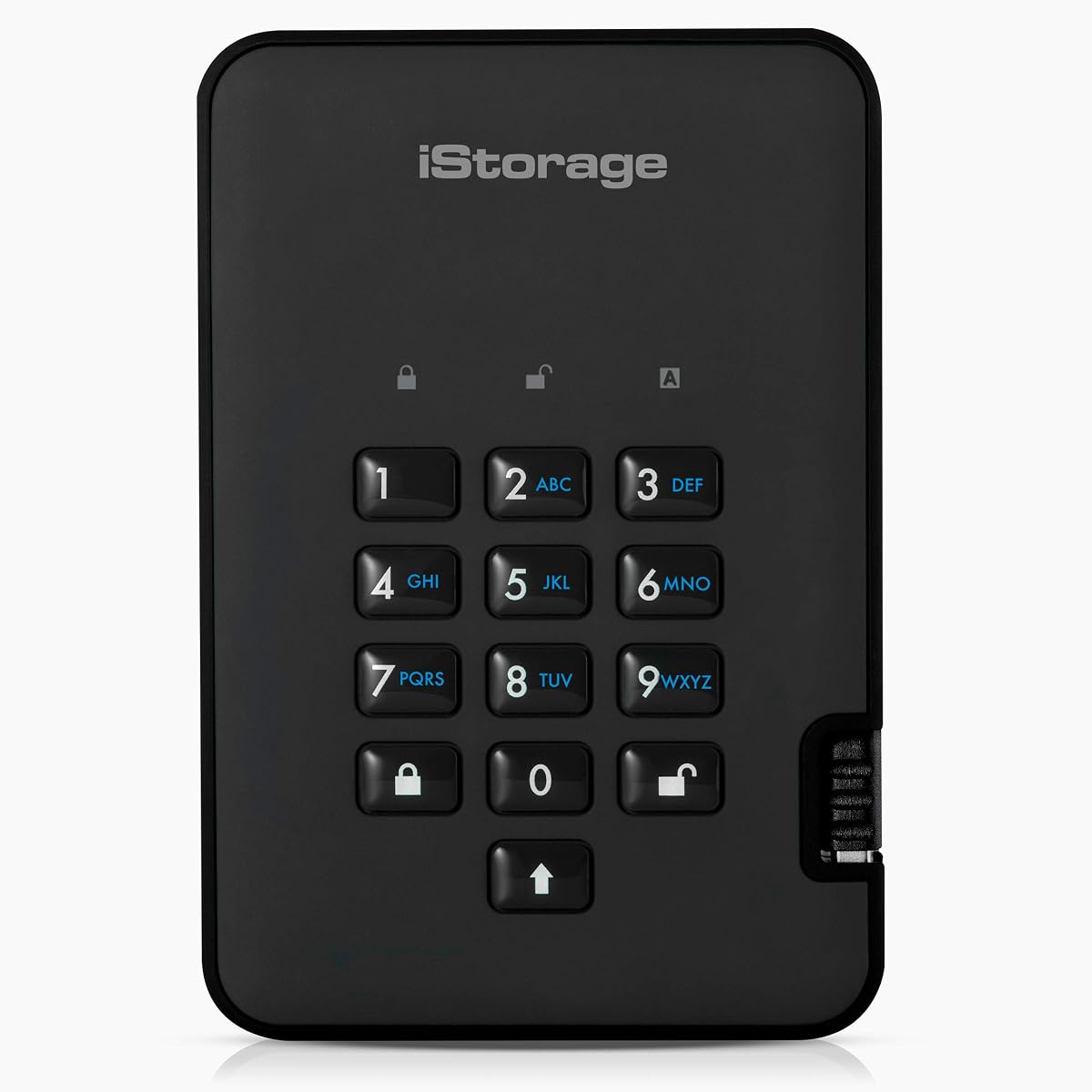
The iStorage diskAshur2 2TB focuses on portable hardware encryption and environmental resistance. It uses AES-XTS 256-bit hardware encryption, a 7-to-15-digit PIN, an EAL 5+ hardware-certified secure microprocessor, and an IP56-rated dust- and splash-resistant body. Its 4.0 rating is the lowest numerical score shown, but the underlying feature set is well suited to users who prioritize ruggedness and platform flexibility.
We may earn a commission when you buy through this link, at no additional cost to you.
Real-time encryption means transferred data is protected while it is being written, and the supplied description states that data remains encrypted when the device is disconnected. The secure processor handles authentication independently of the host computer. Compatibility with Windows, macOS, Linux, Chrome, Android, thin clients, zero clients, embedded systems, Citrix, and VMware is a significant advantage for users who move between varied environments.
The absence of required software keeps setup simple, but it also means the drive offers fewer remote-management and audit functions than a managed platform can provide. The PIN can contain up to 15 digits, which is better than a short four-digit code but still lacks the full character set of a touchscreen. The IP56 rating covers dust and splash protection, not complete submersion, so the drive should not be treated as waterproof in every situation.
This model is a good fit for field technicians, travelers, and organizations operating across mixed platforms. It is also a sensible choice for anyone who needs a portable drive protected from dust and accidental water exposure. Those requiring remote administration or formal centralized control should examine the DataLocker DL4 FE, while users prioritizing even more rugged access resistance may compare the Apricorn Padlock family.
The diskAshur2 does not require host software, and its listed compatibility spans conventional desktops, mobile platforms, virtualized environments, and embedded systems. That makes it particularly useful for technicians who need one protected medium across different locations.
IP56 protection adds resistance to dust and splashes, while the EAL 5+ secure processor provides a stronger hardware root for authentication and encryption. The two-digit PIN remains more guessable than a long passphrase, making sound PIN selection especially important.
We may earn a commission when you buy through this link, at no additional cost to you.
The DataLocker DL4 FE 2TB is an encrypted portable SSD with a feature set tailored to managed and compliance-conscious environments. It combines a stated FIPS 140-3 validation with AES 256-bit XTS encryption, an interactive touchscreen, IP64 dust and water resistance, TAA compliance, and operating-system-independent operation. No numerical customer rating is provided in the supplied information, so the product is evaluated on its documented capabilities.
We may earn a commission when you buy through this link, at no additional cost to you.
The touchscreen is the standout feature because it supports true alphanumeric passwords with special characters without requiring an attached computer. That makes the drive more suitable for long credentials than a simple numeric keypad. USB-C and USB-A connectivity broadens compatibility, while the SSD format offers a different performance and portability profile from the mechanical portable drives included in the guide.
The optional SafeConsole platform introduces remote device management, auditing, and remote detonation capabilities, but its license is sold separately. TAA compliance can be important for government and institutional procurement, although buyers should confirm that the exact configuration satisfies their contracting requirements. The use of the word SSD also means this is not a conventional magnetic hard drive, so shoppers who require that specific technology should focus on the other entries.
This is the premium pick for organizations that need sophisticated credentials, formal validation, environmental resistance, and a path to remote administration. It is well suited to IT teams, government buyers, regulated organizations, and security-conscious professionals. Buyers who do not need remote management may still appreciate the touchscreen and validation, but should account for the complexity of a feature-rich device that goes beyond a simple backup drive.
The interactive display makes it practical to configure a long, mixed-character password rather than being limited to numeric input. This materially increases the number of available credential combinations and reduces the temptation to reuse a short PIN.
FIPS 140-3 validation and TAA compliance support security-focused procurement, while optional SafeConsole management adds centralized auditing and remote control. Organizations should evaluate licensing, deployment effort, and policy requirements before purchasing.
We may earn a commission when you buy through this link, at no additional cost to you.
The Apricorn 4TB Aegis Padlock SSD combines 4TB of portable solid-state capacity with 256-bit AES XTS encryption and transfer speeds stated as high as 350 MB/s. It earns a 4.8 rating, the highest numerical customer score in the supplied set. Separate administrator and user modes, Aegis Configurator compatibility, data recovery PINs, and programmable brute-force defense make it suitable for users who want both performance and controlled access.
We may earn a commission when you buy through this link, at no additional cost to you.
The SSD format is particularly useful for frequent transfers, working files, and fast local copies. A high-capacity encrypted device can shorten the time spent moving large project folders compared with a slower portable drive, although the stated transfer speed is not the same as sustained performance across every workload. A physical keypad keeps the encryption layer independent of the connected computer.
The product is more complex than a standard password-protected consumer drive, so its advantages emerge when the administrator and user modes are configured correctly. Users also need to understand that this is an SSD rather than a magnetic external hard drive, which changes expectations around shock resistance, noise, and storage technology. Recovery PINs should be recorded securely, and the brute-force response should match the user's threat model.
This model is a compelling option for professionals who need a fast, high-capacity encrypted portable drive and can take advantage of its administrative features. It is especially relevant to creative teams moving video and design assets, as well as users creating frequent local backups. For a conventional mechanical drive with a simpler setup, the WD My Passport models are easier to recommend to general consumers.
The stated read and write performance of up to 350 MB/s makes the 4TB SSD useful for large working collections. Hardware encryption and a physical keypad allow users to retain useful speed without relying on operating-system encryption utilities.
Administrator and user modes, recovery PINs, Aegis Configurator compatibility, and programmable brute-force defense provide a flexible management framework. The controls reward careful setup and secure credential custody.
We may earn a commission when you buy through this link, at no additional cost to you.
Selecting a protected portable drive requires balancing encryption strength, access controls, validated security, storage technology, physical durability, capacity, and the convenience of the setup process. The most secure features are not necessarily the most useful for every person, so start by understanding where the drive will be used and who needs access.
Hardware encryption protects data inside the drive itself, using an encryption controller and secure access mechanism. Because the drive can enforce this protection without relying on the host operating system, it is especially useful for shared computers, travel, and environments where users cannot install administration tools. Software encryption can also be highly secure, but its availability and behavior may depend on the computer, operating system, user account, and active session. Buyers should confirm that the listed protection is performed by the drive rather than depending entirely on a companion application.
A validation statement can matter more than a generic reference to strong encryption. The guide includes drives with FIPS 140-2 Level 2, FIPS 140-2 Level 3, FIPS 140-3, Common Criteria EAL 5+, and TAA-related claims. These designations are not interchangeable: they refer to different evaluation scopes and use cases. Organizations should verify the exact model and current certification documentation rather than assuming a family-level claim applies to every capacity or configuration.
Capacity should reflect the size of the files that need protection and the number of copies required. One terabyte may be enough for active documents, while two to five terabytes suits larger media collections. Portable SSDs are attractive for speed, while mechanical external hard drives often serve as larger backup repositories. A secure drive should not be the only copy of irreplaceable data, because hardware failure, lost credentials, and physical damage can still create serious risk.
Keypads, passwords, and touchscreens create different credential experiences. A keypad may support a quick numeric PIN but can limit password length. A conventional software password can be more familiar but may depend on a connected interface. A touchscreen supports long alphanumeric credentials and special characters, making it attractive for strict security policies. Regardless of the interface, users should select a unique, high-entropy password and avoid relying solely on a short PIN.
Separate administrator and user modes are valuable when one person must configure the device and another must use it. Forced enrollment helps ensure that appropriate settings are applied before distribution. Read-only modes can reduce accidental changes, while recovery PINs and planned recovery procedures help maintain business continuity. These features create value in organizations, but they also require responsible documentation and clear ownership of the administrative credentials.
Portable drives face bumps, moisture, dust, and the possibility of deliberate tampering. Rugged enclosures, epoxy sealing, solid aluminum construction, and IP ratings can improve resilience. An IP56 drive is designed for dust and splash protection, while IP64 offers stronger protection against dust and water exposure, but neither rating should be interpreted as permission to submerge the device. A desktop model may be better protected by a locked cabinet, while a travel model needs a different balance of portability and physical defense.
USB 3.0 and newer interfaces offer practical performance for large files, while USB-C and USB-A support broad device compatibility. The diskAshur2 lists a particularly wide range of operating systems and specialized clients. Hardware-encrypted devices generally work without required host software, but buyers should still confirm current compatibility with their systems, especially for managed, embedded, or virtualized environments. A supplied cable is convenient for travel, whereas a detachable cable may be easier to replace.
Standalone devices offer strong local protection with little administration, while centrally managed platforms can provide inventories, remote lockouts, audit trails, policy enforcement, and remote device management. The DataLocker DL4 FE offers optional SafeConsole functionality, although its license is sold separately. Remote management can be valuable for distributed teams, but it also introduces software, licensing, network, and policy dependencies that a standalone drive avoids.
Begin by unpacking the drive, identifying its model, and reviewing the setup instructions before inserting it into a computer. Initialize it, set a strong and unique password or PIN, and create the administrator account if the model supports separate access modes. If recovery PINs are provided, store them in a separate secure location. Avoid configuring the device and leaving it unattended during the first enrollment, and confirm that the host system displays the expected encrypted volume before transferring important files.
Use the drive as one part of a deliberate backup process. Keep at least one additional copy of irreplaceable data on a different medium or service, test that copy periodically, and do not modify only the external copy. Eject the drive through the operating system before unplugging it, avoid using the drive as the sole source for active work, and keep the enclosure away from moisture, extreme heat, and magnetic equipment. When transporting it, use a padded compartment and do not leave it visible in an unattended vehicle.
Periodically review administrator settings, recovery credentials, device enrollment, and backup status. If the drive is lost, retired, shared with another person, or suspected of being compromised, use the available remote-management or wipe functions where applicable and follow the organization's incident-response process. If a keypad is exposed to excessive failed attempts or a self-destruct action has been triggered, follow the manufacturer's recovery procedure rather than attempting repeated unlocks. Replace the drive if its physical condition, firmware, or encryption controls appear compromised.
Hardware encryption is performed by a security controller inside the drive, while software encryption relies on the connected computer and its operating system. Hardware encryption generally provides more consistent protection when a drive moves between trusted and untrusted systems. Software encryption can still be secure, but it may depend on software installation, user permissions, and whether the encryption environment loads correctly.
No. Encryption strength and formal validation are separate concepts, and not every product in this guide provides a specific validation level. FIPS 140-2 Level 2, FIPS 140-2 Level 3, and FIPS 140-3 claims each have different evaluation scopes. Buyers should confirm the exact model, capacity, firmware, and current certification documentation before using a validation claim for compliance.
Many encrypted devices are designed to work across major operating systems, and the diskAshur2 explicitly lists compatibility with Windows, macOS, Linux, and several other environments. Nevertheless, administrators should confirm current support for their exact systems, especially when a device requires management software, updated clients, or particular USB configurations. A device described as OS independent should still be checked against specialized workflows.
A PIN can be secure when it is long, unique, protected with brute-force controls, and stored properly, but short numeric codes are easier to guess. A touchscreen that supports long alphanumeric passwords and special characters offers more credential options than a numeric keypad. For sensitive data, users should avoid birthday patterns, repeated digits, and reused PINs.
The result depends on the model. Some drives provide separate data recovery PINs, while others may require a specific administrator or recovery process, and certain brute-force settings can trigger a self-destruct response. There is not necessarily a universal bypass, which is intentional. Keep recovery credentials in more than one approved secure location and test the organization's recovery procedure before it becomes urgent.
It is not recommended. Encryption protects against unauthorized access, but it does not prevent mechanical failure, electronic failure, accidental deletion, or loss of the entire device. Maintain at least one additional backup on separate media or in a separate location, and periodically verify that the protected copy can be restored and read successfully.
No. IP56 indicates protection against dust and water splashes, while IP64 indicates stronger protection against dust and water exposure under the relevant test conditions. Neither rating means the device can be submerged, washed, or operated in a washing machine. Users should still keep the drive dry and follow the manufacturer's environmental and temperature guidance.
A portable SSD generally favors speed, compactness, shock resistance, and silent operation, making it useful for active working files and frequent transfers. A mechanical external hard drive is often better suited to larger, less frequently accessed backup archives. The right choice depends on capacity, performance, portability, and how often the files must move between locations.
The WD 2TB My Passport is the easiest recommendation for consumers who want recognizable password protection, hardware encryption, and backup software in a portable package. The Apricorn 5TB Aegis Fortress L3 provides the strongest balance for buyers who prioritize a specific validation level, administrator and user modes, and high capacity. The DataLocker DL4 FE 2TB stands apart as the premium option because of its touchscreen, FIPS 140-3 validation, environmental protection, and optional remote management.
Prioritize hardware encryption, a credential method you can use consistently, a documented recovery process, and capacity that matches the data you need to protect. Formal validation and administrative controls matter in regulated or shared environments, while familiar password software and a slim enclosure may be more useful for ordinary home backups. Physical durability, platform compatibility, and the drive's intended location should receive equal attention.
Before purchasing, verify the current specifications, validation records, included accessories, and supported software for the exact model and capacity. Product features and pricing can change, and availability may vary, so readers should check current listings and manufacturer documentation. Whichever device is selected, pair it with sound password practices and maintain a separate verified backup.