
Universal for Hisense TV Remote Replacement
4.4Editor score
Compatible with numerous TV series
Netflix and YouTube shortcuts
One-year full warranty included
Hisense TV Replacement Remote guide comparing 10 options for compatibility, voice control, shortcut buttons, setup ease, signal range, and everyday reliability.
A replacement remote can restore convenient control over a Hisense television without replacing the entire set. The right choice depends heavily on the television platform, exact model, remote number, required features, and whether voice commands or one-touch streaming shortcuts are important.
This guide compares ten replacement remotes based on documented compatibility, supported Hisense series, control method, shortcut layout, setup requirements, operating range, materials, and warranty coverage. It covers traditional infrared models, Roku-style controls, Android and Google TV options, and voice-enabled replacements.
Each review explains the strongest use case and the compromises to consider, helping you avoid an incompatible purchase. Ratings and availability can change over time, and current prices should always be checked on the linked product page before ordering.
4.4Editor score

4.5Editor score
4.3Editor score
The following table compares all ten remotes by platform, compatibility focus, convenient features, transmission method, and warranty coverage, making it easier to narrow the field before checking your television model.


This universal infrared remote is a practical choice for owners of conventional Hisense 4K LED, HD, UHD, and ULED Android televisions. Its 4.5 rating reflects a generally strong customer response, while its compatibility list covers many common remote model numbers used across older Hisense sets.
We may earn a commission when you buy through this link, at no additional cost to you.
The standout advantage is the breadth of the supported remote references, including EN2A27, EN2A127H, EN2A27HT, EN2AN27H, EN2AS27H, EN2B27, EN2C27, EN2D27, EN2G27, and several EN339-series identifiers. You can install two AAA batteries and begin using it without entering codes or completing a pairing process.
Four quick-launch buttons provide faster access to favorite channels, while the ABS housing is designed for regular handling. The listed transmission distance exceeds 35 feet, which should be sufficient for most living-room arrangements when the remote is pointed toward the television's infrared receiver.
The important limitation is platform support: this remote does not work with Hisense Fire or Roku televisions. It is best recommended for a legacy Hisense Android television whose original remote number appears in the compatibility information. Checking that list before ordering will prevent most disappointments.
Because this is an infrared replacement designed around specific Hisense remote references, it needs no programming. Install fresh AAA batteries, aim it toward the television sensor, and confirm that the model or remote number matches before assuming every function will be available.
Four quick-launch buttons reduce the need to navigate menus, and the durable ABS shell should tolerate routine use. The documented range also makes this a sensible option for televisions placed across a room from the usual seating area.
We may earn a commission when you buy through this link, at no additional cost to you.
This replacement is intended for Hisense Smart Google televisions, particularly A6, A65H, A6H, A7, U6, U6H, U7H, U8H, U7, U6K, and U8 models. It carries a 4.4 rating and is designed for users who want a straightforward infrared remote with several direct app buttons.
We may earn a commission when you buy through this link, at no additional cost to you.
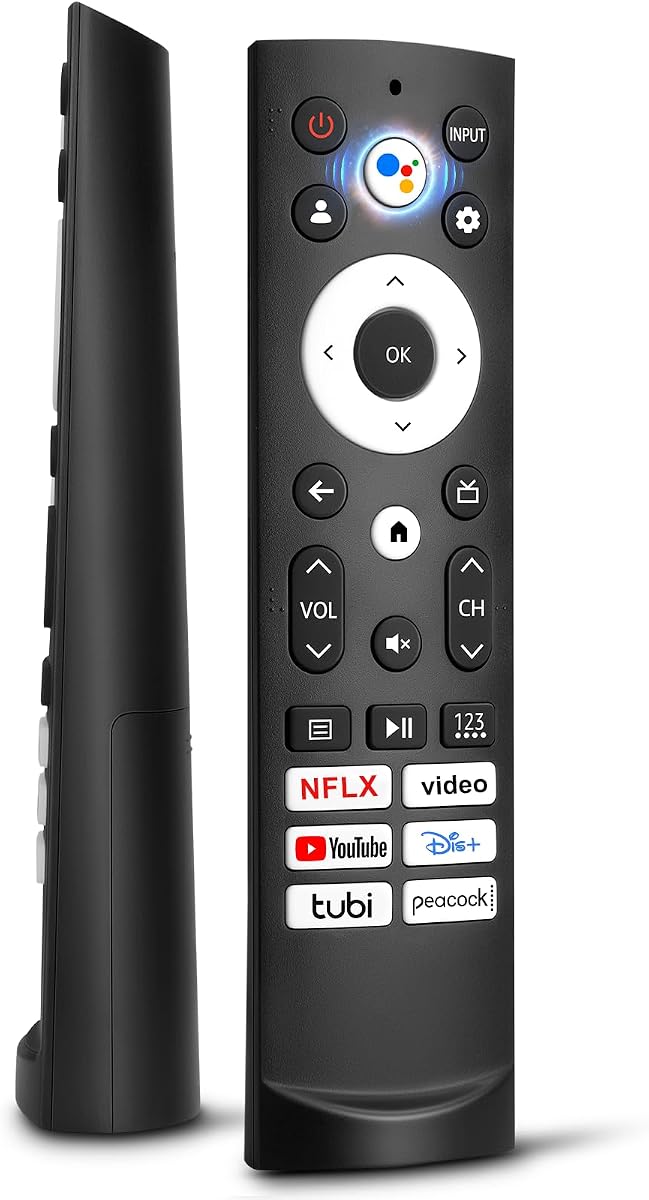
Six hotkeys for Netflix, Video, YouTube, Disney, Tubi, and Peacock make it easy to move from live television to common streaming services. Setup is uncomplicated: two AAA batteries are all that is needed, with no programming or configuration process.
The manufacturer states a transmission distance greater than 35 feet and a quick response time. Its ABS shell is described as resistant to falling and free of an unusual odor, while the buttons are intended to remain comfortable and scratch resistant during routine use.
Compatibility boundaries matter. The listing excludes Google Chromecast remotes, Google TV remote controls, and Google TV streaming devices, which can make the wording confusing even though it supports many Hisense Google TV sets. Verify your television series first; this is a good fit for users who prefer shortcut buttons but do not need voice control.
The app buttons cover a broad mix of major streaming services and one video-focused option. They are most useful when the applications are supported by the connected Google TV platform, allowing direct access without repeatedly searching through the television's application menu.
The narrow-top, wide-bottom shape is designed to rest on a tabletop, making the remote easier to locate. Its infrared operation avoids a separate setup procedure, provided the television's remote reference is listed as compatible.
We may earn a commission when you buy through this link, at no additional cost to you.
This infrared replacement is built around the EN2A27 form and supports a long list of Hisense LCD, LED, HDTV, and Smart TV models. Its 4.4 rating indicates solid customer reception, particularly among buyers who confirmed their television model before ordering.
We may earn a commission when you buy through this link, at no additional cost to you.
Compatibility extends across numerous 40-inch through 65-inch series, including H5C, H6B, H6C, H7B, H7C, H8C, H9B2, CU6000, CU6200, and H10B references. That extensive list makes it useful for owners of older sets whose original remote has been lost or damaged.
Netflix, YouTube, and Google Play buttons offer one-touch access to popular services. The remote works from the box after two AAA batteries are inserted, without pairing or code entry, and the seller includes a one-year full warranty with a defined support route.
This option is strictly for televisions rather than a multi-device universal remote. It does not control Hisense Roku sets, Blu-ray players, DVD players, home theater systems, sound bars, AV receivers, or subwoofers. It is a strong budget-oriented recommendation when your TV model appears in the published list.
Older Hisense televisions frequently use the remote references included in this replacement's compatibility list. Confirming the television's full model designation provides a more reliable purchase decision than relying only on screen size or resolution.
Three shortcut buttons cover frequently used services, while the one-year warranty adds reassurance for a replacement accessory. The remote remains dedicated to the television and should not be selected if you also expect it to operate an audio device.
We may earn a commission when you buy through this link, at no additional cost to you.
This remote is specifically aimed at Hisense Roku televisions rather than standard Android or Google TV sets. Its 4.7 rating is the highest among the products reviewed, indicating a particularly positive reception among buyers who owned matching televisions.
We may earn a commission when you buy through this link, at no additional cost to you.
The listing gives explicit support for the Hisense H4030F1 and R6ER8F series and states that it is also compatible with other Hisense Roku televisions. That makes it a focused choice for owners whose set uses the Roku platform and whose original remote has stopped responding.
As an infrared remote without voice control, it offers a familiar interface and straightforward operation. The principal caveat is explicit in the product information: some buttons may not be compatible with every television. The absence of voice functionality also means users cannot access supported voice commands through the microphone interface.
This is the leading pick for a confirmed Hisense Roku television, especially the H4030F1 or R6ER8F series. It is not the right choice for a Hisense Google, Android, Fire, or VIDAA set, so platform verification is essential before buying.
Hisense sells televisions across several operating platforms, and this remote specifically targets the Roku version. Matching that platform narrows the risk of ending up with a remote that powers on but cannot access the correct functions.
The 4.7 rating suggests a high level of satisfaction, but the listing still warns that a few buttons may not be compatible. Buyers who rely on those buttons should compare the pictured layout with the functions they use most.
We may earn a commission when you buy through this link, at no additional cost to you.
This voice-capable replacement is aimed at modern Hisense Google Smart televisions, including ULED, QLED, TriChroma Mini-LED, and Laser models. Its 4.2 rating is solid, and its defining advantage is the combination of voice activation, rapid command response, and an unusually broad television-series list.
We may earn a commission when you buy through this link, at no additional cost to you.
Compatibility references include A6H, U8K, U7K, U6H, A65K, U75K, UX, U76, A76K, L9, L5H, A7H, U8H, U7H, and several other A and U series. The product information also lists a large collection of specific screen sizes and series combinations, giving buyers ample reference data before ordering.
The remote is engineered for 0.2-second command activation and reliable operation up to 50 feet. Six shortcut buttons open major entertainment applications quickly, while a dedicated microphone button supports voice searches and menu control when the television's built-in voice assistant is functional.
This premium-style option is best for owners of a compatible modern Hisense Google TV who want voice control and long-range operation. Keep in mind that the remote does not create voice functionality if the television itself lacks it, and that the TV must support the applicable voice assistant.
The microphone button can initiate searches, information requests, and navigation when the television provides a compatible built-in assistant. It is not a standalone smart speaker, and its usefulness depends on the television's platform capabilities.
The long list of supported series covers many current Hisense 4K ULED, QLED, Mini-LED, and Laser models. Finding the full television model number before purchase is still important because similar-looking sets can belong to different remote families.
We may earn a commission when you buy through this link, at no additional cost to you.
This two-pack provides broad compatibility with Roku televisions from Hisense, TCL, Onn, Sharp, Philips, Westinghouse, Element, Insignia, JVC, RCA, and Sanyo. Its 4.3 rating reflects positive overall feedback, especially from buyers who wanted one spare for a different television.
We may earn a commission when you buy through this link, at no additional cost to you.
Two remotes are included, making the package useful for a household with more than one compatible Roku television or for keeping a backup nearby. Netflix, Disney, Hulu, and VUDU shortcut buttons support fast access to popular streaming applications.
The remote requires two AAA batteries and needs no programming. The listing claims a response time of 0.3 seconds, a transmission distance above 35 feet, and button testing for more than 120,000 clicks. These specifications make it look well suited to regular daily use.
The key limitation concerns device type rather than television brand. It does not support standalone Roku streaming media players, Express, Express+, Stick, Stick+, Premiere, Premiere+, Ultra, and several box models. Choose it for a Roku television, not a streaming stick or box.
The pack is especially attractive if you own more than one supported Roku television or want a backup in a separate room. It reduces the need to keep moving a single remote between viewing areas.
Compatibility extends across many television brands, but standalone streaming devices use a different remote design. Carefully distinguish a Roku television from a streaming stick or media player before placing the order.
We may earn a commission when you buy through this link, at no additional cost to you.
This replacement offers broad compatibility across Hisense Android, Google, VIDAA, Laser, and several 4K ULED or Mini-LED families. Its 4.4 rating and detailed model references make it a useful option for buyers who know their television series but need support across multiple remote families.
We may earn a commission when you buy through this link, at no additional cost to you.
The listing covers Android series including U7G, U8, U9G, A45H, A4H, A6G, U68G, and U6G. It also names PX1, L5, and L9 Laser TVs, A6 and A65H/A6H/A7/U6/U6H/U7H/U8H Google TVs, and U6K, U8, and UX Mini-LED ULED models.
Three remote model references are supported: ERF3A90, ERF3J80H, and ERF3M90H. Six shortcuts cover Netflix, Video, YouTube, Disney+, Tubi, and Peacock. Installation requires only two AAA batteries, with no programming or pairing listed as necessary.
Its transmission distance is listed as approximately 19 to 26 feet, shorter than several competing products, and the stated response time is 0.5 seconds. Those figures remain practical for many rooms, but this remote is best suited to users who value cross-platform model compatibility more than maximum range.
The compatibility information references ERF3A90, ERF3J80H, and ERF3M90H, giving buyers several avenues for identifying a match. Checking the original remote number can be more reliable than matching the television's screen size or display technology alone.
Six application buttons streamline access to common services, while no-setup infrared operation keeps initial use simple. The documented range may fall short in unusually large rooms, so consider the viewing distance when choosing.
We may earn a commission when you buy through this link, at no additional cost to you.
This two-pack is designed for Hisense Smart Google televisions in UHD, ULED, QLED, and 4K categories. It earns a 4.4 rating and combines a broad modern-series list with a pair of remotes, offering immediate convenience and a ready backup.
We may earn a commission when you buy through this link, at no additional cost to you.
Supported television series include U7, A65H, A4K, A6H, A7H, U6, U6H, U7H, U8H, L5H, U6K, U7K, U8K, U75K, UX, U76, A76K, L9, and A65K. Two AAA alkaline batteries are sufficient, with no complicated pairing steps required.
Six shortcut keys provide direct access to Netflix, Prime Video, YouTube, Disney, Tubi, and Peacock. The infrared system is stated to reach up to 40 feet and respond in 0.2 seconds. High-quality ABS plastic, upgraded silicone buttons, and a non-slip grip are intended to improve durability and tactile operation.
This package is best for owners of compatible Hisense Google televisions who want a spare remote or serve two televisions. It does not support Fire or Roku platforms, and batteries must be purchased separately. Verify the television series before ordering because the remote family is platform-specific.
Two remotes provide useful redundancy and make the package suitable for multiple compatible televisions. Keeping one near the seating area and another near the television can prevent the inconvenience of searching for a misplaced remote.
The stated 0.2-second response time supports prompt navigation, while the six shortcut buttons reduce menu searches. Silicone-covered buttons are intended to feel softer and more sensitive during repeated use.
We may earn a commission when you buy through this link, at no additional cost to you.
This replacement serves Hisense Smart televisions that use the ERF3A90 and ERF3J80H remote families. It has a 4.4 rating and provides a no-voice alternative for users who primarily need navigation, volume, power, and direct streaming-app access.
We may earn a commission when you buy through this link, at no additional cost to you.
The television compatibility list includes A45FH, A4H, A68G, A6G, A6GV, U68G, and U6G models in several screen sizes. The listing also includes detailed remote references and associated television numbers, offering several ways to confirm whether the product fits.
Six hotkeys open NFLX, Video, YouTube, Disney+, Tubi, and Peacock. Two AAA batteries are all that is required for out-of-box operation, and there is no programming procedure. The seller also invites buyers who cannot identify their remote to request help finding the correct replacement.
The platform exclusions are significant: this model does not support Hisense Fire, Roku, or Google televisions, and it has no voice function. It is a sensible choice for a compatible Android Smart TV when voice control is unnecessary or the television itself does not offer it.
This remote provides familiar button-based control without requiring a voice assistant. It is a practical match for Android-based Hisense sets in the listed A4H, A6G, A68G, and U6G families.
The seller offers assistance to customers who cannot locate the correct remote. That support can be valuable because the outer shell of a television remote does not always reveal its underlying model number.
We may earn a commission when you buy through this link, at no additional cost to you.
This voice-enabled remote is designed for modern Hisense Google televisions across 4K Mini-LED, ULED, QLED, Laser, and TriChroma Laser categories. Its 4.3 rating reflects a generally positive response, while its voice assistant and broad modern-series support distinguish it from basic infrared replacements.
We may earn a commission when you buy through this link, at no additional cost to you.
Compatible series include A6H, A65H, A65K, U8K, U6H, U7H, U7K, A4K, U6K, U7, U75K, U8H, L5H, L9, A76K, A7H, U6, U76, and UX. Shortcut buttons provide direct access to Netflix, Video, YouTube, Disney+, and Tubi.
Unlike remotes that work immediately, this one includes a specific pairing method. After inserting two AAA batteries and turning on the television, hold Back and Home for five seconds. The indicator light should blink, and the television should display a pairing-successful message.
The shell uses ABS material and is described as having passed a 100,000-click test. The intelligent speech function can search, play music, and retrieve schedule information when supported by the television. This is a strong recommendation for compatible Google TV owners who value voice navigation, provided they are comfortable completing the pairing steps.
The built-in speech recognition can make searching and menu navigation more convenient. Its capabilities still depend on the television's own voice assistant, so owners should confirm that the required assistant and remote protocol are supported by their model.
The Back-and-Home combination method makes pairing unusually easy to follow. If the indicator does not blink or the success message does not appear, repeat the step with fresh batteries and confirm the remote number before troubleshooting further.
We may earn a commission when you buy through this link, at no additional cost to you.
Compatibility is the decisive factor when selecting a Hisense replacement remote. Platform, television series, remote number, voice requirements, range, shortcuts, setup, and warranty should be considered before choosing a model.
Hisense televisions use several remote platforms, including Roku, Google TV, Android TV, Fire TV, and VIDAA. A remote designed for one platform may power on some Hisense sets but fail to provide complete navigation or access to voice features. Begin by checking the operating system or platform menu on the television, the setup information in its manual, or the model designation on the back of the set. Never rely on the Hisense brand alone, because models within the same television family can use incompatible remote references.
Remote model numbers such as ERF3A90, ERF3J80H, ERF3M90H, EN2A27, and EN2A127H help distinguish the required accessory. Check the physical original remote if it is still available, and look for a printed identifier inside the battery compartment or beneath a removable cover. If the remote is lost, the television's full model number can help you search the seller listings for compatible series. Similar screen sizes, resolutions, and ULED labels do not guarantee that remotes are interchangeable.
Voice remotes can make searching and menu navigation faster, but they are not automatically interchangeable with basic infrared remotes. In this roundup, the premium voice options support selected modern Hisense Google TV families and require compatible television functionality. Basic remotes remain appropriate for users who prefer physical buttons or whose televisions do not offer useful voice-assistant features. Always check whether the replacement includes a microphone and whether the television supports that remote's voice protocol.
Netflix, YouTube, Disney, Tubi, Peacock, Prime Video, Hulu, VUDU, and Google Play buttons can reduce navigation, although the available applications depend on the television platform and region. Some remotes offer three shortcuts, while others provide five or six. More buttons are not automatically better if they duplicate services you do not use. Compare the shortcut layout with your everyday habits and make sure the applications are available on your television.
Documented transmission distances range from approximately 19–26 feet to as much as 50 feet across this roundup. A greater stated range can be helpful in large rooms or when the television is mounted above a fireplace, but actual performance also depends on the television's infrared sensor, room conditions, and pointing direction. Response times range from 0.2 to 0.5 seconds. These differences are generally minor in normal viewing environments, so compatibility should remain the priority.
Most replacements in this guide use infrared signals and work after two AAA batteries are installed. Google TV voice remotes may require a pairing procedure involving the Back and Home buttons. The two-pack options also generally operate without programming. Check whether batteries are included; none of the products listed here specifies included batteries. Using fresh alkaline batteries can improve consistency and reduce troubleshooting confusion caused by weak cells.
A two-pack offers a ready spare or supports two compatible televisions, which can be useful in busy households or rooms with multiple sets. Single remotes are generally simpler to organize and adequate for one television. Warranty coverage varies: some listings include a one-year full warranty or one-year warranty, while others do not present equivalent coverage in the supplied information. Consider warranty terms as reassurance, but let model compatibility remain the deciding factor.
Most options use an ABS shell, which is a practical material for a frequently handled accessory. Several models add a standable shape, scratch resistance, a non-slip grip, or silicone-covered buttons. Button testing claims and response specifications can provide useful comparisons, but they do not replace compatibility checks. If several remotes fit the television, select the one whose layout, shortcut buttons, range, and setup process best match your habits.
Begin by identifying the television's platform and full model number, then compare those details with the remote's published compatibility list. Install two fresh AAA batteries in the correct polarity, turn on the television, and point the remote directly toward its infrared sensor. For models designed to work out of the box, allow a short settling period while the television detects the signal.
If the remote includes a pairing procedure, follow its specified steps precisely. For the voice-enabled Google TV remote in this roundup, insert the batteries, turn on the television, hold Back and Home for five seconds, and wait for the indicator to blink and the pairing-success message to appear. Re-seat the batteries or repeat the process if the remote does not respond immediately.
For long-term care, remove batteries if the remote will remain unused for an extended period, clean the exterior with a soft dry cloth, and avoid moisture or cleaning fluid entering the button gaps. Do not drop the remote onto hard surfaces or place it in direct heat. If a button fails, test the remote from a short distance and replace the batteries before assuming the remote itself is defective.
Check the platform first, such as Roku, Google TV, Android TV, Fire TV, or VIDAA, and then locate the television's full model number. If the original remote is available, look for its model reference inside the battery compartment. Compare both identifiers with the replacement's compatibility list before ordering, because the Hisense brand by itself does not guarantee compatibility.
Usually, no. Roku televisions and Google televisions use different platform functions, button layouts, and often different remote technologies. The Hisense Roku TV IR Remote reviewed here is specifically intended for Roku sets, while the Google TV replacements target compatible Google television series. Always match both the platform and the television model.
Most of the basic infrared replacements are advertised as working after two AAA batteries are installed, without codes or pairing. Voice-capable Google TV remotes may require pairing; one product in this roundup uses a five-second Back-and-Home press and confirms success with an indicator and onscreen message. Follow the instructions associated with the exact model purchased.
The supplied product information consistently notes that batteries are not included. You should plan to purchase two AAA batteries, and using fresh alkaline batteries is advisable. Correct polarity is important, so check the markings inside the compartment before closing the cover.
Most options in this guide are television-specific and do not control audio equipment, Blu-ray players, DVD players, AV receivers, or subwoofers. The universal Hisense replacement explicitly excludes those devices. If you need to operate multiple components, look for a separate programmable universal remote designed for your equipment.
The remote may belong to a related but different remote family, or the television may use a function that the replacement does not support. The Hisense Roku IR Remote also notes that some buttons may not be compatible. Compare the original remote layout and full model numbers, then contact the seller for assistance if the listing cannot confirm the match.
No. A microphone and voice function on the remote do not guarantee that the television supports the required voice assistant or pairing protocol. Voice-enabled remotes in this roundup are intended for specified Google TV series, and the voice feature still depends on the television's built-in functionality.
A single remote is adequate for one television and leaves you with one device to store or maintain. A two-pack provides a spare or can cover two compatible televisions and is useful for shared rooms. Since both units still need to match the television's platform and remote family, pack quantity should be considered only after confirming compatibility.
The Universal for All Hisense TV offers the strongest broad legacy coverage in this roundup and works without programming, making it an excellent general recommendation for conventional Hisense Android sets. The Universal Hisense Replacement is a compelling budget choice with extensive model support, three streaming shortcuts, and a one-year full warranty.
The most feature-focused option is the Hisense Google Voice Remote with 50-foot range, quick shortcuts, and dedicated voice activation, while the other voice-enabled Google remote provides a clear pairing procedure and a broad modern-series list. Prioritize the correct platform and remote model above range, shortcut count, or appearance, then consider voice capability and whether a spare remote would be useful.
Ratings, availability, and prices can change, so review the current product listing and customer feedback before making a final purchase. Confirm the television model, platform, remote number, battery requirement, and return or warranty terms at the time of ordering.