
Amazon Basics Smart Plug
4.4Editor score
Direct Alexa app setup
Remote control and schedules
Compact four-pack design
Explore the top smart plugs for Alexa, comparing compatibility, setup, schedules, app control, safety, power capacity, design, and pack size today.
Smart plugs for Alexa can make everyday routines more convenient by adding voice control, remote access, and automated schedules to compatible appliances. A good model should pair easily with Amazon Alexa, operate on a stable home network, and offer a compact design that does not obstruct nearby outlets.
This guide compares ten smart plug options across Alexa compatibility, setup process, app features, scheduling, safety certifications, power capacity, and multi-pack value. It includes products that connect directly through Alexa as well as Matter-compatible models and plugs that first require configuration through a manufacturer or Smart Life app.
Each review explains the product's strongest benefits, practical limitations, and ideal use case, while the comparison table provides a quick overview. Amazon ratings and product details reflect the supplied listings, and prices and availability can change, so readers should verify current listings before purchasing.
4.4Editor score
4.6Editor score

4.5Editor score
This side-by-side overview highlights each plug's Alexa workflow, connectivity, scheduling capabilities, maximum rated load, and pack configuration to help readers identify the most suitable option for their home.


The Amazon Basics Smart Plug earns a 4.4 rating and stands out for its unusually direct connection between the outlet and the Alexa ecosystem. It supports voice control, remote app control, scheduling, and sunrise or sunset routines without requiring a separate smart hub or a third-party mobile app. That makes it an approachable option for Alexa households that want fewer setup steps and fewer apps.
We may earn a commission when you buy through this link, at no additional cost to you.
Its most compelling feature is the potential zero-touch setup path. When the listing offers the opportunity to link the device to an Alexa account during checkout, eligible customers can reduce the configuration process considerably. Once connected, users can manage plugged-in equipment from the Alexa app, create on and off schedules, or issue voice commands. The compact form also helps preserve access to adjacent wall receptacles.
The trade-off is a deliberately narrow ecosystem. This model is designed to work with Alexa only and requires 2.4 GHz Wi-Fi, so it is not a fit for homes built entirely around Matter, Apple Home, or Google Assistant. Buyers who want cross-platform flexibility may find one of the Matter options more future-oriented, while those who use Alexa consistently will find the focused experience uncomplicated.
This is the best general recommendation for readers who prioritize easy Alexa setup, useful routines, and a compact multi-pack. It is especially appropriate for lamps, fans, holiday lighting, coffee makers, and other compatible appliances. Choose it when keeping the smart-home experience inside Alexa is a benefit rather than a limitation.
Managing the plug through the Alexa app keeps the workflow centralized. Users can control compatible appliances remotely, establish recurring schedules, and tie power behavior to sunrise, sunset, a specific time, or a voice command without installing another manufacturer's app.
The compact plug is intended to fit into a single socket while leaving neighboring receptacles accessible. That design is helpful in kitchens, bedrooms, offices, and holiday-light displays where a bulky adapter could block other connections.
We may earn a commission when you buy through this link, at no additional cost to you.
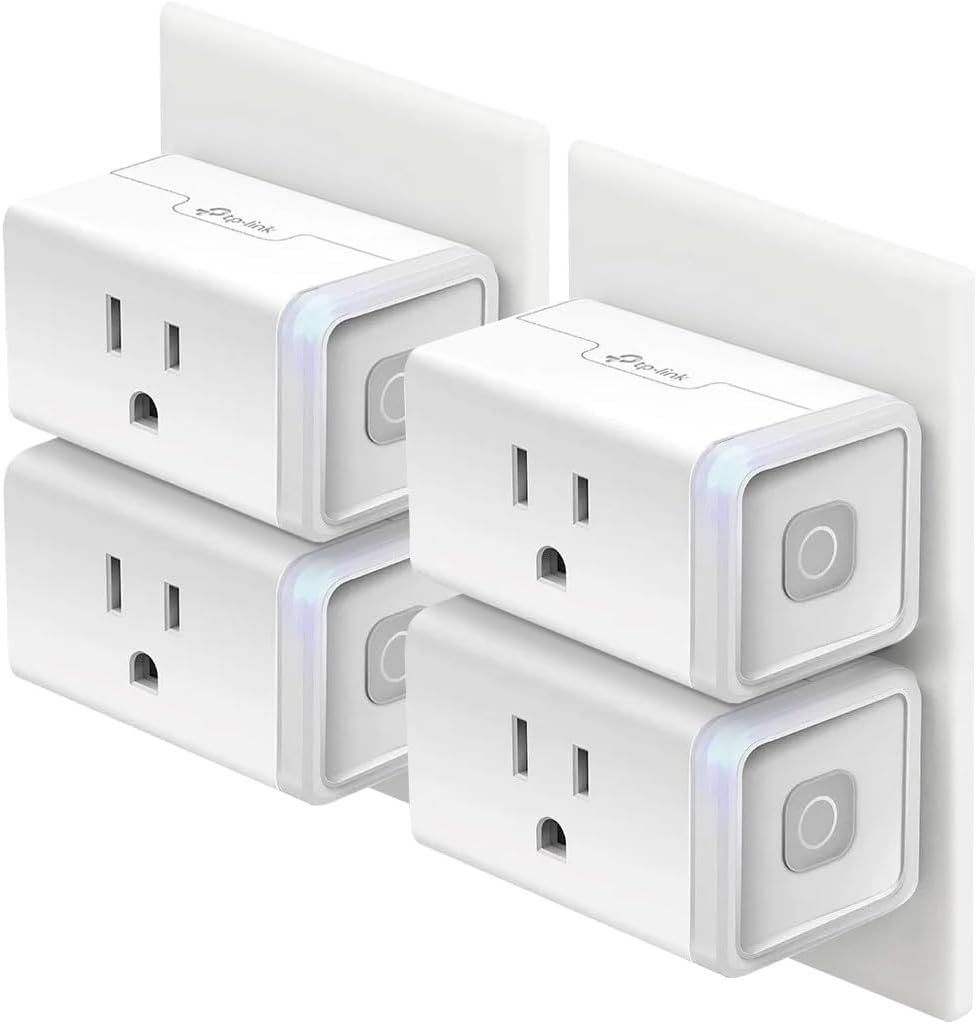
The Kasa Smart Plug HS103P4 has a 4.6 rating, the highest among the ten listed products, and offers a balanced combination of features, safety certification, and convenience. It works with Amazon Alexa and Google Home Assistant, provides hands-free appliance control, and operates without a dedicated hub. The four-pack format is also well suited to building a room-by-room or whole-home outlet network.
We may earn a commission when you buy through this link, at no additional cost to you.
The Kasa app serves as the control center for remote switching, timers, and countdowns. Compatible appliances can be scheduled to start or stop automatically, useful for lamps, fans, humidifiers, and seasonal lights. A physical touch actuator on the plug also provides a familiar way to toggle the connected appliance, while Alexa voice commands provide an alternative when your hands are occupied.
Its main limitations are routine for a mature Wi-Fi plug category. Setup requires 2.4 GHz Wi-Fi and the Kasa app, so buyers should ensure their router provides that band. The listed maximum is 15 amps, but users still need to confirm that the connected appliance falls within the plug's supported load. Those constraints are reasonable and clearly stated in the product information.
The HS103P4 is the strongest all-around pick for a household that wants a dependable mix of voice control, scheduling, remote access, and broad platform support. It works particularly well for people who want four outlets to begin automating several rooms or appliance categories at once. The combination of its 4.6 rating, UL certification, and feature set justifies the Editor's Choice designation.
Timer and countdown schedules add value beyond simple voice commands. A fan can shut off after a set period, holiday lights can follow a daily program, or a humidifier can begin at a consistent time without requiring manual intervention.
Compatibility with both Alexa and Google Home Assistant gives households some freedom in how they organize their broader smart home. The plug can still be controlled locally through the Kasa app when a voice assistant is unavailable.
We may earn a commission when you buy through this link, at no additional cost to you.
The Govee Smart Plug carries a 4.5 rating and is designed for buyers who want an approachable way to automate several compatible appliances at once. This four-pack supports voice control through Alexa and Google Assistant, while the Govee Home app provides remote access, customized schedules, family sharing, and multi-device group management.
We may earn a commission when you buy through this link, at no additional cost to you.
A notable feature is its support for both Bluetooth and Wi-Fi connections. Bluetooth can simplify initial pairing, while Wi-Fi supplies ongoing network control. The group-control function is particularly useful for operating several plugs together, such as switching off a collection of holiday lights or coordinating a room full of connected lamps from one command.
The most important limitation is its 10-amp, 1,200-watt rating at 120 volts. That is lower than the 15-amp capacity offered by several competing plugs, so high-draw equipment may not be suitable. The product also does not support 5 GHz Wi-Fi. Its ETL certification and compact design help offset these constraints, but load requirements should be checked before buying.
This plug is best for Alexa users who want several outlets, app-based group control, and an easy Bluetooth-assisted setup. It suits lighting, fans, humidifiers, and other compatible appliances that operate within the stated 10-amp limit. For heavier loads, a 15-amp alternative would be safer, while for mixed-platform smart homes, the Matter options offer more flexibility.
The group controller allows multiple smart plugs to be managed together. This is particularly valuable for seasonal displays, grouped lighting, or rooms where several compatible appliances should always follow the same schedule.
Bluetooth support gives the plug an additional connection method during setup. Govee Home is the required app for pairing, and family members can be invited through the same app once the devices are configured.
We may earn a commission when you buy through this link, at no additional cost to you.
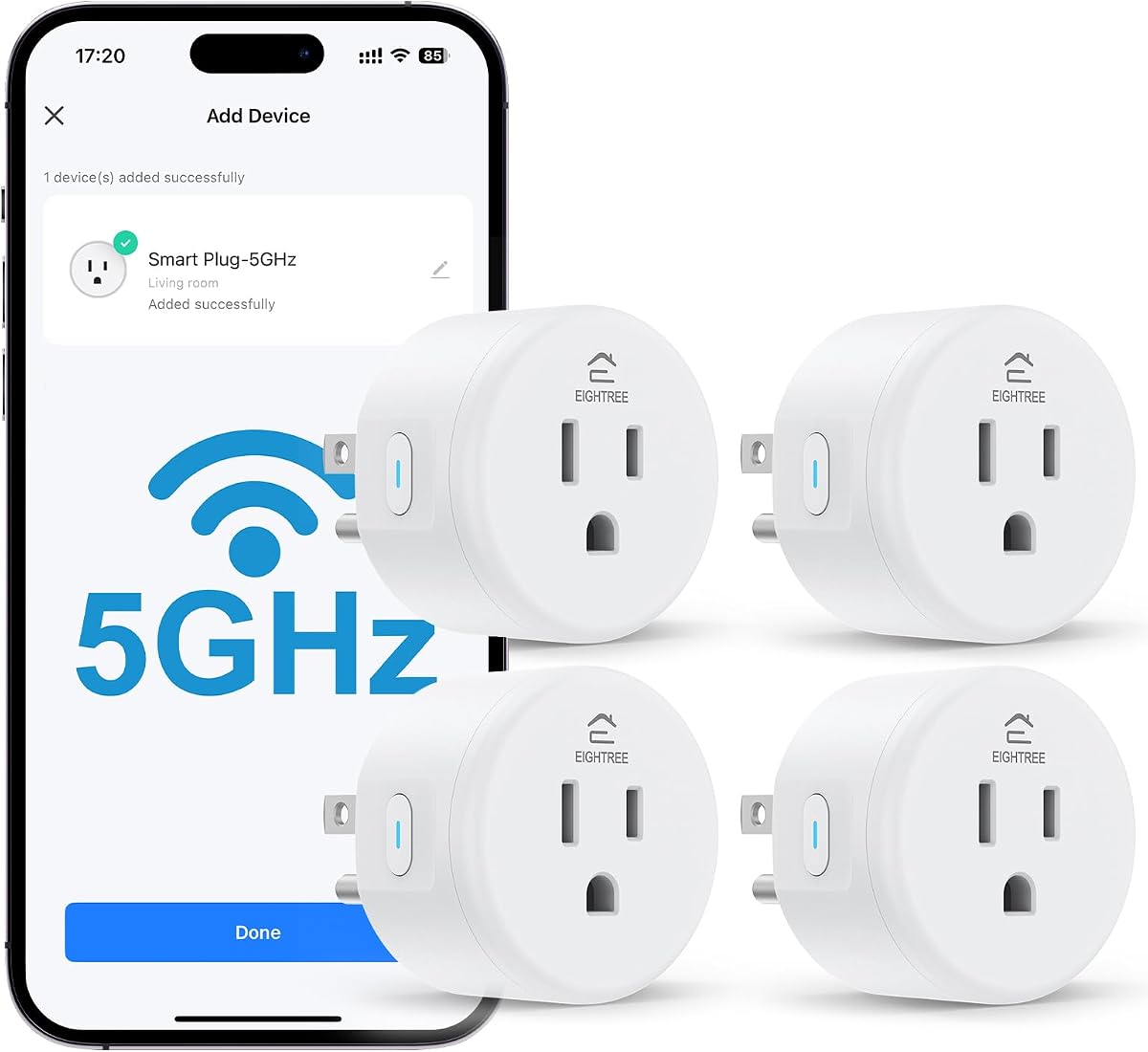
The EIGHTREE 5GHz Smart Plug has a 4.5 rating and is the only product in this list explicitly designed around a 5 GHz connection. Its dual-band Wi-Fi approach can provide quicker response times and fewer perceived delays when the plug is near a compatible router, making it appealing to users whose home network struggles with crowded 2.4 GHz channels.
We may earn a commission when you buy through this link, at no additional cost to you.
The plug supports 15 amps and up to 1,800 watts at 120 volts, giving it more headroom than the 10-amp Govee option. It also includes Bluetooth setup, remote access through Smart Life, schedules, timers, and group control. Alexa and Google Home voice control are available after the plug is first connected through the Smart Life app.
That required Smart Life configuration is the principal trade-off. It is not a direct-to-Alexa product, and the initial setup must be completed through the app before the voice-assistant link becomes available. The listing also asks users to connect to the app first, making this less seamless for people who want an entirely Alexa-native path.
This model is a strong option for households with reliable 5 GHz coverage, compatible higher-power appliances, and a willingness to use Smart Life as the setup platform. It offers the broadest high-frequency connectivity in the group, but readers should confirm that their router and location provide a strong 5 GHz signal before choosing it.
The 5 GHz band is the key distinction for this model. When signal quality is strong, it can make voice commands, app actions, and routine changes feel more responsive, particularly in a busy household network.
A rated capacity of 15 amps and 1,800 watts gives the plug additional flexibility for compatible coffee makers, heaters, and other equipment. Users should still verify each appliance's requirements and avoid using the plug beyond its stated limits.
We may earn a commission when you buy through this link, at no additional cost to you.
The EIGHTREE Smart Plug has a 4.5 rating and is built for users who want more scheduling variety than a simple on-and-off timer can provide. It supports timers, countdowns, cycles, and random schedules through the Smart Life app, giving compatible appliances more nuanced operating patterns.
We may earn a commission when you buy through this link, at no additional cost to you.
Bluetooth-assisted onboarding makes the initial connection more approachable, while remote app control and Alexa or Google Assistant compatibility expand everyday use. The plug also supports SmartThings for broader smart-home integration. Its compact round form is designed to fit tight spaces such as nightstands, corners, and locations behind furniture.
The listing is explicit that direct connection to Alexa is not supported. Users must first connect the plug to the network and the Smart Life app, then link Alexa or Google Home through the app's third-party services area. This adds setup work, although the resulting voice control functions normally once the linkage process is complete.
This EIGHTREE model is a good match for people who value flexible routines and intend to use several outlets. It is especially useful for a coffee maker, lamps, or other compatible appliances that benefit from timed operation. Buyers who do not mind using Smart Life will find strong functionality, but those prioritizing a native Alexa setup may prefer another model.
The combination of timers, countdowns, cycles, and random schedules is the defining feature. These options can create varied appliance behavior instead of forcing every automated action into a single fixed daily timetable.
The small round enclosure is intended to reduce obstruction around nearby sockets and furniture. That makes the four-pack easier to distribute around a room when a larger rectangular plug would be inconvenient.
We may earn a commission when you buy through this link, at no additional cost to you.
The Kasa HS103P3 has a 4.6 rating and delivers the same core Kasa experience as the four-pack in a more moderate three-plug configuration. It works with Alexa and Google Home Assistant, offers remote smartphone control, and supports timer and countdown schedules through the Kasa app.
We may earn a commission when you buy through this link, at no additional cost to you.
Its appeal lies in a familiar, restrained feature set. Plug it in, open the Kasa app, and follow the setup instructions to place it on a 2.4 GHz Wi-Fi network. From there, users can voice-control compatible appliances or create automatic schedules for lamps, fans, humidifiers, and Christmas lights.
There are few surprises. The plug requires 2.4 GHz Wi-Fi and a separate Kasa app, and its smart features do not extend to Matter or offline local control. Its three-pack count also makes it less comprehensive than the four-pack alternatives, although that can be helpful for buyers who only need to automate three locations.
This is a strong recommendation for Alexa users who appreciate Kasa's app and want three outlets rather than four. It may suit a bedroom, home office, or a small set of appliances. The 4.6 rating and UL certification make it a confident choice within a familiar product family, though it lacks the broader compatibility of the Matter models.
Kasa's app provides the expected remote and scheduling controls without adding complexity. The result is a practical setup for users who want the same controls across multiple compatible outlets.
Three plugs are enough to automate a primary lamp, fan, and seasonal display without moving to a larger pack. The configuration can also be easier to place around a home than a full set of four.
We may earn a commission when you buy through this link, at no additional cost to you.
The Kasa HS103P2 is a 4.6-rated two-pack for shoppers who want to add Alexa control to a small number of outlets. It supports voice control through Alexa and Google Home Assistant while preserving app-based remote access and scheduling through Kasa.
We may earn a commission when you buy through this link, at no additional cost to you.
The two-plug format is flexible for targeted automation. A buyer might use one outlet for a bedroom lamp and another for a fan, or place both around a home office. The side button provides a physical way to toggle the connected appliance, giving users a manual alternative when a phone or voice assistant is not nearby.
The product's maximum load is listed at 15 amps resistive at 120 VAC, which provides useful capacity for compatible appliances. As with the other Kasa models, setup requires the Kasa app and a 2.4 GHz Wi-Fi network. Its limited pack count and lack of Matter support are the main reasons it ranks below larger and more flexible options in this guide.
This is the most focused Kasa choice for people who need exactly two outlets rather than a larger pack. It is a good fit for a couple of lamps, a small office, or an apartment where every connected outlet counts. Buyers seeking broader ecosystem support should consider a Matter product, while established Kasa users can appreciate the familiar app and strong rating here.
A two-pack makes it easy to focus automation on the appliances that matter most without adding unnecessary outlets. Both plugs can still be accessed through the same app and associated with Alexa routines.
The side button toggles the power state of the plug and its connected appliance. This provides a familiar fallback for times when using the app or speaking to Alexa is not convenient.
We may earn a commission when you buy through this link, at no additional cost to you.
The Linkind Matter Smart Plug has a 4.4 rating and stands apart through broad Matter support. It can work with Alexa, Apple Home, Siri, Google Home, SmartThings, and AiDot, reducing the need to maintain separate ecosystems for every device category. It is a strong choice for mixed-platform households or users who value a more future-oriented smart-home standard.
We may earn a commission when you buy through this link, at no additional cost to you.
Matter also enables local network communication after setup. Once compatible devices are configured on the LAN, they can communicate directly without depending on an internet connection or cloud service. This gives the plug more resilience during network outages and creates a stronger foundation for local device-to-device automation.
The requirement for a Matter-certified controller is important. Alexa and Google Home users need a compatible controller such as an Echo Dot, Nest, or SmartThings Hub, while the AiDot app can be used without a separate hub. The plug only supports 2.4 GHz Wi-Fi and IPv6, so older network configurations may require adjustment.
This Linkind is ideal for readers who want Alexa support without giving up Apple Home, Google, or SmartThings compatibility. It is particularly attractive to mixed-ecosystem households that value local control. It may be excessive for someone committed only to Alexa, but for broader compatibility and offline resilience, it offers clear advantages.
Matter support lets users add the plug to certified platforms rather than locking it into one manufacturer's ecosystem. That flexibility is especially valuable when a household already uses Apple Home, Alexa, Google Home, or SmartThings alongside other Matter products.
After the devices are configured on the local network, Matter communication can continue without an internet connection. This reduces reliance on cloud availability and enables compatible devices to interact directly within the home.
We may earn a commission when you buy through this link, at no additional cost to you.
The GHome Smart Plug has a 4.4 rating and offers unusual app flexibility, supporting GHome, Smart Life, and Tuya. This can simplify management for users who already use one of the broader platforms, while also providing remote control, schedules, timers, groups, and family sharing.
We may earn a commission when you buy through this link, at no additional cost to you.
Its connection options include both Bluetooth and Wi-Fi. Bluetooth supports quicker setup, and the plug operates on a stable 2.4 GHz network for ongoing control. Alexa and Google Assistant voice commands are supported once the plug is connected to the network and set up through the GHome app.
Direct connection to Alexa is not available, which adds a necessary setup step. The product also remains limited to 2.4 GHz Wi-Fi. Another consideration is that support for several apps does not necessarily mean simultaneous use across all of them; buyers should understand the app relationship and choose a primary interface before installation.
This plug is well suited to Alexa users who want flexible scheduling and already recognize Smart Life or Tuya. Its group controls and sharing capabilities are useful for families managing multiple outlets. It may be less attractive than a Matter model for buyers who prioritize offline local control, but it offers a broad and practical app ecosystem.
Support for GHome, Smart Life, and Tuya gives the plug flexibility within the Tuya-oriented app ecosystem. Users should choose the interface that best fits their existing routine and linked services.
Grouping allows several plugs to be controlled with one action, while family sharing lets additional users manage connected equipment. Cyclic and random schedules add variety for compatible lights, fans, humidifiers, and seasonal decorations.
We may earn a commission when you buy through this link, at no additional cost to you.
The TP-Link Tapo P125M has a 4.5 rating and combines Matter support with a compact, three-plug configuration. It works with Alexa, Apple Home, Siri, Google Home, and Samsung SmartThings, making it a natural choice for users who want to gradually build a mixed-platform smart home around a common standard.
We may earn a commission when you buy through this link, at no additional cost to you.
Matter support brings smooth local-area-network control. Compatible devices can communicate directly after configuration, allowing automation to continue even when the home internet is unavailable. The Tapo app offers remote access, advanced schedules, timers, and voice control through the user's preferred compatible assistant.
The P125M uses a compact, flame-retardant design and is UL certified. Its maximum rating is 15 amps and 1,800 watts, which gives it useful capacity for compatible household appliances. However, it connects only through 2.4 GHz Wi-Fi, and the three-pack format may be more than needed for a single room.
This Tapo model is an excellent choice for Alexa users who want Matter compatibility and local-network resilience without giving up a compact outlet design. It is particularly compelling for households with several smart-home platforms or for users who prioritize a standardized setup. The Tapo app and Bluetooth onboarding make the initial process approachable.
The plug is designed to work across certified smart-home platforms, including Alexa, Apple Home, Google Home, and SmartThings. That standard reduces dependence on any one brand and can make future device additions easier to manage.
The mini enclosure is designed to avoid blocking adjacent outlets, while the flame-retardant materials and UL certification support confidence in daily use. Its stated 15-amp limit should still guide which appliances are connected.
We may earn a commission when you buy through this link, at no additional cost to you.
The right smart plug depends on how the household uses Alexa, which network it operates on, and the appliances that need remote or scheduled control. Compatibility, setup requirements, electrical capacity, and privacy expectations should be considered before purchasing.
Choose direct linking for the simplest Alexa-only experience. Choose app-first or Matter setup if you also use other platforms.
Most buyers need stable 2.4 GHz coverage. Consider the EIGHTREE 5GHz model when faster local response is a priority.
Prefer Matter for cross-platform control and local resilience. Native app-based plugs can be simpler for a single-platform household.
Choose a 15-amp model for greater headroom and a 10-amp plug only for lower-draw compatible equipment.
Match the schedule type to your routine. Simple daily programs are sufficient for many lamps, while varied cycles can suit decorative lighting.
Measure the available outlet space and favor a compact model if another plug or charger must remain connected.
Look for recognized safety certification and select a pack size based on realistic room and appliance coverage.
Pick the app model that matches your comfort level. Use a dedicated app for deeper control, or centralize routine control in Alexa.
Begin by checking the connected appliance and the plug's maximum load, then confirm that the home network uses a supported Wi-Fi band. Plug the smart plug into a dry, accessible wall outlet and install the required manufacturer app, except when using the Amazon Basics model's Alexa-native process. Follow the app's pairing instructions and keep the plug close enough to the router for reliable setup.
After the device appears online, test its physical power control and switch it on and off from the app. Link the plug to Alexa using the Alexa app or complete the app's third-party service setup, then ask Alexa to identify the device by name. After confirming that voice commands work, create schedules, timers, groups, and routines based on the appliance's actual operating needs.
For care, inspect the plug periodically for heat, discoloration, looseness, or damage, and unplug it if any of these signs appear. Do not exceed the stated amperage or wattage, and avoid using a smart plug for equipment that requires continuous high-load operation unless the manufacturer expressly allows it. Firmware updates through the appropriate app can help maintain compatibility and security.
Most of the listed plugs do not require a dedicated hub for basic Alexa use. They connect to a 2.4 GHz or supported dual-band Wi-Fi network and are linked through the Alexa app or a manufacturer app. Matter-compatible models require a Matter-certified controller for Alexa, Apple Home, Google Home, or SmartThings control, although the AiDot app can be used for the Linkind plug without a separate hub.
Once the smart plug is connected and linked to your Alexa account, compatible Alexa speakers and displays generally provide hands-free control. The exact voice command depends on the name assigned to the plug and the appliance connected to it. Make sure the device appears in the Alexa app and test the command before relying on it in a routine.
App-first models use the manufacturer's cloud service or account system to complete registration before Alexa can discover the plug. EIGHTREE, GHome, and other Smart Life-compatible products follow this approach. Matter devices may also require initial setup in a certified platform. The process is normal, but readers who want the fewest steps may prefer the Amazon Basics plug.
The rating indicates the maximum electrical load the plug is designed to handle. The Govee model in this guide is listed at 10 amps and 1,200 watts, while several other models support 15 amps and up to 1,800 watts at 120 volts. Always check the connected appliance's requirements and keep usage within the manufacturer's stated limit.
Standard app-based plugs generally depend on their cloud connection and may lose remote control during an internet outage. Matter models such as Linkind and Tapo can support local-area-network communication after setup, allowing compatible devices to communicate directly without cloud or internet service. Local voice control can still depend on the specific Alexa device and network configuration, so it should be tested in advance.
Yes, once multiple plugs are linked to Alexa, a routine can include their individual actions or a group of devices. Govee, EIGHTREE, Tapo, and other options also provide app-based group controls. Grouping is useful for coordinated lighting, but the devices must be properly named and assigned to the same Alexa group or routine.
They are different wireless bands, and a plug only connects to the band or bands specified in its listing. Most products here require 2.4 GHz, while the EIGHTREE 5GHz model supports 5 GHz and dual-band connectivity. A router that broadcasts both bands can still prevent setup if a particular plug cannot use the selected network.
Only if the appliance's electrical requirements fall within the plug's rating and the plug manufacturer permits that use. The EIGHTREE, Kasa, Linkind, and Tapo options list 15-amp capacities, which can accommodate some higher-draw equipment. Check both products carefully, and discontinue use if the plug becomes unusually hot or shows signs of strain.
The Amazon Basics Smart Plug is the most direct pick for Alexa-only households because it keeps setup and management inside the Alexa ecosystem. The Kasa HS103P4 stands out for its 4.6 rating, 15-amp capacity, timer functions, and broad voice-platform support, while the Govee four-pack is well suited to buyers who value Bluetooth-assisted pairing, group control, and shared household access.
The right priority depends on the home's needs. Choose app-first or Matter-compatible options for broader platform support, select a 15-amp model for more load headroom, and consider offline LAN control when local resilience matters. Also check Wi-Fi band support, required controllers, app preferences, outlet dimensions, and certification before making a final selection.
Product details, ratings, availability, and prices can change, so readers should confirm the current Amazon listing and full technical details before purchasing. Comparing the final product with the intended appliance, Alexa setup, and home network will make the selection more reliable and reduce the chance of choosing a plug whose limitations do not fit the household.