
LGA 1155 Motherboard H61
5.0Editor score
Supports Intel 2nd and 3rd generation
Dual-channel DDR3 up to 16GB
Convertible M.2 NVMe or NGFF
VGA and HDMI display outputs
Our Lga 1155 Motherboard guide compares ten options for CPU support, memory, expansion, storage, networking, display, and overall value.
LGA 1155 motherboards remain useful for affordable builds, system upgrades, and repair projects involving compatible Intel processors. The best choice depends on chipset, memory capacity, expansion needs, storage connections, and whether integrated graphics or a dedicated graphics card will handle display output.
We compared ten LGA 1155 motherboards across important platform traits, including processor compatibility, DDR3 support, expansion slots, M.2 connectivity, SATA ports, display outputs, networking, and form factor. The list includes compact H61 boards and more feature-rich Z77 and H77 ATX models.
Each review identifies a clear use for its motherboard, from budget reuse systems to enthusiast-oriented platforms with stronger expansion and storage options. Product listings and prices can change, so confirm current specifications, included accessories, and component compatibility before purchasing.
5.0Editor score

4.3Editor score

4.1Editor score
The comparison below highlights the processor, memory, storage, expansion, and networking characteristics that distinguish these LGA 1155 motherboards and shape their suitability for different builds.



This H61 board is an economical option for building or repairing an LGA 1155 system, and its listed 5.0 rating gives it the strongest customer feedback in this group. It supports Intel 2nd- and 3rd-generation Core i3, i5, and i7 processors, along with Xeon E3 v2 and Pentium-series processors.
We may earn a commission when you buy through this link, at no additional cost to you.
The board offers two DDR3 slots for up to 16GB of non-ECC unbuffered memory and supports listed memory speeds from 1280 through 1866MHz. Its flexible M.2 interface can be configured for NVMe or NGFF, while the full-size PCIe x16 slot supports a dedicated graphics card. VGA and HDMI outputs are also provided.
Integrated display output requires a processor with integrated graphics, so an F-series Core processor or a Xeon model without integrated graphics would necessitate a separate graphics card. The package includes a SATA cable and I/O baffle, but the manual and CR2032L battery are not supplied. Those omissions should be considered before ordering.
This is a strong recommendation for a straightforward office, home, or light entertainment build using compatible components already on hand. It is less appropriate for a heavily upgraded enthusiast system because its storage, expansion, and memory capacity are more limited than several Z77 and H77 alternatives.
The convertible M.2 interface lets builders choose between NVMe and NGFF configurations, making the board useful when storage format is not yet settled. The listed NVMe implementation uses a PCIe 2.0 x4 lane, while the NGFF option uses SATA.
VGA and HDMI outputs can handle 1080p display output when the selected processor includes integrated graphics. Systems using a processor without integrated graphics can use the PCIe x16 slot for a dedicated graphics card.
We may earn a commission when you buy through this link, at no additional cost to you.
The MACHINIST H61 combines a compact Flex-ATX design with broad support for 2nd- and 3rd-generation Intel processors. Its 3.7 rating is the lowest listed among these ten products, so buyers should pay particular attention to exact processor, memory, and accessory compatibility.
We may earn a commission when you buy through this link, at no additional cost to you.
Two DDR3 slots accept up to 16GB of non-ECC unbuffered memory. The M.2 interface supports 2242, 2260, and 2280 drives and can be configured for NVMe or NGFF after setup, while the board also includes SATA connectivity. VGA and HDMI outputs support 1080p video with a suitable integrated-graphics processor.
A clear limitation is the 100M LAN connection, which is modest for transfers involving large files or network storage. The package contains the motherboard, SATA cable, and I/O baffle, but the manual and CMOS battery are not included. The seller also provides detailed troubleshooting guidance for power, display, and memory issues.
This board makes sense for a compact reuse build where broad processor support and M.2 format flexibility matter more than fast networking. It can serve as a general-purpose system or a stepping-stone platform, but buyers wanting a more established ATX feature set may prefer a Z77 or H77 model.
Support for 2242, 2260, and 2280 modules provides useful flexibility when selecting a compact SSD. Depending on the selected protocol, the M.2 connection can use the PCI Express channel or SATA path.
The board can drive a 1080p display without a graphics card only when the installed processor provides integrated graphics. Most Core desktop models qualify, while F-series Core chips and many Xeon E3 v2 processors do not.
We may earn a commission when you buy through this link, at no additional cost to you.
The Gigabyte Z77-DS3H is a conventional ATX LGA 1155 board that combines the Z77 chipset with support for Core i3, i5, i7, Pentium, and Celeron processors. Its 4.3 rating places it among the stronger-reviewed products here, making it a well-rounded platform for a broad range of compatible builds.
We may earn a commission when you buy through this link, at no additional cost to you.
Compared with basic H61 boards, Z77 is a more established enthusiast platform with a full-size ATX layout and Gigabit LAN. The exact memory, slot, and SATA details are not reproduced in the supplied listing, so prospective buyers should consult the product page and manual before confirming expansion requirements.
One advantage of this model is its recognizable motherboard family and broad stated processor support, which can make it easier to find compatible components and general installation knowledge. The downside is that LGA 1155 systems require supported DDR3 memory and a compatible CPU rather than newer platform parts.
Choose the Z77-DS3H when you want a conventional motherboard with a favorable customer rating, established chipset, and ATX footprint. It is a sensible general option for a reused office or home PC and a practical foundation for a system using already-owned compatible components.
The Z77 chipset gives this board a familiar enthusiast-oriented foundation within the LGA 1155 generation. It is a logical choice for builders who prefer a full-size board and Gigabit networking over a compact entry-level H61 design.
The supplied product information does not enumerate memory capacity, storage ports, or expansion slots. Check the current listing and board manual so every planned RAM module, drive, and card matches the exact revision being considered.
We may earn a commission when you buy through this link, at no additional cost to you.
The ASUS P8Z77-V is a full-size Z77 motherboard aimed at users who want stronger platform features than a basic H61 board. It supports LGA 1155 processors and DDR3 memory up to a listed 2400MHz speed, and its 4.0 rating reflects generally favorable customer feedback.
We may earn a commission when you buy through this link, at no additional cost to you.
Its management features are a major point of distinction. Fan Xpert 2 provides automatic and individual fan tuning, SMART DIGI+ Power Control allows detailed CPU and memory power adjustments, and USB BIOS Flashback simplifies updating the BIOS with a USB drive.
The board also includes a TPM header for enhanced data-protection support. These convenience features make it particularly appealing to a builder who wants granular fan and power management rather than a basic replacement board, although the underlying platform still depends on older DDR3 components.
This is a good match for an enthusiast-style LGA 1155 build, a carefully configured home workstation, or a system where fan tuning and power controls matter. Confirm processor and memory support, then take advantage of the board-specific controls during assembly.
Fan Xpert 2 can automatically tune individual fans and expose controls for changing their behavior. That makes it easier to balance cooling, noise, and system loading without relying entirely on default fan profiles.
USB BIOS Flashback allows the BIOS file to be updated from a USB drive using the onboard button. The feature is convenient during initial setup, especially when the system is not yet ready to boot into the BIOS interface.
We may earn a commission when you buy through this link, at no additional cost to you.
This H61 ATX motherboard offers one of the more balanced entry-level feature sets in the list. It supports 2nd-generation Intel Core i3, i5, and i7 processors as well as compatible Pentium and Celeron chips, and carries a 4.1 rating from customer feedback.
We may earn a commission when you buy through this link, at no additional cost to you.
Two DDR3 slots support up to 16GB of non-ECC memory at listed effective frequencies of 1066, 1333, and 1600MHz. Storage flexibility includes an M.2 interface that supports NVMe or NGFF configurations, plus three listed SATA 2.0 ports. The expansion layout includes PCIe 3.0 x16 and PCIe x1 slots.
For display and peripheral connections, the board provides VGA, HDMI, and six USB 2.0 ports. Integrated display output still depends on a processor with graphics, while the 100Mbps LAN and absence of listed USB 3.0 make it more appropriate for general use than demanding network or peripheral workflows.
Choose this board for a practical LGA 1155 build that needs modern compact storage without moving to a more elaborate enthusiast chipset. Its mix of ATX size, M.2 support, dedicated graphics expansion, and three SATA ports gives it broad utility for a modest home or office system.
Three SATA ports provide conventional drive connections while the M.2 slot adds room for a compact SSD. Supporting both NVMe and NGFF gives builders more choice when selecting or reusing storage hardware.
The PCIe 3.0 x16 slot supports a dedicated graphics card, which is necessary for processors without integrated graphics. A separate PCIe x1 slot is also available for a smaller expansion card.
We may earn a commission when you buy through this link, at no additional cost to you.
The ASUS P8H77-V LE is an ATX H77 board aimed at practical builds that want modern USB and SATA features without moving to a more advanced Z77 chipset. Its 4.3 rating indicates solid customer feedback and places it near the front of this comparison.
We may earn a commission when you buy through this link, at no additional cost to you.
Its standout connectivity includes USB 3.0 and SATA 6Gb/s support. ASUS USB 3.0 Boost provides Normal, Turbo, and UASP operating modes, while GPU Boost offers graphics performance upgrades when compatible integrated graphics are present. The board also uses a DIGI+ VRM design and EPU power management.
Fan Xpert adjusts fan speed according to system load, which helps create a quieter and more stable operating environment. The supplied information does not enumerate memory capacity, expansion slots, or display outputs, so those details should be confirmed in the current product documentation before purchase.
This motherboard is a strong candidate for a general-purpose LGA 1155 system requiring USB 3.0 and SATA 6Gb/s. It also suits builders who value ASUS power-management utilities, while remaining more restrained in chipset complexity than the Z77 alternatives.
USB 3.0 and SATA 6Gb/s support make the board more accommodating for compatible modern drives and peripherals. These interfaces are useful additions for systems that need faster transfers than older USB 2.0 and SATA configurations provide.
Fan Xpert changes fan behavior according to system load, while EPU focuses on system-level energy saving. Together, they help a builder tune a system for a practical balance of cooling, stability, and power use.
We may earn a commission when you buy through this link, at no additional cost to you.
The ASUS P8H77-V is a full ATX H77 board with more memory and storage connectivity than many entries in this comparison. It supports 2nd- and 3rd-generation Intel processors, Turbo Boost 2.0, and up to 32GB of DDR3 memory across four dual-channel DIMM slots.
We may earn a commission when you buy through this link, at no additional cost to you.
Storage and expansion are the major strengths. Two SATA 6Gb/s ports and four SATA 2.0 ports are listed, with RAID 0, 1, 5, and 10 support. Expansion includes a PCIe 3.0 x16 slot, a PCIe 2.0 x16 slot operating at x4, two PCIe 2.0 x1 slots, and three legacy PCI slots.
This breadth makes the board suitable for a multi-drive or legacy-expansion build, although modern graphics cards may still be physically large and could interfere with older slots. It also carries a 4.1 rating, reflecting generally positive feedback without reaching the strongest scores in the group.
Choose the P8H77-V when memory capacity, multiple SATA devices, and a broad set of expansion options are priorities. It is less attractive for a minimal office PC but well suited to a reused workstation or enthusiast system that benefits from ATX flexibility.
Four DDR3 slots and a maximum capacity of 32GB provide more room than the two-slot H61 designs. A builder can install multiple modules while retaining the board's dual-channel memory architecture.
Two SATA 6Gb/s ports and four SATA 2.0 ports support a varied mix of drives. The listed RAID 0, 1, 5, and 10 modes make the board relevant to users who want more than a single-disk configuration.
We may earn a commission when you buy through this link, at no additional cost to you.
The ASUS P8Z77-V LK is the most feature-focused motherboard in this group, combining the Z77 chipset with extensive memory, storage, and PCI Express options. It supports 2nd- and 3rd-generation Intel Core, Pentium, and Celeron processors and lists a customer rating of 4.1.
We may earn a commission when you buy through this link, at no additional cost to you.
Four DDR3 DIMM slots provide dual-channel operation and a maximum listed capacity of 32GB. Memory speeds extend through 2400MHz with listed overclocked profiles above 1866MHz, giving compatible processors and modules some tuning flexibility.
Its expansion layout is especially useful for a multi-GPU or legacy-card build. Two PCIe 3.0 x16 slots can operate at x16 or dual x8, one additional PCIe 2.0 x16 slot runs at x4, two PCIe 2.0 x1 slots are present, and two legacy PCI slots complete the configuration.
For storage, two SATA 6Gb/s and four SATA 2.0 ports support RAID 0, 1, 5, and 10. The P8Z77-V LK is the premium pick for someone who wants the broadest LGA 1155 feature set, but it should not be selected without checking case clearance, graphics-card dimensions, and memory compatibility.
Two PCIe 3.0 x16 slots can run in x16 or dual x8 configurations, making this board relevant to systems using multiple graphics cards. Physical spacing and supported hardware must be checked before installing large modern cards.
The board lists DDR3 support from 1333MHz through 1866MHz and several overclocked profiles up to 2400MHz. The available speed ultimately depends on the processor, modules, and stable settings chosen by the builder.
We may earn a commission when you buy through this link, at no additional cost to you.
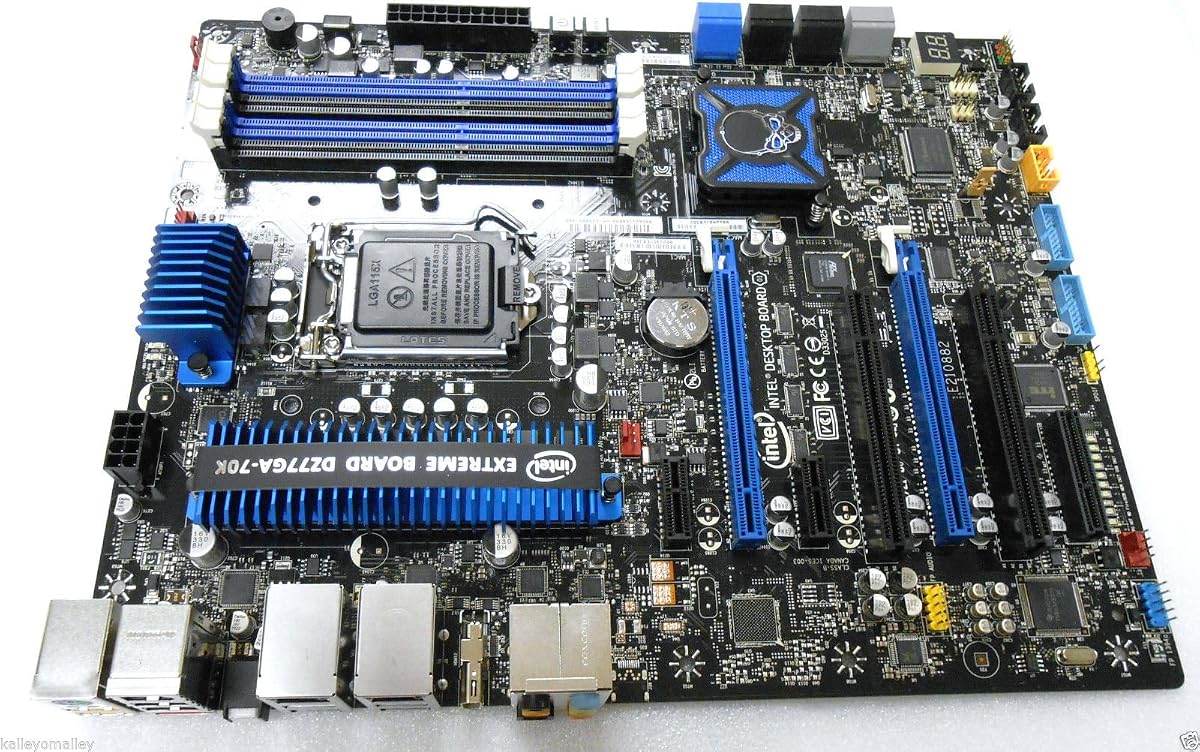
The Intel DZ77GA-70K is a distinctive LGA 1155 ATX board from Intel's Z77 Extreme series, with a 4.2 customer rating. Its defining feature is a broad collection of connectivity options, including dual Gigabit LAN, HDMI, e-SATA, USB 3.0, and FireWire.
We may earn a commission when you buy through this link, at no additional cost to you.
The motherboard supports PCI Express 3.0, SATA 6Gb/s, and Realtek HD audio. Dual Gigabit networking may be useful for a workstation-style configuration or specialized network arrangement, while e-SATA and FireWire can serve equipment that lacks newer connection standards.
The package contains the motherboard only, so it does not provide a complete installation kit. The supplied information also does not list memory capacity, exact slot counts, display details beyond HDMI, or the operating system support associated with its Z77 platform. Those points require verification.
Choose this model when its uncommon legacy and networking interfaces are genuinely needed. For a typical home build, a motherboard with more clearly documented ports and included accessories may be easier, but for a compatible specialist setup, the DZ77GA-70K offers a compelling combination of connections.
e-SATA and FireWire remain relevant for certain older professional, archival, or peripheral equipment. Having those interfaces built into the board can simplify a system that would otherwise require additional adapters.
Two Gigabit LAN ports offer more network connection choices than a typical entry-level motherboard. Builders should confirm the intended network topology and the operating-system drivers needed for their use case.
We may earn a commission when you buy through this link, at no additional cost to you.
The ASUS P8B75-M/CSM combines LGA 1155 support with a compact micro-ATX form factor and a listed DDR3 2200 specification. It has the highest customer rating in this comparison at 4.4, giving it a strong feedback advantage among the available boards.
We may earn a commission when you buy through this link, at no additional cost to you.
Its business-oriented CSM designation suggests a focus on stable, manageable computing, while the UEFI BIOS includes F3 shortcuts and DRAM SPD information. EPU provides system-level energy saving and real-time power management, and GPU Boost can increase integrated graphics performance when the installed processor supports it.
ASUS USB 3.0 Boost adds Normal, Turbo, and UASP modes for compatible devices, improving read and write performance without changing the device itself. The supplied listing does not enumerate the exact memory slots, SATA ports, expansion slots, display outputs, or networking hardware, so buyers must verify those details before finalizing a build.
This is a compelling option for a compact office or home system where power management and a polished BIOS experience matter. Its smaller format and strong customer feedback make it attractive, but component compatibility remains essential because LGA 1155 systems depend on supported DDR3 memory and a compatible processor.
The micro-ATX form factor can suit smaller cases while retaining a full LGA 1155 platform. It is especially relevant for a compact office, home, or managed-system build where desk space and power use are important considerations.
The UEFI BIOS provides F3 shortcuts and DRAM SPD information, while USB 3.0 Boost offers three operating modes for compatible peripherals. These conveniences make routine setup and device transfers more straightforward.
We may earn a commission when you buy through this link, at no additional cost to you.
Choosing an LGA 1155 motherboard requires balancing chipset capabilities, processor compatibility, memory limits, expansion, storage, networking, and physical fit. The right board is the one that supports your existing components and planned upgrades without paying for features you will never use.
LGA 1155 covers 2nd- and 3rd-generation Intel platforms, but the motherboard still needs the correct chipset and supporting firmware for the chosen processor. H61 is the simpler option, H77 adds features such as USB 3.0 and SATA 6Gb/s in the models listed, and Z77 is intended for more extensive enthusiast configurations.
Check the exact processor model, supported memory type, BIOS requirements, and display capabilities before buying. Match the board to the CPU you already own or intend to acquire, and never assume that every processor fitting the socket supports every onboard function.
The most basic H61 boards in this list use two DDR3 slots with a maximum capacity of 16GB, while the ASUS H77 and Z77 models provide four slots and support up to 32GB. Higher-capacity boards are more useful for memory-heavy work and generally make it easier to begin with a smaller kit and add modules later.
Confirm supported DDR3 speeds, module sizes, voltage requirements, and whether the board uses dual-channel memory. Listed speeds of 1866MHz and higher may depend on processor and module support, and overclocked memory profiles require compatible hardware and stable settings.
SATA port count determines how many conventional hard drives or SSDs can connect without adding an expansion card. The ASUS P8H77-V and P8Z77-V LK each list two SATA 6Gb/s and four SATA 2.0 ports, with RAID 0, 1, 5, and 10 support, while some H61 boards provide only three SATA connections.
M.2 support adds another route for compact storage, but protocol and physical size matter. Several boards support both NVMe and NGFF, and the MACHINIST H61 also lists 2242, 2260, and 2280 sizes. Check the interface mode, lane configuration, and drive dimensions before ordering.
A board with VGA or HDMI does not necessarily supply display output by itself. Integrated graphics must come from the installed CPU, and many Xeon E3 v2 models lack that capability, as do Intel Core desktop processors with the F suffix. Those systems require a graphics card in a suitable PCIe slot.
If you plan to install a dedicated graphics card, check the PCIe x16 slot version, physical clearance, and available power connectors. A modern large graphics card may also obstruct adjacent legacy slots, making board dimensions and slot spacing important.
ATX boards generally provide more room for expansion than compact Flex-ATX or micro-ATX designs, but the number of usable slots depends on the chassis and graphics-card size. The ASUS P8Z77-V LK lists two PCIe 3.0 x16 slots, additional smaller PCIe slots, and two legacy PCI connectors, making it especially flexible for specialized expansion.
Match the board form factor to your case and count every card that must remain installed. Legacy PCI devices may still be important in an older system, while modern builders may value M.2 storage and fewer full-length expansion slots.
Network speed can significantly affect large file transfers, remote media, and network storage use. The two H61 boards list 100M LAN, while the Gigabyte Z77-DS3H and Intel DZ77GA-70K advertise Gigabit LAN, and the latter includes two Gigabit connections.
USB version matters when connecting fast external drives, cameras, or storage docks. Boards with USB 3.0 and ASUS USB 3.0 Boost may be more convenient, although boot-device support and operating-system drivers should also be considered.
The list spans standard ATX, Flex-ATX, and micro-ATX designs. ATX boards offer the most room for slots and storage, while smaller boards can suit compact cases and simpler builds. The MACHINIST H61 is listed as Flex-ATX, and the ASUS P8B75-M/CSM is a micro-ATX option.
Compare board dimensions with the case mounting pattern, rear-panel clearance, and available drive bays. Also check whether the power supply, graphics card, and cooling hardware can fit without obstructing slots or creating airflow problems.
A complete package can make installation easier, particularly for a first-time builder. The budget H61 products list a SATA cable and I/O baffle, but the MACHINIST H61 also lacks the user manual and CR2032 battery. The Intel DZ77GA-70K is explicitly a motherboard-only package.
Check the listing for manuals, battery inclusion, rear I/O shield, cables, and any required additional purchases. This matters because the CMOS battery is commonly needed to retain BIOS settings and the correct date, and a missing rear shield can complicate assembly.
Before installation, compare the processor, memory, operating system, and graphics hardware with the motherboard's supported specifications. Read the board manual, identify the correct LGA 1155 processor support information, and install the CPU and cooler before securing the motherboard in the case.
Handle the motherboard by its edges and avoid touching contacts. Install DDR3 modules in the slots recommended for dual-channel operation, connect the 24-pin and CPU power cables, attach SATA devices, and install the listed rear I/O shield if one is not preinstalled. Add a compatible graphics card when the processor lacks integrated graphics.
After assembling the system, enter the BIOS to confirm that memory, drives, and the processor are detected. Update the BIOS when required for processor support, load appropriate operating-system and chipset drivers, and monitor temperatures and fan behavior. For any board that lacks a CMOS battery, add the specified battery type and keep replacement parts available.
LGA 1155 motherboards generally support compatible Intel 2nd- and 3rd-generation Core i3, i5, and i7 processors, along with certain Pentium and Celeron models. Some boards also list Xeon E3 v2 support. Check the exact board listing and BIOS requirements because chipset and firmware support determine the final processor compatibility.
No. These boards use DDR3 memory rather than DDR4. The listed models support different capacities, ranging from a maximum of 16GB on the two-slot H61 boards to 32GB on the four-slot ASUS H77 and Z77 models. Match the module size, speed, voltage, and supported capacity of the exact motherboard.
Yes, provided the processor, memory, graphics card, storage, and operating system are appropriate for the intended game. A dedicated graphics card is generally important for modern gaming, and faster NVMe storage can improve load times. A Z77 board also provides more expansion options for a multi-card enthusiast build.
The onboard VGA or HDMI output requires a processor with integrated graphics. Intel Core processors with the F suffix and most Xeon E3 v2 chips lack integrated graphics, so the motherboard cannot produce a display image from those processors. Install a supported graphics card, connect the monitor to that card, and verify the display cable.
NVMe uses the PCI Express interface and provides higher transfer performance, while NGFF SATA uses a SATA connection. Several listed boards support both modes through one M.2 position, but the required configuration can differ. Confirm the protocol, physical drive size, key, and lane or SATA connection before installing an M.2 drive.
No. Although they share a socket, chipset features, BIOS revisions, memory support, and power delivery can differ. A processor may fit physically but require firmware support or a feature not provided by a simpler H61 board. Use the exact model and revision information when checking compatibility.
The amount depends on the operating system and workload. The boards in this guide support up to 16GB or 32GB, and matching capacities in the correct slots can enable dual-channel operation. For a new general-purpose installation, use as much compatible memory as the operating system, applications, and budget reasonably require.
A few sellers ship the motherboard without the small CR2032 or CR2032L backup battery. Without it, BIOS settings and the system clock may reset whenever the system loses power. Purchase the exact battery type specified by the board manual and install it with care so the retention circuit is not damaged.
The LGA 1155 H61 board is the strongest budget pick because it combines broad processor support, dual-channel DDR3, convertible M.2 connectivity, and integrated display options. The Gigabyte Z77-DS3H is the all-around choice for a conventional ATX Z77 system, while the ASUS P8Z77-V LK stands out as the premium option through its extensive expansion, memory, and storage configuration.
Prioritize exact component compatibility before chipset or features. Confirm the processor, DDR3 modules, graphics requirements, case dimensions, storage protocol, and included accessories. Basic builders can often use a streamlined H61 design, whereas H77 and Z77 boards suit users who want faster USB, more SATA connections, RAID, or additional expansion.
Product listings, stock, and prices can change, so review the current seller page before purchasing. The final decision should reflect the components already owned and the upgrades genuinely planned, rather than relying only on a specification list or a product rating.
