
BESIGN LS03 Aluminum Laptop Stand
4.8Editor score
Detachable three-step assembly
Supports laptops up to 15.6 inches
Folds flat for storage
An ergonomic laptop stand can transform a crowded desk by raising the screen, improving screen visibility, and creating a more comfortable working position. The right model also provides stability, airflow, portability, and enough adjustment to suit different desks, chairs, bodies, and working habits.
This guide compares ten popular ergonomic laptop stands across height and angle adjustment, construction, load capacity, rotation, ventilation, folding, device compatibility, and intended workspace. The list includes fixed-height risers, folding portable models, rotating stands, and telescopic options designed to support both seated and standing work.
Each pick demonstrates a different way to improve a laptop setup, from a compact aluminum riser to a large adjustable model with a swiveling base. Ratings and product details reflect the supplied information, while prices and availability can change, so shoppers should confirm current listings before purchasing.
4.8Editor score

4.7Editor score
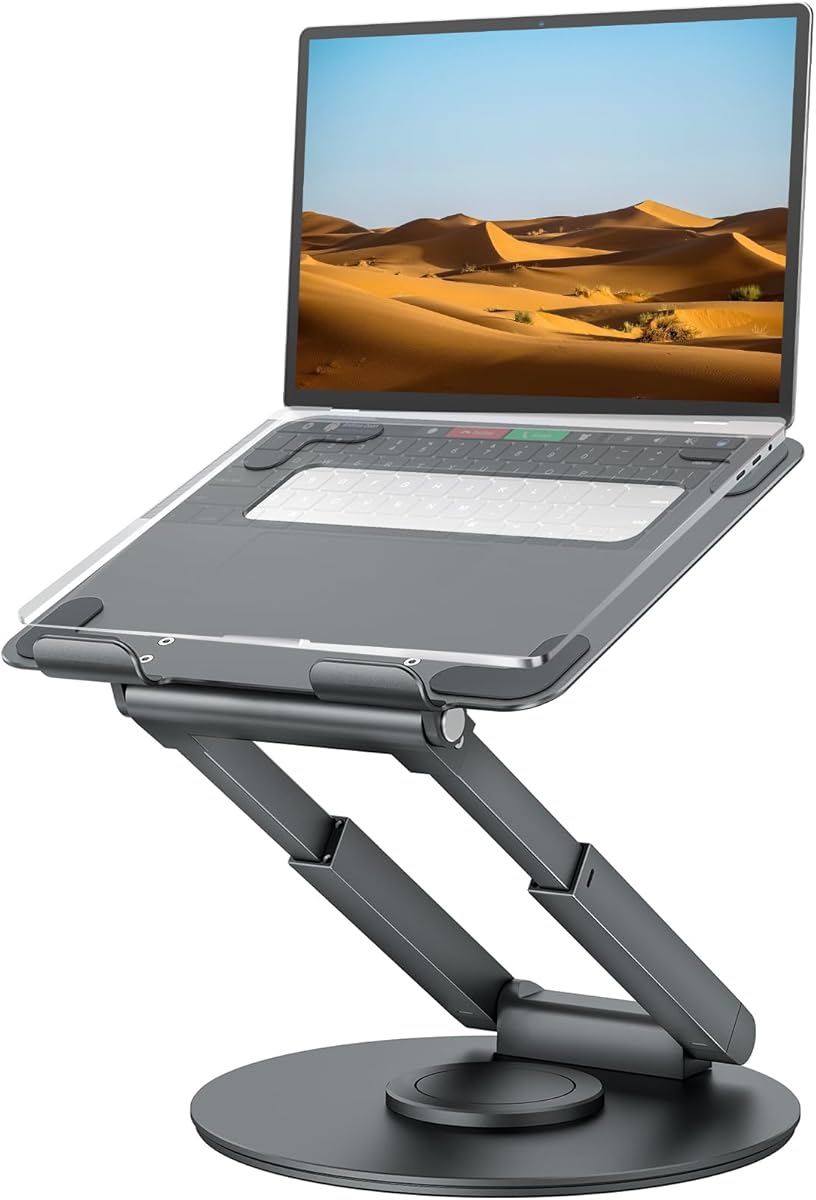
4.7Editor score
As an Amazon Associate we earn from qualifying purchases.
The comparison below highlights the most important differences among the ten stands, including their adjustment systems, supported device sizes, structural features, and portability. This side-by-side view helps identify the model that best matches a fixed desk, shared workspace, travel bag, or sit-to-stand routine.



The Nulaxy Ergonomic Adjustable Laptop Stand is a strong all-around choice for people who want a more comfortable desktop setup without committing to a large standing frame. It holds a 4.7 rating and combines height adjustment, a dual-rod support mechanism, a ventilated upper panel, and a design that folds flat for travel.
We may earn a commission when you buy through this link, at no additional cost to you.
Its most useful feature is the dual-support rod arrangement, which is designed to distribute the laptop's weight and limit the wobble associated with single-hinge risers. The stand supports devices up to 22 pounds, making it suitable for many business notebooks and larger gaming laptops. The geometric cutouts in the upper panel promote airflow, while silicone pads help keep the computer secure and protect its finish.
The main compromise is that it does not rotate the screen. That means the user must physically turn the entire laptop to share a display, and the model offers fewer collaborative options than the rotating and telescopic alternatives in this list. Some users may also need external keyboard and mouse accessories once the laptop is raised, since a higher screen can change the relationship between the keyboard and the user's forearms.
It is a particularly good recommendation for home-office workers, students, travelers, and anyone moving among desks who values stable elevation, broad device support, and packability. For shoppers seeking the strongest balance of ergonomics, construction, cooling, and portability in the group, this stand is the most versatile overall choice.
The dual-rod mechanism supports the laptop at a more consistent height than many lightweight folding risers. This makes the stand particularly useful during long typing sessions, where screen movement and repeated leaning toward a low display can undermine comfort.
Ventilated upper-panel openings support airflow, and the dual-foldable structure reduces the space required for storage or travel. It is a practical option for hybrid workers who alternate between a home desk, office, café, and shared workspace.
We may earn a commission when you buy through this link, at no additional cost to you.
The LOXP Adjustable Laptop Stand is built for users who frequently change the orientation of their screen. Its 360-degree rotating base makes it easy to turn a laptop toward a colleague, reposition it for a video call, or alternate between viewing angles without moving the whole stand.
We may earn a commission when you buy through this link, at no additional cost to you.
The stand also provides adjustable height and tilt, helping users raise the display closer to eye level. It is constructed from one-piece fiber metal and includes a non-slip silicone surface. Compatibility extends across 10- to 16-inch laptops, including MacBook Air and Pro models, Dell XPS, HP, ASUS, Lenovo ThinkPad, Acer, Chromebook, and Microsoft Surface devices.
A rotating base introduces a few practical considerations. The stand occupies more room than a simple fixed riser, and the smooth swivel will not be necessary in a solo workspace where the laptop never needs to face another person. The supplied information also does not state a specific load capacity, so buyers who routinely use unusually heavy devices should look for clear stability and weight guidance.
Despite that limitation, the model is a strong fit for offices, studios, classrooms, and shared desks. Its combination of rotation, foldability, and height adjustment makes it particularly appealing for people who want more control over screen placement without moving to a full-height standing desk.
The full 360-degree base allows the display to face different people around a desk. This is useful for demonstrations, interviews, group reviews, and collaborative video calls.
The stand folds for transport and supports height and angle changes, making it practical for workers who alternate between fixed office setups and temporary workspaces away from home.
We may earn a commission when you buy through this link, at no additional cost to you.
The Lamicall Aluminum Laptop Stand is an adaptable ergonomic riser with a 4.7 rating and support for laptops from 10 to 17.3 inches. That range makes it one of the broadest options in the guide and is useful for users who switch among MacBook, Surface, Dell XPS, Pixelbook, HP, ASUS, Acer, Chromebook, and other systems.
We may earn a commission when you buy through this link, at no additional cost to you.
The stand is made from aluminum alloy and uses a larger, heavier base to improve stability. Its adjustable configuration lets users select a comfortable height and angle, while multiple ventilation holes promote airflow. Anti-skid silicone and smooth edges help protect the laptop from sliding and scratches.
Its fixed upper design does not offer the screen-sharing convenience of a rotating base. Raising the display can also create a larger gap between the keyboard and the desk, so many users will benefit from pairing it with an external keyboard and mouse. Even with those accessories, the stable base and broad size support remain useful.
This is an excellent choice for a home office, shared workstation, or organization that wants one consistent stand across different computer sizes. It is also a strong travel option because it folds up for storage. Buyers who prioritize broad compatibility, a weighted base, ventilation, and adjustable elevation will find it particularly versatile.
The 10- to 17.3-inch range exceeds that of most conventional 15.6-inch stands. It gives users a single platform for smaller notebooks, mainstream business laptops, and larger machines.
The broad aluminum base is designed to resist shaking and sliding, while the perforated platform encourages cooling. Together, these features support steadier typing and sustained airflow.
We may earn a commission when you buy through this link, at no additional cost to you.
The Amazon Basics Sturdy and Portable Ergonomic Laptop Stand combines a generous seven-inch height adjustment range with a relatively compact folded profile. Its 4.6 rating reflects a practical balance of stability, portability, ventilation, and support for 10- to 15.6-inch laptops and tablets.
We may earn a commission when you buy through this link, at no additional cost to you.
The stand is made from rust-resistant aluminum and has a stated loading capacity of 11 pounds. Non-slip silicone pads and protective hooks secure the device, while the open hollow frame promotes airflow during extended work. It folds to 10 by 8.7 by 1.8 inches and weighs 1.7 pounds, making it suitable for a laptop bag or shared storage area.
The weight makes the stand less convenient for users who prioritize carrying the lightest possible accessory, although the fold-flat design still offsets that drawback. The product information warns that larger or heavier devices may affect balance, so buyers should consider both the size and weight of their computer. Typing pressure should also be moderate to maintain stability.
This model is a good recommendation for commuters, students, and hybrid employees who need meaningful height adjustment without a large standing base. It is less suited to people who need screen rotation or who work with exceptionally heavy laptops, but it remains a clear, practical option for everyday portability.
Seven inches of adjustment gives users more freedom to find a screen height suited to their chair, desk, and viewing habits. This is more useful than a fixed riser for users who move between sitting and standing.
The low folded profile allows the stand to slide into most laptop bags. Its open frame also reduces unnecessary material while improving airflow around the device.
We may earn a commission when you buy through this link, at no additional cost to you.
The BESIGN LS03 is a compact aluminum riser that combines a 4.8 rating with a straightforward, detachable design. It raises compatible laptops by as much as 14.5 centimeters, or 5.7 inches, bringing the display higher without requiring a complex frame or a permanent desk mount.
We may earn a commission when you buy through this link, at no additional cost to you.
The open aluminum construction supports laptops from 10 to 15.6 inches and provides ventilation around the device. Rubber pads hold the computer in place and help prevent scratches, while the frame can support up to 8.8 pounds. Assembly takes three steps, and the stand folds flat when it is not needed.
Its 5.7-inch elevation range is narrower than that offered by telescopic models, so it cannot accommodate every seated or standing position. It also lacks rotation, which limits its usefulness for screen sharing. Users who type heavily may still need an external keyboard once the laptop is raised.
The BESIGN LS03 is an excellent entry-level ergonomic accessory for students, travelers, and office workers using mainstream notebooks. It is especially attractive for buyers who want a simple aluminum riser, broad compatibility, easy assembly, and a compact footprint without paying for powered or motorized features.
The detachable design can be assembled in three steps and disassembled when the desk needs to return to its normal configuration. This makes the stand easy to move between a home office and a shared workplace.
The open aluminum frame leaves space around the computer for ventilation. Combined with rubber contact points, it offers a clean, stable platform for routine browsing, writing, and video meetings.
We may earn a commission when you buy through this link, at no additional cost to you.
The JOYEKY Laptop Stand is designed for people who want a high degree of control over screen position. It combines height and angle adjustment with a 360-degree dual-axis swivel, allowing the laptop to be turned for presentations, screen sharing, or collaboration.
We may earn a commission when you buy through this link, at no additional cost to you.
Its aluminum construction and larger, heavier base are intended to resist shaking, sliding, and falling while the user types. The stand supports up to 11 pounds and accommodates 10- to 16-inch laptops, including MacBook Air and Pro, Dell XPS, HP, Lenovo, Acer, and Chromebook models. It also lists tablet compatibility.
A device this flexible occupies more space when fully extended, and a 360-degree swivel can require care to avoid pushing the base into a neighboring work area. The combination of several moving mechanisms also makes it more mechanically complex than a simple folding riser. Users should adjust the stand in a stable position and avoid applying unnecessary force to the laptop.
The stand is well suited to offices, conference rooms, reception desks, and shared creative workspaces. For a user who values swivel freedom and a broad height range, it is more capable than a fixed aluminum riser. It is less compelling for a private desk where screen rotation would rarely be used.
The rotating mechanism can be used to reposition the display during a meeting without taking the laptop off the platform. That convenience makes this stand better suited to collaborative work than a basic fixed riser.
Height can reach 11.81 inches, giving users considerable control over viewing angle and screen elevation. The larger base helps maintain stability as the stand is extended.
We may earn a commission when you buy through this link, at no additional cost to you.
The Nulaxy 360° Rotating Ergonomic Laptop Stand combines screen-sharing convenience with a fully foldable structure. It has a 4.7 rating, a 360-degree base, flexible height and angle adjustment, and a 22-pound load capacity that accommodates heavy business and gaming laptops.
We may earn a commission when you buy through this link, at no additional cost to you.
Its high-precision dual hinges are stated to have passed more than 6,000 rotation tests. The damping system is intended to prevent shaking, sagging, and screen jitter while typing. Non-slip silicone pads and reinforced baffle hooks keep the computer from sliding, falling, or scratching the frame.
The supplied information does not list a specific maximum laptop size, so buyers should check the current product dimensions and their device measurements before ordering. As with any rotating model, the base needs enough clearance to turn safely. Users who work close to a wall or another monitor may need to adjust their desk layout.
This stand is a good middle ground for people who want more than a fixed riser but do not need the full telescoping height of a standing frame. It is particularly suitable for hybrid workers, shared offices, and frequent video callers who also want a model that can collapse for transport.
The dual-hinge design is intended to hold a selected angle without visible screen jitter. This creates a more comfortable viewing experience during typing, calls, and extended study sessions.
A 22-pound capacity covers many larger laptops, while silicone pads and baffle hooks help keep the machine anchored. These details add reassurance for setups where the computer is touched frequently.
We may earn a commission when you buy through this link, at no additional cost to you.
The Metal Adjustable Riser is a straightforward option for people who prioritize durability over rotation or a large standing platform. It has a 4.6 rating, a stated load capacity of 17.6 pounds, and adjustable height and angle for 10- to 15.6-inch laptops.
We may earn a commission when you buy through this link, at no additional cost to you.
Rubber mats on the hooks and anti-skid silicone pads on the upper and lower surfaces help keep the laptop stable and protect it from scratches. Multiple ventilation holes and the open metal design promote airflow, while smooth edges reduce the chance of uncomfortable contact with the hands.
The model folds for transport, making it useful for business trips, but metal construction may be heavier than a plastic or ultralight aluminum alternative. It also does not rotate, so sharing a screen still requires picking up or manually turning the laptop. Buyers who need a broader height range may also find the adjustment less expansive than a telescopic model.
It is a solid recommendation for offices, studios, shared workstations, and anyone using a heavier mainstream laptop. Its high capacity, protective pads, and ventilated frame make it a dependable daily riser, particularly for users who do not need a swivel mechanism.
The stated 17.6-pound capacity is among the higher figures in this guide. It gives users a comfortable margin for many larger business and gaming laptops, provided the base remains flat and stable.
Rubber and silicone contact points reduce sliding and scratching, while perforated sections allow heat to move away from the computer. The open frame balances protection with passive cooling.
We may earn a commission when you buy through this link, at no additional cost to you.
The tounee Telescopic Laptop Stand is the most vertically versatile model in the guide. Its height can extend from 2.1 to 21 inches, allowing the screen to move from a conventional desk setup to a standing position without requiring a separate adjustable desk.
We may earn a commission when you buy through this link, at no additional cost to you.
A 360-degree rotating base allows the display to be moved toward a colleague or repositioned for calls. The stand is built from aluminum alloy and uses a large, weighted base with two pivot joints. It supports up to 22 pounds and accommodates laptops from 10 to 17 inches.
The large height range necessarily involves a larger footprint than a compact folding riser, and telescoping structures may not be as convenient to carry or store. When the laptop is raised high, its own keyboard and touchpad are no longer ergonomically aligned with the user's hands, making an external keyboard and mouse practically important.
This is the strongest recommendation for users who want to alternate between sitting and standing or who need to bring a screen closer to eye level. It also suits collaborative offices because of its swivel base. For a fixed, compact setup, a smaller folding model would be more space-efficient, but the tounee offers the most complete working-position control.
The telescoping structure changes the screen height substantially rather than merely adding a fixed elevation. Users can move between desk-seated and standing positions while keeping the computer on one support.
The heavy aluminum base and dual pivot joints help resist movement when the stand is extended. This construction is especially valuable because tall positions place more leverage on the supporting frame.
We may earn a commission when you buy through this link, at no additional cost to you.
The Nulaxy 18-inch Height Telescopic 360 Rotating Aluminum Laptop Stand is built for users who want a laptop to function more like a desktop display. It reaches 18 inches, includes a 360-degree rotating base, and carries a 4.7 rating.
We may earn a commission when you buy through this link, at no additional cost to you.
The stand supports laptops, notebooks, and tablets up to 17 inches and has a stated bearing capacity of 22 pounds. Its solid base is intended to prevent tipping while the user types or draws. Height and tilt adjustments help raise the screen toward eye level, and rotation makes the device easy to turn toward someone across a desk.
The product information specifically recommends removing the laptop before adjusting height or angle, which is an important safety practice. At elevated positions, an external keyboard and mouse are also recommended because the built-in keyboard will be too high for comfortable typing. The telescoping frame also requires more clearance than a conventional desk riser.
This model is well suited to open offices, creative studios, reception areas, and presentation setups. It is a strong option for users who need a high, shareable display, although those wanting a compact everyday stand should choose a smaller folding model. Its combination of height, rotation, and heavy-duty support makes it a capable premium alternative to the other telescopic pick.
The 18-inch extension can bring a laptop screen much closer to the eye level of a seated user. That makes the stand useful for prolonged document work, design, and media viewing.
Users can turn the display toward another person for a meeting, review, or idea session. The 360-degree base is especially valuable in open offices and collaborative studios.
We may earn a commission when you buy through this link, at no additional cost to you.
The best ergonomic laptop stand depends on how and where you work. Device size, load, adjustability, portability, rotation, cooling, and the height of your existing desk all influence which design will be most useful.
Choose a model explicitly rated for your computer and allow some margin when possible. This is especially important for large gaming laptops and robust workstations.
Prioritize a useful adjustment range over a very tall maximum height you will never use. Test the expected screen position relative to your eyes.
Place any stand on a flat, solid surface and avoid leaning or pressing heavily on the upper edge. A higher capacity alone cannot compensate for an uneven desk.
Add rotation only when screen sharing or frequent orientation changes are real parts of your workflow. It is a feature, not an automatic ergonomic upgrade.
For frequent commuting, prioritize a truly flat-folding design. For occasional travel, any manageable folded size may be sufficient.
Choose an open or ventilated platform, and keep the intake areas unobstructed. Avoid placing the stand on soft fabric that can block airflow.
Look for secure silicone pads, protective hooks, and finished edges. These details matter as much as the headline material when protecting a laptop.
Evaluate the stand as part of the complete desk, not as an isolated accessory. Screen height, input-device position, and available armroom should work together.
Place the stand on a flat, firm desk with the base fully supported. Open or assemble it according to the instructions, check that the upper platform and hooks are secure, and place the laptop so its weight is centered rather than concentrated at an edge. Avoid using the stand on soft bedding, unstable tables, or surfaces with sharp edges.
Adjust the height and viewing angle gradually while seated at your normal working position. The goal is to reduce the need to hunch or lean forward, not to force the screen into a rigid position. Once the laptop is raised, connect an external keyboard and mouse if the built-in controls are too high. For rotating or telescopic models, move the computer to a safe position before changing its height or angle.
Clean the metal or plastic frame with a soft, slightly damp cloth and dry it thoroughly. Do not flood the hinges, rotating base, or silicone pads with liquid. Keep ventilation openings clear, tighten any loose joints, and check periodically for wobble, loose hooks, damaged pads, or bending. Follow the manufacturer's cleaning and load instructions for the specific model.
Yes. Raising the screen can help you keep your head in a more neutral position instead of looking downward for long periods. It works best when the screen is close to eye level, the viewing distance is reasonable, and the keyboard remains at a comfortable typing height. A stand alone cannot solve every posture problem, so an external keyboard and mouse may also be needed.
It depends on how high the stand raises the computer. Low risers may leave the built-in keyboard usable, while elevated or telescopic models usually place the keyboard too high for comfortable typing. If the raised laptop causes raised shoulders or extended arms, an external keyboard and mouse are the better solution. Position the input devices so elbows remain relaxed.
A fixed riser is sufficient when your desk, chair, and working height rarely change. Adjustable or telescopic stands provide more flexibility for different users, sitting and standing positions, or changing workspaces. Choose based on the positions you actually use rather than assuming greater adjustment is always necessary.
Rotating stands are much more convenient for screen sharing because the display can be turned toward another person without moving the whole computer. They are especially useful in offices, studios, meeting rooms, and group workspaces. For a private desk where the screen is never shared, the rotation may add complexity and desk footprint without providing a meaningful benefit.
Look for non-slip silicone pads, rubber contact points, and protective hooks that keep the computer centered on the platform. Clean the contact surfaces before placement and avoid pressing down on the upper edge while typing. If the stand has an open design, make sure the computer is not resting on another surface that could scratch its underside.
A stand can improve passive cooling by allowing air to circulate beneath the computer. Open frames, ventilation holes, and geometric vent patterns are more helpful than a sealed platform, although no passive stand replaces adequate room ventilation. Heavy workloads may still benefit from additional cooling, particularly if the laptop's own intake vents are restricted.
Choose a model rated for both the dimensions and weight of your computer. Most models support 10- to 15.6-inch laptops, while a few accommodate devices up to 17 or 17.3 inches. A larger chassis needs a correspondingly stable platform, so size compatibility should be checked together with the stated load capacity.
Yes, provided you select a model designed to fold or disassemble into a portable form. Check the folded dimensions against your laptop bag and consider the weight of the stand itself. For frequent travel, a flat-folding aluminum model is generally easier to carry than a large telescopic or rotating frame with a broad base.
The Nulaxy Adjustable Stand is the strongest all-around recommendation because it combines stable dual-rod support, ventilation, broad device compatibility, and a fully foldable design. The BESIGN LS03 stands out as a budget-friendly option with a 4.8 rating, while the tounee Telescopic Stand offers the most extensive height range for users who alternate between sitting and standing.
Prioritize the features that match your daily work: choose strong dual supports or a high load rating for heavier computers, rotation for collaborative sessions, and a flat-folding frame for travel. Also account for external keyboard clearance, desk space, ventilation, and the screen height you need to reach without hunching.
Product ratings, designs, and availability can change, and prices should always be checked on the current listing. Use the comparison and buying guide to narrow the field, then confirm the stand's dimensions, load limit, included parts, and compatibility with your laptop before making a final purchase.