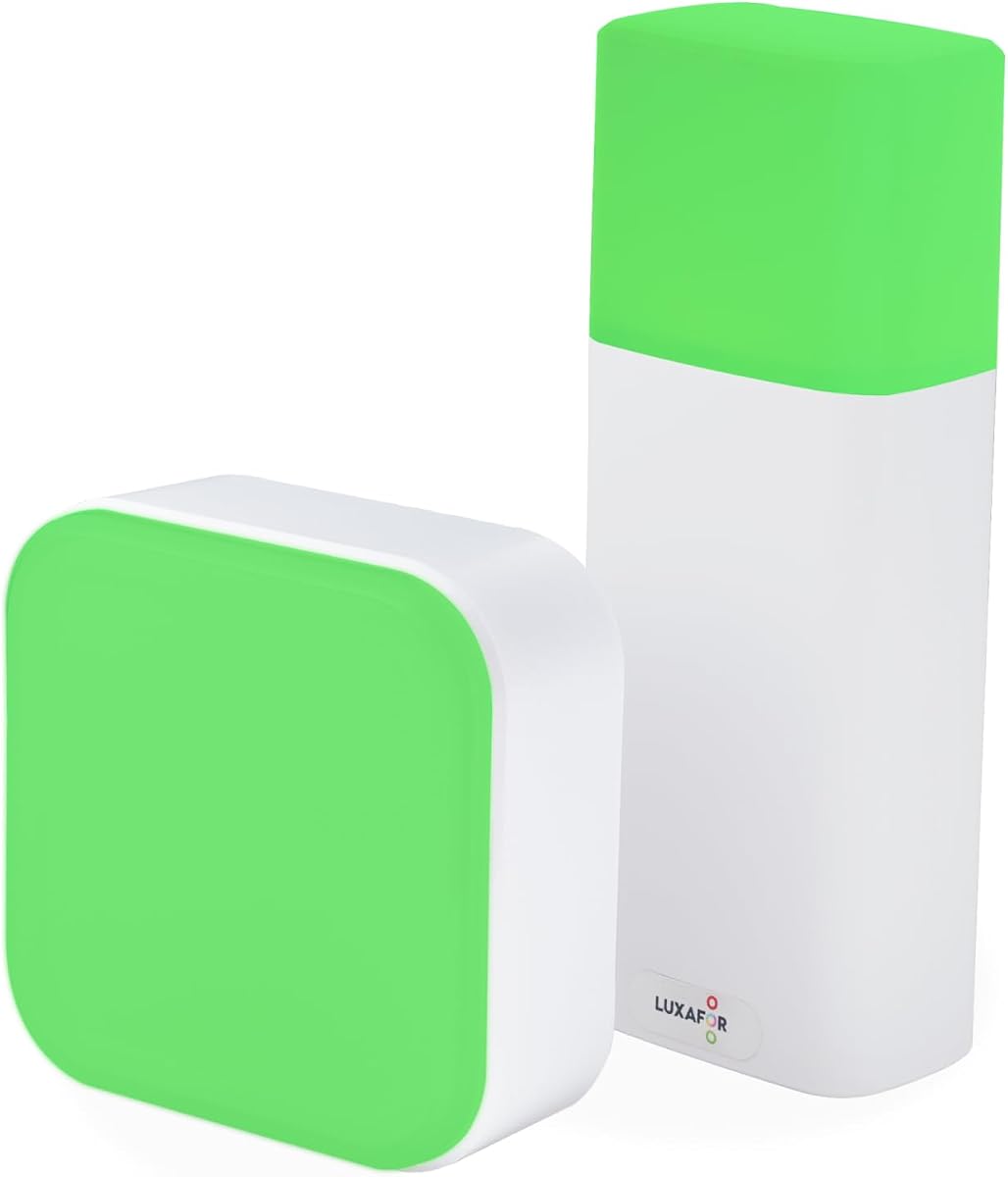
Switch Pro 2 Wireless Office Busy Light
4.2Editor score
Wireless meeting-room signal
Four standard status colors
No software installation required
Our Busy Lights for Office guide compares 10 status indicators, focusing on visibility, connectivity, alerts, mounting, ease of use, and fit for teams.
Busy lights for office use provide a visible signal that communicates availability, focus time, meeting status, and incoming activity. A good model reduces unnecessary interruptions without requiring colleagues to stop, ask, or read messages before approaching your desk or meeting room.
We compared these ten indicators across core considerations such as color visibility, software compatibility, wireless control, call alerts, mounting options, power requirements, and ease of daily operation. The guide covers simple manually controlled lights, USB-connected models, software-synchronized devices, and wireless meeting-room systems.
Each pick highlights the product's strongest qualities and practical trade-offs, helping you identify the right balance for a private desk, shared workspace, home office, or meeting-room doorway. Product availability and pricing can change, so confirm current details before purchasing.
4.2Editor score

4.4Editor score

4.6Editor score
This side-by-side comparison covers every product's signal style, power source, control method, compatibility, and ideal office placement, making it easier to compare simple desk indicators with software-connected and wireless meeting-room systems.


The Clip Busy Light Standard earns a 4.4 rating and stands out as a straightforward, highly visible way to manage availability in a shared office. Its tall tube makes the current state readable from a distance, while the red and green color scheme gives colleagues an immediate, universally understandable signal.
We may earn a commission when you buy through this link, at no additional cost to you.
The included 59-inch USB cable offers substantial placement flexibility around a desk, monitor, wall, or doorway. Its metal clip is designed to grip a monitor or another border no thicker than 30 millimeters, making the device especially practical where permanently installed equipment would be inconvenient.
The main limitation is its manual operation. It does not automatically change when you enter a meeting or accept a call, so you must update the light yourself. That trade-off is acceptable for users who value a low-complexity signal and already have a consistent routine for managing interruptions.
This is an excellent choice for individual desks, focused-work areas, and open offices where visibility matters more than automation. It is particularly well suited to anyone who wants a clear do-not-disturb signal without installing desktop applications or configuring communication platforms.
The elongated illuminated tube is designed to be noticed without requiring a coworker to approach your workstation. Its green state communicates availability, while red signals that you are occupied, on a call, or engaged in deadline work.
The metal clip provides a practical way to mount the tube near a monitor or on the edge of a desk. The generous USB cable allows the light itself to sit where it is easiest to see rather than being confined to the computer's immediate reach.
We may earn a commission when you buy through this link, at no additional cost to you.
The Kuando Busylight UC Omega receives a 4.3 rating and combines a compact presence light with a useful audible ringer. It is designed for users who want their availability to follow activity in supported communication platforms rather than relying on a manual button press.
We may earn a commission when you buy through this link, at no additional cost to you.
Its free Busylight software works with Microsoft Teams, Skype for Business, Cisco Jabber, Webex, RingCentral, Zoom, and Avaya products, among other supported platforms. The kuandoHUB application can also manage multiple services, allow manual control, and integrate with Microsoft Outlook so meeting status can be reflected automatically.
The main requirement is the free software, which is necessary for synchronization and fuller control. Call and chat alerts also depend on the user's UC platform, and the ring function may not behave identically across every service. Nevertheless, the compact round housing makes the device easy to place on a desk.
Choose this model when synchronized presence and audible notifications are more important than a fully manual indicator. It is well suited to virtual and hybrid workers who alternate among calls, chats, and calendar-based meetings and want a consistent visual cue.
Using kuandoHUB to coordinate supported UC platforms reduces the need to maintain separate manual signals for each service. The light can reflect a broader view of the user's working day while retaining manual override controls.
A visual status alone can be overlooked by colleagues walking past with headsets on. The built-in ringer offers another way to catch incoming calls or chats, with eight ringtones available for users to select a distinct sound.
We may earn a commission when you buy through this link, at no additional cost to you.
The Switch Pro 2 earns a 4.2 rating and targets a distinct office need: showing meeting-room availability to people outside the room. Its two-part system combines an indoor control cube with an exterior indicator, making it possible to communicate status without opening the door.
We may earn a commission when you buy through this link, at no additional cost to you.
The exterior unit displays red for busy, green for available, blue for a call, and yellow for away, with custom colors also available on the cube. Pairing over Bluetooth 5.2 links the units, and rotating the indoor cube causes the outside signal to update from as far as 80 meters without stated obstacles.
Its strongest operational advantage is that no desktop application, mobile application, Teams configuration, Zoom configuration, IT ticket, or administrator approval is needed. That makes it appealing to security-conscious and IT-restricted offices. The trade-off is that this is a more involved system than a single desktop light.
The Switch Pro 2 is best for organizations that need a dependable visual system for meeting-room doors or shared spaces. It is less relevant to a single desk where a simple status lamp would be sufficient, but it offers an elegant solution where every interruption at a busy room is costly.
The exterior indicator lets a passerby understand whether a room is open, occupied, or handling a call before knocking. Custom color options extend the standard red, green, blue, and yellow scheme for teams with their own operational rules.
Because the system does not need software integration or device configuration, it can work in environments where installing new applications is difficult. The included magnet and anti-slip pads simplify installation without drilling.
We may earn a commission when you buy through this link, at no additional cost to you.
This Clip Busy Light Standard 59-inch model earns a 4.4 rating and offers a straightforward way to protect concentration time. Its tall status tube is easy to interpret, with red representing work in progress and green indicating that the user is idle or available.
We may earn a commission when you buy through this link, at no additional cost to you.
The long USB cable provides freedom in placement around the desk, while the metal clip is designed to attach to a monitor or a border less than 30 millimeters thick. That makes it a natural choice for quick setup at a workstation, reception position, or shared office counter.
Like other simple manual indicators, it will not automatically reflect a meeting invitation or active call. Users must remember to change it, and the limited color palette offers less flexibility than multi-status models. Its appeal lies in immediate operation and the absence of software configuration.
This light is recommended for individuals who want an easy-to-see availability marker and can comfortably treat updating the signal as part of their workday. It offers strong practicality for shared workspaces and does not require an ongoing connection to a communication application.
The red and green states make it simple to communicate whether you are available for a conversation or committed to deadline work. A visible signal can reduce the need for coworkers to hover near your desk or interrupt with a question.
The clip-and-cable format can be deployed quickly. Users who prefer not to install communication software or connect office devices to additional services can still establish a consistent status routine with minimal setup.
We may earn a commission when you buy through this link, at no additional cost to you.
The USB Status Busylight has a 4.6 rating and offers an appealing mix of automatic synchronization and manual control. It reflects real-time availability when paired with Microsoft Teams, Zoom, and supported Cisco Jabber or Webex environments, while the top remains tappable for manual changes.
We may earn a commission when you buy through this link, at no additional cost to you.
Its color system is easy to learn: green means available, red means busy, yellow means away, blue signals an incoming call, and purple represents do not disturb. The light flashes blue for incoming calls and turns red after the user answers or joins a meeting when automatic mode is configured.
Automatic mode requires the included free software, and support for Cisco Jabber and Webex is limited to Windows. Those requirements add a little setup complexity, but manual mode remains available without software. The Type-C interface and USB C-to-A adapter provide practical connection options for common office setups.
This is a strong recommendation for a hybrid employee who moves frequently between calls, chat, and project work. It is especially attractive for users who want automatic status behavior but still want control to override the signal during focused work.
Automatic synchronization is useful during scheduled meetings, but a manual override matters when a call ends early or you need uninterrupted focus time. Tapping the top changes the color without navigating through software.
Separate colors for available, busy, away, incoming calls, and do-not-disturb make the device more expressive than a two-color lamp. The scheme is broad enough for common office states without becoming difficult to interpret.
We may earn a commission when you buy through this link, at no additional cost to you.
The Kuando Busylight UC Alpha earns a 4.2 rating and serves as a more visible cousin of the compact Omega model. Its cylindrical body is approximately 4.5 inches tall and half an inch in diameter, giving it a slender profile that can be seen from across a desk.
We may earn a commission when you buy through this link, at no additional cost to you.
Like the Omega, it supports a broad collection of communication environments through free Busylight software, including Teams, Zoom, Skype for Business, Cisco Jabber, Webex, RingCentral, and Avaya products. kuandoHUB can control multiple platforms, while Outlook integration can reflect meeting status.
The built-in ringer includes eight ringtones, software volume controls, and mute options, which is particularly useful when a user wears a headset and might otherwise miss an incoming call. As with the Omega, actual call and chat alert behavior depends on the underlying UC platform.
Choose the Alpha when a taller signal and sound-based alerts are preferable to a compact sphere. It suits dedicated desk workers who want a visible presence device with a broad software feature set and do not mind completing the initial setup.
The tall cylinder provides a readable status signal without occupying a large portion of the desk. It is well suited to positions where colleagues approach from different angles and need a clear visual cue.
Eight ringtones, adjustable volume, and mute settings make the alert function more adaptable than a simple fixed-tone device. These controls are available through the software and can help prevent repeated alerts from becoming disruptive.
We may earn a commission when you buy through this link, at no additional cost to you.
The Embrava Blynclight Standard receives a 4.2 rating and distinguishes itself through broad integration options. It displays availability to colleagues, flashes for incoming calls and instant messages, and lets users adjust color and brightness to suit the office environment.
We may earn a commission when you buy through this link, at no additional cost to you.
Compatibility includes Microsoft Teams, Skype for Business, Cisco Jabber, RingCentral, Cisco Finesse, CounterPath Bria, and Skype Home edition, subject to the platform limitations stated for the product. The availability of a Software Development Kit also makes it relevant to organizations that want to connect a busy light to proprietary business applications.
Important limitations apply to alerts. Incoming-call alerts through Cisco Jabber are supported only with the Windows softphone, not the desk phone, and alerts for calls or messages are not supported on Mac or Attendant versions. Cisco Jabber also does not support incoming-message alerts.
The Blynclight is a good option for technically capable teams that want more than a simple light-and-ringer setup. Buyers should verify support for their exact operating system and communication platform before purchase, especially if their workflow depends on every category of incoming alert.
The included Software Development Kit gives development teams a path to connect the indicator with internal applications. That potential makes the device more relevant for organizations seeking a custom status system rather than a fixed off-the-shelf light.
Adjustable color and brightness help the signal blend into different office styles and remain legible in varying surroundings. This flexibility is especially useful in shared workplaces with changing ambient light.
We may earn a commission when you buy through this link, at no additional cost to you.
The LED Busy Light Status Indicator earns a 4.6 rating and delivers one of the most approachable ways to communicate availability. Green and red cover the two most common office states, while touch controls on the base make status changes quick enough for daily use.
We may earn a commission when you buy through this link, at no additional cost to you.
A brief tap changes the color, and a long press adjusts brightness. Its smooth, compact form can sit on a desk without looking purely utilitarian, allowing it to serve as an office accessory as well as a status device. It can also function as a warm auxiliary light when work mode is not needed.
The device does not synchronize with communication applications, so users must change it manually. The product information also notes that status switching does not work while it is charging, which can interrupt a routine if the light is frequently connected to power.
This is an excellent choice for a home office, individual desk, or shared workspace needing a basic but polished signal. Buyers who want automatic call awareness should choose a software-connected model instead, while most users can gain plenty from the simple color system.
Touch controls make the light easy to operate without hunting for a remote or opening an application. A short tap is enough to move between available and busy, supporting a consistent interruption-management routine.
The compact shape and smooth finish help the indicator blend into a professional workspace. Adjustable brightness also allows it to remain visible without dominating the visual character of the desk.
We may earn a commission when you buy through this link, at no additional cost to you.
The Busy Light Cordless Desk Lamp has the highest rating in this group at 4.7 and combines status signaling with a detachable magnetic base and cordless operation. It is designed for desks, monitor positions, and metal door frames where a permanent connection would be inconvenient.
We may earn a commission when you buy through this link, at no additional cost to you.
Users can control it by touching the top, touching the front sensor area, or using the included remote. Red and green handle common status choices, while white, yellow, and natural-light modes create a more relaxed atmosphere. The remote also offers direct color selection, an auto-changing mode, and a timer for scheduled operation.
Unlike software-synchronized models, it does not automatically react to calls or meetings. The battery claim of remaining constantly on for one day after a full hour of charging may not match every workload, so power requirements should be considered in intensive office use.
This indicator is a compelling pick for flexible, cordless placement and users who enjoy richer lighting controls. It works especially well for temporary workstations, hot desks, and collaborative spaces where flexibility matters more than automatic synchronization.
The detachable magnetic base lets the light move between a desktop and a suitable metal surface. This flexibility makes it useful for changing desks, shared environments, and locations where power access is limited.
Remote, touch, and sensor controls offer several ways to operate the indicator. Color-changing, automatic, and timed modes make it more versatile than a basic red-and-green availability lamp.
We may earn a commission when you buy through this link, at no additional cost to you.
The Kuando Busylight Omega Plus earns a 4 rating and offers a compact presence light with an included magnet kit. Its round body is about 1.5 inches in diameter, yet the product information emphasizes that the strong LED remains clearly visible despite the small footprint.
We may earn a commission when you buy through this link, at no additional cost to you.
It combines automated status, manual control, and an eight-ringer alert system. The free Busylight software supports a wide list of UC and softphone platforms, while kuandoHUB can control multiple services and integrate with Microsoft Outlook for meeting status. The included magnet kit makes vertical placement easier.
As with other Kuando models, automatic features require the free software, and call or chat alerts depend on the relevant platform. Its 4 rating is the lowest among the products reviewed, although it still offers a capable feature set for users who prioritize compactness and mounting flexibility.
The Omega Plus is best for a small desk, a compact home office, or a workspace where every centimeter matters. It is particularly useful for users who want the familiar Kuando synchronization and ringer features in a smaller package with mounting hardware.
The compact sphere is suitable for desks where a tall light would consume valuable space. Despite its small dimensions, it is intended to provide a clear signal that nearby colleagues can recognize without approaching the workstation.
The included magnet kit provides more placement options than a basic desktop model. It can support positioning on a suitable vertical surface while retaining the core presence-light and ringer functionality.
We may earn a commission when you buy through this link, at no additional cost to you.
The right office status light depends on where it will be used, how your availability changes, and whether colleagues need visual cues, audible alerts, or a combination of both. These factors help separate simple desk accessories from connected workplace systems.
Manual lights are the easiest to deploy and can work without applications, user profiles, or communication-platform access. They are effective when your routine has predictable transitions, such as turning green when you begin a focus block and red when you enter meetings. Automatic lights are more convenient when calls and calendar changes are unpredictable, although they add software, permissions, and platform-compatibility considerations. A touch-controlled lamp offers a middle ground, allowing quick manual changes without frequent physical interaction.
In short, prioritize manual simplicity for individual desks and automatic synchronization for communication-heavy workflows.
If the light is expected to reflect calls, chats, or meetings, confirm that its software supports the exact platform, operating system, and device you use. The supplied information lists support for products such as Microsoft Teams, Zoom, Skype for Business, Cisco Jabber, Webex, RingCentral, and several Avaya applications, but coverage differs by model. Some features are limited to Windows, some alerts require particular softphone versions, and other features depend on the UC platform.
Do not treat broad platform support as universal support; verify the specific combination before buying.
Red and green provide the clearest basic distinction between busy and available, but additional colors can separate incoming calls, away time, meetings, and do-not-disturb periods. A meeting-room system may need several states to prevent unnecessary knocks. A private desk may only need two states, and a simpler device is less likely to be set incorrectly. Consider the number of people who will interpret the light and establish a shared color convention if more than one device is deployed.
More colors provide flexibility, while fewer colors are easier for colleagues to interpret quickly.
Visibility depends on light height, brightness, lamp design, and the position relative to approaching colleagues. Tall tube models are easy to notice from across a room, while compact spheres work well on crowded desks. Wall, door, monitor-edge, and magnetic mounting options support different layouts. If the light will sit near a doorway or serve a meeting room, prioritize an exterior-facing indicator; if it will remain at a workstation, a smaller design may preserve space.
Place the light where colleagues can see it before they reach your desk or open a door.
An audible ringer can catch calls that a visual status misses, especially for users wearing noise-cancelling headsets. Several models provide multiple ringtones, software volume control, and mute options, while a simpler lamp may only flash or display color. The value of sound depends on your environment: shared offices may need discreet levels, while remote workers may benefit from a louder alert. Remember that the listed ringer and message features can vary by communication platform.
Choose an audible model if missed calls are costly, but test the sound level in your actual workspace.
USB-powered lights are dependable for fixed workstations because they avoid battery management. Cordless models provide more placement freedom and can move with you between desks, but their runtime and charging needs require attention. A long USB cable can make a tall status tube easier to position without adding visible complexity. Check connector types and whether an adapter is included, especially when your computer exposes limited USB ports.
Fixed desks favor dependable USB power; flexible setups favor cordless operation.
Open-plan offices, private offices, reception desks, remote workspaces, and meeting rooms all benefit from status signaling, but their operating needs differ. Open offices need strong visibility, reception areas may benefit from simple status cues, and meeting rooms require information from outside the room. Security-restricted or IT-locked environments may rule out software-based options. A water-resistant, cordless indicator may be useful in busier shared spaces, while a mounted light works best in a fixed position.
Match the form factor to the space, not just to the feature list.
Some products use a clip, some stand on a desk, some connect to a monitor, and others attach with magnets or to meeting-room frames. A no-drill installation is convenient in rented or flexible workspaces, but you should confirm that the surface is appropriate and that the light will not be moved accidentally. Software-connected devices also require installation on each participating computer, while a two-part wireless room system requires careful placement of both the interior control and exterior indicator.
Plan the full setup, including power access, software, mounting, and both sides of the signal.
Begin by defining a simple status code with the people who will see the light. For example, green can mean available, red can mean busy or in a meeting, and another color can indicate an incoming call or temporary do-not-disturb status. If several devices are used, consistency is essential so colleagues interpret each signal the same way. Place the light where approaching coworkers can see it, and avoid positioning it where a monitor, plant, or other object blocks the glow.
For automatic models, install the required software on each computer and connect the indicator using the supplied cable or wireless pairing process. Test synchronization before relying on the device during important calls. Manual and touch models should be configured with a routine, such as changing the light at the start and end of meetings. Meeting-room systems require one unit inside the room and the signal unit outside, with both positioned so the status can be seen clearly.
Care for the device according to its construction and power source. Keep USB connections secure without sharply bending the cable, and clean the light and mounting surfaces with a soft, dry or lightly damp cloth. Avoid exposing non-water-resistant models to liquids, and do not clean the unit while it is connected to power unless the manufacturer permits it. Cordless models should be recharged before extended meetings and their timer or auto-change settings reviewed to prevent unexpected shutoff.
A busy light communicates a person's availability or a room's status through visible colors and sometimes sound. Green commonly means available, while red indicates that the user is busy, in a meeting, or should not be interrupted. Some models also distinguish incoming calls, away time, and do-not-disturb periods. The goal is to reduce unnecessary interruptions and make shared spaces easier to navigate.
Only if you want the indicator to change automatically with your calls or meetings. A manual light can still provide an effective availability signal, but someone must update it. Software-connected models are more convenient for hybrid workers because they can reflect platform activity automatically. Confirm that your exact operating system and communication application are supported before purchasing.
Yes, but a dedicated meeting-room system is generally more suitable than a basic desk light. A product such as the Switch Pro 2 uses an indoor control and an exterior indicator, allowing people outside the room to see red, green, blue, yellow, or a custom color. This can prevent repeated door checks and unnecessary interruptions.
Red normally communicates busy, occupied, focused, or do-not-disturb status, while green normally indicates that you are available. The exact convention should be agreed upon with the team, especially if other colors are used. A consistent meaning helps colleagues respond appropriately and prevents the signal from becoming ambiguous.
Yes. A home-office light can communicate availability to family members, household guests, or colleagues visiting a shared space. It is also useful for remote workers who use a physical light alongside Teams or Zoom. Compact touch-controlled and cordless models are especially convenient where desk space or power access is limited.
It depends on the model. Manual and touch-controlled lights function without software, although users must change their status themselves. Software-synchronized devices require the appropriate free application and compatible communication platform to automate presence, meeting, call, or chat alerts. Wireless meeting-room products that use an indoor control cube may work without desktop software because status is changed physically inside the room.
It should be visible from the normal approach path without being harsh for you or nearby coworkers. Models with adjustable brightness offer the most flexibility for different office lighting. Consider the viewing angle, the distance from which colleagues usually approach, and whether the lamp will face windows or strong ambient light before settling on a brightness level.
Some software-connected models can, particularly those managed through a central hub application. Supported platforms can include Microsoft Teams, Zoom, Skype for Business, Cisco Jabber, Webex, RingCentral, and Avaya applications. The exact multi-platform behavior and available alerts depend on the chosen product, so check its current compatibility list and any platform-specific restrictions.
The Clip Busy Light Standard is the strongest general choice for a visible, low-complexity desk signal, while the Switch Pro 2 stands out for wireless meeting-room communication. The LED Busy Light Status Indicator offers a polished, easy-to-use two-color alternative for basic availability needs, and the USB Status Busylight is a strong option when automatic synchronization is important.
Prioritize the operating method that matches your day: choose manual touch controls for predictable routines, software synchronization for frequent calls and meetings, and a two-part room system for shared meeting spaces. Also consider color clarity, audible alerts, power requirements, and mounting location before deciding, because the best device is the one colleagues can see and interpret correctly.
Finally, check the current product details, compatibility information, and price before purchasing, as availability and specifications can change. The most effective busy light is one your team understands, maintains consistently, and can see from the places where interruptions are most likely to happen.