
8-Port 10G SFP+ Switch
4.7Editor score
Eight 10G SFP+ ports
Inter-VLAN static routing
Fanless metal enclosure
Our Layer 3 Network Switch guide compares ten managed models for routing, VLANs, PoE, port speed, uplinks, scalability, and ease of administration at work.
A Layer 3 network switch combines local Ethernet switching with IP routing, making it well suited to segmented networks that need more than basic plug-and-play connectivity. Important qualities include routing capabilities, VLAN support, port speed, switching capacity, management tools, security features, and optional Power over Ethernet for access points, cameras, and other networked devices.
This guide compares ten Layer 3 network switches across port counts, copper and fiber connectivity, routing functions, PoE availability, physical design, and administrator-friendly features. The list includes compact desktop models, rack-mounted enterprise switches, high-speed SFP+ options, and solutions designed for access, aggregation, or core-layer network roles without assuming that every buyer needs the same level of scalability.
Each recommendation highlights the product information supplied by its manufacturer or listing and places practical limitations alongside the advantages. The top selections illustrate why a strong router, a capable managed access switch, and a specialized fiber switch can serve very different environments. Product listings and commercial terms can change, so readers should confirm current specifications and pricing with the seller before purchasing.
4.7Editor score

4.7Editor score

4.6Editor score
The comparison below organizes all ten switches by their most consequential features, including Layer 3 routing scope, copper port speed, high-speed uplinks, PoE capability, form factor, and intended network role.

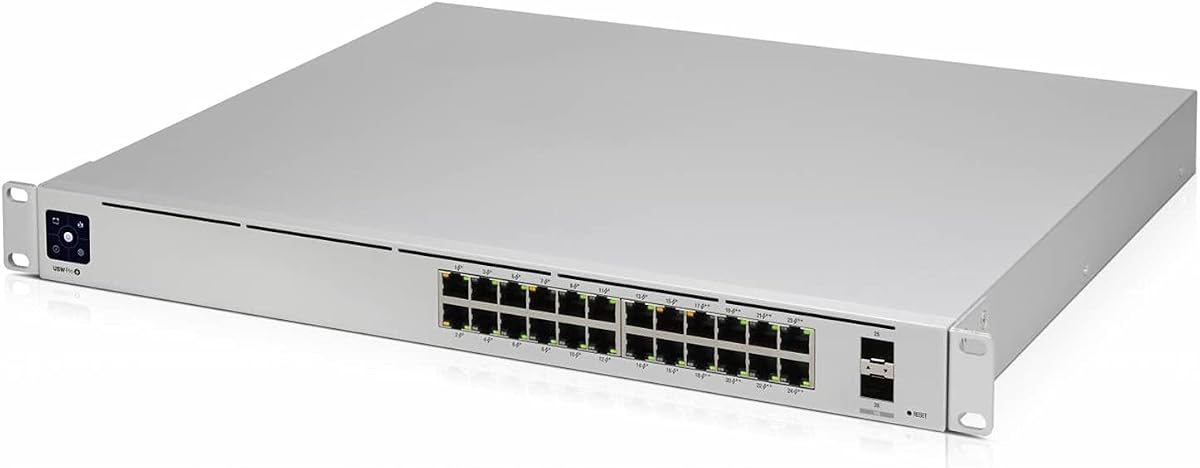



The Ubiquiti UniFi USW-Pro-24-PoE is a 24-port managed Layer 3 switch built for networks that need reliable Ethernet switching, inter-VLAN routing, and convenient power delivery in one platform. Its supplied rating is 4.7 out of 5, placing it among the strongest performers in this guide. The defining advantage is the combination of a substantial access-port count with integrated PoE, making it especially attractive to organizations standardizing powered access points, cameras, or other endpoint devices across a larger installation.
We may earn a commission when you buy through this link, at no additional cost to you.
Its 24-port design gives an administrator room to connect many wired devices without splitting the role across several small switches. Because it is explicitly identified as a Layer 3 switch, it can take on a more advanced role than a basic unmanaged model. That makes it useful for networks that are growing beyond a flat broadcast domain while retaining a centralized switching structure. The UniFi context also suggests a platform-oriented approach, particularly for buyers already comfortable managing Ubiquiti equipment through a broader ecosystem.
The principal trade-off is that the product listing provides less granular information than some competing entries. It identifies the included 24-port switch and its Layer 3 positioning but does not present a detailed port-speed, uplink, or power-budget breakdown. That means a buyer should verify the exact copper and optical interface arrangement, available switching capacity, PoE standards, and management features in the current documentation. Those checks are essential before assuming it matches a particular installation plan.
This model is a strong recommendation for a business, school, hospitality environment, or advanced home lab that wants one managed access switch to handle numerous wired endpoints and powered devices. It is less convincing for a tiny network that only needs a few ports or for a specialist fiber aggregation role. Subject to confirming the current specifications, the combination of 24 PoE-capable ports, Layer 3 capability, and a 4.7 rating makes it the most balanced overall choice here.
Centralized PoE can reduce the need for separate power adapters and make powered access points or cameras easier to deploy. It also provides a more scalable foundation for network expansion than adding power-only adapters at every endpoint.
Layer 3 switching allows the switch to participate in IP routing rather than limiting the installation to Layer 2 forwarding. That makes it more appropriate for VLAN-based networks where traffic must move efficiently between designated network segments.
We may earn a commission when you buy through this link, at no additional cost to you.
The MokerLink 8 Port 10G Managed Ethernet Switch is a compact but feature-dense Layer 3 option for administrators who want multi-speed copper connectivity without moving immediately to a fiber-heavy design. It carries a supplied rating of 4.3 out of 5 and provides eight ports that adapt across 10G, 5G, 2.5G, 1G, and 100M rates. This versatility makes it particularly interesting for mixed environments containing newer workstations, older devices, NAS systems, and access infrastructure.
We may earn a commission when you buy through this link, at no additional cost to you.
The routing and management capabilities extend well beyond a simple managed switch. The listing identifies IPv4 and IPv6 management, IPv4 and IPv6 routes, ARP, and loopback interfaces at Layer 3. Layer 2 tools include VLANs, ACLs, QoS, jumbo frames, DHCP, multicast controls, and spanning-tree protocols such as MSTP, RSTP, and STP. Administrators can work through a web interface or command line, while Telnet, SSH, SNMP, firmware upgrades, and configuration file transfer support ongoing maintenance.
Security and diagnostics are unusually comprehensive for this class of product. Features include AAA, 802.1X and MAC-based authentication, dynamic ARP inspection, DHCP snooping, IP source guard, port security, protected ports, storm control, port mirroring, UDLD, ping, traceroute, and port tests. These controls can help establish a more disciplined network, although the number of options also means the device may be more involved to configure than a simpler model intended for a small installation.
The metal enclosure and desktop or wall-mounting arrangement broaden deployment options, while a fan assists heat dissipation during sustained workloads. It is best suited to technically confident administrators, small businesses, advanced home labs, and compact aggregation environments. Buyers who need effortless setup or silent operation may prefer a fanless option, but for a dense multi-speed feature set, this switch earns a place among the most capable selections in the roundup.
Supporting 10G down to 100M on each copper port allows older equipment and newer high-bandwidth devices to share the same switch. That flexibility is valuable where network hardware is upgraded gradually rather than replaced all at once.
Ping, traceroute, port testing, UDLD, monitoring, and configuration file tools give administrators practical ways to inspect faults. These functions are especially helpful in distributed installations where physical access is inconvenient or remote troubleshooting is necessary.
We may earn a commission when you buy through this link, at no additional cost to you.
The Ubiquiti USW-Pro-24 Layer 3 Switch without PoE is built around 24 Gigabit RJ45 ports, making it a natural fit for offices and other environments where most endpoints receive conventional wired power. Its supplied rating is 4.4 out of 5. The product supports Layer 3 switching for more capable traffic handling, while its built-in power supply is designed to provide consistent voltage to internal components.
We may earn a commission when you buy through this link, at no additional cost to you.
A major strength is the combination of many access ports with optical fiber media support. That combination can serve as the wired foundation of a larger campus or business network while preserving a path to faster uplinks. Rack mounting also helps organize cables and secure the installation, which is more than a cosmetic consideration once a switch moves beyond a small office cabinet.
Its lack of PoE is the defining difference from the first-ranked model, and it should be viewed as a deliberate simplification rather than a defect. PoE-capable switches can be convenient when powering access points or cameras, but they may add unnecessary cost or complexity where those devices already have reliable outlets nearby. This non-PoE version avoids requiring administrators to think about powered-device capacity when that feature is not part of the deployment plan.
This switch is a sensible recommendation for a high-density office, school, or home lab with many conventional Ethernet clients and a need for Layer 3 functionality. It is less appropriate for a camera-heavy or access-point-heavy network where centralized PoE would reduce cabling and simplify maintenance. For those who want the UniFi Pro platform, 24-port capacity, and fiber expansion without PoE, it provides a focused and economical path into managed Layer 3 switching.
Twenty-four Gigabit Ethernet ports provide enough capacity for a broad collection of PCs, printers, access infrastructure, and other peripherals. The large port count also reduces the need for multiple downstream switches in suitable installations.
For networks where every endpoint already has access to conventional power, omitting PoE can simplify procurement and cabling. It also avoids confusion over which devices consume the most power and how much capacity the switch must provide.
We may earn a commission when you buy through this link, at no additional cost to you.
This 10-Port 2.5G PoE++ switch is the most specialized high-power option in the guide, combining eight 2.5GbE RJ45 ports with two 10G SFP+ slots. Its supplied rating is 4.6 out of 5. It is aimed at networks where modern high-bandwidth devices and demanding powered endpoints must coexist, including studios, technical environments, and power-user installations that want more than standard Gigabit access.
We may earn a commission when you buy through this link, at no additional cost to you.
PoE++ is its defining advantage. Four ports support IEEE 802.3bt and can deliver up to 90W each, while the remaining four 2.5G ports can deliver up to 30W each, subject to the listed 275W total PoE budget. This opens the door to high-demand devices such as Wi-Fi 7 or Wi-Fi 6E access points, PTZ cameras, and smart lighting. A PoE watchdog is also listed, helping connected devices reboot if they freeze.
At Layer 3, the switch supports static routing for IPv4 and IPv6, OSPF v2, a DHCP server, and VLAN management. Administrators can use a physical console connection, CLI, SSH, or a web interface. The two 10G uplinks are particularly valuable when the eight 2.5G access ports need to feed a faster core or aggregation layer. Its listed 80Gbps switching capacity provides additional headroom for high-throughput local exchanges.
The premium feature is clearly the combination of high-speed access, 10G uplinks, and substantial PoE++ capability. The trade-off is that the 275W budget still imposes a real limit on how many high-power devices can run at once, and the active cooling fan may be noticeable in quiet rooms. It is best for administrators who specifically need 90W-class PoE and 2.5G access, while simpler or quieter installations should choose a more conventional model.
The first four copper ports can supply up to 90W under IEEE 802.3bt, reducing the need to choose between high-power devices and switch capacity. This is valuable where modern access points, cameras, and lighting equipment require more power than ordinary PoE provides.
Two SFP+ slots allow the access layer to connect to faster upstream infrastructure. For NAS-heavy, studio, or server environments, that aggregation capacity can be more consequential than adding a few additional low-speed copper ports.
We may earn a commission when you buy through this link, at no additional cost to you.
The MikroTik CRS312-4C+8XG-RM is a one-rack-unit Layer 3 switch designed around 10G Ethernet capability. Its supplied rating is 4.3 out of 5, and the supplied product title identifies Ethernet support across 100, 1000, and 10000 standards. It is an attractive option for administrators building a compact aggregation or mixed-interface network where high-speed connectivity matters more than a large number of basic access ports.
We may earn a commission when you buy through this link, at no additional cost to you.
Its one-unit rack format makes it especially useful in space-conscious cabinets and structured installations. A small footprint does not necessarily mean limited capability: because the product is designated as a Layer 3 switch and is centered on 10G connectivity, it can serve as a more specialized building block than an ordinary 24-port office switch. The four-plus-eight naming pattern also suggests a deliberate blend of interface types, which can help connect both copper and fiber-based devices after the exact connector options are confirmed.
The chief limitation of this roundup entry is the limited detail provided in the listing. Although it identifies the switch as Layer 3, the supplied information does not spell out the individual port connectors, routing protocols, management software, power requirements, or thermal design. Those are essential details for infrastructure equipment and should be reviewed in current documentation before purchase. The concise claims of quality material and ease of use do not replace a technical compatibility check.
This MikroTik model makes the most sense for a technically experienced buyer who wants a compact, 10G-focused switch for a rack or aggregation role. It may be less attractive for a beginner seeking guided setup or a home user who primarily needs many ordinary Ethernet sockets. For the right environment, its small size, high-speed orientation, and managed Layer 3 positioning make it a practical specialist choice.
A one-rack-unit design keeps the switch compact while retaining the physical form expected of infrastructure equipment. That makes it easier to reserve limited rack capacity for network infrastructure, storage, and monitoring equipment.
A switch built around 10G Ethernet is better aligned with modern aggregation tasks than a simple access switch. It can serve as a compact upstream building block when downstream systems require more bandwidth than conventional gigabit links provide.
We may earn a commission when you buy through this link, at no additional cost to you.
The MikroTik CRS317-1G-16S+RM is a managed Layer 3 switch designed for installations in which fiber interfaces are the primary concern. Its supplied rating is 4.4 out of 5, while the listing identifies 16 SFP+ connections, no RJ45 Ethernet ports, a managed L3 switch type, and a one-unit gray rack chassis. It is therefore a specialized option rather than a general-purpose desktop switch.
We may earn a commission when you buy through this link, at no additional cost to you.
Sixteen SFP+ ports can provide a large amount of flexible high-speed connectivity when paired with compatible modules and appropriate cabling. Fiber is especially useful for linking distant network cabinets, building distribution points, storage systems, and aggregation layers. IEEE 802.1Q support provides a foundation for VLAN-based segmentation, while the Layer 3 designation allows the device to participate in routed network designs.
The lack of listed RJ45 ports is the main consideration. It means this switch is not a natural selection for a desk where ordinary computers need immediate Ethernet connections without transceivers or breakout cables. It also means buyers must plan the full optical or copper transceiver strategy in advance. The supplied information does not detail supported module types, switching capacity, routing protocols, or management workflow, so compatibility should be verified directly with MikroTik documentation.
This model is well suited to a campus, datacenter-adjacent, or structured fiber network with an experienced administrator. It is less suitable for beginners, temporary deployments, or users who expect an all-in-one switch with conventional copper ports. When the goal is a dense fiber switching layer with managed routing in a compact one-unit chassis, it offers a focused and scalable approach.
A high SFP+ count is valuable in buildings where connectivity runs between cabinets or across longer distances. It allows administrators to standardize fiber links rather than relying on a smaller number of mixed copper interfaces.
IEEE 802.1Q support enables VLAN-based segmentation on compatible connected systems. That separation can improve traffic organization and create clearer security boundaries when paired with appropriate routing and access-control design.
We may earn a commission when you buy through this link, at no additional cost to you.
The Ubiquiti UniFi Switch Pro 48 is built for networks with a very large number of ordinary Ethernet endpoints. It provides 48 Gigabit RJ45 ports, four 10G SFP+ ports, and both Layer 2 and Layer 3 features. The built-in 1.3-inch touchscreen gives administrators a visible status interface, while UniFi SmartPower RPS DC input adds a power-related option for resilient deployments.
We may earn a commission when you buy through this link, at no additional cost to you.
The 48-port count is the central attraction. It can reduce switch sprawl in an office, school, hospitality property, or other access-heavy environment where numerous PCs, phones, printers, and other devices need wired connectivity. Four SFP+ uplinks also create a meaningful path for high-speed aggregation without requiring a separate fiber switch at the edge of the network.
Its supplied rating of 3.7 out of 5 is the lowest among the ten products, so it deserves more careful evaluation than the otherwise similar UniFi access switches. That rating does not automatically indicate poor hardware, but it does make buyer research especially important. Potential considerations include management-software preferences, thermal and physical requirements, current documentation, power design, and how the SmartPower feature fits the intended redundancy scheme. The supplied listing does not describe every detail needed for a final infrastructure decision.
The model is most appropriate for a large access layer where maximizing downstream port density is the priority. It is less appealing when only a dozen or fewer devices need connectivity, when a large chassis would be underused, or when the lowest listed rating raises concern for a risk-sensitive buyer. Subject to those caveats, its combination of 48 copper ports and four 10G uplinks makes it a compelling high-density access switch.
A high-density access layer can connect many endpoint categories from one platform. This reduces the number of smaller switches, cables, and separate power systems required in a busy cabinet or equipment room.
The integrated display provides a convenient way to inspect status without opening a management interface on every device. It is particularly useful in shared racks where quick physical verification is often more practical than remote login.
We may earn a commission when you buy through this link, at no additional cost to you.
The 8-Port 10G SFP+ Switch is a compact, high-speed Layer 3 option with a supplied rating of 4.7 out of 5. Its eight 10Gbps SFP+ interfaces and 160Gbps switching capacity make it well suited to NAS systems, high-speed workstations, creative studios, and Wi-Fi 7 access point aggregation. It delivers modern switching performance without the bulk of a large enterprise access chassis.
We may earn a commission when you buy through this link, at no additional cost to you.
Routing support includes static routing, RIP versions 1 and 2, and OSPF v2. The listed inter-VLAN routing capability is valuable because it can move traffic between network segments within the switch rather than forcing every inter-VLAN flow through a separate primary router. A web interface and console port provide flexible administration options for different levels of technical experience.
One important operational note concerns the two switchable global rate modes: 10G with 1G as the default, or 10G with 2.5G. A change applies to all eight ports rather than only one. Every connected SFP+, DAC, or copper transceiver must therefore match the active mode to avoid disconnection. This shared behavior makes planning especially important in a lab where modules are exchanged frequently.
The fanless metal chassis is a meaningful advantage in quiet offices, bedrooms, and creative spaces. It can be placed on a desk or wall-mounted, and ERPS supports millisecond-level loop recovery while DAI and ACLs help protect against internal spoofing. This is an excellent recommendation for a technically informed buyer who wants dense 10G routing, inter-VLAN performance, and quiet operation in a compact enclosure.
Handling inter-VLAN traffic inside the switch can reduce the load placed on a primary router. That is especially useful when multiple fast networks, storage systems, and workstations need to communicate without saturating an external gateway.
A fanless chassis removes moving mechanical parts and associated operating noise from the design. That makes the switch easier to place near creative workspaces, offices, or living areas where quiet equipment is desirable.
We may earn a commission when you buy through this link, at no additional cost to you.
The Ubiquiti Pro Max 16-Port 2.5G / 1G Managed Network Switch is a compact UniFi option centered on modern multi-gigabit access. Its supplied rating is 4.5 out of 5. With 16 ports and support for both 2.5G and 1G operation, it targets networks where the jump from one-gigabit Ethernet is useful but a full 24-port or 48-port enterprise chassis is unnecessary.
We may earn a commission when you buy through this link, at no additional cost to you.
The value proposition lies in the balance between port count and speed. Sixteen 2.5G-class ports can serve modern workstations, Wi-Fi infrastructure, NAS connections, and other demanding devices without forcing every endpoint onto an older 1G ceiling. Its managed Layer 3 status also makes it more appropriate for segmented networks than an unmanaged consumer switch, while its relative compactness suits smaller offices, studios, and advanced home labs.
The supplied listing is limited to the model name, so detailed claims about specific routing protocols, uplinks, PoE, management functions, thermal design, and mounting hardware would go beyond the available source information. Those details should be confirmed in the current Ubiquiti product documentation. Buyers should also clarify whether the application is primarily access switching, inter-VLAN routing, or aggregation, because that determines which additional ports and cables may be required.
This model is a good middle ground for buyers who want more speed than standard Gigabit Ethernet without the footprint of a large access switch. It is less suitable for an installation that depends on integrated PoE, extensive optical uplinks, or a fully specified high-availability design. With verification of the current port and power specifications, its 16 multi-gigabit ports and 4.5 rating make it a strong compact-access recommendation.
Supporting 2.5G and 1G operations gives administrators room to match each endpoint with an appropriate connection. Faster clients can take advantage of available bandwidth while legacy devices remain usable on the same platform.
Sixteen ports cover a meaningful number of endpoints without requiring the larger chassis associated with 24- or 48-port models. The result is a practical option for compact installations that need meaningful capacity and multi-gigabit performance.
We may earn a commission when you buy through this link, at no additional cost to you.
The Ubiquiti USW-Pro-Max-16-PoE combines 16 PoE-capable copper ports with two 10G SFP+ ports in a Layer 3 Etherlighting switch. Its supplied rating is 4.7 out of 5. Four ports provide 2.5GbE with PoE++ output, while the remaining 12 provide Gigabit Ethernet with PoE+. This mixed arrangement allows administrators to serve both ordinary and higher-power devices from one platform.
We may earn a commission when you buy through this link, at no additional cost to you.
The 180W total PoE availability is the key capacity figure for planners. It provides room for a mixture of access points, cameras, and other powered endpoints without requiring every device to have a local power adapter. The two 10G SFP+ ports offer a high-speed uplink path, which is important if the 16 access devices generate substantial aggregate traffic or need to connect to a faster core layer.
Etherlighting is a distinctive operational convenience. The illuminated ports indicate location, speed and link status, and native VLAN or network information. This can make physical identification faster in a crowded rack or cabinet, reducing the time required to trace a questionable connection. Versatile desktop, wall, and rack mounting broadens deployment options, while the fanless cooling design keeps operation quiet.
The switch is best for a small business, creative studio, or advanced home network that needs several PoE endpoints, some multi-gigabit devices, and fast uplinks. The principal trade-off is that mixed port capabilities and a finite 180W budget require careful inventory of connected equipment. Buyers should verify whether the listed rack-mounting option requires separate hardware. With the right power mix, it offers one of the strongest combinations of flexibility, status visibility, and modern connectivity.
Port illumination communicates location, link or speed state, and native network information directly at the switch. That visible feedback helps technicians identify the correct port and evaluate connectivity without immediately opening the management interface.
Four PoE++ ports can serve equipment with greater power requirements, while twelve PoE+ ports cover conventional powered endpoints. This tiered approach can be more efficient than buying a uniformly high-power switch when the device population is mixed.
We may earn a commission when you buy through this link, at no additional cost to you.
Selecting a Layer 3 network switch requires matching routing functions, port capacity, media support, power delivery, and management capabilities to the network being built rather than comparing headline port counts alone.
A Layer 3 designation does not mean every product supports the same protocols or workflows. Buyers who need inter-VLAN routing should verify static routes, dynamic routing options, IPv4 and IPv6 support, loopback interfaces, ARP behavior, and DHCP-related functions in the current documentation. A network with only a handful of VLANs may be satisfied with static routing, while a larger or more distributed environment may benefit from OSPF or another dynamic protocol. Matching the routing method to the topology prevents an expensive mismatch.
The useful port speed is determined by the slowest link that matters, not simply the fastest headline number. Gigabit switches remain appropriate for many offices, while 2.5G can benefit NAS systems, high-resolution creative workflows, modern access points, and recent workstations. A 10G-oriented switch can be ideal for aggregation or fiber-heavy installations, but it may place the burden of compatible cabling and transceivers on the buyer. Calculate expected traffic and identify which endpoints genuinely need faster access.
Start with the number of connected devices, not a generic office recommendation. Add room for growth, mobile-device charging stations, security equipment, and future access points. Models with 24 or 48 copper ports reduce the need for multiple downstream switches, while compact eight- and sixteen-port units may be better where space is limited. For fiber aggregation, count usable SFP or SFP+ interfaces rather than assuming the total port count will meet the design.
PoE switches vary by both per-port output and total available power. A port that supports PoE++ may provide up to 90W, while standard or PoE+ ports may provide less, and the overall budget determines how many demanding devices can run at once. Inventory each powered endpoint, identify its power standard, and leave reasonable headroom. If the installation mainly contains conventional Ethernet clients, a non-PoE model may be simpler and more appropriate.
A switch with many fast access ports can still become a bottleneck if its uplinks are slow. Identify how the switch will connect to a router, core, NAS, or distribution point, and make sure the uplink speed and media match the expected aggregate flow. SFP and SFP+ systems require compatible transceivers, cables, or breakout arrangements. Shared operating modes can affect the entire switch, so record the intended module types and confirm compatibility before procurement.
Managed switches can be powerful but complicated, so the software workflow matters. Look for web interfaces, command-line access, SSH, SNMP, configuration backups, monitoring, and diagnostic utilities. Security tools such as VLANs, ACLs, 802.1X, DHCP snooping, dynamic ARP inspection, storm control, port security, and protected ports may be essential in business networks. For less technical users, vendor familiarity, guided setup, and the availability of clear documentation can outweigh a longer feature list.
The physical design must suit the actual location. Rack mounting is valuable in equipment cabinets, while desktop or wall mounting may be more appropriate for a home office, studio, or small business. Fanless designs are quiet, while active cooling may be preferable in a sustained high-load environment with adequate airflow. Consider color, status displays, port illumination, dimensions, cable-management needs, and whether the installation can support the switch without creating an accidental service bottleneck.
Begin by documenting the intended topology, assigning ports to roles, and preparing an IP addressing plan before moving traffic. Identify the default gateway, management VLAN, routing scheme, uplink assignment, and every VLAN that must operate on the switch. Firmware, management-software versions, and hardware revisions should be checked against the official documentation. Installing the latest appropriate software and saving a baseline configuration reduces surprises during troubleshooting.
Configure the switch in stages. Begin with basic administration, management access, and uplinks, then add VLANs, routing, security policies, and endpoint services one at a time. Use console access as a fallback when network changes might otherwise lock out a remote administrator. Activate and test one port at a time, confirm link speed, verify addressing, and check that traffic reaches the intended VLAN before connecting critical devices. Save a configuration file after each validated stage.
For long-term care, provide stable power, ventilation, cable support, and a secure physical location. Inspect LEDs and temperature-related behavior periodically, remove dust carefully, and avoid stacking equipment in a way that blocks airflow. Review connected PoE devices, routing tables, logs, and configuration backups on a regular schedule. Test failover and recovery procedures in a controlled way, and revisit VLAN, routing, and uplink assignments whenever the physical network changes.
A Layer 2 switch primarily forwards Ethernet frames according to MAC addresses and VLAN assignments. A Layer 3 switch can also route IP packets between subnets or VLANs using functions such as static routes, DHCP services, or dynamic routing protocols. This added capability can reduce reliance on a separate router for inter-VLAN traffic, although a Layer 3 switch does not automatically replace every router function.
A small, mostly flat home network may not need a Layer 3 switch if its router already handles the required routing and VLAN functions. It becomes more useful when you want local inter-VLAN routing, numerous managed ports, high-speed uplinks, or centralized PoE for access points and cameras. The best choice depends more on your topology and administration goals than on the number of devices alone.
Power over Ethernet delivers electrical power and network data through the same Ethernet connection. This can simplify access-point, camera, and lighting installations by reducing separate power adapters. Buyers should compare per-port output with total switch capacity because a high maximum on one port does not mean every port can deliver that amount simultaneously.
Not always. SFP+ ports generally require compatible optical modules, direct attach cables, or appropriate copper transceiver arrangements. The exact supported hardware depends on the switch, and some models also use shared operating modes that affect every port. Check the documentation and match the transceiver or cable system before connecting devices.
It can perform some router-like functions, particularly inter-VLAN IP routing and DHCP services, but it may not provide every feature required for the internet connection. Many administrators use a Layer 3 switch behind a dedicated router or firewall. This arrangement keeps internet-boundary functions separate while allowing local traffic to be routed efficiently inside the building.
A web interface is generally easier for initial configuration, while command-line access can be valuable for detailed diagnostics and automation. SSH, SNMP, console access, and configuration export tools can all help with long-term maintenance. The most important consideration is whether the documentation and interface match the administrator's experience.
Calculate the power requirements of every connected PoE device, identify the fastest expected traffic flows, and leave room for expansion. A switch with ample headroom is more useful than one that reaches its per-port or total limits immediately. Also consider future access points, cameras, workstations, and uplinks rather than sizing solely for today's connected equipment.
A fanless model is attractive in quiet offices, studios, bedrooms, and other noise-sensitive spaces because it has no moving fan. An actively cooled switch can be preferable where sustained heavy loading makes continuous airflow more important. The correct choice depends on the selected hardware's thermal design, workload, ambient conditions, and the location where it will operate.
The strongest all-around recommendation is the Ubiquiti UniFi USW-Pro-24-PoE because it combines 24 access ports, integrated PoE, and Layer 3 switching in a single managed platform. The MokerLink 8-Port 10G stands out for adaptable multi-speed copper ports and an extensive management and security toolset, while the 8-Port 10G SFP+ model offers a compact, quiet, high-speed routing solution for specialized networks.
Prioritize the functions that directly affect the installation: required routing protocols, realistic port counts, uplink speed, compatible media, and total PoE budget. A high-speed model is not automatically the right choice for a large office with ordinary Gigabit clients, while a high-port-count switch is unnecessary in a compact lab. Confirm management workflows, physical mounting, cooling, and current hardware documentation before finalizing a purchase.
Commercial terms and product details can change over time, so check the current listing, manufacturer documentation, and seller information before ordering. In particular, verify port speeds, transceiver compatibility, PoE standards, routing features, and included mounting hardware. Those checks are more reliable than relying on a product name alone and help ensure that the selected Layer 3 switch fits both present requirements and future expansion.