
Anker Prime TB5 Docking Station
4.2Editor score
14-in-1 port configuration
140W Thunderbolt 5 upstream
Active cooling under full load
Our Thunderbolt 5 Hub guide compares ten leading docks and hubs across bandwidth, display support, power delivery, port selection, portability, and compatibilit
A Thunderbolt 5 hub can turn a compatible laptop into a compact workstation by adding displays, storage, networking, charging, and everyday peripherals through one streamlined connection. The best model depends on whether your priority is maximum bandwidth, flexible display support, a wide port selection, or a smaller setup that travels easily.
This guide compares ten Thunderbolt hub and docking-station options using the supplied specifications, customer ratings, port layouts, charging capabilities, display claims, and compatibility details. It covers true Thunderbolt 5 docks, Thunderbolt 4 alternatives, and more compact USB-C hubs for readers considering different levels of expansion.
Each review explains where the product is strongest, where compromises appear, and which kind of user may benefit from it. Ratings and specifications can change with firmware or marketplace updates, and current prices fluctuate, so readers should verify the latest details and compatibility before purchasing.
4.2Editor score

4.8Editor score

4.1Editor score
The table below compares all ten products by their core positioning, connection standard, display capabilities, charging, and major connectivity features. Several compact USB-C hubs are included as practical alternatives, while dedicated Thunderbolt 5 models offer greater bandwidth, power, and display flexibility.
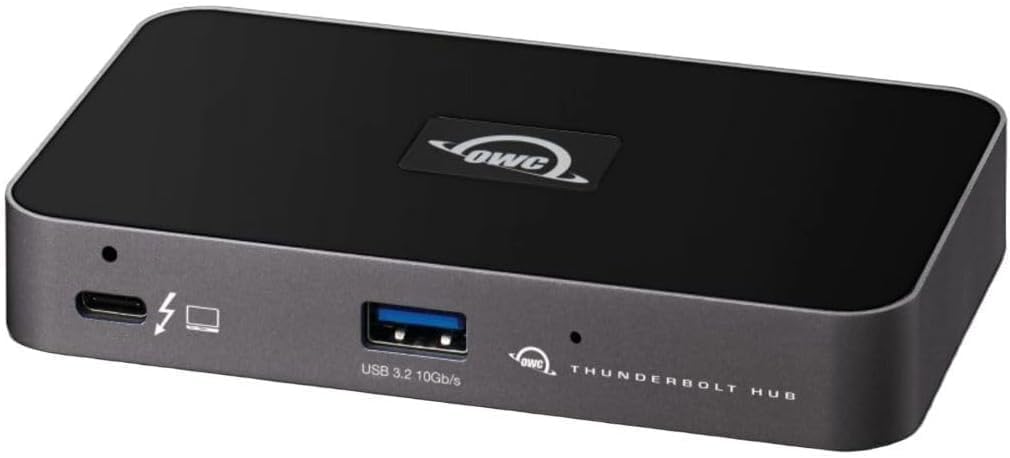


The OWC Thunderbolt Hub 5-Port Connectivity Solution is a compact expansion option for users who want more than a basic USB-C adapter without moving to a large desktop dock. It carries a 4.4 rating, placing it among the stronger-rated products in this guide, and its combination of three Thunderbolt 4 ports, USB-A connectivity, high-resolution display support, an adjustable LED, and a Kensington Nano Security Slot makes it practical for focused professional setups.
We may earn a commission when you buy through this link, at no additional cost to you.
Its strongest feature is the balance it strikes between size and capability. Thunderbolt 4 supports data transfer rates up to 40Gbps, making the hub suitable for demanding workflows involving external storage, displays, and other Thunderbolt peripherals. The included USB 3.2 Gen 2 Type-A port provides a familiar connection for keyboards, mice, flash drives, and other everyday accessories, while the ability to support resolutions up to 8K allows the hub to serve more demanding visual workloads.
The trade-off is that this is not a native Thunderbolt 5 product. It lacks the up-to-120Gbps bandwidth available from the newer standard, and its five-port arrangement is much simpler than the 12-, 14-, and 17-port docks in this roundup. Users with several USB-A devices, multiple card readers, wired Ethernet, or audio connections may need to supplement it with another adapter. The single USB-A port is particularly limiting for a desk that already has a keyboard and mouse.
Despite that limitation, the OWC is a compelling choice for a compact Thunderbolt workstation, especially for users who value its 4.4 rating, high-resolution support, and security slot. It is better suited to Thunderbolt 4 owners than buyers seeking the absolute maximum throughput of Thunderbolt 5, but it remains a polished and focused solution for a laptop, one or two high-resolution displays, and a small group of peripherals.
The five-port footprint is easy to integrate into a permanent desk setup without adding the visual and physical bulk of a full docking station. Its Thunderbolt connections can support high-resolution displays and provide a direct path to compatible storage or other peripherals.
The Kensington Nano Security Slot gives offices and shared workspaces a way to reduce casual theft risk. The adjustable LED also provides a practical way to monitor the hub's status without adding another separate accessory.
We may earn a commission when you buy through this link, at no additional cost to you.
Belkin's USB-C Hub 5-Port 4K HDMI 100W PD is the most versatile compact option in this list for users who need one external display, reliable host charging, and several USB connections. Its 4.5 rating is the second-highest among the ten products, and the combination of 100W Power Delivery, HDMI 2.0, 10Gbps transfers, a dedicated USB-C data port, and a safety system makes it well suited to hybrid work and travel.
We may earn a commission when you buy through this link, at no additional cost to you.
The hub can connect an external display through HDMI while providing up to four additional device connections. Its 100W charging capability can keep a demanding laptop powered while other accessories remain connected. Data transfer speeds of up to 10Gbps are twice the cited rate of USB 3.0, which makes the hub useful for routine file movement, media synchronization, and connections to fast external storage.
Its limitations are easy to identify when compared with a full Thunderbolt dock. This model does not offer Thunderbolt 5 bandwidth, multiple display outputs, Ethernet, card readers, or the ability to daisy-chain multiple high-bandwidth devices. The dedicated USB-C port shares 12W of output among the hub's USB-C ports, so it is not intended to power several demanding USB-C accessories independently.
This Belkin is a strong pick for a MacBook, iPad, or compatible laptop that spends part of its time on the road. Users who need a complete desk setup should choose a Thunderbolt 5 dock, while buyers wanting video, fast data, and dependable single-device charging in a small package will find this model easier to carry and simpler to use.
A slim enclosure makes this hub suitable for a carry-on, laptop sleeve, or shared office drawer. It adds display, charging, and peripheral connectivity without requiring a permanently deployed desktop dock.
The dedicated two-in-one USB-C connection allows charging and file transfer at the same time. That makes the hub more useful than a simple display adapter for users who regularly move files between devices.
We may earn a commission when you buy through this link, at no additional cost to you.
The Anker Prime TB5 Docking Station is a premium desktop solution for creators, engineers, and power users who want broad connectivity without assembling several separate adapters. It has a 4.2 rating, fourteen ports, four Thunderbolt 5 connections, 140W upstream power delivery, card readers, 2.5Gbps Ethernet, and an active cooling system. Those features make it a more specialized choice than a simple travel hub.
We may earn a commission when you buy through this link, at no additional cost to you.
Thunderbolt 5 serves as the dock's central advantage. The supplied specifications state that a 150GB file can move in 25 seconds through a Thunderbolt 5 port, while the upstream connection can provide up to 140W under PD 3.1. The dock can also connect a single display at up to 8K and 60Hz or two such displays on compatible Thunderbolt 5 Windows laptops, giving demanding creative workflows considerable flexibility.
The package supports two Thunderbolt 5 downstream ports, two USB-C ports, three USB-A ports, SD and TF readers, a 2.5Gbps Ethernet connection, audio, and HDMI 2.1 or DisplayPort 2.1 output. Active cooling is especially notable because it is designed to maintain performance under a full port load. The trade-off is physical size: this is a desk-bound dock rather than a minimal adapter, and advanced display arrangements still depend on host compatibility.
The Anker is best for a permanent workstation where fast storage, multiple displays, wired networking, card import, and substantial host charging all matter. It is less attractive for occasional travel, and buyers should confirm that their computer supports the required Thunderbolt 5 modes. For those who do, its speed, port density, and cooling make it one of the most complete picks in the guide.
Fast file transfer, high-resolution displays, and built-in SD and TF readers support common creative tasks without requiring separate card-reader adapters. Its active cooling system is designed to help sustain performance under sustained workloads.
The 140W upstream connection can power a demanding host while displays and peripherals remain active. Front-facing USB-C ports also provide shared charging for attached accessories, making the dock a central power and data hub.
We may earn a commission when you buy through this link, at no additional cost to you.
The Belkin Connect Thunderbolt 4 Docking Station provides a compact five-port solution for users who need more charging power and display flexibility than a basic USB-C hub. It carries a 3.8 rating, the lowest in this group, but its 96W Power Delivery, up-to-40Gbps transfer capability, and support for a single 8K or dual 4K displays remain relevant for compatible workstations.
We may earn a commission when you buy through this link, at no additional cost to you.
Despite its compact name, it includes three upstream Thunderbolt 4 USB-C ports and one downstream Thunderbolt 4 port, allowing up to six devices to be daisy-chained. This gives users a way to connect displays, storage, and other Thunderbolt devices while reducing the number of cables running back to the host. Certified overcurrent protection adds a reassuring element for a hub intended to remain connected throughout the workday.
The main compromises are the older Thunderbolt 4 interface and the modest five-port configuration. It does not match the 120Gbps bandwidth, multi-port layouts, or card-reader integration of the newer docks. Its dual-monitor support also depends on the capabilities and operating limitations of the connected computer, and the 3.8 rating may make cautious buyers want to examine recent customer feedback carefully.
This dock makes the most sense for a MacBook or Windows laptop that already uses Thunderbolt 4 and needs dependable host charging plus one or two high-resolution displays. Buyers seeking the newest standard, more ports, or a guaranteed path to the highest transfer rates should move up to a Thunderbolt 5 model instead.
The supplied Thunderbolt 4 cable and power supply remove the need to source both separately before the dock can be put into service. Its compact port count also keeps the footprint smaller than that of a full multi-display desktop station.
With three upstream connections, one downstream connection, and support for up to six chained devices, the dock can simplify a desk that contains several Thunderbolt accessories. It is particularly useful when every additional cable would otherwise need to reach the laptop.
We may earn a commission when you buy through this link, at no additional cost to you.
The WAVLINK Thunderbolt 5 Dock is a value-focused way to build a full Thunderbolt workstation. Its 4.1 rating, Intel-certified Thunderbolt 5 connection, 120Gbps stated bandwidth, and 12-port layout offer a compelling balance for users who need extensive expansion but may not require every premium feature of a larger flagship dock.
We may earn a commission when you buy through this link, at no additional cost to you.
The port selection is unusually complete for this category. It includes an upstream Thunderbolt 5 port rated at 120Gbps and 140W in the port breakdown, three downstream Thunderbolt 5 ports, four USB-A 3.2 ports, 2.5G RJ45 Ethernet, an SD 4.0 reader, a 3.5mm audio and microphone connection, and a Kensington security slot. The supplied information also states that the upstream connection provides 140W output, making it suitable for charging a demanding laptop while the dock handles data and displays.
Display flexibility is broad but heavily dependent on compatibility. The listed maximums include a single 8K display at 144Hz, dual 8K at 60Hz, and triple 4K at 144Hz. Triple external display use requires Windows 11 or later with Thunderbolt 5, while macOS supports dual external displays. USB-C-to-HDMI or DisplayPort cables and the security lock are not included, which could add extra steps and costs to setup.
The WAVLINK is a strong recommendation for budget-conscious Thunderbolt 5 users who value many ports, fast networking, card reading, and strong host charging. It is best for users willing to review the compatibility list and choose the correct display adapters. Those needing guaranteed triple-display behavior across more operating systems or a larger storage ecosystem may prefer a different dock.
Twelve ports cover the most common workstation needs, including fast networking, four USB-A connections, three downstream Thunderbolt ports, card reading, and audio. It offers broad expansion while remaining more focused than the 14- and 17-port models.
The SD 4.0 reader can reach up to 312MB/s, and the integrated 2.5G Ethernet connection offers a stable wired option for large transfers, meetings, and busy networks where Wi-Fi performance may be inconsistent.
We may earn a commission when you buy through this link, at no additional cost to you.
UGREEN's Maxidok Thunderbolt 5 Docking Station is built for users who want to consolidate an entire desktop into one device. Its 4.2 rating is solid, but the defining characteristic is the 17-port layout. It adds multiple USB-A and USB-C connections, SD and TF card readers, three audio jacks, 2.5G Ethernet, DisplayPort, two downstream Thunderbolt 5 ports, and a dedicated M.2 NVMe storage slot.
We may earn a commission when you buy through this link, at no additional cost to you.
The built-in PCIe Gen4x4 M.2 slot is the most unusual feature in the roundup. It supports 2230 through 2280 NVMe SSDs up to 8TB, creating a way to add fast local storage without a separate enclosure. The aluminum unibody, 60mm active cooling fan, and 240W total power system also point toward a permanent workstation rather than a travel accessory.
The caveats are substantial. Compatible M.2 drives must have a height no greater than 12mm and width no greater than 24mm; several named SSDs with larger heatsinks are not supported. Windows can use three independent displays through the two Thunderbolt 5 outputs and DisplayPort, while Mac systems support two displays. An HDMI monitor requires an active DisplayPort-to-HDMI adapter or cable because passive conversion will not work.
This dock is best for a high-capacity editing, engineering, or data-transfer desk where storage, card readers, audio, networking, displays, and charging are all needed. It offers the most complete consolidation of this group, but its size, active fan, substantial power system, and drive-size restrictions make it less attractive to occasional travelers or owners of larger desktop SSDs.
A compatible NVMe SSD turns the dock into a high-speed storage hub, reducing the need for a separate enclosure and duplicated data. Buyers should verify drive dimensions and ensure that the selected SSD includes a compatible low-profile heatsink.
The aluminum unibody, active cooling system, security lock, and 240W power capability indicate a dock designed to remain installed. Its many ports can also reduce desk clutter by replacing several separate adapters.
We may earn a commission when you buy through this link, at no additional cost to you.
Belkin's compact 5-port USB-C hub offers a straightforward way to add an external display, charging, and several accessories to a compatible laptop. Its 3.9 rating is modest, but the feature set is well matched to mobile work: a lightweight housing, 100W Power Delivery, 4K HDMI output, and a dedicated USB-C connection for data transfer and charging.
We may earn a commission when you buy through this link, at no additional cost to you.
The hub supports display resolutions up to 4K at 60Hz through HDMI 2.0, while its dedicated USB-C port can handle data at up to 5Gbps while the host remains charged. That makes it suitable for routine office accessories, presentations, and general media work. A six-point safety system covers over-voltage, overload, overcurrent, over-temperature, short circuits, and fire-resistant materials.
Compared with a Thunderbolt 5 dock, it is limited by its 5Gbps transfer rate and lack of native Thunderbolt, Ethernet, card readers, and multiple display outputs. The 3.9 rating should also be considered relative to the group's higher-rated products. It is better understood as a travel adapter than a high-end workstation tool, and heavy external storage users may find the transfer speed limiting.
Despite these constraints, it is a useful choice for a lightweight laptop bag, shared meeting room, or occasional mobile workstation. Buyers who prioritize portability, one external display, dependable charging, and a compact footprint will appreciate its focused design. Those who routinely move large files or connect complex desktop arrays should choose a Thunderbolt dock with more bandwidth and ports.
The hub provides the essentials needed for a temporary desk without taking up much room in a bag. It is especially suitable for users who regularly work from a laptop and need HDMI output, host charging, and a few peripherals.
Its multi-part protection system and fire-resistant housing provide useful safeguards for a device that may travel and operate in different environments. The housing also contains 75% post-consumer recycled material.
We may earn a commission when you buy through this link, at no additional cost to you.
The OWC Five-Port Hub, identified as model TB4HUB5P, is a streamlined option for creative professionals and desktop users who need high-resolution displays more than a large collection of peripheral ports. Its 4.2 rating is solid, and the hub's ability to connect a 5K, 6K, or 8K display—or dual 4K displays—makes it relevant for detailed visual work.
We may earn a commission when you buy through this link, at no additional cost to you.
The practical use cases are clear. Designers can inspect detailed CAD drawings or Photoshop images with greater clarity, while video editors can keep a large-format timeline on one screen and preview raw playback on another. It is also useful for separating a meeting display from an editing display, giving the user more room to work without depending on a laptop screen.
The compromise is its simple, older-generation design. It does not provide the 120Gbps bandwidth of native Thunderbolt 5, the large port count of a desktop dock, or the latest charging and storage features found in more specialized products. Buyers who need fast card readers, multiple USB-A devices, Ethernet, or newer host compatibility may need to look elsewhere.
The OWC is best for a focused two-display creative workstation or a user who values high-resolution image quality and a compact hub over maximum connectivity. It is also a reasonable way to expand a Thunderbolt 4 laptop without committing to a full docking station. A Thunderbolt 5 buyer focused on future-facing bandwidth should treat this as a more modest alternative.
High-resolution and dual-display support can make detailed design, photo, and video workflows easier to manage. The additional screen space can reduce the need to switch continually between application windows and previews.
For users who only need displays and a small number of Thunderbolt connections, the five-port format keeps the setup simple. It avoids the larger footprint and greater complexity of a full 14- or 17-port workstation dock.
We may earn a commission when you buy through this link, at no additional cost to you.
The Belkin 7-Port USB-C Hub stands out as the highest-rated product in this guide, with a 4.9 customer rating. It combines a relatively rich portable layout with 100W host charging, 4K HDMI output, 5Gbps data transfer, and built-in SD and microSD readers. That makes it especially appealing to photographers, video creators, and mobile professionals who want to import media without carrying a separate reader.
We may earn a commission when you buy through this link, at no additional cost to you.
One USB-C connection gives the host a display, charging, data, and up to six additional device connections. HDMI 2.0 supports resolutions up to 4K at 60Hz, and the dedicated USB-C connection can transfer files while charging the host. The card readers simplify a common gap in lightweight laptop setups, while the six-point safety system adds protection against over-voltage, overload, overcurrent, over-temperature, and short circuits.
It remains a conventional USB-C hub rather than a Thunderbolt 5 dock. Its stated 5Gbps transfer speed is modest for modern high-speed storage, and it cannot provide the multi-display flexibility, daisy-chaining, Ethernet, or extreme throughput of the dedicated Thunderbolt products. The 4.9 rating is a strong point, but it should not be mistaken for a guarantee that every host or accessory combination will perform identically.
The Belkin is an excellent choice for a mobile creative desk, a student laptop, or a shared workstation that needs media import and one reliable display. It provides more practical value than a three-port adapter while remaining easier to carry than a full desktop dock. Users who need maximum file-transfer speed or several screens should move to a Thunderbolt model.
Separate SD and microSD slots make it possible to import files from two card formats without another adapter. This is a meaningful convenience for photographers, filmmakers, and users who regularly move footage from cameras to a laptop.
Seven ports give the hub more flexibility than a simple HDMI adapter while preserving a slim, lightweight design. It can sit in a tech pouch for travel or remain permanently attached to a lightweight office laptop.
We may earn a commission when you buy through this link, at no additional cost to you.
Belkin's 140W Thunderbolt 5 Dock is the most complete all-around choice in this guide. It carries an excellent 4.8 rating and combines 14 ports, up to 140W host charging, 2.5Gb Ethernet, high-speed Thunderbolt connectivity, and support for as many as three extended 4K displays. The balance of power, expansion, display flexibility, and practical safety features makes it especially appealing to demanding laptop users.
We may earn a commission when you buy through this link, at no additional cost to you.
Thunderbolt 5 bandwidth reaches up to 80Gbps, with a stated 120Gbps Bandwidth Boost for applicable transfers. The dock supports up to three extended monitors at 4K and 144Hz, as well as 8K at 60Hz. It also provides 2.5Gb Ethernet, allowing large transfers, video calls, and downloads to benefit from a stable wired connection when Wi-Fi is inconsistent.
Host charging reaches 140W through one USB-C connection, and up to six Thunderbolt devices can be daisy-chained. That combination can substantially reduce desk clutter by consolidating displays, storage, and accessories. The trade-off is a larger desktop dock rather than a pocketable adapter. Exact monitor counts, resolutions, refresh rates, and data-transfer modes still depend on the host computer, connected displays, cables, and operating system.
The dock is best for a permanent Thunderbolt 5 workstation that handles multiple screens, fast storage, networking, and demanding charging. It also suits users of compatible MacBook Pro, Chromebook, iPad, or USB-C laptops who want one clean connection. While the UGREEN offers more total ports and internal storage, this Belkin provides a particularly persuasive mix of refinement, rating, charging, displays, and everyday usability.
Support for three extended 4K displays at up to 144Hz makes the dock attractive to editors, developers, analysts, and streamers. The 8K and high-refresh combinations provide options for demanding visual and gaming workflows when the host and display hardware support them.
Up to 140W charging, high-speed data, Ethernet, and multi-display video arrive through one host connection. Daisy-chaining up to six Thunderbolt devices further simplifies a desk that would otherwise require several separate connections.
A Kensington lock and six-point safety system support a professional installation. The product also arrives in plastic-free packaging and includes three-year coverage, adding reassurance for a permanent workstation accessory.
We may earn a commission when you buy through this link, at no additional cost to you.
The right hub depends on your computer, display needs, power requirements, and the accessories you use every day. Start by separating genuine Thunderbolt 5 performance from basic USB-C convenience, then compare the details that determine whether the dock will simplify or complicate your setup.
In short, prioritize native Thunderbolt 5 for demanding workflows and USB-C for a lighter, more focused adapter.
In short, verify the exact display matrix and host compatibility rather than relying only on the largest headline resolution.
In short, choose enough host power for sustained use, then check how much charging is shared with downstream ports.
In short, prioritize the ports you use every day rather than choosing solely by the largest total.
In short, prioritize native high-speed storage for large media, or choose built-in card readers when simple media import is the main need.
In short, prioritize 2.5Gb Ethernet for busy networks and confirm that the required audio jack is physically present.
In short, confirm the host operating system, graphics capabilities, port generation, and required display mode before purchase.
In short, choose a portable hub for occasional travel and a cooled desktop dock for sustained heavy workloads.
Begin by checking the host computer's Thunderbolt or USB-C capabilities, the operating system, and the display requirements listed by the manufacturer. Connect the appropriate upstream cable to the computer, then attach the dock's power supply if it uses one. For a desktop model, place the dock where cables can reach without strain and where an active fan has clearance for airflow.
Add displays before high-bandwidth storage, using cables that support the intended resolution and refresh rate. Next, connect Ethernet, card readers, audio equipment, and USB accessories. If the computer has multiple Thunderbolt or USB-C ports, testing a different host connection can help identify whether a performance or display limitation comes from the dock, the cable, or the computer.
For regular care, keep the enclosure dry, avoid blocking vents, and do not leave the dock exposed to liquids or extreme heat. Storage inserted in a built-in M.2 slot should be handled carefully and installed only after checking physical compatibility. Periodically review firmware and host-driver updates, and use the security slot when the dock is installed in a shared or public workspace.
A Thunderbolt 5 host is recommended when you want to access the full capabilities of a Thunderbolt 5 dock. Some docks can still function through compatible USB-C or Thunderbolt 4 connections, but maximum bandwidth, charging behavior, and display arrangements may be reduced. Check the manufacturer's compatibility list before purchasing, especially if multiple high-resolution displays are planned.
It can, but the exact number and resolution depend on the dock, host operating system, graphics capabilities, cables, and display configuration. The Belkin 140W model supports up to three extended 4K displays at 144Hz, while the Anker and WAVLINK support various high-resolution combinations under specified conditions. Confirm the detailed display matrix rather than relying on a general 8K claim.
A USB-C hub is adequate for many routine storage tasks, particularly when it provides 5Gbps or 10Gbps data transfer. Fast Thunderbolt 5 storage is preferable for large media libraries, active editing, and repeated transfers. The limiting factor may also be the SSD itself, so a high-speed drive cannot exceed the slower connection attached to it.
The wattage indicates the maximum power the dock can provide to the connected computer, subject to device and protocol requirements. A 140W upstream connection offers more headroom for demanding laptops, while 100W may be sufficient for many mainstream models. Actual charging speed also depends on the host, cable, power supply, and thermal conditions.
Most modern USB-A and USB-C storage devices can connect through compatible ports, but performance will reflect the slower interface involved. A USB 3.2 port will not deliver Thunderbolt 5 transfer rates, and some legacy devices may require additional power. For consistent high-speed results, use a compatible Thunderbolt or USB 4 storage enclosure and a cable rated for the intended bandwidth.
Usually, yes. Compact hubs such as the Belkin five- and seven-port models are smaller, lighter, and easier to place in a laptop bag. They commonly provide one 4K display, host charging, and basic data expansion. Dedicated Thunderbolt 5 docks are better when a user needs high bandwidth, multiple screens, Ethernet, card readers, and a permanent one-cable workstation.
The largest advertised mode may apply only to a specific port, display count, operating system, host processor, or adapter arrangement. Refresh rate, color depth, HDR, and scaling requirements can also reduce the attainable resolution. Buyers should review the detailed compatibility chart and ensure that their display and cables support the selected mode.
Confirm the supported NVMe interface, capacity, physical dimensions, and heatsink height. The UGREEN model supports compatible 2230 through 2280 PCIe Gen4x4 NVMe SSDs up to 8TB, but the drive must be no taller than 12mm and no wider than 24mm. Some larger desktop drives with substantial heatsinks are explicitly excluded.
The Belkin 140W Thunderbolt 5 Dock is the strongest all-around recommendation because it combines a 4.8 rating with 140W charging, 2.5Gb Ethernet, 14 ports, and support for as many as three extended 4K displays. The Anker Prime TB5 Dock is the premium choice for fast transfers, active cooling, extensive ports, and high-end display flexibility, while the WAVLINK provides a value-focused 12-port Thunderbolt 5 configuration.
Prioritize compatibility before any other feature. Confirm the host computer, operating system, display count, resolution, refresh rate, charging requirements, and necessary cables. A smaller USB-C hub may be more appropriate for travel, while a desktop Thunderbolt 5 dock is the better solution for fast storage, multiple screens, networking, and permanent one-cable expansion.
Ratings, firmware behavior, supported display modes, and marketplace prices can change over time. Review the latest product listing, manufacturer compatibility notes, and customer feedback before buying, and compare the included cables and accessories with what your setup already has. That final check helps ensure the selected hub fits both the computer and the way you actually work.