
GE Big Button Universal Remote
4.2Editor score
Controls up to two devices
Automatic code search
Master volume function
Explore simple TV remote control choices for seniors, comparing 10 remotes with large buttons, clear labeling, easy setup, and varied device compatibility.
A simple TV remote control should put essential viewing functions within easy reach, especially for seniors, people with low vision, and anyone who finds conventional remotes confusing. The most useful models emphasize large buttons, tactile feedback, limited layouts, and straightforward operation rather than dense collections of tiny controls.
We compared ten remotes based on the information supplied for each product, including button layout, compatibility, programming requirements, power needs, accessibility features, and support for traditional television functions. The list covers dedicated-brand models, universal television remotes, cable-box solutions, and a backlit option designed for compatible smart televisions.
Each review explains where a remote stands out and where its limitations may matter. Ratings reflect the supplied customer feedback, while compatibility details deserve careful attention because television brands, cable providers, streaming devices, and soundbars can behave differently. Product availability and prices change, so confirm the current listing and device requirements before buying.
4.2Editor score

4.2Editor score

4.1Editor score
The table below compares all ten remotes by their most important practical traits, including the intended user, device coverage, setup method, accessibility features, navigation ability, and power requirements.



The EZclicker TV Remote for Seniors in black is a compact universal remote built around large controls, tactile feedback, and a simple layout. Its supplied rating is 4.2, placing it among the stronger customer-rated options in this guide. It appears especially well suited to users who want the common television controls without navigating a crowded modern remote.
We may earn a commission when you buy through this link, at no additional cost to you.
Programming follows a direct process: point the remote at the television, hold the Mute and Volume Up buttons together for as long as needed, and release them when the television volume changes. This method avoids the need to search manually through a long code list. Its universal television coverage also makes it more flexible than a model restricted to a single television brand, provided the user's set appears on the compatibility list.
The main limitation is scope. This remote is designed for televisions rather than cable boxes, Firestick, Roku devices, or streaming applications. It will not navigate app menus, and users whose entertainment system depends on a separate set-top box should choose a multi-device model instead. The remote also requires two AAA batteries, which are not included, and its television model compatibility should be checked before purchase.
This is a good option for a household with a straightforward television setup, particularly when the original remote has been lost or has become difficult to operate. Seniors, grandparents, and people with reduced vision or dexterity may appreciate the physical separation between oversized buttons. For anyone who watches through a streaming stick or needs channel changing through a cable box, the Flipper or GE alternatives offer more appropriate coverage.
The large-button design and tactile feedback reduce the visual and precision demands associated with small, densely packed controls. Its stated audience includes seniors and people with limited dexterity or vision, making the layout one of the most important features to evaluate.
The Mute and Volume Up programming combination offers a comparatively uncomplicated setup routine. Keeping the television on and pointing the remote toward it during programming is the central step, making the process approachable for users who do not want to deal with complex code searches.
We may earn a commission when you buy through this link, at no additional cost to you.
The Flipper Big Button TV Remote takes simplicity more seriously than most conventional universal remotes. Its supplied rating is 4.2, and the defining feature is a visible face with only four everyday buttons: Power, Volume Up, Volume Down, and Channel Up, while Mute and additional controls can be revealed. That restraint makes it an especially compelling option for seniors, people with dementia, and users with low vision.
We may earn a commission when you buy through this link, at no additional cost to you.
The design uses large, tactile buttons organized by color. Green identifies Power, orange identifies volume, blue identifies channels, and gray identifies Mute, helping users locate controls by appearance as well as position. A caregiver can pre-program up to 25 favorite channels, allowing the channel controls to move directly through preferred choices rather than requiring someone to remember channel numbers.
Flipper goes beyond basic television functions in a meaningful way. It is described as controlling both a television and a cable or satellite box and lists compatibility with major television manufacturers and providers such as Xfinity, Spectrum, DirecTV, Dish, AT&T, and TiVo. It can also work with compatible soundbars and infrared devices. However, it cannot navigate streaming applications such as Netflix, YouTube, Prime Video, Hulu, Roku, Google TV, Apple TV, or Fire TV.
This remote is best for a household that primarily watches broadcast, cable, or satellite television and wants to reduce remote clutter without giving up familiar channel navigation. Its limited visible layout may require patience during initial configuration, but the payoff is a remote that does not present an intimidating wall of controls. For users centered on smart-TV applications rather than linear channels, the UltraPro backlit model offers a more suitable feature set.
Keeping only four core actions visible minimizes the number of choices a user must process. Hidden buttons preserve customization without turning the everyday face into a complicated interface, which is a meaningful advantage for people with cognitive or visual impairments.
The ability to pre-program as many as 25 favorite channels can remove the frustration of scrolling through long channel lists. Caregivers can set the preferences once, after which the user can cycle through familiar viewing choices using the oversized channel buttons.
We may earn a commission when you buy through this link, at no additional cost to you.
The EZclicker Samsung TV Remote Big Button is purpose-built for compatible Samsung televisions, and its supplied 4.5 rating is the highest among the products reviewed. It removes one of the most common obstacles to replacing a remote: programming. Once two AAA batteries are inserted, users can begin operating the television without entering a code or completing a pairing process.
We may earn a commission when you buy through this link, at no additional cost to you.
Its layout places accessibility ahead of extensive functionality. An extra-large Enter button, large universal television controls, and tactile feedback make it easier to identify and press the essential inputs. The stated target users include seniors, grandparents, people with dementia, and visually impaired users, while the compact seven-by-two-by-one-inch dimensions should also make the remote easy to hold and store.
The trade-off is brand specificity. This remote is not compatible with streaming devices, cable boxes, or unrelated television platforms. A Samsung television that operates its smart features through the television itself may fit this arrangement well, but a household using a separate streaming stick or set-top box will need additional equipment or a different remote. The batteries are not included.
This is a particularly strong recommendation for a household with a compatible Samsung television and a desire for immediate setup. It can be an easy replacement for a missing or damaged original remote because it removes both code entry and unfamiliar layouts. Buyers should confirm that the television is used directly and does not depend on a separate cable, satellite, or streaming controller.
The ability to insert batteries and begin using the remote makes this one of the most approachable choices in the guide. It is especially helpful for a senior who cannot comfortably search through programming menus or memorize remote codes.
The prominent Enter control is useful because selection and confirmation are often needed when moving through television menus. Its larger size reduces the precision required compared with the tiny center button found on many conventional remotes.
We may earn a commission when you buy through this link, at no additional cost to you.
The EZclicker Big Button Universal TV Remote is designed for users who want a straightforward television remote without committing to a brand-specific model. It carries a supplied rating of 4.1 and combines large universal television controls, an extra-large Enter button, and tactile feedback. The result is a relatively familiar universal layout scaled for easier viewing and pressing.
We may earn a commission when you buy through this link, at no additional cost to you.
Its programming method is refreshingly concise. Turn on the television, point the remote toward it, then hold the Mute and Volume Up buttons together until the volume behavior changes. Releasing the buttons completes the pairing. This avoids lengthy manual code entry, although buyers should still check the compatible television model list shown in the product images before purchasing.
Compatibility is limited to televisions. The remote explicitly does not work with cable boxes, Firestick, Roku streaming devices, or other streaming platforms. It also does not provide app-menu navigation. Its seven-by-two-by-one-inch body is compact and lightweight, and two AAA batteries are required but not included.
The remote suits homes where the television receives content directly and the standard functions of power, volume, and channel are enough. It may also suit a user who appreciates a familiar television-button arrangement more than a reduced four-button design. If the user's setup includes a separate provider box, the Flipper or GE multi-device options are more practical.
The ability to work with major television brands makes this option less dependent on the make of the set than the dedicated Samsung and LG remotes. It still requires the user's television to appear in the supplied compatibility list, so checking before purchase remains essential.
Unlike the Flipper's deliberately minimal visible face, this EZclicker retains a broader universal-control layout. That can feel more intuitive to users accustomed to standard television remotes while still providing oversized targets and tactile feedback.
We may earn a commission when you buy through this link, at no additional cost to you.
The Big Button Universal Remote combines a 4.4 supplied rating with support for a broad list of television manufacturers, including Samsung, LG, Vizio, Sony, Hisense, Philips, Panasonic, and Sharp. It is positioned as a simple alternative for users who need large controls but may replace televisions or move between compatible sets over time.
We may earn a commission when you buy through this link, at no additional cost to you.
The product description states that no programming is needed, with setup reduced to inserting batteries and starting use. This makes it a convenient option when the television is already supported. The physical design includes an extra-large Enter button, large universal controls, and tactile feedback, all of which help users with reduced vision or dexterity operate the set more confidently.
The compatibility boundary is equally important. It is not designed for streaming devices, cable boxes, or unrelated television platforms, and the description's setup reference specifically mentions Samsung televisions despite its broader stated brand support. Buyers should therefore verify their exact television model rather than assuming every television from a listed brand behaves identically. The listing also mentions a free replacement within a 90-day warranty.
This remote is a good fit for a straightforward television-centered setup and for buyers who value a generous compatibility list. It is less suitable if the television's main functions are provided by a separate streaming device or set-top box. The no-programming experience also depends on the television remaining within the supported group, so checking the model list before ordering is a sensible precaution.
Supporting numerous major television brands reduces the chance of buying a remote intended for the wrong ecosystem. This makes the product attractive in multi-room homes, provided each television is compatible and the user does not expect the remote to operate streaming hardware.
The stated 90-day replacement service adds reassurance for a remote that must be programmed or matched to the user's equipment. Direct contact support is also offered, which can be valuable when verifying compatibility before setup.
We may earn a commission when you buy through this link, at no additional cost to you.
The EZclicker LG TV Remote Big Button is a focused alternative for compatible LG televisions. It has a supplied rating of 4.5, tying for the highest rating in the guide, while its no-programming design removes the code-search process. For an LG television used without a separate streaming or cable controller, that combination of accessibility and setup simplicity is especially attractive.
We may earn a commission when you buy through this link, at no additional cost to you.
The remote emphasizes the functions a viewer needs most often. An extra-large Enter button sits within a layout of large universal television controls, and tactile feedback helps users confirm a press without looking closely at the keypad. These details make the product relevant to seniors, people with dementia, and anyone with impaired vision or limited dexterity.
Compatibility is intentionally narrow. The product is designed for LG television models and is not compatible with streaming devices, cable boxes, or unrelated platforms. It therefore suits a direct television setup rather than a home entertainment system with multiple external components. Two AAA batteries are required, and they are not included with the remote.
For a compatible LG television, this is one of the most straightforward replacements available in the guide. It should be considered especially when the original remote is missing, damaged, or physically difficult to use. Buyers should confirm that the television is operated directly and that a separate streaming stick, provider box, or soundbar does not need to be controlled through the same unit.
Restricting the remote to LG televisions allows the controls to be tailored to that brand rather than burdened by unnecessary universal-code functions. The result is a more focused proposition for owners who know their television and do not need a multi-device remote.
Once the required batteries are installed, no pairing or code entry is necessary. That low-friction start can make the remote easier for a senior to adopt independently than a conventional replacement that opens with a setup menu.
We may earn a commission when you buy through this link, at no additional cost to you.
The GE Big Button Universal Remote Control stands out for offering more versatility than the simplest television-only models. It has a supplied rating of 4.2 and can control up to two devices, such as a television and soundbar, cable box, satellite receiver, or another compatible component. The title also specifically identifies Samsung, Vizio, LG, Sony, and Roku among its supported equipment.
We may earn a commission when you buy through this link, at no additional cost to you.
Its setup methods are more flexible than a no-code approach. Users can perform an automatic code search, enter a direct code, or benefit from the television's preprogrammed Samsung setting. Master volume control adjusts audio regardless of which of the two devices is active, a convenient feature when a television and soundbar are used together. Two AA batteries are required, but the batteries are not included.
The tradeoff is that this is not as visually minimal as the Flipper. A larger keyboard gives the remote more functions, which may not be ideal for a user whose primary need is to prevent accidental presses or cognitive overload. Even so, the enlarged buttons remain suitable for impaired vision, and the product is specifically promoted for basic home setups, nursing homes, hotels, and assisted-living facilities.
This is a strong recommendation for a buyer who wants one accessible remote to manage a television plus a second compatible device. It balances readability, programming flexibility, and soundbar or provider-box support better than a television-only model. It is less suited to someone who insists on a four-button daily interface or needs advanced smart-TV application navigation.
Two-device control can reduce the number of physical remotes in active use. The option is especially useful when a television is paired with a compatible soundbar, although buyers should confirm that their exact components are supported.
The master volume function is designed to adjust sound regardless of which managed device is selected. This is useful in homes where volume normally changes on an audio component rather than on the television.
We may earn a commission when you buy through this link, at no additional cost to you.
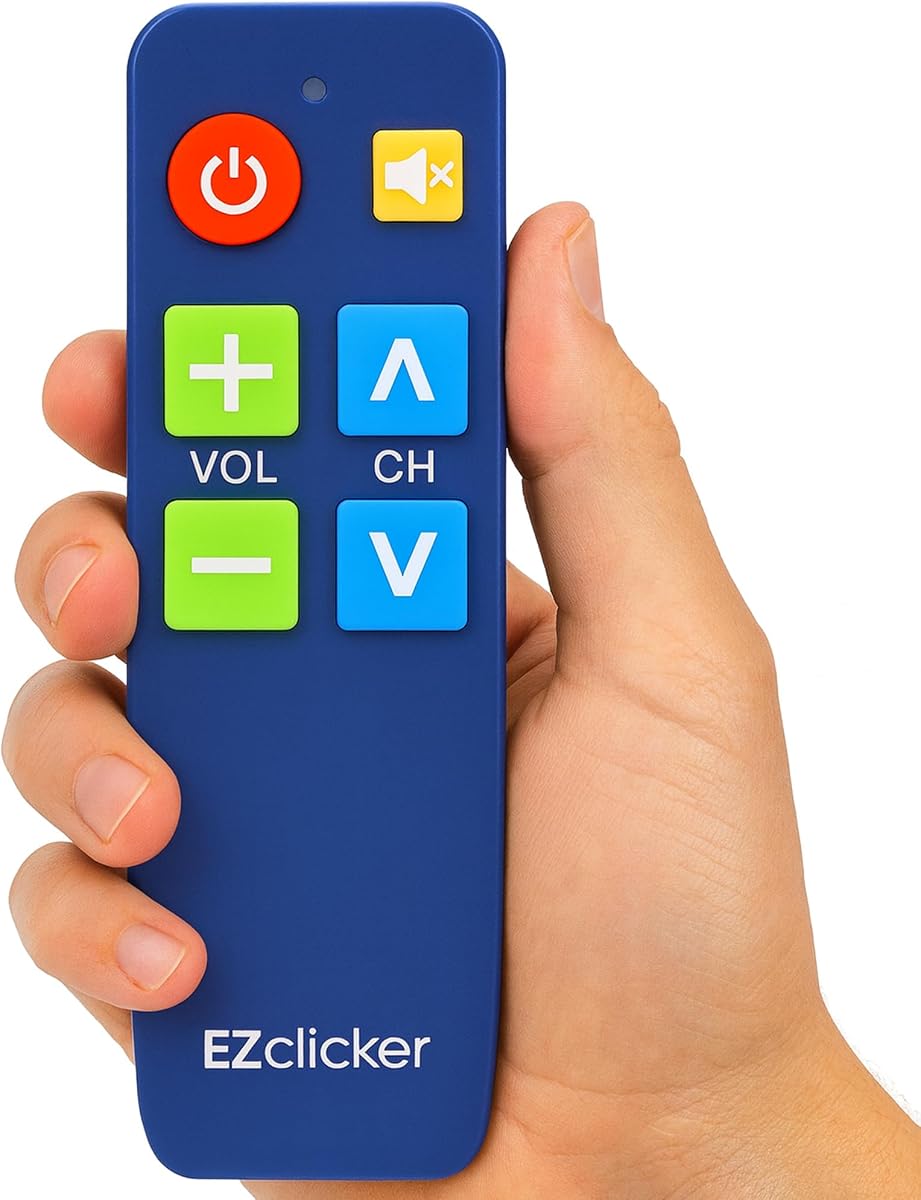
The EZclicker TV Remote for Seniors in blue offers the same accessible universal-television approach as the black version, with a supplied rating of 4.2. Its large controls, tactile feedback, and straightforward programming are designed for users who benefit from a visually obvious and uncomplicated remote. The blue color also makes it easy to distinguish from other remotes in a shared household.
We may earn a commission when you buy through this link, at no additional cost to you.
Programming takes place through the Mute and Volume Up combination. With the television turned on and the remote pointed toward it, the user holds both buttons until the television's volume behavior changes, then releases them. This eliminates manual code entry, while the universal television support makes the remote useful across different compatible sets.
Its scope is limited to televisions, however. The product expressly excludes cable boxes, Firestick, Roku devices, and streaming applications, so it is best suited to a direct television setup. Two AAA batteries are required and not included. The six-by-two-by-one-inch dimensions help it remain easy to hold and store, which is helpful where space is limited.
This model is worth considering when color distinction or a simple senior-focused aesthetic is important. It provides the same core television functions as other EZclicker senior models, so the black option may be preferable for users with impaired vision who find one color easier to distinguish. It should not be selected for a home centered on streaming devices or provider set-top boxes.
The blue housing gives the remote a visible identity in a room containing several similar controllers. For households with multiple users, this simple visual difference can reduce the chance of picking up the wrong remote.
The two-button programming sequence is easy to remember and does not require a printed code list. It is a practical alternative to a more involved universal remote, although the television model must be checked for compatibility.
We may earn a commission when you buy through this link, at no additional cost to you.
The GE Big Button Universal Remote Control is among the most functionally capable products in this guide because it combines a large, simplified keyboard with a directional pad. Its supplied rating is 4.0, the lowest of the ten products, but the feature set is relevant to users who need more than basic power, volume, and channel buttons.
We may earn a commission when you buy through this link, at no additional cost to you.
The remote can manage up to two devices, including a television, streaming media player, cable box, satellite receiver, or soundbar. That wider coverage makes it a better candidate for a modern multi-device entertainment setup. It is preset for Samsung televisions and supports automatic code search and direct code entry, while master volume can adjust the audio regardless of the active device.
The direction pad is the decisive feature for smart televisions. Unlike the EZclicker senior remotes, which emphasize basic television operation, this GE model can navigate menus and interfaces. The simplified keyboard still uses large, readable buttons intended for impaired vision or anyone seeking a less demanding alternative to a dense original remote.
Two AAA batteries are required, and the product does not include them. Buyers should also verify compatibility for both the television and any second device before purchase. This remote is recommended for a Samsung household that needs accessible smart-TV navigation or wants one larger-button controller for a television and another compatible component. It is less relevant to someone who wants only four visible everyday buttons.
A dedicated direction pad provides the navigation control missing from many basic senior remotes. It can be used to move through television menus and compatible streaming interfaces, making the remote more useful when a television supports apps directly.
Controlling a television and a compatible streaming player, provider box, receiver, or soundbar can simplify the remote arrangement in a modern home. The exact supported combination should be confirmed, and the device-selection steps may be more involved than those of a dedicated-brand remote.
We may earn a commission when you buy through this link, at no additional cost to you.
The UltraPro OneTouch Backlit Remote Control is designed for users who want a simple television remote with better visibility in low-light conditions. Its supplied rating is 4.1, and its most distinctive feature is a fully backlit keypad that illuminates every button in dark rooms, bedrooms, and media spaces.
We may earn a commission when you buy through this link, at no additional cost to you.
The television coverage includes preprogrammed support for Samsung, LG, Sony, Vizio, Fire TV, and Roku TV. Setup requires inserting two AAA batteries and selecting the television brand. Some Sharp and Insignia Roku television models may require programming, which prevents the no-setup promise from applying universally. The remote is intended as a convenient replacement for compatible smart television models.
Dedicated hotkeys provide direct access to Netflix, Prime Video, Disney+, and YouTube when those applications were installed by the television manufacturer. Support for user-installed applications may vary, so a user should not assume every streaming service will appear exactly as it does on the television's original remote. The full keypad also allows broader navigation than a basic power-and-volume remote.
This is a compelling option for a bedroom or low-light viewing area, particularly when a household uses a compatible smart television and values shortcut buttons. It is less suitable for a senior who wants the absolute minimum number of visible controls or whose television falls outside the preprogrammed brands. Two AAA batteries are required and are not included.
A fully illuminated keypad makes buttons easier to locate without turning on overhead lighting. This is particularly useful for late-night viewing, low-vision users, and anyone who prefers not to brighten the entire room to find a control.
The four dedicated application buttons can shorten the route to popular streaming services. Their behavior depends on how the applications were installed, and support for user-installed apps may vary, so compatibility should be verified against the user's television.
We may earn a commission when you buy through this link, at no additional cost to you.
The most useful simple TV remote is not automatically the model with the fewest buttons. Compatibility, programming burden, visibility, device coverage, and the user's physical or cognitive needs should determine which design will work best in the home.
Begin by identifying every device the remote must operate. Some models control only a television, while others are designed to include a cable box, satellite receiver, soundbar, streaming media player, or smart television interface. Check the exact television model against the manufacturer's compatibility list rather than relying only on the brand name. Pay particular attention to explicit exclusions, because products described as universal sometimes support only infrared television functions. If the viewing setup depends on a streaming stick or set-top box, a television-only remote will not be a complete replacement.
Setup complexity can determine whether a senior will actually use a replacement remote. Dedicated-brand models such as the EZclicker Samsung and LG remotes are presented as requiring no programming, which is ideal when the television is supported. Universal remotes may use an automatic search, direct code entry, a button combination, or a brand-selection process. Compare these methods with the user's technical comfort. Also consider who will perform the initial setup: a straightforward code search may be acceptable if a family member can assist, while a no-code remote is preferable for independent daily use.
Large buttons are easier to see, locate, and press, particularly for people with low vision, arthritis, tremors, or reduced dexterity. Tactile feedback adds another way to recognize a control without relying entirely on sight. The most accessible layout also avoids placing frequently used functions close together or burying them beneath a flap. A large Enter button helps with menu confirmation, while distinct channel and volume areas support the most common actions. Look for a body shape that is comfortable to hold and buttons with enough separation to reduce accidental presses.
Simple can mean either a minimal visible layout or a scaled-down version of a conventional remote. The Flipper presents only four everyday actions and hides additional controls, reducing cognitive overload. EZclicker models retain familiar television functions with larger buttons, which may be more recognizable to users accustomed to standard remotes. A very minimal design is advantageous for dementia or severe visual impairment, but a hidden-button mechanism requires initial configuration by a caregiver. A familiar layout may be easier for a user who does not need dramatic simplification.
Basic television remotes usually control power, volume, and channels, but they often lack a directional pad. The GE replacement remote and the backlit UltraPro model offer navigation features better suited to smart televisions and streaming interfaces. Dedicated app hotkeys can also provide direct access to major services. These capabilities are valuable when the user browses applications, but they add buttons and may make the remote less minimal. For a household centered on Netflix, Prime Video, Disney+, YouTube, or other apps, navigation support is more important than a strictly minimal button count.
Backlighting is a meaningful advantage for a television in a bedroom or a room used after dark. The UltraPro OneTouch illuminates the full keypad, allowing the user to identify controls without turning on a bright lamp. Other remotes may use contrasting button colors or distinct color groups, which help during daylight but do not necessarily provide active illumination. Consider the user's vision, the primary viewing time, and whether a small illuminated indicator is enough to guide them. Full backlighting is especially useful when the user must locate buttons without relying on memory or ambient light.
Color coding can make common functions easier to remember and distinguish. The Flipper assigns green to power, orange to volume, blue to channels, and gray to mute, while its favorite-channel feature can further personalize the experience. For users who have established strong color associations, this approach can reduce hesitation. Color should support rather than replace strong labels and tactile differences, because some users may not distinguish certain colors well. A visually distinctive housing, such as the blue EZclicker option, can also help a remote stand out from other devices in a shared room.
Most remotes require two AA or AAA batteries, and the supplied information indicates that batteries are generally not included. Confirm the battery type before ordering, especially if a caregiver maintains a set of replacement remotes for a care facility. Technical support and online programming guidance can also reduce setup friction. The GE products mention U.S.-based support, and one Big Button Universal listing describes a 90-day replacement service. For a remote intended for an older relative, dependable support may be as valuable as the physical design.
Start by identifying the devices the remote is designed to control and checking their compatibility. For a no-programming model, install the specified batteries, point the remote at the television, and test power, volume, and channel functions. For a universal model, follow the stated automatic search, direct code entry, or button-combination method. Keep the television on during the relevant setup step and release the programming buttons only when the television confirms that the remote has responded.
After setup, label the remote or store it in a consistent place so it does not become mixed with other controllers. If the remote includes favorites, program them in a logical order that matches how the user prefers to browse. A caregiver can write down the channel sequence, but the remote should still be operated by its primary user whenever possible. For a backlit model, replace the batteries promptly if the illumination weakens, since reduced backlighting can make the buttons difficult to identify.
Remove batteries if the remote will not be used for an extended period, and clean the exterior with a dry, soft cloth rather than a liquid that could enter the button gaps. Do not spray cleaner directly on the remote. Keep the device away from food, moisture, and excessive heat, and replace batteries in pairs when the signal becomes slow or unreliable. If a universal remote stops responding, recheck the device mode, replace the batteries, and repeat the programming process before assuming the remote has failed.
The easiest remote is usually the one that requires the least setup and places the fewest visible controls on its face. The Flipper is particularly accessible because it shows only four everyday buttons, uses color coding and tactile feedback, and supports favorite channels. The EZclicker Samsung and LG models are also easy to begin using because they are presented as requiring no programming. Compatibility with the user's television and external devices should be checked first.
It depends on the design. The Flipper and EZclicker senior remotes focus on basic television functions and do not navigate streaming applications. The GE Samsung replacement remote includes a directional pad for compatible smart televisions and streaming devices, while the UltraPro OneTouch provides app hotkeys for Netflix, Prime Video, Disney+, and YouTube when the television manufacturer installed those apps. App support varies, particularly for user-installed applications.
Not every universal remote supports every box. The Flipper is described as working with compatible cable and satellite boxes, and the GE Big Button Universal can control a television plus one compatible cable or satellite receiver. By contrast, the EZclicker television-only remotes explicitly exclude cable boxes. Check the list of supported devices and provider brands before purchasing, especially when the remote must change channels through a separate set-top box.
The dedicated EZclicker Samsung and LG remotes are described as needing no programming, while the Big Button Universal listing also states that setup is unnecessary for compatible sets. Other universal models may require an automatic code search, direct code entry, or a special button combination. The GE products offer several programming approaches. Always follow the instructions for the exact model and keep the television powered on during setup if the procedure requires it.
Large buttons can improve visibility and reduce the precision required to press a control. Models with tactile feedback, strong contrast, color coding, or full backlighting offer additional visual and physical guidance. The Flipper is specifically designed with large, color-coded, tactile controls in mind, while the UltraPro OneTouch has a fully illuminated keypad. Lighting, contrast, and label clarity still vary, so visual needs should be compared with the product's layout.
The EZclicker models reviewed use two AAA batteries, as do the GE Samsung replacement and UltraPro OneTouch. The Flipper and the original GE Big Button Universal require two AA batteries. Batteries are not included with the listed products. Using the correct battery type improves reliability and reduces the chance of confusing an installation or programming problem with a simple power issue.
Yes, when the model supports two compatible devices. The original GE Big Button Universal can manage a television and a compatible soundbar, cable box, satellite receiver, or other device. It also provides master volume control, which is useful when audio is adjusted through the soundbar. The Flipper also states that it works with compatible soundbars and infrared devices, but users should verify their exact equipment before ordering.
First, replace the batteries with the correct type and confirm that the remote is in the proper device mode. For a universal model, repeat the programming process and make sure the television is on and the remote is pointed directly toward it during setup. Also check that the television or box is not on a different input. If the remote still fails, consult the product's compatibility list and available technical support rather than repeatedly pressing unfamiliar buttons.
The Flipper is the leading choice for users who value the fewest visible everyday controls, strong tactile and color cues, and the ability to manage both a television and a cable or satellite box. The GE Big Button Universal is the strongest budget-oriented alternative because it controls two devices, offers several programming methods, and includes master volume. The UltraPro OneTouch stands out for full backlighting, smart-TV navigation, and streaming hotkeys.
For a dedicated Samsung or LG television used directly, the matching EZclicker models offer an especially low-friction setup. The broad Big Button Universal option can suit a household with several compatible television brands, while the GE Samsung replacement is useful when smart-menu navigation and a second device are necessary. Prioritize exact equipment compatibility first, then choose between a minimal button face, familiar universal controls, and backlighting based on the user's vision, dexterity, and cognitive comfort.
Ratings and product features offer a useful starting point, but they cannot replace checking the current listing and compatibility details. Availability, supported television models, included accessories, and prices can change, and none of the reviewed products includes batteries. Before ordering, confirm the television and any provider or streaming devices, review the setup method, and choose the model whose everyday controls best match the intended user's needs.