
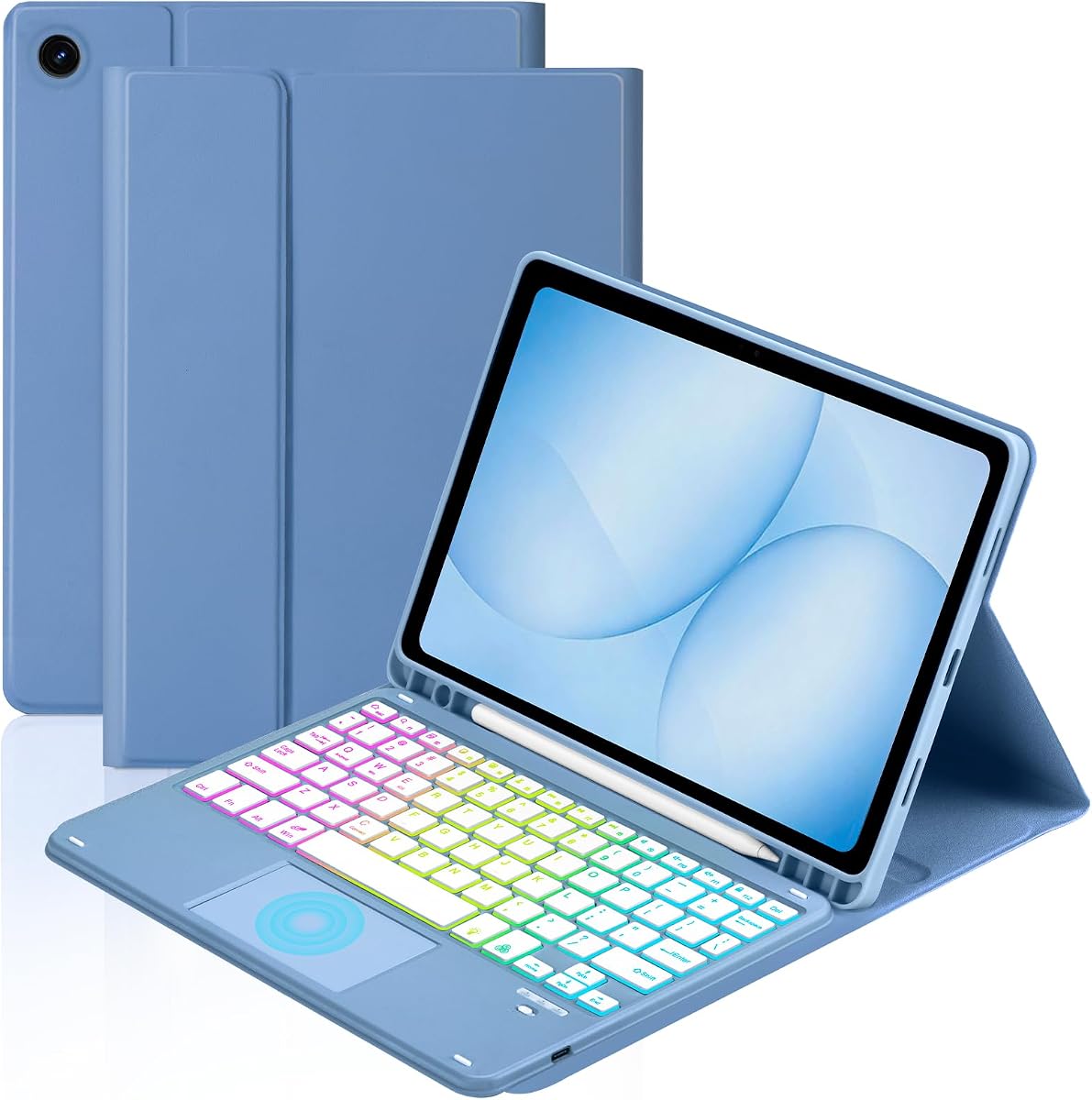
Soke Keyboard Case for Samsung Galaxy Tab A11+ Plus 11 Inch, Black
4.6Editor score
Detachable wireless keyboard
Seven-color keyboard backlight
Two supported viewing angles
Compare the best keyboard for Samsung A11 Tablet options, including compatibility, backlighting, touchpads, battery life, viewing angles, protection, and
A keyboard case can transform a Samsung Galaxy Tab A11+ or A9+ into a more practical typing, browsing, and work setup. The right model should fit your exact tablet, protect it, hold a comfortable viewing angle, and provide navigation features suited to your workflow.
We compared ten keyboard cases using their published specifications, covering model compatibility, key layout, touchpad support, backlighting, battery life, viewing positions, magnetic attachment, stylus storage, and device protection. The list includes slim detachable designs, larger workstations, and cases supplied with a wireless mouse.
Each review explains the strongest reasons to consider that model and any practical limitations to understand before buying. The top recommendations balance useful features and construction, while ratings and prices can change over time, so check the current listing before making a final decision.
4.6Editor score

4.3Editor score

4.6Editor score
The following comparison highlights each keyboard case's core hardware, navigation, lighting, battery, viewing, and protection features so buyers can quickly identify the setup that best matches their tablet model and routine.







The Dexnor case is a full keyboard workstation for the Galaxy Tab A11+ and A9+ with a 4.3 rating. Its standout feature is the integrated multi-touch trackpad, which adds a familiar pointer-control method without requiring a separate mouse. The 120-degree viewing position, rechargeable keyboard, and magnetic support make it especially relevant for users who want a compact desk setup.
We may earn a commission when you buy through this link, at no additional cost to you.
The case supports a broad range of named Galaxy Tab models, including SM-X230, SM-X236B, SM-X315, and several A9+ identifiers. Strong embedded magnets keep the tablet firmly seated, while the full shortcut row gives quick access to common tablet controls. The 650mAh lithium polymer battery is specified to deliver up to 720 hours of standby, 200 hours of use without illumination, and 10 hours with the backlight at its brightest.
There are important design limitations. The tablet rests directly on the keyboard base rather than floating above it, and the keyboard cannot be folded around the back of the screen. Its weight of 1.36 pounds remains portable, but buyers expecting the floating display used by some premium laptop-style cases may find this arrangement less dramatic. The stylus and tablet are not included, either.
This is a strong recommendation for someone who prioritizes a trackpad, conventional typing, useful shortcuts, and dependable magnetic positioning. It is particularly suitable for document editing, schoolwork, and extended tablet use in a fixed workspace. Buyers primarily interested in colorful lighting or the highest published customer rating may prefer the Soke or Supveco alternatives listed later.
The multi-touch trackpad supports finger gestures and can be disabled through the listed Fn and spacebar combination for situations where palm rejection becomes distracting. That makes the case usable for both precise pointing and ordinary touch navigation.
The rechargeable battery, automatic keyboard sleep behavior, folding magnetic clasp, and S Pen holder create a travel-oriented package. The case is not designed to float the display, but it remains a portable way to add physical keys and a trackpad.
We may earn a commission when you buy through this link, at no additional cost to you.
The TUNKARMOR case combines a slim protective shell with a detachable magnetic keyboard and earns a 4.3 rating. It is designed for the Galaxy Tab A9+ and A11+ 11-inch families, with explicit support for SM-X210, SM-X215, SM-X216B, SM-X230, SM-X236B, and SM-X315. The emphasis is on protection, flexible viewing angles, and convenient everyday portability.
We may earn a commission when you buy through this link, at no additional cost to you.
Its magnetic keyboard can be attached or repositioned, allowing the tablet to move between a compact presentation and a more conventional typing position. Three viewing positions are created through anti-slip slots, while the pen holder keeps an S Pen accessible. Opening or closing the folio triggers the listed sleep and wake behavior, helping the tablet conserve power when it is not being viewed.
The full edge coverage and honeycomb-pattern inner layer are intended to guard against scratches, bumps, dents, and ordinary impact. The product listing also claims that the cushioning helps reduce overheating. Its main drawback is that it focuses on the keyboard and case rather than advanced pointing: no mouse or touchpad is listed among the included components, and the backlight is not described.
Choose this model if you want a protective folio with physical typing and need to move between several viewing positions. It is a practical option for students, travelers, and users who mostly navigate with touch. Those who spend considerable time in documents or creative software may benefit more from a model with a trackpad, an included mouse, or illuminated keys.
Full edge coverage, a closing magnetic structure, and a cushioned interior give the tablet more protection than a loose standalone keyboard. It is a sensible selection when the case will regularly travel between a desk, classroom, and meeting room.
Because the keyboard is magnetically detachable, the tablet can be raised for reading or viewing without forcing every task through a laptop-like arrangement. The three supported angles offer useful flexibility for different postures.
We may earn a commission when you buy through this link, at no additional cost to you.
This Galaxy Tab A11+ and A9+ keyboard case has a 4.4 rating and the broadest navigation package in the group. It includes a rechargeable Bluetooth mouse, a built-in multi-touch trackpad, and a detachable backlit keyboard. That combination supports precise pointing, cursor movement, scrolling, zooming, application switching, and gesture-based control.
We may earn a commission when you buy through this link, at no additional cost to you.
The keyboard offers seven backlight colors with constant-on, breathing, and off modes. Three brightness levels make it adaptable to different lighting conditions, while the shortcut row reduces the need to navigate through menus for common commands. It is listed as compatible with iOS, Windows, and Android, although the product is physically intended for the specified Samsung tablet models.
The case uses three non-slip grooves for different viewing angles and includes a stylus slot at the top. Its rechargeable keyboard is said to reach a full charge in two to three hours. A potential drawback is that the listing does not clearly confirm whether a charging cable is included, and neither the tablet nor stylus comes with the package, so buyers should review the final package contents before ordering.
This is an attractive choice for anyone who wants alternatives to touch navigation without needing to carry a separate mouse. It is especially practical for detailed document work, browsing, and app management. The combination of pointer options and colorful illumination is more feature-rich than many competing folio cases, although the detachable mouse adds another item to keep track of.
The included mouse is intended for conventional precision control, while the trackpad accepts one-, two-, and three-finger gestures. Having both allows the user to choose the input method that best fits the available space.
Seven colors, three brightness levels, and a breathing-light mode make the keyboard easier to personalize than a standard fixed-light model. These options are useful in dim rooms, travel spaces, and shared work areas.
We may earn a commission when you buy through this link, at no additional cost to you.
The Soke case has a 4.6 rating, making it one of the strongest customer-rated choices for the Galaxy Tab A11+ 11-inch. It is built around a rechargeable, detachable Bluetooth keyboard, a folio-style protective case, and a straightforward set of everyday features. The design is intended for SM-X230, SM-X236, and SM-X238 models.
We may earn a commission when you buy through this link, at no additional cost to you.
The keyboard connects wirelessly over a stated 10-meter range and can be removed for tablet-only use. Seven backlight colors make it easier to type in darker surroundings, while two non-slip grooves support viewing angles of 120 and 130 degrees. A magnetic strip in the case detects tablet use status and triggers the listed automatic sleep and wake functions.
Compared with more elaborate workstation models, the Soke does not include a mouse or touchpad and offers only two viewing positions. Those limitations may matter for users who spend long periods editing documents or navigating software. The charging time is listed as approximately three to four hours, and the package includes a Type-C cable, user guide, case, and keyboard without a tablet, pen, or charging head.
This is a well-rounded recommendation for a buyer seeking reliable typing, colored illumination, automatic power management, and broad device support without a large collection of accessories. It works particularly well for general school, work, and travel use. Anyone who requires a precision pointer should plan to add one separately or choose the model that includes a mouse and trackpad.
Removing the keyboard allows the case to function more like a conventional folio when reading or watching. Reattaching it creates a physical typing setup, and the 10-meter listed range provides freedom from a direct cable connection.
The magnetic sleep and wake function reduces the need to manage the tablet manually whenever the folio is opened or closed. It is a convenient feature for users who alternate frequently between tablet and keyboard modes.
We may earn a commission when you buy through this link, at no additional cost to you.
The YBING keyboard case has a 4.5 rating and emphasizes versatility. It is compatible with the Galaxy Tab A11+ and A9+ 11-inch models across several SM-X identifiers, and its rear cover rotates 360 degrees so the tablet can be used in landscape or portrait orientation. A magnetic detachable keyboard and three anti-slip grooves support a range of work and entertainment positions.
We may earn a commission when you buy through this link, at no additional cost to you.
Its keyboard includes a rechargeable battery, seven-color rainbow illumination, and a breathing-light mode. The first row contains shortcuts for tasks such as select all, copy, paste, and media playback. Battery performance is listed at approximately five hours with the backlight on and about 80 hours with it off, while a full recharge takes roughly two to three hours.
The magnetic system uses 16 built-in magnets to keep the keyboard stable, and the PU leather exterior provides a more traditional folio appearance. The case does not include a touchpad, and the product guidance recommends using the first two lower slots when working in portrait mode. That last detail is worth considering because the rotating cover can place the tablet in several orientations.
Choose the YBING if you alternate between typing, reading, drawing, and video viewing, especially in landscape and portrait. It offers one of the more flexible physical arrangements in the group without adding a mouse or trackpad. Users who need a large pointer-control surface for spreadsheet or creative work may be better served by one of the touchpad-equipped alternatives.
The 360-degree rear cover allows the display to move between orientations suited to typing, reading, or viewing. This is especially helpful for users who alternate between productivity tasks and entertainment rather than maintaining one fixed laptop-style posture.
Sixteen magnets help keep the detachable keyboard from shifting, while the shortcut row provides direct access to frequently used editing and media commands. The arrangement balances portability with a practical desktop layout.
We may earn a commission when you buy through this link, at no additional cost to you.
The Harvopu Galaxy Tab A11+ and A9+ case includes a detachable backlit keyboard and a wireless mouse, earning a 4.3 rating. Its clearest advantage for desktop-style use is the mouse, which offers three levels of DPI and can be adjusted for detailed editing, document navigation, or faster browsing. The case supports specified Wi-Fi and 5G Galaxy Tab identifiers.
We may earn a commission when you buy through this link, at no additional cost to you.
The keyboard uses a rechargeable design and is claimed to provide up to 180 hours of continuous use after a two-hour Type-C charge. It also has single-color and three-color backlight modes, making it suitable for both bright and dim settings. The detachable design lets the tablet be used without the keyboard when a physical typing surface is unnecessary.
The protective shell is described as stain-resistant and easy to wipe clean, with coverage against scratches, bumps, and daily wear. Unlike several competing models, the supplied information does not specify viewing angles, a trackpad, an integrated stylus holder, or automatic tablet sleep and wake. The lack of a touchpad may also limit mouse-free operation.
This model is best for buyers who want a more conventional desktop experience with a real mouse and a durable protective case. It is a sensible fit for spreadsheet work, browsing, and users who find touch navigation tiring. If viewing flexibility and pointer alternatives are priorities, compare it with the three-position case that includes both a trackpad and mouse.
The three-level DPI control lets the user tune the included mouse to different tasks. That is particularly useful when moving between detailed editing, ordinary document work, and fast web navigation without changing hardware.
The easy-clean, stain-resistant finish is designed for routine handling and accidental marks. Combined with the detachable keyboard, it creates a practical setup for users who need mouse precision but still want mobile flexibility.
We may earn a commission when you buy through this link, at no additional cost to you.
The TiMOVO case is a straightforward Galaxy Tab A11+ keyboard folio with a 4.4 rating. It is listed for 11-inch 2026 models SM-X230, SM-X235, and SM-X236B. Its detachable rechargeable keyboard combines seven backlight colors, three brightness levels, and three viewing angles without adding a mouse or a large trackpad.
We may earn a commission when you buy through this link, at no additional cost to you.
The built-in 420mA battery is claimed to work for more than 90 hours and remain on standby for 90 days after a two-to-three-hour charge. An automatic hibernation mode helps conserve power after periods of inactivity. The keyboard also disconnects after ten minutes without use, then wakes and reconnects when a key is pressed, according to the product information.
Its anti-slip design and protective construction are intended to resist scratches, bumps, dents, fingerprints, shocks, and dust. The keyboard can be detached for easier tablet-only carrying, while three supported angles provide options for typing, viewing, and reading. The main omissions are a trackpad, an included mouse, and a specified built-in stylus holder.
This is an attractive choice for someone who wants a long-lasting, illuminated keyboard without needing many accessories. It suits general typing, browsing, and entertainment, particularly where the three viewing positions improve desk ergonomics. Those who need gesture navigation should choose a model with a multi-touch trackpad rather than expecting touch gestures to be available here.
The stated working duration and standby time make this a practical choice for regular users who do not want to recharge the keyboard frequently. Automatic hibernation and disconnection further reduce unnecessary power use.
Seven colors and three brightness levels cover a wide range of lighting conditions. Three viewing angles complement the keyboard, allowing the tablet to sit at a more comfortable position for different tasks.
We may earn a commission when you buy through this link, at no additional cost to you.
This MePadKey touchpad case has a 4.2 rating and is built for the Galaxy Tab A11+ and A9+ 11-inch models. Its defining feature is a smart touchpad that supports one-, two-, three-, and four-finger gestures. It combines that navigation area with a detachable, rechargeable keyboard and seven-color rainbow backlight.
We may earn a commission when you buy through this link, at no additional cost to you.
The listed gestures include one-finger cursor movement and selection, two-finger scrolling and zooming, three-finger application switching, and a four-finger screenshot action. The keyboard's first row includes shortcuts for select all, copy, paste, and media controls. This makes the case more flexible for mouse-free operation than the basic keyboard folios in the group.
Magnetic adsorption secures the keyboard, while two anti-slip grooves let the tablet be positioned at different angles. The rechargeable battery is listed as lasting about five hours with the backlight on and approximately 80 hours with it off, following a two-to-three-hour charge. A mouse is not included, and only two viewing positions are specified, which are modest limits compared with three-angle alternatives.
This case is well suited to users who understand and use touchpad gestures but prefer not to carry a separate mouse. It is also useful for tablet workflows that mix physical typing with app switching, scrolling, and media control. For buyers needing the widest selection of viewing positions, one of the three-groove models would be more flexible.
The four-finger gesture support goes beyond a basic click pad, enabling application switching and screenshots directly from the keyboard case. It offers a useful middle ground for owners who want laptop-style navigation without carrying a mouse.
The first row places frequently used editing and media controls within easy reach. These shortcuts can reduce steps through Samsung's interface when the tablet is being used as a compact productivity device.
We may earn a commission when you buy through this link, at no additional cost to you.
The second MePadKey option has a 4.3 rating and combines a touchpad keyboard with a 360-degree rotating folio. It is intended for the Galaxy Tab A11+ models SM-X230, SM-X235, and SM-X236B, as well as A9+ models SM-X210, SM-X215, SM-X216, and SM-X218. The rotating cover supports both work and entertainment positions.
We may earn a commission when you buy through this link, at no additional cost to you.
Its multi-finger touchpad can move and select with one finger, navigate and zoom with two fingers, and perform screenshot or home-screen functions with three-finger movements. The detachable keyboard has a rechargeable battery, rainbow illumination, a breathing mode, and a first row of shortcut keys. System switching is handled through the listed Fn plus Q, W, and E combination for iOS, Windows, and Android.
The case has non-slip grooves and thickened edges designed to protect against scraping and falls. A pen holder keeps a stylus accessible, and the magnetic keyboard can be removed for tablet-only use. Compared with the newer MePadKey listing in this roundup, this version offers the 360-degree rotating cover but lists only two grooves for angle selection and does not include a mouse.
Choose this model if a rotating tablet cover and a capable integrated touchpad matter more than having the latest alternative in the range. It is especially useful for users who alternate between typing and media viewing, or who want a pen holder and a detachable keyboard in the same case. The gesture set makes it more versatile than a plain keyboard-only folio.
The 360-degree cover changes the tablet from a conventional typing position into a more flexible media or reading arrangement. This makes the case useful beyond desk-based document work.
The keyboard can switch among iOS, Windows, and Android layouts, while the function row and gesture commands provide direct access to common actions. The combination adds flexibility for users who move between tablet operating environments.
We may earn a commission when you buy through this link, at no additional cost to you.
The Supveco keyboard case has a 4.6 rating and offers a well-rounded premium-style design for the Galaxy Tab A11+ 11-inch 2026. It is listed for SM-X230, SM-X236, and SM-X238 tablets and combines a flexible silicone back, TPU cover, magnetic detachable keyboard, colorful illumination, and a protective folio structure.
We may earn a commission when you buy through this link, at no additional cost to you.
The inner layer uses a honeycomb grid pattern intended to cushion the tablet and help protect it from overheating. The product information also claims that this design can increase device lifespan by more than 30 percent, although that figure should be understood as a seller-provided claim rather than an independently verified result. The outer materials are designed to resist shocks and scratches.
Its backlit keyboard offers seven colors with automatic color changes, and shortcut switching is compatible with iOS, Windows, and Android. The anti-slip front stand supports multiple landscape viewing angles, while magnetic closure helps keep the case secure. The rechargeable keyboard reaches a full charge in approximately three and a half hours, and opening or closing the folio triggers the listed tablet sleep and wake behavior.
This is a strong final recommendation for buyers who value protection, automatic power management, colorful keys, and a detachable keyboard. It fits both general productivity and entertainment use, particularly when the tablet spends substantial time in a case. The lack of a mouse or trackpad means navigation remains touch-led, so users requiring precision pointing should consider one of the navigation-focused alternatives.
The TPU cover, flexible silicone back, and honeycomb cushioning form a layered protective approach. These materials also create the structure that supports the magnetic keyboard and landscape viewing positions.
Seven automatically changing backlight colors add visual variety, while the folio's automatic sleep and wake behavior helps reduce tablet power consumption. Together, they keep the case ready for use without requiring frequent manual adjustments.
We may earn a commission when you buy through this link, at no additional cost to you.
The most important first step is confirming the exact Galaxy Tab model. After that, compare navigation features, lighting, battery behavior, viewing flexibility, protection, and the accessories included in the package.
Keyboard cases are shaped around the dimensions, ports, camera placement, and rear profile of specific tablets. The products in this guide list Galaxy Tab A11+ and A9+ identifiers such as SM-X230, SM-X235, SM-X236, SM-X236B, SM-X238, SM-X210, SM-X215, SM-X216, SM-X216B, SM-X218, and SM-X315. Some sellers combine several supported identifiers, while others focus on a narrower subset. Check the model number in the tablet settings before ordering rather than relying only on the marketed name.
Match the model exactly and also confirm whether the tablet is Wi-Fi or 5G, because the housing and cutouts can differ. Do not assume that a case labeled for a nearby Galaxy Tab generation will fit.
A physical keyboard does not automatically solve every navigation problem. Some products in this roundup include a multi-touch trackpad, one includes both a trackpad and a rechargeable mouse, and another includes only a wireless mouse. Several other designs provide no additional pointer device and rely on the tablet touchscreen. A trackpad is compact and useful for scrolling, zooming, and application switching, while a mouse can provide more familiar precision.
Choose a trackpad or mouse if you spend substantial time in spreadsheets, word-processing applications, creative software, or complex web pages. If the tablet is mainly for reading, streaming, and occasional typing, the touchscreen may already be sufficient and a simpler case may be more portable.
Backlit keys make a keyboard easier to use in dim rooms and during evening travel. The available designs offer either a white adjustable backlight or seven-color illumination, sometimes with breathing effects and multiple brightness levels. Color options are useful for personalization, but brightness control is more important for practical comfort. A shortcut row can also provide direct access to brightness, volume, media playback, copy, paste, and other common actions.
Look for multiple brightness levels if the keyboard will be used in both bright and dark environments. Shortcuts are valuable when they match your routines, but a crowded layout should not compromise the basic typing experience.
Detachable keyboard cases generally use a rechargeable lithium battery rather than disposable cells. Published figures vary widely because some describe standby time, some describe backlight-off use, and others focus on continuous work with illumination. A typical full-charge time in this group is approximately two to four hours, depending on the model. Automatic sleep, hibernation, and reconnection behavior can make a substantial difference in real-world use.
Prioritize a model with clear charging requirements, a stated battery specification, and automatic power saving. If you use the keyboard heavily with the backlight continuously, pay particular attention to the shorter illuminated-use estimate rather than the maximum standby figure.
Viewing-angle support determines whether the tablet can sit comfortably for typing, reading, drawing, or video. Some cases offer two grooves, while others provide three or a rotating 360-degree cover. More positions are not automatically better, but they make it easier to accommodate different postures and desk arrangements. The Dexnor model is intentionally non-floating, with the screen resting directly on the keyboard base, so buyers who prefer an elevated display should choose a cantilever or rotatable design.
Check the listed angle range and consider the height of the display relative to your eyes. Also decide whether you need portrait support. A rotating folio is useful for media and reading, while a landscape stand is usually better for typing and trackpad use.
A keyboard case can add protection by covering the tablet's edges and back, but the materials and closure design vary. Options in this group include PU leather, flexible silicone, TPU, cushioned honeycomb interiors, magnetic clasps, and anti-slip grooves. If the tablet frequently travels, a detachable keyboard and folding closure are valuable because they let you use the tablet without carrying the keys. If it remains on a desk, a more rigid magnetic attachment may be easier.
Balance protection against bulk. A folio with several grooves or a rotating cover may occupy more space than a slim tablet-only sleeve, while a detachable keyboard creates two pieces to organize. Consider the stylus holder as well if you already own an S Pen.
The tablet, S Pen, and charging head are not included with most of the reviewed products. Some packages include a USB-C charging cable, user guide, keyboard, and case, while one also supplies a rechargeable mouse. The product descriptions do not consistently identify a trackpad as a separate accessory, so read the package section carefully. Do not assume that a cable shown in a promotional image is included unless the listing explicitly states that it is.
Make a short list of what you already own: tablet, stylus, mouse, charging cable, and wall adapter. This prevents an unnecessary accessory purchase and helps you choose the most complete package for your needs.
Begin by fully charging the detachable keyboard with its specified USB-C cable before the first use. If the keyboard uses Bluetooth, turn it on and follow the product's pairing instructions through the tablet's Bluetooth settings. Confirm that the tablet is seated correctly in the case, that the magnetic connection is secure, and that the selected viewing angle feels comfortable before beginning a long typing session.
Use the shortcut row for the functions you use most often, but do not force a workflow onto an unfamiliar key combination. On touchpad-equipped models, practice the documented gestures in a simple application first. When the keyboard is not in use, switch it off or remove it, and use the case's automatic sleep and wake behavior where available. Avoid leaving the keyboard connected to a tablet that is not in use for long periods.
To care for the case, remove the tablet or keyboard as directed before wiping the surfaces. Use a soft, lightly dampened cloth and avoid abrasive cleaners, excessive liquid, and direct heat. Keep charging ports and magnetic contacts free of dust. When the keyboard battery indicator blinks, recharge it according to the product guidance, and do not use a cable or power source that conflicts with the listed charging requirements.
Some cases support both tablet families, but you should never assume compatibility from the product name alone. Check whether the case lists your tablet's exact SM-X model identifier and whether the physical dimensions, cutouts, and camera position match. A case may look similar while using different openings or a different keyboard-to-screen arrangement.
Open the tablet's Settings and look for the model information under the About tablet or Device information section. The identifier commonly begins with SM-X, followed by a sequence of numbers and letters. Compare that full identifier with the compatibility list on the product page, and confirm the tablet size before ordering.
It depends on the model. The Galaxy Tab A11+ 5G case includes both a rechargeable Bluetooth mouse and a built-in multi-touch trackpad, while the Harvopu case includes a wireless mouse. Several other products provide only physical keys and rely on the tablet touchscreen for navigation, so verify the included accessories carefully.
The products described use a rechargeable detachable or Bluetooth-style keyboard, and the normal process involves powering on the keyboard and selecting it in the tablet's Bluetooth settings. Some models also support automatic reconnection. If a keyboard does not appear, charge it fully, confirm that it is not connected to another device, and repeat the pairing process.
Runtime depends on the model and whether the backlight is active. Published figures range from about five hours with the backlight on to as much as 90 hours of use or 180 hours of continuous operation in other listings, with different standby claims. Treat maximum figures as model-specific rather than universal, and consider the illumination setting when comparing expected use.
Some cases support portrait use, while others are specifically designed around a landscape keyboard position. The YBING and MePadKey rotating models allow the tablet to be placed horizontally or vertically. For non-rotating cases, follow the slot guidance in the product instructions, as using the wrong slot can produce an unstable viewing position.
Most of the reviewed cases add meaningful protection through a folio cover, edge coverage, anti-slip structure, and cushioning. Several also use magnetic closures or a rotating shell to keep the tablet enclosed. Protection levels still vary, and a keyboard case should not be assumed to make a tablet waterproof or immune to serious impact.
No. The supplied product information repeatedly states that the tablet and stylus are not included, even when the case has a built-in pen holder. A USB-C cable is included with some keyboards, but a charging head is generally not. Check the final package contents before ordering so you know which accessories must already be in your possession.
The Dexnor case leads the guide as a premium workstation for buyers who want a built-in multi-touch trackpad, strong magnetic support, and a long battery specification. The Soke case stands out as a budget all-rounder with a 4.6 rating, detachable Bluetooth keyboard, seven-color illumination, and automatic sleep and wake. The Supveco model also carries a 4.6 rating and offers cushioned protection, automatic lighting, and a detachable keyboard.
Your priority should determine the best fit. Choose a mouse or touchpad model for intensive navigation, a rotating case for switching between portrait and landscape, a long-battery design for frequent work sessions, or a simpler illuminated folio for reading, browsing, and occasional typing. Above all, verify the exact SM-X model identifier before purchasing because tablet dimensions and case cutouts matter.
Ratings, bundle contents, and prices can change over time, so consult the current product listing and package details before placing an order. Comparing the final listing against the features identified in this guide will make it easier to select a Galaxy Tab A11+ or A9+ keyboard case that matches both your device and your way of working.